Gemini AI Food Prompts:
Make Appetizing Food Photos for Every Dish
Unlock the power of AI-generated food photography with our free Gemini food prompts. Generate restaurant-quality food images for menus, delivery apps, Instagram posts, and marketing campaigns effortlessly. From sizzling burgers and artisan pizzas to decadent desserts and specialty coffee, these professional-grade Gemini prompts for food cover different cuisine categories.
Simply tap on the image, copy-and-paste the prompt, and get delicious food photos in seconds.
Loading more templates...
 Category:
 Duration:
 Aspect Ratio:
Cook Up Amazing Visuals
With Gemini AI Food Prompts
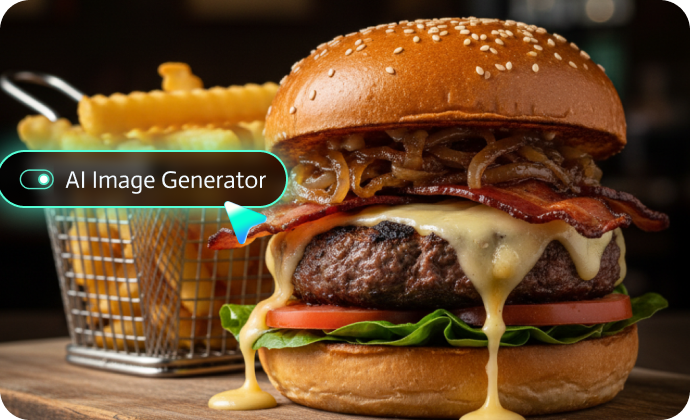
Want to create your own stunning Gemini AI Food Photos in seconds? Try Filmora's AI Image Generator, powered by advanced models like Nano Banana. Whether you're aiming for mouthwatering restaurant-style shots, aesthetic recipe visuals, or creative food art, Filmora helps you generate high-quality results instantly—no photography skills needed.
Turn Gemini Food Prompts into Photos with Filmora AI Image Generator
Turn Gemini Food Prompts into Photos with Filmora AI Image Generator
Simply copy any of our Gemini food prompts into Filmora's AI Image Generator, and watch as it creates incredibly realistic, appetite-inducing food images in seconds. Perfect for restaurant owners, food bloggers, social media managers, and culinary marketers who need professional-quality food visuals without the cost of photoshoots.
- Generate Food Photos from Prompts: Use our Gemini prompts for food photography with up to 1500 characters for maximum detail. Describe burger layers, pizza toppings, dessert textures, or coffee latte art—Filmora brings your culinary vision to life.
- Upload Reference Images: Transform your existing food photos with AI enhancement. Fix lighting, change backgrounds, add steam effects, or enhance color vibrancy using Gemini food photo editing prompts.
- Restaurant-Ready Quality: Generate 4K-8K resolution images suitable for large menu boards, delivery app listings, Instagram posts, and print marketing materials.
Beyond Photos: Bring Your Food to Life with AI Image to Video
Transform Static Food Photos into Engaging Video Ads That Sell
Don't just show your food—make it sizzle, steam, and move! Filmora's powerful AI Image to Video generator transforms your Gemini-generated food photos into captivating video content perfect for social media advertising, restaurant websites, and digital menu boards. Create professional food advertisement videos and food promo videos that stop scrollers in their tracks and drive customer action.
- Food Advertisement Videos: Transform burger photos into sizzling grill animations with smoke rising and cheese melting. Perfect for Facebook/Instagram ads.
- Food Promo Videos: Create limited-time offer videos with pizza slices being lifted, showing stretching cheese pulls that trigger instant cravings.
- Menu Showcase Videos: Animate your full menu with smooth transitions between dishes, adding subtle motion like steam rising from soup or coffee, bubbles in drinks, or desserts being drizzled with sauce.
- Delivery App Content: Create looping videos for food delivery platforms that highlight your most popular dishes with appetizing motion effects.
A Powerful Food Content Creation Suite Beyond AI Generation
A Powerful Food Content Creation Suite Beyond AI Generation
While AI generation gets you started, Filmora offers comprehensive editing capabilities to perfect your food content and create complete marketing campaigns. Transform raw food visuals into polished, professional content that drives restaurant sales and social media engagement.
- Professional Filters & Effects: Apply various food-specific filters—warm rustic tones for comfort food, clean bright looks for healthy dishes, dark moody aesthetics for upscale dining.
- AI Object Remover: Erase distracting background elements, unwanted utensils, or food imperfections with AI-powered object removal. Clean up phone shadows, remove date stamps, or eliminate messy backgrounds in seconds.
- Background Replacement: Instantly change photo backgrounds—replace cluttered kitchen scenes with professional studio gradients, rustic wooden tables, or minimalist marble countertops. Perfect for standardizing menu photo aesthetics.
In addition, Filmora offers plenty of features for food videos, whether you are looking for preset video templates, generating and adding royalty-free background music and sound effects, controlling the video speed, and many more.
FAQs About Gemini Food Prompts
How to Use Gemini Food Prompts in Filmora?
Don't know how to use Gemini AI food prompts to create delicious, mouthwatering food photos? No worries—Filmora makes it incredibly easy. With just a few simple taps, you can transform ordinary meals into stunning visual art in seconds.
Step 1 Activate AI Image Generator

Step 2 Generate Images From Text or Reference Pictures

Step 3 Download and Export Your AI-Generated Images

-
1:Activate AI Image Generator
Launch the latest version of Filmora, create a project, and click "Stock Media", choose "AI Image" from the Media panel. -
2:Generate Images From Text or Reference Pictures
Select the Nano Banana model, then type in your AI Gemini prompts for food photos, then click on the "Generate" to start making photos. You can also upload a reference picture, and add gemini food photo editing prompts to perfect the picture. -
3:Download and Export Your AI-Generated Images
After generating the photo, you can preview the image, tap on the download button, and drag it to the timeline, edit it if required, take a snapshot, or export to save the picture.
More Than Just a Food Photo Generator
Filmora goes far beyond generating delicious AI food photos with Gemini Food Prompts. It also lets you turn any prompt style into stunning AI images or videos. Whether you're creating visuals from text prompts or uploading your own pictures, Filmora gives you a complete creative toolkit with powerful editing features all in one place.