Filmora
Filmora - AI Video Editor
Edit Faster, Smarter and Easier!
OPEN

Music for Travel Vlogs and Everyday Videos | Filmora

Give Every Journey the Right Sound in Filmora

  • Explore Universal Music for Creators tracks directly in Filmora's Audio Library.
  • Preview music for daily vlogs, city scenes, travel edits, and personal stories.
  • Balance music, narration, and scene changes in one streamlined Filmora workspace.
Universal Music for Creators | Filmora Audio Library | Vlog and travel soundtracks

A vlog rarely stays in one place. A morning routine, a café stop, and a view from the train may all appear in the same edit. Music can connect those moments without competing with the creator's voice. The collections below offer different starting points for everyday, travel, and reflective footage.

Preview the tracks from Universal Music for Creators, then look for them in Filmora's Audio Library while editing. Compare how a candidate track sits beneath spoken sections and scene changes before settling on your final choice.
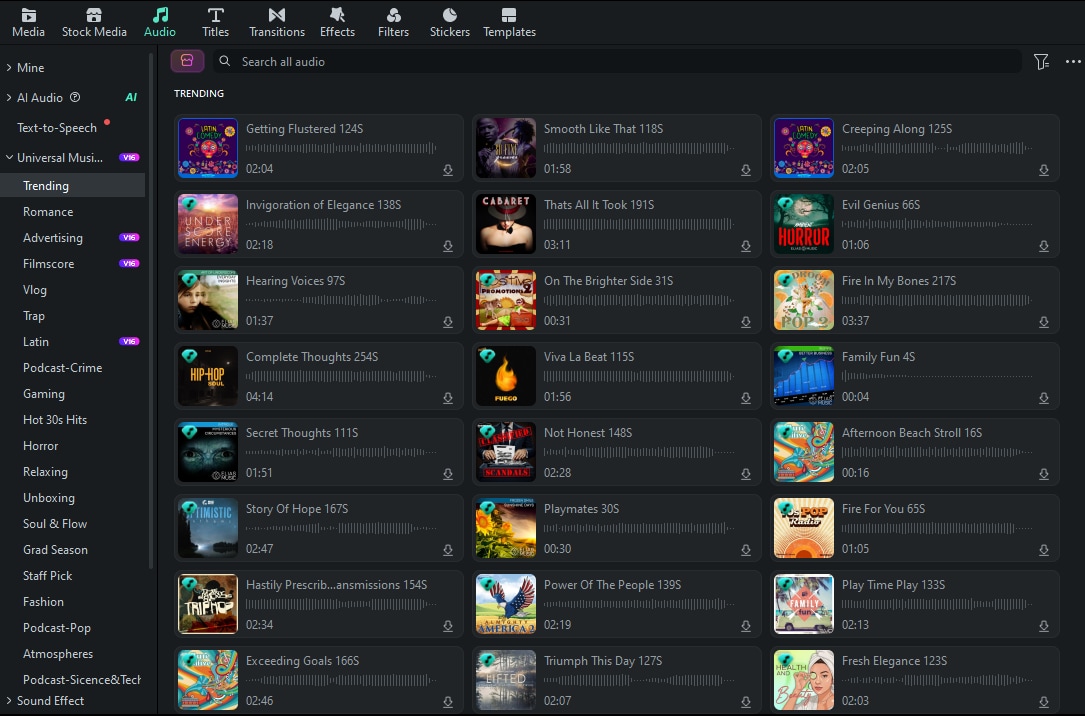
Filmora Audio Library
A useful vlog soundtrack leaves space for the story. Audition a few tracks against your actual clips, especially where narration begins or the location changes.

Everyday Vlogs and Lifestyle Moments

For routines, food clips, and casual updates, start with a selection that can sit behind the footage without becoming the main event. Preview the openings and endings to find a comfortable fit for your cut.

Chasing The Sun cover
Chasing The Sun
02:17
audio progress
played audio progress
play audio pause audio
Sepia Soundbytes cover
Sepia Soundbytes
02:06
audio progress
played audio progress
play audio pause audio
Sharp Blue Sky cover
Sharp Blue Sky
01:48
audio progress
played audio progress
play audio pause audio
Horizon Mindset cover
Horizon Mindset
02:09
audio progress
played audio progress
play audio pause audio
Sparkle and Shine cover
Sparkle and Shine
02:16
audio progress
played audio progress
play audio pause audio
Rose Bed cover
Rose Bed
01:51
audio progress
played audio progress
play audio pause audio
Sun Loving cover
Sun Loving
02:13
audio progress
played audio progress
play audio pause audio

Travel Stops and City Scenes

A trip can move between wide views and close-up details. Try these tracks over arrival shots, street scenes, or short destination sequences, then keep the one whose changes follow your visual pace.
El Cafecito (The Little Coffee) cover
El Cafecito (The Little Coffee)
01:56
audio progress
played audio progress
play audio pause audio
Cumbiame cover
Cumbiame
02:49
audio progress
played audio progress
play audio pause audio
Loco Loco cover
Loco Loco
03:18
audio progress
played audio progress
play audio pause audio
Margarita cover
Margarita
01:56
audio progress
played audio progress
play audio pause audio
Both Coasts Bound cover
Both Coasts Bound
02:00
audio progress
played audio progress
play audio pause audio
City Dusk cover
City Dusk
02:02
audio progress
played audio progress
play audio pause audio
Polaroid Moments cover
Polaroid Moments
01:46
audio progress
played audio progress
play audio pause audio

Quiet Chapters and Personal Diaries

Voice-led updates and memory clips often call for a gentler transition between scenes. Audition these options at a lower volume, and check whether their timing supports rather than interrupts the spoken story.
They Said They Wanted Jazz Chill cover
They Said They Wanted Jazz Chill
01:52
audio progress
played audio progress
play audio pause audio
Nostalgia cover
Nostalgia
03:09
audio progress
played audio progress
play audio pause audio
Satellite Call cover
Satellite Call
03:48
audio progress
played audio progress
play audio pause audio
Where I'll Go cover
Where I'll Go
03:04
audio progress
played audio progress
play audio pause audio
A New You cover
A New You
02:07
audio progress
played audio progress
play audio pause audio
Fond Recollection cover
Fond Recollection
02:09
audio progress
played audio progress
play audio pause audio
Fine Cuisine cover
Fine Cuisine
01:48
audio progress
played audio progress
play audio pause audio

Build Smoother Vlogs with Filmora

After choosing a track, use Wondershare Filmora to shape it around the footage. Smart BGM can help with runtime, Audio Ducking makes room for a voiceover, and Auto Beat Sync is useful when you want transitions to follow the music.

Create a Perfect-Length Track with Smart BGM Generation

Smart BGM Generation can create background music that fits the duration of your video. It is useful when a travel montage or daily vlog needs a soundtrack that ends with the final clip instead of requiring repeated manual trimming.

Keep Vlog Narration Clear with Audio Ducking with Audio Ducking

Lower background music automatically when narration or on-camera dialogue starts, then let it rise again between spoken sections. This helps preserve the atmosphere of travel footage without hiding the creator's voice.

Create More Dynamic Cuts with Auto Beat Sync with Auto Beat Sync

Use beat points to give quick vlog cuts, scenic transitions, and short-form travel edits a more consistent rhythm. Filmora helps connect the visual pace to the selected soundtrack with less manual adjustment.

Filmora
AI Video Editing App & Software
Try It Free Try It Free
qrcode-img
Scan to get the Filmora App
Give Your Vlog a Soundtrack in Filmora
Preview music, adjust it to your story, and keep every spoken moment clear.
secure-icon Secure Download

FAQs

  • What is Smart BGM Generation in Filmora?
    Smart BGM Generation is designed to create background music that matches the duration and overall pacing of a video. It can help vlog and travel creators avoid searching through multiple tracks or repeatedly cutting a song to fit the timeline.
  • Can Smart BGM fit a short travel video?
    Yes. Short-form travel videos, social clips, and quick daily vlogs can benefit from a soundtrack generated or adjusted for the actual length of the edit. Preview the result and refine the surrounding clips when the pacing needs a different emphasis.
  • How should I choose music for a travel vlog?
    Start with the feeling of the footage. Bright, open tracks work well for scenic views and movement, while warmer or more reflective pieces suit personal moments, quiet transitions, and voice-led sections.
  • How do I keep music from covering my vlog narration?
    Place narration and music on separate tracks and use Audio Ducking to reduce the soundtrack while someone is speaking. You can also adjust volume, fade points, and clip placement manually for more control.
  • Can Filmora match vlog cuts to music?
    Filmora's Auto Beat Sync can help identify beat points and create a more coordinated relationship between soundtrack, cuts, and effects. It is especially useful for travel montages and fast social videos.

You May Also Like

Download and Apply TV Static Sound Effects All in One Platform

Download, edit, and generate royalty-free TV static sound effects to use in your projects. Everything you need is in one easy platform.

Posted byJames Hogan|2026-10-12 16:30:32
What Is Foley Sound and How to Create It

Foley sound is a key part of film and video production that makes every scene more realistic. Learn how it’s made and modern AI tools that make the process easier.

Posted byJames Hogan|2026-10-12 16:30:15
Free Logo Intro Sound Effects: Create Perfect Audio for Your Brand

Find and use free logo intro sound effects with AI tools to enhance your brand identity. Simple steps for perfect results.

Posted byJames Hogan|2026-10-12 16:29:41
Using Trailer Sound Effects: How To Make The Perfect Impact

Sound is an important element of a video that complements the visuals. This article covers the formation of a video using trailer sound effects.

Posted byJames Hogan|2026-10-12 16:24:16
How to Add Echo Effect to Video

Want to make your video audio more impactful? Learn how to add an echo effect to your videos effortlessly using the best online, Windows, and Mac video editors. Enhance your sound with simple steps and built-in effects!

Posted bySumia Rafique|2026-10-12 15:55:28
Adobe Voice Enhancer AI: What You Need To Know

Make your audio recordings better with Adobe voice enhancer AI. Learn how to remove noise, and fix speech issues easily in Adobe Podcast and Premiere Pro.

Posted byAndrew Murray|2026-10-12 16:33:49
How To Enhance Audio in Premiere Pro Using 7 Methods?

Discover how to enhance audio in Premiere Pro with six essential methods. Improve sound quality and create polished audio tracks for your video productions.

Posted byAndrew Murray|2026-10-12 16:33:38