
AI Logo Template Examples & Guides
Browse our extensive collection of AI logo templates and professional AI logo design tutorials.
Loading more AI logo template examples...
 Category:
 Duration:
 Aspect Ratio:
Everything You Need to Master AI Logo Design
A distinctive brand starts with a great design. Filmora provides an expansive library of ai logo templates paired with an advanced AI Image Generator to bring your vision to life. Whether you are launching a startup or refreshing a YouTube channel, Filmora empowers you with powerful features to generate, customize, and animate your new logo seamlessly.
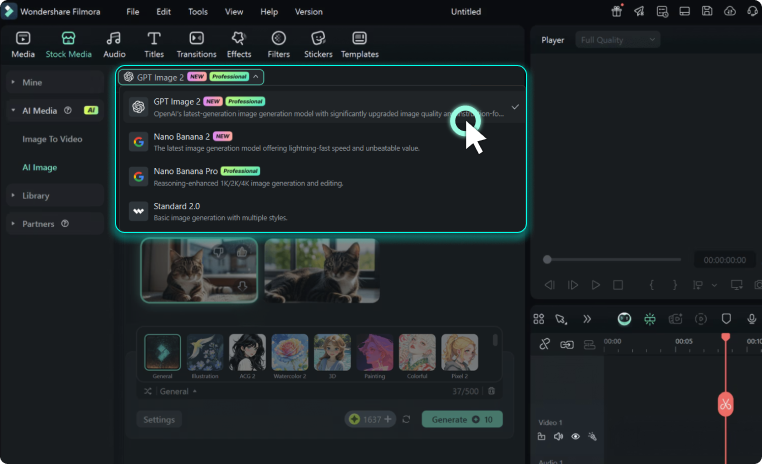
Instantly Generate Logos With GPT Image 2 Models
Instantly Generate Logos With GPT Image 2 Models
Leverage the power of cutting-edge models like GPT Image 2 and Nano Banana Pro directly inside your editing workspace to produce a unique ai generated logo in seconds.
- Enter your creative prompt to let the AI logo generator free your imagination with instant visual concepts.
- Choose between various powerful models like Nano Banana and ChatGPT Image 2 to achieve your preferred artistic style.
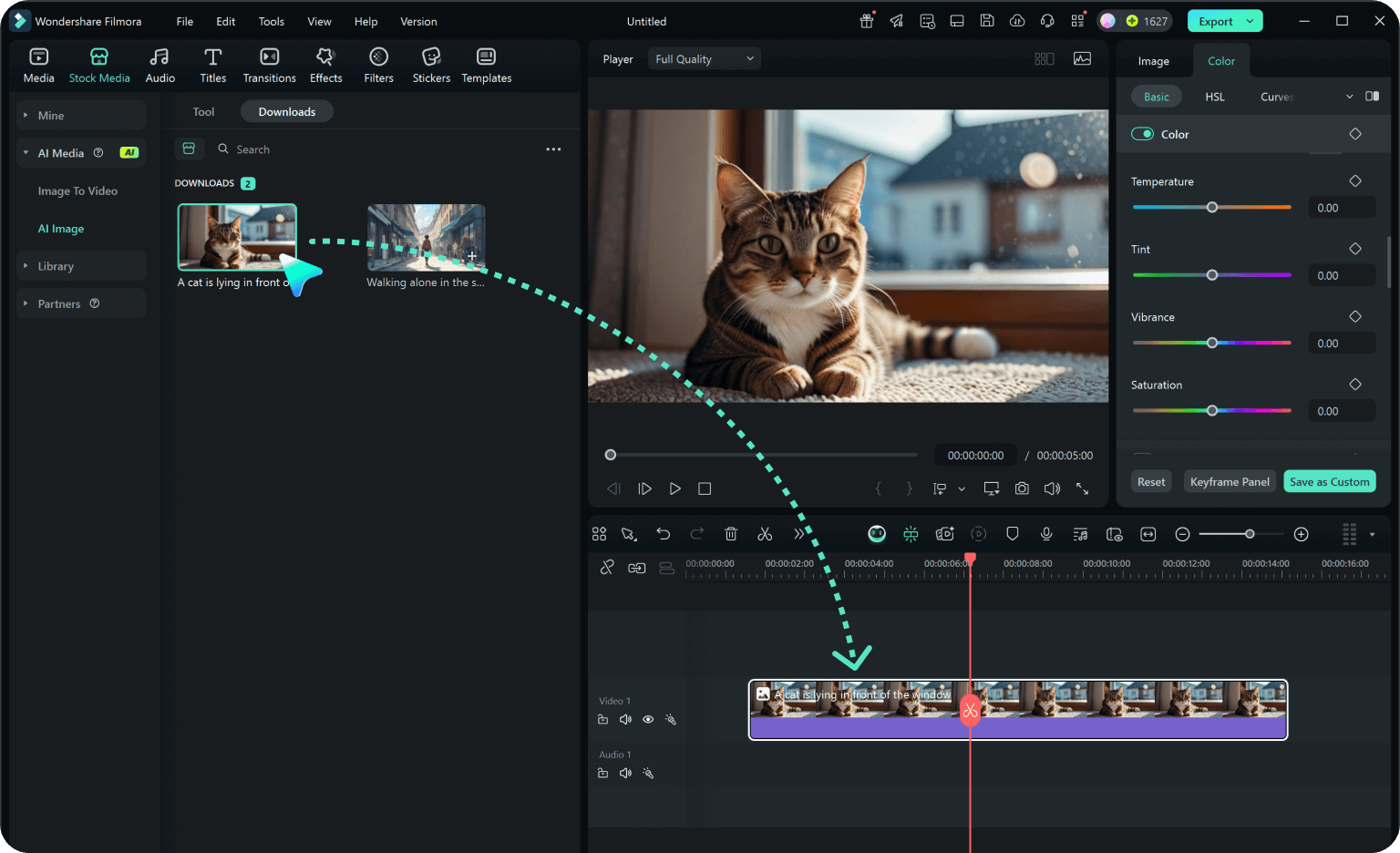
- Seamlessly drop your newly created emblems into the timeline to begin animating your complete brand identity.
Customize Your AI Logo Template With Professional Tools
Customize Your AI Logo Template With Professional Tools
Generating the base image is just the beginning of your ai logo design journey. Use Filmora's comprehensive suite of creative assets and blending modes to refine your graphics effortlessly.
- Apply dynamic video transitions and effects to turn a static AI logo into an engaging animated logo reveal.
- Adjust colors, contrast, and saturation precisely using built-in color correction tools to match your brand guidelines.
- Layer transparent AI stickers and vector shapes over your generated logo to add personalized finishing touches.
Animate Your AI Generated Logo Automatically

Animate Your AI Generated Logo Automatically
Bring your ai logo maker creations to life effortlessly. Filmora allows you to apply one-click animations and text effects, ensuring your brand stands out in every single video.
- Combine your fresh AI logo template with stunning video effects to instantly hook viewers in your video intros.
- Utilize smart keyframing to create smooth, professional motion graphics without any complex technical knowledge.
- Export your finalized animated logos directly to your favorite social media platforms in optimal resolutions.
Frequently Asked Questions About AI Logo Design
How to Create an AI Logo Template in Filmora
Design a breathtaking AI generated logo using our advanced AI logo maker in just three simple steps.
Step 1 Enter Your Prompt

Step 2 Customize Design
Step 3 Animate and Export
-
1:Enter Your Prompt
Generate your initial concept by entering a descriptive prompt into Filmora's AI Image Generator, selecting your preferred model. -
2:Customize Design
Refine your AI logo design by adding vibrant colors, transparent backgrounds, and add titles to include your brand name perfectly. -
3:Animate and Export
Drag your finalized logo onto the timeline, apply dynamic video transitions, and export your animated brand asset in high resolution.
Elevate Your Brand With Advanced AI Logo Generation
Generating a stunning ai logo template is just the first step in building a memorable brand identity. Filmora's comprehensive Filmora video editor empowers you to take your static designs and transform them into dynamic visual assets. Whether you want to experiment with different prompt variations, layer your logo over cinematic backgrounds, or create a full-scale intro sequence, you have all the necessary tools at your fingertips. By integrating advanced models like GPT Image 2 and Nano Banana Pro, you can ensure that your ai generated logo remains completely unique, scalable, and perfectly aligned with your creative vision.








