
Maple Transition Examples & Guides
Explore popular maple transition applications and creative editing techniques
Loading more maple transition examples...
 Category:
 Duration:
 Aspect Ratio:
Everything You Need to Master the Maple Transition
A well-placed maple transition instantly elevates your seasonal footage, giving it a professional autumn vibe. Filmora provides an extensive library of dynamic leaf effects and blending tools that drop straight into your sequence without complex keyframing. Whether you are editing a cozy vlog or a professional nature documentary, Filmora offers the precise controls you need to apply the perfect maple transition and publish directly to your audience.
Dynamic Foliage Effects for Seamless Video Flow
Dynamic Foliage Effects for Seamless Video Flow
Avoid spending hours masking leaves manually. Filmora offers instant dynamic leaf animations that bridge your clips beautifully. From subtle falling leaves to turbulent autumn winds sweeping across the frame, you get complete thematic control over your video sequence. Browse through video templates to jumpstart your seasonal projects.
- Instant Application - Drag any foliage effect onto your sequence for immediate visual impact.
- Natural Movement - Every animation features organic physics that mimic real wind patterns perfectly.
- Flexible Layouts - Effects are formatted flawlessly for vertical shorts and widescreen cinematic formats.
Advanced Color Control and Cinematic Blending
Advanced Color Control and Cinematic Blending
Adjust every hue and shadow within your maple transition to match your specific aesthetic. Filmora empowers you to shift tones from vibrant amber to deep crimson, ensuring perfect consistency across your footage. You can layer multiple effects or leverage AI Video Editing capabilities to stabilize shaky outdoor shots before applying your transition.
- Precision Layering - Stack numerous visual elements and dictate their exact opacity and sequence order.
- Custom Typography - Integrate sleek titles over your falling leaves to match your seasonal branding.
- Color Refinement - Alter the warmth and contrast of your effects to suit varying lighting conditions.
Intelligent Masking and Immersive Audio Integration

Intelligent Masking and Immersive Audio Integration
Enhance the sensory experience of your maple transition by blending crisp visual elements with atmospheric soundscapes. Utilize Filmora tools to add rich ambient audio while applying motion tracking to lock leaf elements onto moving subjects effortlessly. Finish your project by syncing your visuals with rhythmic beats perfectly.
- Audio Synchronization - Pair your visual effects with crisp wind soundscapes directly on the primary timeline.
- Intelligent Tracking - Attach dynamic leaves to specific focal points as they move across the screen.
- Platform Optimization - Render your seasonal masterpiece at optimal resolutions for major social media platforms.
Frequently Asked Questions About Maple Transitions
How to Add a Maple Transition in Filmora
Apply a breathtaking maple transition to your autumn footage in just a few clicks, with no advanced motion graphics skills required.
1. Import Your Autumn Footage
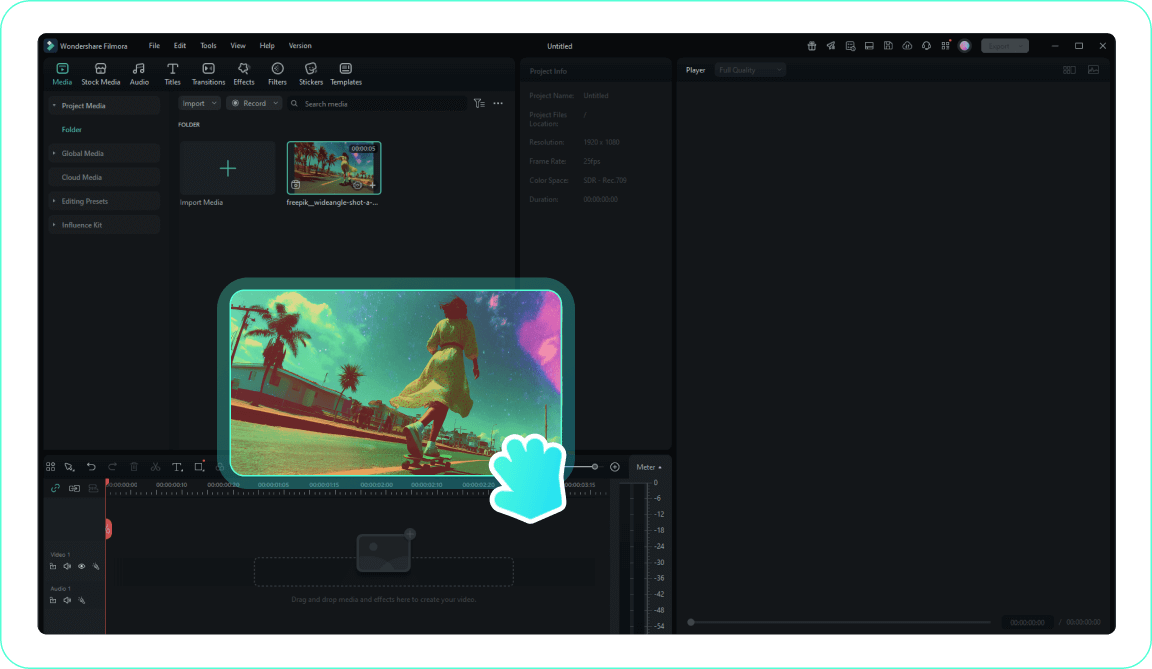
2. Access the Transitions Tab
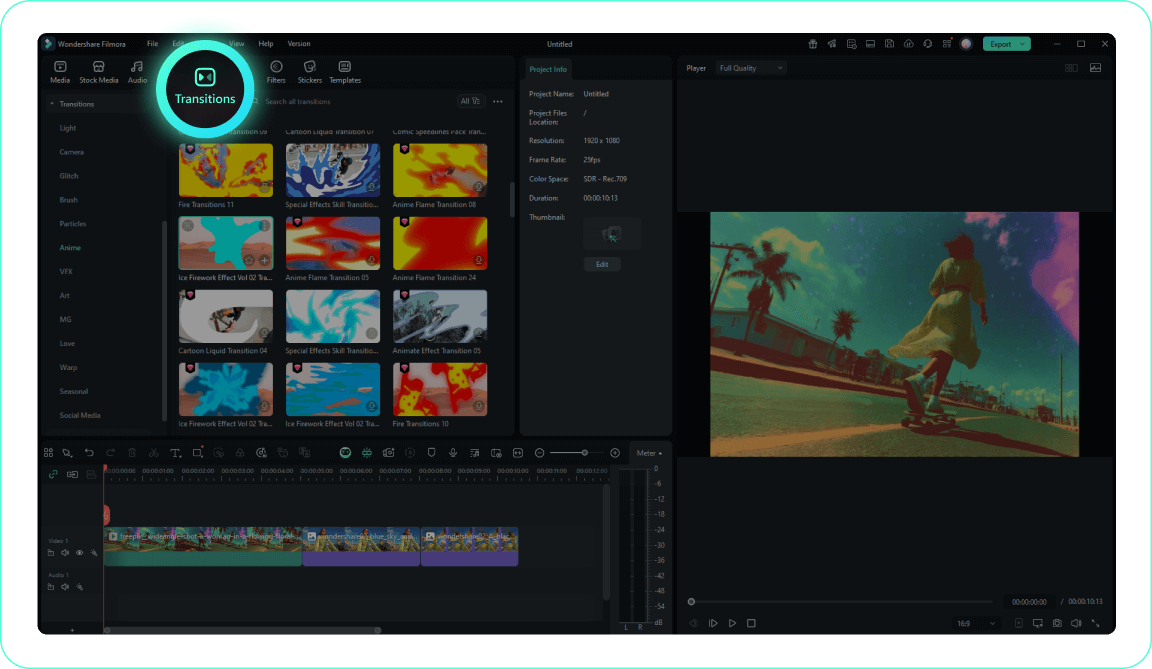
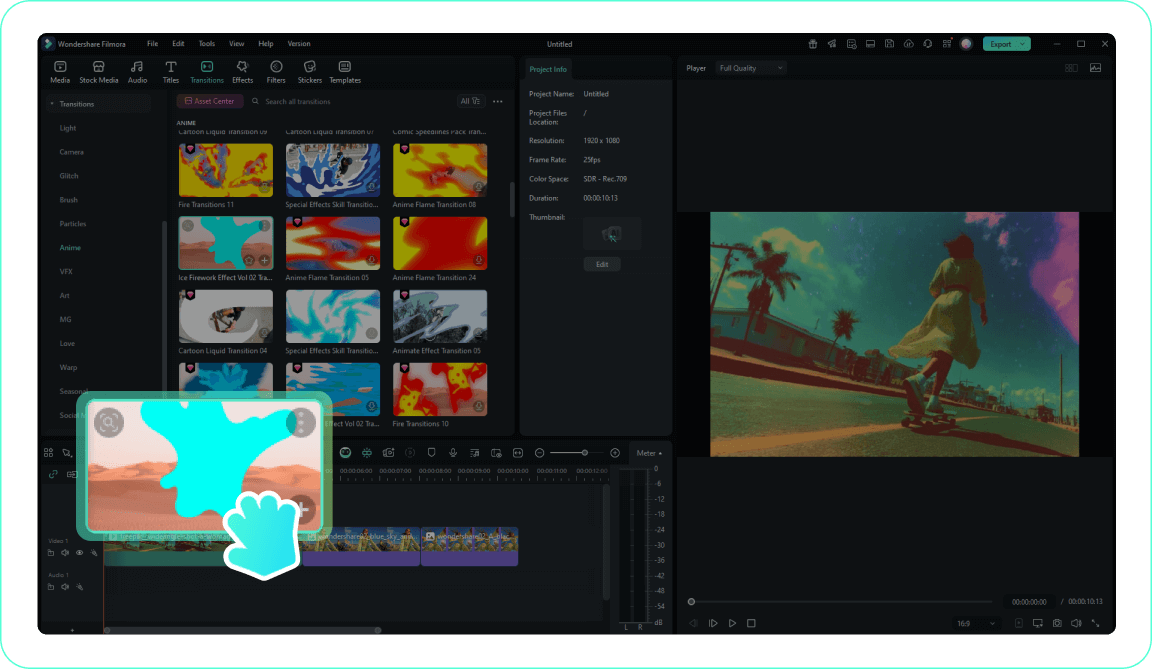
3. Apply the Maple Transition
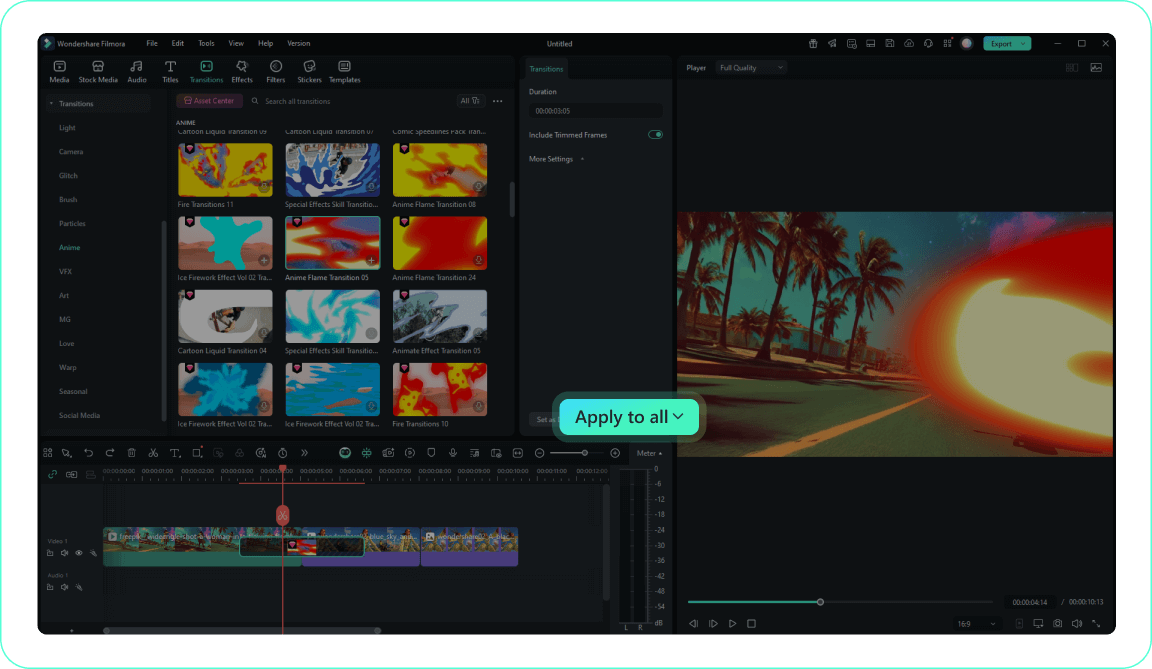
4. Customize and Preview
-
1. Import Your Autumn Footage
Import your fall video clips or creative assets to the Media Library and drag them to the timeline in the order you want them to appear.Pro Tip: Organize your media into folders for easier access on larger projects. -
2. Access the Transitions Tab
Navigate to the Transitions tab to explore Filmora's comprehensive collection, including seasonal and maple transition effects. -
3. Apply the Maple Transition
Drag your chosen maple transition between two clips on your timeline to create a seamless autumnal shift. -
4. Customize and Preview
Double-click the transition to adjust its duration and other parameters, then preview your cinematic autumn edit using the play button.Pro Tip: Right-click on a transition and select "Apply to All" to use the same transition consistently throughout your project.
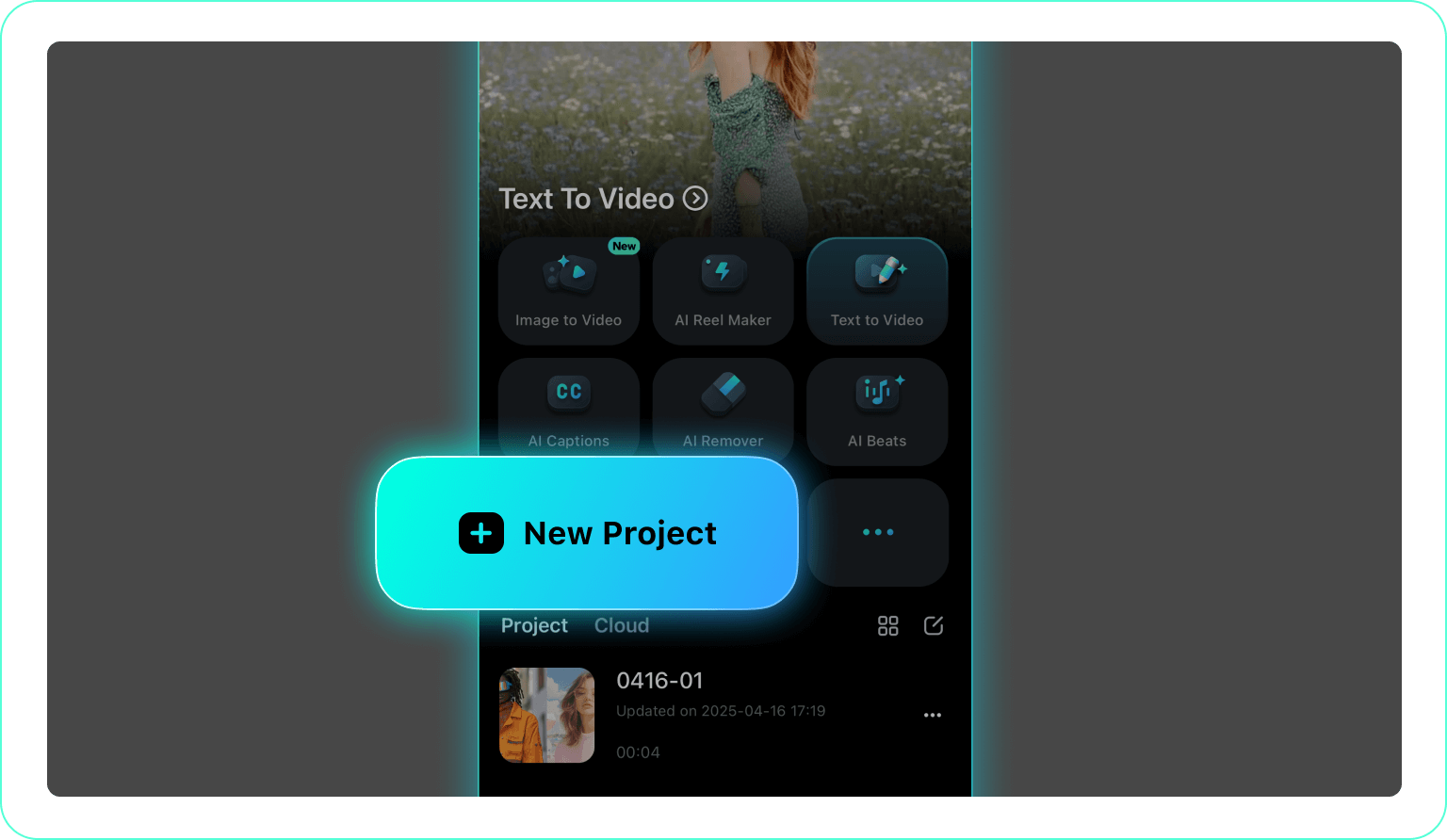
1. Open Your Project
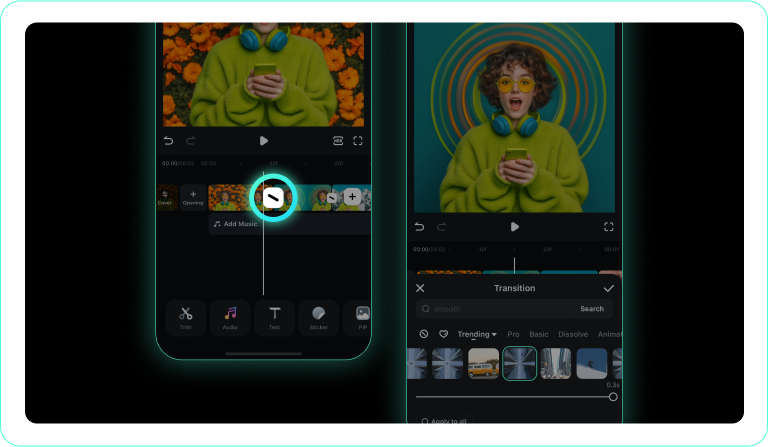
2. Tap the Transitions Icon
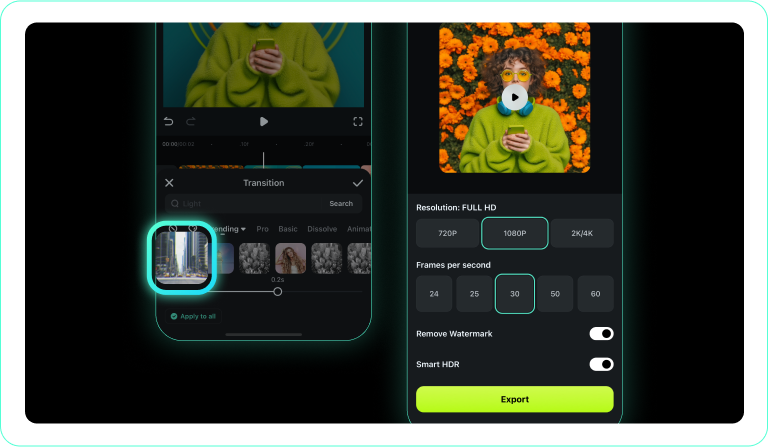
3. Choose and Apply
-
1. Open Your Project
Launch the Filmora app and import your seasonal video clips. -
2. Tap the Transitions Icon
Tap the transition icon between clips to open the transition library. -
3. Choose and Apply
Select a maple transition style, preview the leaf animation, and apply it directly to your sequence.
Enhance Your Autumn Projects Beyond Transitions
Filmora provides much more than a simple maple transition. You can layer atmospheric fog overlays to add visual depth to your forest scenes, utilize stock media to fill gaps in your outdoor shoots, and apply cinematic vignettes that pull focus toward your subject. Create immersive seasonal videos by fine-tuning luminance curves to enhance those warm amber tones, using the AI Image Generator to craft custom autumnal backgrounds, and adding dramatic slow motion that amplifies the crisp beauty of your footage. Whether you are building a nature travelogue, a cozy lifestyle vlog, or a cinematic autumn short, everything you need to craft your complete seasonal visual identity is available in one streamlined workspace.








