

 TL;DR:
Access the viral Mama Duck and duck face filters by searching the TikTok Effects Library and Snapchat Lens Explorer, or build a custom motion-tracked duck effect using Filmora's AI tools if native options are unavailable.
● If the filter does not appear on TikTok, update the app, clear the cache, or test a secondary account, as the platform releases effects in stages and search results vary by region.
● Instagram cannot be used to replicate this specific trend because the platform removed many third-party AR face filters from its Effects Gallery in early 2025.
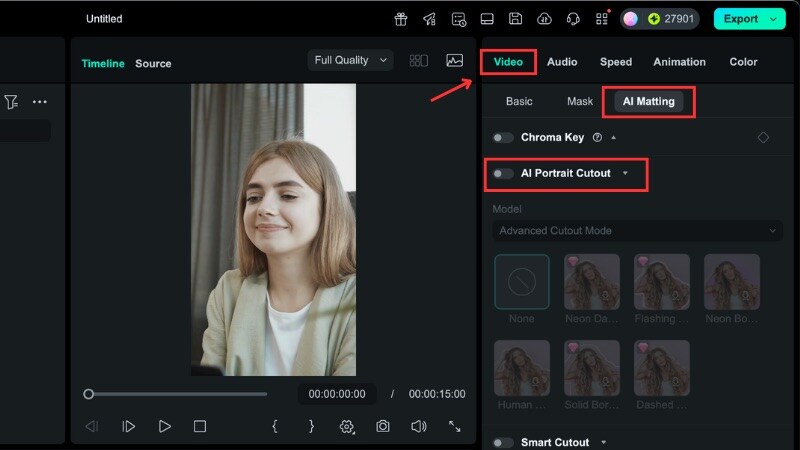
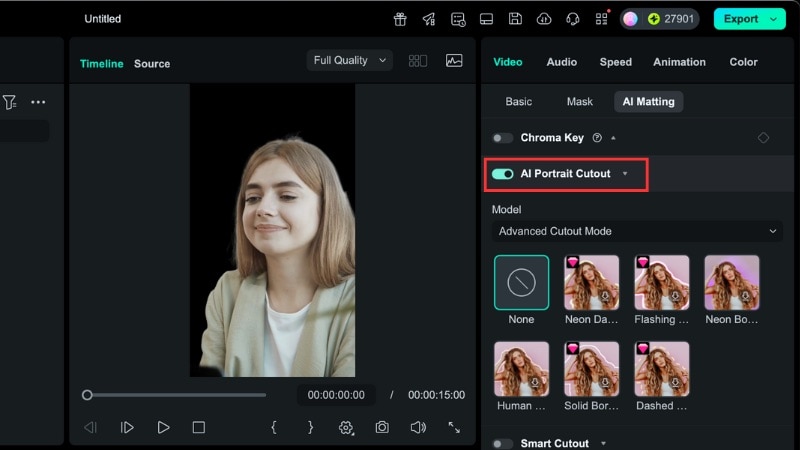
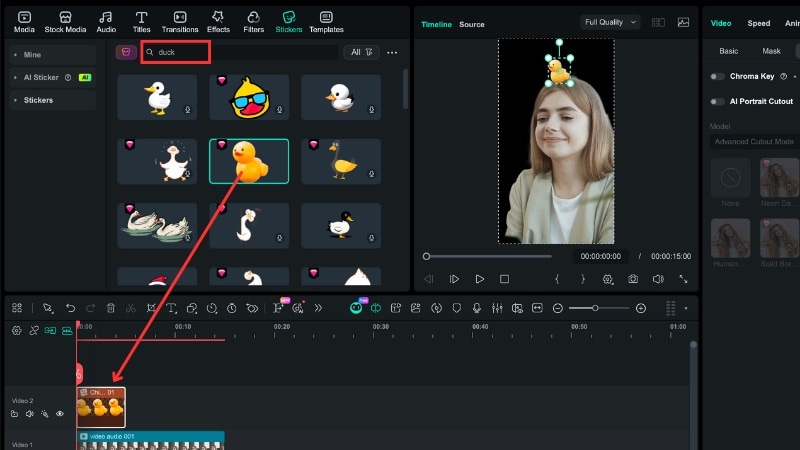
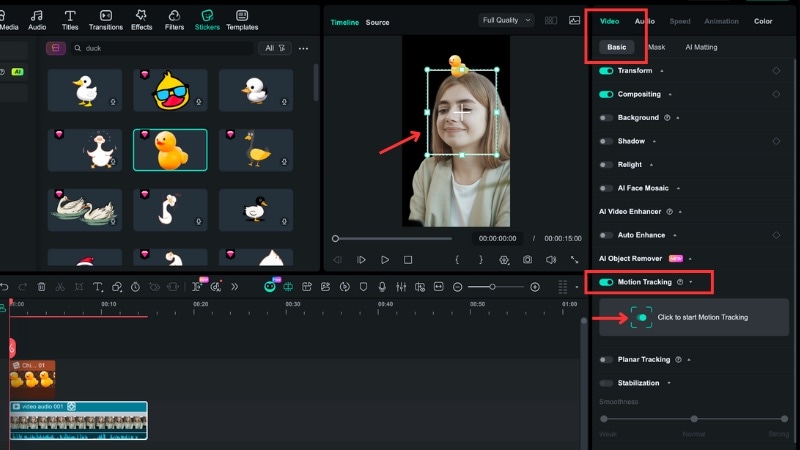
● To build a custom duck effect in Filmora, apply AI Portrait Cutout to isolate the face and link a duck sticker using Motion Tracking, keeping in mind that effects cannot be removed from a video once exported.
Ask AI for a summary
 ChatGPT
 Perplexity
 Gemini
 Claude
 Grok
Grok
Can't find the viral Mama Duck filter on TikTok or the FaceTime Duck lens on Snapchat? You're not alone. These trending effects often hide under different names, making them hard to track down. In this guide, we'll show you exactly how to get the duck filter on every platform. Plus, if you want a unique look, we'll teach you how to create a custom duck face filter using Filmora's AI tools. Let's jump into the trend!
Part 1. What is the Viral Duck Filter Everyone is Using?
The duck filter trend on social apps does not point to one single effect. You can see several styles of duck-themed filters across short videos, memes, and story posts on each platform. These effects add duck characters, duck animations, or duck face filters to a clip.
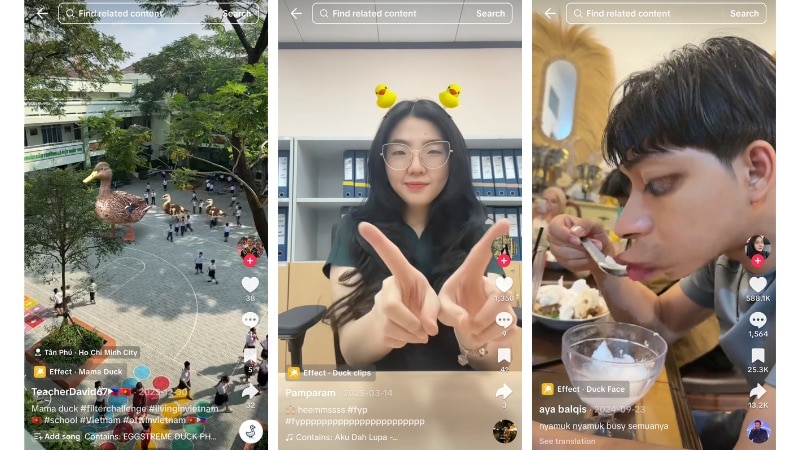
Some of the most common duck filters on TikTok that many people use right now are:
- Mama Duck Filter
This version places a Mama duck walking around with a row of ducklings behind it in the video. Many creators pair it with walking clips, pet videos, or short skits while a duck family follows along.
- Duck Clips Filter
This effect adds animated duck stickers around the head or body of the person in the video. The ducks pop into the scene, float, or move with the camera, which works well for reaction videos and short jokes.
- Duck Face Filter
This duck face filter on TikTok reshapes a face with a duck beak and wide cartoon eyes. It gives a playful look that works well for selfies, lip-sync clips, and reaction videos.
Why the Duck Filter is Trending
These duck filters trend on social media because they fit meme posts, pet content, and short clips. The mix of cute visuals and simple humor makes these effects easy to relate to daily jokes. People also reuse them across TikTok, Snapchat, and Instagram without much setup.
Part 2. How to Find and Get the Mama Duck Filter on TikTok
Looking for one specific filter but can't find it right away? The duck filter on TikTok does not always show up under one clear name. Plus, search results can vary by account and region. For example, use the steps below to find and save the Mama Duck filter to your effects list.
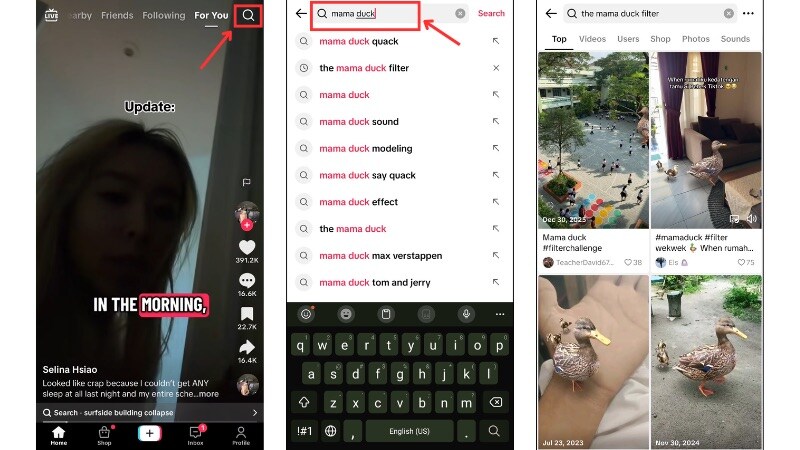
Method 1. From the Effects Library
This method works best if TikTok already lists the Mama Duck filter in its public effects search. It is the fastest option when the effect shows up under a common name.
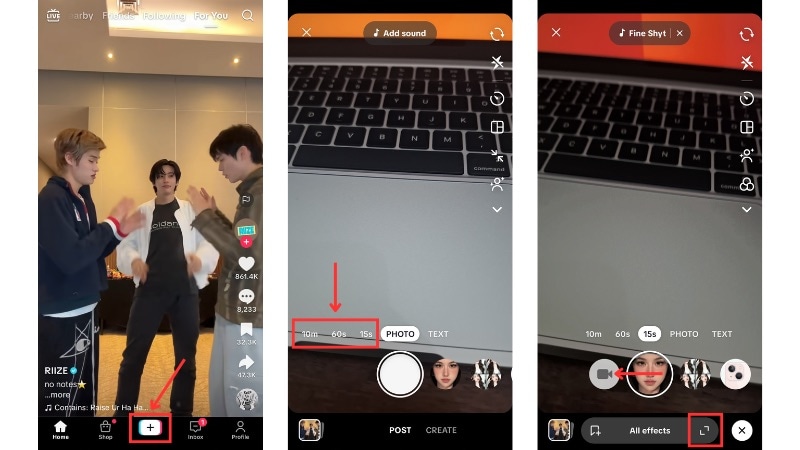
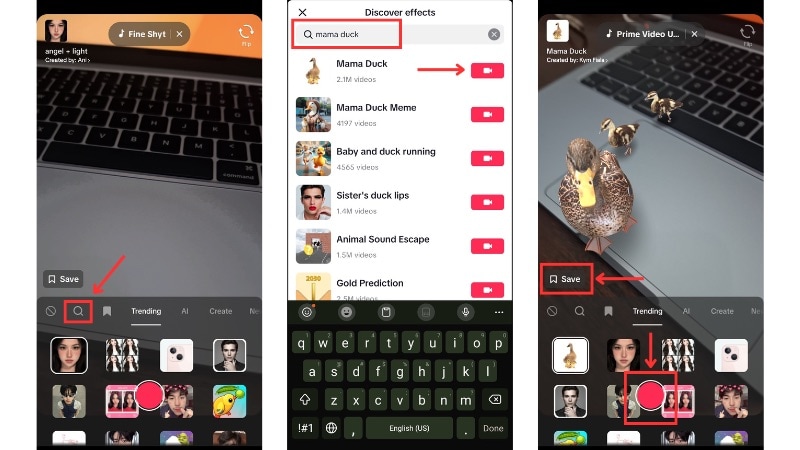
Follow the steps below to find the Mama Duck filter from TikTok's effects library:
Method 2. From Other Creator Videos
Use this method when you want the same Mama Duck filter seen in trending videos. It loads the effect from another creator's post. Follow the steps below to open the Mama Duck filter on TikTok from another creator's video:
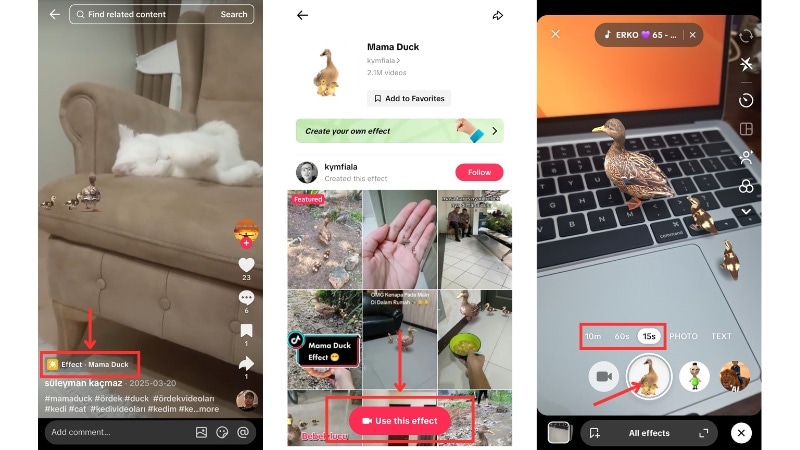
Method 3. Use an Effect Link or Scan Feature (When Available)
Use this method when someone shares a direct link or a QR code for the duck filter. It saves time and takes you straight to the effect page without browsing the Effects Library.
Follow the steps below to open the duck filter on TikTok using a link or QR code:
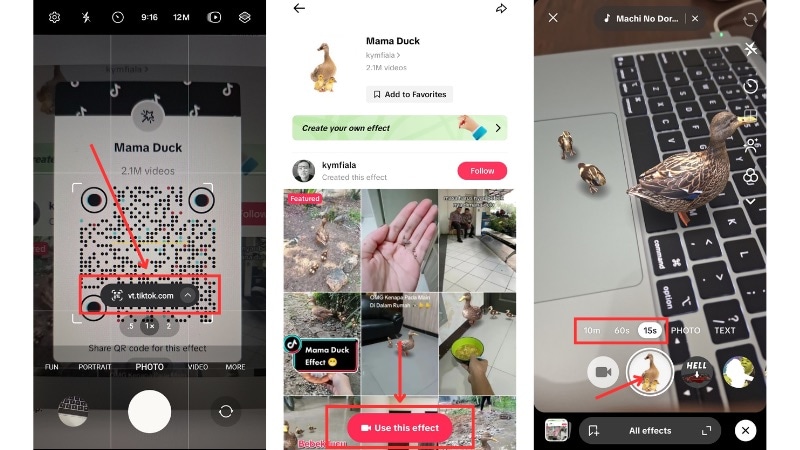
- Effect link: Find a link in a creator's bio, caption, comment section, or group chat, then tap it to open in TikTok.
- QR code: Scan the code using your phone's camera or a QR scanner app. If your phone doesn't support built-in scanning, use a third-party scanner.
What to Do If the Duck Filter on TikTok Does Not Show

If you still can't find the Mama Duck filter on TikTok after trying the methods above, use the fixes below. These fixes cover the most common reasons the filter on TikTok does not appear.
- Update the TikTok app: Open the App Store or Google Play Store and install the latest version of TikTok. New effects often arrive through app updates, and older versions may not show them.
- Try different search terms: The duck filter may appear under different names. Open the Effects search and try different kinds of keywords; you can focus on describing the duck's movement or its color.
- Clear the TikTok cache: Open TikTok settings, go to Cache & Cellular Data, then tap Clear cache. Restart the app and search for the duck filter on TikTok again.
- Test with another TikTok account: TikTok releases effects in stages. A second account on the same device may show the filter when your main account does not.
Part 3. Finding the Duck Filter on Other Platforms
The duck filter you want isn't available on TikTok? Try looking for one on other platforms like Snapchat or Instagram. These platforms do not offer the same effect, but you can still find duck-style filters or create clips that match the trend.
Duck Snapchat Filter: The "Facetime Duck" Lens
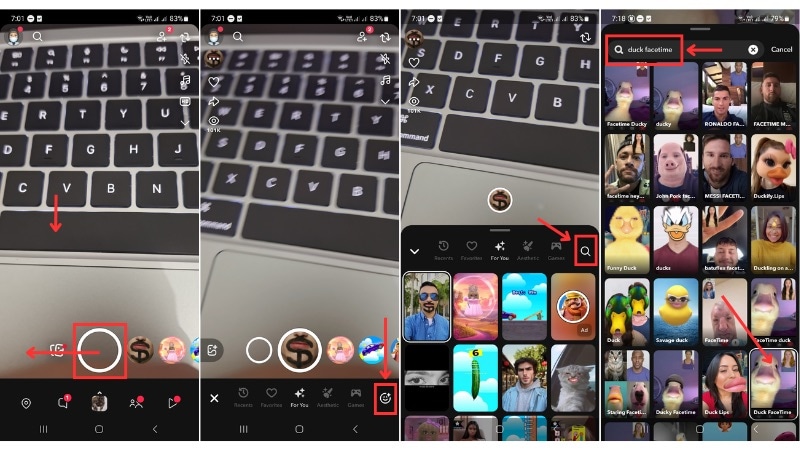
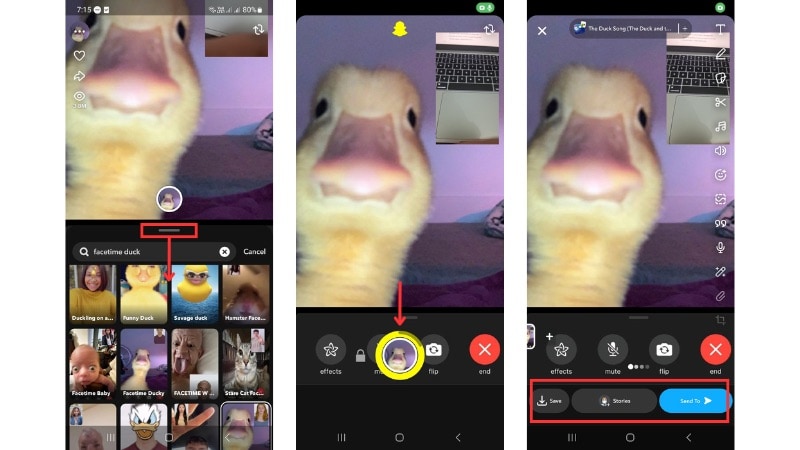
The FaceTime Duck filter is one of the duck Snapchat filters you can find in Snapchat's Lens Explorer. You'll see several versions of this effect. For example, a lens that makes it look like you're on a FaceTime call with a duck.
How to find and use Duck Lens Filters on Snapchat:
Duck Face Filter Instagram: Is It Available?
If you search for a duck filter on Instagram, you may not find a match for the duck trend on TikTok. Instagram removed many third-party AR filters in early 2025, which reduced the number of face filters in its Effects Gallery.
What remains are a few basic face masks and color effects, but none of them recreate the viral duck filter style.
Part 4. DIY Duck Effects: How to Make a Custom Duck Face Filter with Filmora
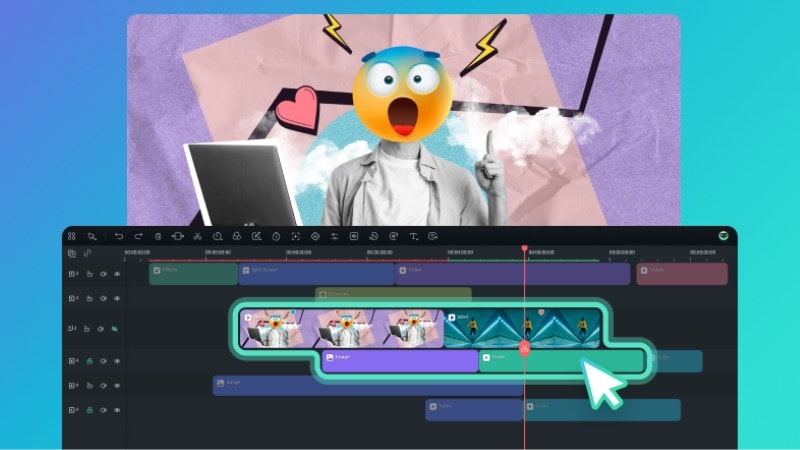
If you can't find a duck filter that you want on social apps, you can build your own version with Wondershare Filmora. You control how the duck face looks, where it appears, and how it moves in your video.
 Secure Download
Follow the steps below to create a duck filter–style effect in Filmora:
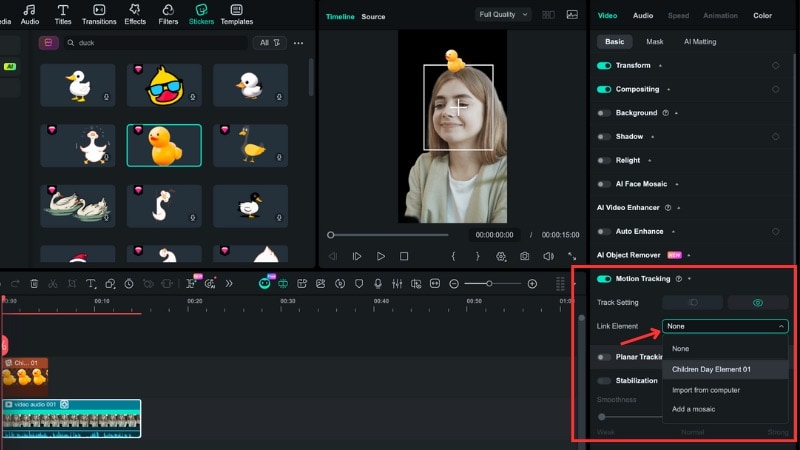
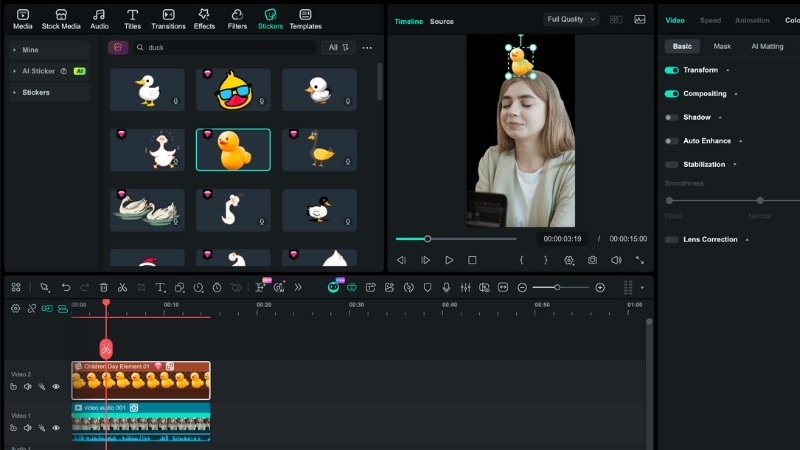
Part 5. Top 5 Creative Ideas for Your Next Duck Filter Video
After you choose which duck filter to use, it's time to plan the clip that goes with it. The right setup helps the duck face or ducklings feel fun instead of random. Below are five simple clip ideas you can use for your duck filter.

- The "Duck Walk" Challenge: Record yourself or your pet walking toward or past the camera. This clip works best for the Mama Duck filter since the ducklings follow your movement.
- Sit and Talk Clip: Sit or stand in front of the camera and record a short reaction or storytelling shot. This clip fits a duck face filter on TikTok, where the beak and eyes track your face.
- Point and Place Clip: Record yourself pointing at empty space next to you. Later, you can add duck stickers or animated ducks in that spot.
- Over the Shoulder Turn: Start with your back to the camera, then turn around to face it. This motion pairs well with duck face filters that appear as you turn.
- Ducklings Circling Your Pet: Record your cat or dog sitting or standing in one spot. Apply the Mama Duck filter so ducklings circle around or line up behind your pet.
Conclusion
Finding the right duck filter on TikTok, Snapchat, and Instagram can take a few tries since each app labels effects in different ways. Once you know where to search, you can use the Mama Duck filter, duck clips, or a duck face filter to match the trend or create short joke clips.
If none of the presets match what you want, you can build your own duck filter in Filmora. Try one of the clip ideas from this guide and post your next content today.

FAQs
-
Is the duck filter free?
Yes. Most duck filters on TikTok and Snapchat come free inside each app. You don't need to pay to use the filter. If you use Filmora, you can use free stickers and tools, but some assets may require a paid plan.
-
How to remove a duck face filter from a saved video?
You can't remove a duck face filter once it's baked into a saved video. Filters become part of the video during export. If you still have the original clip, re-edit it without the filter or add a new version using Filmora.
-
Why is the duck Snapchat filter trending again?
Duck filters trend again because short memes and pet videos bring them back into feeds. When one viral clip gains views, other creators copy the format and use similar duck filters. This cycle often restarts trends on TikTok and Snapchat.
