

 TL;DR:
To participate in the Red Flag Filter trend, you can search for and record the randomized effect directly on TikTok, but deploying it on Instagram requires cross-platform uploading or custom editing software due to recent platform restrictions.
● Because Instagram's early 2025 AR filter policy update removed many user-created effects, you must now record the filter video natively on TikTok, save it locally to your device, and manually upload the clip to Instagram Reels.
● The native TikTok effects generate entirely randomized, inaccurate entertainment results that function in both video and still-photo selfie modes, though specific filters may become unavailable if the original creator renames or deletes them.
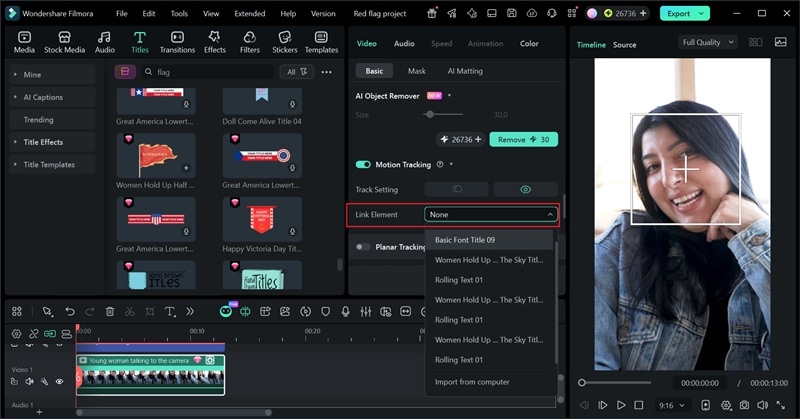
● To bypass randomized results and create tailored flags, you can build a customized version in Wondershare Filmora by applying the Motion Tracking tool to link custom text titles and flag stickers directly to the video subject.
Ask AI for a summary
 ChatGPT
 Perplexity
 Gemini
 Claude
 Grok
Grok
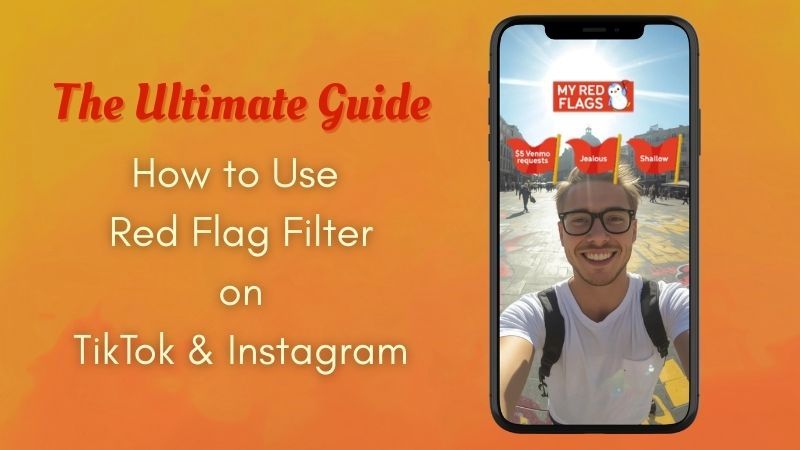
If you're active on TikTok or Instagram, you've probably come across the viral red flag filters. This hilarious trend has taken social media by storm, allowing users to playfully expose their "toxic" traits. However, finding the exact TikTok red flag filter or using it on Instagram can be tricky due to recent updates. In this 2026 guide, we'll show you exactly how to get the red flag filter, why it's trending, and how to create a custom, professional version using Wondershare Filmora.
Part 1. What is the Red Flag Filter Trend?
The red flag filter plays on the idea of "red flags," which usually mean warning signs in someone's behavior or relationships. You'll see multiple red flags appear on your screen, each containing a specific trait or behavior.
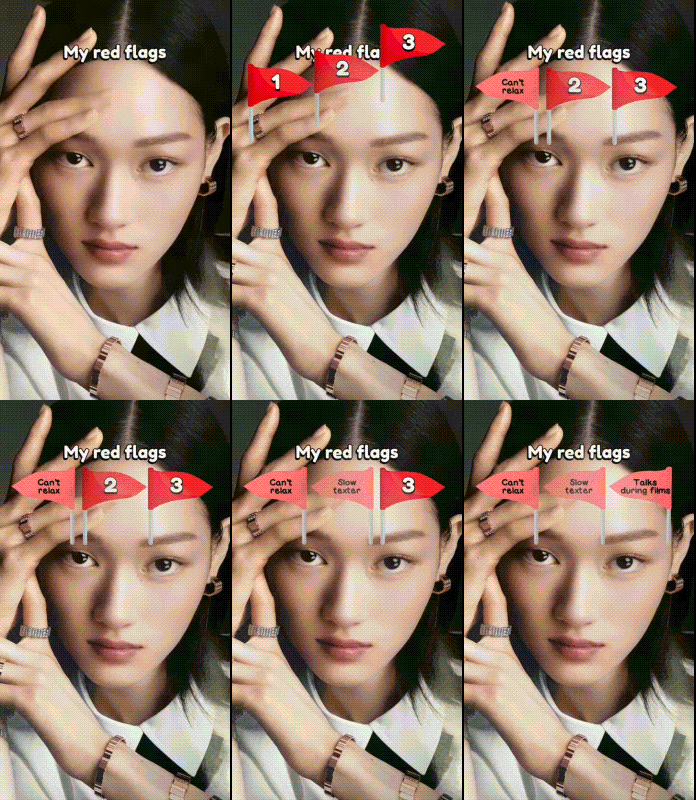
When you record a video, the red flag filter randomly stops and reveals one or several "red flags" about you, such as always being late or oversharing.
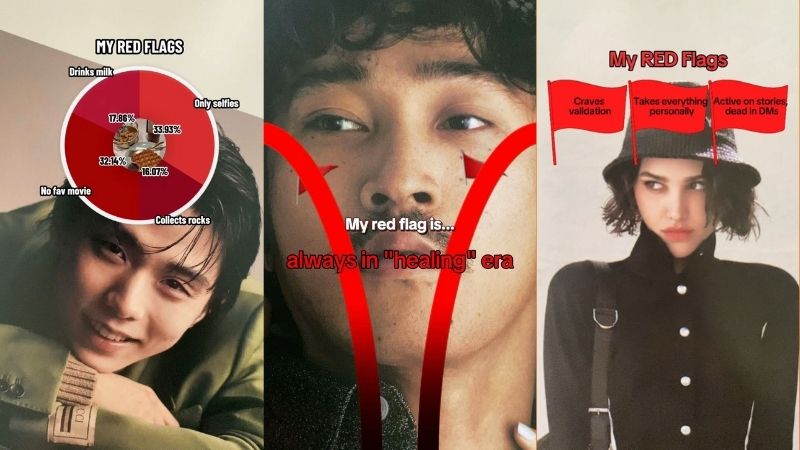
Even so, this isn't a serious tool that can actually analyze your real personality. The red flag filter is purely for entertainment. Still, you might be wondering, how did it become so viral?
- Laughing at Yourself: People enjoy pointing out their own small flaws or annoying habits in a fun way, turning things like "bad texter" into something funny and relatable.
- Unpredictable Results: Part of the fun is not knowing what the red flag filter will reveal. Sometimes it's accurate, sometimes completely off. Either way, the reaction is entertaining.
- Shared Experience: It's easy to bond over similar red flag filter outcomes. People comment things like, "Wait, I got that too!" That interaction keeps the trend going.
- Perfect for Duets and Reactions: People love stitching or duetting their friends' results, especially when the flags are shocking or funny.
Part 2. Step-by-Step: How to Use The Red Flag Filter on TikTok
When something starts going viral, TikTok is usually where it spreads the fastest. Just by scrolling through a few videos, you'll easily find creators using the red flag filter. So, if you don't want to miss out, let's jump right into how to use the red flag filter on TikTok.
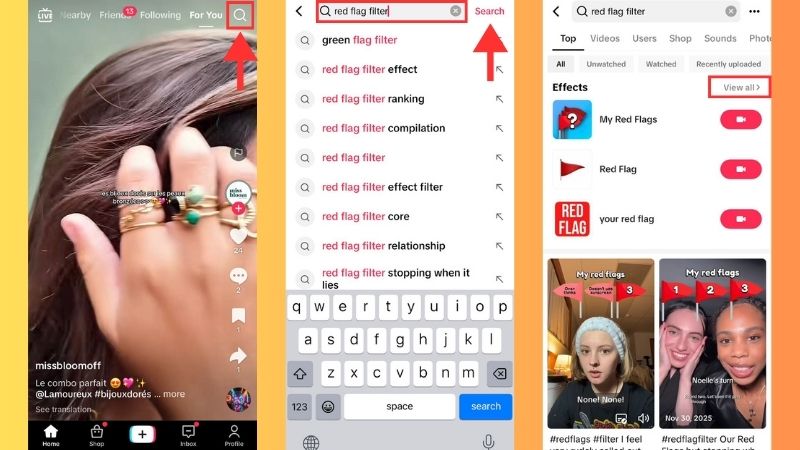
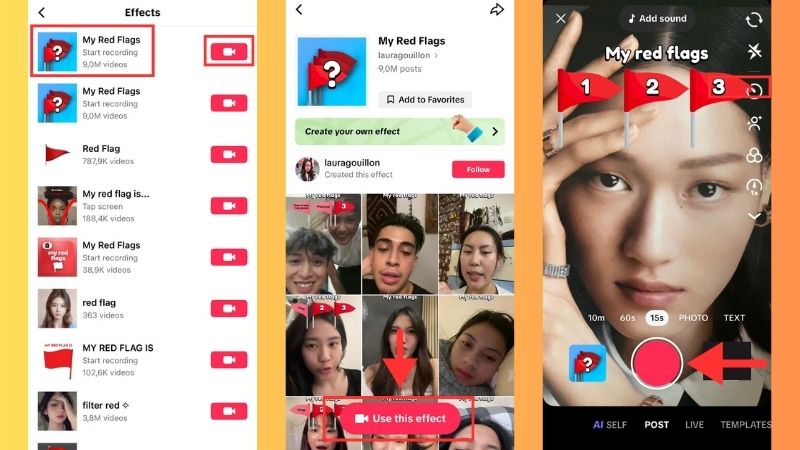
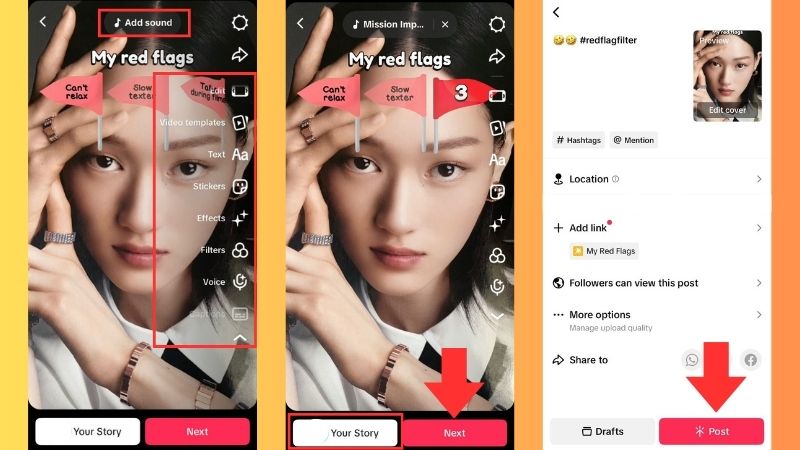
Within just a few simple steps, your red flag filter content is ready. For this example, we used My Red Flags by lauragouillon, which has been used over 9 million times. The numbers alone show how viral it is.
At first, you'll notice there are three flags that appear closed above our heads. As soon as the recording starts, they open one by one and reveal the labels of our "red flag". Since the results are randomized, you might get something surprisingly relatable or completely the opposite. Either way, it's all meant for lighthearted fun.
Part 3. How to Get Red Flag Filter on Instagram (2025-2026 Update)
If you've been trying to search for the red flag filter Instagram users were posting everywhere, you might have noticed something strange: it's not easy to find anymore.
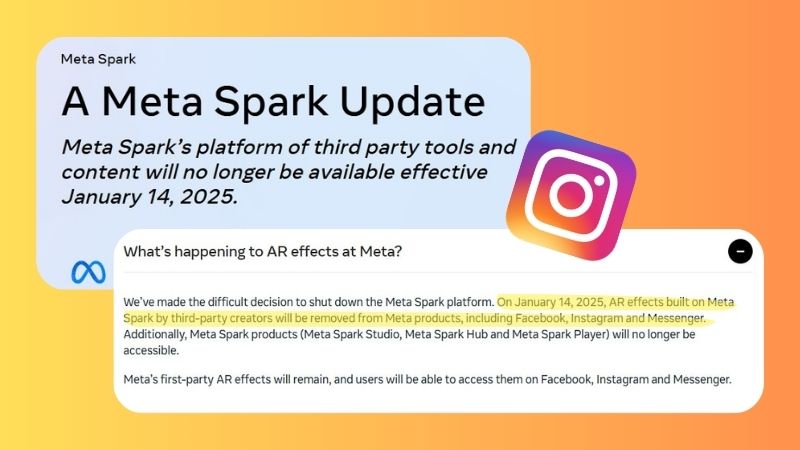
That's because Instagram updated its AR filter policy in early 2025, which removed many user-created effects from the platform. Unfortunately, the viral red flag filter was one of the filters affected by this change.
So, if you're wondering how to get a red flag filter on Instagram, here's a simple solution. Instead of applying the filter directly inside Instagram, many creators record the video on another platform first and then upload it to Instagram.
Here's the easiest way to do it:
- Open TikTok and search for the TikTok red flag filter.
- Record your video using the filter.
- Save the video to your device.
- Upload the clip to Instagram Reels.
Part 4. Beyond the Filter: How to Create Professional "Red Flag" Videos with Filmora
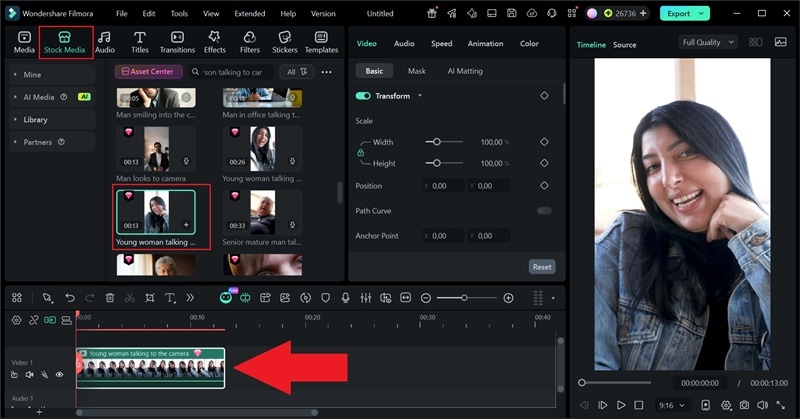
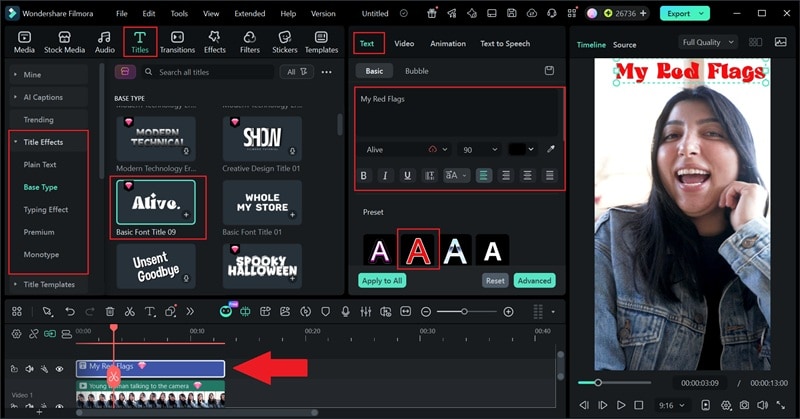
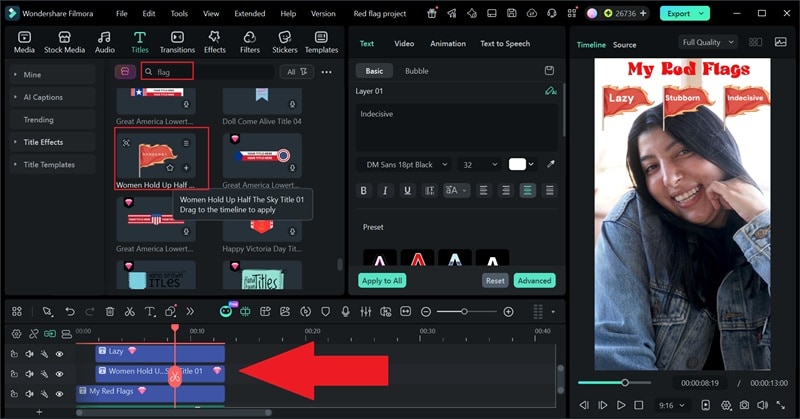
Want to stand out from the crowd? Instead of using the same randomized TikTok red flag filter as everyone else, you can create your own red flag filter video using Wondershare Filmora. This allows you to customize the "flags" to be more relatable to your specific audience. By using Filmora's Motion Tracking and Custom Titles, you can make high-quality "Red Flag" content that looks professional and has a higher chance of going viral on Reels and TikTok.
See our breakdown below to learn how to do the red flag filter yourself in a more creative way.
 Secure Download
Adding Custom Text and Motion Graphics to Your Red Flags
The most recognizable part of the trend is the floating red flag labels. Instead of relying on a preset filter, we'll build them ourselves using Filmora's titles and stickers.
Apply Motion Tracking
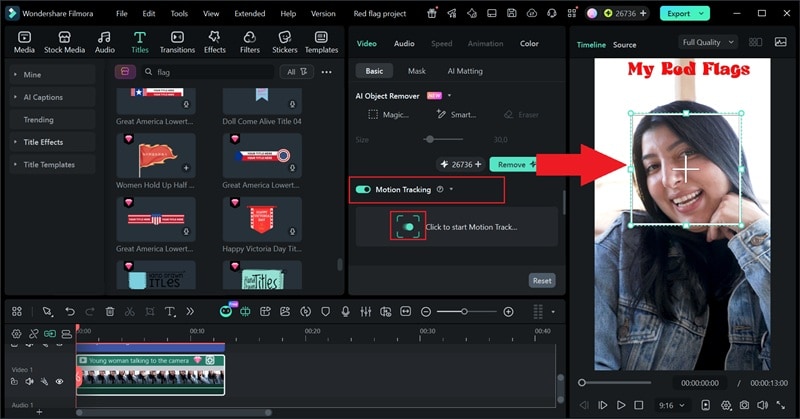
If you look closely at the TikTok red flag filter, the flags usually follow the movement of the person in the video. You can recreate the same effect using Filmora's Motion Tracking tool.
Using Trending Audio for Higher Exposure
Don't forget about audio. The right sound can make your red flag filter video feel much funnier and help it blend into the trend.
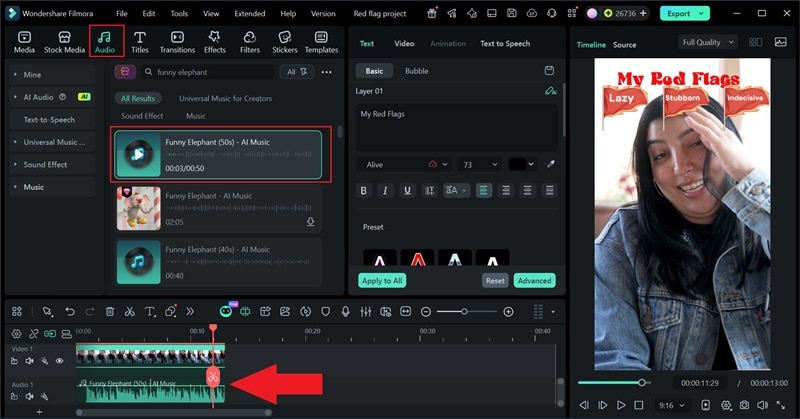
Here's the final result. The visuals, stickers, text, audio, and the person's reactions all blend together to make the video feel fun and lively. With Filmora, you can create a red flag filter that truly feels like your own.
Secure DownloadPart 5. 3 Pro Tips to Make Your Red Flag Video Go Viral
By now, you understand how to get a red flag filter on Instagram & TikTok. You've even learned how to create your own red flag filter version in Filmora. But here's the real challenge: getting people to stop scrolling.
Social feeds move fast, and thousands of creators are already posting their own red flag filter videos. If you want yours to stand out, you need a little strategy.
So how to make your red flag filter video stand out? Here are some tips you can try.
Tip 1: Apply Hook in the First 3 Seconds
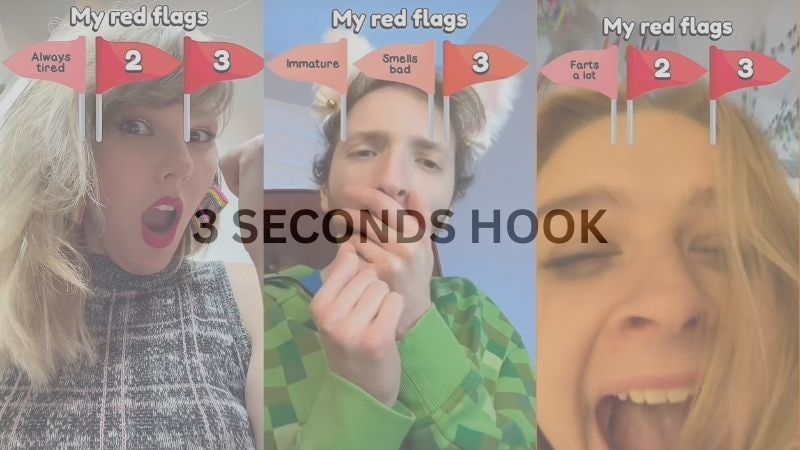
On TikTok and Reels, the first three seconds decide everything. If viewers aren't curious right away, they'll scroll past your video without thinking twice.
Start your video with something that instantly grabs attention, such as:
- "I didn't expect THIS to be my red flag…"
- "POV: you just discovered your biggest red flag 🚩"
- A dramatic reaction shot before the reveal
The goal is simple: make people curious enough to stay. And remember, reactions work best when they feel natural and unscripted. If it looks staged, viewers will notice.
Tip 2: Use Trending Audio to Boost Reach
Many creators boost their TikTok red flag filter videos by using trending music or meme sounds. A great trick is to reveal the red flag right when the beat drops or when a dramatic sound effect hits.
You can experiment with:
- Trending TikTok sounds.
- Comedic sound effects.
- Dramatic background music.
- Short meme audio clips.
Tip 3: Keep It Short, Relatable, and Interactive
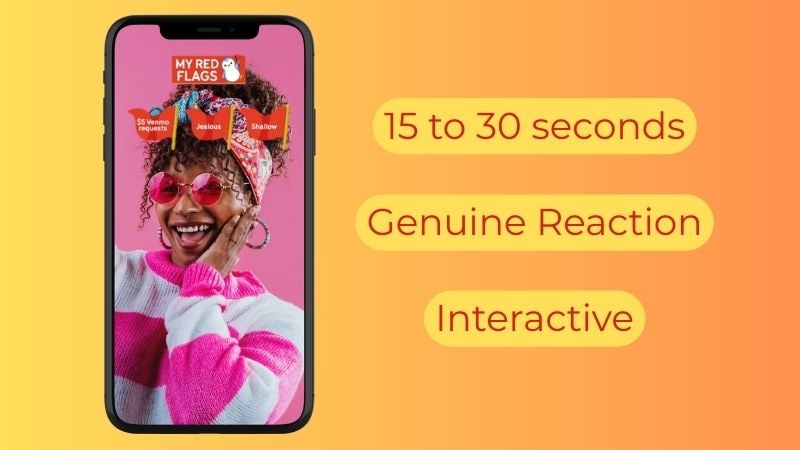
Most viral red flag filter videos are surprisingly short. Instead of overexplaining, aim for 15–30 seconds and focus on one or two relatable moments.
And here's a bonus trick to boost your comments section: end the video by asking viewers to share their own red flags. Something like "Drop your biggest red flag below 👇" turns passive viewers into active participants, which tells the algorithm your content is worth pushing to more people.
Conclusion
In this guide, we've unpacked what the red flag filter is and why it went viral so fast. We also walked through how to use the red flag filter on TikTok and Instagram, plus shared tips to help your content stand out in a sea of similar posts. Ultimately, the red flag filter is just a light and entertaining way to highlight your traits for fun.
If you want more control over the red flag filter, Wondershare Filmora gives you the flexibility to customize everything. From animated text to trending audio, you can shape the red flag filter to match your style.

FAQ
-
Is the red flag filter free to use?
Yes, the red flag filter is completely free to use on TikTok. -
Is the red flag filter accurate?
No. Even though some results may feel relatable, the red flag filter works randomly and is meant purely for entertainment. -
Can the red flag filter work on a photo, not just video?
Yes, you don't need to record a video. The red flag filter can be used in selfie mode, allowing you to take a still photo with the effect applied. -
Why can't I find the red flag filter on TikTok or Instagram?
If you can't find the TikTok red flag filter, try updating your app first. In some cases, the creator might have renamed or removed the filter, which makes it harder to find. Meanwhile, the red flag filters on Instagram are no longer available.
