

 TL;DR:
Creators can execute viral Time Warp Scan challenges by timing physical movements against a moving scan line natively on TikTok and Snapchat, or bypass manual recording entirely using AI video generation.
● Due to Instagram discontinuing many third-party filters in early 2025, users must record the effect on TikTok or Snapchat to upload as Reels, or use the free TimeWarpScan website to generate the distortion directly in a browser.
● When recording manually with the official TikTok filter, tapping the screen allows users to instantly toggle between vertical and horizontal scan directions or freeze specific parts of the frame.
● For creators who struggle to perfectly time complex physical poses, Wondershare Filmora's AI Text-to-Video tool automatically generates the time warp distortion from specific text prompts detailing scan directions and freeze behaviors.
Ask AI for a summary
 ChatGPT
 Perplexity
 Gemini
 Claude
 Grok
Grok
The Time Warp Scan filter is a viral sensation that continues to dominate social media. By manipulating the "blue line scan," users can create mind-bending visuals that defy gravity. Whether you want to join a TikTok trend or create unique content, this guide covers everything from basic usage to advanced AI video editing techniques.
Whether you're looking to jump into the latest TikTok challenge like the "snake face" or just mess around with something fun, this effect can be your next viral content. We've prepared a complete guide on how to master the Time Warp filter on TikTok and Snapchat, explore a free online alternative, and even use AI to get the look without stressing over perfect timing.
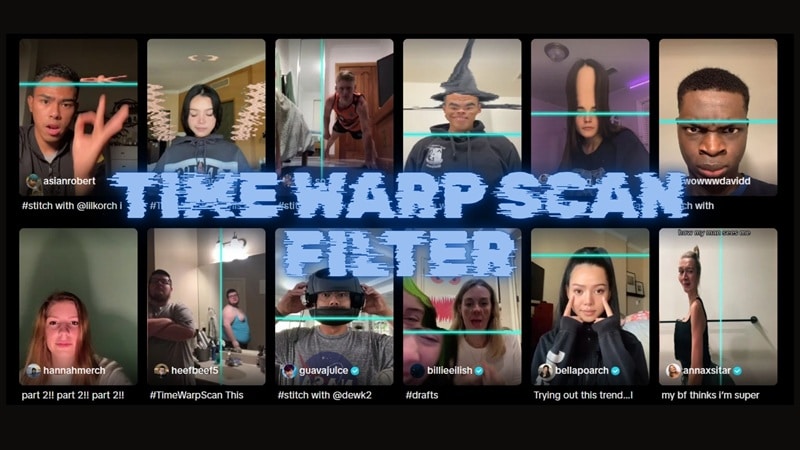
Part 1. 7+ Viral Time Warp Scan Challenges & Poses
Since the Time Warp Scan filter took over social media, people have been getting really creative with it. This filter works by slowly scanning across the screen and locking everything in place as it passes.
Whatever is in the frame at that exact moment gets frozen, while the rest keeps moving. As a result, you can get those stretched faces and funny poses you often see on your feeds.
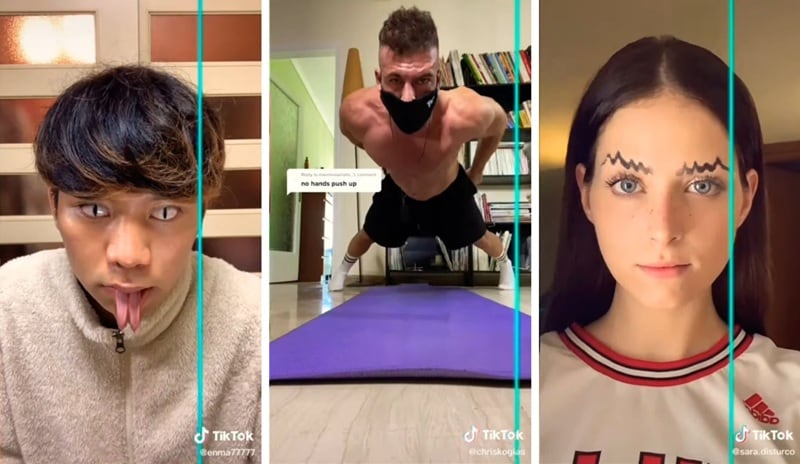
At least there are several challenges that have become really popular. Take a look at some of the most viral ones below and see if you can recreate any of them.
| Time Warp Challenges | Difficulty Level |
| Face Stretch | ★☆☆☆☆ |
| Snake Face | ★★☆☆☆ |
| No Hands Push Up | ★★★☆☆ |
| Wiggly Eyebrows | ★☆☆☆☆ |
| Demon vs Angel | ★★★★☆ |
| Smoking Effects | ★★★☆☆ |
| Flying | ★★★★★ |
|
Show More
Show Less
|
|
1. Face Stretch
The first one you can try is the classic face stretch challenge. You can make your eyes, neck, tongue, palms, or even your biceps look longer, or do the opposite and make your face look smaller.
How to Do It: Slowly move or hold a pose as the scan line passes. The key is timing and choosing the right scan direction to get the stretch you want. Stay still when you want something to look normal, and move just enough when you want it to stretch or warp.
2. Snake Face
Snakes are known for their vertical pupils and split tongues, and you can copy that look with the scan effect.
How to Do It:
- As the scan line moves across your eyes, quickly look left and right so each pupil gets frozen as a thin vertical line.
- When the line reaches your mouth, stick your tongue out twice as it passes to create the split-tongue effect.
3. No Hands Push Up
There is no way you can actually do a push-up without using your hands. However, you can create the illusion that you are with the Time Warp Scan filter. For this challenge, you need to set your phone on a stable surface and choose the scan direction that moves from left to right.
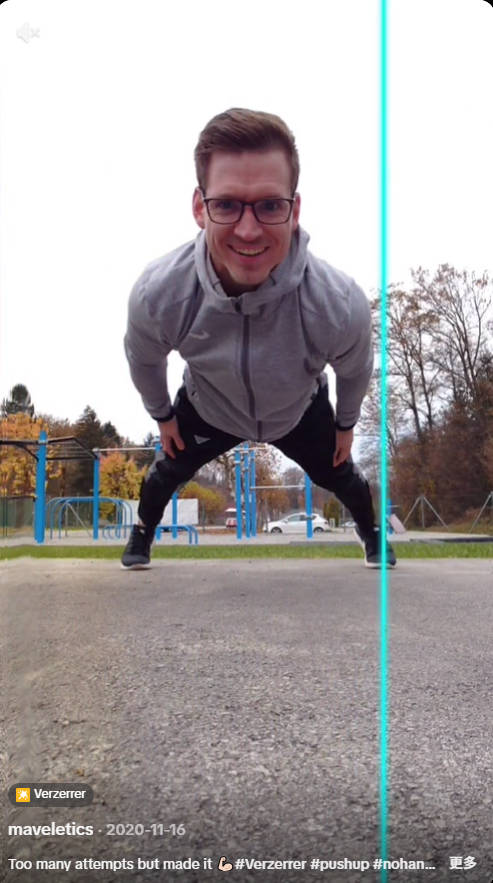
How to Do It:
- Get into a normal push-up position with your hands on the floor.
- As the scan line passes your right hand, quickly slide it out of the frame while keeping your body steady with your left hand.
- Repeat the same move for the left hand as the line continues, and hold still until the scan finishes.
4. Wiggly Eyebrows
This challenge may look simple, but it actually takes a bit of control. You need to keep your face as still as possible while moving only your eyebrows to make them look wiggly. Any extra movement from your head or eyes can break the effect.
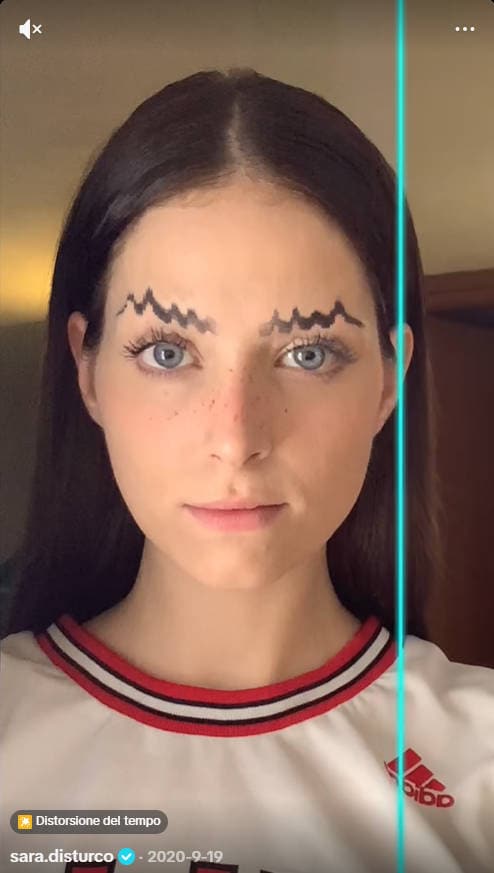
How to Do It: Use the scan direction from right to left and move your eyebrow up and down quickly as the scan line passes over it.
5. Demon vs Angel
Up for something a bit more challenging? You can use the Time Warp filter to make yourself look like a demon (Baphomet), or flip the idea and create an angel look with wings and a halo.
How to Do It: Use the scan direction from top to bottom. After that, try to copy the hand movements and poses based on the look you are going for:
- For the demon look, move your hands over and around your head as the scan line passes to shape horns and form a goat-head silhouette around your face.
- For the angel version, form a circle above your head with your hands to create the halo. Then, move your hands quickly over your shoulders as the scan line passes to create the illusion of wings.
6. Smoking Effect
To make yourself look like you are smoking, you need an object to stand in for the cigarette. It doesn't have to be real at all. Anything slim and straight, like a pen or pencil, works just fine.

How to Do It:
- Hold a pen or pencil and move it slightly as the Time Warp Scan filter moves from top to bottom to create a smoke-like trail.
- When the scan line reaches your mouth, place the object between your lips as if you are smoking, then stay still until the scan finishes.
7. Flying
This one feels like a level-up version of the "No Hands Push Up" challenge. You can use the Time Warp filter to make it look like you are flying! For this effect, you will need another person and chairs to help support or lift you while the scan line is moving.
How to Do It:
- Position yourself in a flying pose using chairs under your hands and legs for support. Make sure the chair under your legs is not visible in the first scanned section.
- As the scan line moves past that area and reaches your hands, quickly remove the chairs and have someone support you instead.
- Hold your body steady until the scan finishes to lock in the flying illusion.
Part 2. How to Get and Use the Time Warp Scan Filter on TikTok, Snapchat, and Instagram
To use the Time Warp Scan filter, you can access it directly inside popular social media apps like TikTok. You will need the app installed on your phone, an account, and your phone camera, since the effect runs in real time while you record.
How to Use the Time Warp Filter on TikTok:
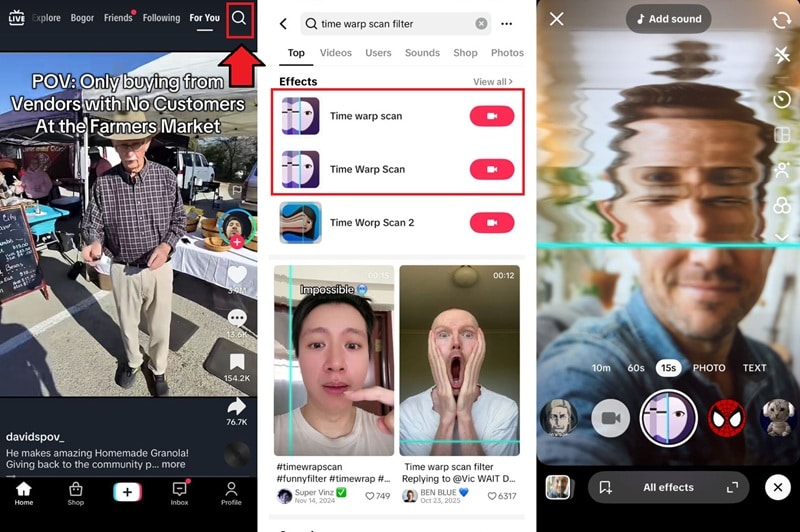
- Open TikTok and tap the Search button.
- Search for the TikTok time warp scan filter, then tap the recording tape button on the Time Warp Scan effect by TikTok.
- Tap the screen to change the scan direction. Then, start recording once you're ready.
How to Use the Time Warp Filter on Snapchat:
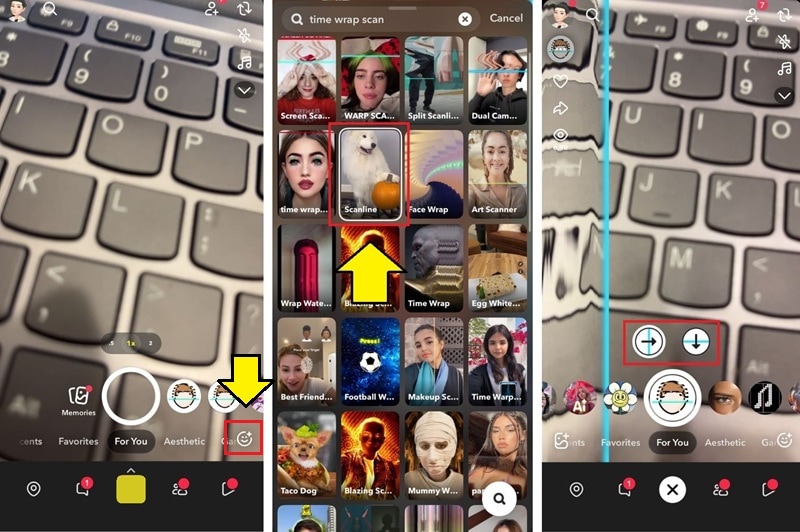
- Open Snapchat and tap the smiley emoji to browse more filters and lenses.
- Search for "Time Warp Scan" or "Scanline," then select the lens by Vivek Thakur.
- Choose the scan direction, either left to right or top to bottom, then start recording and hold your pose as the scan line moves.
Time Warp Scan Filter on Instagram (Reels Effects)
On Instagram, the Time Warp Scan filter is among the ones affected by the platform's decision to discontinue many third-party filters in early 2025. The easiest workaround is to create the video in another app like TikTok or Snapchat first, save it to your phone, and then upload it as a Reel on Instagram.
Part 3. Best Free Online Tools for Time Warp Scan (No App Required)
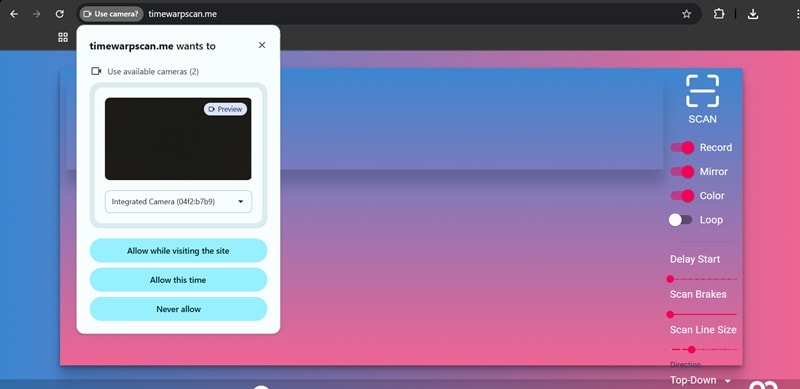
If you don't want to install an app or create a social media account, you can try the Time Warp Scan effect online on a website like TimeWarpScan. You don't need to create an account or download anything to use it for free.
First, make sure you allow camera access. Next, adjust the settings shown on the right. When you are ready, click the Scan button to start.
Part 4. Pro Tip: How to Create Perfect Time Warp Scan Effects with Filmora AI
Why struggle if you can let AI handle the timing for you? Getting a clean time warp effect often takes many tries, and even a small movement at the wrong moment can ruin the result.
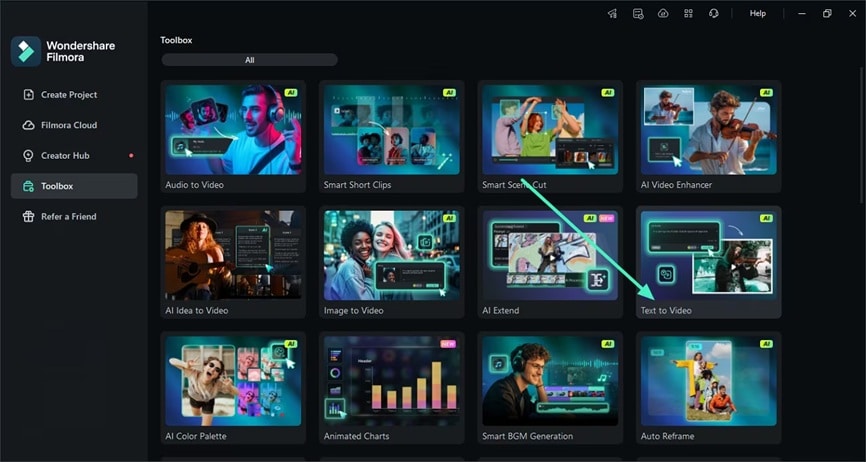
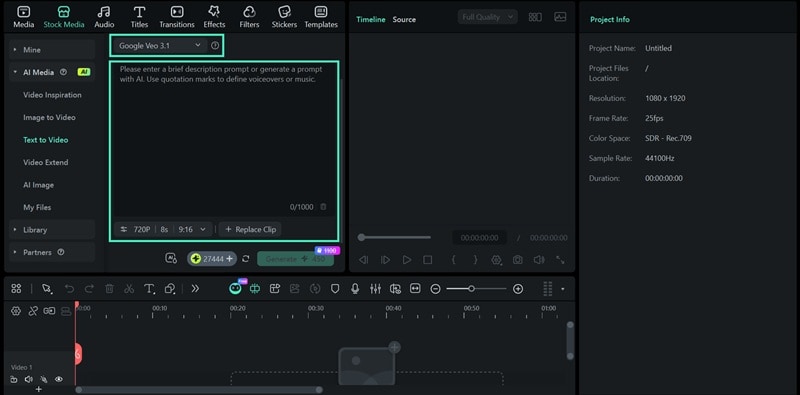
you can leverage Wondershare Filmora's AI Text-to-Video tool to generate these effects automatically. This is a game-changer for creators who want the Time Warp Look without the hassle of manual recording. Simply input your prompt and let the AI video generator do the work.
This feature is able to create anything you imagine, including recreating the time warp filter.
 Secure Download
Simply describe the scan direction, the freeze timing, or the type of distortion you want, and your time warp video is ready in no time. Since Filmora's Text to Video is powered by advanced AI models, it's capable of generating time warp scan videos with great quality.
How to Create an AI Time Warp Scan Video from Prompt
Conclusion
Now, are you ready to challenge yourself and recreate some of the viral videos you've seen using the Time Warp Scan filter? You can do it on a social media app like TikTok or Snapchat, and then post the results for everyone to see!
Even if you don't want to rely on real-time filters, you can take a shortcut and create a time warp-style effect using Filmora's AI instead. This method is perfect for creators who don't want to go through the hassle of making the perfect time warp or keep failing during recording.

FAQs
-
Why is my Time Warp Scan lagging?
There are a few common reasons why the Time Warp Scan filter may lag while you're using it. It often happens on older phones or when too many apps are running at the same time. Since the filter works in real time, it needs extra processing power. You can try closing any background apps or freeing up storage space to help the filter run more smoothly.
-
How to freeze the frame in Time Warp?
You can freeze the frame while using the Time Warp filter by tapping the screen during recording. It's useful when you need a specific part of the frame to stay still for the rest of the scan. This method works on most Time Warp filters across social media apps like TikTok and Snapchat.
-
Why is the Time Warp filter not showing up?
If you can't find the Time Warp scan filter or it isn't showing up, the issue is often an incompatible device, an outdated app version, or region-based availability. In some cases (like Instagram), the platform may have removed or limited the filter. Updating the app, restarting it, or trying a different platform can usually fix the problem.
-
How to change the scan direction (Vertical vs. Horizontal)?
To change the scan direction, different Time Warp filters offer different controls. On the official TikTok Time Warp scan filter, you can switch between vertical and horizontal scanning by tapping the screen. On Snapchat, you'll see an option to choose the scan direction when applying the filter.
-
Can I edit Time Warp Scan videos on my PC?
Yes! After recording your video on TikTok or Snapchat, you can import it into Wondershare Filmora to add professional transitions, music, and additional AI effects to make your viral content stand out.
