


 TL;DR:
inMelo is a beginner-friendly, mobile-only video editor for iOS and Android that utilizes over 1,000 beat-synced templates and AI tools to quickly generate short-form social media content.
● The free application supports background rendering and MP4 exports up to 4K resolution at 60fps, but upgrading to the inMelo Pro subscription is required to remove watermarks, block in-app ads, and access premium AI features.
● Advanced users will quickly outgrow the application due to its lack of a PC or online version, absence of HDR export support, and a simplified timeline that prevents manual keyframe control and multi-track flexibility.
● Wondershare Filmora is the recommended alternative for professional creators needing precise desktop-grade adjustments, offering cross-platform integration across mobile and desktop systems, over 3,000 templates, and multiple export formats.
Ask AI for a summary
 ChatGPT
 Perplexity
 Gemini
 Claude
 Grok
Grok
With over 10 million downloads on Google Play, inMelo has caught a lot of attention for creating all kinds of short videos. But what actually sets it apart from other mobile editing apps out there?
The rise of short-form content has gone hand in hand with the boom in mobile editing apps. Everyone wants something fast and simple. So, in the search for the best mobile video editor, we decided to test inMelo.
We wanted to see what the inMelo app actually offers and whether it can keep up with the kind of projects you're planning to create.
Quick Overview of inMelo
Developed by AppByte Ltd., inMelo is a mobile app that promises AI-powered editing and templates to help users produce content quickly. Started as a music video editor, it evolved into a versatile Reels & video editor for short-form content. inMelo grows its features by including video templates, AI enhancements, AI generator, and fast social media exports.
| Features | Details |
| Editing Features | Template-based editing, clip editing, beat-style edits and slideshow workflows |
| AI Capabilities | AI enhancer, AI art generator |
| Performance & Speed | Quick, lightweight social creation, simple steps or workflow |
| Value for Money | Free with ads in-app purchases on Android, "InMelo Pro" subscription options on iOS |
| Compatibility | iPhone and Android |
Download tip: For a safe inMelo app download, stick to Google Play or the App Store. Avoid downloading inMelo APK files from third-party websites, since unofficial sources can expose your device to security risks. There's no inMelo online version.
Part 1. What is inMelo? Current Version and Pricing
By 2026, music video editor inMelo has evolved significantly as a full-featured video creation suite that handles everything. Many are now using it for making TikTok videos, Instagram Reels, birthday edits, fan edits, slideshows, and even simple promo content for small businesses.
This shift signals that inMelo is positioned as a general "short-form content maker," not just a "music video editor" tool.
Is inMelo Free?
Yes, the inMelo app is free to download. The free version gives you access to basic editing tools, a limited selection of templates, and high-quality export up to 4K. New users also usually get a 3-day free trial.
If you decide to upgrade, inMelo offers monthly and yearly subscription plans, ranging from $4.99 to $17.99. With inMelo Pro, you get:
- Unlock 300+ pro exclusive templates
- Access all advanced AI tools
- Use premium effects, filters, and animations
- Export videos without ads or watermark
Note: Pricing varies slightly by region and device platform. iOS and Android pricing may differ.
Part 2. inMelo Editing Features & Capabilities
InMelo video editor promotes itself as a tool where you can "create in a few steps," mainly because of its features that are designed to speed up the video creation process.
Instant Reels Maker
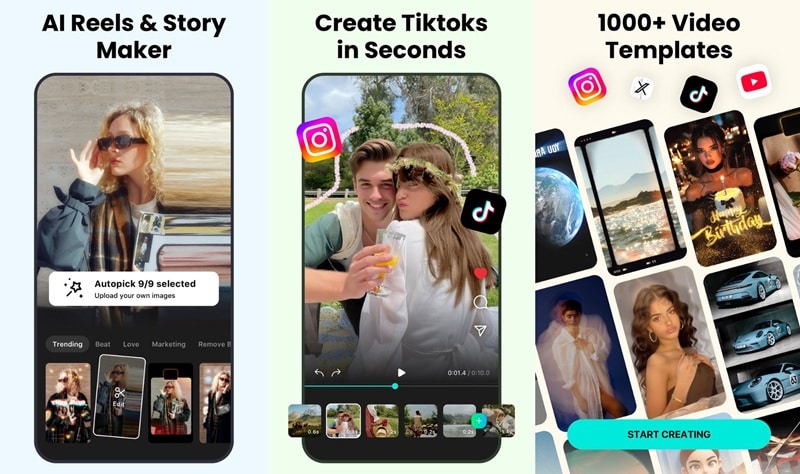
You don't always have to start with a blank page. The inMelo Instant Reels Maker is built for quick edits. You just pick the photos or videos you want to use and the app automatically arranges everything for you. As a Reels & video editor, inMelo syncs your clips with music, adds transitions, and applies effects in seconds.
Edit Videos with AI
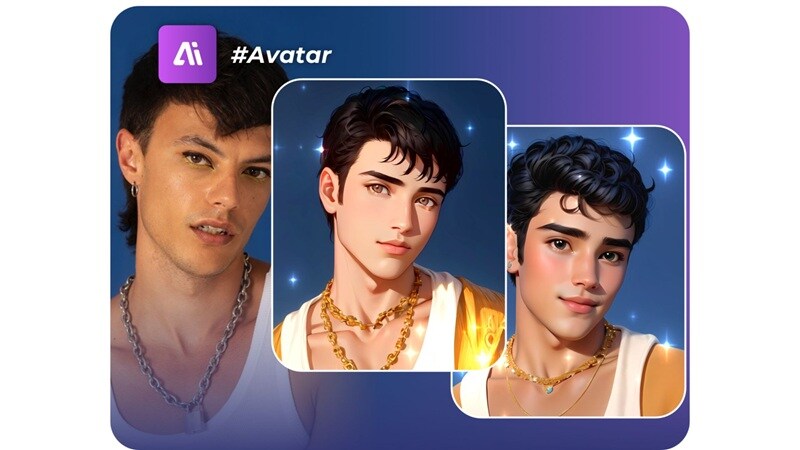
AI features in inMelo are also designed to make editing faster. Some of the main AI tools include:
- Photo/Video Enhancer for fixing old, pixelated, or blurry footage and restoring it to a sharper quality.
- AI Art Generator that transforms photos into stylized cartoons.
- Background Removal for cutting out the subject and swapping in a new background.
- Night Enhancement to brighten dark scenes and bring out more detail in low-light videos.
- AI Extend to lengthen a clip by generating extra frames, which is useful when you need to match the music timing or smooth out transitions.
Explore 1000+ Templates

Templates are where inMelo really stands out. The app has over 1,000 professionally made video templates for almost every theme you can imagine. There are categories like Aesthetic, New Year, Birthday, Love, Retro, Mood, and many more.
Each template also already includes cool transitions, effects, and moving text that match popular songs. All you have to do is swap in your own media, and the finished video is ready in seconds.
Enhance Videos with Filters and Effects
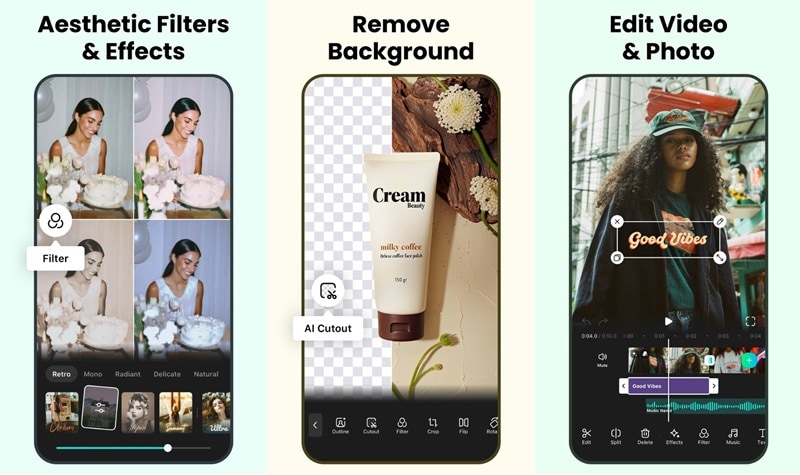
Besides templates, inMelo also has a large library of effects. You can add glitch effects, slow motion, freeze frames, neon lights, flash warnings, and more. The transitions can automatically match the beat of the music. Your video can feel smooth and exciting without needing to adjust everything by hand.
Animated Text Tools
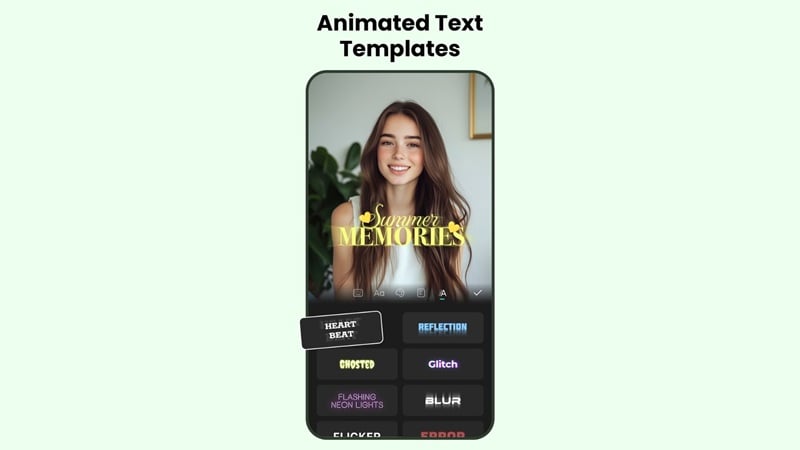
Make use of inMelo's Text Art feature to turn ordinary words into eye-catching typography with presets. You can quickly apply stylish text designs made for captions, quotes, or animated lyrics. There are dozens of fonts, colors, and motion styles that move with the beat. Each text layer can be placed anywhere on the screen and timed exactly on the video timeline for perfect control.
Part 3. Reviewing inMelo's User Experience and Interface
When you open inMelo for the first time, it feels friendly and easy to use. The app starts with a clean home screen that clearly shows options like "New Video," "HD Enhance," "AI Tools," and popular or trending templates.
The design of the video templates editor inMelo looks modern, with rounded buttons, bright colors, and simple icons that make everything easy to understand. You can quickly find what you need at a glance, without feeling confused or overwhelmed.
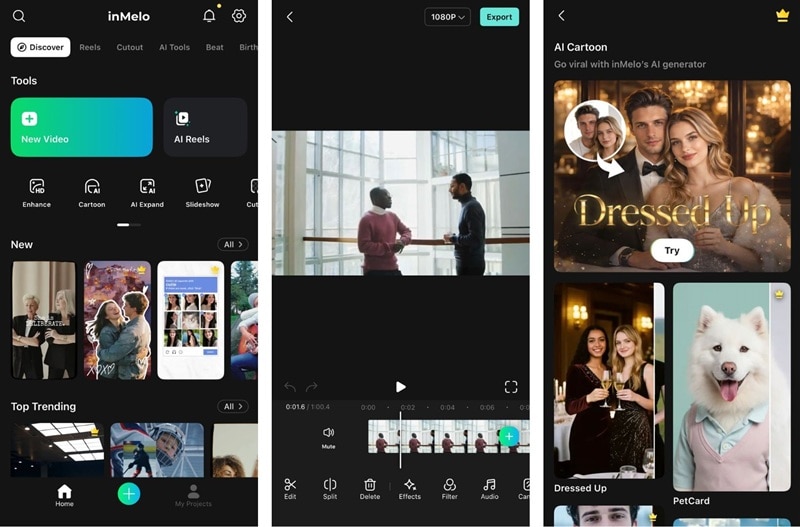
The features also run smoothly. Assets like stickers, fonts, filters, and effects are placed at the bottom of the screen and are easy to apply. The timeline controls are simple to use, similar to other professional editing apps.
If you're just making light or simple content, the app feels fast and enjoyable because it loads quickly. However, using several effects at the same time can sometimes slow down the performance.
Is inMelo Beginner-friendly?
Absolutely. The inMelo app is made especially for people who have no editing experience at all. Every tool has clear visual guides. The template-first design lets you create a polished video without any complicated settings.
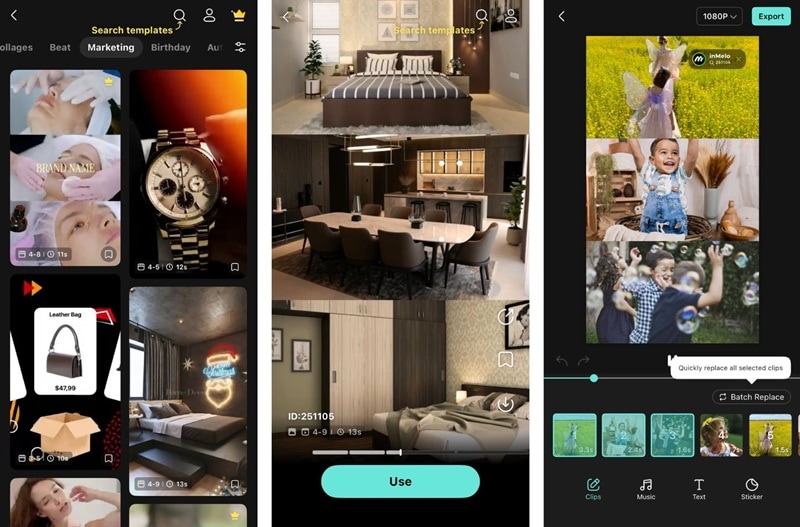
The timeline is also simpler than professional editing apps. It only shows the most important tracks, so users don't feel overwhelmed. However, advanced users might feel limited when working on more complex projects with many layers.
The app also includes helpful tutorial prompts for new users. So you'll be guided step by step through choosing templates and exporting your videos.
inMelo's Templates Variety and Use Cases
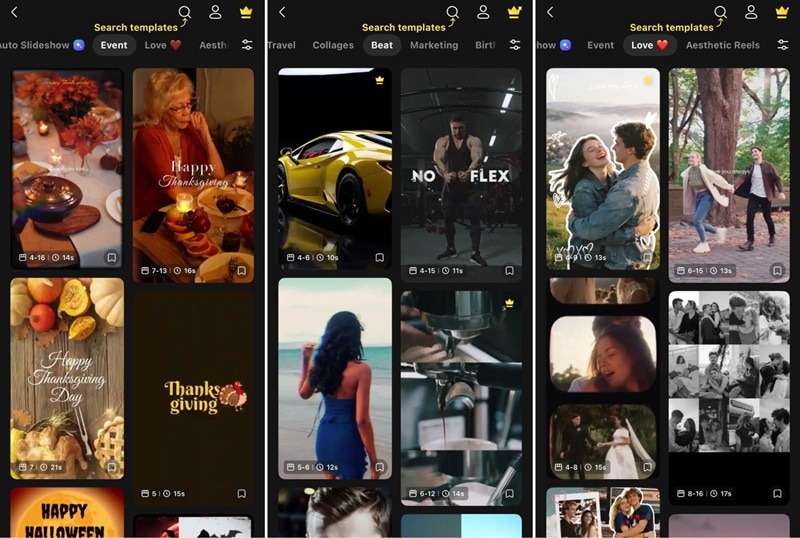
The template library is genuinely impressive in both quantity and quality. Categories we explored include:
- Beat: Fast-paced, rhythm-heavy templates for viral and stylish content
- Iconic: Perfect for quote videos or song lyrics
- Daily Pick: Soft, pastel-toned templates for lifestyle and fashion content
- Love: Couple-inspired templates
- Travel: Atmospheric templates for emotional storytelling
- Seasonal: For Christmas, New Year, Valentine's Day, Birthday or even Business
Part 4. inMelo Performance and Rendering Quality
User reviews for inMelo video editor have been very positive. On both the App Store and Google Play, inMelo holds ratings of 4.8 out of 5, which shows that most users are happy with their experience. This high rating is a good sign for overall stability, ease of use, and export results.
App Stability and Speed
The app stayed stable, with no crashes or sudden shutdowns. The important point: it supports background rendering, so you can keep editing while their video is exporting.
Export and Rendering Times
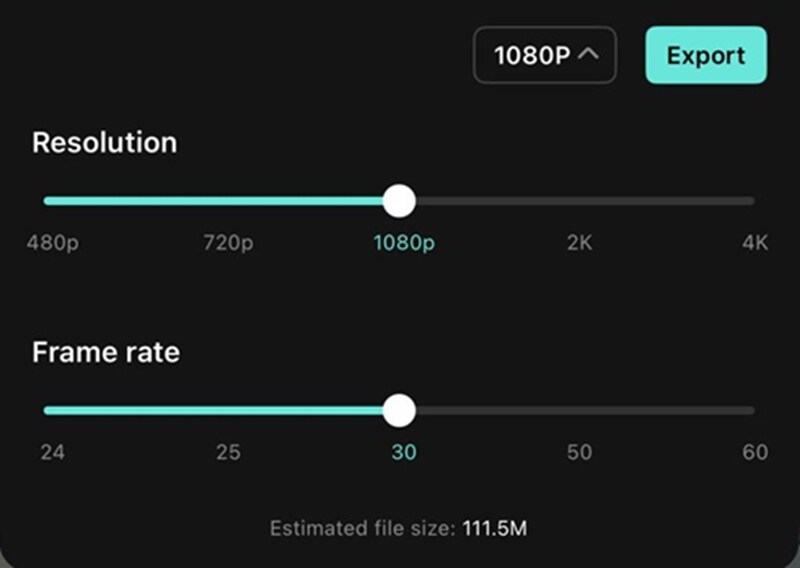
A 30-second 1080p 60fps video with effects and music took about 30 seconds to export on an iPhone. On mid-range Android phones, similar projects took around 30 to 45 seconds. These speeds are competitive compared to other mobile editing apps, although longer videos will naturally take more time.
Support for 4K, HDR, and 60fps
Even if you are on a free plan, you can still export inMelo videos up to 4K. The app also supports 60fps export for compatible projects, so your videos can look smoother for fast transitions. However, there doesn't appear to be dedicated HDR export support at the moment. Most projects are processed in standard dynamic range.
Part 5. Verdict: The Strengths, Limits, and Best Use Cases
After spending a lot of time using inMelo, it's easy to see what it does really well and where it has some limits.
- Exceptionally beginner-friendly: Anyone can create professional-looking videos in minutes.
- Massive template library: Over a thousand templates across dozens of categories.
- Powerful AI tools: Covers basic needs, including enhancement, cartoon conversion, background removal, and color correction.
- Simplified timeline: Advanced users will miss keyframe control and multi-track flexibility.
- Mobile-only editing: There's no inMelo for PC if you need it for complex projects.
- Limited export options: You can only export videos in MP4 format.

Who inMelo is Best For
- Social media content creators, specially those focused on TikTok, Reels, and Shorts
- Small business owners who want to create quick promotional videos without hiring editors
- Influencers and micro-creators who need fast, trendy content with minimal effort
- Casual users for making birthday compilations, travel memories, or fun personal videos
Who May Want to Skip It
- Professional editors as they will quickly outgrow the simplified toolset and want deep manual control
- Filmmakers or YouTubers who need desktop-grade editors and tools
- Brands requiring unique visual identity, since templates can homogenize content
Part 6. Best inMelo Video Editor Alternative If You Want More Control
If inMelo feels limited for your needs, or if you want more room to grow, Wondershare Filmora is a video editor you can check out next. Similar to inMelo, Filmora offers AI tools and templates that speed up video creation, but it gives you much more control and advanced tools for bigger projects.
Filmora is available on both desktop and mobile, so you can edit wherever you're most comfortable. With its strong focus on AI, Filmora's AI features are more advanced and flexible than many mobile apps.
 Secure Download
Why We Recommend Filmora
- Cross-platform integration: Work seamlessly between desktop and mobile
- Manual keyframe animation: Precise control over every element's movement and timing
- Advanced color correction and grading tools: Professional color wheels, LUTs, and scopes
- Detailed audio editing and mixing controls: Multi-track audio with envelopes, ducking, and effects
- Support for longer, more complex video projects: No arbitrary time limits
- Flexible export settings: Choose codecs, bitrates, and formats for any platform
With Filmora, you can start simply using AI-powered templates. It's just like inMelo, but expands to advanced editing as your skills grow.
| inMelo | Filmora | |
| Platform | iOS, Android | iOS, Android, macOS, Windows |
| AI Features | Auto Enhance, AI Auto Cut, AI Expand, Night View, AI Cartoon Generator | Auto Enhance (Retouch), AI Auto Cut, AI Cartoon Generator (Image Stylizer), AI Captions, AI Ultra HD, AI Remover, VideoGen, and more |
| AI Video Generator | Text to Video, Image to Video, with Veo 3.1 and Sora 2 integration | |
| Templates | 1,000+ | 3,000+ |
| Beat Sync | ||
| Stock Library | ||
| Reel Maker | ||
| Export Format | MP4 | MP4, GIF, and other common formats on the desktop version |
Secure DownloadConclusion
inMelo delivers exactly what it promises: an easy, fast, and fun way to make engaging social media videos on your phone. Its huge template library, smart AI tools, and automatic beat-sync make it perfect for creators who want HD videos without much editing. The free version is great for casual users, and the paid subscription unlocks good deals for creators.
However, if you want more control or tools, inMelo's features might feel limiting. Filmora offers the same beginner-friendly AI tools but also lets you grow into more advanced editing.
