

 TL;DR:
Creators can download eight distinct royalty-free MP3 ocean soundscapes tailored to specific project moods, or use Wondershare Filmora's AI Sound Effect Generator to create custom, studio-quality audio directly from text descriptions.
● The pre-made MP3 downloads are categorized by use case, providing precise audio profiles like gentle rhythms for ASMR, low-frequency rumbles for cinematic documentaries, and chaotic storms for high-impact dramatic scenes.
● When generating custom audio via AI, you must use descriptive prompts to dictate exact variables—such as the track duration, wave intensity, and specific background layers like distant ship horns—to produce a unique file entirely free of field recording noise.
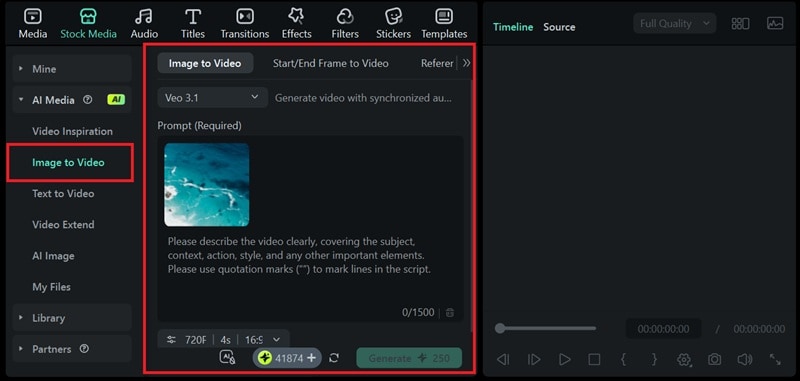
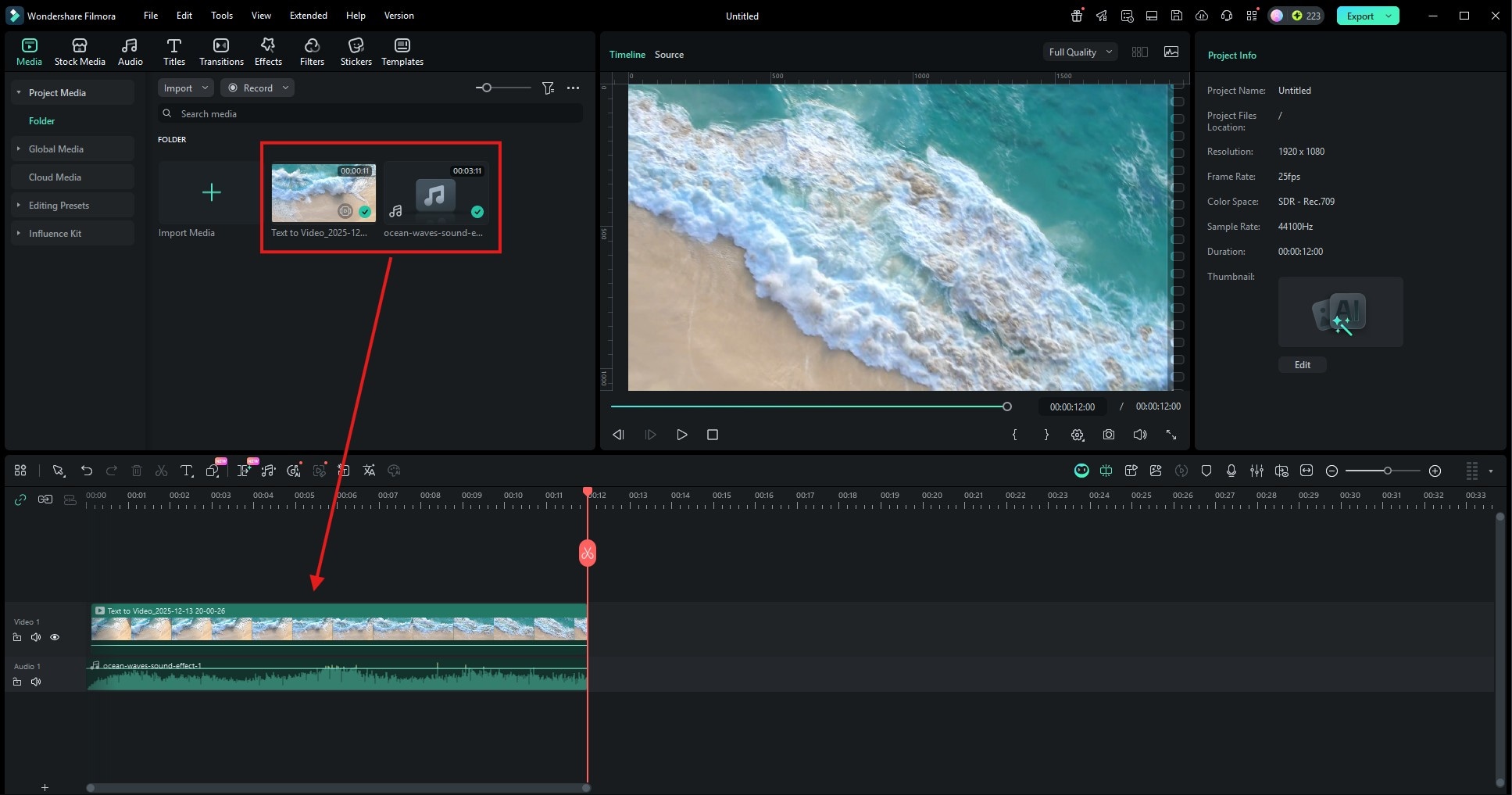
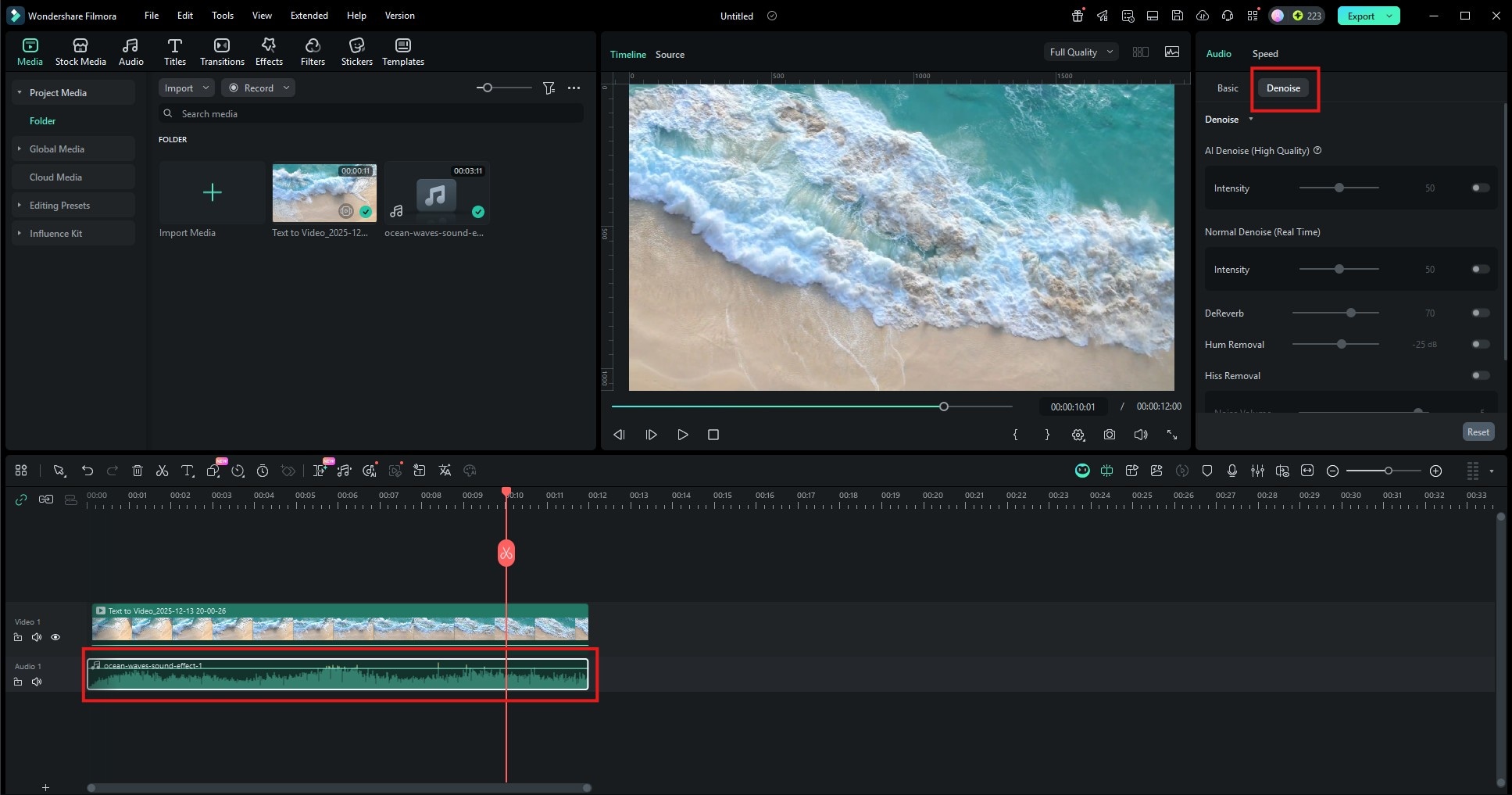
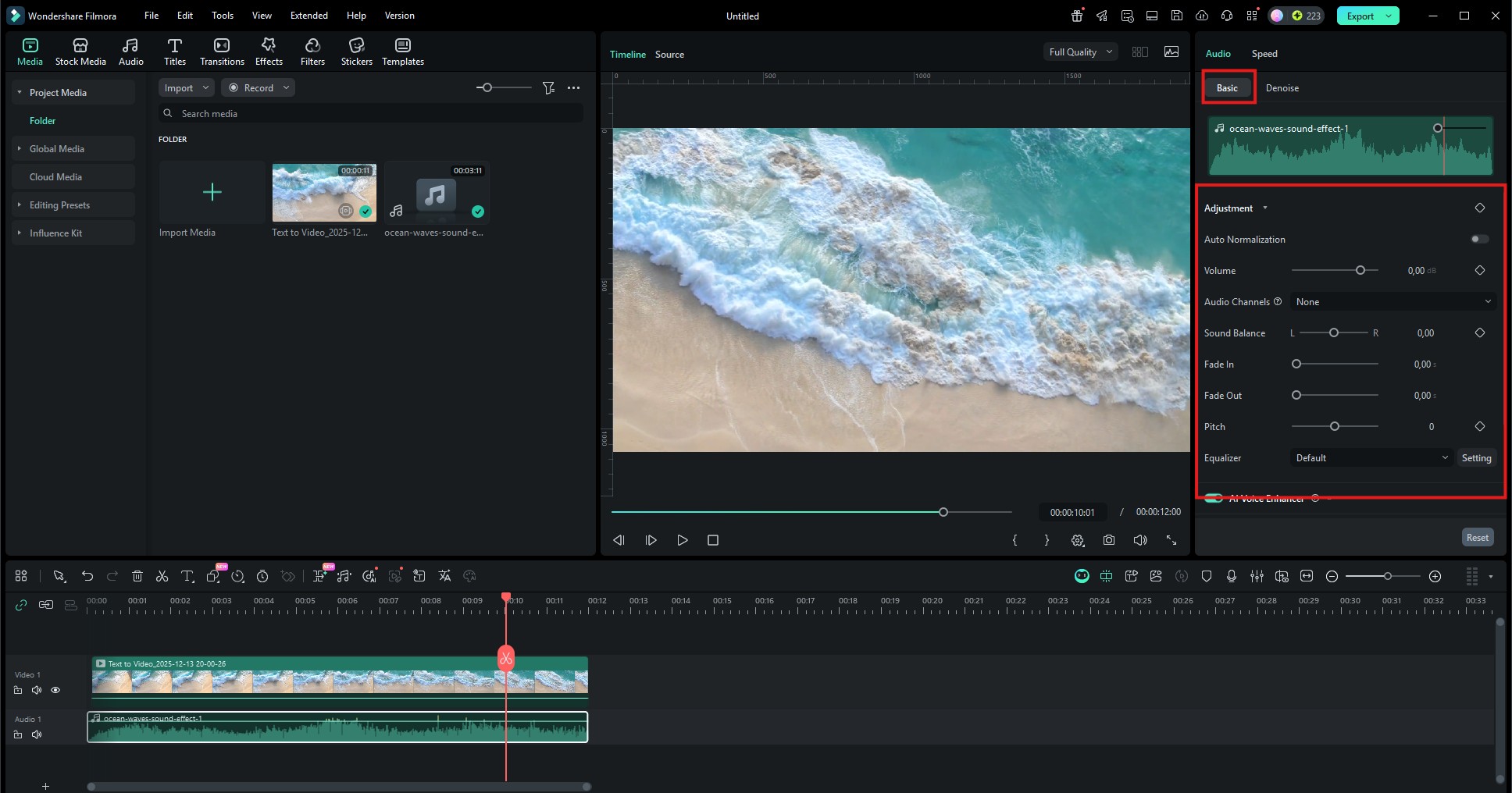
● To pair your audio with visuals, Filmora's Text to Video and Image to Video tools (powered by Veo 3.1) generate cinematic 4K ocean clips that include default synced sound, which you must manually mute on the timeline before applying your custom wave audio.
Ask AI for a summary
 ChatGPT
 Perplexity
 Gemini
 Claude
 Grok
Grok
Searching for the perfect ocean waves sound effect for your next project? Whether you need a gentle ocean sound for meditation or a stormy sea ambiance for a cinematic video, we've got you covered. In this guide, you can find 8 free ocean sound effects MP3 downloads. Plus, we'll show you how to use Wondershare Filmora's AI Sound Effect Generator to create unique, royalty-free ocean audio tailored to your specific needs.
Part 1. Top 8 High-Quality Ocean Sound Effects for Free MP3 Download
Sometimes, you just need the perfect sound to make it ready to go. In this section, we provide a curated list of high-quality, royalty-free ocean wave sound effects you can download instantly. Each captures a different mood, so now you have the right audio for any project.
1. Gentle Ocean Waves Sound Effect




Vibe: Calm, Serene, Meditative.
This gentle ocean waves sound effect captures the serene rhythm of the sea, making it the best free nature sound for ASMR, sleep therapy, and background noise. If you need more variety, Filmora's AI audio tools can help you adjust the intensity and duration of the waves instantly.
Best for:
- ASMR and sleep content
- Meditation and mindfulness apps
- Spa, yoga, or relaxation videos
2. Deep Ocean Sound Effects (Low-Frequency Rumble)
Vibe: Powerful, Mysterious, Atmospheric.
This sound captures the low, resonant rumble of massive, rolling waves far from shore. It's less about the crash and more about the deep, powerful movement of water. Ideal for scenes depicting the open sea, depth, or mysterious underwater sequences.
Best for:
- Cinematic scenes
- Nature or science documentaries
3. Shoreline Ocean Ambience
Vibe: Realistic, Immersive, Natural.
More than just waves, this ocean sound effect includes the subtle, textured layers of water receding over sand and pebbles. It creates a highly realistic soundscape that places the listener right at the water's edge.
Best for:
- Travel videos and vlogs
- Drone shots for tourism promotions
4. Stormy Ocean Sound Effect
Vibe: Dramatic, Intense, Chaotic.
The full fury of the sea. This audio features powerful, irregular crashing waves, howling wind in the background, and the chaotic energy of a tempest. Perfect for intense scenes, dramatic reveals, or conveying turmoil.
Best for:
- Dramatic storytelling
- Survival or disaster scenes
- Cinematic trailers
5. Tropical Beach Waves with Seagulls
Vibe: Bright, Vacation, Idyllic.
By combining the gentle, warm waves with the distant cries of seagulls, this ocean sound effect instantly evokes a sunny, tropical beach paradise. Ideal for travel vlogs, summer-themed content, or any project needing a cheerful, outdoor ambience.
Best for:
- Vacation and resort videos
- Lifestyle or travel influencers
- Relaxed social media content
6. Rocky Coastline Waves
Vibe: Harsh, Crisp, Dynamic.
Waves crashing violently against rocks and cliffs. The free ocean sound effect is sharper, more explosive, and less rhythmic than sandy shore waves. It's filled with whitewater hiss and powerful percussion. Great for adventure content, rugged landscapes, and high-energy scenes.
Best for:
- Nature documentaries
- Rugged landscape footage
- Dramatic coastline visuals
7. Ocean Sounds with Light Rain
Vibe: Melancholic, Cozy, Reflective.
A beautiful blend of steady ocean waves and the soft patter of rainfall. This complex, layered soundscape is deeply relaxing. It's perfect for introspective moments, cozy scenes, or unique meditation tracks.
Best for:
- Sleep and study playlists
- Background ambience for reading apps
- Relaxation videos
8. Crashing Waves Sound Effect
Vibe: Impactful, Focused, Tense.
A close-mic'd, singular capture of a powerful wave reaching its peak and crashing down. This is a punchy, short-to-medium length effect ideal for transition stings, emphasizing a point, or adding a burst of natural energy.
Best for:
- Action sequences
- Transition effects
- High-impact intros or outros
Part 2. How to Generate Custom Ocean Wave Sound Effects with Filmora AI
Looking for more ocean sounds? Why search the web when your video editor already has what you need! Forget switching between websites and audio files. Wondershare Filmora comes with a huge, integrated audio library right inside the editor.
How to Find and Use Ocean Sound Effects
In Filmora's editing interface, click the "Audio" tab. Use the search bar and type keywords like "ocean," "stormy sea," or "beach" to find a variety of ocean wave sound effects. Some of the ocean sound effects are free downloads, so you can just use them right away in your project.
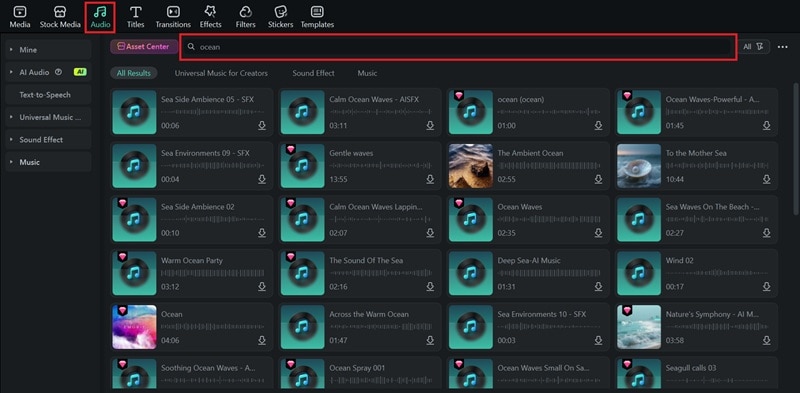
Just download the audio and drop it onto the timeline to pair it with your video, or export it as a standalone audio file. You can also use Filmora's audio editing tools to refine the sound before saving it.
Create Unique Ocean Sound Effects with AI
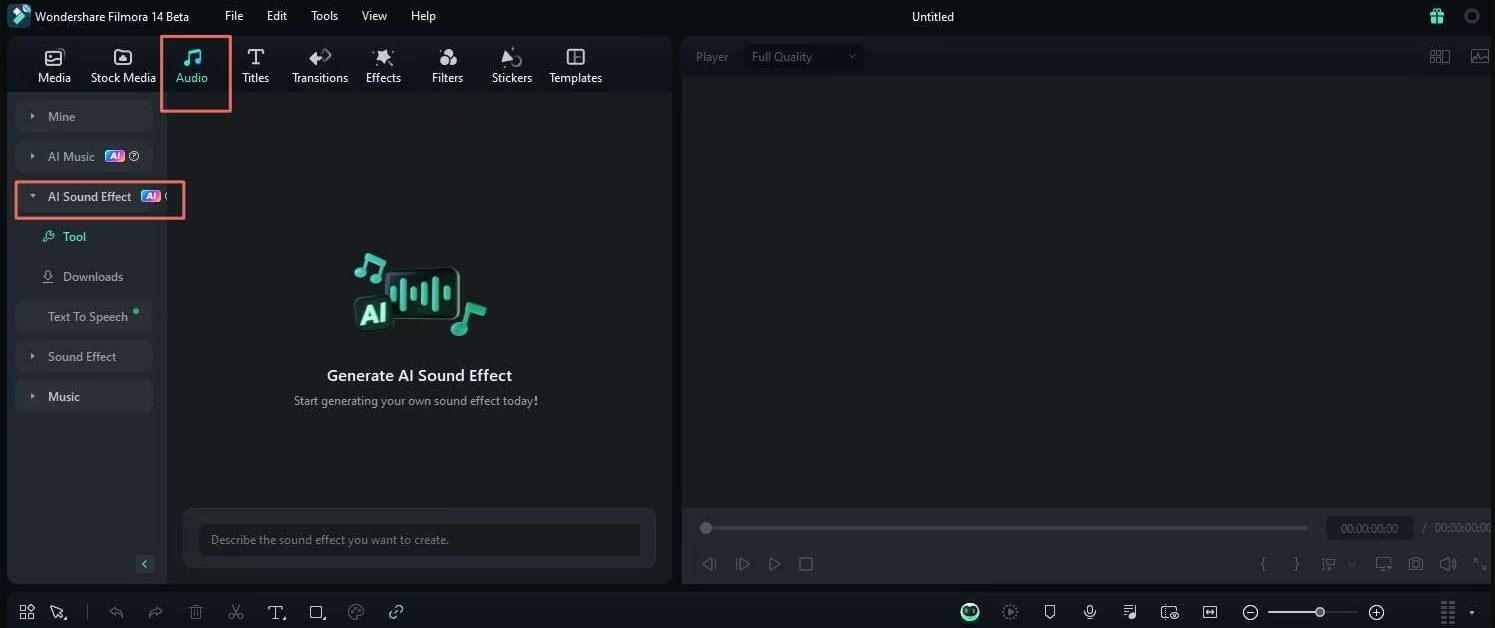
When you need a specific ocean sound effect that you can't find anywhere else, you can make a custom one using Filmora's AI Sound Effect generator. It transforms simple text descriptions into unique and noise-free ocean audio.
 Secure Download
Using AI sound effects in Filmora comes with several advantages:
- Precision: You can create the exact ocean mood you want, from a serene sunrise lap to a chaotic storm. Describe the specific details you need, such as "Calm, continuous flow of water in a hidden tropical lagoon."
- Uniqueness: You're not limited by existing libraries. Since the AI generates a brand-new audio file, every sound feels unique and perfectly tailored to your project.
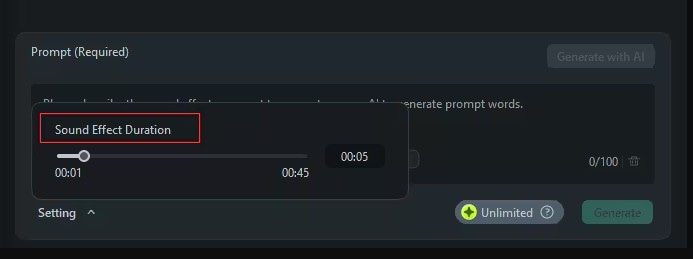
- Control: Through descriptive prompts, you can adjust the perceived intensity, rhythm, and ambience. Your prompt can specify duration (10 seconds), intensity ("loud," "subtle"), and other ambience layers ("distant ship horn," "light wind").
- Clarity: The generated audio is studio-quality and free from common recording imperfections like microphone noise or field recordings.
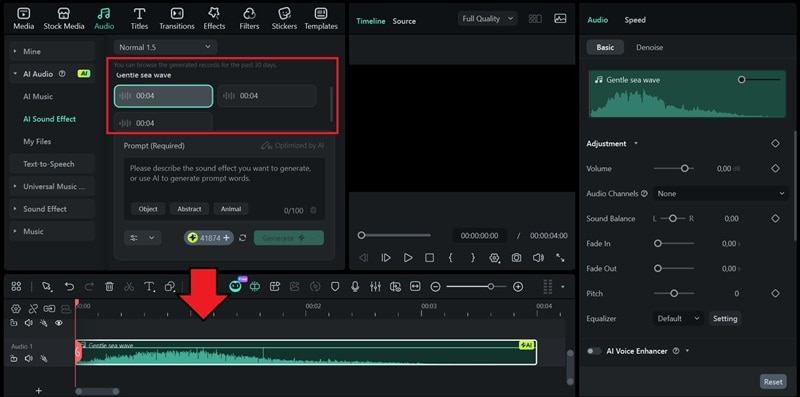
- Variety: Filmora often generates several options based on your prompt. So you can generate multiple variations of a prompt to find the best one
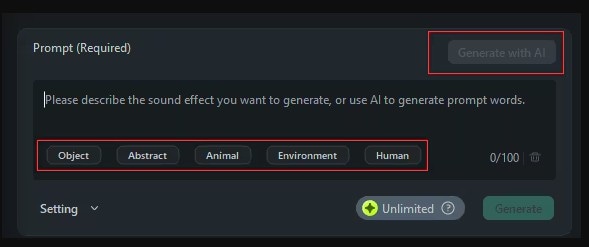
Step by Step: How to Generate AI Ocean Waves Sound Effects
 Secure Download
Tip: You can use the "Generate with AI" option for prompt ideas or click tags like "Environment" for keyword inspiration.
Part 3. Enhance Your Ocean Sounds & Create Matching Visuals in Filmora
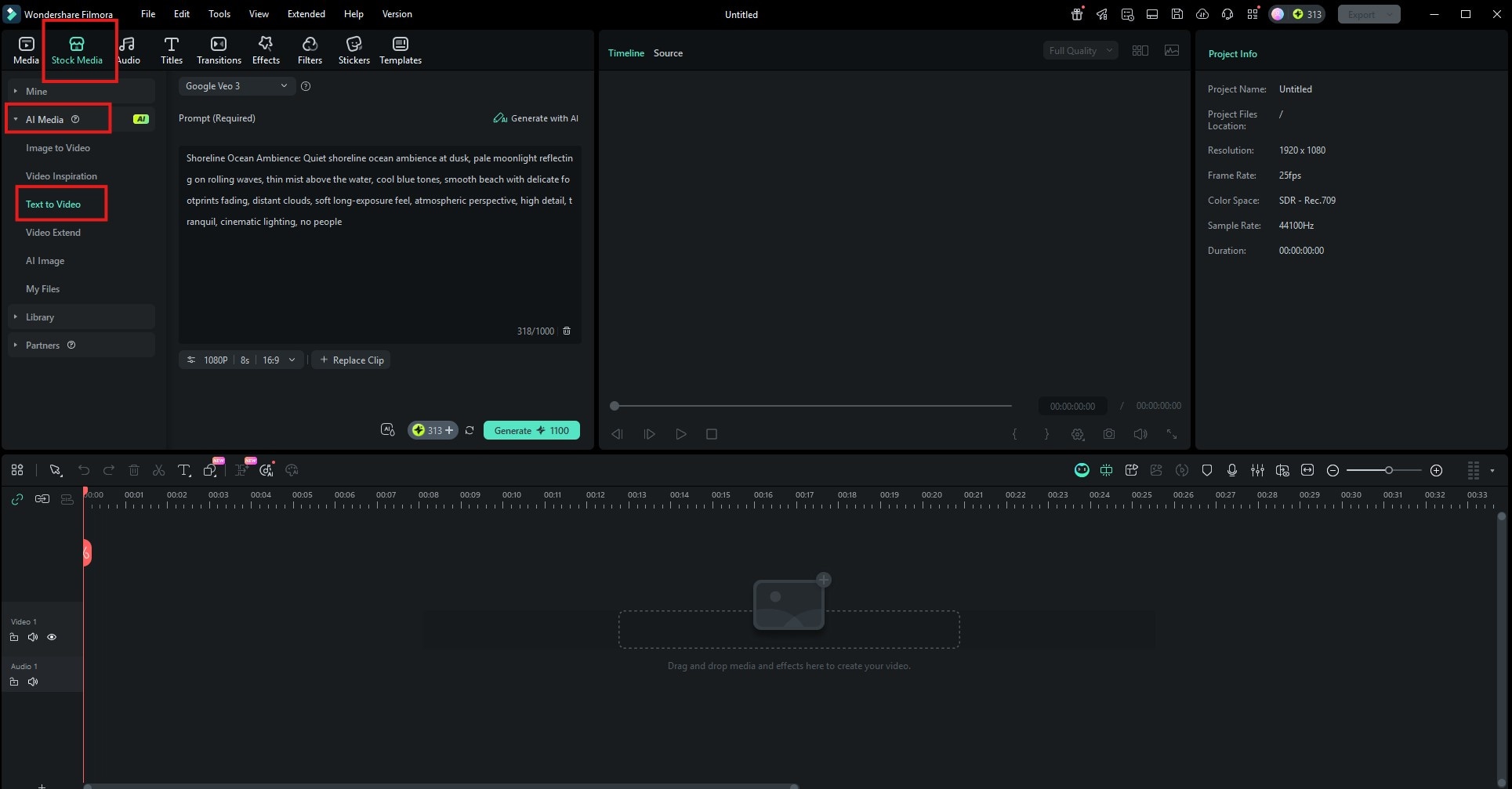
Now that you have the perfect ocean soundtrack, it's time to bring the scene to life visually. The perfect ocean sound effect deserves an equally compelling visual backdrop. Filmora's AI video generator tools, including Text to Video and Image to Video, allow you to automatically generate realistic ocean video clips, along with a matching audio.
With Text to Video, you describe the scene. With Image to Video, you animate a still image. This seamless integration means you never have to leave your editor to produce content.
Secure DownloadStep-by-Step: Building Your Ocean Video with AI
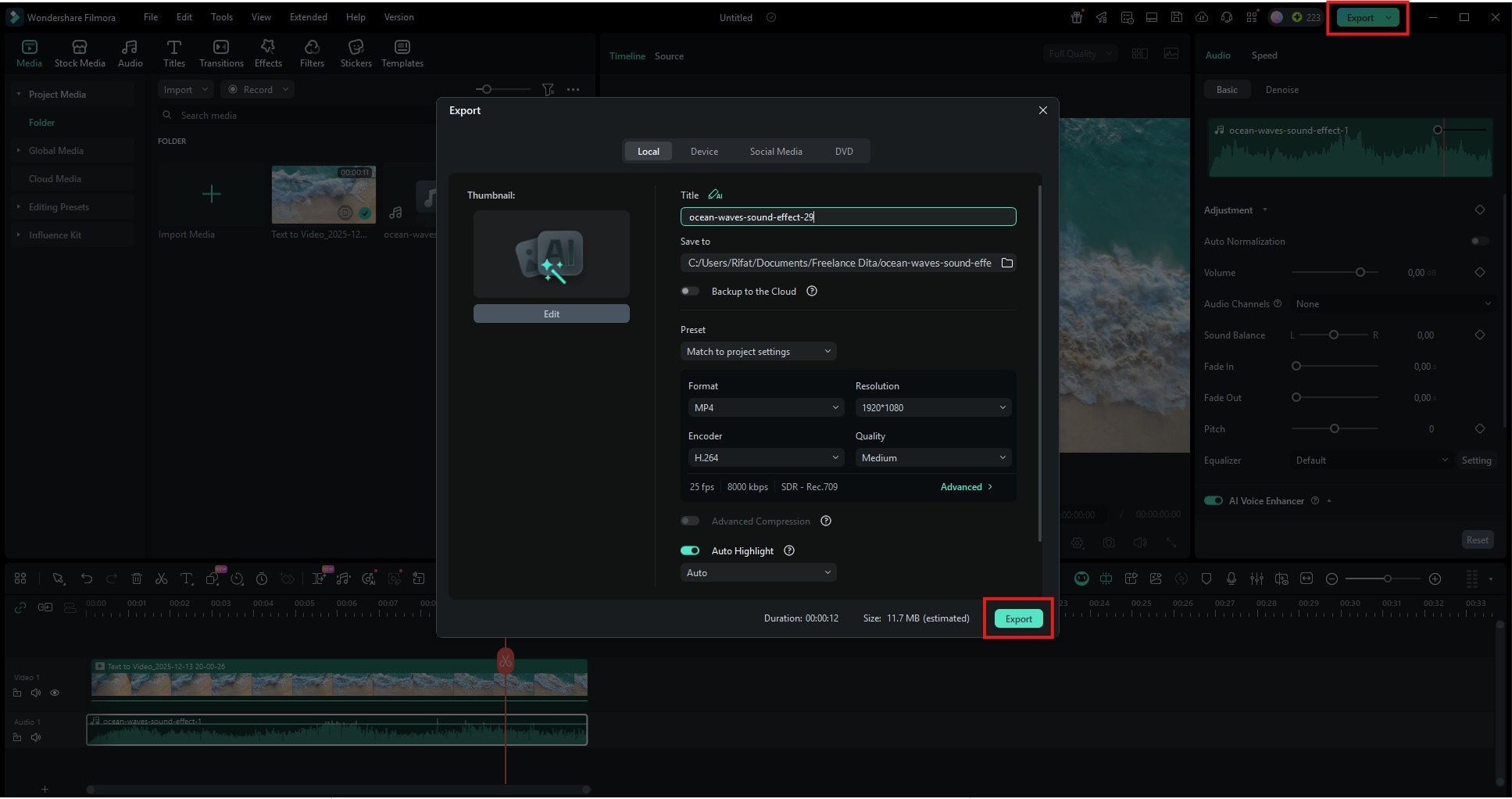
Why This AI Workflow Wins
- Cinematic Quality: Generates high-fidelity 4K clips that look real.
- Audio Included: Each video comes with synced sound, but you have full control to replace it.
- Seamless Editing: Clips are ready to drag and drop into your timeline for immediate editing alongside all other assets.
This integrated approach allows you to control every element, from the specific sound of a wave to the cinematic look of the scene, within a single, powerful app. With Filmora's AI, you can quickly produce truly immersive and professional content.
Conclusion
Creating an immersive maritime experience is now easier than ever. From downloading free ocean sound MP3s to generating custom AI ocean wave sounds, Wondershare Filmora offers everything you need. Download Filmora today to craft the perfect soundscape for your videos with our advanced AI sound technology.
For even more control and uniqueness, leverage Wondershare Filmora's vast audio library and groundbreaking AI Sound Effects Generator to craft custom waves from a simple text prompt. Finally, bring your project to life by using Filmora's AI Text to Video and Image to Video (powered by Veo 3.1) tools to create stunning, matching visuals in minutes.
This end-to-end creative workflow empowers you to produce professional, immersive ocean-themed content faster and easier than ever before.

