

 TL;DR:
BeatBot AI permanently shut down and deleted all user data on April 22, 2024, making Wondershare Filmora the recommended alternative for creators needing to generate custom background music.
● Filmora provides royalty-free AI generated music for commercial use, but generating these tracks requires credits even when using the trial version of the software.
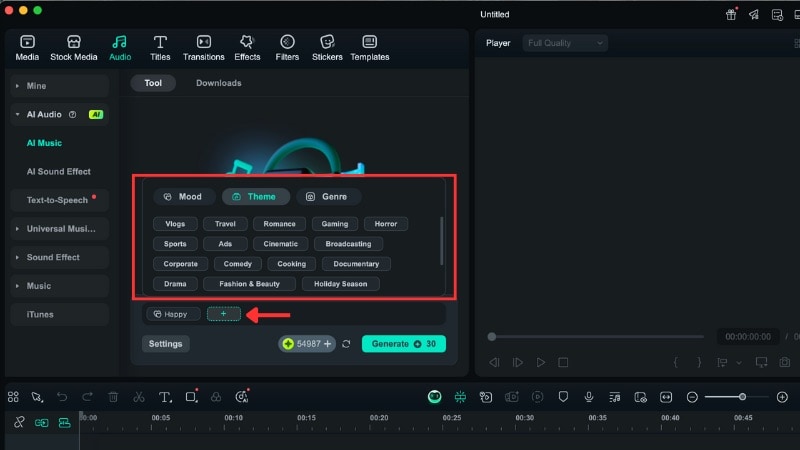
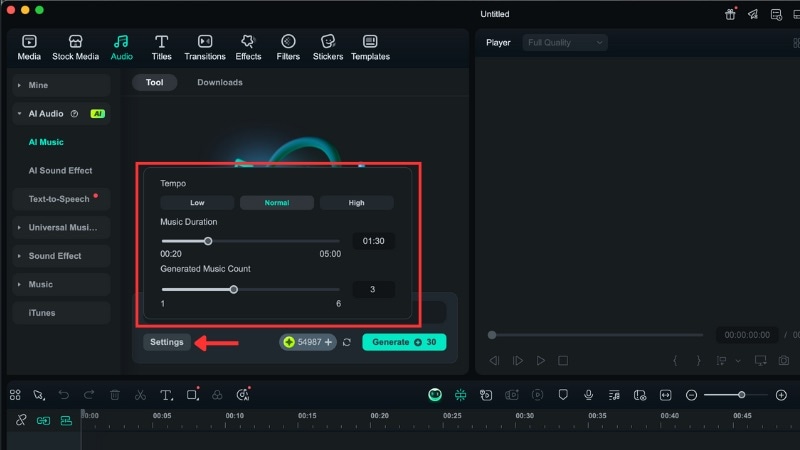
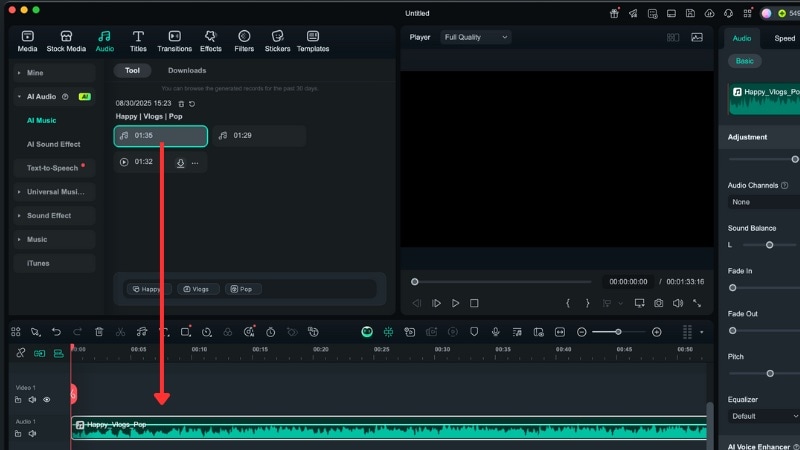
● To generate a custom track in Filmora, navigate to the Audio tab, select AI Audio, click AI Music, and specify the mood, theme, genre, tempo, and duration.
● Unlike BeatBot AI's focus on short rap clips with synthetic vocals, Filmora acts as an integrated video editor featuring an audio stretcher to match video length without altering pitch and a vocal remover for remixes.
Ask AI for a summary
 ChatGPT
 Perplexity
 Gemini
 Claude
 Grok
Grok
BeatBot AI, which turned text into catchy mini rap clips, is officially shut down. If you're searching for BeatBot AI music generator free options or a reliable alternative, you're in the right place. This detailed guide explains what happened to the tool and introduces the best AI music generator for video creators: Wondershare Filmora, an all-in-one music and video editor.
Part 1. What Was BeatBot AI? A Brief History
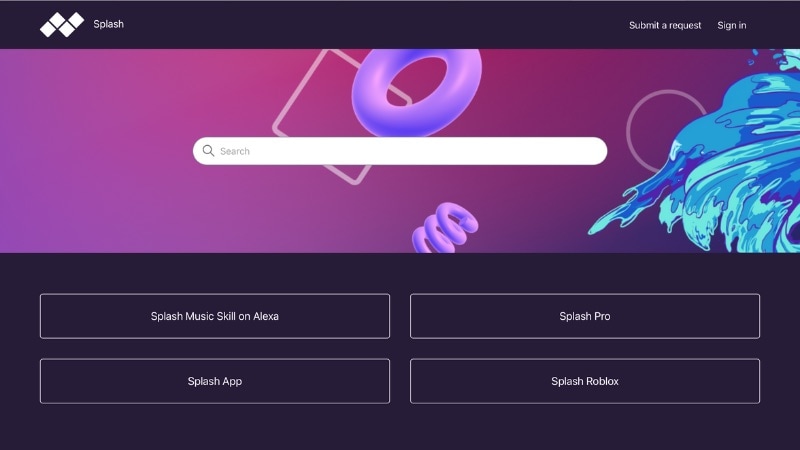
BeatBot AI was an experimental AI music generator built by Splash. It focused on creating short rap songs using user prompts, AI-written lyrics, and synthetic vocals.
The History & Shutdown:
- Launch (March 2023): Splash introduced BeatBot AI as a playful experiment to make music creation accessible to more people.
- Evolution (Mid-2023): Later, the project evolved into Splash Pro. It was a generative AI platform with more advanced music creation tools.
- Shutdown (April 2024): Splash announced that it would shut down Splash Pro on April 22, 2024. All user data was permanently deleted shortly after the closure.
The decision to close the Beatbot Music reflected a shift in the company's focus toward other projects, such as its music game on Roblox. Today, searching “BeatBot” will bring up results for a pool-cleaning robot rather than the original tool.
This makes it harder for creators to find information about the original AI music tool. Thus, many creators are now looking for reliable alternatives.
Part 2. The Best BeatBot AI Alternative You Can Use Today
While BeatBot is gone, the need for an easy AI music creation tool has not disappeared. If you liked the BeatBot AI music generator, you can use Wondershare Filmora as a replacement.
 Secure Download
Filmora gives creators an all-in-one platform to produce AI-generated music and edit videos in a single workflow. This makes it easier to create content without switching between multiple apps.
Key AI Features in Filmora
AI Music Generator
This feature creates custom, royalty-free background music based on your chosen mood, pace, and video duration. It helps you build background music without needing external music sources.
AI Vocal Remover
You can remove vocals from any track to create clean instrumentals for remixes, karaoke, or video edits. You can use it to repurpose existing songs without extra software.
AI Audio Stretch
This tool adjusts music length to match your video without changing the pitch. It ensures smooth transitions and keeps the quality of your music.
AI Audio Denoise
It lets you remove unwanted background noise from your audio track. You can use this tool to improve voice overs or live recordings.
AI Text-to-Video
Turn a script or written content into a video with AI-generated visuals and transitions. It speeds up production for creators who want to focus on ideas rather than editing from scratch.
With the BeatBot AI music generator free no longer available, Filmora offers a full platform for music and video editing. Its AI tools simplify audio production and video creation, helping you produce content without switching between programs.
Part 3. How to Generate AI Music in Filmora: Step-by-Step Guide
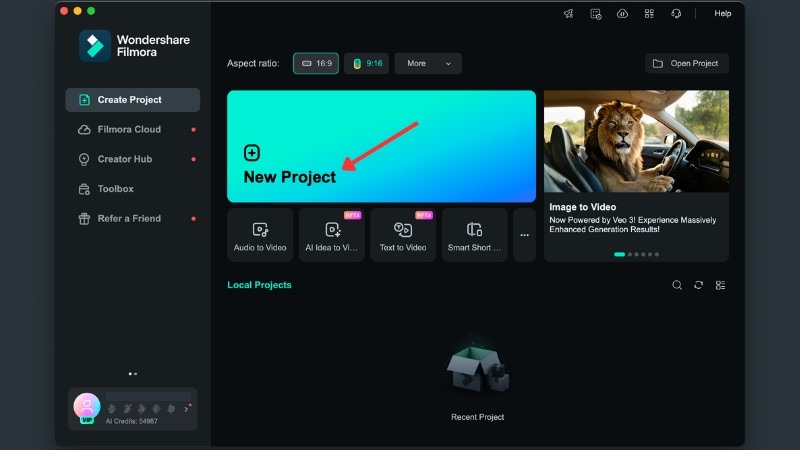
Generating custom, royalty-free background music in Filmora is quick and simple. Unlike the BeatBot AI app, Filmora integrates this feature directly into your video editing workflow. Here's how to use the AI Music Generator:
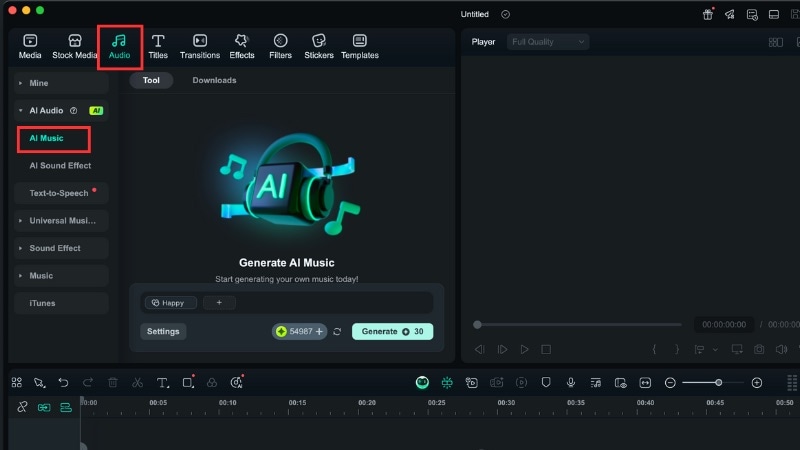
Then, use the Settings menu to adjust tempo and set the desired duration.
Conclusion
The BeatBot AI platform allowed creators to make short rap clips, but it's no longer available. Many users now look for a practical BeatBot AI music generator replacement.
This guide suggests Filmora as a BeatBot alternative that combines music creation and video editing in one platform. You can create music, clean audio, and edit videos without switching tools, making workflows more efficient.
Start using Filmora to replace BeatBot Music and create content with ease!

Frequently Asked Questions
-
Is there a BeatBot AI app I can install today?
No, the BeatBot AI app is no longer available. Splash shut down the platform in April 2024, and it has not been relaunched. -
Is there a Beatbot AI music generator free option today?
There is no official free BeatBot AI music generator now. Filmora is a strong alternative, but AI music creation requires credits, even on the trial version. -
Can I use AI-generated music from Filmora commercially?
Yes, Filmora's AI music is royalty-free. You can use the generated tracks in personal or commercial projects without extra fees. -
What is the best AI music generator for social media videos?
Filmora is a strong choice for social media content because it combines AI music tools and video editing in one app.
