


 TL;DR:
DeeVid AI is a prompt-based video generator best suited for beginners creating 5 to 15-second social media clips across Web, iOS, and Android, while Wondershare Filmora is the recommended alternative for creators requiring full timeline control and 4K production.
● Access requires an immediate paid subscription starting at $7 monthly for 100 credits, with no free trial available, making trial-and-error costly when encountering occasional AI glitches like distorted faces in complex movements.
● Video generation relies entirely on Text-to-Video and Image-to-Video prompts processed through models like Sora 2, Kling, and Runway, capped at 1080p resolution without the ability to manually fix specific frames or stitch multiple clips together.
● Wondershare Filmora serves as a superior upgrade for users needing deeper creative control, offering exclusive capabilities like Audio-to-Video conversion, a traditional professional timeline, built-in stock media, and AI Noise Removal.
Ask AI for a summary
 ChatGPT
 Perplexity
 Gemini
 Claude
 Grok
Grok
If you scroll through TikTok, Reels, or Shorts for a few minutes, there must be a few AI videos popping up on your feeds now. In fact, according to Zebracat, 67% of social media users interact with AI-generated video content at least once per day.
But creating those videos isn’t always easy, and that's the exact headache DeeVid AI promises to cure; turning your text, images, or existing clips into polished videos in just a few clicks.
But does it actually live up to the hype, or will you end up burning through credits for mediocre results? Well, our DeeVid AI review covers everything you need to know before hitting that sign-up button.
What Exactly Is DeeVid AI?
Let’s start our review by talking about what this tool actually does and why everyone is suddenly using it. In simple terms, DeeVid AI is an AI video generator that lets you create videos using text prompts, images, or existing footage.
The platform is designed to strip away all the complexity of traditional video editing and replace it with a simple, prompt-based approach anyone can use.
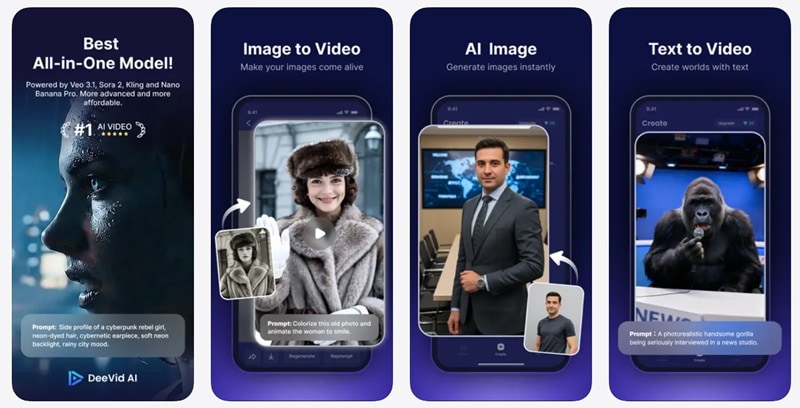
Many creators use DeeVid AI video generator to make:
- Short social media videos (TikTok, Reels, Shorts).
- Animated story clips and visual narratives.
- Marketing visuals and product promos.
- AI talking avatars for presentations.
- Stylized animations and AI art videos.
The whole goal of the DeeVid AI video tools is to make video creation feel less technical. Instead of messing with timelines for hours, you just use prompts to build whatever you imagine.
Where to Access DeeVid AI
One of the more practical advantages of DeeVid AI is that it doesn't lock you into a single device or operating system. You've got three solid ways to get in:
- Web: Accessible through any modern browser at https://deevid.ai/.
- Android Mobile App: Download via Google Play Store.
- iOS Mobile App: Available on the Apple App Store.
This means you can use the DeeVid AI app on both desktop and mobile without installing complicated editing software.
Everything DeeVid AI Can Do: Breaking Down Its Feature Arsenal
There are plenty of AI features to explore on this platform, and each one serves a pretty distinct purpose. Here's a one-by-one breakdown so you know exactly what you're getting.
1. AI Text to Video
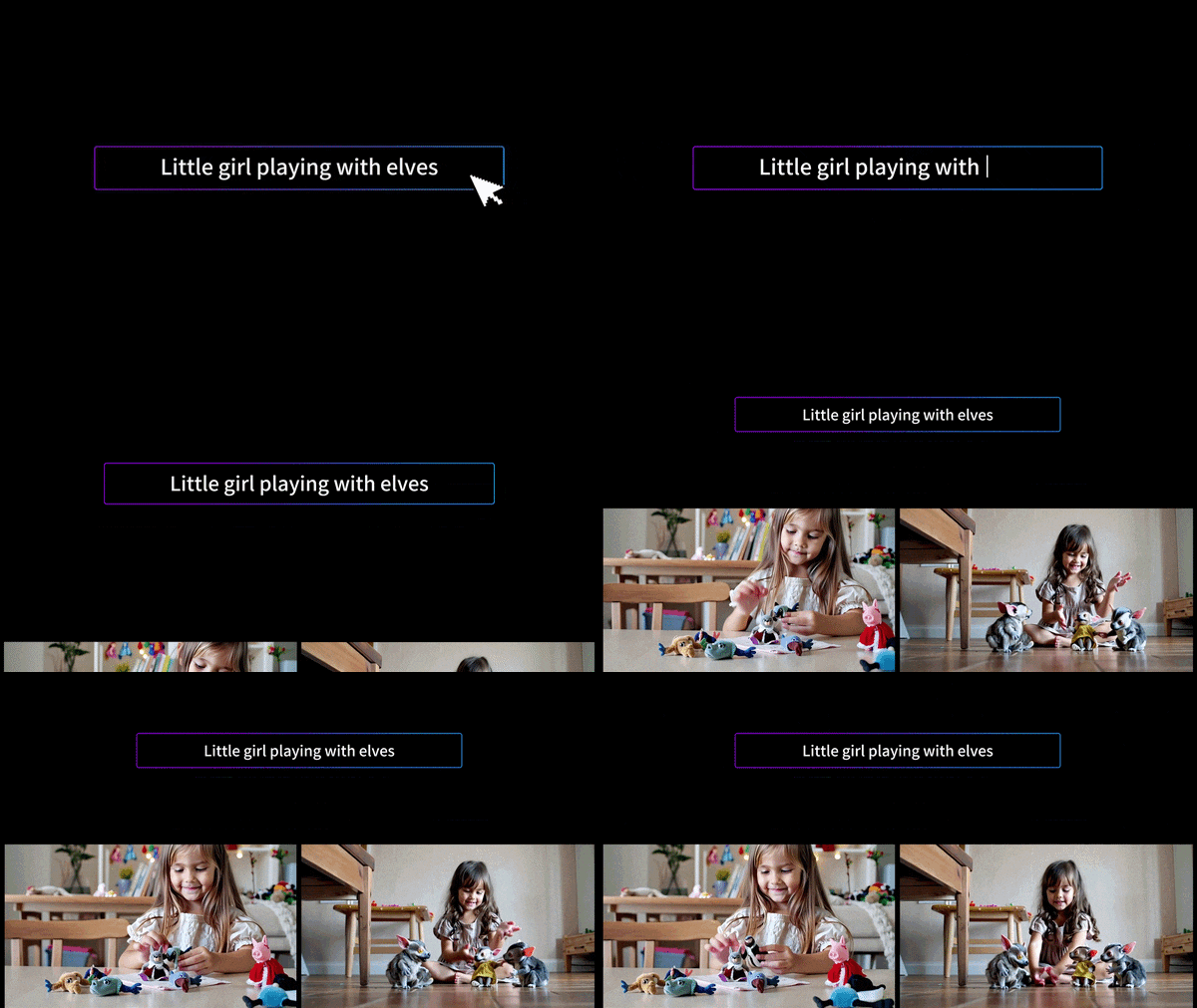
This is the core feature of DeeVid AI. Like its name suggest, DeeVid AI text to video feature works by typing something like "a futuristic cat drinking coffee in space," and you'll get a surprisingly cinematic short clip back. The more specific and visual your prompt, the better the output tends to be.
2. AI Image to Video
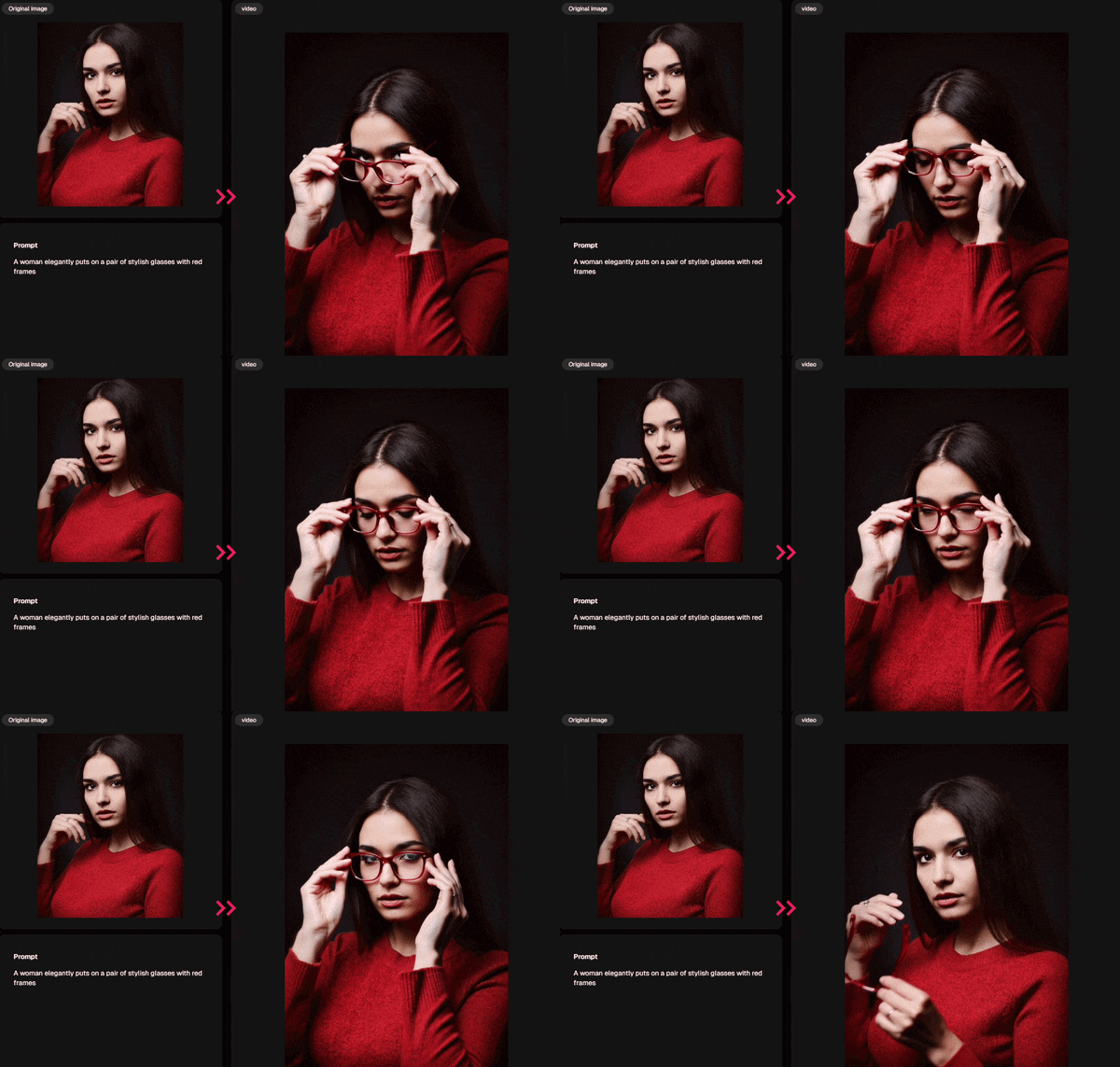
Another popular feature is DeeVid AI image to video. So, instead of starting with text, you upload the photo, write a prompt describing the motion you want, and the AI adds life and movement to what was previously a static image.
What makes this feature particularly useful for beginners is the built-in template library. You can even use the viral DeeVid AI kissing or hugging templates if you're not sure what prompt to use.
3. AI Image and Video Editor

DeeVid also includes a DeeVid AI image-to-image and video-to-video features. If that's too confusing for you, you can think of it like a prompt-based editor for content you've already created or own.
- "Replace the person on the right with an alien."
- "Turn this video into anime style."
- "Add cinematic lighting and fog."
- "Make the background look like a futuristic city."
The results aren't always pixel-perfect, but for social media content where speed matters more than perfection, this editor is a genuinely useful time-saver.
4. Other Notable Features
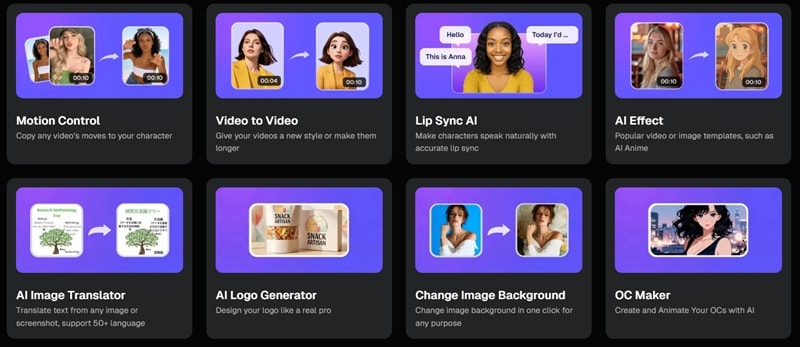
Beyond the main generation tools, DeeVid AI also includes a handful of additional features that round out the platform nicely:
- Motion Control: Copy the movement from another video and apply it to your generated character or animation.
- AI Logo Generator: Generate simple brand logos using text prompts.
- AI Image Translator: Translate text from images or screenshots into 50+ languages.
- Lip Sync AI: Create talking characters with realistic lip synchronization that matches the audio.
DeeVid AI Price: Is It Worth Paying For?
So, all those features sound cool, but none of them matters if the DeeVid AI price is totally out of reach. And the thing is, this platform uses a credit system. Basically, every time you make something, it eats up credits, and the better the quality, the more credits you’ll spend.
Also, don't get too excited about a free trial because you don't actually get daily free credits or a sign-up bonus to play with. You pretty much have to pick a plan to get moving. There are three main tiers depending on how much you plan to create. Here is the breakdown of what you are looking at:
| Feature | Lite | Pro | Premium |
| Monthly Price | $7 | $35 | $159 |
| Credits | 100 credits per month | 600 credits per month | 3000 credits per month |
| Video Capacity | Up to 50 videos or 50 images | Up to 300 videos or 300 images | Up to 1500 videos or 1500 images |
| Video Quality | 720P | 1080P | 1080P |
| Watermark | No watermark | No watermark | No watermark |
| Commercial License | Full commercial use | Full commercial use | Full commercial use |
| Priority Processing | Standard processing | Faster processing | Priority support and fastest processing |
| Best For | Beginners and casual creators | Regular content creators | High-volume pros and agencies |
Trying DeeVid AI: A Real Walkthrough From Start to Finish
Alright, when discussing a review, there's no real substitute for seeing it in action. So, let's walk through exactly what the experience of using DeeVid AI actually looks like. We'll guide you from opening the platform to downloading your finished video.
Here's a hands-on look at the two most popular creation modes.
1. How to Use AI Text to Video
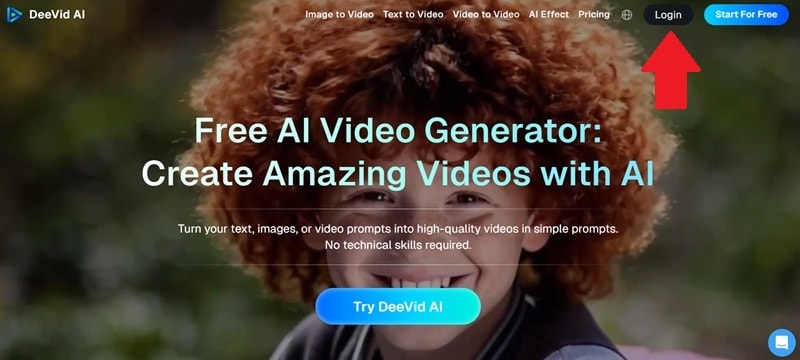
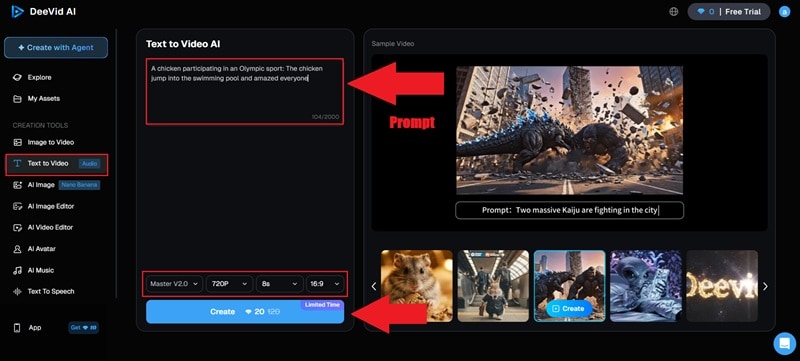
And that’s pretty much it! When the tool is done processing, you’ll see it right away on the right side of the screen. There’s an official tutorial from DeeVid AI on YouTube that explains it in more detail, you can check that out!
2. How to Use AI Image to Video
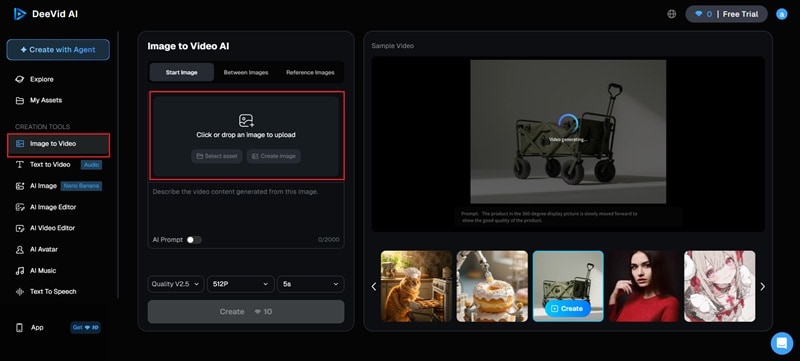
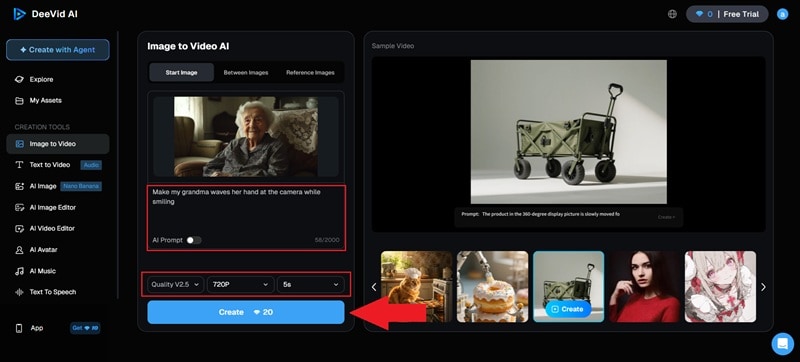
And just like that, you’re done! As you can see, the steps required are very easy to follow. And in seconds, you’ll have your image being animated through whatever prompt you used. Now, let’s see what it looks like!

Honest Review: The Pros and Cons
So, at this point, you've seen the features, you know the pricing, and you've had a walkthrough of how DeeVid AI actually works. Now, comes the part where we stop being polite and just tell you what's actually worth your time and what isn't.
Below, we'll break down our honest take on where it shines and where it still has some catching up to do.
- Easy for Beginners: You don’t need to be some pro editor or tech genius to figure this out. The interface is really clean and simple so you can start creating DeeVid AI video clips almost immediately.
- Fast Generation: Most videos are ready in under a minute. It makes the whole process feel snappy rather than something you have to sit around waiting for.
- Take It Anywhere: Since it works on your browser and has a dedicated DeeVid AI app for your phone, you can start a project on your laptop and check the results while you are out grabbing coffee.
- Multiple AI Models: DeeVid AI gives you access to several top models like Sora 2, Kling, and Runway all in one place. You can switch between them depending on the look you're going for.
- Credits Run Out Fast: Especially on the lower plans. If you're in experimenting mode and regenerating videos a few times to get the result right, your monthly credits can disappear pretty quickly.
- Inconsistent Quality: While most results look great, you will definitely run into those weird AI glitches every now and then. Sometimes the faces or hands look a bit distorted, especially in complex movements.
- Limited Control: Most editing happens through prompts, which can feel limiting when you want precise adjustments. There's no timeline, no manual adjustments, no way to go in and fix a specific frame.
- No Free Credits: A lot of AI tools out there give you a small batch of free credits every day, or at least a decent amount just for signing up. DeeVid AI does not. So, technically, you'll hit a wall almost immediately.
Not Feeling DeeVid AI? Here's a Solid Alternative Worth Checking Out
Look, DeeVid AI is a solid tool, and it does what it promises for the most part. But it's not going to be the right fit for everyone, and that's totally fine. If you've gone through this whole review and you're thinking "I want a bit more than this," the one name that keeps coming up is Wondershare Filmora.
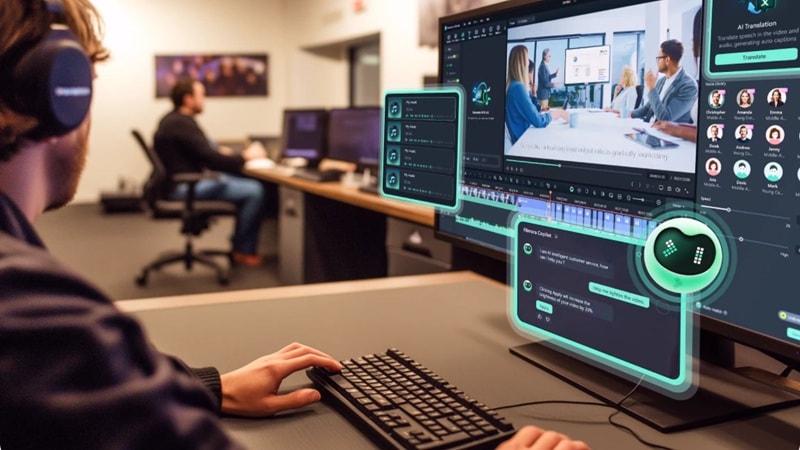
It is a fully AI-powered video editor that covers the same ground as DeeVid AI; text to video, image to video, and more, but goes significantly further in terms of creative control and feature richness. Below, we’ll break down why Filmora is more than a DeeVid AI alternative.
 Secure Download
Why Filmora Might Actually Be the Better Pick
1. Full Timeline Control, Not Just Prompts
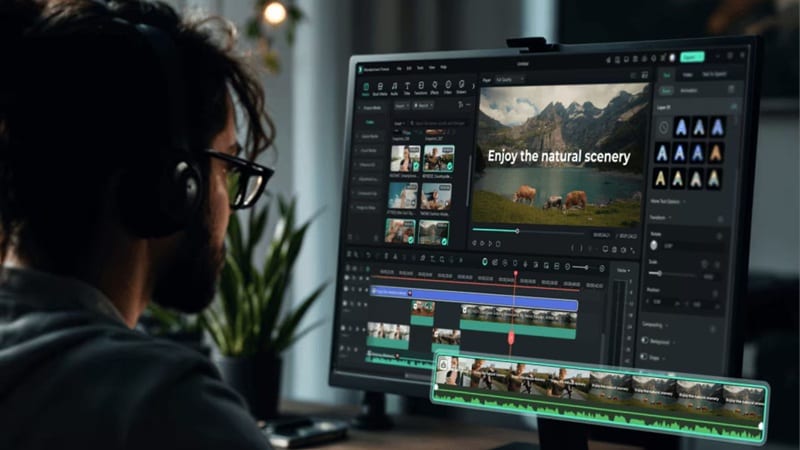
This is probably the biggest practical difference between the two. With DeeVid AI, if the output isn't quite right, your only move is to tweak the prompt and regenerate. With Filmora, you get a full professional timeline where you can cut, trim, layer clips, adjust audio, and fine-tune exactly how things flow.
2. You Can Turn Audio Into a Video
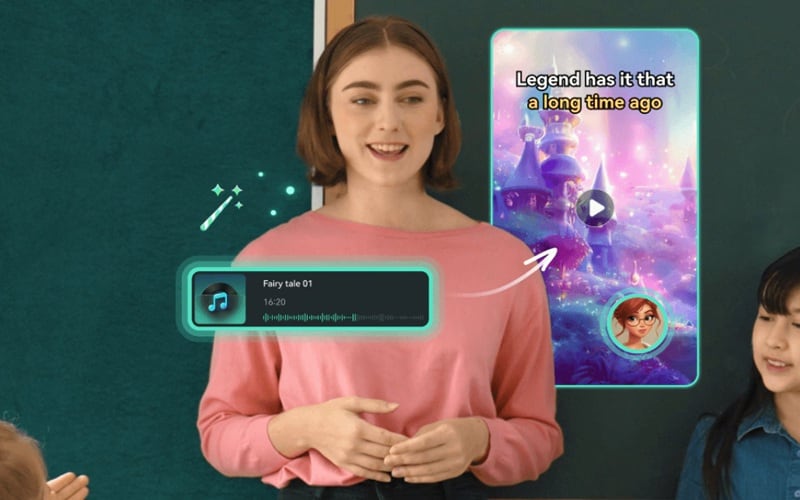
Filmora has an AI Audio to Video feature that DeeVid AI simply doesn't offer. It lets you drop in any audio file, a voiceover, a music track, a podcast clip, and the AI builds a video around it. For anyone who starts their content from sound rather than visuals, that's a genuinely different creative starting point that opens up a lot of possibilities.
3. Way More Templates Across Way More Niches

The templates on DeeVid AI image to video are fun, but the library is fairly limited in scope. On the other hand, Filmora's AI template collection is far broader; spanning lifestyle, business, education, entertainment, travel, and more. So, no matter your niche, there's something ready to go.
4. Stock Media Built Right In
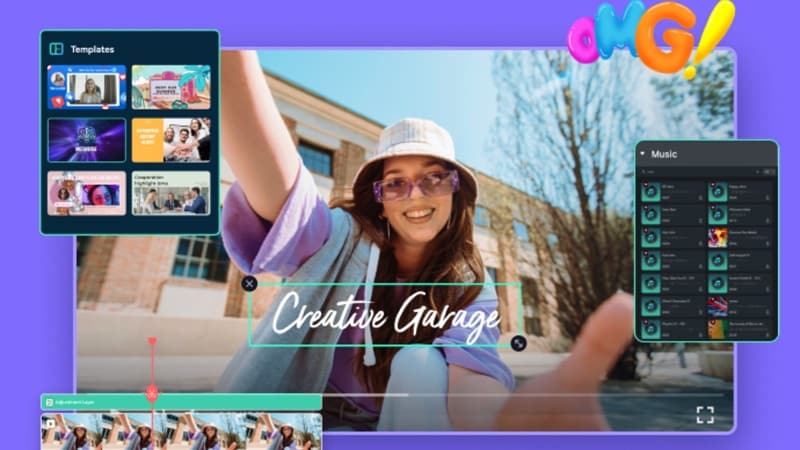
With DeeVid AI, you're working with what the AI generates, which is fine until you need a specific shot or track that the AI just isn't nailing. Meanwhile, Filmora comes with a built-in library of stock footage, music, sound effects, and images that you can drop straight into your projects.
5. Richer AI Feature Set That Actually Impresses
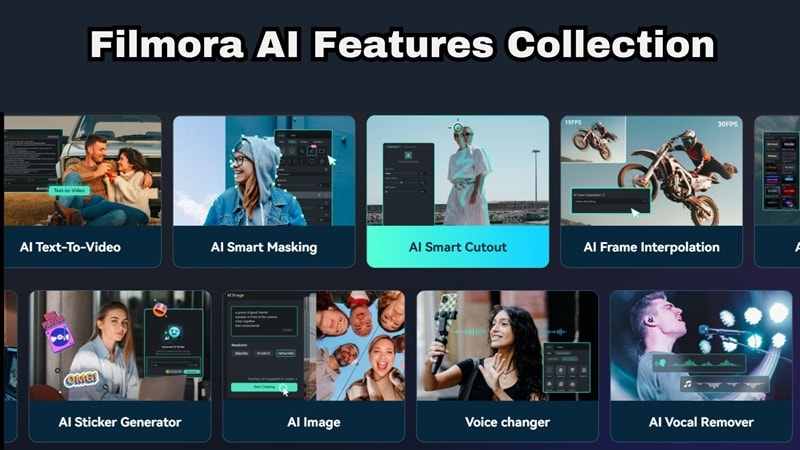
Filmora goes well beyond simple video generation. Its AI toolkit includes features that help polish your final video, not just create it.
Some useful ones include:
- AI Smart Cutout: Remove or isolate subjects from any clip automatically.
- AI Noise Removal: Clean up messy background audio in one click.
- AI Copilot Editing: A built-in AI assistant that suggests edits as you work.
- AI Portrait: Automatically enhance facial appearance in video.
- AI Thumbnail Creator: Generate click-worthy YouTube thumbnails instantly.
Secure DownloadDeeVid AI vs Filmora Comparison
So, both DeeVid AI and Filmora are built around AI video creation, but they serve slightly different needs. Now, the question is: Which one should you choose?
To help you decide that, we'll present an honest, feature-by-feature comparison of both tools across the categories that matter most to content creators:
| Feature | DeeVid AI | Filmora |
| AI Video Generation Features | Text-to-Video, Image-to-Video | Text-to-Video, Image-to-Video, Audio-to-Video |
| Editing Method | Prompt-based editing | Full Timeline + AI Prompts |
| Max Video Quality | 1080p | 4K |
| Built-in Stock Media | Not available | Available |
| Template Library | 100+ limited niches | Large multi-niche library |
| Platform Support | Web, Android, iOS | Windows, Mac, Android, iOS |
| Video Length Support | Short AI clips | Short and long videos |
| Best For | Quick AI video creation | Full creative video production |
Secure DownloadConclusion
DeeVid AI is a genuinely useful tool for creators who want to jump into AI video generation without a steep learning curve. The DeeVid AI text-to-video and DeeVid AI image-to-video are solid for quick social media content or simple visual experiments.
If you find yourself getting frustrated by the lack of control, switching over to Filmora is honestly a move you won't regret. You can actually fine-tune every single detail of your project, use AI to clean up your audio, and even generate custom music tracks all in one place. It is the perfect upgrade for creators who want the speed of AI but still want to be the one in the driver's seat.
FAQs About DeeVid AI
-
Is it safe to get DeeVid AI from an APK download?
While DeeVid AI is available on Android, it's safer to install the DeeVid AI app from Google Play Store instead of downloading a random DeeVid AI APK file from third-party websites. Those unofficial APK files may contain modified or unsafe versions of the app. -
Can DeeVid AI generate longer videos?
Most DeeVid AI video clips are short, usually around 5 to 15 seconds long. While it is great for quick social media hits, you would need to use an external editor like Filmora to stitch multiple clips together if you want to make a longer video. -
Can I use the videos I make for my business?
Yes, every paid plan includes full commercial use rights. So, whether you're making product promos, social media ads, or branded content, you're covered. -
What is the best DeeVid AI alternative for video editing?
If you want more editing control, tools like Wondershare Filmora are often recommended as a DeeVid AI alternative. DeeVid focuses mainly on prompt-based generation, while Filmora includes a full timeline editor, AI video tools, templates, and deeper editing features.
