

 TL;DR:
DreamFace AI is a freemium mobile application best suited for casual creators looking to quickly animate static photos into short, lip-synced avatars and talking pets for social media platforms.
● Generating convincing animations requires inputting clear, well-lit portrait photos with minimal background distractions to prevent edge distortion and rigid facial expressions.
● The free tier restricts users to watermarked, standard-resolution clips under 30 seconds, while upgrading to the Pro plan for $29.99 annually unlocks watermark-free, high-definition videos up to 3 minutes.
● Because the app lacks multi-layer editing, users needing timeline control should import generated clips into Wondershare Filmora, and enterprise users requiring multilingual support or ultra-realistic corporate presenters should opt for alternatives like HeyGen, Synthesia, or DeepBrain AI.
Ask AI for a summary
 ChatGPT
 Perplexity
 Gemini
 Claude
 Grok
Grok
DreamFace AI is a popular mobile AI video generator that transforms static photos into talking avatars using advanced AI lip sync technology. In this DreamFace AI review, we will dive into its performance, video quality, and pricing to help you decide if it's the right tool for your social media content or if a professional AI video editor like Wondershare Filmora is a better fit.
What is DreamFace AI?
DreamFace AI is a mobile AI video generator that turns static photos into animated, talking videos. With just a single image and a short script or audio input, the app can generate clips where faces move naturally, lips sync to speech, and characters appear to speak directly to the viewer. Its goal is to make video creation fast, fun, and accessible without requiring filming equipment or editing experience.
The platform is popular with social media creators and short-form video bloggers who want quick, eye-catching content. From talking avatar videos to playful talking pet animations, DreamFace AI focuses on creating short clips designed for platforms like TikTok, Instagram Reels, and YouTube Shorts.
Since everything happens within a mobile interface, users can create and share animated videos in minutes, which makes it a convenient tool for casual creators exploring AI-based storytelling.
Key Features: DreamFace AI Lip Sync & Talking Pet
At first glance, DreamFace AI looks like a simple photo-to-video app. But once you explore the platform, you'll notice several AI-driven tools designed to turn static images into lively, shareable content. Ranging from realistic lip-syncing to playful talking-pet videos, these features focus on creating quick, entertaining clips that are perfect for short-form platforms.
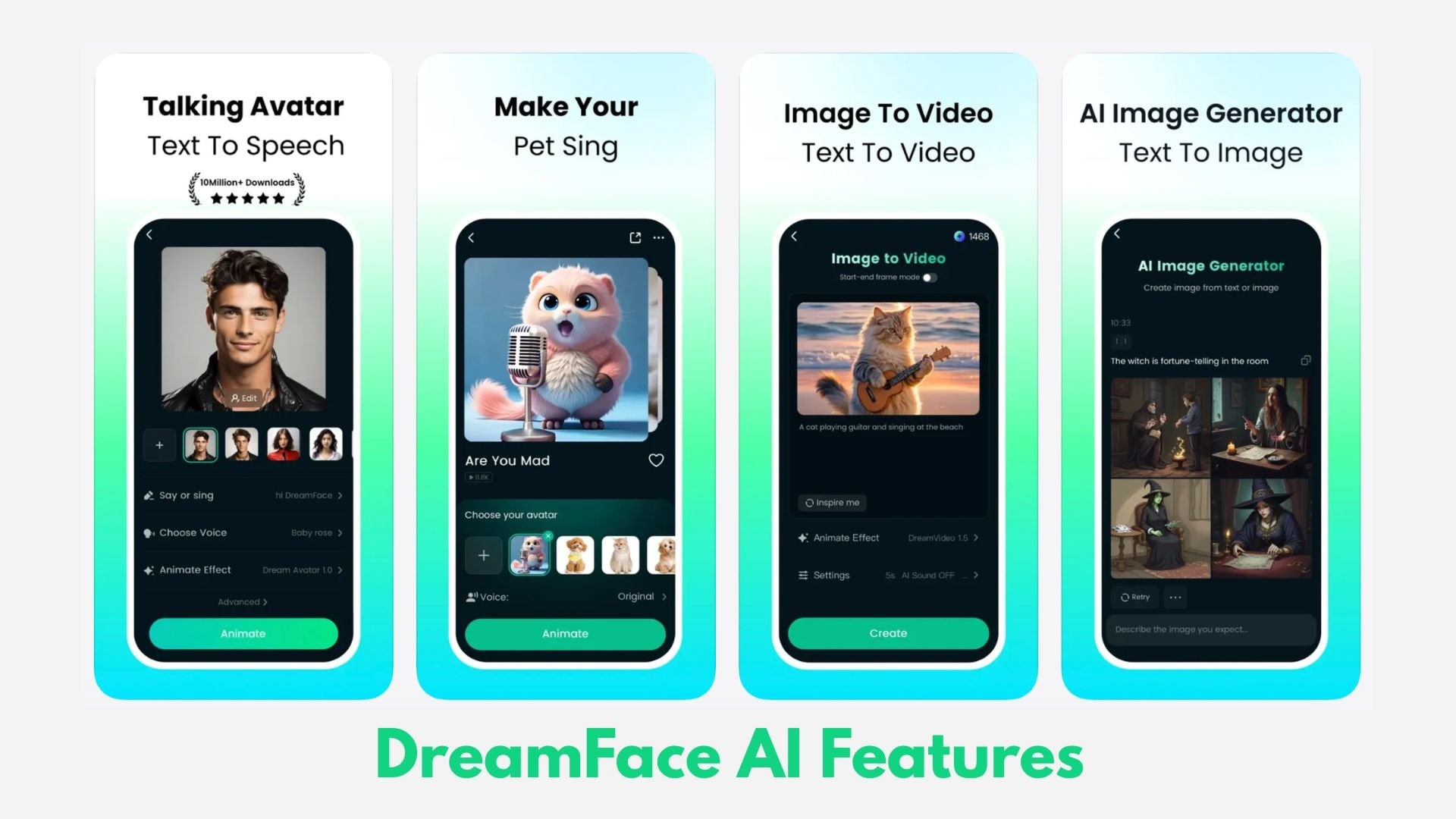
Here are the key features that power the DreamFace AI video generator:
DreamFace AI Lip Sync
The platform leverages DreamFace AI lip sync technology to synchronize spoken audio with realistic facial expressions. Whether you're using a pre-recorded voiceover or a text-to-speech script, the AI avatar generator ensures the mouth movements align with the audio. For creators who need higher precision and 4K output, integrating these clips into Wondershare Filmora allows for advanced post-production that mobile apps can't match.
DreamFace Animated with AI
DreamFace can animate still photos by adding subtle facial movements such as blinking, small head motions, and expression changes. This helps transform a static portrait into a more dynamic video, making it useful for storytelling, short messages, or creative avatar content.
DreamFace Talking Pet AI
One of the most entertaining features lets users upload a pet photo and generate videos in which the animal appears to talk or sing. Although this feature is primarily for entertainment, it has become popular for funny videos and lighthearted social media posts.
Hands-on Review: Performance & Quality
To understand how well DreamFace AI performs, it's important to look beyond the viral demos and test how the tool behaves in real use. Here is an objective breakdown of its performance:
- User-Friendly Interface: The app is easy to navigate, even for beginners. Users simply upload a photo, add text or voice input, and the AI automatically generates a talking or animated video in a few steps.
- Fast Video Generation: Most clips are created within minutes, convenient for creators who want quick content for social media platforms.
- Decent Lip-Sync Accuracy: The AI generally aligns mouth movements with speech well, especially in short clips. For quick avatar-style videos, the effect is convincing enough for casual viewers.
- Best Results with Clear Portrait Photos: Videos look more natural when the input image has a clear face, good lighting, and minimal background distractions.
- Possible Edge Distortion: Some users report visual distortion around the edges of the face, especially when the original image contains complex backgrounds.
- Occasionally, Stiff Facial Expressions: While the lip sync works well, facial expressions and head movements can sometimes appear rigid or repetitive in longer videos.
Overall, DreamFace AI performs well for entertaining short clips, although its automatic animation still feels limited compared to more advanced video production tools.
DreamFace AI Pricing & Free Features
Before upgrading, many users want to know what the free version actually offers and whether the paid plans are worth the price. DreamFace AI follows a freemium model, meaning you can test the core features for free, while advanced capabilities like HD export and longer videos require a subscription.
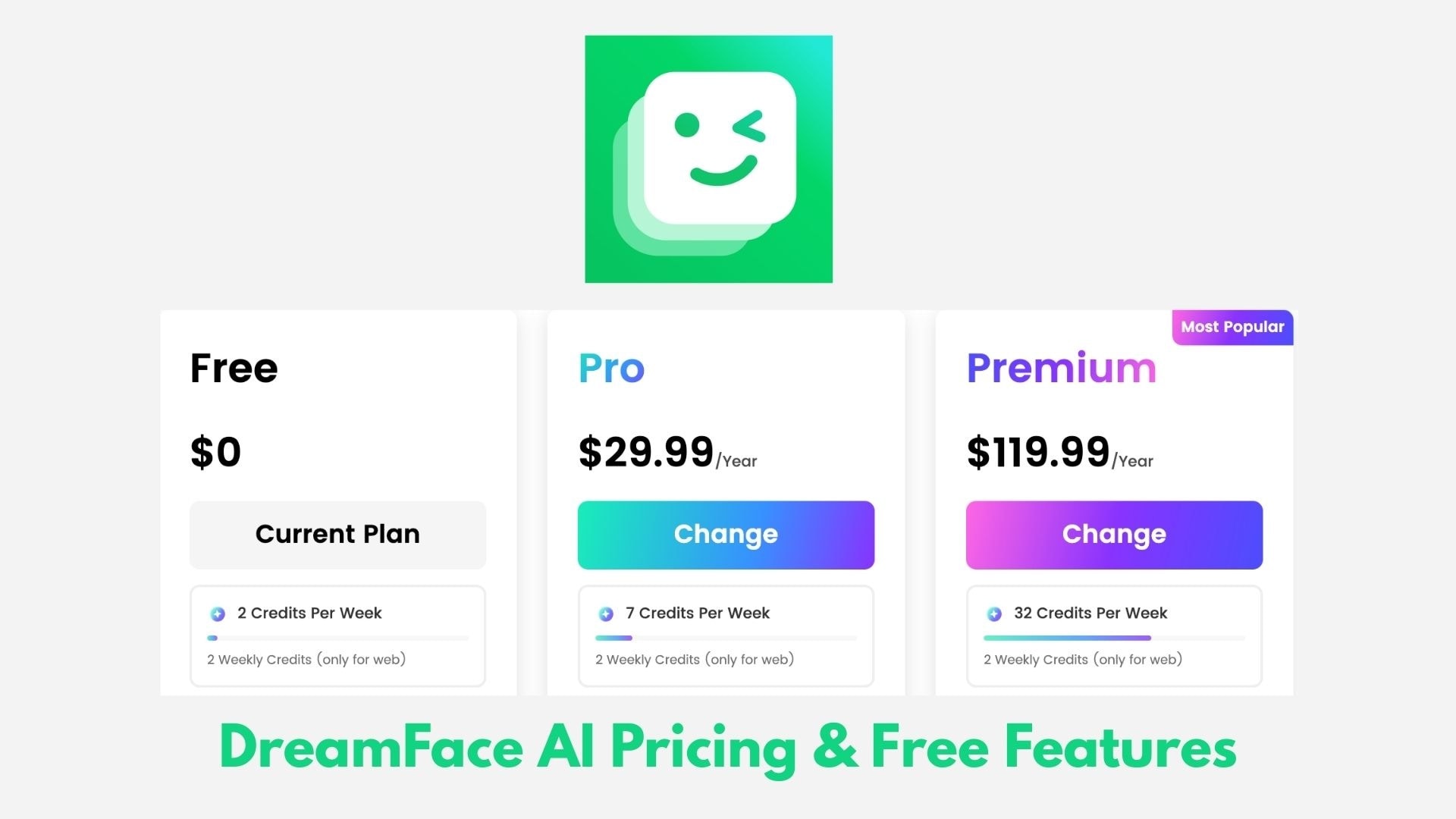
The table below highlights the key differences between the DreamFace AI free plan and paid plans.
| Plan | Price | Video Length | Output Quality | Watermark | Generation Limits | Best For |
| Free Plan | $0 | Up to ~30 seconds | Standard resolution | Limited daily creations or credits | Testing the platform and casual use | |
| Pro Plan | About $4.99/week or $29.99/year | Up to ~3 minutes | HD output | No watermark | Higher or unlimited generations | Regular social media creators |
| Premium Plan | About $19.99/week or $119.99/year | Up to ~10 minutes | Up to 1080p | No watermark | Higher generation limits + advanced features | Heavy creators and marketing content |
Key insight:
- The free version is useful for experimenting with features such as AI lip sync, avatar videos, and talking pets.
- The Pro plan removes watermarks and supports longer HD videos, which makes it the most practical option for frequent creators.
- The Premium plan targets advanced users who want longer videos and higher output quality.
DreamFace AI vs. Wondershare Filmora: Which is Better for Creators?
AI tools like DreamFace AI make video creation surprisingly easy. In just a few taps, you can turn a photo into a talking avatar or a lip-synced clip ready for social media. But once creators move beyond quick experiments, a common question appears: what if you want to create a complete, polished video, not just a short AI animation?
Wondershare Filmora comes as a practical answer to that question. Rather than focusing only on automated avatar generation, Filmora provides the tools needed to shape, refine, and expand AI-generated clips into full video projects.
Here are the differences between the two approaches:
- Quick AI Generation vs. Creative Control: DreamFace AI focuses on automation. Filmora, on the other hand, gives creators full control over the timeline, allowing precise adjustments to clips, audio, and visual elements.
- Short Social Clips vs. Full Video Projects: AI avatar tools are ideal for short content. Filmora is designed for longer formats such as YouTube videos, tutorials, or storytelling projects with multiple scenes.
- Basic Animation vs. Advanced Visual Editing: Filmora includes features like multi-layer editing, color correction, transitions, motion graphics, and visual effects that help elevate simple clips into more cinematic content.
- Limited Scene Customization vs. Professional Compositing: With Filmora, creators can combine AI-generated avatars with backgrounds, overlays, subtitles, and sound design to create a more immersive final video.
Many creators actually combine both tools. They might generate a talking avatar with DreamFace AI and then import the clip into Filmora to add music, subtitles, transitions, and visual polish. This workflow maintains the speed of AI creation while achieving a more professional final result.
Top Alternatives for Pro Creators
Although DreamFace AI works well for quick avatar videos and social media clips, professional creators often turn to other AI platforms that offer greater realism, multilingual support, or enterprise-level video production tools.
Reviewing these alternatives helps provide a more balanced view of the AI avatar ecosystem.
HeyGen: Best for Marketing Videos
HeyGen focuses on creating realistic talking avatars for marketing, training, and explainer videos. It supports 40+ languages and fast text-to-video generation; it's a popular option for businesses producing localized video content.
Synthesia: Enterprise-Level AI Video Creation
Companies widely use Synthesia to produce professional presentation videos with AI avatars. It includes features such as corporate templates, multilingual voiceovers, and scalable video production workflows for training or internal communication.
D-ID: Interactive AI Avatar Technology
D-ID specializes in creating interactive digital avatars that can respond to voice or text inputs. It's useful for applications such as virtual assistants, customer support agents, or educational AI presenters.
DeepBrain AI: Ultra-Realistic Digital Humans
DeepBrain AI focuses on producing highly realistic AI presenters that resemble real people. This platform is commonly used in industries like finance, healthcare, and e-learning, where professional, high-quality video presenters are required.
Conclusion
DreamFace AI proves that creating animated videos no longer requires cameras, actors, or complicated editing. With just a photo and a short script, users can generate lip-synced avatars, talking pets, and playful clips that fit perfectly into today's short-form content culture. It's quick, easy to experiment with, and surprisingly entertaining for casual creators.
However, the results still depend heavily on the AI, which means limited control and occasional animation glitches. For creators who want to go beyond quick avatar clips, combining AI outputs with a full editor like Wondershare Filmora can make a significant difference. Used this way, DreamFace becomes more of a creative trigger for larger video projects than a complete studio solution.

 Secure Download
FAQ
-
Is DreamFace AI free to use?
Yes, DreamFace AI offers a free version. You can create basic animated videos and test features such as AI lip sync. However, the free plan usually includes watermarks, shorter video limits, and limited generation credits. Paid plans unlock HD videos and longer clips.
-
How does DreamFace AI create talking videos?
DreamFace AI analyzes a photo and uses AI animation to move the mouth and face. When you add text or audio, the AI syncs the lip movements to make the image look like it's speaking.
-
Can DreamFace AI make pets talk?
Yes. The Talking Pet feature lets you upload a pet photo and generate a video where the animal appears to talk or sing. This feature is mainly used for fun social media content.
-
Is DreamFace AI safe to use?
Yes, it is generally safe if you use the official app or website. Avoid uploading personal or sensitive images.
-
What are good alternatives to DreamFace AI?
Some popular options include HeyGen, Synthesia, and D-ID for AI avatar videos. To edit and refine AI-generated clips, many creators also use Wondershare Filmora.
