
EasyVid is an AI tool that promises to turn scripts and ideas into complete videos while keeping characters consistent across multiple scenes. It can generate visuals, dialogue, voiceovers, subtitles, and music in one place, with options for animated stories, short films, music videos, and ads.
But how well does it handle longer videos, and are the results good enough to publish? Read our EasyVid AI review below to help you decide if it's worth using.
Part 1. EasyVid: An All-in-One AI Video Studio
As the name implies, EasyVid is an AI video studio that’s meant to make video creation easy. It runs in the browser and turns a script or text prompt into a multi-scene video. You can review the storyboard, regenerate any scene, add music, and render videos up to 10 minutes. There’s no dedicated EasyVid app for mobile or desktop.
While many AI video generators focus on creating short clips, EasyVid aims to handle more of the video production process. Its focus on multi-scene generation and character consistency makes it particularly popular for animated stories, short films, explainers, and promotional videos.
Part 2. Key Features of EasyVid AI Video Generator
Once you complete the EasyVid login, we can break down the full video workflow into five main features. EasyVid generates the scenes first, keeps the characters consistent, lets you fix individual scenes, adds voices and dialogue, and can cut a video to a song.
1. AI Video Generator
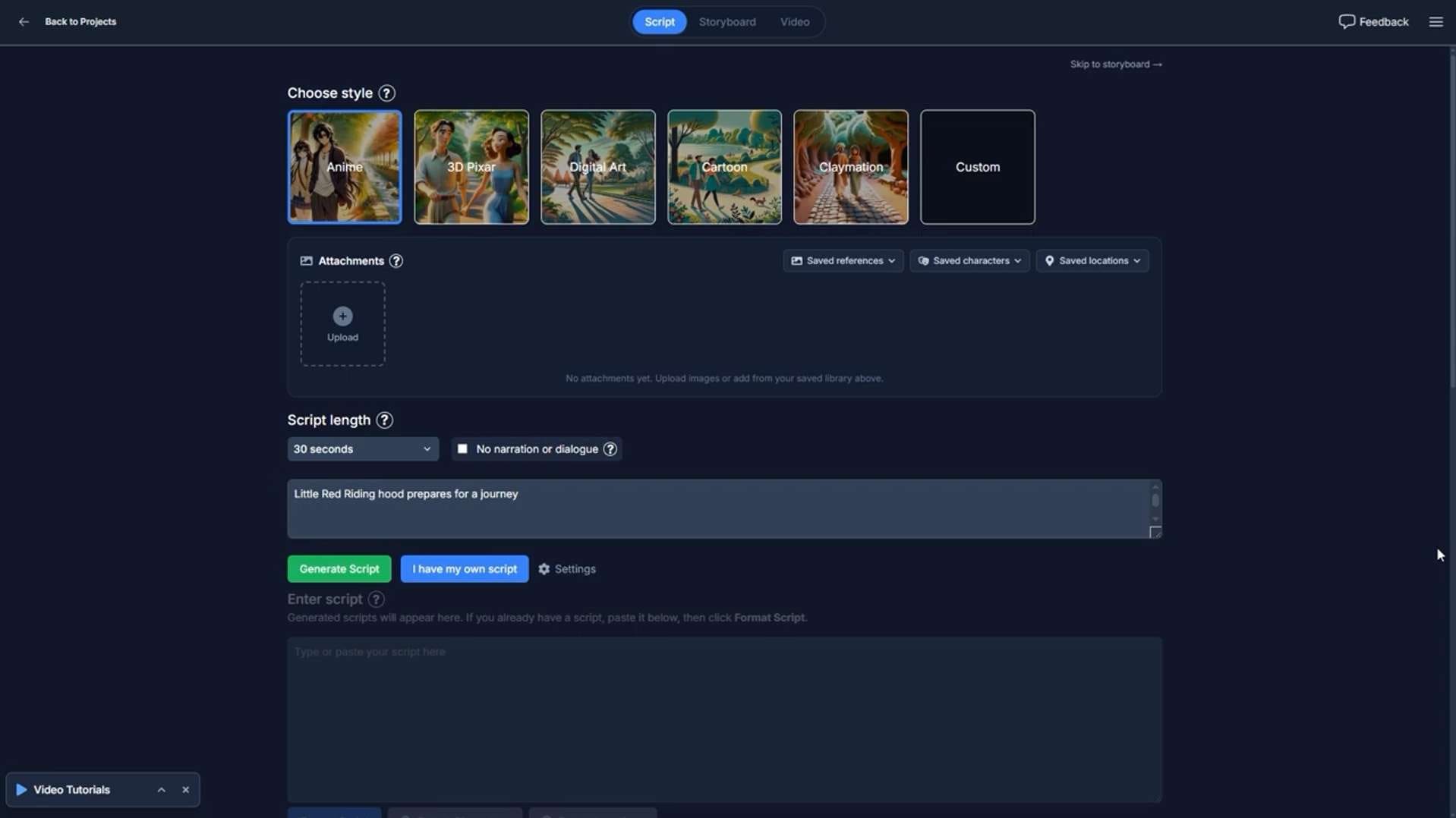
The core of EasyVid is its AI video generator. You can start from a one-line idea or paste a finished script. EasyVid AI video generator then breaks the content into scenes and generates the corresponding visuals in a storyboard. Each scene may include dialogue, narration, subtitles, and music. You can pick the video length and aspect ratio before generating.
The video models depend on the mode you use. Director Mode uses Seedance 2.5 or MiniMax H3 Max, and Classic Mode uses MiniMax H3 Max Turbo or MiniMax H3 Max (HD). You may switch the model per scene.
2. Consistent Character Generation
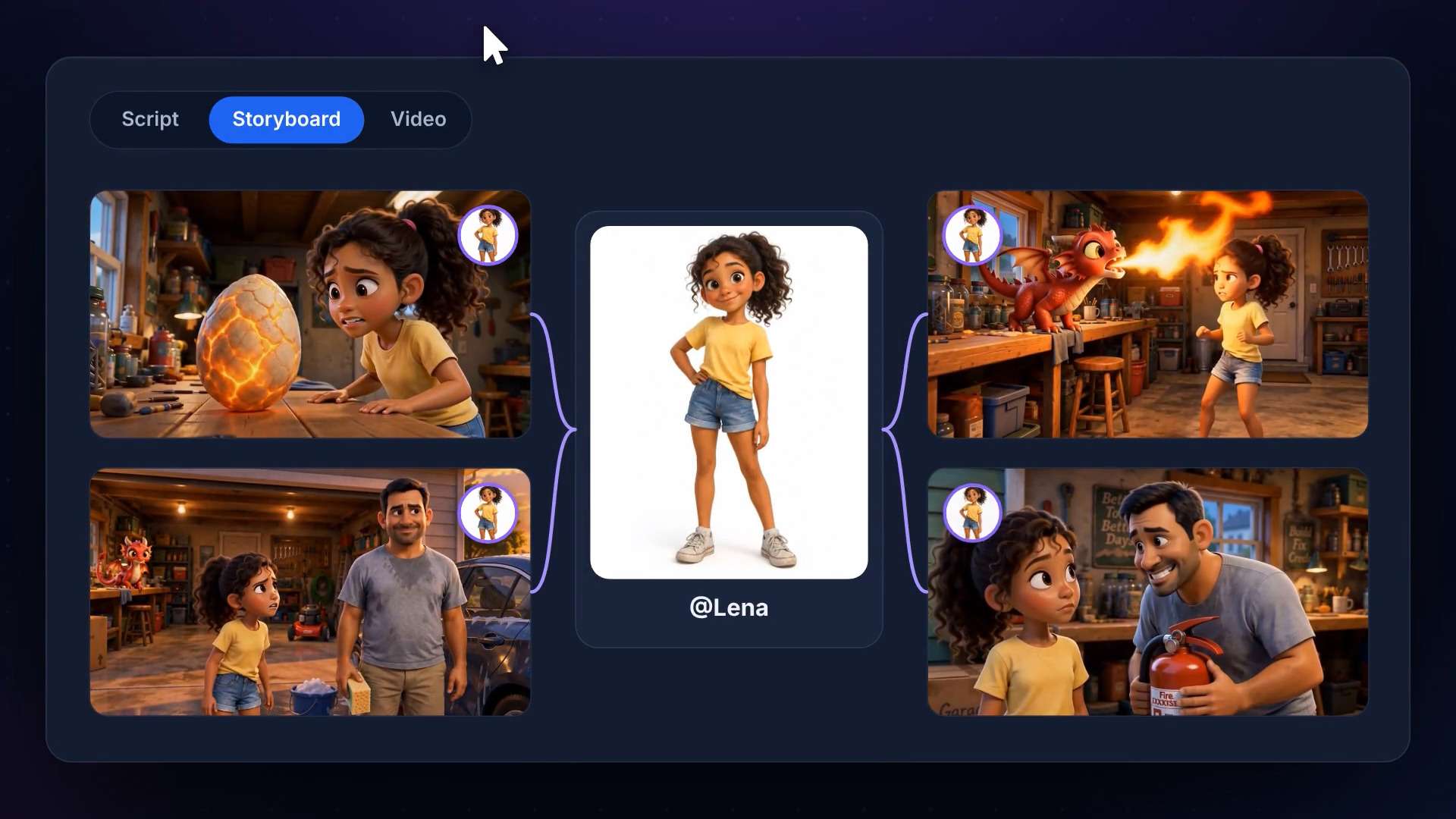
Character consistency is another of EasyVid AI video studio’s main selling points. The key to this feature is its ability to turn every character, location, and prop in your script into a reusable asset. It then uses these assets as visual references when generating to maintain a consistent appearance throughout the video.
3. Scene-by-Scene Editing
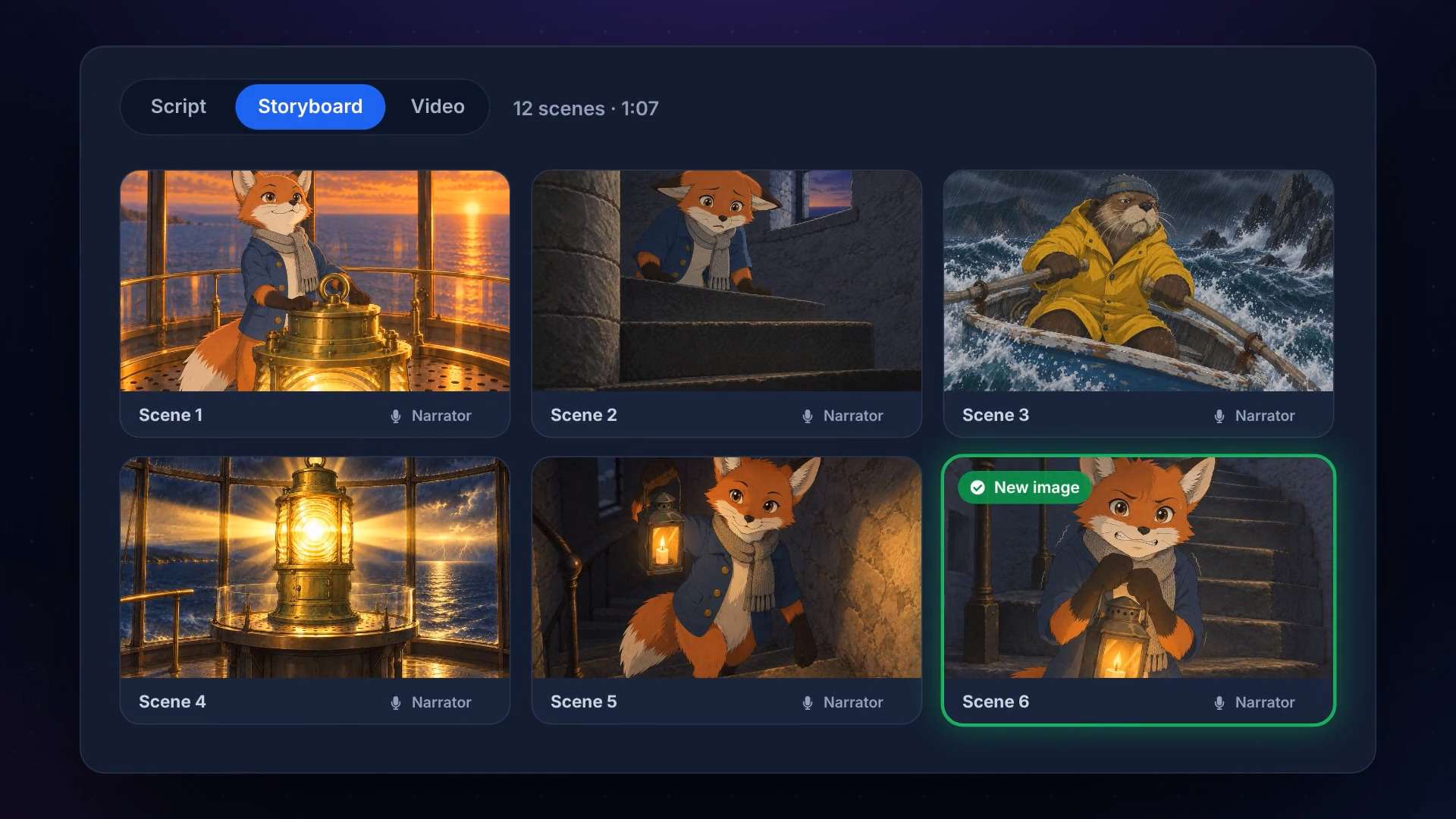
As mentioned before, you can review the storyboard before rendering and regenerate any single scene. Each scene has its own visual, prompt, and audio elements, which you can change without starting the whole project again.
EasyVid also offers free regenerations for individual images and clips, subject to a few limits:
- Each free regeneration covers one image or clip that costs up to 30 credits.
- Regenerations for items costing more than 30 credits use your regular credits.
- You can’t use free regenerations to redo an entire project or storyboard.
- Free video clip regenerations are only available in Classic Mode.
4. AI Voices, Dialogue, and Lip Sync
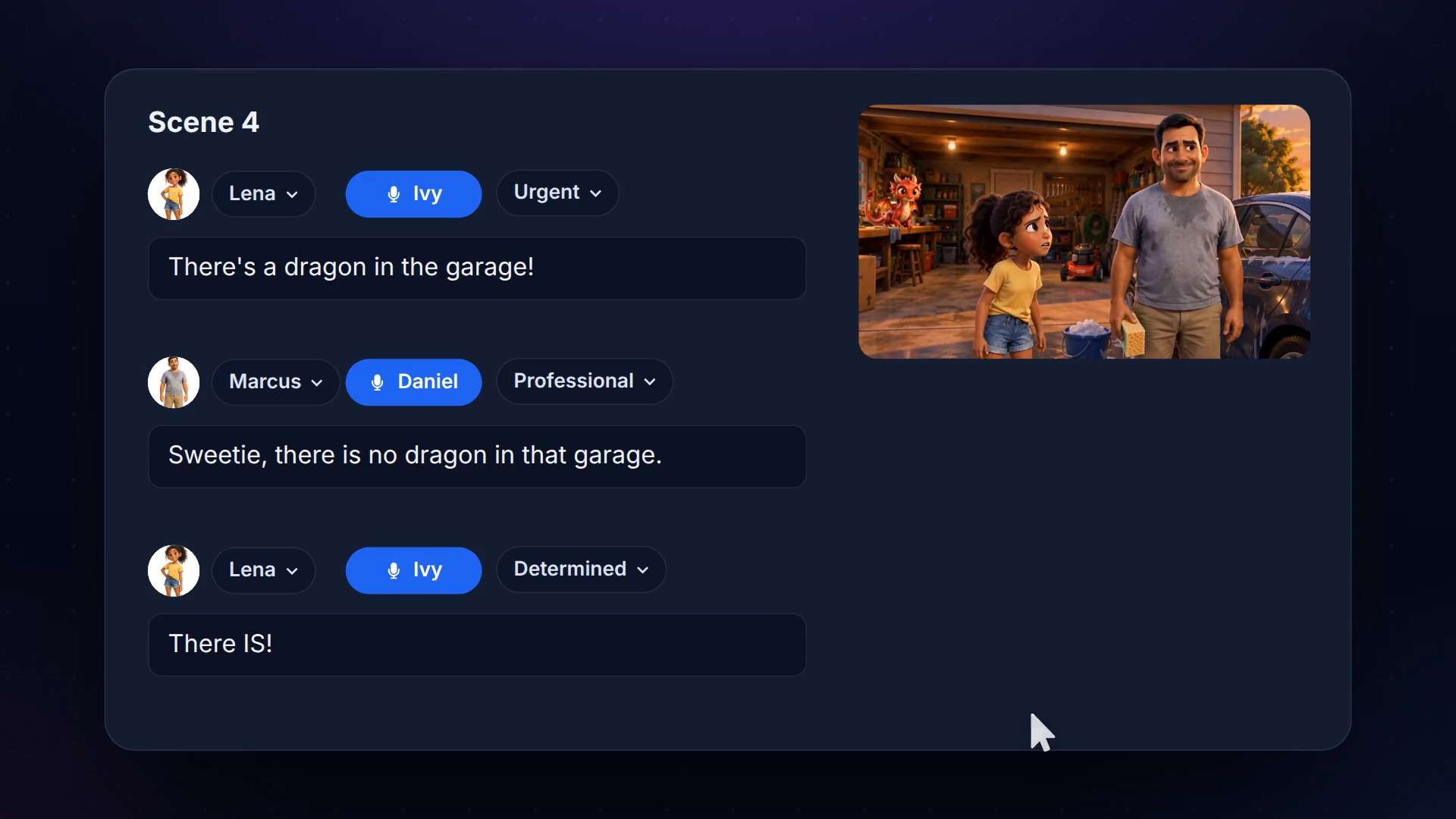
The character and the narrator you generated with the EasyVid AI video generator get a voice, and you can change it at any time. You can choose an HD voice and set the emotion and tone for each one. The voice generation is powered by ElevenLabs and Google Gemini. You can also record or upload your own voice for individual lines.
For projects that need characters to speak on camera, EasyVid Director Mode offers AI lip sync. The dialogue audio is sent to the video model during clip generation so that the characters can speak their lines as part of the scene.
5. AI Music Video Generator
On top of script-to-video, EasyVid also has a dedicated music video generator. You can upload a song and let the platform create scenes that follow its rhythm and structure. The AI analyzes the song’s tempo, beats, and sections, then uses that information to time the scenes and transitions. It can also generate lip-synced singing and karaoke-style lyrics.
Part 3. Is EasyVid Free? Pricing Breakdown
You can create an account and sign up for EasyVid for free. But generating your own content requires a paid subscription. It doesn’t offer free credits, a free trial, or a free plan for making your own videos.
To start using EasyVid AI, you need to subscribe to a paid plan. Each plan offers monthly and annual billing, and the annual option gives two months free.
EasyVid Pricing (2026)
| Creator | Studio | Pro | |
| Price* | $29/mo or $24/mo (billed yearly) | $49/mo or $40/mo (billed yearly) | $99/mo or $82/mo (billed yearly) |
| Monthly Credits | 1,500 | 4,000 | 10,000 |
| Daily Free Image/Video Regenerations | 5 (up to 30 credits each) | 10 (up to 30 credits each) | 15 (up to 30 credits each) |
| Director Mode | 750-credit Director trial (one-time) | Characters speak on camera with lip-sync | Characters speak on camera with lip-sync |
| Full-length Music Videos | - | ||
| Watermark | |||
| HD Expressive Voices | |||
| Custom Voices | ✅ (Beta) | ||
|
Show More
Show Less
|
|||
*) Prices are subject to change depending on ongoing promotions and special offers.
Money-back Guarantee
Every paid plan has a 7-day money-back guarantee. You get a full refund if you’ve used fewer than 1,000 credits. A single Director Mode minute costs about 900 credits, so you can test a few Classic Mode videos or one Director Mode video.
Part 4. EasyVid AI Review: Test Results and Video Quality
EasyVid first appeared on Reddit in 2024, when its creator, Tupptupp_XD, introduced it in the r/indiehackers community as an AI video studio for creating complete videos with less manual work.
What stands out then, based on EasyVid AI Reddit reviews, is that the platform is pretty fast. It also takes a different route from most AI generators, which return isolated clips, by helping you build a more structured, multi-scene video from a script. Moreover, you can review and change AI-generated elements before the final render on the storyboard.
The video generation result itself is pretty good, though not perfect. You can still tell it’s AI-generated. For the best quality, you need to use and spend more on the costlier Director Mode, which runs on advanced models like Seedance 2.5 and MiniMax H3 Max and gives the highest-quality output EasyVid offers.
Pros and Cons
- Multi-scene videos from one script. EasyVid splits a script or idea into scenes with characters, locations, and dialogue, then renders one finished video.
- Supports videos up to 10 minutes.
- Every character, location, and prop is saved as an asset, so the same cast and settings carry through the scenes.
- Storyboard review before rendering. You can check each scene, regenerate the ones you don’t like, and add music before the final render.
- Paid plans come with a 7-day money-back guarantee.
- No free generation. Making your own videos requires a paid plan.
- Credits go quickly in Director Mode.
- Best features need higher plans.
- Less fine-tuning than a full editor.
- Characters don’t speak on screen unless you use Director Mode.
- Custom voices are a Pro feature.
Part 5. The Bottom Line: Is EasyVid Enough for You?
EasyVid is worth a try for a project where you already have a story or script in mind but don't have the time or resources to produce every scene yourself. It’s suitable for:
- Animated story and short film creators
- YouTubers running faceless channels
- Marketers making ads and explainers
- Musicians working on a music video for a full song
But if you want frame-level control, EasyVid will feel limiting, since it favors speed over deep customization. For bigger projects that need more detailed editing, you may want to pair EasyVid with a dedicated video editor.
EasyVid Alternative for Long Videos: Filmora
Wondershare Filmora is the recommended option to consider for making long videos. It’s a video editor first, with AI video generation built into a multi-track timeline. You can trim, layer, and rearrange every generated clip, so you control the final video's length and structure instead of the AI.
For video creation itself, Filmora offers several AI features, including:
- AI Text-to-Video and Image-to-Video: Generate videos from an image or text, powered by Seedance 2.0, Veo 3.1, ToMoviee, HappyHorse 1.0, and more.
- AI Idea-to-Video: Turn a simple idea into a video with AI-generated scripts and visuals.
- AI Video Extend: Extend existing footage when you need more scenes or longer clips.
- AI Voice and Audio Tools: Generate voiceovers, clone voices, create music, and improve audio quality.
The two tools start from opposite ends. EasyVid AI video studio builds the whole video from a script and lets you adjust it afterward. Filmora gives you AI clips, voices, and visuals to build the video around yourself. There is no set structure to follow, and you can edit generated clips alongside your own footage, just like working in a regular video editor.
EasyVid vs Filmora
| EasyVid | Filmora | |
| Starting point | Script or text prompt | Text, image, audio, or video |
| AI generation | A full multi-scene video | Clips and scenes inside the editor |
| Editing | Via storyboard and per-scene regeneration | Multi-track timeline with effects, color, captions, and audio tools |
| Best for | Quick, story-driven videos | Longer projects that need hands-on control |
|
Show More
Show Less
|
||
 Secure Download
Conclusion
EasyVid is a browser-based AI video studio with a script-to-video workflow. It builds multi-scene videos with consistent characters, voices, subtitles, and music, and the storyboard lets you fix weak scenes before you render.
Since there’s no free generation to test the tool beforehand, we hope this EasyVid review can give you a clear picture of the whole platform before deciding to subscribe. It works best for story-driven videos, ads, and music videos. But for long projects that need frame-level control, a timeline editor alternative like Filmora is worth a look.
FAQs
-
1. Is EasyVid legit?
Yes, EasyVid is a working product. EasyVid publishes its own terms of service and FAQ, has a privacy policy covering how your data is stored, and offers a 7-day money-back guarantee on paid plans. -
2. Can you cancel your EasyVid subscription?
Yes. You can cancel your subscription through your account or billing settings. If you’ve used fewer than 1,000 credits, the 7-day money-back guarantee gets you a full refund. After that, fees are non-refundable. -
3. Can you monetize EasyVid videos on YouTube?
Yes, but with conditions. Your videos can be monetized on YouTube as long as you put effort into making them unique, and its terms allow paid plan users to use their content commercially if they hold the necessary rights.