

 TL;DR:
Freepik's 2026 AI Image Generator is a highly flexible, all-in-one creative suite providing access to over 30 AI models and a 200-million asset stock library, making it the best overall value for users wanting integrated image, video, and editing workflows rather than relying on single-purpose generators.
● The free tier is strictly limited to 20 image generations per day, while the AI image-to-video generator requires a paid plan (starting at €6/month) and currently struggles with unfinished lip-syncing, strict content moderation, and occasional anatomical errors like distorted hands.
● For optimal results, users must match their prompts to specific models: Flux is best for detailed photorealism and product shots, Mystic excels at natural-looking stylized artwork, and Ideogram is required for designs heavily reliant on readable text elements.
● For specialized needs, Midjourney remains superior for pure image quality, Adobe Firefly is the safest alternative for client work requiring strict legal protection, and Wondershare Filmora is the best choice for video-first creators wanting Sora 2 and Veo 3.1 models integrated directly into a post-production timeline.
Ask AI for a summary
 ChatGPT
 Perplexity
 Gemini
 Claude
 Grok
Grok
Looking for an honest Freepik AI image generator review? In 2026, creating custom visuals is no longer about searching archives—it's about manifesting them. As the AI image market heads toward a $1.7 billion valuation, we'll test if Freepik's AI suite truly delivers high-quality assets or just digital noise.
Part 1. What is Freepik AI Image Generator? (2026 Deep Dive)
Before we get too deep into our Freepik AI review, let's take a second to appreciate just how much Freepik has evolved. What started as a simple library of downloadable design assets back in 2010 has quietly morphed into something much bigger. And honestly, more impressive than most people give it credit for.
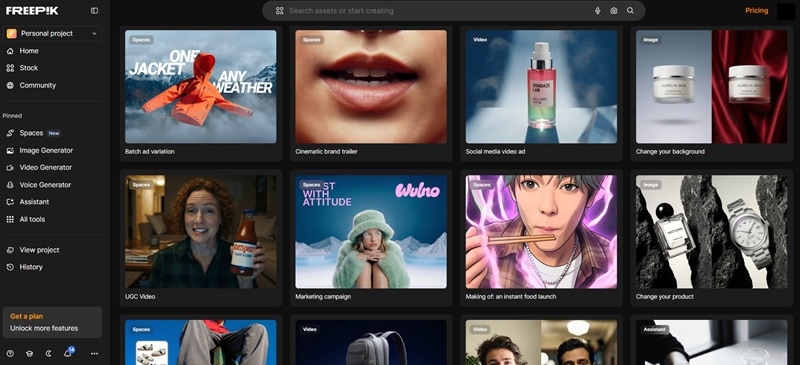
Today, Freepik has evolved into a complete AI-powered creative suite that includes:
- AI Image Generator: Access to various advanced AI models to create images from text prompts with different styles and levels of realism.
- AI Video Generator: Supports both text-to-video and image-to-video, allowing you to turn ideas or static visuals into short animated clips.
- AI Editing Tools: Built-in features like Retouch, Background Remover, Upscaler, and other enhancement tools to refine your visuals instantly.
- Massive Stock Library: Over 200 million photos, vectors, illustrations, and design assets available in the same ecosystem.
Everything is integrated into one platform, so you can generate, edit, and download without switching tools.
Available AI Models in Freepik AI Image Generator
One of the biggest things that sets the Freepik AI image generator apart is the variety of models you can choose from. That flexibility is a big deal, especially if you like testing different looks before settling on the final image.
Here's a simple breakdown of some of the AI models currently available and what they're generally best at:
| AI Model | Best For |
| Flux | High-detail photorealistic images, product shots, portraits |
| Mystic | Stylized artwork, fantasy themes, dramatic lighting |
| Google Imagen | Clean, realistic visuals with strong text understanding |
| Google Nano Banana Pro | Fast generation with solid quality for social content and marketing visuals |
| Ideogram | Images with readable text elements, posters, typography-heavy designs |
| Runway | Creative visuals with a cinematic or motion-ready feel |
| GPT | Concept-driven visuals, idea exploration, prompt-based experimentation |
| Seedream | Dreamlike, artistic, and imaginative compositions |
|
Show More
Show Less
|
|
Freepik Pricing: What's Free, What's Not
Freepik runs on a credit-based system with four plan tiers: Essential, Premium, Premium+, and Pro. As for the "free" version, Freepik AI image generator allows you to generate up to 20 free images per day.
The main difference between plans really comes down to how many credits you get each month and how much unlimited usage is included. To make it easier to compare everything side-by-side, check out the simple pricing table below.
| Plan | Monthly Price | Credits / Month | Unlimited Models | Best For |
| Essential | €6 | 7000 | 30+ selected models | Hobbyists just getting started with AI |
| Premium | €15 | 18000 | 30+ selected models | Individuals using Premium stock + AI regularly |
| Premium+ | €34 | 45000 | Selected models + fast generations | Creatives who need higher limits and more flexibility |
| Pro | €215 | 300000 + 20% extra | Selected models + fast generations | Professionals scaling large content production |
|
Show More
Show Less
|
||||
On top of that, no matter which paid plan you choose, they all come with:
- Access to all image, video, and audio AI models.
- Commercial AI license.
- 200M+ stock assets.
- AI editing tools.
- Music, voice, and sound generation.
- Option to top up credits anytime.
Part 2. Step-by-Step Tutorial: How to Use Freepik AI Effectively
Alright, now let's actually use the thing. The nice part about the Freepik AI image generator is that you don't need to be a designer or tech nerd to start. But if you understand a few small details, your results can go from average to seriously impressive. Let's break them down properly!
How to Access Freepik AI Image Generator
Getting in is simple. Here's the quick flow:
Freepik homepage → Sign in or create an account → Open the AI Suite → Click on AI Image Generator.
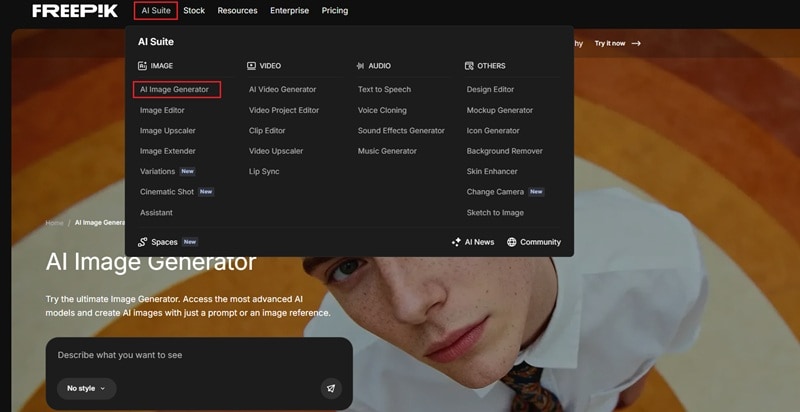
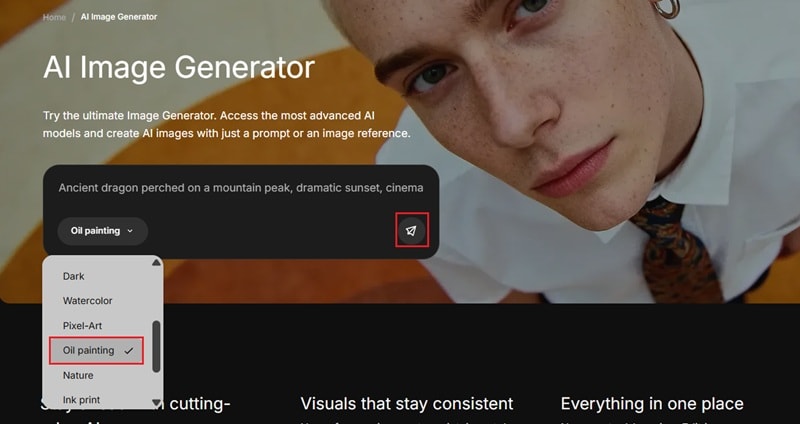
That's literally it. Once you're inside, you'll see that the interface is laid out intuitively. Your prompt box is front and center, with style selection living just below it. You can start typing your idea right away and see what happens.
How to Write Better Prompts
When it comes to Freepik AI image generator, your output depends heavily on how you write prompts. This is where most beginners stumble. The key is to be as descriptive as possible, because a vague prompt = a vague result.
Here's a quick prompt formula to get consistently great images:
[Subject] + [Setting/Environment] + [Style/Mood] + [Lighting] + [Camera/Composition] + [Material/Texture].
Take a look at the templates below:
| Goal | Sample Prompt |
| Product Shot | “Minimalist skincare serum bottle on white marble, soft studio lighting, close-up, 35mm lens, photorealistic” |
| Social Media Visual | “Young woman laughing in a sunlit café, candid style, warm tones, shallow depth of field, lifestyle photography” |
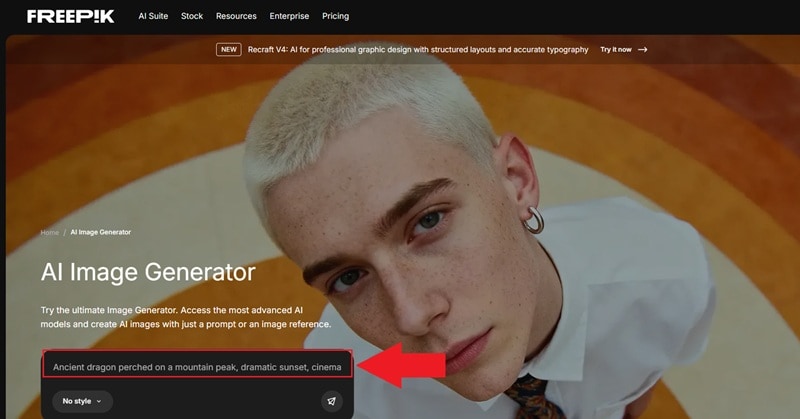
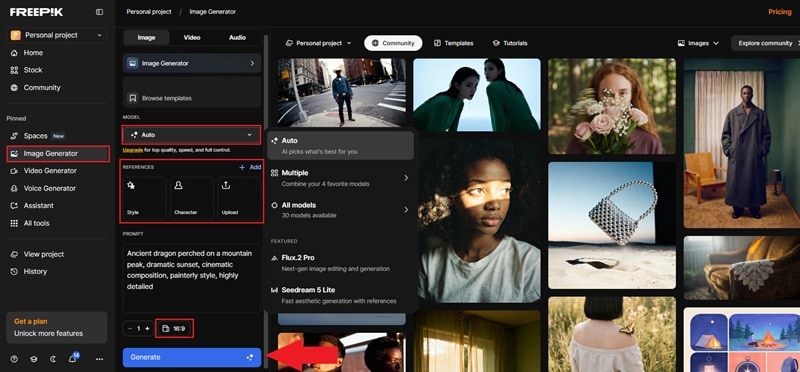
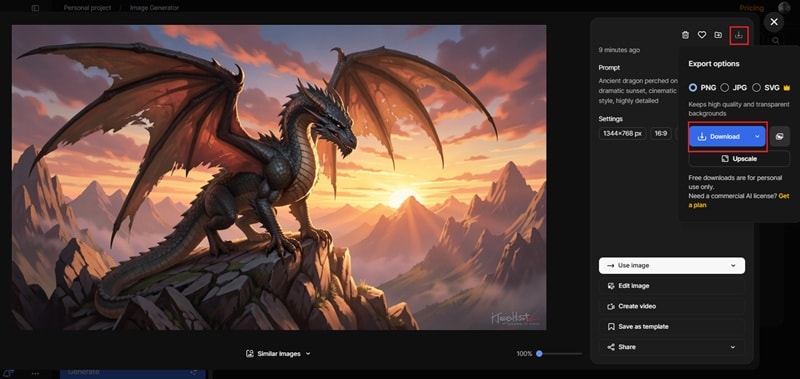
| Fantasy Illustration | “Ancient dragon perched on a mountain peak, dramatic sunset, cinematic composition, painterly style, highly detailed” |
| Logo Concept | “Modern tech startup logo, clean geometric shapes, teal and black palette, flat design, white background” |
|
Show More
Show Less
|
|
Full Tutorial for Creating Images From Scratch
Alright, now you know how to get in and how to write a prompt that actually works. Now, it's time for the actual Freepik AI image generator tutorial. Here's the full step-by-step for your first AI image:
Part 3. Beyond Images: Leveraging Freepik's AI Ecosystem
If you thought Freepik was just an AI image generator with a fancy interface, you're about to be seriously surprised. As we mentioned earlier, the platform has expanded into a whole ecosystem of AI-powered creative tools, and this time, we'll break down other creative ways to use the platform beyond the Freepik AI image generator.
Freepik AI Image-to-Video Generator: How it Works
The Freepik AI image-to-video generator is one of the most talked-about additions of the past year. Just like the name suggests, it lets you turn a static image into a short video clip. Here is how to do it:
- Open the Video Generator tab.
- Upload your image.
- Type a prompt describing how you want things to move, or just pick from the ready-made templates on the right side of the panel.
- Set your video quality, aspect ratio, and whether you want sound or not, then hit Generate.
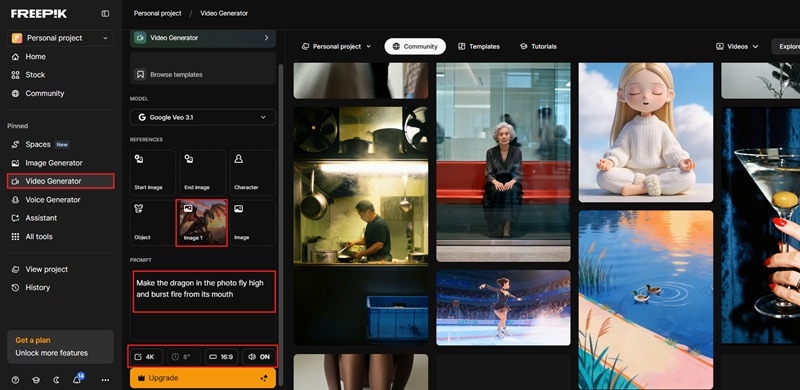
That said, there is one thing worth knowing before you get too excited: unlike the image generator, the Freepik AI image-to-video generator does not come with a free trial. To use this feature, you'll need to subscribe to one of Freepik's paid plans.
Extend and Upscale Your Clips
1. Video Upscaler
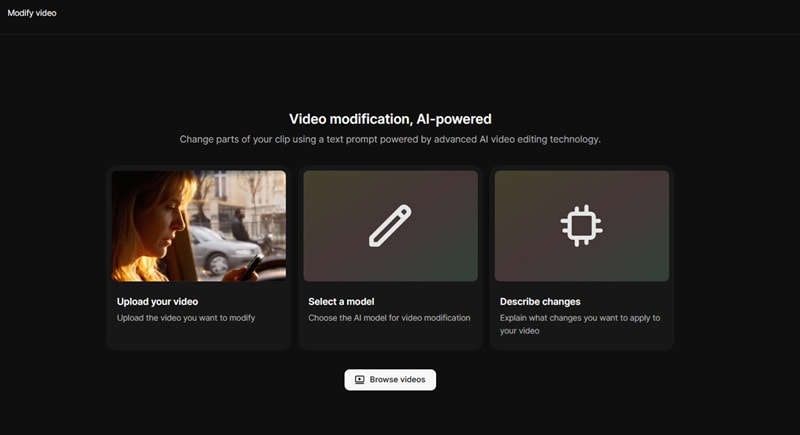
If your clip looks a little blurry or low quality, the Video Upscaler can sharpen it. It increases the resolution and can bring the video up to 4K so the details look clearer. This is especially useful if you plan to post the clip on large screens, presentations, or high quality social media uploads.
2. Video Extender
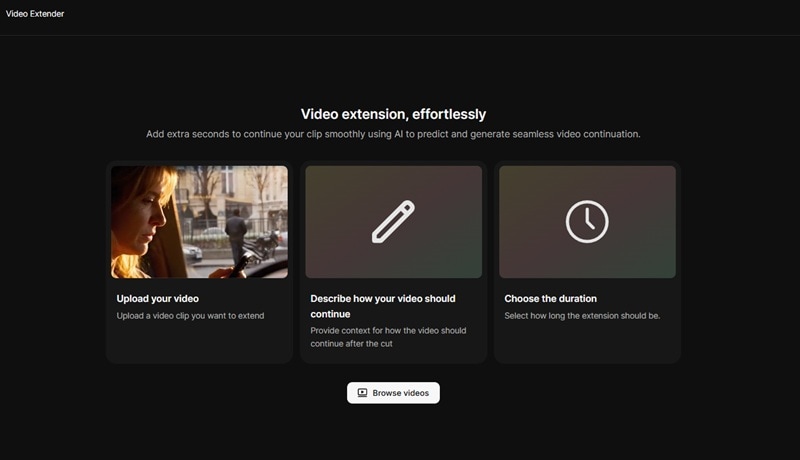
The Video Extender lets you continue the motion so the scene plays longer than the original version. Instead of abruptly ending, the AI tries to expand the movement naturally, which works great for looping backgrounds, cinematic shots, or storytelling moments that need a bit more breathing room.
The All-in-One Workflow
One thing that really stands out with Freepik is how everything works together in one place. Instead of jumping between different apps, you can move from one step to the next without breaking your workflow.
It usually goes like this:
Text prompt → AI image → AI video → edit in the Freepik editor → download or publish.
The best part is you don't need to export files and upload them again somewhere else. Everything happens inside the same platform, under the same subscription. Just create, adjust, and export when you're ready.
Part 4. Honest Freepik AI Review: Is It Worth Your Subscription?
Now, it's time to talk about real results. We dug deep into expert analysis, community feedback, and actual user experiences to give you the most balanced Freepik AI review possible. Let's break it down!
Creative Quality and Multi-Model Performance
As mentioned earlier, Freepik does not rely on a single AI engine. This multi model setup is honestly one of the best parts of the Freepik AI image generator. If one model gives a weird result, you can try another and get something completely different.
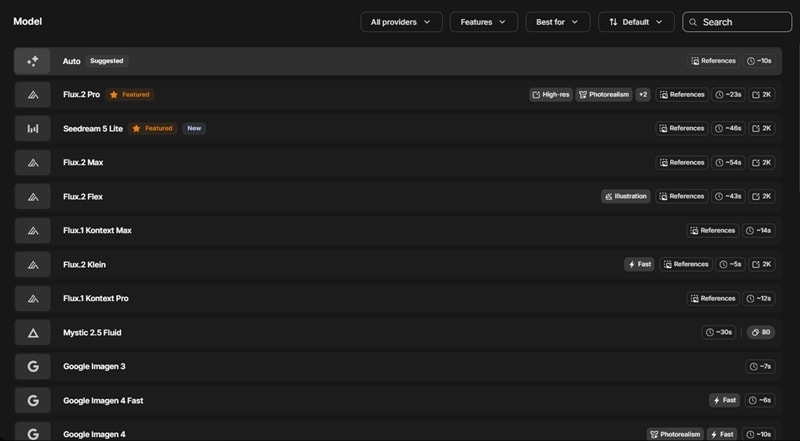
After all, some models are clearly stronger in certain areas.
- Models like Flux follow instructions closely, which makes it easier to guide the result.
- Mystic tends to produce images that look natural instead of overly artificial.
- Ideogram does a solid job with posters, titles, and branding visuals.
- If you rely too much on presets, some images end up feeling repetitive.
- Hands, fingers, or complex objects sometimes look a bit off.
- Sometimes the tool misunderstands very specific instructions.
Freepik AI vs. The Competition
So, how does Freepik AI image generator actually hold up against the other big names out there? After all, platforms like Midjourney, Adobe Firefly, and DALL E 3 all approach AI image creation a little differently.
Here's a simple side-by-side look.
| Feature | Freepik AI | Midjourney | Adobe Firefly | DALL-E 3 |
| AI Models | 30 models | One proprietary model | 19 models | Uses the DALL E image model |
| Image Quality | Very good across most use cases | Best pure image quality out there | Very good | Very good |
| Video Generation | Full video suite built-in | Available | Available | Not available |
| Stock Library | 200M+ assets | Not available | Integrated with Adobe Stock | Not available |
| Free Tier | 20 images per day | Not available | Available with credits limits | Available with limits |
|
Show More
Show Less
|
||||
What's the Internet Actually Saying? Real Reddit Feedback
Sometimes, the best way to figure out if a tool is worth it is to just look at what regular people are saying after actually using it. In this case, Reddit is the best site to go to. One user shared their experience after one month of heavy use and more than 100k credits spent, which gives a pretty realistic picture of what the platform does well and where it still struggles.

So, we went through the Freepik AI Reddit threads to get a feel for the real sentiment. Below is a quick summary of the main pros and cons people mentioned.
| What Users Really Like | What Frustrates Some Users |
| Strong image quality from models like Mystic and Flux | Inpainting can be inconsistent |
| Character reference tools work surprisingly well | Video tools are decent but not always as strong as native platforms |
| Outpainting and upscaling tools are excellent | Lip sync still feels unfinished |
| Huge selection of AI models and features in one place | Strict content moderation |
| Good for fast creative workflows | Small interface bugs appear sometimes |
|
Show More
Show Less
|
|
Part 5. Best Freepik AI Image Generator Alternatives in 2026
After considering all important aspects in our Freepik AI image generator review, it seems like while Freepik is solid, it's still not perfect for everyone. Maybe the credit system drives you crazy, or you need tighter video editing control, or your workflow demands something more specialized.
In such cases, there is nothing wrong in looking at other options. So, we'll recommend the top three Freepik AI image generator alternatives!
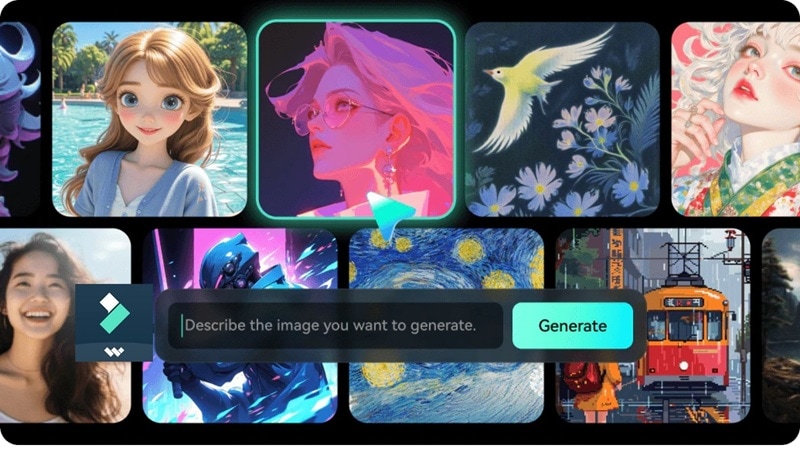
1. Wondershare Filmora: Best Overall Alternative (Best for Video-First Creators)
 Secure Download
For creators who need more than just static visuals, Wondershare Filmora stands as the premier Freepik AI alternative. While Freepik excels in stock assets, Filmora integrates the AI image generator directly into a professional video timeline. It's powered by cutting-edge models like Sora 2 and Veo 3.1, making it the ultimate tool for turning prompts into cinematic video content seamlessly.
- Timeline-Integrated AI Image Generator: Generate images from text prompts directly inside your editing project and drag them straight onto the timeline.
- AI Image-to-Video with Native Audio: Transform images into dynamic video clips with auto-generated dialogue, ambient sounds, and music using Sora 2 and Veo 3.1.
- Multi-Style Variety: Anime, cinematic, 3D, cyberpunk, sketch, realistic, and more; instant style-switching on the same prompt.
- Complete Post-Production Suite: Color correction, noise reduction, captions, audio ducking, transitions, AI object removal, all in one timeline.
- Cross-Platform: Desktop (Windows & Mac) and mobile (Android & iOS) support for an uninterrupted creative workflow on the go.
- Extensive AI features for enhancing your image after generating.
- Wide range of templates inside its AI image to video across different niches.
- Ideal for YouTube creators, social media managers, and marketers.
- If you only need images with no video workflow, it may feel like overkill.
2. Adobe Firefly: Best for Professional Designers & Client Work
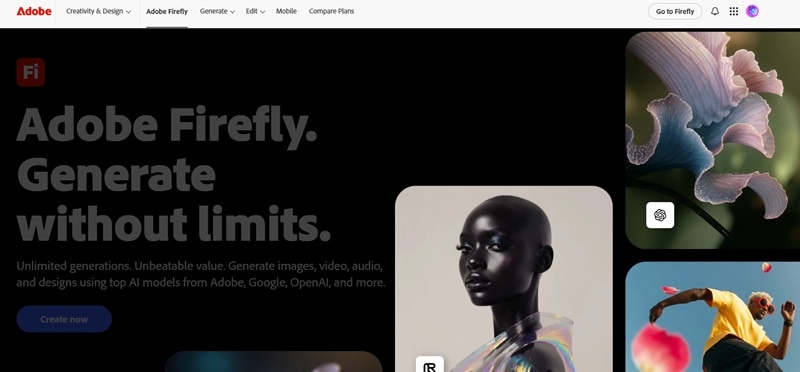
For professional designers working with clients or in corporate environments, Adobe Firefly is the Freepik AI image generator alternative that prioritizes legal safety above all else. It's built into the Adobe Creative Cloud ecosystem and is the go-to choice for anyone already living in Photoshop, Illustrator, or Premiere Pro.
- Generative Match: Upload a reference image and generate style-matched variations for exceptional brand consistency.
- Structure Reference: Keep a composition's exact layout while completely changing the creative style.
- Seamless CC Integration: Use Generative Fill directly in Photoshop for smart, context-aware editing.
- Unmatched legal protection.
- Deep integration with Photoshop, Illustrator, and Premiere Pro for seamless workflows.
- Video generation and advanced features require a paid Creative Cloud plan.
- Less intuitive or valuable for non-Adobe users.
3. Stable Diffusion: Best for Power Users Who Want Total Control
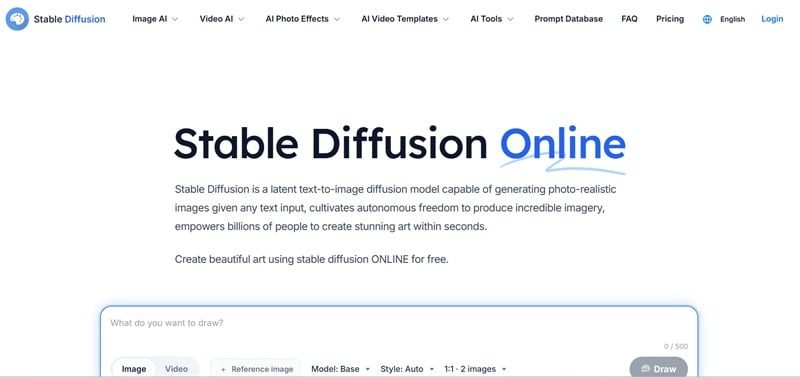
For our last Freepik AI image generator alternative, we'd like to recommend Stable Diffusion. It's open-source, free to use, and can be run locally on your own hardware. For the technically inclined, the privacy-conscious, and anyone who wants complete creative freedom with zero subscription fees, Stable Diffusion remains in a category of its own.
- Massive Community & Custom Models: Thousands of fine-tuned models, LoRAs, and checkpoints on platforms like Civitai.
- ControlNet: Granular control over pose, depth, composition, and style. The technical depth here is unmatched anywhere.
- ComfyUI & Automatic1111: Powerful interfaces that let advanced users build complex, multi-step generation pipelines.
- Genuinely unlimited and free after initial setup.
- Maximum creative freedom and customization through open-source extensions and community fine-tunes.
- Setup requires technical knowledge (Python, GPU drivers, command line).
- Consistent quality requires significant prompt engineering, model research, and manual fine-tuning.
Conclusion
This Freepik AI image generator review takes a close look at the image quality, the wide range of AI models available, and the tools that come with the platform. Overall, Freepik stands out as a strong option thanks to its all-in-one AI suite. At the same time, it is not flawless. Some results can feel inconsistent, moderation rules can be strict, and the video generation tools still have room to grow.
If your workflow leans more toward deeper video creation, Wondershare Filmora is a great companion. Its AI image generator offers a wide range of styles, and the platform connects smoothly with AI video generation and editing tools. Filmora also gives you a full timeline editor, which makes it easier to turn simple AI visuals into complete videos with transitions, effects, and polished finishing touches.

FAQs
-
Can I use images generated by Freepik AI for commercial projects?
Images created with the Freepik AI image generator can be used for commercial work as long as you follow Freepik's license terms. Paid subscribers receive a commercial AI license, which allows you to use generated visuals in marketing materials, websites, social media, and client projects. -
How do I use the Freepik AI image generator to create custom images?
Start by opening the Freepik AI image generator feature inside the AI Suite. Type a clear prompt describing the image you want, choose an AI model and style, adjust settings like aspect ratio, then click generate. After the image appears, you can refine it, upscale it, or download it. -
Is there a way to use Freepik Premium features for free?
Freepik's free plan includes up to 20 AI image generations per day. However, most advanced tools require a paid plan, so there isn't a fully free way to access Premium features long term.
