
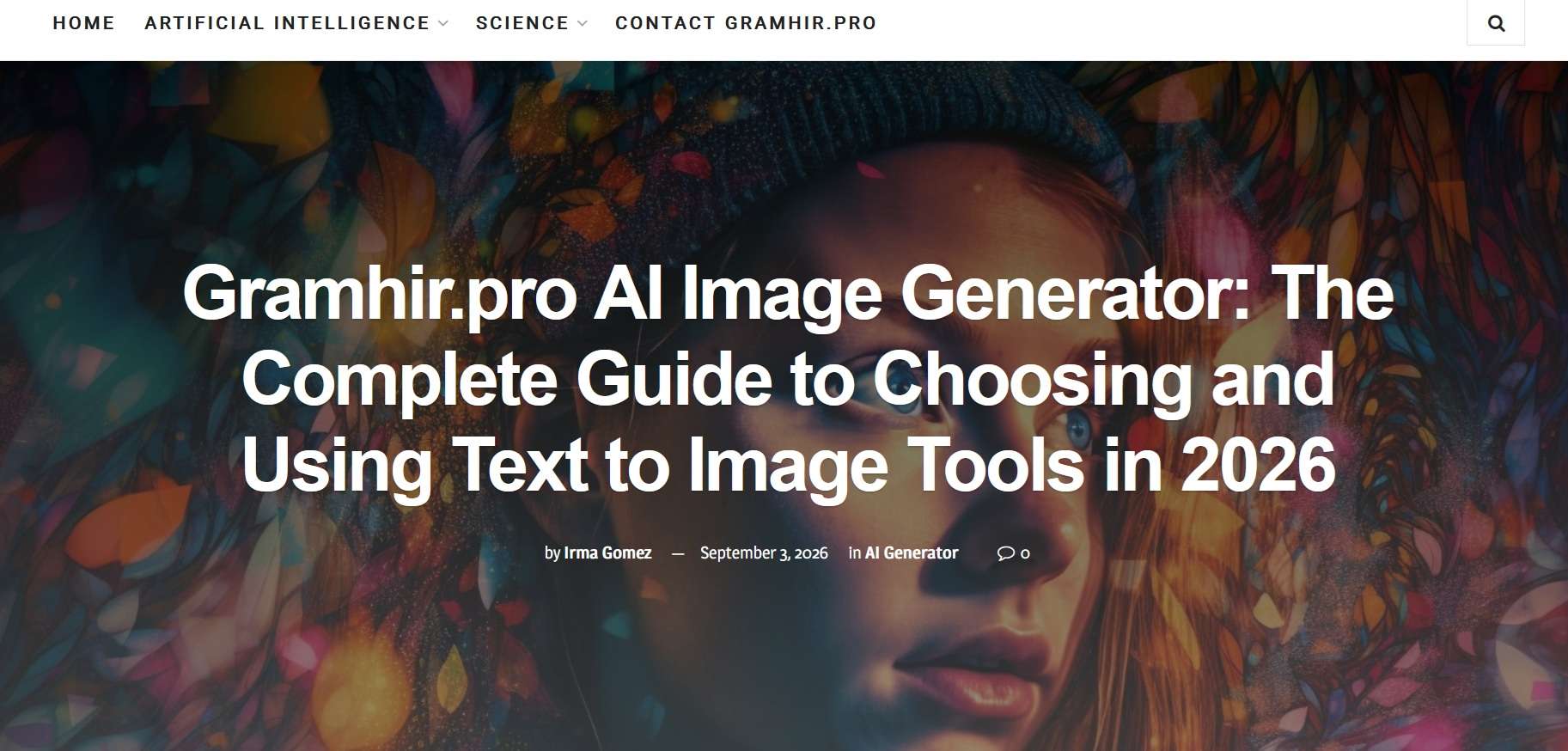
If you search for Gramhir.pro, you may come across websites describing it as a free AI image generator, and even claiming it to support multiple art styles. However, visiting the actual website tells a different story.
What you will find on Gramhir.pro is mostly a publication about AI and science. It writes about AI, but it can’t turn a text prompt into an image the way Nano Banana or GPT Image can. So, what is Gramhir.pro good for, then? We have reviewed its content and topics below, and we have added a working alternative for anyone who came looking for an AI image generator.

Part 1. What is Gramhir.pro?
Gramhir.pro is a content website that publishes articles on artificial intelligence, technology, and science. There is no app to log in to, and no Gramhir.pro AI workspace where you can create anything.
However, many search results and reviews talk about a “Gramhir.pro AI image generator” as if it were a real tool. In reality, it’s a misconception, and it probably spreads because of a few things:
- Reviews copy each other. Many articles describe the same features, such as art styles, fast generation, and free plans, in nearly identical wording. A review that repeats claims from other websites doesn’t necessarily provide reliable evidence that the tool actually works as described.
- The site writes about AI image generation. Gramhir Pro publishes articles and guides on how to generate AI images, which can be mistaken for a generator. Reading about the process is not the same as having a tool that does it.
Some websites also correlate Gramhir.pro with Gramho, an Instagram analyzer and viewer tool that was reportedly renamed Gramhir and later shut down. But neither Gramho nor Gramhir.pro is proven to be an AI generation tool itself, and there’s no confirmed link showing that Gramhir.pro belongs to the same operator.
Part 2. What Does Gramhir.pro Offer?
Gramhir.pro is a place to read. Its content is built around AI news and explainers, plus some wider science coverage. Some of the main topics covered on Gramhir.pro include:
- Artificial Intelligence
- AI in Industry
- AI Ethics and Regulation
- AI Security
- Science
Does Gramhir.pro Have an AI Image Generator?
No, Gramhir.pro only publishes articles about AI image generators. It doesn’t have its own image generation tool or a feature that lets you turn text prompts into pictures. Although you may find guides and information about AI image generation on the website, you can’t use Gramhir.pro to create or edit images.
Part 3. Gramhir.pro AI Image Generator Alternatives for Creating Images
To actually generate AI images, Wondershare Filmora works as a Gramhir.pro AI image generator alternative that turns text prompts into images inside a video editor. Filmora’s AI Image Generator supports models such as Nano Banana Pro, Nano Banana 2, and GPT-Image 2.
You can choose the model that best suits your prompt and compare results without leaving the app. Moreover, since Filmora is primarily a video editor with built-in AI tools, you can also add your generated images to videos, apply text and effects, or combine them with other media to create complete projects.
Features of Filmora AI Image Generator
- Text-to-image generation: Describe what you want and get an image back.
- Style options: Choose a look such as photorealistic, illustration, 3D, or abstract.
- Aspect ratio control: Select an aspect ratio that fits your intended platform, including square, landscape, and vertical formats.
- Resolution settings: Choose the output quality that suits your project, with support for resolutions up to 4K (depending on the selected model).
- Timeline integration: Drag your generated images directly onto the editing timeline to refine or use them in videos.
- Post-generation editing: Adjust colors, apply filters, add text, and make other edits without switching to another application.
Part 4. How to Generate AI Images with Filmora
Filmora works both on desktop and mobile. You can generate images on either one, and start by following the tutorial below.
How to Generate AI Images on PC
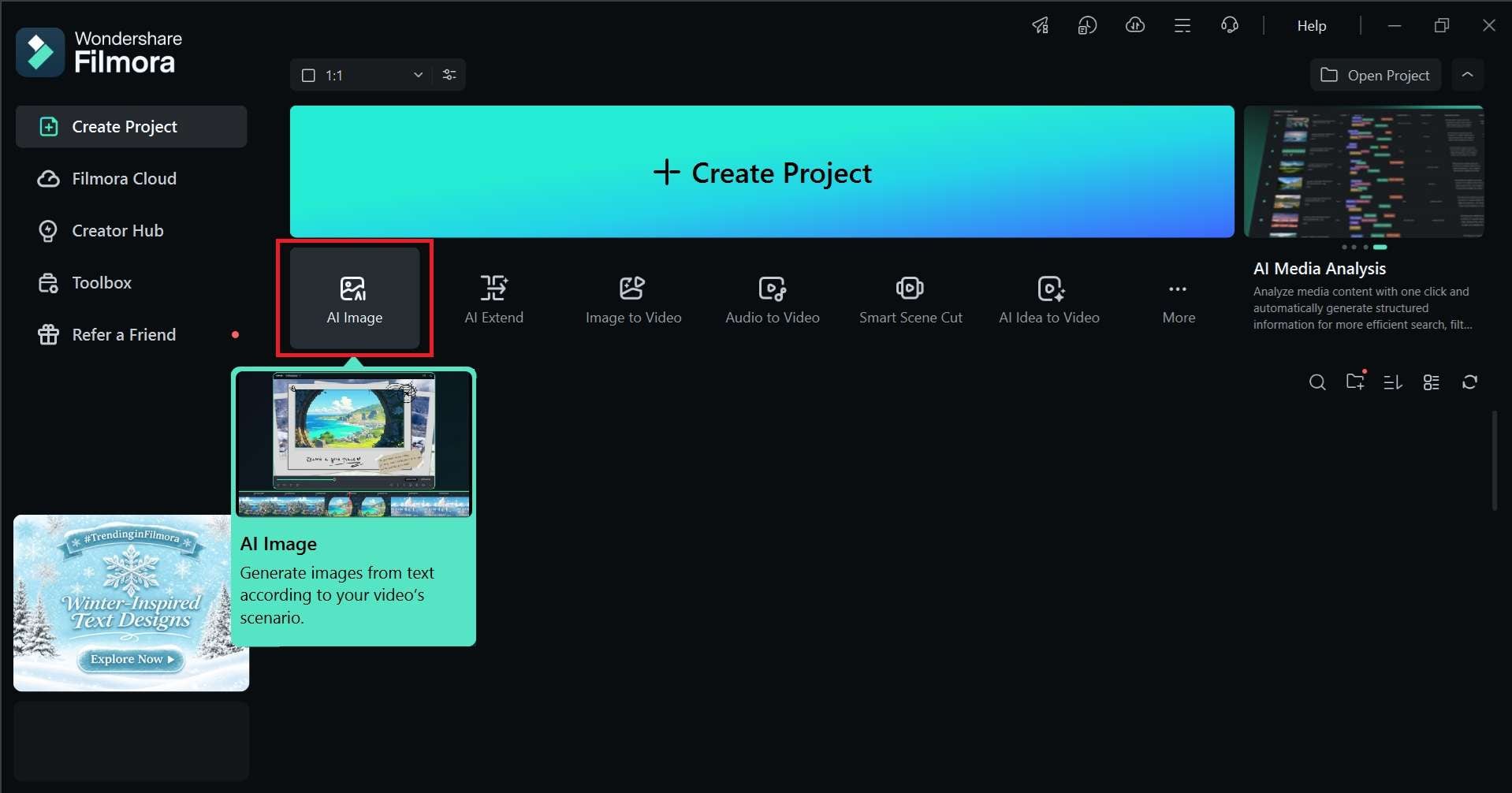
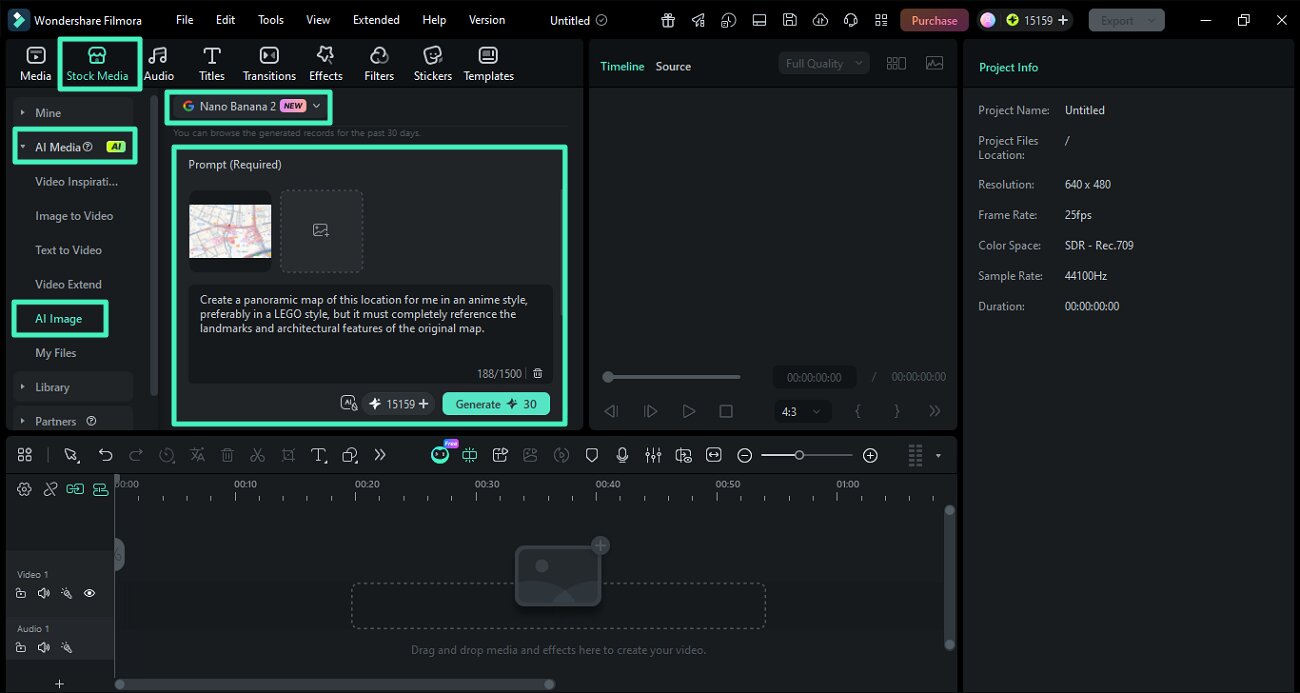
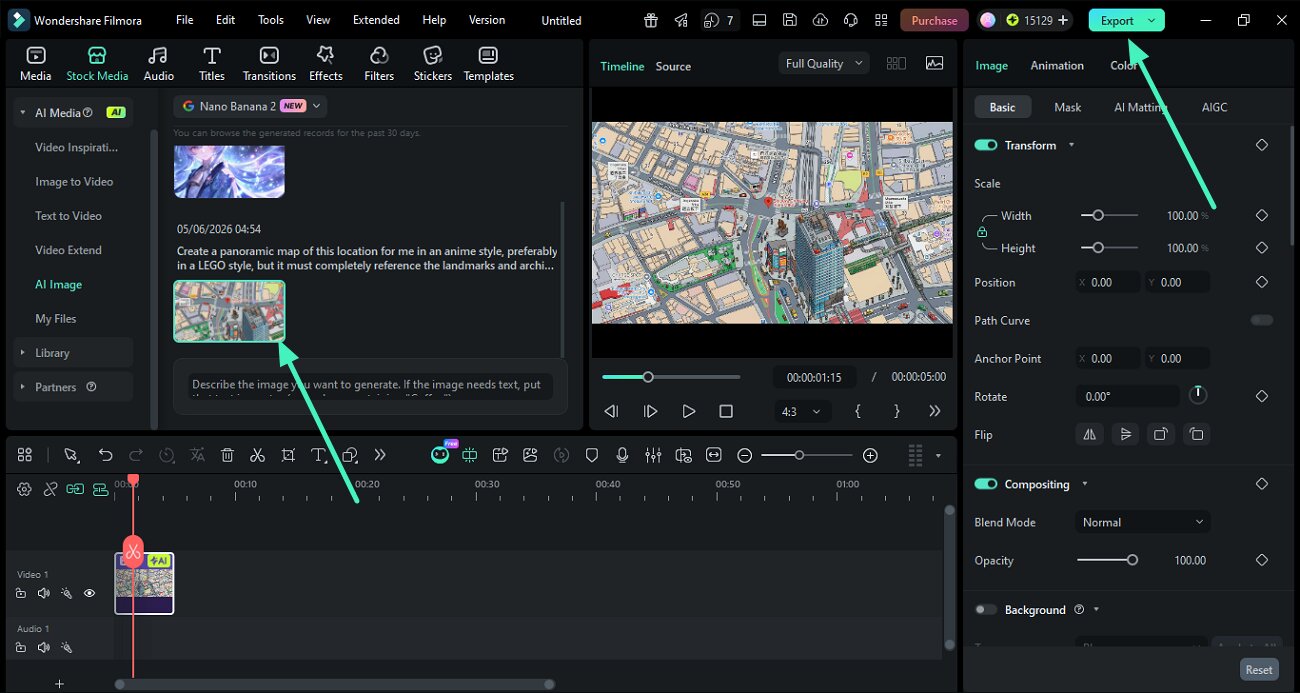
To download the result, click Export and choose the format you need, whether you want to save the result as an image or export your edited project as a video.
How to Generate AI Images on Mobile
To generate AI images in the Filmora mobile app, you can find the AI Image tab when you start a project. After that, you can enter a prompt, choose your settings, and generate the image just like on desktop.
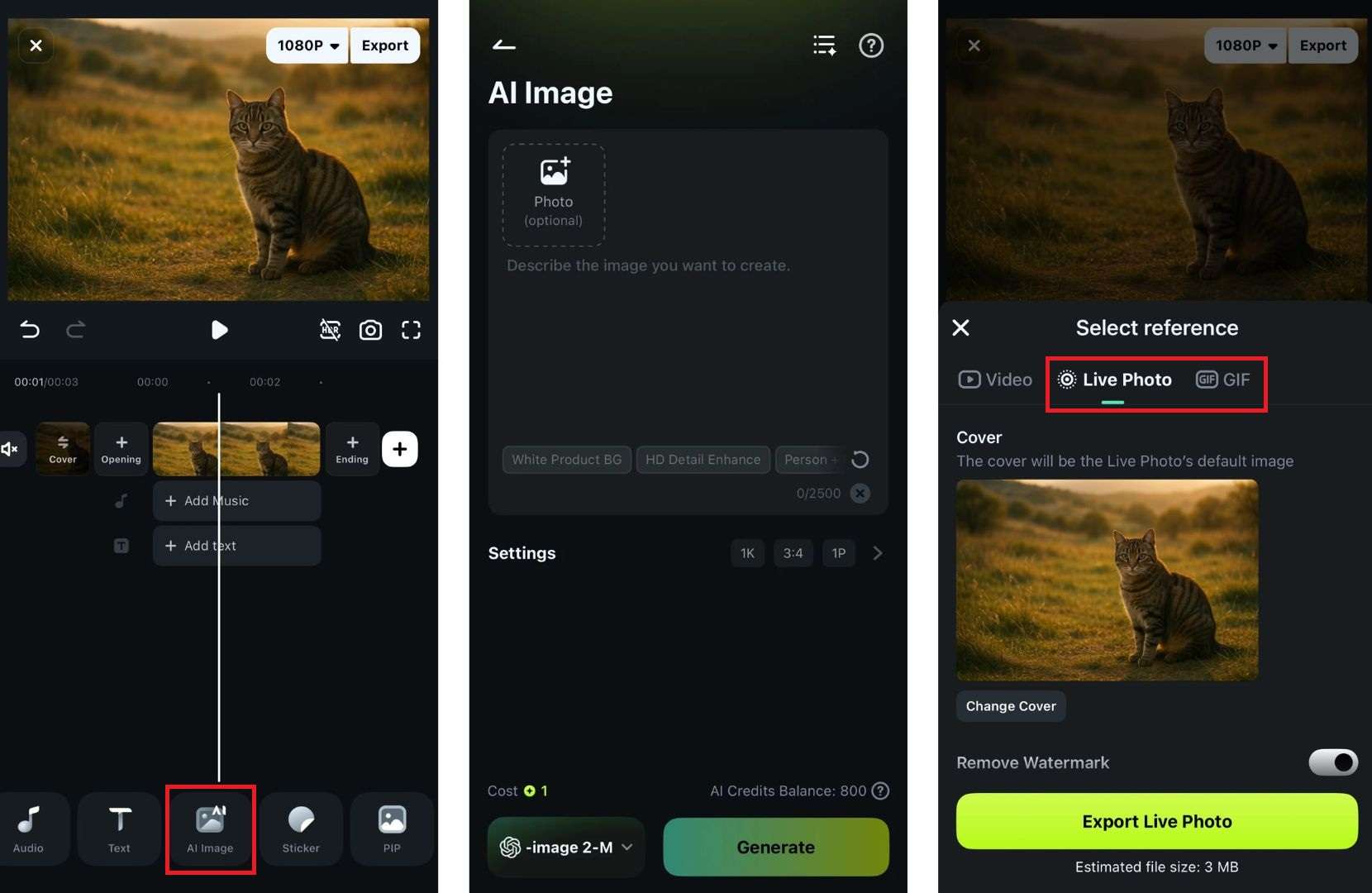
Note that the Filmora mobile app currently offers Live Photo or GIFs as an image output format. You can also turn them into video with Filmora’s AI Image-to-Video.
 Secure Download
Conclusion
Gramhir.pro is not an AI image generator tool, even though some websites claim it is. There is no such thing as Gramhir Pro AI. What it offers is articles and guides about AI and science, with no prompt box or image creation feature. You can use it to read and learn about AI.
If you want to turn a text prompt into an image, you need a tool like Filmora’s AI Image Generator that’s built for it. It lets you choose a model, set the resolution and aspect ratio, and bring the result straight onto the timeline for editing.
FAQs
-
1. How often does Gramhir.pro update its content?
Gramhir.pro has no fixed schedule to update its content. New articles come in irregular bursts, with gaps of weeks or months between them. -
2. What’s Gramhir.pro's pricing?
You can access Gramhir.pro and read its content for free. You don’t need to pay for a subscription or create an account to browse its content. -
3. Does Gramhir.pro offer AI tutorials for beginners?
Yes, Gramhir.pro publishes informational guides about AI tools and technologies that help beginners understand different concepts and how these tools work. However, these are written articles rather than interactive tutorials or hands-on training. -
4. Can I download images from Gramhir.pro?
Gramhir.pro doesn’t provide an AI image generation or download feature. You can view images included in its articles, but you can’t use the website to generate and download your own AI pictures.