

 TL;DR:
Magic Hour AI is a fast, browser-based generative tool best suited for creating quick social media clips and visual prototypes, but its raw outputs typically require timeline editors like Wondershare Filmora for professional polish.
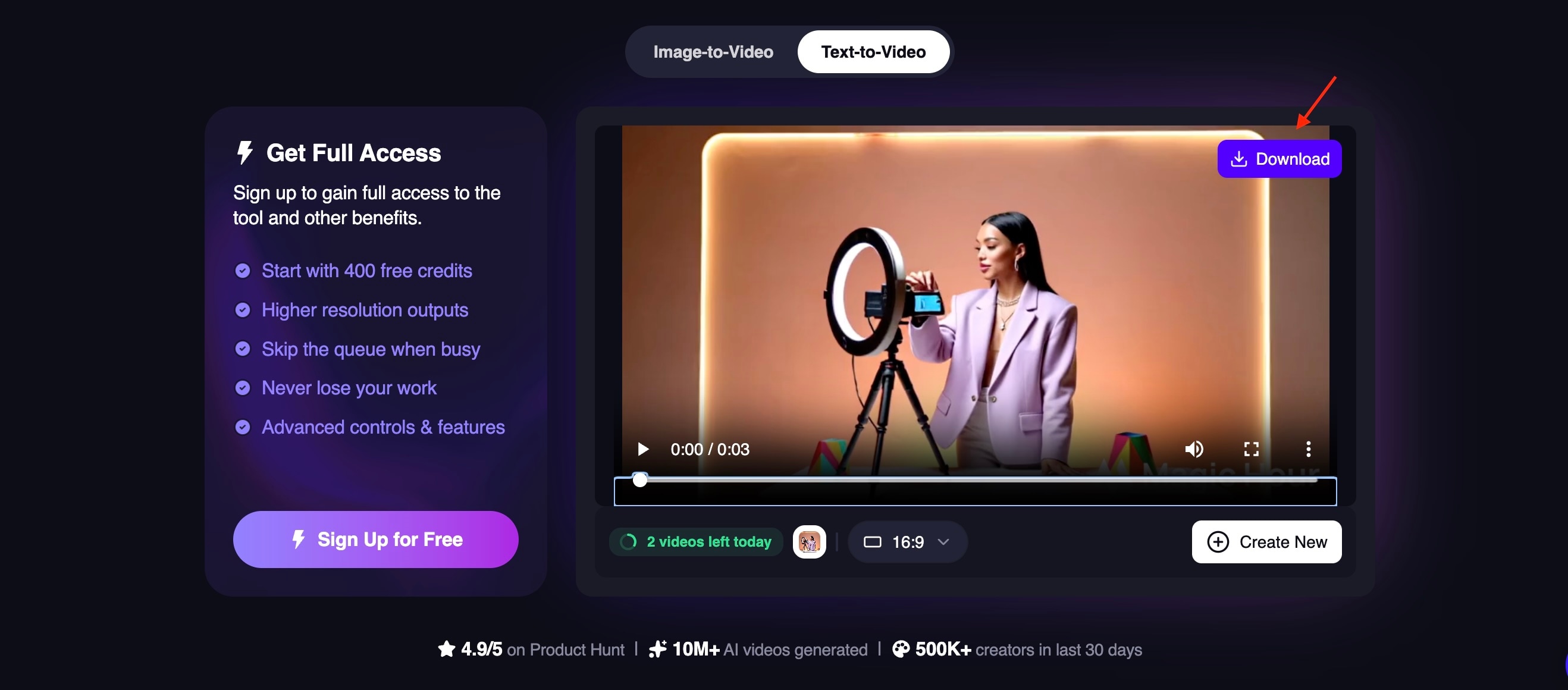
● The free tier provides 400 non-expiring credits upon signup to generate 10 daily images, three 3-second videos, and 5-second AI talking photos, but restricts all exports to a 512px resolution, enforces watermarks, and prohibits commercial use.
● Image-to-video and animation outputs frequently exhibit mechanical stiffness, visual artifacts in complex scenes, and a weak understanding of real-world physics, making the platform reliable primarily for low-motion scenarios.
● For alternative use cases, Runway ML offers better cinematic quality and advanced motion control, Pika provides superior stylized visual expressiveness, whereas Magic Hour AI focuses strictly on speed and low-effort generation.
Ask AI for a summary
 ChatGPT
 Perplexity
 Gemini
 Claude
 Grok
Grok
Magic Hour AI is a powerful browser-based AI video creator that integrates a Magic Hour AI image generator, text-to-video, and AI image-to-video tools. Whether you need an AI talking photo for social media or high-quality AI text-to-image assets, this platform simplifies the creative workflow.
Features You'll Love
Creating videos or animated visuals used to require multiple tools, editing skills, and a significant amount of time. Now, AI platforms are transforming that workflow.
Magic Hour AI is one of the latest tools designed to simplify the process by allowing users to generate images, animate photos, and create short videos from simple prompts or uploaded visuals. Rather than jumping through multiple apps, you can experiment with various AI-powered features within a single browser-based platform.
The idea behind Magic Hour AI is straightforward: turning text, images, and portraits into engaging visual content with minimal manual editing. Here are its key features:
Text to Video Generation
Magic Hour AI can convert written prompts into short AI-generated videos. Users describe a scene, concept, or action, and the system creates a visual sequence based on that input. This feature is useful for quick storytelling, promotional content, or concept visualization.
Image to Video Animation
The Magic Hour AI image-to-video feature transforms static photos into animated clips. The AI adds motion effects, simulated camera movement, or scene dynamics, to make ordinary images feel more cinematic and engaging.
AI Talking Photos
One of the most attention-grabbing features is the ability to animate portraits. By syncing facial movement and voice, Magic Hour AI can turn a still photo into a speaking character. This is often used for explainer videos, educational content, or creative social media posts.
Text to Image Creation
With the Magic Hour AI image generator, users can create entirely new visuals from text descriptions. This allows creators to generate unique images, illustrations, or concept art without needing graphic design skills.
AI Photo Enhancements and Creative Effects
The platform also includes tools for generating stylized images and modifying existing photos, helping users experiment with different artistic looks or visual styles.
Price
Yes, and it's one of the platform's biggest selling points. Magic Hour operates on a freemium model, meaning you can access core features without spending a cent.
- Magic Hour AI Image Generator is free for 10 generations per day
- Magic Hour AI Image-to-Video and Text-to-Video are free for up to 3 generations per day, with each clip capped at 3 seconds.
- Magic Hour AI Talking Photo is free for up to 5 seconds of video in length. Sign up for a free account to access extended durations.
- Magic Hour AI Lip Sync and Auto Caption Generator are also free to use
When you create an account, you get 400 credits for free. However, there are limits worth knowing about:
- Watermark on all outputs. Free plan generations include a Magic Hour watermark.
- Resolution capped at 512px. Higher resolution exports are locked behind paid tiers.
- Non-commercial use only. The free plan is intended for personal use. Commercial rights require a paid subscription.
Pros & Cons
Like many modern AI creation tools, Magic Hour AI sits at the intersection of speed and creative automation.
Tools such as the Magic Hour AI image generator, Magic Hour AI text-to-image, and Magic Hour AI image-to-video are designed to remove many technical barriers that usually come with visual production. However, that convenience also means creators sometimes sacrifice the level of precision and control that traditional editing tools provide.
- Generous free tier. Most AI tools are accessible without a subscription or credit card.
- Multiple AI tools within one platform. The platform combines text-to-image, image-to-video, and animated portrait tools in one interface.
- Accessible for non-technical creators. The interface focuses on prompt-based generation rather than manual timelines or animation layers.
- Encourages creative exploration. Because content can be generated quickly, creators can test multiple visual ideas and styles without committing significant production time.
- Credits never expire. Any unused credits roll over and remain yours indefinitely.
- Limited fine-tuning compared to traditional editors. Magic Hour AI offers less control over precise details. You may still rely on dedicated editing software afterward.
- Inconsistent generation quality. Some outputs may look impressive on the first try, while others require several attempts to achieve a usable result.
- Short-form output limitations. Most generated videos are relatively short, which works well for social media but may not meet the needs of creators working on longer narrative projects.
- AI artifacts in complex visuals. Highly detailed scenes, human anatomy, or complicated movements can sometimes produce visual artifacts or unrealistic motion.
Part 2. Hands-on Testing: Magic Hour AI Key Features
After exploring what the platform offers on paper, the next step is to see how well it performs in practice. Magic Hour AI promises a quick way to generate visuals and videos from simple prompts, but how does it actually hold up?
During testing, the most standout capabilities were its AI image generation and image-to-video transformation tools.
AI Image Generation Capabilities
Magic Hour AI's image generator focuses on converting text prompts into ready-to-use visuals. During testing, the tool produced images that were generally sharp, especially when the prompt included clear details about style, lighting, and composition.

A few key observations from testing include:
- Prompt interpretation. The AI responds well to descriptive prompts such as environment, mood, and artistic style. Detailed prompts tend to generate more accurate and visually coherent images.
- Style flexibility. The generator supports a wide range of styles, including cinematic visuals, illustrations, and stylized portraits, giving creators room to experiment with different looks.
- Occasional inconsistencies. Like many AI image generators, results can vary. Some prompts may produce slightly distorted details or unexpected elements, especially with complex scenes.
- Built for speed and scale over artistry. The platform prioritizes speed and usability over highly stylized outputs.
Overall, the Magic Hour AI image generation tool performs well for quick visual ideation and creative experimentation.
Transforming Visuals
One of the platform's most compelling features is turning static images into animated content through the Magic Hour AI image-to-video feature. During testing, we deliberately uploaded an image without adding any prompt to see how the tool handles creative decisions on its own.

Here are some key takeaways from the testing process:
- No prompt, no problem—to a point. The tool can generate output without any text prompt, defaulting to subtle, safe motion like gentle camera drift or simple movement.
- Motion feels stiff. Even with prompts, the animation lacks natural fluidity. Movements come across as mechanical rather than organic.
- Physics understanding is weak. The AI doesn't have a strong grasp of how objects actually move in the real world. Weight, momentum, and cause-and-effect motion are often ignored or handled inconsistently.
- Speed is the main advantage. The tool's strongest selling point remains how fast it gets you from a still image to a video clip, even for a free user.
Where it performs most reliably is in low-motion scenarios. It may not fully replace traditional video editing or animation tools, but Magic Hour's AI-powered video generation from images is still quite impressive for quick content creation and experimental visual projects.
Part 4. Why You Might Need More Than Just an AI Generator
AI-powered content creation tools like Magic Hour AI are ideal for quickly generating visuals, but the results they produce rarely serve as the final step in a professional content creation workflow.
While features such as the AI image generator, text-to-image, and AI image-to-video can create impressive visuals within minutes, most creators still need a second stage of editing to refine the results.
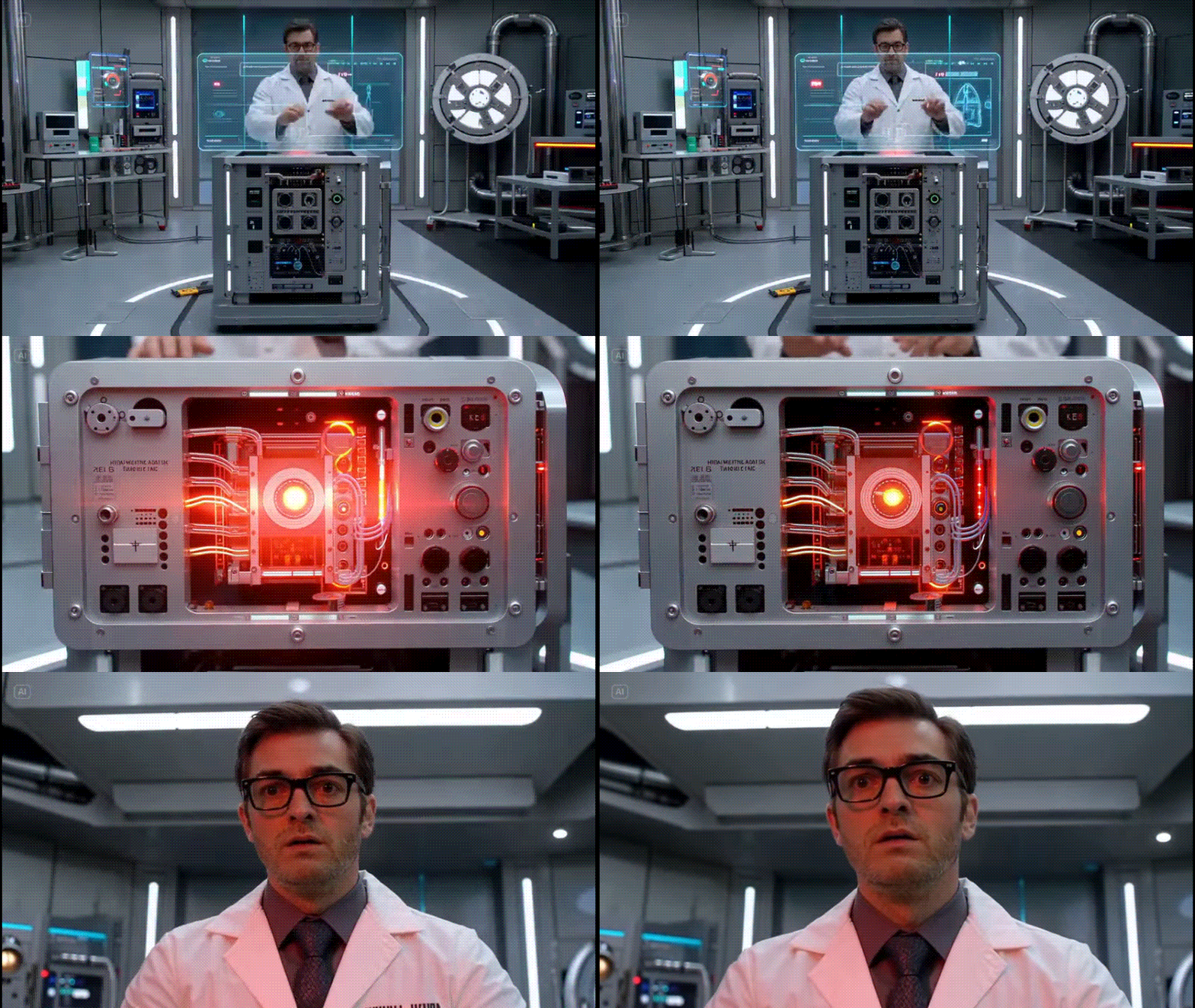
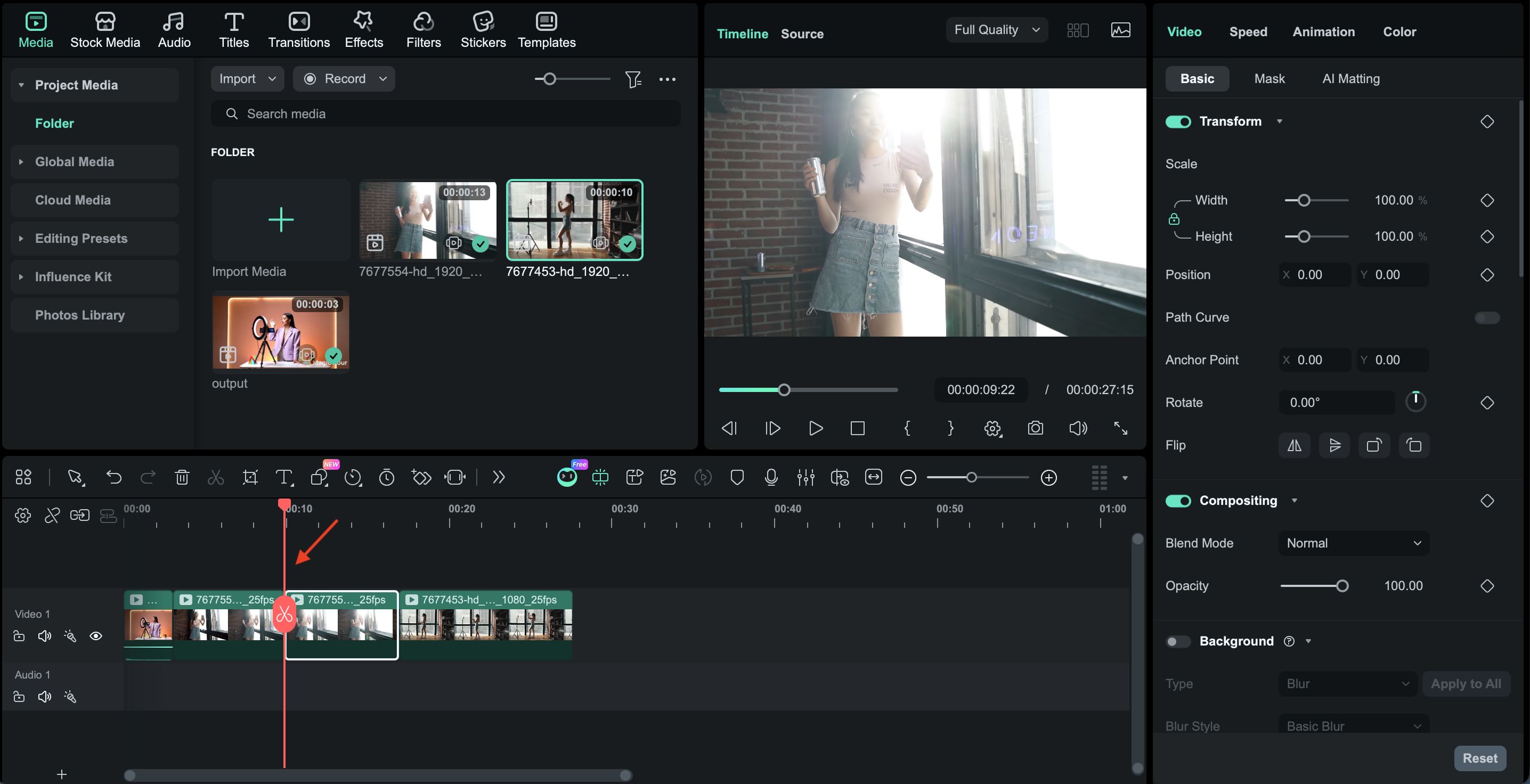
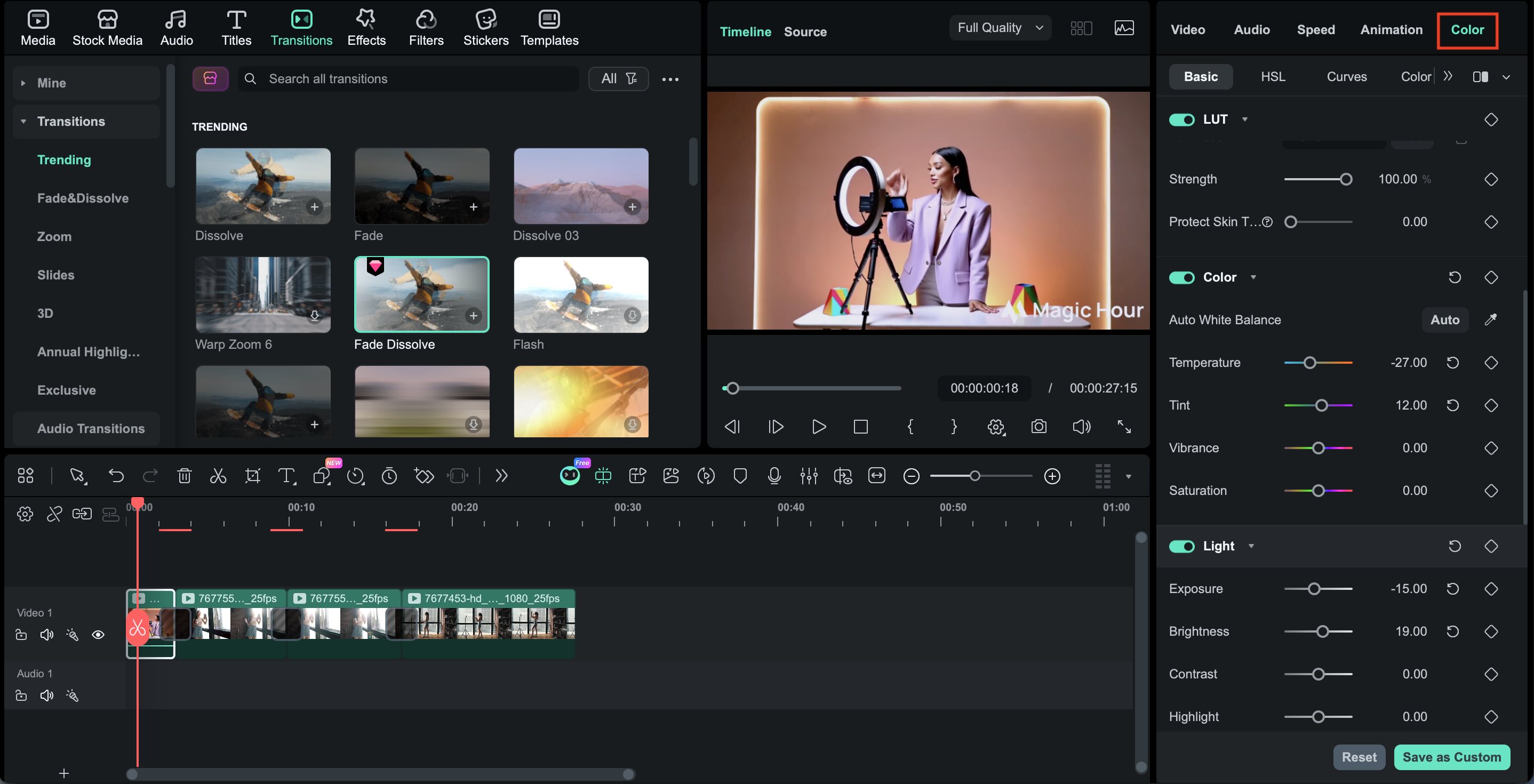
For example, AI-generated clips often require adjustments such as trimming unwanted frames, improving pacing, adding subtitles, enhancing color, or combining multiple generated scenes into a coherent narrative. Without these finishing touches, AI visuals can feel more like raw material rather than a fully polished video.
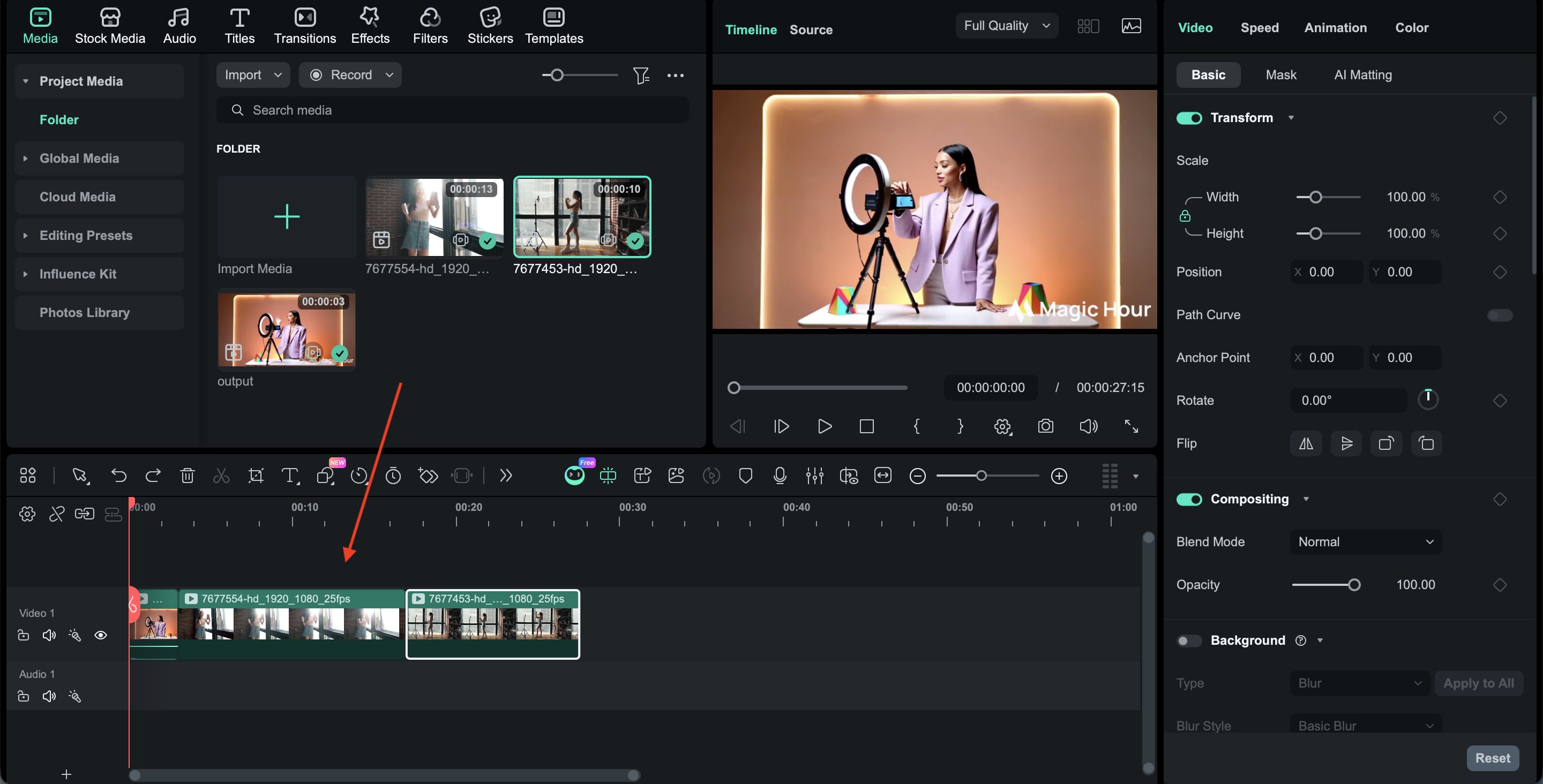
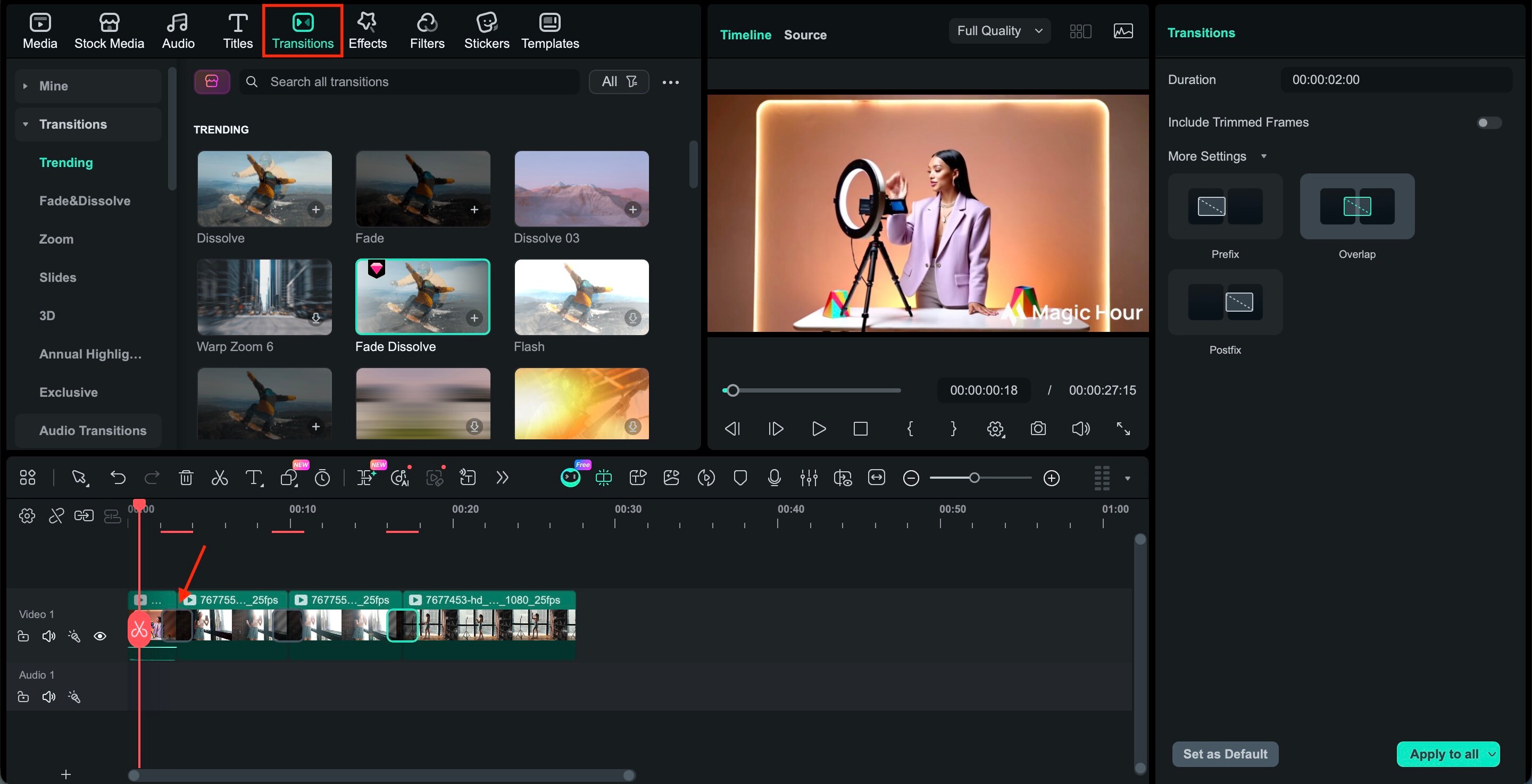
To achieve professional results, we recommend using Wondershare Filmora to refine your clips. Filmora's AI video editing features perfectly complement Magic Hour's raw outputs by adding transitions, color grading, and precise cuts.
 Secure Download
Some capabilities that make Filmora useful after AI generation include:
- Precise timeline editing: Creators can trim, rearrange, and layer clips generated from tools like Magic Hour AI to build a smoother visual flow.
- AI-powered enhancement tools: Filmora includes features such as AI captions, AI copywriting, AI image style transfer and AI visual effects that help polish content without requiring complex manual editing.
- Creative visual effects and transitions: Generated clips can be enhanced with cinematic transitions, overlays, and motion effects to create a more professional look.
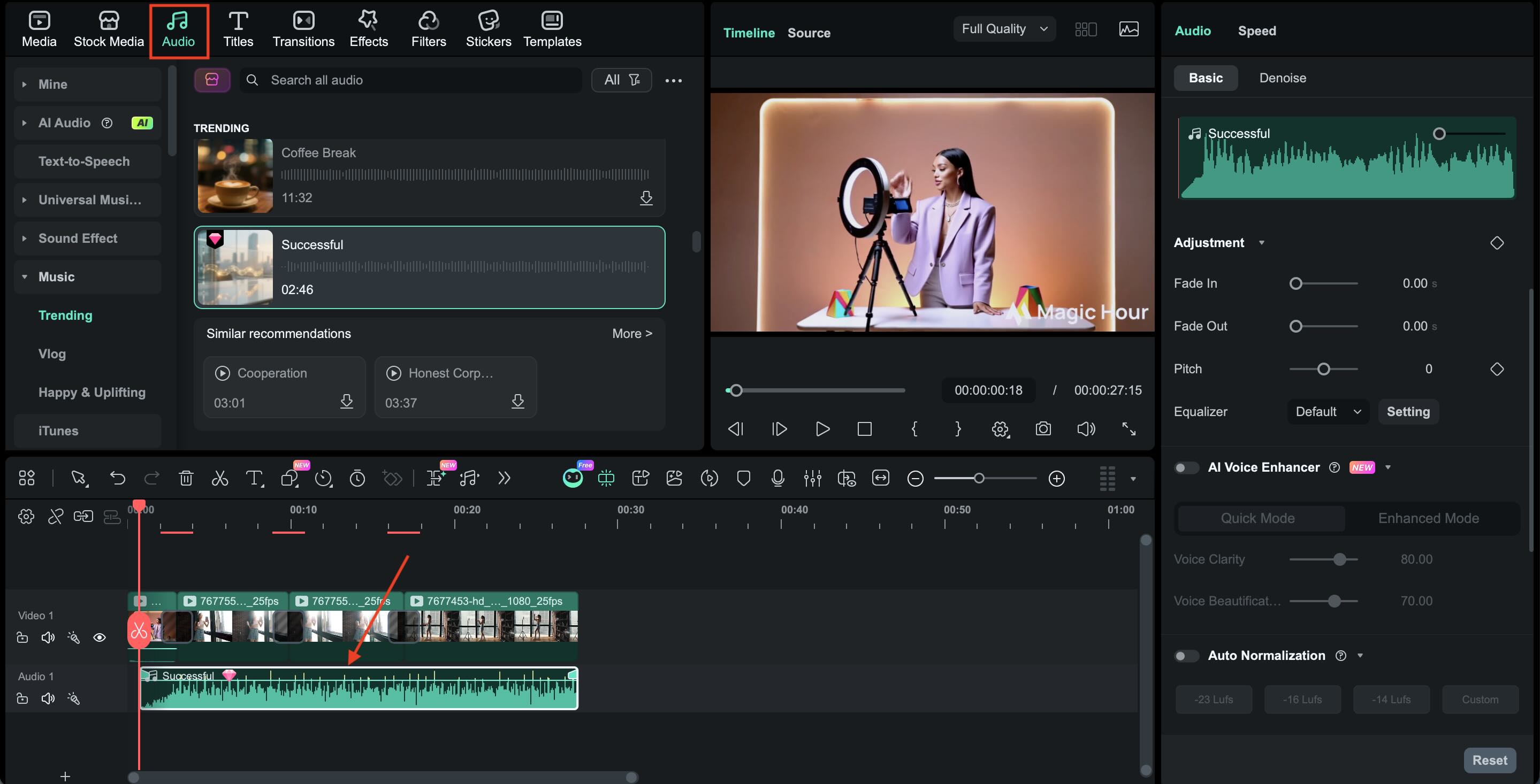
- Audio and storytelling control: Adding voiceovers, sound effects, and background music helps transform isolated AI clips into engaging narrative content.
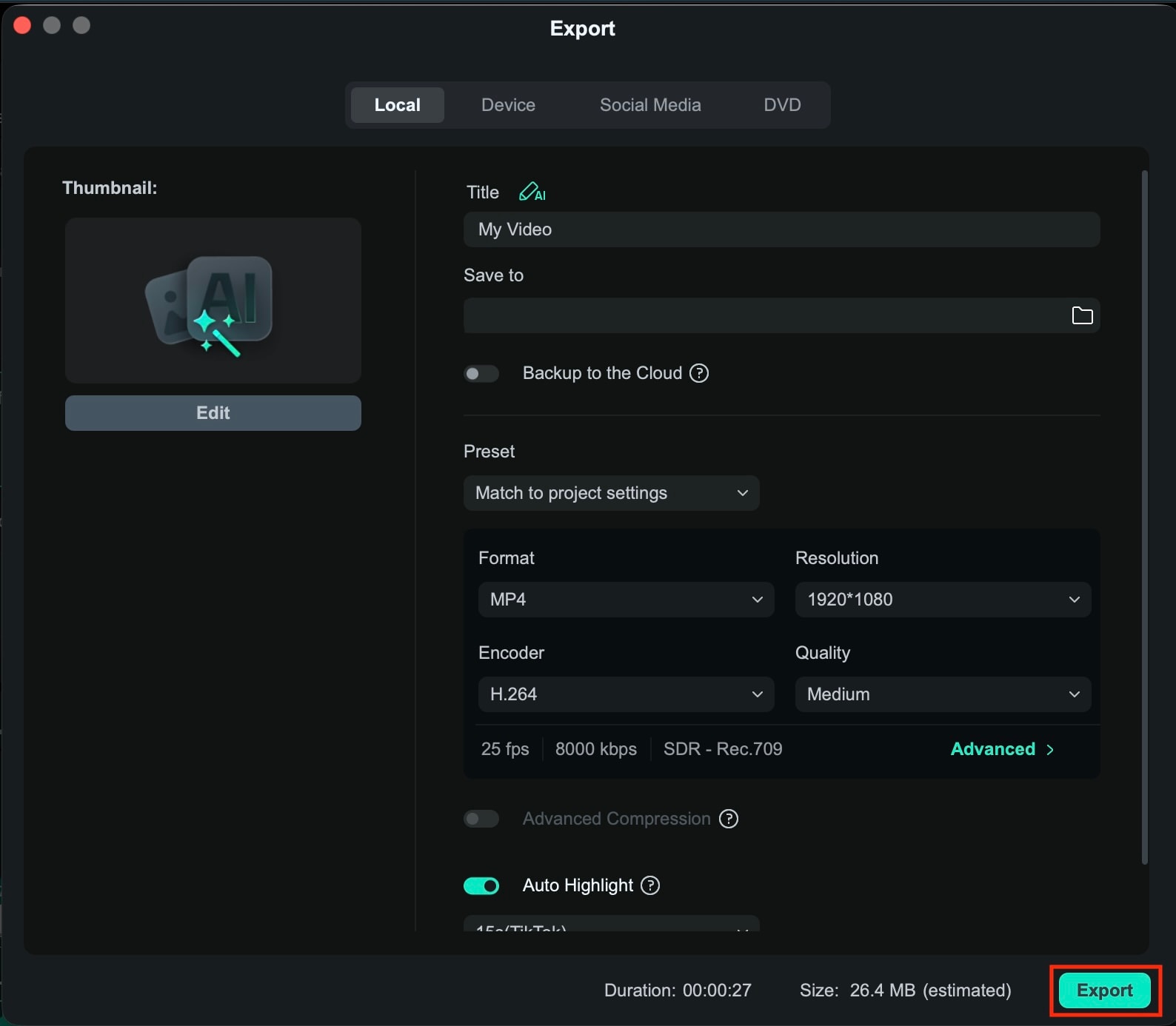
In other words, AI generators like Magic Hour AI can speed up the content creation process, but tools like Filmora help creators turn that raw output into polished videos, ready to be uploaded to platforms like YouTube, TikTok, or Instagram.
Part 5. Magic Hour AI vs. Other Tools: Which Should You Choose?
When reading a Magic Hour AI review, one of the most common questions is how the platform compares with other AI content creation tools. However, not every AI tool is designed for the same purpose.
We try to compare Magic Hour with other leading tools that creators commonly use alongside or instead of it, including:
- Wondershare Filmora — a full-featured video editor with AI-assisted tools, built for refining and polishing footage into a finished product.
- Runway ML — a professional-grade AI video platform favored by creators working on cinematic or experimental AI-generated content.
- Pika — a stylized AI video generator known for its dynamic motion effects and visually expressive output.
Comparison of Magic Hour AI and Other AI Creative Tools
| Tool | Primary Focus | Key Strength | Best For |
| Magic Hour AI | AI content generation | Converts prompts or images into short videos and visuals quickly | Creators who want fast AI-generated content for social media or creative experimentation |
| Wondershare Filmora | Video editing and enhancement | Timeline-based editing, visual effects, and AI-assisted editing tools | Refining AI-generated clips into polished videos |
| Runway ML | Advanced AI video creation | Powerful generative models and creative AI workflows | Creators working on experimental or cinematic AI visuals |
| Pika | Stylized AI video generation | Strong motion effects and visually dynamic AI clips | Creators exploring stylized AI animation and storytelling |
|
Show More
Show Less
|
|||
Verdict
- Magic hour is best for quick, low-effort content, such as social media clips, visual prototypes, and creative experiments.
- Pairing it with Filmora is the smarter workflow for polished output.
- If cinematic quality or advanced motion control matters, Runway ML is the stronger choice.
- For stylized, visually dynamic clips, Pika edges it out on motion expressiveness.
- At its price point, especially on the free tier, Magic Hour offers strong value for what it does.
Part 6. How to Create Professional Videos with AI and Filmora
AI generators are highly effective at producing visuals fast, but turning those clips into a finished video almost always requires an editing pass using a dedicated editor like Filmora.
Conclusion
In this Magic Hour AI review, it's clear that Magic Hour AI offers an accessible way to experiment with AI-powered visuals. Features like the Magic Hour AI image generator, text-to-image, and image-to-video make it easy to turn ideas into visual content within minutes.
While Magic Hour AI is an excellent starting point for creators, the most engaging videos are those with a human touch. Download Wondershare Filmora today to transform your AI-generated visuals into cinematic masterpieces.

FAQs
-
Does Magic Hour AI have a free version?
Yes. Magic Hour AI offers a free tier that gives new users a set number of credits to try the platform. These credits can be used to generate images or short videos. The free plan is mainly intended for testing features, while heavier usage usually requires purchasing additional credits or upgrading to a paid subscription.
-
How does Magic Hour AI's credit system work?
Magic Hour AI runs on a credit-based model. Every generation task, such as creating an image, animating a photo, or producing a video, consumes a certain number of credits. The amount used depends on factors like resolution, video length, and generation type. Higher-tier plans provide more monthly credits and access to additional features.
-
Can content create with Magic Hour AI be used commercially?
In most cases, commercial usage is tied to the platform's paid plans. Users on premium tiers typically receive broader usage rights for the content they generate. Those using the free version may face restrictions, so it's important to check the platform's licensing terms before using generated visuals in commercial projects.
