


 TL;DR:
NewBlueFX is a comprehensive, GPU-accelerated plugin suite containing over 1,500 presets and 177 effects that operates exclusively inside existing 64-bit video editors rather than as a standalone application.
● System requirements demand Windows 10 or macOS 10.15+, 8 GB of RAM (16 GB for 4K workflows), and a minimum of 1 GB VRAM, though utilizing the advanced Titler Pro 7 module requires 4 GB+ VRAM to prevent rendering bottlenecks.
● The flagship TotalFX bundle costs $39 monthly or $799 for a perpetual license, but users exclusively needing advanced 2D and 3D text generation can purchase the Titler Pro module individually to save money.
● Wondershare Filmora eliminates manual installation and version conflicts by natively integrating five core NewBlueFX categories—Stylizer, Essentials, Filters, Elements, and Titler Pro 7—directly into its built-in Effects panel for immediate drag-and-drop application.
Ask AI for a summary
 ChatGPT
 Perplexity
 Gemini
 Claude
 Grok
Grok
According to recent TikTok research, studies show that viewers decide within the first 3 seconds whether to keep watching a video. So, as an editor, titles, transitions, and effects aren't just aesthetic choices; they're make-or-break moments. That’s usually when people start looking into tools like NewBlueFX.
Known for its massive collection of NewBlueFX plugins, it promises to upgrade your editing without switching software. But for many beginners, this platform can be confusing, and that's why we're here to explain it all!
Part 1. NewBlueFX Unpacked: Plugin System or Full Software?
First things first, if you are getting tripped up between "NewBlue" and "NewBlueFX," don't sweat it because they are actually the same thing. Basically, the company dropped the "FX" from their official name a while back because they do way more than just effects now, but honestly, everyone still uses the names interchangeably.
Another thing to keep in mind is that NewBlue is not some standalone video editor where you go to cut your clips and arrange your timeline from scratch. It is a massive, plugin-based system that lives inside the editor you already use.

This is exactly why people getting started often feel a bit lost when they download NewBlueFX. They expect a new app icon to pop up on their desktop, but instead, the magic happens right inside your current workspace.
So, they are basically a collection of video effects, transitions, and titling tools Installed as plugins inside editors like:
- Adobe Premiere Pro
- Blackmagic DaVinci Resolve
- VEGAS Pro
- Avid Media Composer
- Grass Valley EDIUS
- Wondershare Filmora (more on this later!)
This system is often referred to as the NewBlue system, where you stack plugins on top of your main editor.
Basic System Requirements (General Overview)
Because NewBlueFX runs inside another editor, requirements depend on your setup. But generally, here is the baseline for a smooth experience:
| Spec | Minimum | Recommended |
| OS | Windows 10 / macOS 10.15 | Windows 11 / macOS 12+ |
| RAM | 8 GB | 16 GB for 4K |
| GPU VRAM | 1 GB | 4 GB+ for Titler Pro 7 |
| GPU Clock | 902 MHz base | 1506 MHz+ |
| Drive Space | 2 GB (install) | SSD preferred |
| Architecture | 64-bit only | 64-bit only |
Part 2. Inside the Toolbox: Everything NewBlueFX's TotalFX Actually Does
Though NewBlueFX also offers Live production capabilities, most editors hunt down NewBlue software for its post-production magic. The flagship product, TotalFX, is essentially a digital Swiss Army knife. We are talking about over 1,500 presets across 177 video plugins. It’s a lot to take in, so let’s break down the heavy hitters.
1. Titling (Titler Pro)

This is easily one of the strongest parts of NewBlue software. If you’ve ever struggled to make clean, professional titles, this tool alone can save you a ton of time.
Key Features:
- Create stunning animated 2D and 3D titles.
- Lower thirds, intro cards, and credit rolls.
- Hundreds of pre-built customizable templates.
Best For: YouTubers, event videographers, news broadcasters, and anyone who wants titles that genuinely impress.
2. Video Stabilization

If your footage comes out shaky, this tool helps clean it up without needing extra software. It’s built for quick fixes but still gives you enough control to fine-tune things.
Key Features:
- Smooth out shaky, handheld, or action footage.
- Fine-tune stabilization region and strength.
- Multiple tracking points for smarter results.
Best For: Travel vloggers, event shooters, and anyone filming handheld.
3. Video Transitions

This is where your edits start to feel more dynamic. Instead of basic cuts, you get a wide range of transitions that are easy to apply but still look professional.
Key Features:
- 3D transitions, light effects, and stylized wipes.
- 69 transitions with 861 presets.
- Includes Graphic Wipe, Light Rays, Louver Grid, and more.
Best For: Social media videos, weddings, and fast-paced edits.
4. Chroma Key (Green Screen)
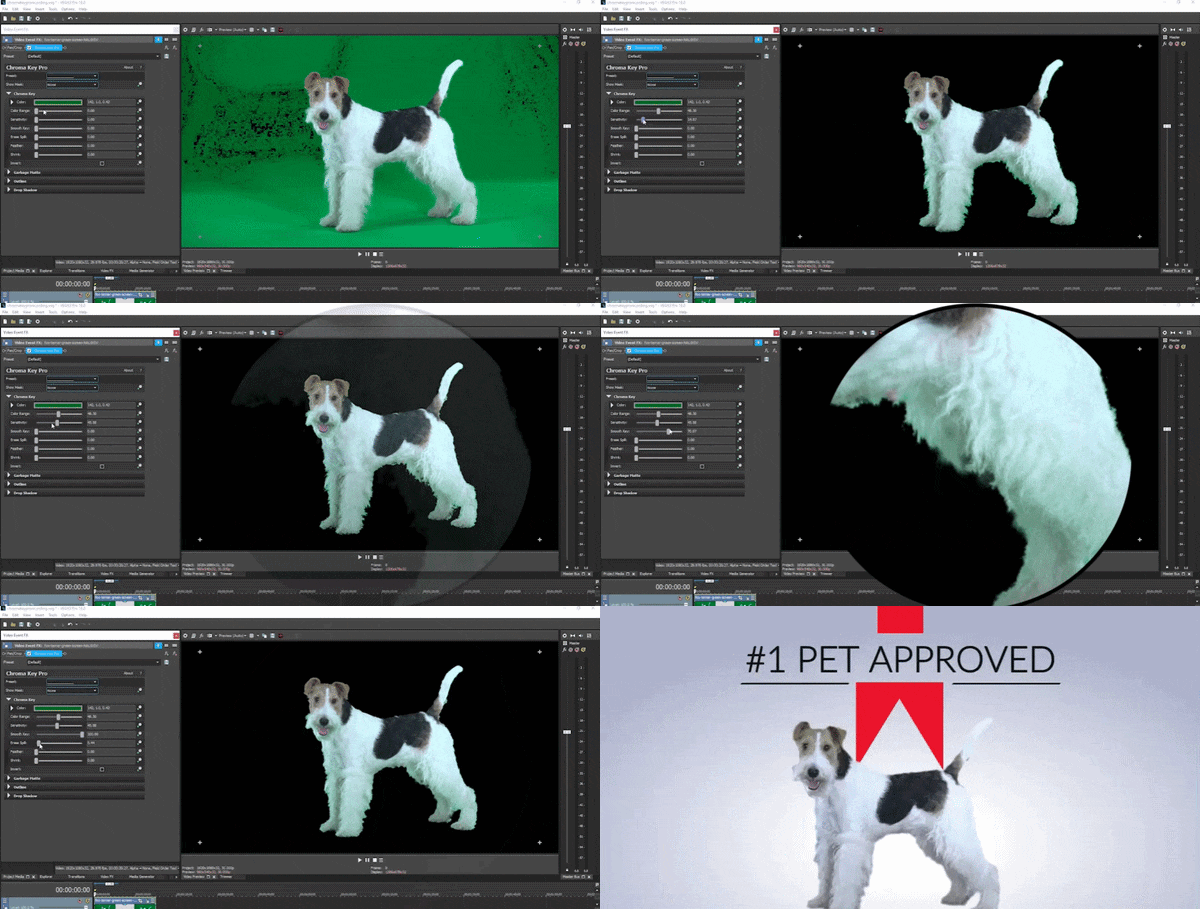
This tool helps you remove backgrounds and place your subject anywhere you want. It’s simple enough for basic use but flexible enough for more detailed setups.
Key Features:
- Clean background removal with precise keying.
- Controls for sensitivity, range, and spill.
- Custom masking for tricky shots.
Best For: Filmmakers, streamers, studios, and anyone compositing subjects over custom backgrounds.
5. Video Filters

If you want your video to have a certain vibe or style, this NewBlueFX plugin is where you’ll spend time. These effects can completely change how your footage looks in just a few clicks.
Key Features:
- 27 color-enhancing cinematic filters.
- Stylized looks: film, cartoon, glow, sketch, and more.
- 35 Stylizer effects with 400+ presets.
Best For: Music video editors, content creators, and anyone who wants a distinct, polished visual identity.
6. Color Correction

Color work can get complicated fast, but NewBlue keeps things simple. It gives you enough control to fix your footage without diving into advanced grading tools.
Key Features:
- ColorFast 2 plugin for quick, accurate color fixes.
- Adjust tone, contrast, exposure, and white balance.
- Fix color inconsistencies between shots.
Best For: All editors who want consistent, professional-looking footage across every clip in their timeline.
Part 3. What Does NewBlueFX Actually Cost? The Full Pricing Breakdown
Obviously, the amount of great features in TotalFX and with quality this high doesn't come for free. Thankfully, NewBlue offers a flexible pricing system to fit everyone from the solo YouTuber to the big-budget studio.
Here's exactly what each plan includes, laid out clearly so you can make the smartest call for your budget.
| Plan | Price | What You Get |
| Monthly Subscription | $39 | Full access to all 177 plugins and 1,500+ presets. Cancel anytime. Great for short-term projects or testing the waters. |
| Annual Subscription | $299 | All plugins and presets at a lower monthly rate. Billed annually. Best value for regular creators who want ongoing access. |
| Perpetual License | $799 | Own it forever, no expiration, no cancellation. Includes 1 year of free maintenance, updates, and support. |
| Maintenance Plan | $99/year | After year 1 of a perpetual license, this keeps updates, upgrades, and support flowing. First year included free with purchase. |
Which Plan Is Right for You?
Here's a quick cheat sheet to help you decide:
- Go Monthly if: You have a single project or just want to test NewBlueFX before committing to a longer plan.
- Go Annual if: You're creating content regularly throughout the year and want the best value-per-month ratio.
- Go Perpetual if: You plan to use NewBlueFX long-term and would rather own it outright than pay ongoing fees forever.
Part 4. How to Actually Access NewBlueFX — And the Easiest Way to Do It
Alright, so now you know what NewBlueFX can do. But here's where a lot of people hit a wall: setting up plugins across multiple pieces of software, managing installations, dealing with compatibility headaches... It's genuinely annoying.
Thankfully, Wondershare Filmora has NewBlueFX built directly into its interface. This means you won’t need to deal with confusing plugin management. No installation drama. You just need to open Filmora, and the NewBlueFX plugins are already there waiting.
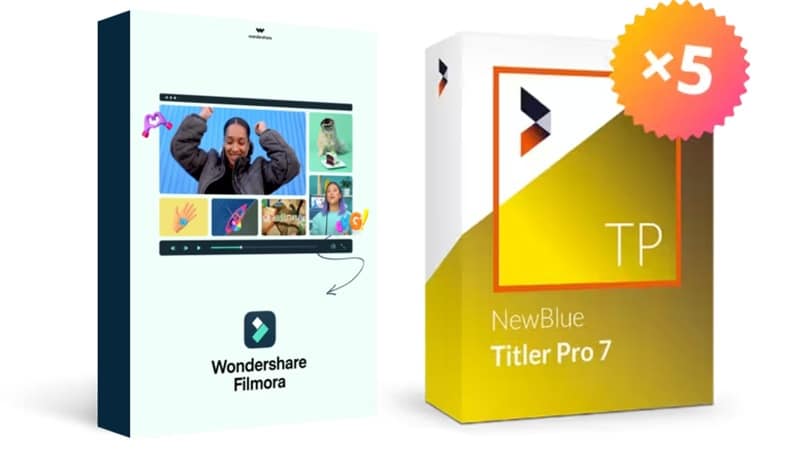
This native integration is one of the most seamless ways to access the NewBlue system's full power, especially if you're new to plugin-based workflows.
 Secure Download
What Kind of NewBlueFX Do You Get in Filmora
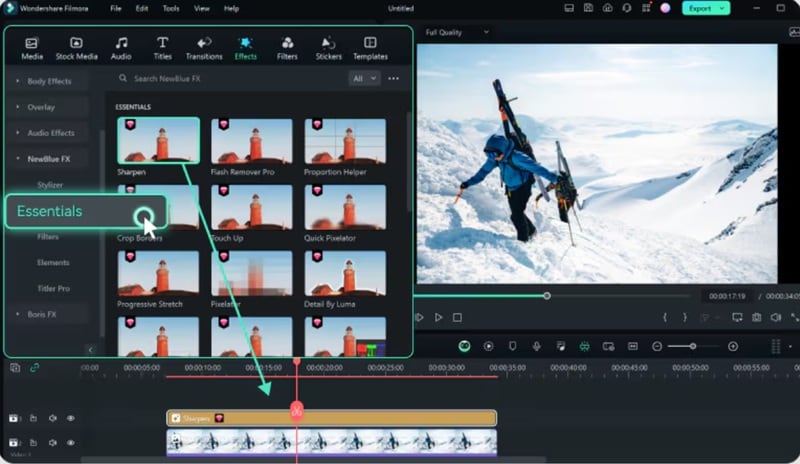
1. Stylizer
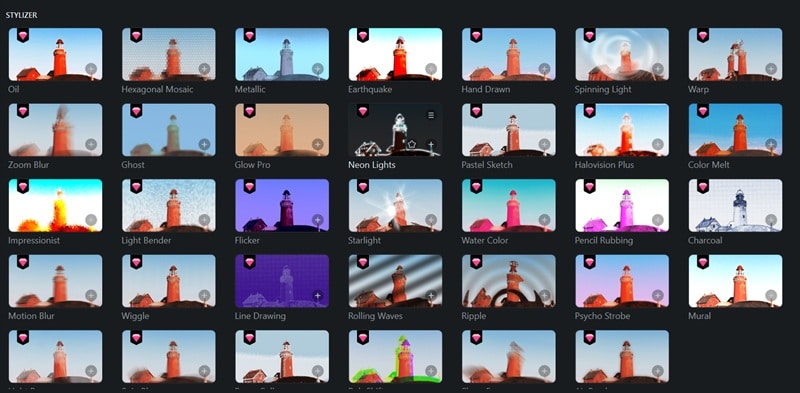
Artistic effects and creative visual transformations. It's pretty much like cinematic filters, sketch looks, and stylized glows.
2. Essentials
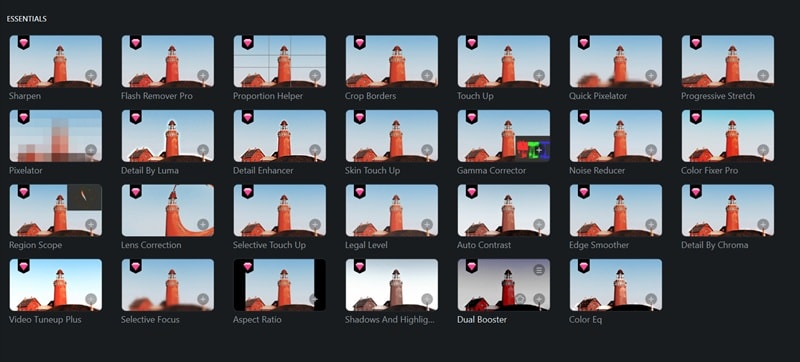
These are the quiet workhorses that fix real-world footage problems fast. We're talking stabilization, video touch-up, skin smoothing, flash removal, and lens correction tools.
3. Filters
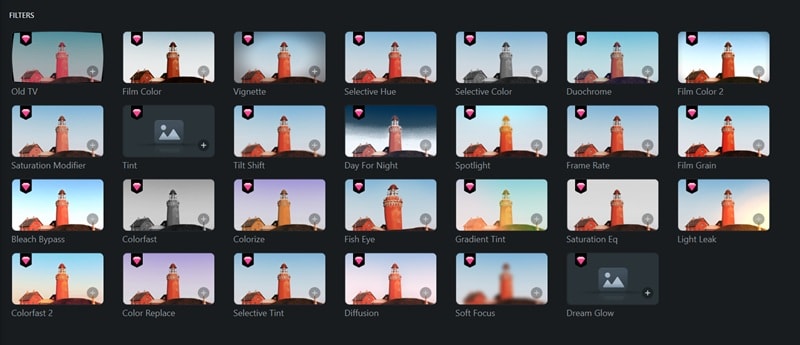
Visual style presets and tone adjustments to set the mood of your footage quickly. There are 27 filters here, so you'll have plenty of options.
4. Elements
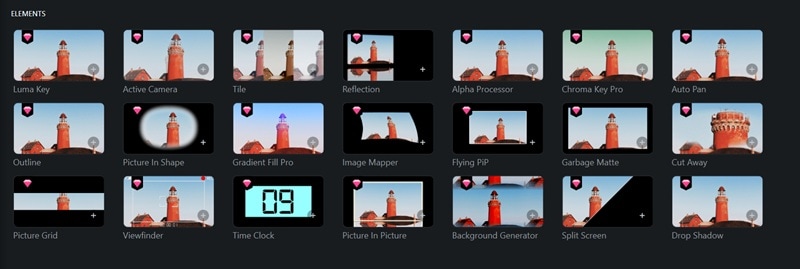
It's for professional overlays and graphic effects. There are compositing tools, overlays, split-screen layouts, drop shadows, and graphic elements that add depth and visual complexity to any scene.
5. Titler Pro 7
The full Titler Pro engine is embedded right in Filmora. Meaning, you can create animated 2D and 3D titles, lower thirds, credit rolls, and motion graphics without leaving your editing environment.
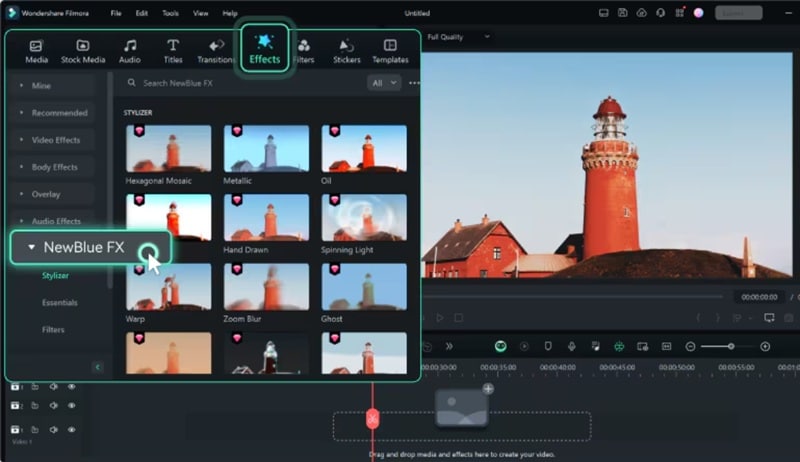
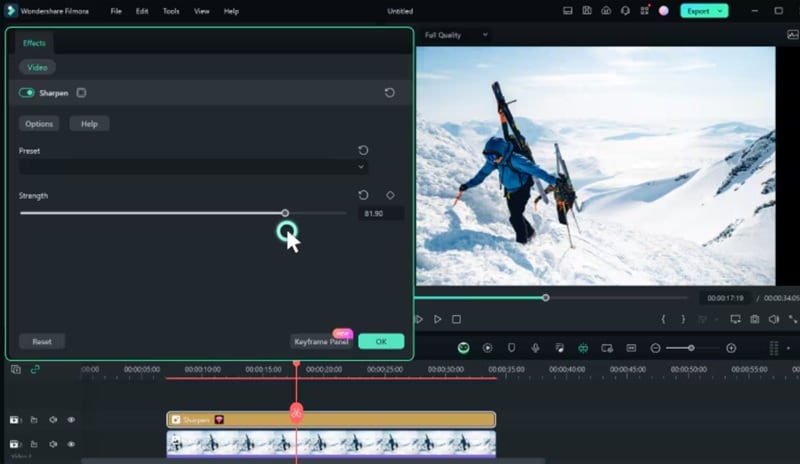
How to Access It in Filmora (Simple Steps)
Since NewBlueFX is integrated into Filmora's interface, finding them takes less than 5 seconds. Here's the complete walkthrough:
 Secure Download
Part 5. Using NewBlueFX and Filmora Together (A Workflow That Actually Works)
Downloading NewBlueFX is certainly powerful; there's no denying that. But at the end of the day, it’s still just a plugin system. That means you need a solid editor to actually build your project. So, the real magic happens when you combine the "easy-to-use" nature of Filmora with the "pro-level" depth of NewBlue.
Why Filmora Makes the Workflow Easier
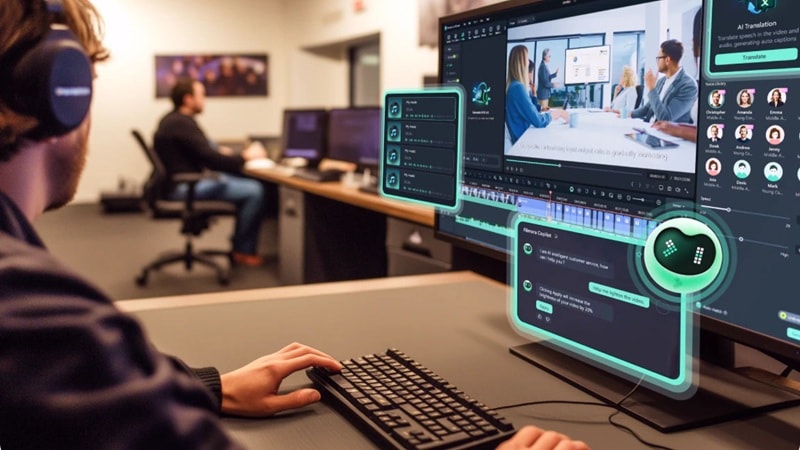
Filmora is an all-in-one video editor, meaning:
- Everything lives in one place; no switching between apps or managing plugin panels in separate windows.
- Filmora’s AI-powered tools handle repetitive tasks automatically, freeing you for creative decisions.
- No plugin conflicts, rendering issues, or version mismatches to troubleshoot.
- Beginner-friendly interface means less time in menus, more time actually editing.
- Direct NewBlueFX integration means effects just work, no extra setup required.
How You Can Combine Both in a Project
This workflow is ideal for content creators, social media producers, and freelance videographers who want professional-grade results without a professional-grade headache. You get the depth when you want it, and the simplicity when you need it.
Below is a practical, step-by-step process you can follow for your next project:
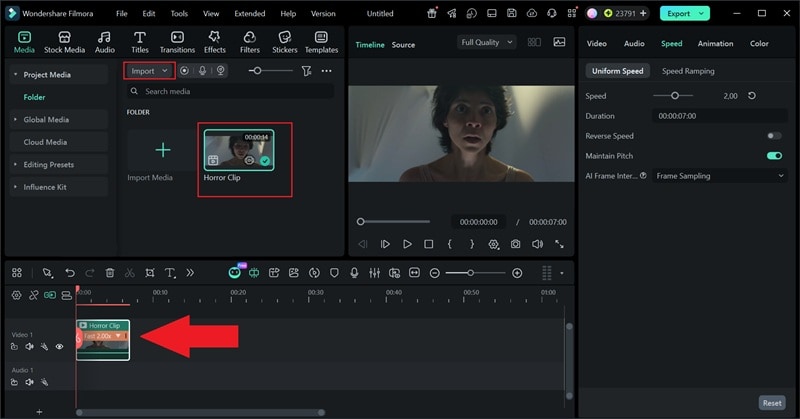
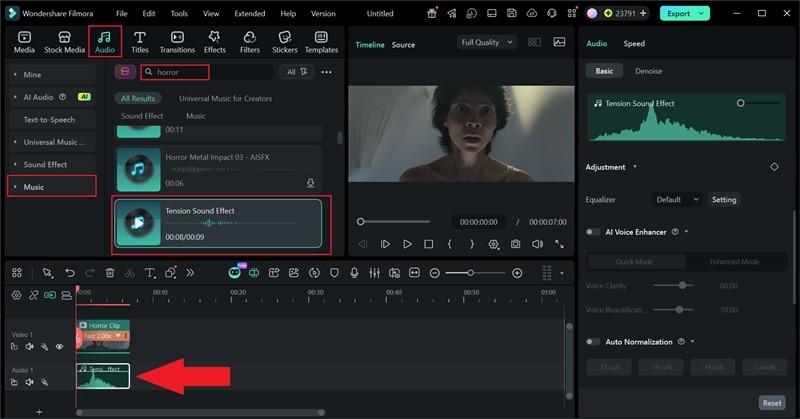
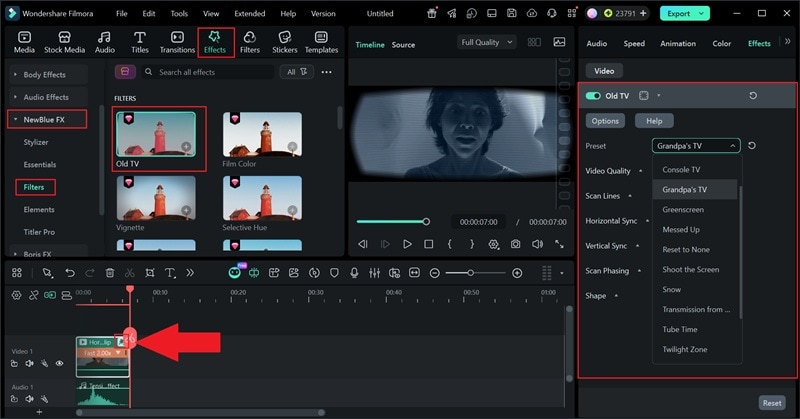
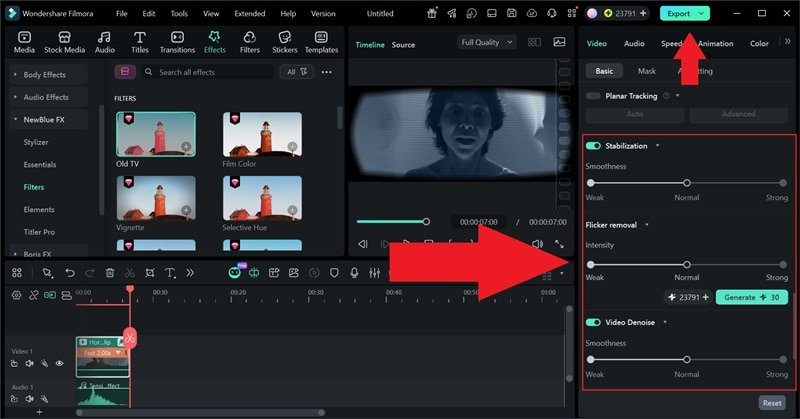
- AI Video Stabilization helps smooth out shaky footage so your shots look steady.
- AI Flicker Removal fixes lighting flicker from screens or inconsistent exposure.
- AI Video Denoise reduces grain and noise to make your video look clearer.
 Secure Download
Conclusion
NewBlueFX is one of the most comprehensive toolkits available to working video editors today. Between TotalFX's 1,500+ presets, Titler Pro's professional titling suite, and the full spectrum of transitions, stabilization, and visual effects, there's genuinely something for every type of project and every tier of creator.
On top of that, the integration with Wondershare Filmora makes the whole experience dramatically smoother than traditional plugin setups. Instead of juggling installations and compatibility headaches, you get all the power of NewBlueFX plugins inside a clean, intuitive environment that just works.
FAQs About NewBlueFX
-
Can I use individual NewBlueFX plugin collections without buying the full TotalFX bundle?
Yes! If you only need titles, you can buy Titler Pro individually. However, if you need more than two categories, the TotalFX bundle usually ends up being much more cost-effective. -
Can beginners use NewBlueFX easily?
Definitely. While NewBlueFX has deep settings for pros, the hundreds of "drag-and-drop" presets make it very friendly for newcomers who just want a great look instantly. -
Will NewBlueFX slow down my rendering speed?
Because NewBlue is GPU-accelerated, it’s quite fast. However, complex 3D titles will always take longer to render than a simple text box, so make sure your graphics card is up to date!
