


 TL;DR:
ByteDance's Seedance 2.0 is a multimodal AI video generator that differentiates itself by simultaneously rendering synchronized audio and video while utilizing a 12-file reference system for precise narrative control.
● Users can guide the generation process by uploading up to 12 reference files and using an @mention system to enforce strict character, style, and camera movement consistency across shots.
● Strict content moderation introduced in early 2026 completely blocks the upload of real human faces as reference inputs and prevents the generation of copyrighted intellectual property.
● Accessing the full model requires a paid subscription on platforms like Dreamina or CapCut, and outputs are currently capped at 15-second video bursts at 1080p resolution.
Ask AI for a summary
 ChatGPT
 Perplexity
 Gemini
 Claude
 Grok
Grok
If you've been following the AI video industry, you've probably noticed how fast things are moving. Every tool aims to make better, more realistic videos in seconds, and ByteDance isn't holding back—its latest Seedance 2.0 is a major push in that race.
Seedance 2.0 is ByteDance's multimodal AI video generator released in 2026, featuring native audio-visual synchronization and a 12-file Omni Reference system for precise creative control.
This AI video generator has quickly stolen the spotlight, going toe-to-toe with other leading models like Kling 3.0 and Sora 2 in motion quality and scene consistency. But should you try it?
We'll take a closer look at Seedance 2.0, including what's new, output quality, pricing, and where it still falls short.
Table Overview of Seedance AI
| Feature | Details |
| Model Name | Seedance |
| Current Version | 2.0 (Feb 2026 initial release; global rollout from Mar 2026) |
| Developer | ByteDance |
| Input Methods | Text, image, video, audio |
| Audio | Native Dual-Branch Generation (Sync Sound) |
| Motion Quality | ★★★★✰ |
| Prompt Adherence | ★★★★★ |
| Temporal Consistency | ★★★★✰ |
| Visual Fidelity | ★★★★✰ |
| API Access | Not available yet (for Seedance 2.0) |
Key Takeaways:
- Seedance 2.0 introduces native dual-branch audio-visual generation for perfect lip-syncing.
- The Omni Reference system supports up to 12 input files (9 images, 3 videos, 3 audio) for character consistency.
- Wondershare Filmora has integrated Seedance 2.0 for direct timeline-based AI video generation in 2026.
Part 1. What are the Features of Seedance 2.0 AI Video Model?
The internet has been completely swept up lately with viral videos made by Seedance 2.0, the latest version of Seedance AI. Many of the videos are unbelievably realistic, some even featuring major Hollywood stars and iconic movie characters in a high-octane fight scene.
Beyond the viral videos, Seedance 2.0 is a massive leap forward from the first version. Launched by ByteDance in early 2026, it's a "Multimodal Powerhouse" that supports text, photos, videos, and even audio files as inputs with control over performance, lighting, and camera movement.
Video: QingQ77 (on X)
If you compare it to the previous version (Seedance 1.5 and 1.0), there are a few upgrades that differentiate Seedance 2.0.
| Seedance 1.0 | Seedance 1.5 | Seedance 2.0 | |
| Video length | Up to 10 seconds | Up to 12 seconds | Up to 15 seconds |
| Video resolution | Up to 1080p | Up to 1080p | Up to 1080p |
| Input Mode | Text, image | Text, image, video | Text, image, video, audio |
| Audio integration | |||
| Reference System |
Features of Seedance 2.0
1. Native Audio-Video Generation
Most AI generators still require you to hunt for sound effects later, but Seedance 2.0 can handle the visual and the audio in one go. Using a dual-branch system, it generates video and audio at the exact same time. You get phoneme-level lip-syncing for characters and foley sounds that land exactly when they should.
2. Support for Up to 12 Reference Files
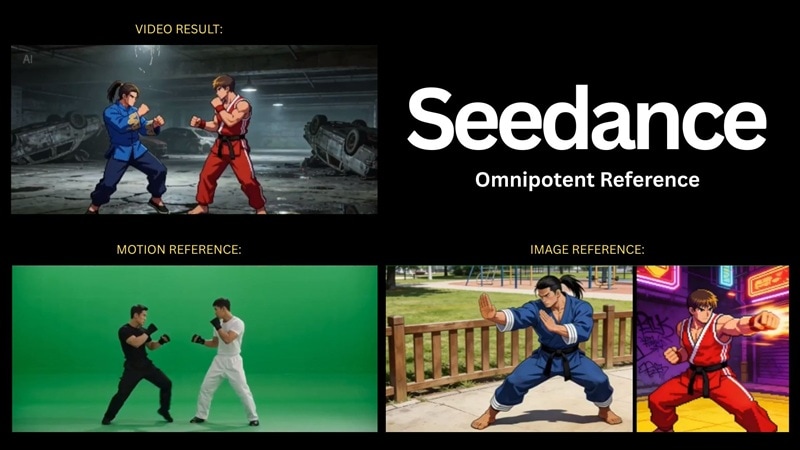
With its new multimodal workflow, Seedance 2.0 uses an "Omni Reference" system that lets you upload up to 9 images, 3 videos, and 3 audio clips (total 12) to act as blueprints. By using the @mention system (more about this later), you can lock in specific faces, styles, and motions, and feed the AI exactly what it needs to maintain perfect consistency across every shot.
3. Director-Level Camera Intelligence
Instead of hoping the AI picks a good angle for you, you can literally call the shots. Seedance 2.0 understands complex cinematography like Dolly Zooms, tracking shots, and rack focuses. If you have a specific vision, you can even upload a reference video of a camera move, and the AI will replicate that exact motion for your new scene.
4. Physics-Aware Motion Quality
The biggest tell for AI video used to be its "floaty" movement. Seedance 2.0 is designed to fix this with better physics common sense. It understands how gravity works, how fabric should drape over a shoulder, and how heavy a car should feel when it takes a sharp turn.
Part 2. How to Use Seedance AI Video Generator
If you have been eager to test out Seedance 2.0, ByteDance has officially launched it globally as of March 23, 2026, though it's still in a gradual rollout phase, as the CapCut team confirmed on X. It's currently available in Indonesia, Philippines, Thailand, Vietnam, Malaysia, Brazil, and Mexico, with more regions to follow.
If you already have access to Seedance 2.0, you can use it on Dreamina, in the CapCut desktop and mobile apps, or in Wondershare Filmora. In Filmora, generation and timeline editing live in one app—and the ToMoviee AI template hub is built around Seedance 2.0: pick a preset, get storyboard-style structure and beat-synced cuts, then polish the result without leaving Filmora.
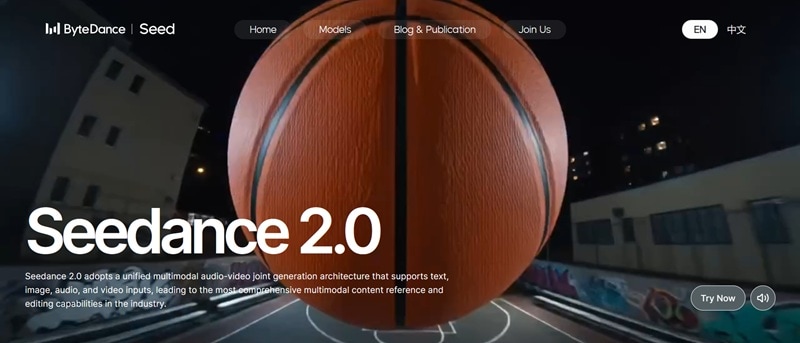
Note: If you want to still use Seedance 1.5 or Seedance 1.0, these versions are still available via BytePlus (ModelArk).
How to Use Seedance 2.0 Video Generator
Start by visiting the Dreamina website. If you're coming from the Seedance AI official website, click Try Now and you'll be redirected there automatically. Select AI Video.
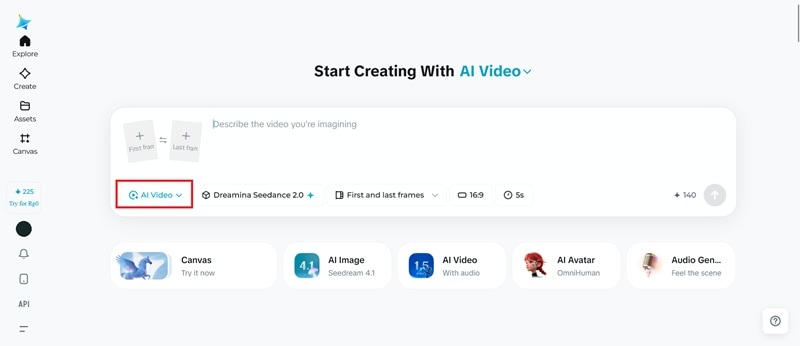
If you prefer working within CapCut, open the app, tap Create with AI, and select AI Video. You can also use Seedance 2.0 on CapCut's Video Studio.
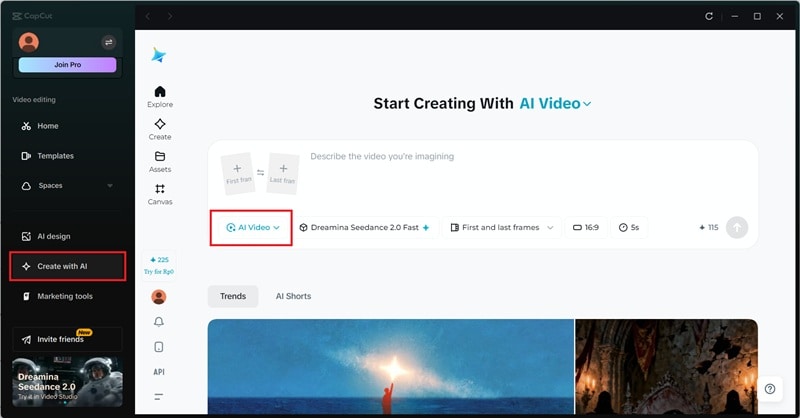
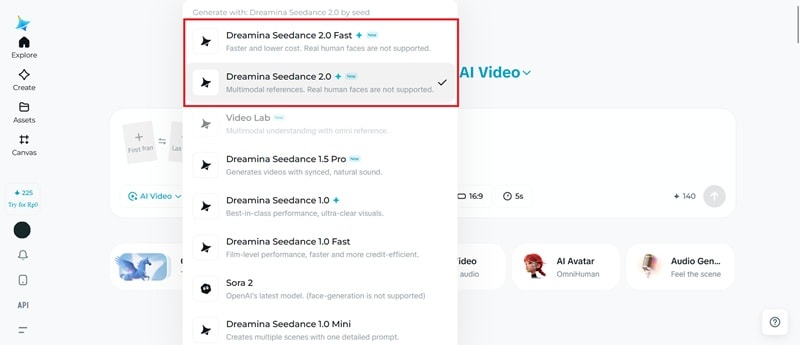
Then, choose between two model tiers:
- Dreamina Seedance 2.0 Fast: A quicker generation option with lower cost suited for rapid iteration with slightly less detail.
- Dreamina Seedance 2.0: The full-quality model delivering maximum cinematic fidelity, motion stability, and physical realism. May take longer.
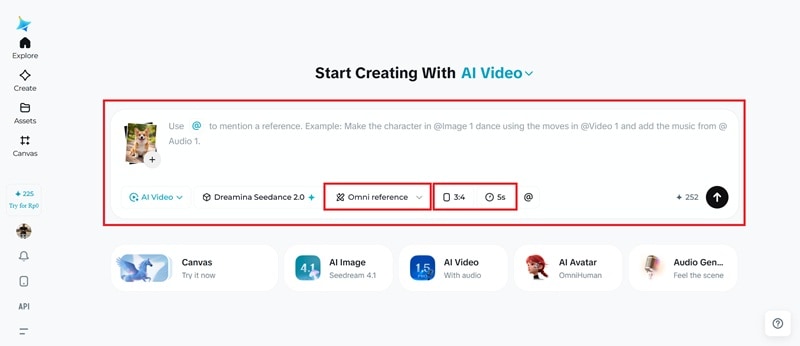
- Set the mode to Omni Reference.
- Upload your reference files (images, videos, and/or audio).
- Use the "@" symbol followed by the file number and write a prompt.
- Adjust other video settings, such as duration and aspect ratio.
- Generate soundtrack
- Interpolate
- Upscale the video
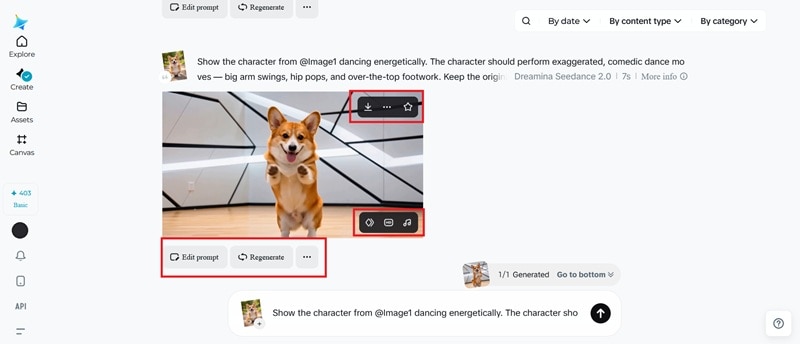
These steps are applicable to Seedance AI Image-to-Video as well.
Seedance AI Pricing
Dreamina uses a credit-based system where credits are shared across all tools. One video generation with Seedance 2.0 starts from around 100 credits, though the actual cost will increase depending on the mode, clip duration, and the number of reference files used.
Free users receive 225 bonus credits per day to get started, plus an additional 570 credits as a one-time welcome bonus during the free trial period. Despite the free credits, a paid plan is still required for full access to Seedance 2.0.
| Basic | Standard | Advanced | |
| Pricing (Subscription) | $9.9/month or $118.8/year | $19.9/month or $238.8/year | $49.9/month or $598.8/year |
| Pricing (1-month) | $18/month | $42/month | $84/month |
| Credits | 2,465 | 6,080 | 12,870 |
If you need more credits, you can also buy credit packs as a separate purchase, which are available in different sizes and valid for 2 years.
Note: The exact cost may vary depending on the platform, selected plan, and region you use to access the engine. Refer to the official Dreamina or CapCut pricing pages for the most up-to-date information.
Seedance 2.0 in Filmora
Seedance 2.0 AI Video is now built into Wondershare Filmora. Generate clips with Seedance 2.0 inside the app, then edit on the same timeline—cut, color-correct, mix audio, and add titles and effects without round-tripping through another tool.
Filmora already ships with strong models such as OpenAI's Sora 2 and Google's Veo 3.1 for Image-to-Video and Text-to-Video. Adding Seedance 2.0 gives you another flagship generator alongside full manual control in one project.
For workflows that blend fast AI drafts with hands-on polish, you can keep Seedance-generated footage on the timeline and finish the full post-production workflow in Filmora. The same ToMoviee AI hub introduced above is also where Filmora rounds up Seedance 2.0-oriented presets—cinematic layouts, auto-paced edits, and vertical-friendly formats—when you do not want to start from scratch.
 Secure Download
Part 3. Our Thoughts on Seedance AI Video After Testing
After putting the 2.0 model through its paces, the biggest takeaway of ByteDance Seedance AI video generator is that the prompt-and-pray days are coming to an end.
In previous versions, you often had to hit generate a few more times just to get a clip where the character didn't morph into someone else. With the Omni Reference system in Seedance 2.0, that frustration is mostly gone.
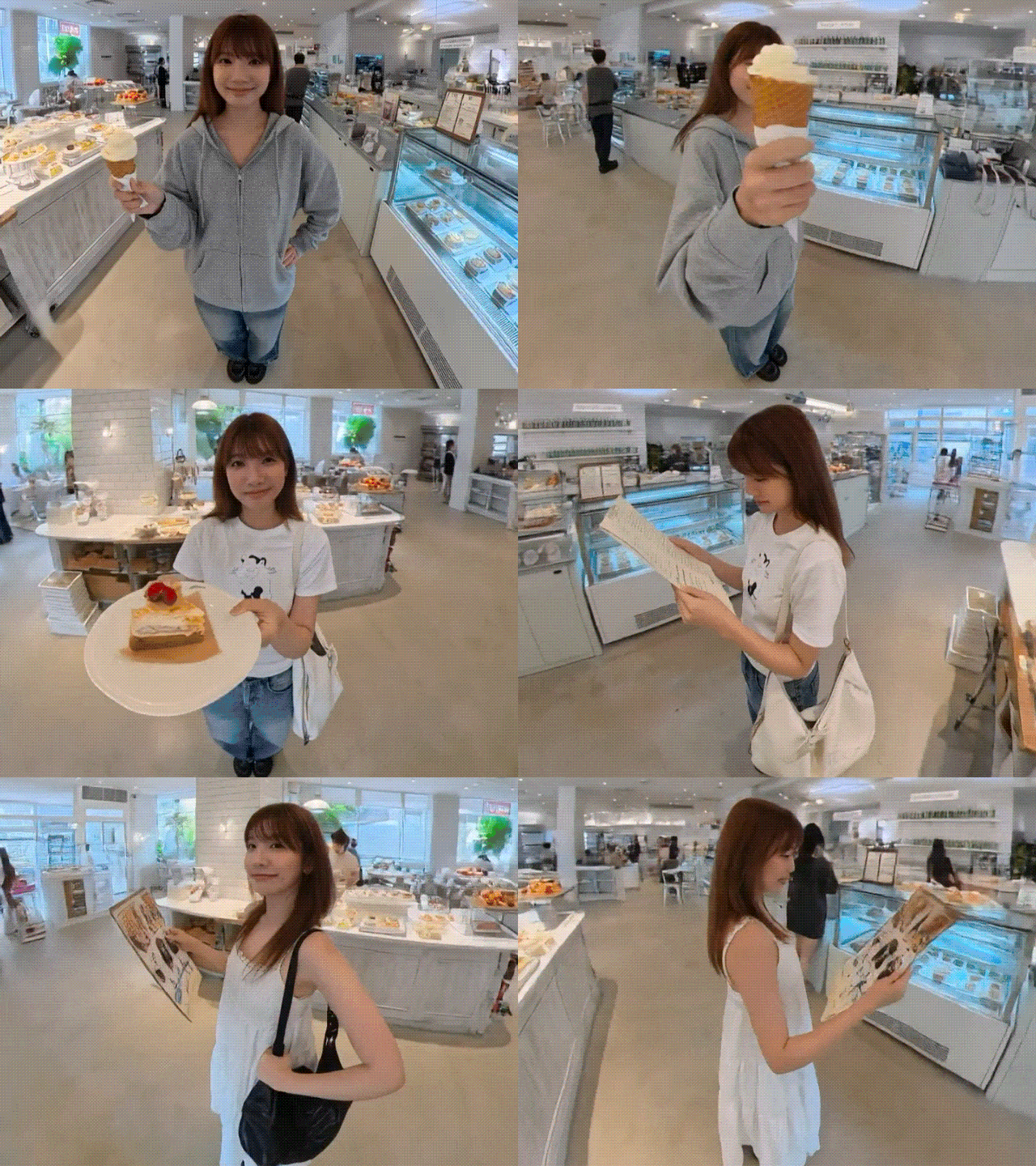
According to a recent review on Vertu, Seedance 2.0 achieves an incredible 90% usable output rate on the first generation. This is a staggering leap from the roughly 20% success rate seen with previous AI video tools. Plus, Seedance 2.0's built for speed—about 30% faster than Seedance 1.5.
Seedance AI Review & Ratings
- Motion Quality (4.5 / 5) – Seedance 2.0 excels at complex action sequences (like dancing or stunts). Objects possess a realistic sense of "weight," and movements respect the laws of gravity and momentum better than almost any other model on the market.
- Prompt Adherence (4.7 / 5) – Because of the @mention system, the AI doesn't just guess. It follows your instructions to the letter, so you can maintain control over the final composition.
- Temporal Consistency (4.4 / 5) – Characters, clothing, and background details in Seedance AI videos remain consistent across the entire clip. The glitches that plagued earlier versions are almost non-existent here.
- Styles and Customizations (4.4 / 5) – Seedance 2.0 also nails style consistency. As showcased by X user @Framer_X, the model is capable of mastering different aesthetics with impressive results. You can use it to make animations in different styles, including stylized 3D, 1980s anime, illustrative 2D, pixel, stop motion, and more.
IP and Censorship Issues
While we can import up to 12 reference images to direct the AI better, it has triggered another problem that is pretty prevalent with Seedance 2.0: censorship and copyright enforcement. When you try to upload a photo of a person, the system often refuses to process the request and generate the clip due to updated safety protocols.
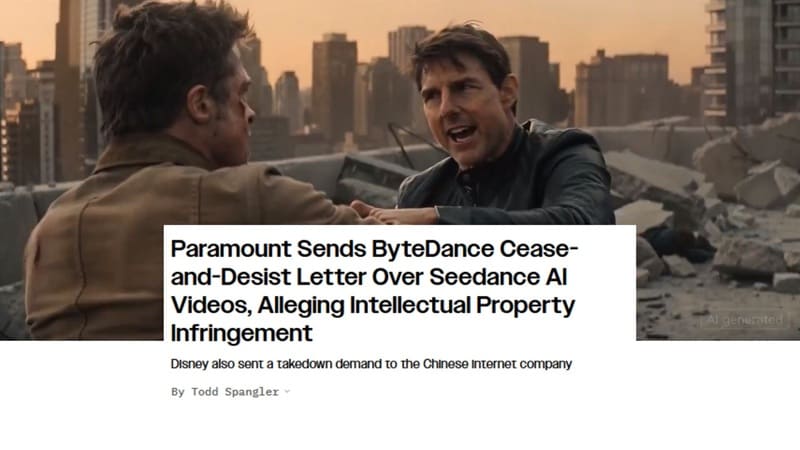
This shift follows a major legal firestorm in February 2026, which was also responsible for delaying the global release by roughly one month. After a viral, AI-generated fight scene featuring Tom Cruise and Brad Pitt, companies like Disney, Paramount, and the MPA issued cease-and-desist letters to ByteDance.
Disney even accused the company of a "virtual smash-and-grab" of their intellectual property (IP), as reported by Variety. ByteDance ultimately pulled back the global launch to address compliance concerns before pushing it out again in late March.
In response to this legal pressure, ByteDance has also implemented strict new “Red Lines” within the tool, including:
- IP Blocks: The system now utilizes a real-time scanner to block the generation of protected franchises like Marvel, Star Wars, or DC.
- No real-face references: You can no longer upload photos of real humans as references.
Some other filters have also been implemented to ensure a safe environment, including explicit violence, nudity, and high-risk political scenarios.
Part 4. Seedance AI Strengths and Limitations at a Glance
Based on what we have covered so far, the overall performance of Seedance AI, especially the latest Seedance 2.0, can be summarized as follows.
- Insane control. The "Omni Reference" system lets you lock in characters, motion, and style using your own files. No more "guessing" what the AI will build.
- Perfect sync. Because audio and video are generated together, the lip-sync and sound effects are frame-perfect right out of the gate.
- Better stability. It's a leader in keeping characters and outfits consistent. You won't see a character's shirt change colors halfway through the clip.
- No face references and strict content moderation. You can't use recognizable real faces as reference inputs. The content moderation is also quite sensitive and will block prompts that touch on anything remotely controversial.
- You're still capped at short bursts. If you want a full scene, get ready to do some heavy lifting in your editing software and stitch multiple clips together manually.
- Credit-heavy for complex generations. Adding more reference files or increasing clip duration will cost significantly more credits per generation.
Part 5. How Seedance AI Compares with Other AI Models
Besides Seedance AI video generator, many competitors like Kling, Sora, and Veo 3.1 have also made their mark on the industry. So, how does Seedance actually hold up against them?
| Seedance 2.0 | Kling 3.0 | Veo 3.1 | Sora 2 | |
| Core Strength | Multimodal directing | Physics & realism | Cinematic quality | Narrative reasoning |
| Max. Resolution | 1080p | 4K native (Pro) | 1080p | 1080p |
| Max. Duration | 15 seconds | 15 seconds | 8 seconds | 25 seconds (for pro) |
| Input Files | Up to 12 files | Up to 7 files | Up to 3 files | 1-2 files |
| Camera Control | Via reference video & @mentions | Motion brush & directions | Via API & prompts | Primarily text-based |
| Multimodal Inputs | Quad-modal (text, image, video, audio) | Tri-modal (text, image, video) | Tri-modal (text, image, video) | Dual-modal (text, image) |
In the text-to-video workflow, Seedance 2.0 is especially dominant in its native audio-visual integration, thanks to the use of dual-branch diffusion transformers. Although it still has some room to grow, this has already set a new standard for the industry.
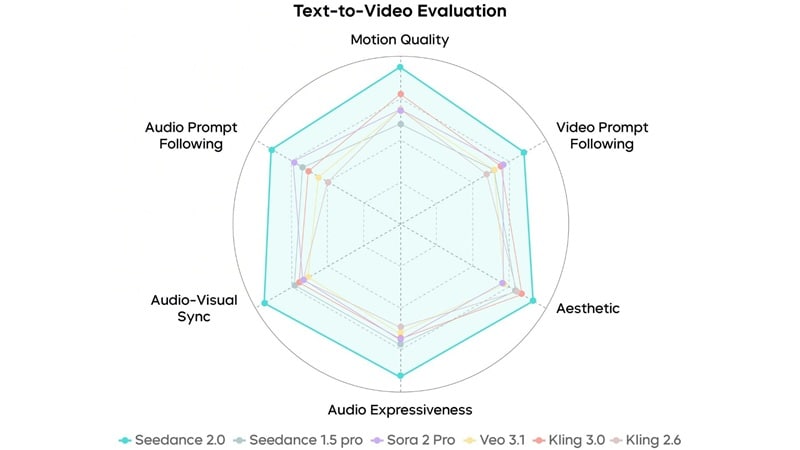
By rendering high-fidelity audio, like ambient sound effects and lip-syncing, at the exact same time as the video frames, it essentially acts as a "multimodal director” capable of maintaining strict narrative and character consistency across complex scenes and multi-shot sequences.
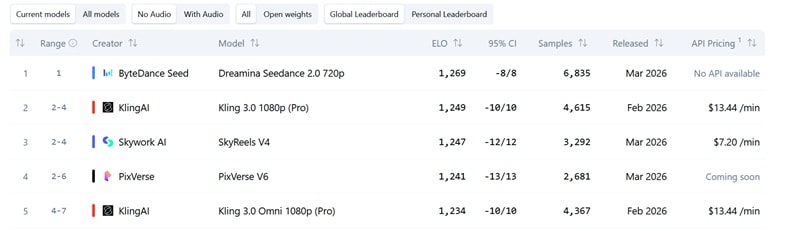
In the latest independent blind tests by Artificial Analysis, Seedance 2.0 also claimed the top spot in the Text-to-Video category with an Elo score of 1,269 (without audio) and 1,213 (with audio), and ranks among the best in Image-to-Video.
Swiss-based consultancy CTOL also called Seedance 2.0 the “most advanced AI video generation model available,” even surpassing Sora 2 and Veo 3.1 in practical testing. The true differentiator is its ability to function as both director and editor.
Part 6. Improve and Fine-Tune Your Seedance AI Results
Because Seedance 2.0 runs inside Filmora, you can generate a take and move straight into polish: trim, grade, and mix in the same project. Even if you produced clips in Dreamina or CapCut first, Filmora is built to stitch those AI pieces into a finished story with professional editing tools. For longer, episode-style arcs, Filmora’s AI short drama templates are a useful way to plan beats and scene structure when each Seedance clip is still short on its own.
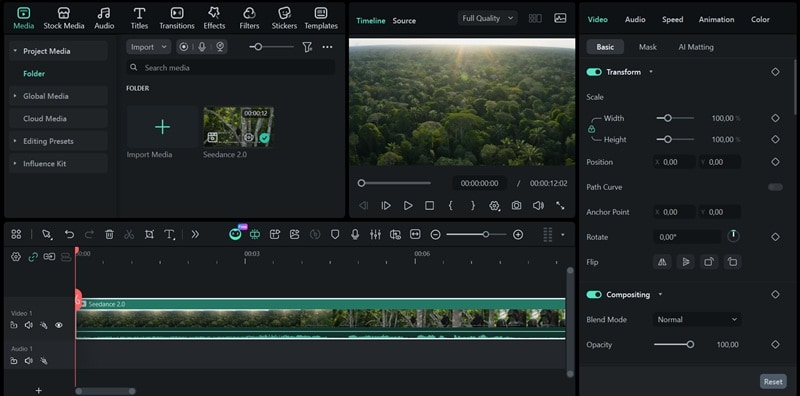
Here's what makes Filmora a strong match for Seedance output:
- Multitrack Timeline-based Video Editor: Move beyond single-clip generation. Layer your Seedance footage with text, overlays, and secondary B-roll to build a multi-dimensional narrative.
- AI Video Extend: If your Seedance clip ends a moment too soon, use Filmora's AI Extend to intelligently generate a few extra frames to smooth out your timing and fix awkward cuts.
- Advanced Color Correction & LUT Support: AI clips can sometimes vary in tone between prompts. Use professional LUTs in Filmora to unify the color grading across different scenes.
- Audio Editing & Noise Reduction: While Seedance 2.0 generates impressive sound, Filmora lets you master it. Use AI-powered denoise to clean up artifacts or AI Audio Stretch to perfectly fit background music to your scene's length.
- Built-In Effects & Transitions Library: Add that final professional "sparkle" with thousands of motion elements and transitions that help disguise any AI-generated inconsistencies.
Together, Seedance 2.0 and Filmora cover the arc from first generation to final cut—especially when you generate and edit in one place.
Secure DownloadConclusion
If you are into video creation or digital storytelling, Seedance 2.0 is the tool you must try this year. The update that ByteDance brings sets a new industry benchmark for multimodal control, finally moving AI video to a more precise direction.
What's more, you can merge Seedance's hyper-realistic clips with Filmora's editing tools—in-app Seedance 2.0 generation, ToMoviee AI (Seedance 2.0–driven templates), and full timeline control—to build stories that used to take a full post house.
FAQs
-
1. Why can't I see Seedance 2.0 on Dreamina?
Seedance 2.0 is still in a gradual regional rollout. If you don't see it yet, your region may not have access yet. Check back regularly, or try accessing it via a supported region. -
2. How long does it take to generate videos with Seedance AI?
Generation time varies depending on the model and complexity of your prompt. Seedance 2.0 Fast usually produces results in under a minute, while the full Seedance 2.0 model can take one to several minutes due to its higher quality output. Adding more reference files, increasing clip duration, or requesting higher resolution will also add to the processing time. -
3. Can I use Seedance 2.0 outside of Dreamina or CapCut?
Yes. Third-party platforms such as Topview AI have integrated Seedance 2.0. In Wondershare Filmora, Seedance 2.0 is built in for timeline generation, and the ToMoviee AI template hub focuses on Seedance 2.0-style, storyboard-driven workflows—so you can generate, start from a template, and edit in one ecosystem. -
4. Can I use Seedance 2.0 for free?
While you do get free credits to generate videos, accessing Seedance 2.0 AI on CapCut or Dreamina still requires a paid subscription.
