



 100% Security Verified | No Subscription Required | No Malware
 TL;DR:
Adding featured channels to your profile requires accessing the Customization tab in YouTube Studio, allowing you to cross-promote related content, build community trust, and generate additional revenue.
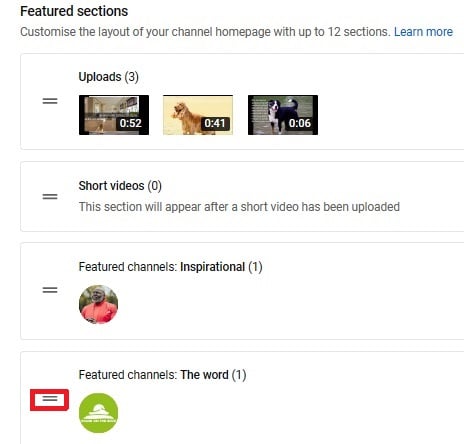
● To configure the layout, click "ADD section" in the left sidebar of YouTube Studio, select "featured channels," and drag the double-line icon next to the channel names to adjust their display order.
● If your featured channels fail to retain traffic or audience interest, address the drop-offs by applying custom high-contrast thumbnails, communicating your upload schedule clearly, and updating videos based on viewer comments.
● Creators can use Wondershare Filmora to edit their featured videos, utilizing its specific built-in capabilities such as an advanced text editor, GIF support, color tuning, audio equalizer, noise removal, and scene detection.
Ask AI for a summary
 ChatGPT
 Perplexity
 Gemini
 Claude
 Grok
Grok
Versatile YouTube Video Editor - Filmora
An easy yet powerful editor
Numerous effects to choose from
Detailed tutorials provided by the official channel
Since the inception of YouTube, accessing videos and content has become easy for social media users. You can get content in the comfort of your home because millions of featured channel owners feature more channels every minute across the globe. Many YouTubers have learned the importance of how to add featured channels on YouTube mobile; many audiences can access mobile that they can use to access the internet. Featured channels have many advantages for the owner because it is the easiest way to reach many audiences than other means of getting the viewers. Featured channels attract larger target audiences, which leads to more subscribers.
What are Featured Channels on YouTube?
YouTube featured channels displayed on YouTube have videos that YouTube considers worth watching by the audience, based on the site's algorithms. Using featured channels expands your channel being viewed and accessed by many audiences, which leads to many subscribing to the channels recommended on your channel.
Why does Adding Feature Channels on YouTube Matter?
Here we shall mention the importance of featured channels on YouTube:
1. Give audiences more required content
The channels with videos and YouTube featured channels have more audience because of their content. The audience always visits the channels with more informative content and even refers friends to it.
2. Source of more traffic
Many viewers visit the YouTube channels searching for information found in videos featured and knowing how to add a featured channel on YouTube in 2021 and get what they are looking for. Featured Channels with good content attract traffic and increase subscribers and referrals to the channels.
3. Personal connection
Featured Channels on YouTube matter immensely because they attract viewers to the actors or someone featured in the video. This leads to the audience is getting closer connected to the videos and information conveyed through the content. Videos increase familiarity and build a larger community where the audience identifies themselves with the channels.
4. Source of Revenue
Adding feature channels on YouTube matters because they lead to income/revenue through YouTube Ads, a course on your channels, and subscriptions to the channels by the viewers who view the channels daily.
5. Growing audience
Most audiences are visual learners worldwide, so having channels featured on YouTube matters because they attract many audiences globally. Uploading videos/content more often leads to more visitors flocking to your featured channels.
6. High credibility
Featuring channels on YouTube increases the channel's credibility among the audience. Especially when the content answers the audiences' questions and solves the problems they face, audiences develop trust, associate, and frequently interact with your YouTube featured channels.
How to Add Featured Channels on YouTube?
Adding featured channels on YouTube is more accessible than most people think to follow the steps required to upload the channels and videos.
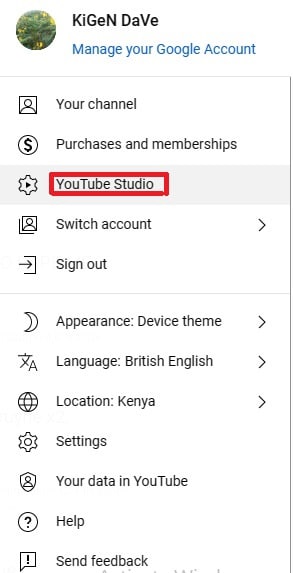
1 Login into YouTube studio
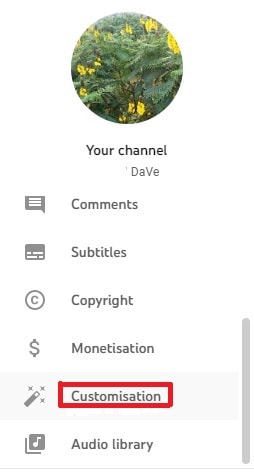
2 Go to the sidebar on the left and scroll to customization
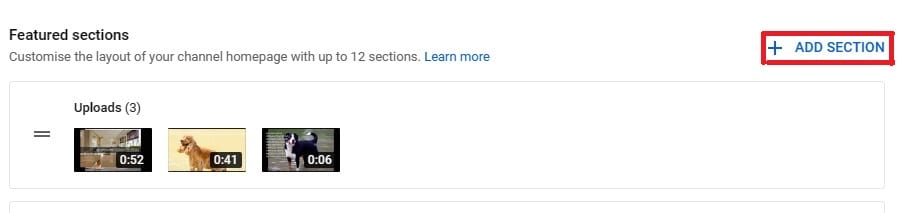
3 Click on ADD section
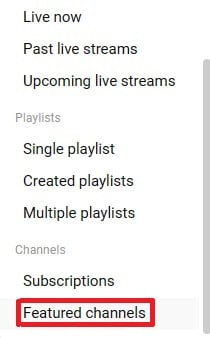
4 A small window will unroll, scroll down and click featured channels
5 You can change featured channels on YouTube on the featured section, place the mouse cursor on the double lines next to the channel’s name as shown below on “featured channels name, The word,” and drag it to wherever you want.
Fix the Problem - Why Can't I Feature Channels on YouTube?
Many reasons can cause failure to feature your channel on YouTube that make you wonder why you can't feature channels on YouTube.
1. Your YouTube Thumbnails
Your video thumbnail is the first thing your viewers see on their home feed when they click on your channels. The thumbnail must be catchy with accurate images showing what your video entails.
How to fix this issue?
Create relevant and exciting thumbnails that will attract viewers. It is advisable to use custom thumbnails and contrast to be catchy. This will make the viewers desire to visit your channel more often.
2. Lack of Consistency
Being inconsistent in your channels makes your viewers distrust your future work. If you take too long to feature your YouTube video/contents, viewers may decide to even unsubscribe from your channels, which may lead your traffic to drop to zero.
How to fix the inconsistency?
Be open to your viewers about when to expect the following videos on your channels, and it is good manners to keep your audience updated about what is coming. Consistently featured channels always get a good flow of viewers and even referrals.
3. Lack of content on the channels
Failing to update the channels often leads viewers not to visit your YouTube channels; viewers search for up-to-date information. If your channels lack content, audiences will quickly hop onto others in the market for the information they need.
How to fix the lack of content?
Read the minds of your audiences, primarily through comments they leave behind. You should update the channels with the required videos to satisfy your audience. Having quality content is the crucial thing here.
4. Lack of value in your videos
Before uploading videos on your channels, it’s good to ask yourself some questions, like:
What value does my video add to the audience?
How to fix it?
You are ready to value your videos if you answer these few questions. Value is the crucial thing in every product in the market. YouTube channel owners ought to know what the competitors offer to the same viewers and exceed them by posting videos that meet audiences' needs.
It's good manners to go back to the drawing board and research why your YouTube channels aren't being featured.
Bonus Tip - Make YouTube Videos with Good Video Editor
Making videos featured in the YouTube channels requires a good video editor. Although various video editors do excellent work, making videos with an exceptional video editor must be a goal. Filmora is such kind of best video editor that can handle the editing of videos very well. It is an excellent software for beginners and pros, and it is more potent than other video editors in the market.
It allows a person to make professional-looking videos because Filmora has various presets like overplays, transitions, elements, filters, and several layers of effects.
Wondershare Filmora
Get started easily with Filmora's powerful performance, intuitive interface, and countless effects!

Key features of Wondershare filmora
Filmora video editor comes with several features that make it the best video editor. The features include an advanced text editor, GIF support, Color tuning, noise removal, audio equalizer, stabilization of the video, and scene detection.
Conclusion
YouTube featured channels with quality informative videos/contents attract more audiences, mainly social media users, in the larger market. Before featuring channels on YouTube, one has to know what the target audiences need, test and the demography of the audiences matters a lot.
Featured channels on the YouTube platform can be an excellent source of revenue for ready, consistent, and considerate value on their videos uploaded on the channels. Inconsistency can be detrimental to the owner of the channels because the channels can end up being dormant with no one subscribing to them. The owner ought to learn how to add featured channels on YouTube by following the complete guide.
Also, making YouTube videos with a good video editor is advisable for quality videos that will attract more audiences. Value is what viewers are after on the featured channels on YouTube.
