
Age Transformation Examples & Guides
Explore viral age transformation effects and creative tutorials.
Loading more age transformation examples...
 Category:
 Duration:
 Aspect Ratio:
Everything You Need to Master Age Transformation Effects
A realistic age transformation effect can turn a simple portrait into a compelling journey through time. Filmora provides an expansive library of AI-driven tools that let you seamlessly age or de-age your subjects without complex manual masking. Whether you are building a cinematic flashback, creating viral time-lapse trends, or designing character progressions for a short film, the Filmora video editor equips you with the exact features needed to manipulate time.
AI-Powered Generative Aging and De-Aging
AI-Powered Generative Aging and De-Aging
Leverage the incredible capabilities of Filmora to instantly alter the age of your subjects. By utilizing the AI Image Generator, which incorporates powerful models like GPT Image 2 and Nano Banana Pro, you can create highly realistic younger or older versions of any character. This eliminates the need for expensive practical makeup while giving you ultimate creative control.
- Generate highly detailed age progressions using advanced artificial intelligence models.
- Transform character portraits instantly with GPT Image 2 and Nano Banana Pro integrations.
- Maintain consistent facial features while flawlessly altering skin texture and hair color.
Seamless Temporal Transitions for Time Lapses
Seamless Temporal Transitions for Time Lapses
Creating a believable passage of time requires more than just swapping images. Filmora allows you to blend your age transformation effects flawlessly using dynamic overlays and precise keyframing. Morph a youthful face into an elderly portrait with smooth, cinematic cross-dissolves using precise video transitions that keep your audience mesmerized.
- Animate the transition between different life stages using precise keyframe controls.
- Blend generative images seamlessly to create viral storytelling sequences.
- Adjust the opacity and pacing to match the emotional weight of your scene.
Cinematic Color and Lighting Integration

Cinematic Color and Lighting Integration
A true age transformation effect must sit perfectly within your scene's environment. Enhance your generational edits by fine-tuning the atmospheric lighting and applying professional grading. Filmora ensures that your transformed characters match the exact lighting conditions of your original footage. Match the lighting perfectly using advanced color correction to ensure a cohesive narrative.
- Match the lighting of your generated assets perfectly to your live-action footage.
- Apply professional grading to enhance the moody atmosphere of your time-lapse edits.
- Enhance visual depth by layering subtle atmospheric fog over your character portraits.
Frequently Asked Questions About Age Transformation Effects
How to Apply Age Transformation Effects in Filmora
Create realistic character aging timelines in just a few simple steps without requiring complex VFX knowledge.
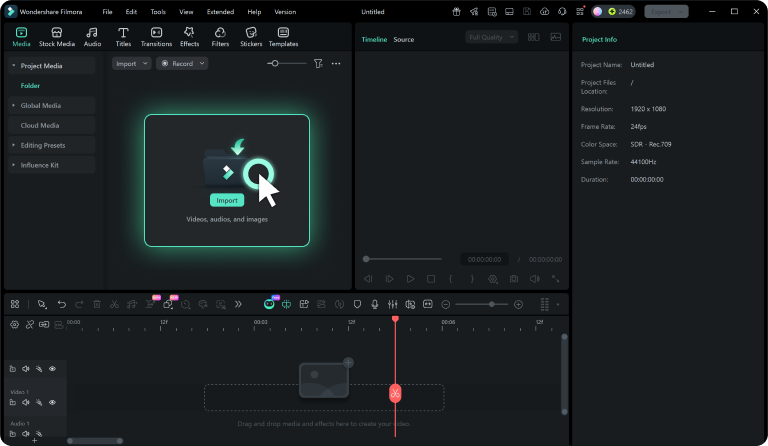
Step 1 Generate or Import Assets
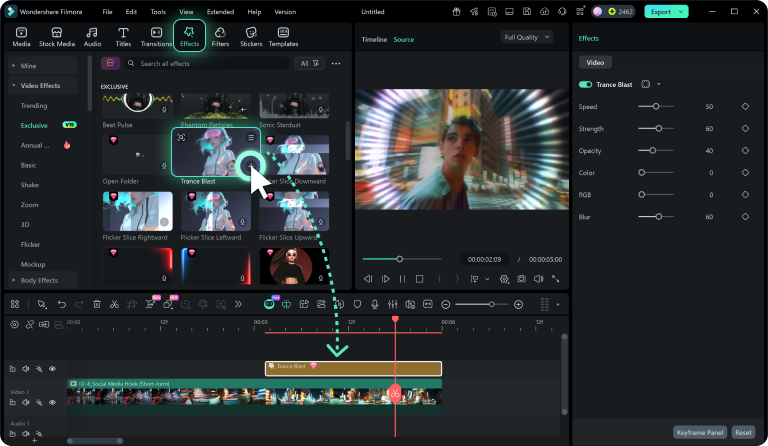
Step 2 Arrange on the Timeline
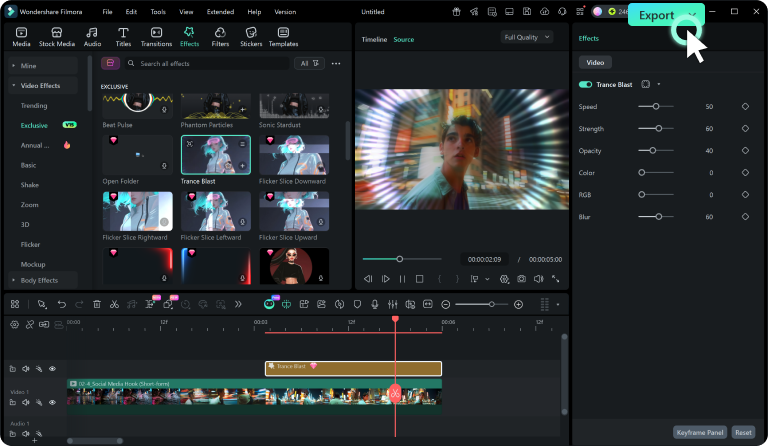
Step 3 Apply Transitions and Export
-
1: Generate or Import Assets
Use the AI Image Generator to create older or younger versions of your subject, or import your own sequential portraits into the media library. -
2: Arrange on the Timeline
Drag your generated clips onto the timeline in chronological order to begin building your visual age transformation sequence. -
3: Apply Transitions and Export
Add smooth morphing transitions between the clips to create a seamless aging effect, then export your final masterpiece.
Beyond Basic Age Transformation Effects
Filmora goes far beyond simple face filters. You can enrich your age transformation effects by applying professional grading, adding dynamic motion blur, and incorporating atmospheric elements that elevate the emotional impact of your time-lapse. Combine these visual changes with an AI music generator to set the perfect nostalgic mood for your aging sequences. Whether you are crafting a heartfelt family documentary or a futuristic sci-fi narrative, everything you need to shape your characters' temporal journey is available right inside this comprehensive video editor.








