
Camera Lens Filter Examples & Guides
Explore popular camera lens filter applications and how-to guides for pro results
Loading more camera lens filter examples...
 Category:
 Duration:
 Aspect Ratio:
Everything You Need to Master Camera Lens Filter Effects
Achieving a cinematic look requires more than just high-resolution footage; it requires the organic texture of a pro camera lens filter. Filmora provides an expansive library of optical simulations, from anamorphic flares to soft-focus diffusions, that you can drag and drop onto your clips.
Whether you want to soften skin tones, add a vintage haze, or protect your highlights, our digital camera lens filter tools give you the flexibility of a professional gear bag without the weight. Take full control of light refraction and color shifts to create a signature visual style for your brand.
Realistic Optical Simulations — Replicate World-Class Glass

Realistic Optical Simulations — Replicate World-Class Glass
Skip the physical filters and simulate high-end optics digitally. Our camera lens filter library mimics the way light interacts with premium glass, adding depth and character to every frame. You can even combine these with particle effects to add organic dust or light leaks for a truly authentic film feel.
- Diffusion & Bloom - Soften harsh highlights and skin textures for a dreamlike, ethereal aesthetic.
- Anamorphic Streaks - Create professional horizontal lens flares that react dynamically to light sources.
- ND Filter Emulation - Manage exposure levels and maintain motion blur without changing your camera settings.
Artistic Distortion & Depth Control

Artistic Distortion & Depth Control
A digital camera lens filter allows for precise control over focus and depth. You can create soft bokeh backgrounds that draw the viewer's eye exactly where you want it. Fine-tune the intensity of the effect to match the narrative mood of your project, from sharp documentary styles to moody art-house visuals.
- 🌈 Prismatic Rainbows - Add subtle color refractions to the edges of your frame for an artistic touch.
- 🎞️ Vintage Grain Overlays - Combine optics with textured grain to recreate the look of 16mm or 35mm film.
- 🔍 Vignette & Edge Softening - Focus the audience's attention by subtly darkening and blurring the frame's perimeter.
- ✨ Chromatic Aberration - Simulate realistic lens imperfections for a more natural, non-digital appearance.
Integrated Workflow with Pro Grading

Integrated Workflow with Pro Grading
Applying a camera lens filter is only half the battle. Filmora’s unified workflow allows you to pair your optical effects with professional color grading tools. Easily Adjust brightness, contrast, and saturation to ensure your filter integrates perfectly with your footage.
- Dynamic Range Enhancement - Use lens filters to preserve highlight detail while boosting shadows.
- LUT Compatibility - Layer your favorite cinematic LUTs on top of your camera lens filter for unique looks.
- AI-Powered Smart Filters - Let AI suggest the best camera lens filter based on the lighting in your scene.
- Keyframe Animation - Animate filter intensity over time to simulate changing lighting conditions or focus pulls.
Frequently Asked Questions About Camera Lens Filters
How to Apply a Camera Lens Filter in Filmora
Give your digital footage the organic feel of real optical glass in seconds. Follow these simple steps to import your footage, apply a cinematic camera lens filter, and export your masterpiece.
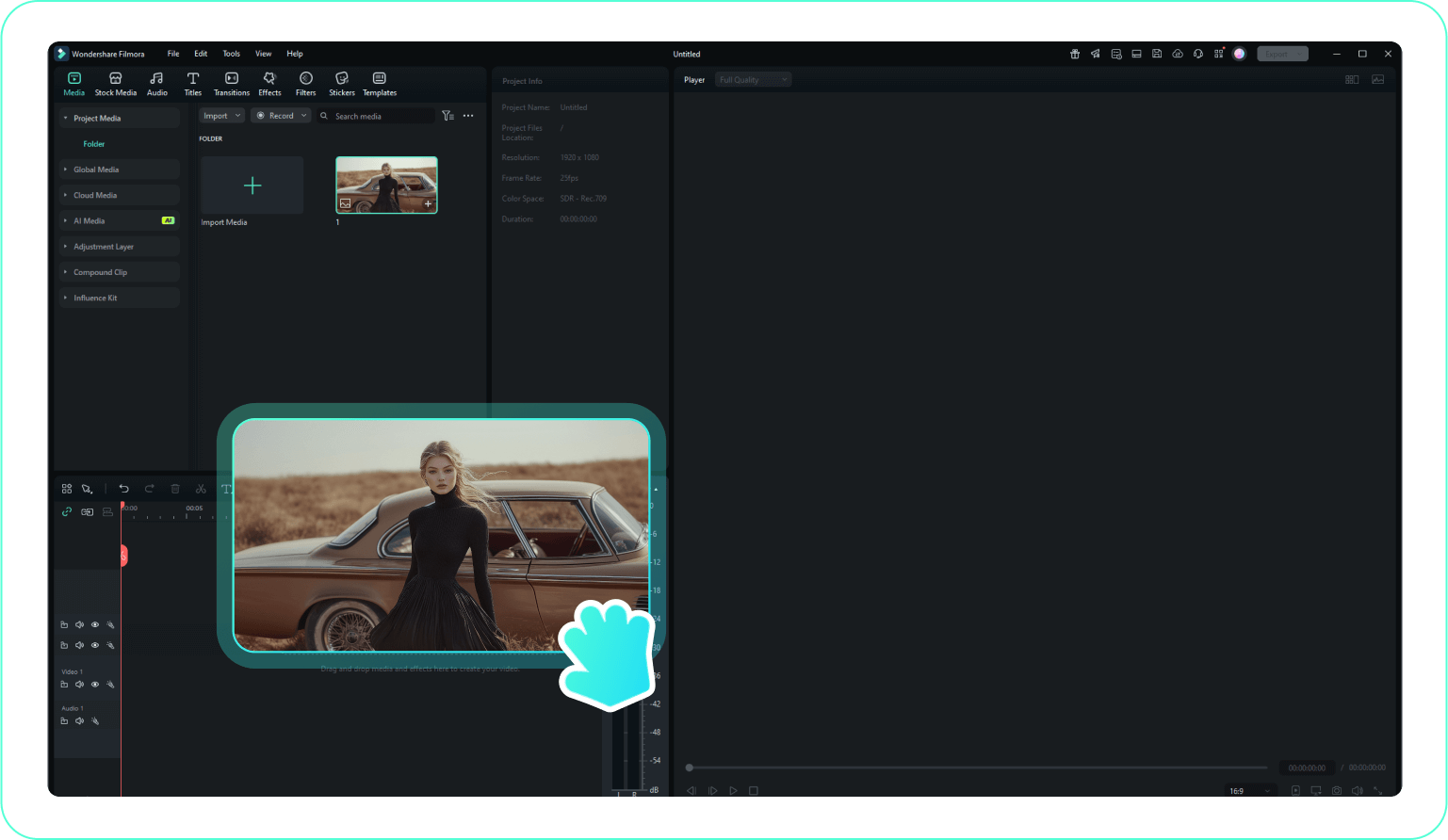
Step 1 Import Your Video Clips
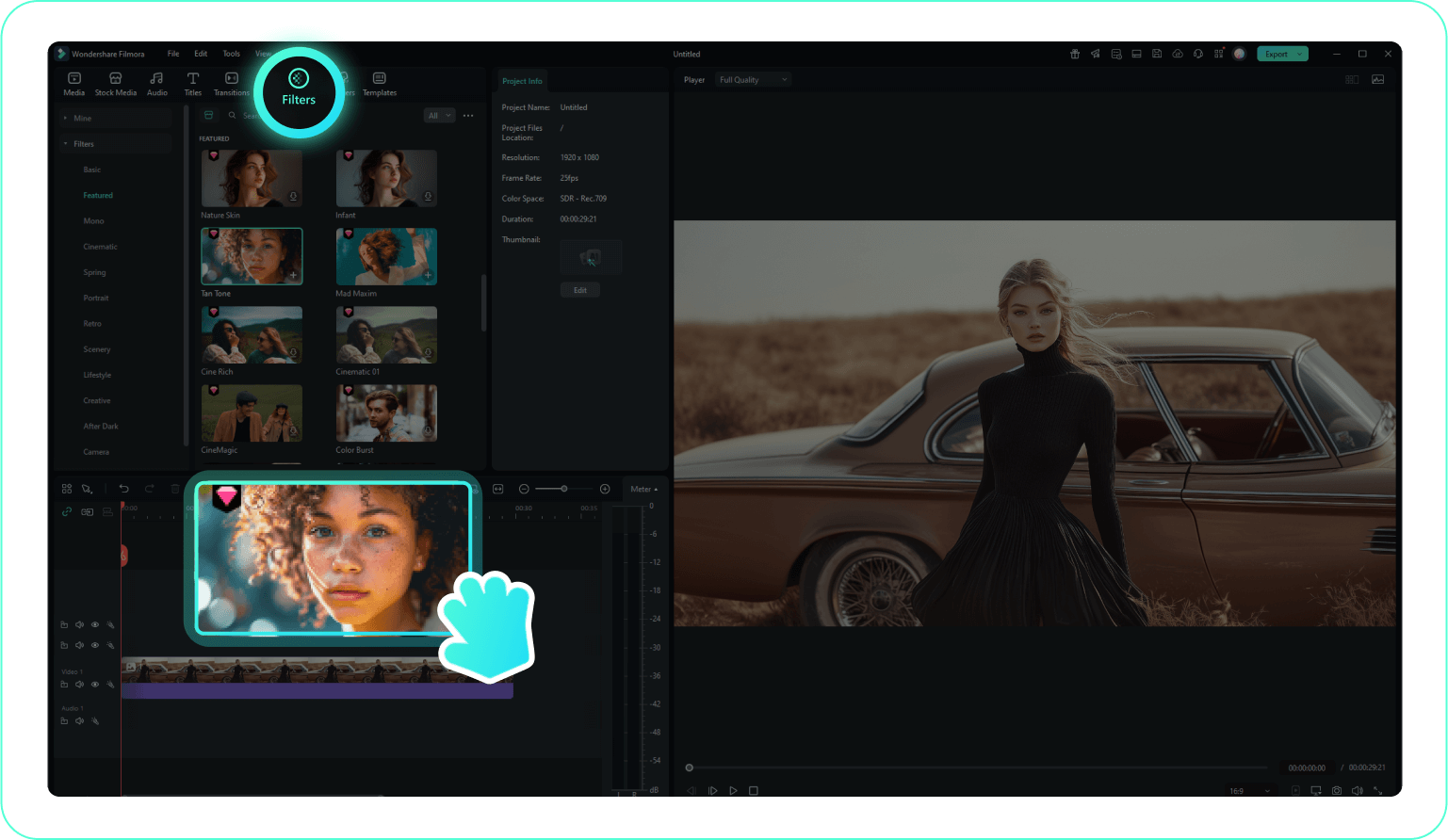
Step 2 Choose a Camera Lens Filter
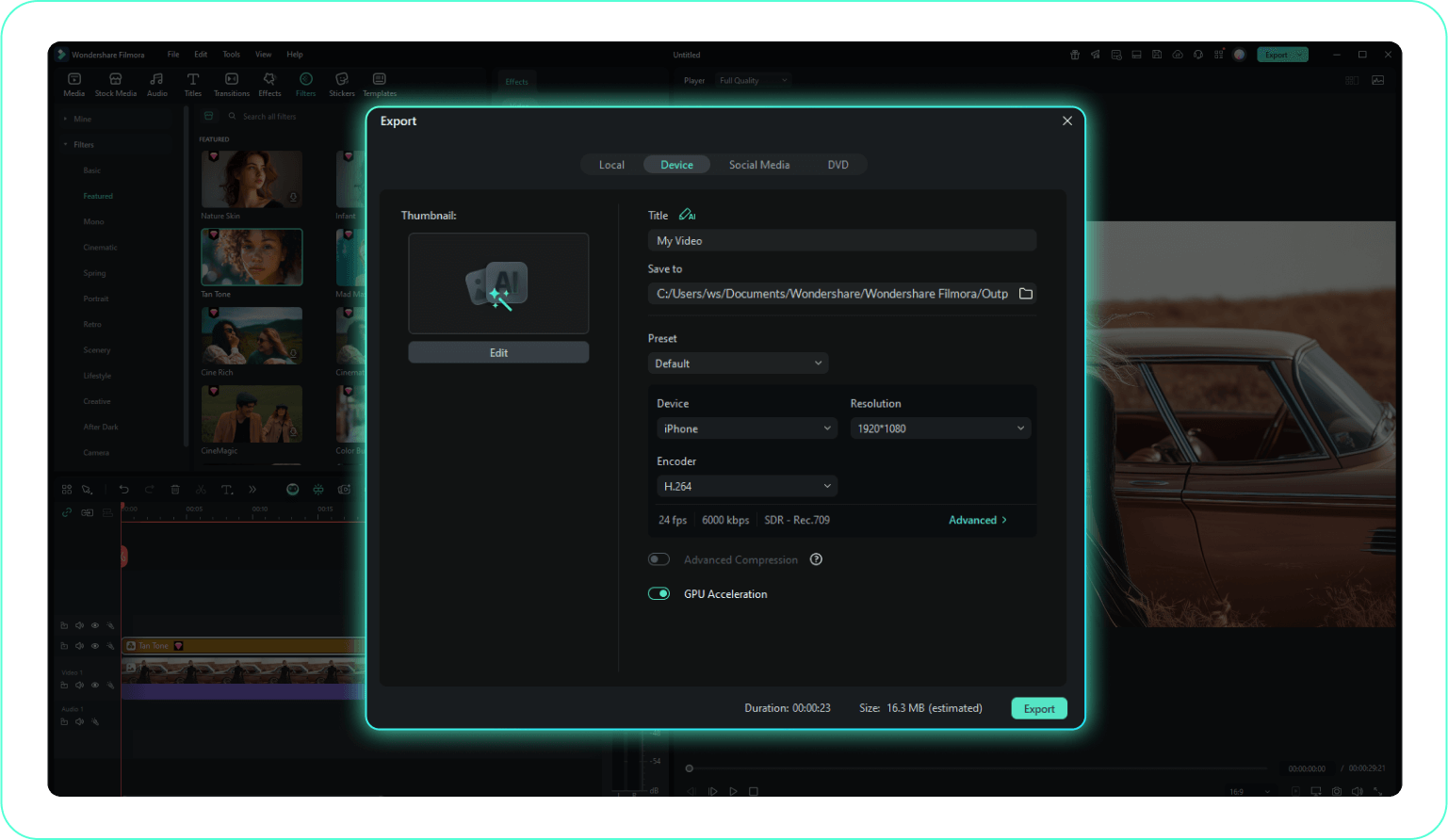
Step 3 Customize Optics & Export
-
1:Import Your Video Clips
Open Filmora and upload your footage by clicking "Import Media". Drag the video to the timeline to prepare it for optical enhancements. -
2:Choose a Camera Lens Filter
Navigate to the "Filters" section and explore the optics collection. Select your preferred camera lens filter to instantly change the lighting and depth of your shot. -
3:Customize Optics & Export
Fine-tune the look using parameters like Opacity. When your cinematic look is ready, click Export to render your high-quality video.
Explore More Visual Asset Templates
Discover other filter categories and creative effects to perfect your video storytelling




