


 TL;DR:
To bypass Seedance 2's strict human face restrictions and regional limits, creators can switch to specialized 2026 AI video models like Kling 3.0 for unrestricted character physics, Google Veo 3.1 for native 4K audio sync, or Wan 2.6 for local open-source deployment.
● Developed by Alibaba, Wan 2.6 is the only fully open-source, uncensored alternative that escapes cloud credit systems, but it generates video very slowly and requires a high-performance GPU to run locally.
● Runway Gen-4.5 caters to professional studios by offering precise Director Mode camera controls and seamless Adobe After Effects workflows, though its visual output is strictly capped at a 720p resolution without native audio.
● Rather than purchasing separate software plans, editors can use Wondershare Filmora to access Seedance 2.0, Veo 3.1, Sora 2, and ToMoviee under a single shared credit pool combined with an integrated timeline for fixing short AI clips.
Ask AI for a summary
 ChatGPT
 Perplexity
 Gemini
 Claude
 Grok
Grok
As impressive as Seedance 2 videos have become, many of its limitations have pushed people to look for a Seedance alternative. The strict restriction on uploading real human faces (goodbye, personal branding!), limited regional availability, and the hefty "pro-only" pricing are some of the most common frustrations we keep hearing about in the editing community.
Before you sign up and pay for the first tool you come across, we have broken down the 8 best Seedance 2 alternative options you can use right now. These tools are shortlisted for every use case, from professional cinematic production to Seedance open-source alternative models you can run locally.
To find the absolute best Seedance AI alternative, we put these tools through a rigorous test. Here's exactly what we looked at to separate the real contenders from the hype:
- Prompt Fidelity: Does it actually follow complex instructions?
- Human Realism: Can it handle faces without looking like a wax museum?
- Motion Physics: Do hair, water, and fabric move naturally?
- Consistency: Can the same character survive from shot A to shot B?
- Control & Precision: How much creative control do you actually get?
Our Top 3 Picks for Seedance Alternatives
With so many Seedance alternatives in the ring, choosing just three wasn't easy. But these three stood out for very different reasons, which means at least one of them is probably exactly what you need.



Part 1. 8 Best Seedance Alternatives with Reviews
The AI landscape moves fast. While Seedance is great for "vibey" aesthetics, these Seedance alternatives offer the utility, speed, and accessibility that professional editors actually need in a 2026 workflow.
To make things easier, here’s a quick comparison before we go deeper:
| Video Quality | Control & Precision | Character & Scene Consistency | Audio & Lip-Sync | Speed & Cost | Input Flexibility | Platform & Accessibility | |
| Kling 3.0 | Up to 1080P | ⭐⭐⭐⭐ | ⭐⭐⭐⭐⭐ | Available | Moderate (mid-cost) | Text & Image | Web, iOS, Android |
| Google Veo 3.1 | Up to 4K | ⭐⭐⭐⭐⭐ | ⭐⭐⭐⭐ | Available | Moderate (high-cost) | Text & Image | Web (Gemini/Flow) |
| Wan 2.6 | Up to 1080p | ⭐⭐⭐ | ⭐⭐⭐⭐⭐ | Available | Slow (free) | Text & Image | Web, Android |
| Runway Gen-4.5 | Up to 4K | ⭐⭐⭐⭐⭐ | ⭐⭐⭐⭐ | Not available | Moderate (credit-based) | Text & Image | Web |
| Pika 2.5 | Up to 1080p | ⭐⭐⭐ | ⭐⭐⭐ | Available | Fast (low-cost) | Text & Image | Web, iOS |
| Luma Dream Machine 3 | Up to 4K | ⭐⭐⭐⭐ | ⭐⭐⭐⭐ | Not available | Fast (mid-cost) | Text & Image | Web, iOS |
| Hailuo AI | Up to 1080p | ⭐⭐⭐ | ⭐⭐⭐⭐⭐ | Not available | Fast (low-cost) | Text & Image | Web, iOS, Android |
| ToMoviee | Up to 2K | ⭐⭐⭐⭐ | ⭐⭐⭐ | Available | Fast (low-cost) | Text & Image | Web, iOS, Android |
|
Show More
Show Less
|
|||||||
1. Kling 3.0
If Seedance feels restrictive, Kling is the closest direct upgrade. Kling has quickly become the primary Seedance alternative for creators who felt "stuck" by Seedance's strict limitations. It specializes in realistic human physics and high-intensity movement. It also offers better accessibility and stronger consistency in character animation.
- No restrictions on human face uploads.
- Wider global availability, including regions where Seedance is unavailable.
- Stronger multi-scene character consistency across long-form projects.
- More affordable subscription plans with generous credit allocation.
- Slightly less hyper-cinematic than Seedance's top-tier commercial outputs.
- Motion Brush & Camera Control: Move the camera and animate specific parts of your scene with more precision.
- Image-to-Video & Text-to-Video: Turn text or images into video clips with just a few steps.
- Consistent Characters: Keep the same character look across multiple scenes using reference images.
- No human face upload restrictions.
- Supports long-form video generation (up to 3 minutes).
- Advanced camera controls have a learning curve for beginners.
- Processing speed can slow down during peak hours.
Free monthly credits available. Paid plans start from $10 per month. Pay-as-you-go credits are also available.
4.7/5.
Professional creators, social media video producers, and anyone frustrated by Seedance's face upload restrictions.
2. Google Veo 3.1
Google Veo 3.1 is a direct Seedance AI alternative for those who need a generated video with native, synchronized audio. We're talking background music, ambient sounds, and dialogue that actually match what's happening on screen, all in a single generation step.
- Native audio generation with natural voice, dialogue, and sound effects.
- Generate realistic human faces freely.
- Broader international availability via Google's global infrastructure.
- Superior lip-sync accuracy for talking-head and dialogue-based scenes.
- More developer-focused; less intuitive UI for non-technical users.
- Accurate Lip-Sync: Characters speak naturally with mouth movements that match the audio.
- Text & Image to Video: Create videos from prompts or animate images with solid quality.
- API Access: Can be integrated into workflows through Google Cloud.
- Backed by Google's global cloud infrastructure.
- 4K output quality with cinematic realism.
- More expensive at scale compared to other alternatives.
- Steep learning curve for non-developers.
Free version not available. Paid plans start from $0.40 (720p and 1080p) per seconds.
4.8/5.
Filmmakers, marketers, and content creators who need native audio.
3. Wan 2.6
Wan 2.6 (developed by Alibaba) is the most powerful Seedance open-source alternative available in 2026. Unlike Seedance, which locks you into a credit system and cloud access, Wan gives you full control by letting you run the model locally. It is the go-to for creators who want to escape cloud-based credits and strict corporate filters.
- Fully open-source and can run locally on your own hardware.
- No restrictive safety filters on creative or edgy content.
- Superior at transforming existing footage into new styles.
- Often follows long, complex technical prompts better than Seedance.
- Lower visual quality compared to Seedance's best outputs.
- Unlimited Usage: The free version allows you to generate as much as your hardware allows.
- Flexible Input Options: Supports text, image, and custom pipelines.
- Open-Source Community Support: Regular updates and improvements from developers.
- Extremely flexible for developers using the API.
- Highly customizable with LoRA fine-tuning support.
- The generation speed is very slow.
- Requires a strong GPU to run smoothly.
Free version available. Paid plans start from $10 per month. Credit packs are also available.
4.3/5.
VFX artists, developers, and creators who need a Seedance local alternative for private or uncensored projects.
4. Runway Gen-4.5
If you're looking for a Seedance AI alternative that gives you more control instead of just generating clips, Runway Gen-4.5 is one of the strongest options right now. While Seedance focuses on balanced output, Runway leans heavily into precision, camera control, and production workflows, making it feel closer to a real filmmaking tool.
- Much stronger camera and motion control (Director Mode, Motion Brush).
- Better prompt accuracy for complex scenes and sequences.
- Seamlessly works with Premiere Pro and After Effects workflows.
- Modify specific elements of a generated video without rerendering the whole shot.
- Shorter clip length and no fully native audio pipeline.
- Gen-to-Gen Stylization: Use one video as a structural reference to "reskin" it into a completely new style.
- High-Fidelity Resolution: Native support for 4K exports with professional-grade color depth.
- Story Engine: A specialized tool for linking multiple clips together into a coherent storyboard.
- Frequent updates and cutting-edge research features.
- Excellent character and background stability.
- No fully integrated native audio workflow.
- Only supports up to 720p.
No free version available. Paid plans start from $15 per month.
4.4/5.
Hollywood studios, creative agencies, and power users who want full control over motion, camera, and scene direction.
5. Pika 2.5
While Seedance 2.0 focuses on being a serious "cinematic engine," Pika 2.5 has carved out a niche as the most creative and interactive Seedance AI alternative tool on the market. It doesn't just generate video; it understands physics in a way that allows you to manipulate objects within the frame.
- Features like "Melt" and "Crush" offer creative styles Seedance cannot match.
- Pika's "Turbo Mode" generates clips up to 3x faster than the standard Seedance render.
- Automatically generates Foley sounds (crashes, splashes) that sync with the video action.
- A much simpler, cleaner web and mobile interface compared to Seedance's complex dashboard.
- Lower realism and weaker physics compared to Seedance.
- Pikaffects: A suite of one-click physics simulations including Inflate, Melt, Explode, and Cake-ify.
- Lip Sync & Pikaformance: Advanced facial animation that syncs character mouth movements to uploaded audio or text.
- Pikaswaps: Easily swap objects or characters in an existing video while keeping the background intact.
- Pikatwists: Change the action of a character mid-scene (e.g., "make them start dancing") using simple text prompts.
- Pikaframes: Extend short clips up to 25 seconds by generating transitions between up to five keyframes.
- A generous free plan makes it easy to try.
- Excellent for "viral" social media content and memes.
- Standard plans won't remove watermarks; you need to upgrade to Pro ($35/month).
- Resolution maxes out at 1080p (no 4K support in 2026).
Free plan available. Paid plans start at $10/month with more credits and features.
4.5/5.
Social media creators, marketers, and anyone who wants fast, creative videos without dealing with complex settings.
6. Luma Dream Machine 3
If Seedance 2.0 is the leader in "vibe," Luma Dream Machine 3 (powered by the Ray architecture) is the leader in "reality." It is widely considered the top Seedance AI alternative for editors who prioritize high-end cinematography and realistic light interactions. It focuses less on strict control and more on generating visually polished shots with natural motion and flow.
- Handles water splashes, reflections, and clothing dynamics with near-perfect realism.
- Upload both a starting and ending image to "bridge" a specific narrative transition.
- Native 4K HDR support that outshines Seedance's default 1080p output.
- One of the best iOS apps in the game, allowing pro-gen on the go.
- Luma tends to favor slow, cinematic movement over the high-speed action found in Kling or Seedance.
- Ray Architecture: A next-gen rendering system that simulates realistic ray-traced lighting and shadows in AI video.
- Keyframe Continuity: Define specific points in time to ensure a character's pose or an object's position stays locked.
- Cinematic Extensions: Add 5-second increments to any clip with a single click while maintaining perfect environmental consistency.
- Excellent mobile app integration for Apple users.
- The "End Frame" feature allows for much tighter storytelling control.
- Can be prone to "hallucinating" extra limbs during fast character turns.
- Less intuitive for creators coming from a non-technical background.
Free plan available with limited credits. Paid plans start at $9.99 per month.
4.6/5.
Creative directors and VFX artists obsessed with photorealistic output, product visualizations, and visually stunning nature or fantasy scenes.
7. Hailuo AI
Hailuo AI, developed by Chinese AI startup MiniMax, is easily one of the most underrated Seedance AI alternatives on this list. It punches significantly above its weight class in terms of video quality, while being far more affordable and accessible. Plus, their outputs genuinely rival Seedance 2 in motion smoothness and scene realism.
- Superior at capturing subtle human micro-expressions and facial nuances.
- Features a "film-look" by default that requires less post-production.
- Much faster generation for short clips.
- Strong presence on both iOS and Android with a very intuitive "mobile-first" UI.
- Lacks the deep "Director Mode" or "Motion Brush" features found in Runway or Seedance.
- Artistic Engine 2.3: A proprietary rendering system that mimics real-world film stock and lens flares.
- Pro-Motion Rendering: High frame-rate outputs that eliminate the "jitter" often seen in other AI models.
- Expressive Human Modeling: Specifically tuned to prevent the "uncanny valley" look in close-up shots.
- Free plan available with credits.
- Stunning aesthetic that feels like professional cinematography.
- Prompt adherence for complex objects (like machinery) can be hit-or-miss.
- Fewer advanced controls than Runway or Kling.
Offers a free-to-try model with login credits (100). Paid plans start from $119.99 per month.
4.5/5.
Film students, digital artists, and any creator who needs fast, high-volume video generation instead of cinematic-level production.
8. ToMoviee AI
Last but not least, we recommend the ToMoviee AI. It is the best Seedance AI alternative for those who don't just want a raw clip, but a finished product. Developed within the Wondershare ecosystem, ToMoviee bridges the gap between raw AI generation and a polished edit. It's more of an all-in-one creative studio compared to Seedance, which focuses mainly on video.
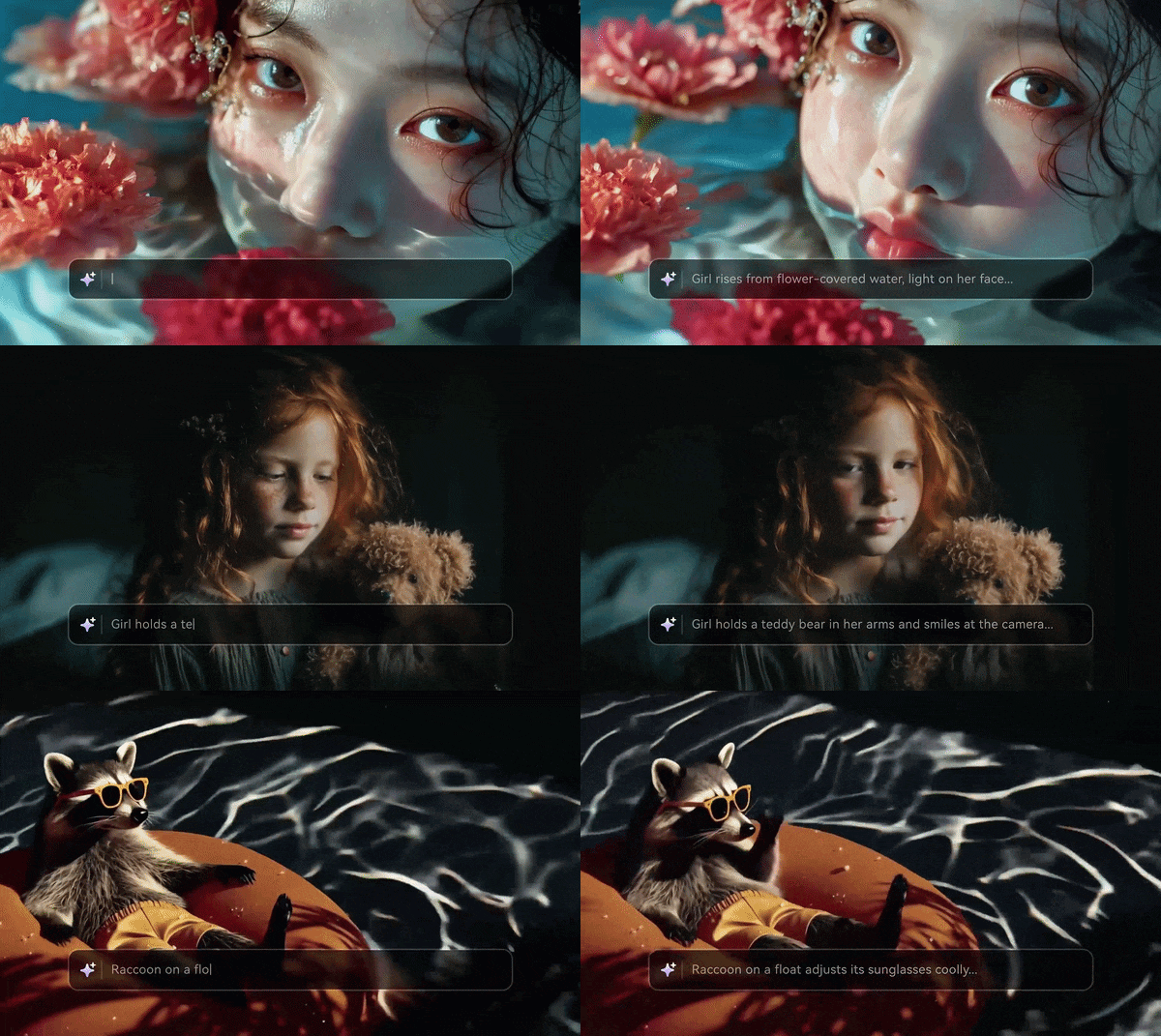
- All-in-one platform (video, image, audio, voice in one tool).
- Unlike Seedance's fixed loops, ToMoviee can smartly "stretch" your footage while keeping quality.
- Automatically suggests and syncs background music (BGM) to match the visual vibe.
- More accessible with lower entry pricing.
- The raw cinematic "crunch" isn't quite at the level of Seedance's latest 4K research models.
- Built-in Audio Generation: Includes text-to-music, sound effects, and voice generation.
- Video Extension: Extend short clips without starting over.
- Multi-Style Presets: Quickly toggle between "Cinematic," "Anime," "3D Render," and "Vlog" styles without complex prompting.
- Video quality supports up to 2K.
- Allows for batch video generation.
- Limited advanced camera customization options.
- Less proven at scale vs. established competitors.
There is no free plan available. Paid plans start at $9.99 per month.
4.6/5.
Beginners, marketers, and creators who want a simple all-in-one Seedance alternative for quick content creation without juggling multiple tools.
Part 2. Try Different AI Models in One Platform – Filmora
If reading through all those Seedance alternatives has left you wondering 'Which one should I actually try first?', there's a smarter answer than signing up for eight different platforms.
Filmora, Wondershare's professional video editor, has built a native AI video generation hub directly into its interface. This allows you to run top-tier models, including Seedance 2.0, Veo 3.1, Sora 2, and ToMoviee, on a single subscription with a shared credit pool.
 Secure Download
Here's what makes Filmora worth a serious look as your AI video headquarters:
Generate Videos from Text, Image, or Audio
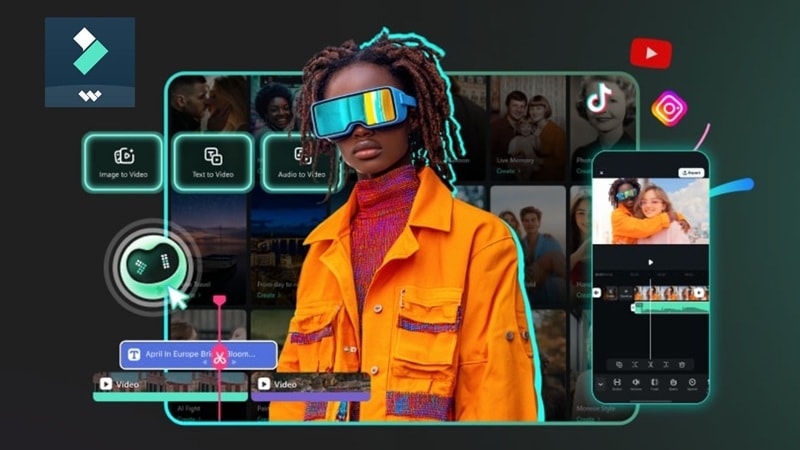
Filmora supports AI Text-to-Video, Image-to-Video, and Audio-to-Video. You’re not locked into one input type, which makes it easier to experiment.
Turn Raw AI Clips into Real Content
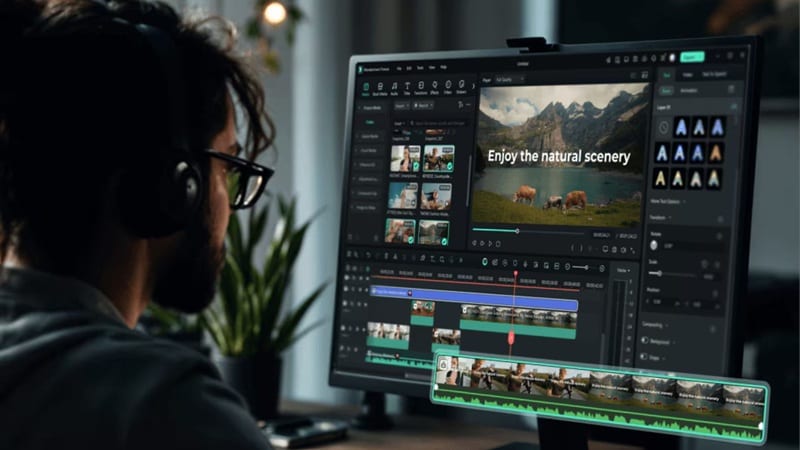
Most generators stop at the output. Filmora gives you a full timeline to edit, cut, and combine clips into something usable.
Extend and Fix Short AI Videos

AI clips are often too short. Filmora’s AI Extend feature helps continue scenes without starting over.
Smart AI Editing Tools That Learn Your Style
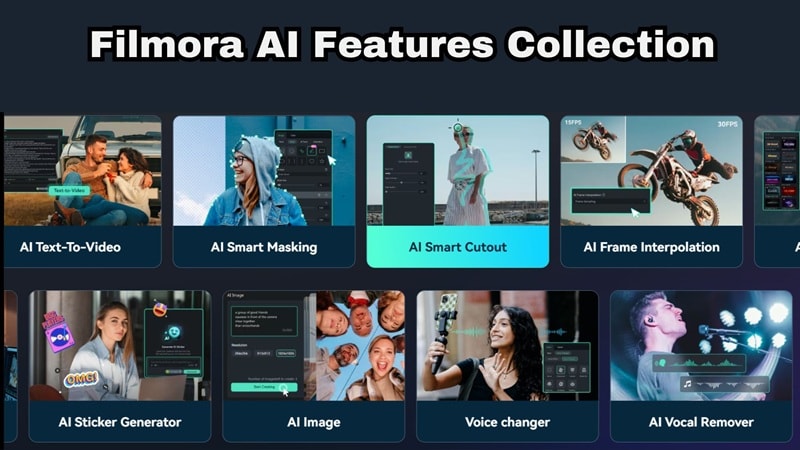
Beyond generation, Filmora packs AI-powered editing tools that save hours on routine tasks:
- AI Smart Cutout for background removal
- AI Color Match to harmonize clips from different sources
- AI Motion Tracking to pin graphics to moving subjects.
These tools are especially valuable when combining AI-generated clips with real footage, helping unify the visual style across your entire project.
AI Audio That Actually Matches Your Video
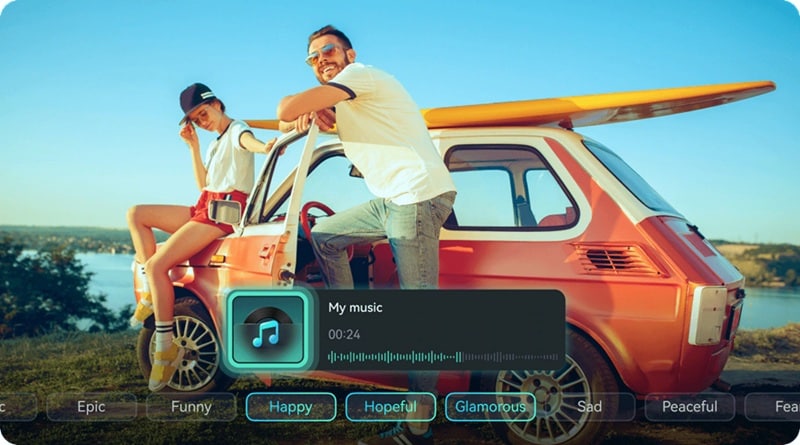
Filmora includes AI Audio tools that work hand-in-hand with its video generation features.
- Generate background music that adapts to your clip's mood.
- Apply AI voice cloning or voiceover narration.
- Use audio ducking to balance audio levels automatically.
Combined with Veo 3.1's native audio generation (available inside Filmora), this gives you a complete audio-video production pipeline without touching a separate DAW or sound editor.
Secure DownloadPart 3. How to Choose the Right Seedance Alternative
With eight solid Seedance alternatives on the table, the real question isn't 'Which tool is the best?', it's 'Which tool is the best for what I'm trying to do?' The answer depends on two key dimensions: your use case and your technical requirements. Let's break both down clearly.

1. Choose by Use Case
- Multi-Scene & Long-Form Storytelling: Filmora is the best here. It offers advanced AI video models with strong scene consistency and camera control, as well as an editing timeline to stitch footage together.
- Open Source / Privacy: Go straight to Wan 2.6. It's the only fully open-source option on this list, and it's more capable than most people expect.
- Budget-Friendly Creation: Hailuo AI is the pick. Its free tier refreshes daily, and even its paid plans are among the most affordable on this list.
- Cinematic Quality: It's between Google Veo 3.1 and Luma Dream Machine 3. Veo 3.1 edges ahead if audio matters; Luma wins on photorealistic surface detail.
2. Choose by Technical Need
- Native Audio Generation: If your content needs dialogue, ambient sound, or music without post-production audio work, Veo 3.1 is the only real answer.
- Longest Clip Duration: If you need extended clip lengths out of the box, Kling 3.0 leads with multi-minute generation capability.
- 4K Video Quality: For 4K output, your top options are Filmora, Google Veo 3.1 (via Vertex AI), and Luma Dream Machine 3. They generate at high resolution with detail fidelity that holds up on large screens.
- API Access: Teams looking to integrate AI video generation into their existing software stack should evaluate Runway Gen-4.5 (mature, well-documented API), Luma Dream Machine 3 (clean developer API), and Google Veo 3.1 via Vertex AI (enterprise-grade with Google Cloud SLAs).
Conclusion
Seedance is still a solid tool, but it is no longer the only choice. There are now better options depending on what you actually need. Kling gives you more flexibility, Veo delivers top-tier realism, and Wan stands out as a true Seedance open-source alternative you can run locally. The smarter move is not relying on just one Seedance AI alternative, but testing a few and seeing what works for your workflow.
Before committing, try different models side-by-side. Filmora makes this easier by letting you test tools like Seedance, Veo, and ToMoviee under one subscription. On top of that, you get a full editing timeline, AI video generation, audio tools, and features like AI Extend to turn short clips into complete videos without switching platforms.
FAQs
-
1. Is Seedance 2.0 free to use?
Not really. You do get some free credits to try it out, but using Seedance 2.0 requires a paid plan. Pricing starts at around $30.10 for 7 million tokens, and those credits are valid for three months. -
2. What is the best free Seedance alternative?
The best free Seedance alternative depends on your needs. For cloud-based tools, Hailuo AI has the most generous free tier with daily credit refreshes and no watermarks on standard outputs. For a completely free, no-strings-attached option, Wan 2.6 is open-source and free to run locally. -
3. Which Seedance alternative is best for realistic human faces?
Kling 3.0 is currently the strongest Seedance alternative for realistic human face generation and animation. Unlike Seedance, which restricts real human face uploads entirely, Kling places no such restrictions and maintains strong facial consistency across clips. -
4. Can I use Seedance alternatives for commercial projects?
Most of the tools on this list allow commercial use on their paid plans. Kling 3.0, Runway Gen-4.5, Pika 2.5, and Luma Dream Machine 3 all explicitly permit commercial licensing on paid subscriptions. Wan 2.6 is open-source with a permissive license for commercial use. Always check the specific terms of service for the plan you're on, as commercial rights can vary by tier.
