


 TL;DR:
Avoid downloading Motionleap Mod APKs due to severe malware and privacy risks; instead, utilize the official free app for basic animations or Wondershare Filmora for advanced cross-platform editing.
● The official free version of Motionleap already provides watermark-free exports for standard photo animations, restricting only AI text-to-image outputs and specific premium assets like water effects and extra sky styles.
● Third-party modified APKs violate Lightricks terms of service and frequently cause app instability, device overheating, and unauthorized access to personal files or contacts.
● Wondershare Filmora is best suited for users requiring an official desktop editor, offering secure access to Veo 3.1 AI video generation, 3D camera movements, and automated pan and zoom effects without piracy risks.
Ask AI for a summary
 ChatGPT
 Perplexity
 Gemini
 Claude
 Grok
Grok
If you like editing photos, chances are you already know Motionleap. Previously known as Pixaloop, it is a popular app by Lightricks that lets you animate photos and share them on social media. The app has even reached more than 50 million downloads on Google Play.
Since many people want the full Motionleap Pro experience without paying, a lot of users end up searching for Motionleap by Lightricks Pro APK. You may have bumped into those sites promising free access with every feature unlocked.
In this guide, we explain why using Motion Leap Mod APK can be unsafe and what you can do instead. We also give a safer option that works on both mobile and desktop.

Part 1. What Is Motionleap by Lightricks?
Lightricks released Enlight Pixaloop in 2018 and later renamed it Motionleap in 2020. That’s why many people still look for Pixaloop APK cracked even though the app now goes by a different name.
Motionleap or Pixaloop is basically an app that helps you animate photos in a few taps. The animations are ready to use. Also, Motionleap is available on iOS and Android.
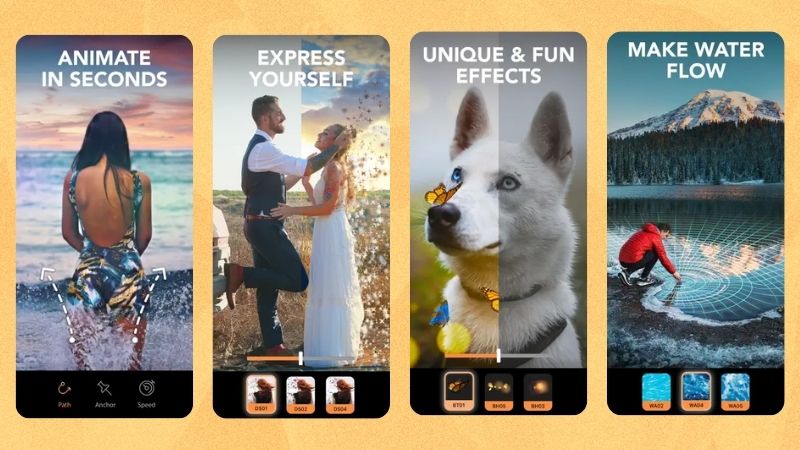
Here are the main features of Motionleap or Pixaloop:
- Animate using "Arrows": You can animate an object by brushing the area you want to move and placing arrows to guide the direction.
- Motion Leaps: There are several motion presets you can try. Sky to replace the sky, Water to add natural water movement, and Beatloops to add music and sync the animation to the beat.
- Wide Variety of Overlays and Effects: Decorate photos with animated elements using Elements and Overlays. You can also use Effects to add dispersion, and 3D Effects for 3D-style animation.
- Simple Photo Editor: Adjust basic settings like brightness, contrast, saturation, and temperature to match your style.
- AI Text-to-Image: The newest features in Motionleap allow you to generate images in many styles, from realistic to fantasy.
Understanding the Price Gap in Motionleap
Cost is usually the biggest reason why people look for Motionleap Pro APK. To see whether the difference between Motionleap Free and Motionleap Pro is really that big, we’ve put together a quick comparison. Let’s take a look.
| Aspect | Motionleap Free | Motionleap Pro |
| Price | $0 | $9.99 monthly, $59.99 yearly, $206.39 one-time |
| Motion Styles | 16 Sky, 0 Water, 4 Beatloops | 69 Sky, 9 Water, 12 Beatloops |
| Overlays and Effects | 61 Elements, 39 Overlays, 7 Effects, 2 3D Motion | 322 Elements, 155 Overlays, 37 Effects, 12 3D Motion |
| Photo Editor | Yes | Yes |
| AI Text to Image | Available with watermark | Available with no watermark |
| Watermark | No | No |
|
Show More
Show Less
|
||
As you can see, Motionleap is generous with its free plan. You can access everything except the Water animations. Still, many users try to download Motionleap Mod APK without a watermark, even though the free version already has clean exports except for AI-generated photos. The main difference is really just the number of effects and motion styles.
Part 2. Why Motionleap Mod APK Downloads Are Popular
Before we look deeper into the risks of using Motionleap Full APK, it helps to understand what a Mod APK actually is. Many people do not realize what they are installing and assume it is just another version of the app.
What Exactly Is a Mod APK?
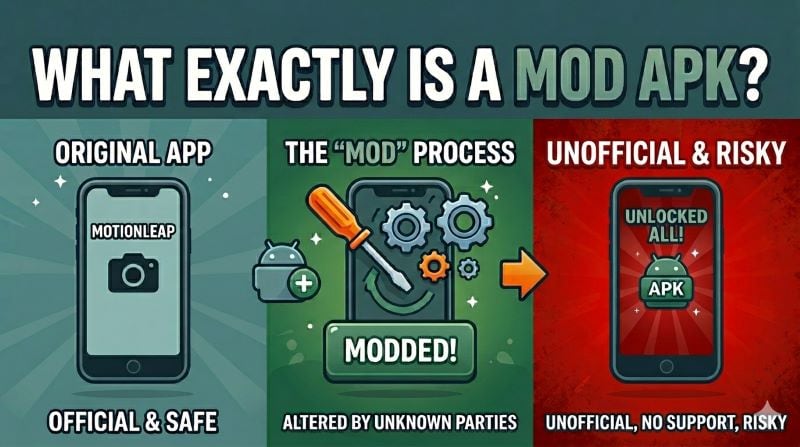
A Mod APK stands for Modified Android Package, which means a third-party hacked version of an Android app. The purpose is usually to unlock premium features, give unlimited resources, or remove ads without paying. It may sound like a good deal, but it is considered piracy and using it is illegal.
The Real Reasons People Search for Mod APKs
Since Motionleap makes it quick and easy to apply animations, many users start wanting more features. Instead of paying for a subscription, many people try to download Motionleap Pro APK as an alternative.
Here are the most common reasons why people look for shortcuts:
- Unlock All Motion Styles: The free Motionleap has fewer motion styles, so users get curious and want to try everything. That is why many people search for Pixaloop Mod APK premium unlocked.
- Avoid Paying: Some users want premium features but do not want to pay, especially if they only edit occasionally.
- Aggressive Ads: Some users may try to find the official Motionleap app and end up landing on Motionleap Pro APK free download, Photoleap by Lightricks APK Mod, or Pixaloop Mod APK latest version because the ads make them think it is legitimate.
Is There Any Legal Mod APK?

There is never a legal Mod APK. In fact, using Motionleap Mod Pro APK downloads is a violation of Motionleap’s terms and conditions. The original version is only available through official sites and app stores, while the rest are created by third parties that are unverified and unreliable.
Part 3. Hidden Risks Behind Motionleap Mod APK Downloads
Motionleap APK Pro downloads may look harmless, but they often come with hidden dangers that most people do not realize at first. These risks can affect your privacy, your device, and even your Motionleap account. Before downloading anything outside the official store, it is important to understand what you are exposing yourself to.
| Risk Type | What It Means |
| Malware & Virus Infection | Mod APKs may include viruses that can steal your data or damage your device. |
| Hidden Ads or Pop-ups | You may get tons of pop-ups that make the app hard to use. |
| Privacy Threat | Some APKs request unnecessary permissions that expose personal files, contacts, or account info. |
| Account Ban Risk | Your account may be blocked if the system detects a modded version. |
| Lack of Updates & Support | No bug fixes, no improvements, no customer support. |
| Potential Device Issues | Modded apps can overload system performance, cause overheating, or trigger crashes that affect device stability. |
Part 4. How to Use Motionleap Safely Without Mod APK
Before turning to risky downloads, remember that Motionleap already offers safe ways to access its tools. Instead of downloading Pixaloop Mod APK, you can follow these safer options.
1. Download Motionleap from Official App Stores
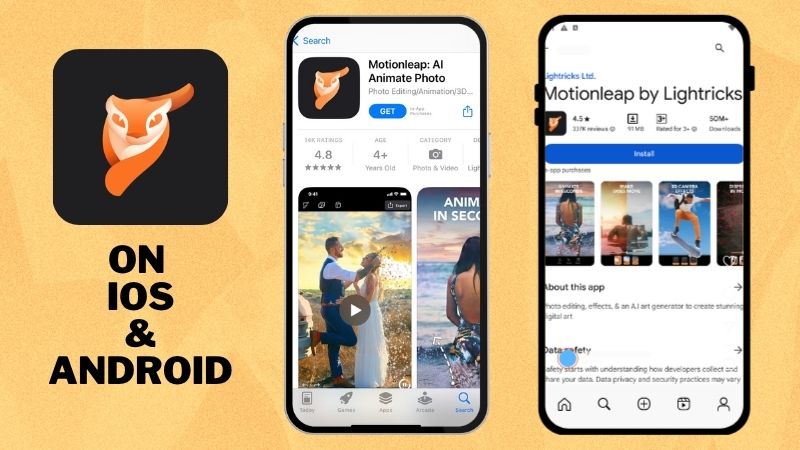
Never trust Motionleap Pro downloads from random or suspicious websites. Since Motionleap is only available for mobile devices, the safest and official way to get it is through these platforms:
- App Store (iOS) for iPhone and iPad, not Motionleap Pro APK iOS
- Play Store (Android) for Android phones and tablets, not the Motionleap APK download for Android
2. Start with What Motionleap Offers for Free
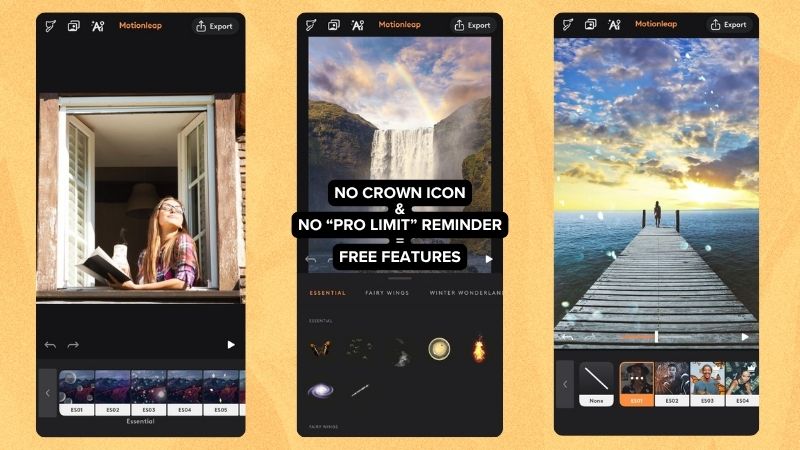
The free Motionleap version already covers most features, so looking for the Pixaloop APK Pro is not worth it. You can layer different animations and create fun variations for each photo. The export is also watermark-free, which means your animated photos are good to go for social media.
3. Switch to Pro When You Outgrow the Free Plan
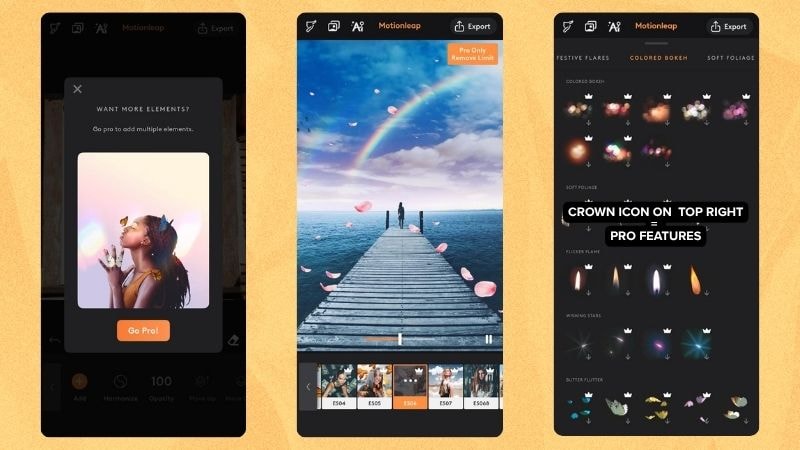
If you reach a point where the free plan feels limiting and you want more motion styles and effects, it might be time to switch to a paid plan. You can choose from three official plans, depending on your budget and needs. Upgrading is also safer than relying on Motionleap Mod APK from APKdone, which can cause project loss and end up harming you instead.
Part 5. The Best Pro Alternative to Animate Photos: Wondershare Filmora
Instead of relying on Motionleap by Lightricks APK to animate photos, there’s a much better and safer choice: Wondershare Filmora. It’s official, legal, and affordable, so you don’t need to risk your device’s security just for short-term needs.
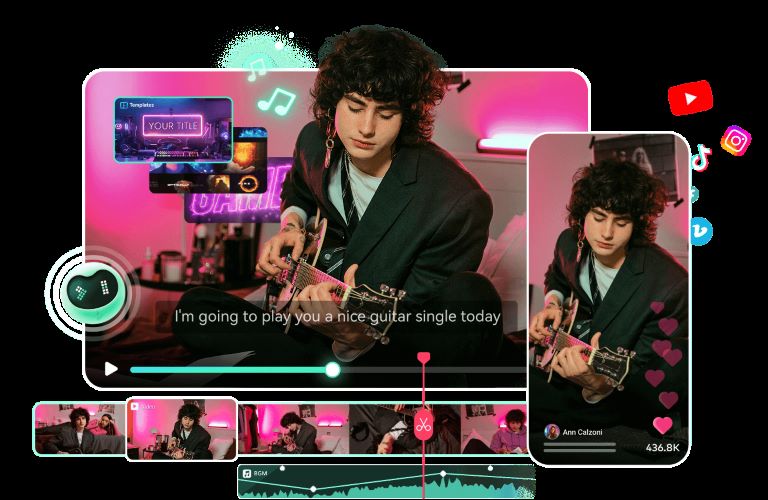
Filmora lets you animate photos and do full edits on both mobile and desktop. It’s practical for quick edits anywhere, while still giving you the full workspace you need on a larger screen.
 Secure Download
Why Use Filmora Instead of Motionleap Mod APK
Easy Timeline Editing

Filmora has an intuitive interface that is easy to use even for beginners. The magnetic timeline lets you layer clips without overlap, while ripple, slip, and slide tools give you more control. You can also use split screen and group clips to keep your project organized.
AI-Powered Editing Tools
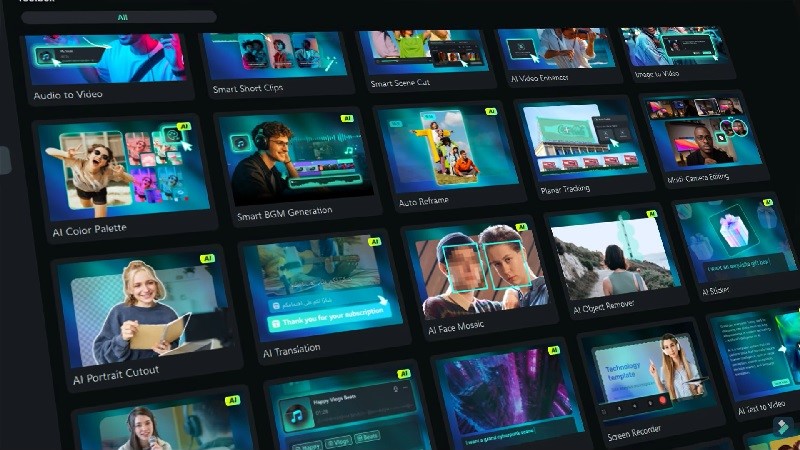
Instead of using a Motionleap free APK with limited AI features that can crash anytime, Filmora gives you a full set of AI tools for both video and audio editing.
- AI Image Generator to create photos to animate.
- AI Text to Video for quick video generation.
- AI Music and AI Sound Effect Generator to add the right soundtrack.
Not to mention, Filmora still has many other useful AI features that help speed up your workflow and create results that can match or surpass Motionleap.
Extensive Creative Assets Library
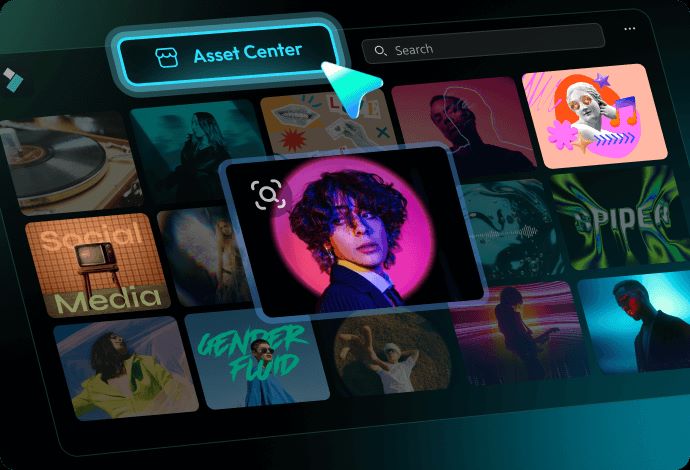
Filmora has millions of creative assets, including stock media, video effects, titles, and animation templates. This is far more than what you get in a Motionleap Premium APK. With such a large collection, you can create videos in any theme or style you want without running out of ideas or inspiration.
Safe and Official Software

Unlike Motionleap APK downloads, Filmora is easy to find on its official website. You do not need to rely on sketchy sites with misleading buttons. Filmora also keeps improving its features, and you can always get updates and customer support whenever you face bugs or issues.
Motionleap App APK vs Filmora: Side-by-Side Comparison
Now that we’ve talked about both tools, let’s compare them side-by-side. With this, you can judge for yourself if Motionleap APK Pro still makes sense compared to Filmora’s official and fully supported version.
| Category | Motionleap App APK | Wondershare Filmora |
| App Origin | Distributed through unofficial download sites | Officially provided through the official website, Apple Store, and Play Store |
| Security | Not safe with potential malware or data theft | Secure to use with trusted protection |
| Features | Unlocked features but often not stable | Fully working tools with stable output |
| Developer Support | Zero updates or technical support | Constant improvements and bug fixes |
| Performance | Runs poorly with frequent bugs | Runs smoothly with steady performance |
| Legality | Unauthorized and illegal to download and use | Officially authorized and legal |
Quick Tutorials to Animate Photos with Filmora
Looking for a way to create Motionleap-style animations? Filmora offers three easy desktop tutorials you can try without using Motion Leap by Lightricks Mod APK.
For this example, we use a photo of a man surfing in the ocean. Now let’s see how Filmora can bring the image to life.
1. Using 3D Effects
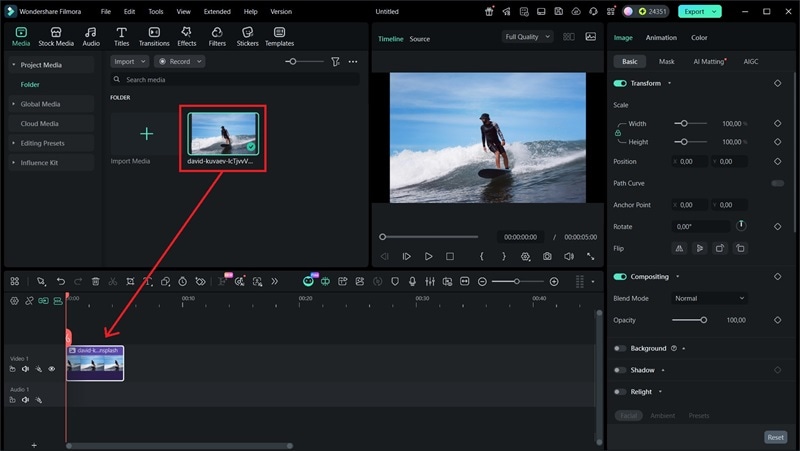
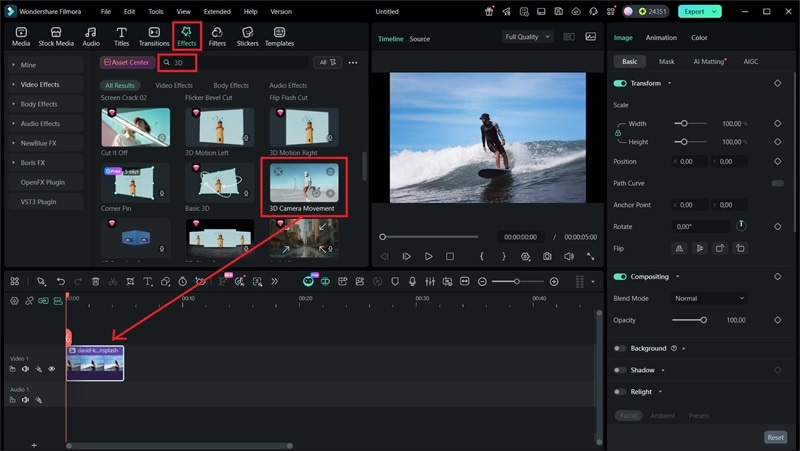
After that, export it to your device, and it’s ready to share on social media.
You can see that the animation begins with the background slightly tilted before returning to its original angle. The AI detects the subject, lifts him from the photo, then places him above the surfboard. The camera movement makes the originally flat photo look more dynamic.

2. Using the Zoom-in and Zoom-out Effect
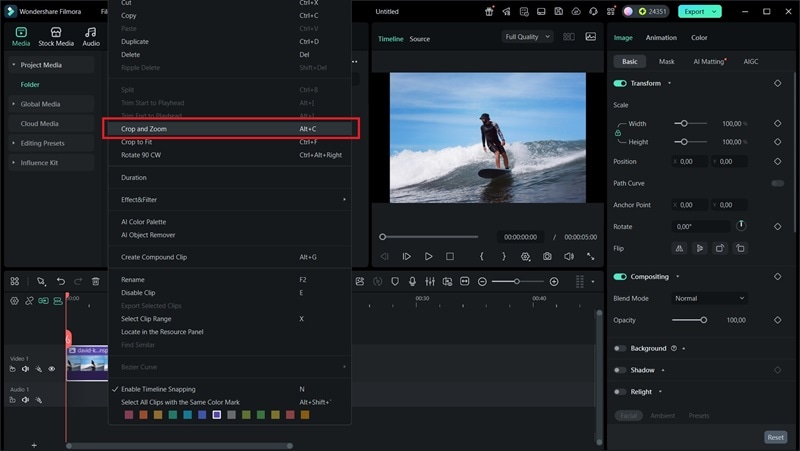
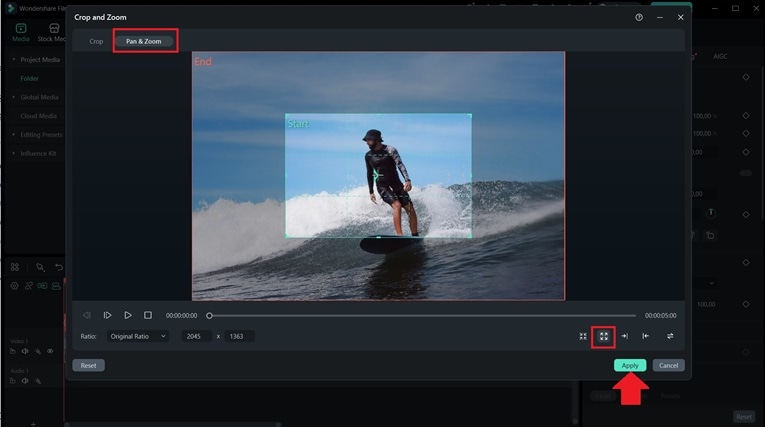
Once you’re done, you can export the animated photo to your device or save it on cloud storage.
With the Pan and Zoom tool, you don’t need to use keyframes and create animations manually. It automatically begins zooming in on the surfer, then gradually pulls back to show the ocean around him. This creates a smooth, dramatic transition.

3. Using AI Image to Video
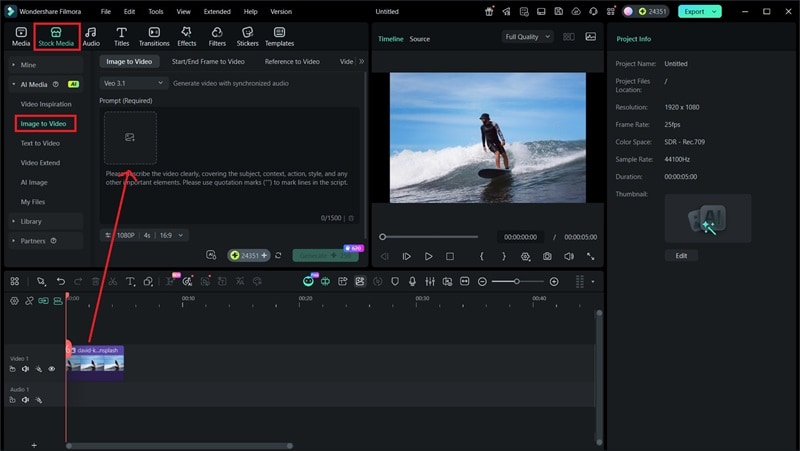
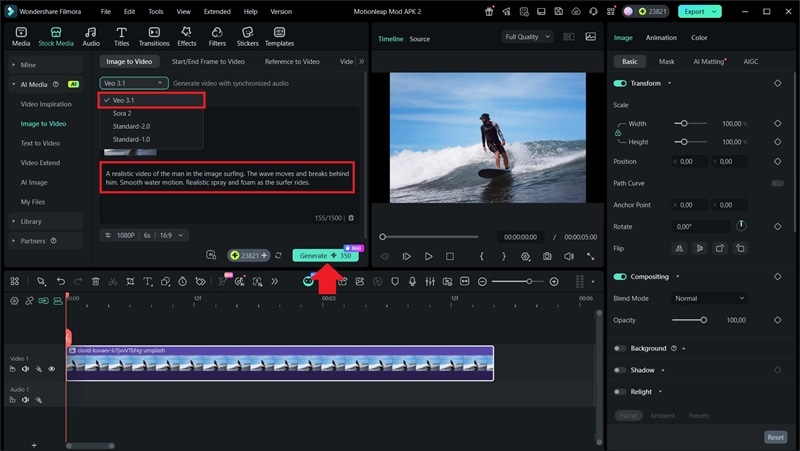
Wait until the processing is complete, then preview the generated video. Once you are happy with the result, save it to your device.
In this example, the AI model used is Veo 3.1. You can see the man moving smoothly on the wave, and the water movement looks natural. The AI produces a realistic result with background audio that matches the scene.
Secure DownloadConclusion
Motion Leap APK or Pixaloop Premium APK might seem like a great shortcut to unlock everything for free, but the risks are not worth it. You can lose your projects, get your account banned, or end up with malware that steals your data and harms your device.
It is always safer to use the official Motionleap app on iOS or Android. The free version already gives you enough tools to explore and animate photos. You can also try Filmora on desktop and mobile. You’ll get a powerful video editor with a bunch of advanced AI features and an extensive library of creative assets.
FAQs
-
Can I use Motionleap on a desktop?
No, there is no official Motionleap for PC. This is why many people try to download the APK Motionleap, but we strongly do not recommend it because it can harm your privacy and data. For a safe option, use Wondershare Filmora, which is available on both PC and mobile. -
What happened to Pixaloop?
The app was originally called Enlight Pixaloop when it launched in 2018. In 2020, Lightricks rebranded it to Motionleap, which explains why many users still search for Enlight Pixaloop Mod APK. -
Why does Motionleap Mod APK keep crashing on my device?
Motionleap by Lightricks Mod is created by an unofficial third party, so its quality is not reliable. Since the Motionleap App APK is a pirated version, it does not receive proper updates or support, which makes it unstable and prone to constant crashes on your device. -
Can Motionleap Mod APK access my photos or files?
Yes, downloading APK Motionleap from untrusted sites can expose your device to malware. Without you realizing it, the app may access your gallery or files without permission.
