
Have you ever come across a video generator you wanted to try, only to discover it's available on a platform you don't use? Exploring different creative tools can quickly become a hassle when you have to manage multiple accounts, subscriptions, and credits. VidpexAI offers access to several generation models, with tools to turn text and images into videos, create pictures, apply visual effects, and make music.
But how much can you actually get out of the platform? This VidpexAI review will look at its generation quality, available features, credit system, and pricing to help you decide if it's worth subscribing.
Part 1. Getting to Know VidpexAI
A single product photo can now be easily turned into a short video ad or used to develop a campaign concept with visual elements before launch. VidpexAI gives you several ways to create that content without installing desktop software. The platform runs in a web browser at https://www.vidpexai.com/ and offers tools for video and image generation, music creation, face swaps, and visual effects. See some examples of what you can create with it:
| Content type | What you can use it for |
| Short videos | Social media clips, product promotions, and visual storytelling |
| Animated photos | Moving product shots, animated portraits, and image-based clips |
| AI images | Product visuals, concept art, and digital illustrations |
| Face swaps and avatars | Character edits, avatar content, and creative portraits |
| Music and audio | Original songs, AI song covers, and music videos |
| Visual effects | Creative transformations and stylized photo or video edits |
Who is VidpexAI for?
- Social media creators who regularly publish content for TikTok, Instagram Reels, and YouTube Shorts.
- Small business owners who want to turn existing product photos into promotional visuals.
- Digital marketers who need additional creative assets for ads, product launches, and campaigns.
- Designers and hobbyists who enjoy experimenting with different generation models and visual styles.
Part 2. Exploring VidpexAI’s Creative Tools
VidpexAI features several creative tools in one browser-based platform, covering video generation, image creation, visual effects, and music production. Start with a text prompt, work from an existing image or video, or upload an audio track, depending on the content you want to create.
1. Text-to-Video and Image-to-Video
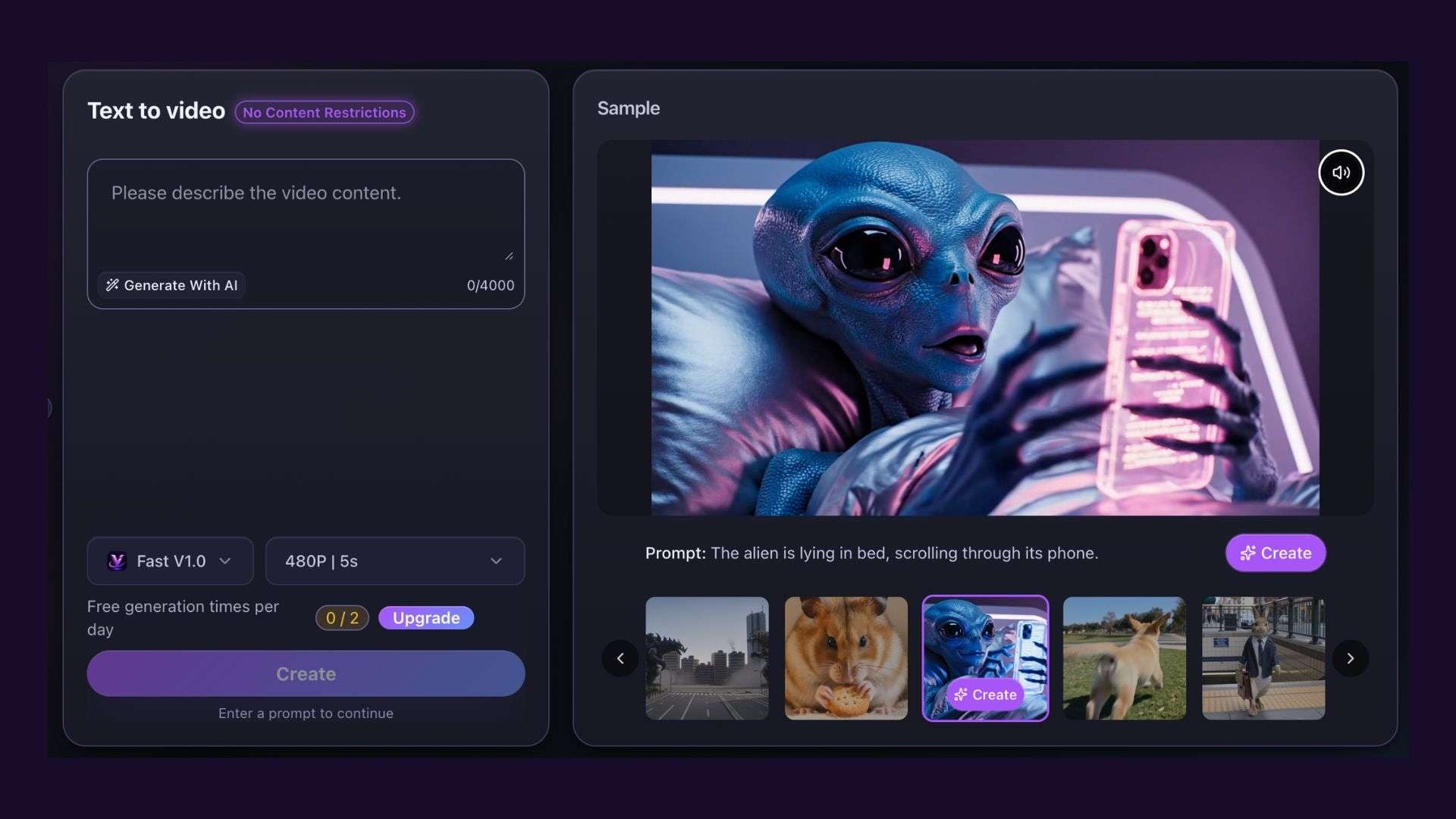
VidpexAI offers two ways to generate AI videos:
- Text-to-Video: Describe the scene, subject, and action in a prompt, then use it to generate a video.
- Image-to-Video: Upload a JPG, JPEG, PNG, or WebP image and describe the movement. You can choose Start Image, Between Images, or Reference Images to provide visual guidance.
The first option creates visuals from a written description, while the second animates existing images. VidpexAI also provides an AI Effect tool with ready-made video effects for different themes. Options include the AI Beach Sunset Kiss Generator, AI Miniature Video Generator, AI Mermaid Video Generator, and more. Simply choose an effect to create a video based on your preferred theme.
2. AI Image Generator
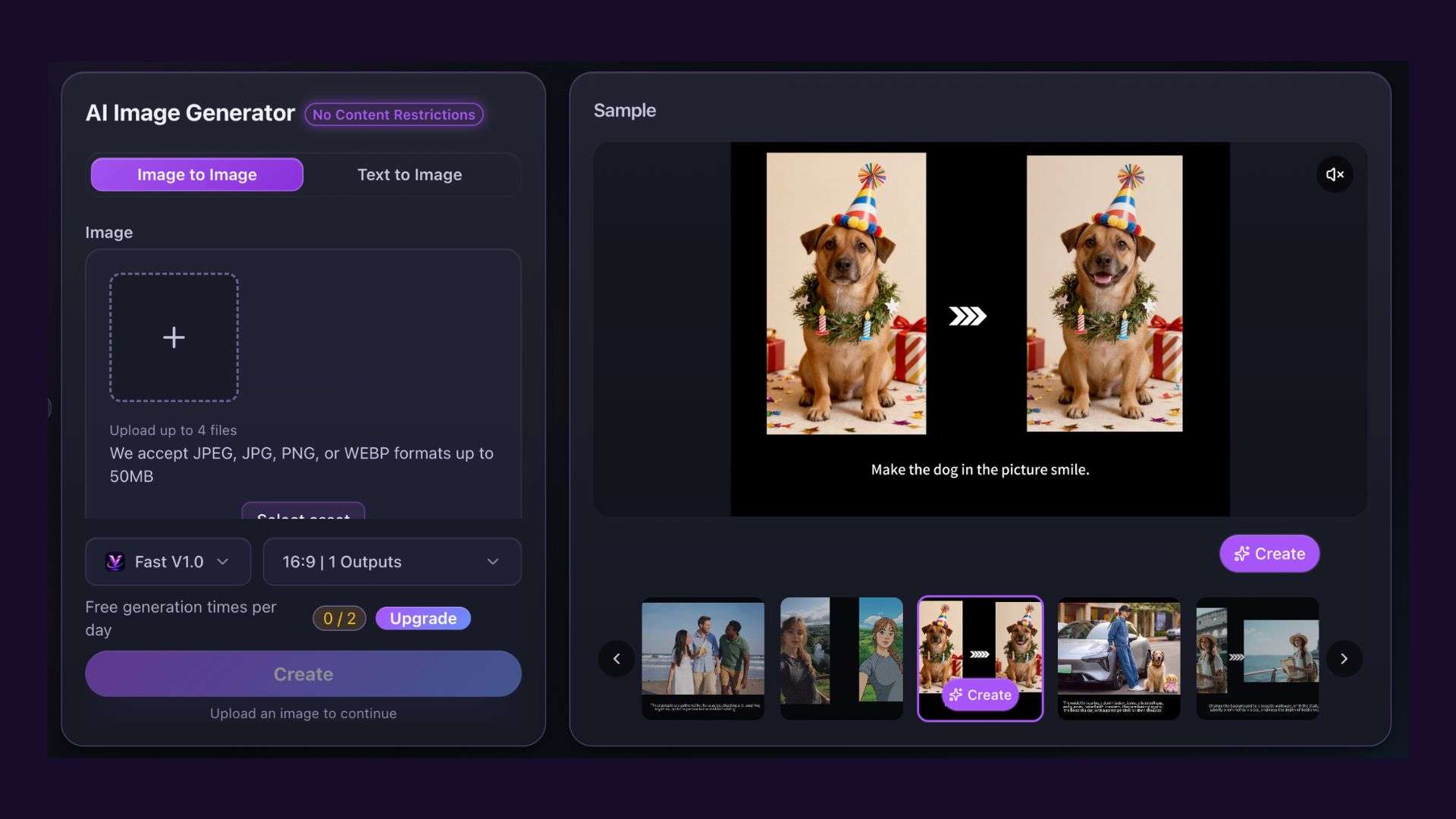
The AI Image Generator supports both Text-to-Image and Image-to-Image creation. You can enter a prompt to generate a new visual or upload an existing photo for editing and transformation. VidpexAI also offers various image models, including Nano Banana, Wan, and Gemini.
3. AI Viral Video Cloner and Effects
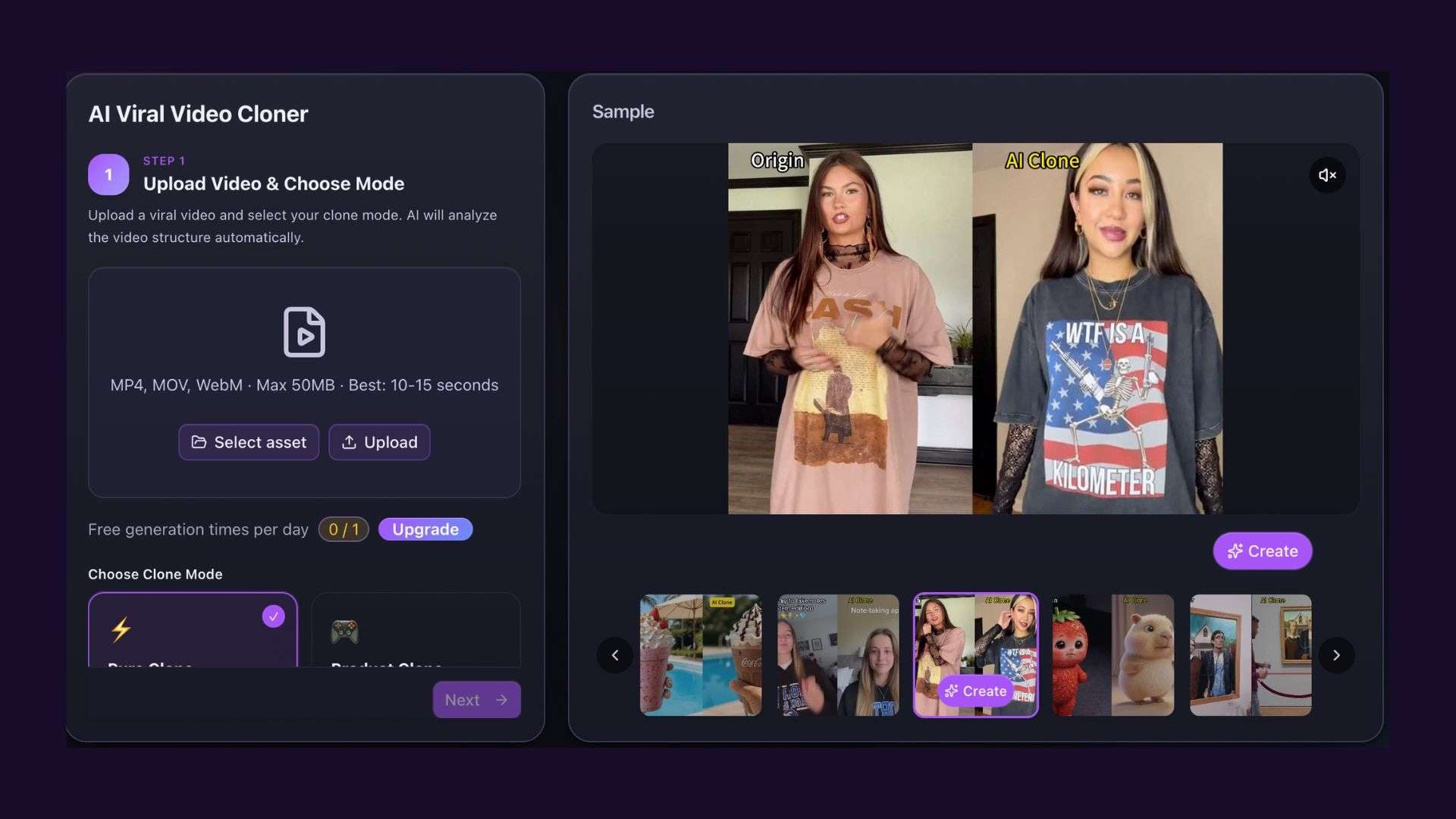
The AI Viral Video Cloner uses a reference clip to guide the creation of a new video. Upload an MP4, MOV, or WebM file (up to 50MB), with 10 to 15 seconds recommended, then select one of two modes:
- Pure Clone: Recreates the reference video's structure without product images.
- Product Clone: Incorporates product images into a video inspired by the reference.
4. AI Music and Audio Tools
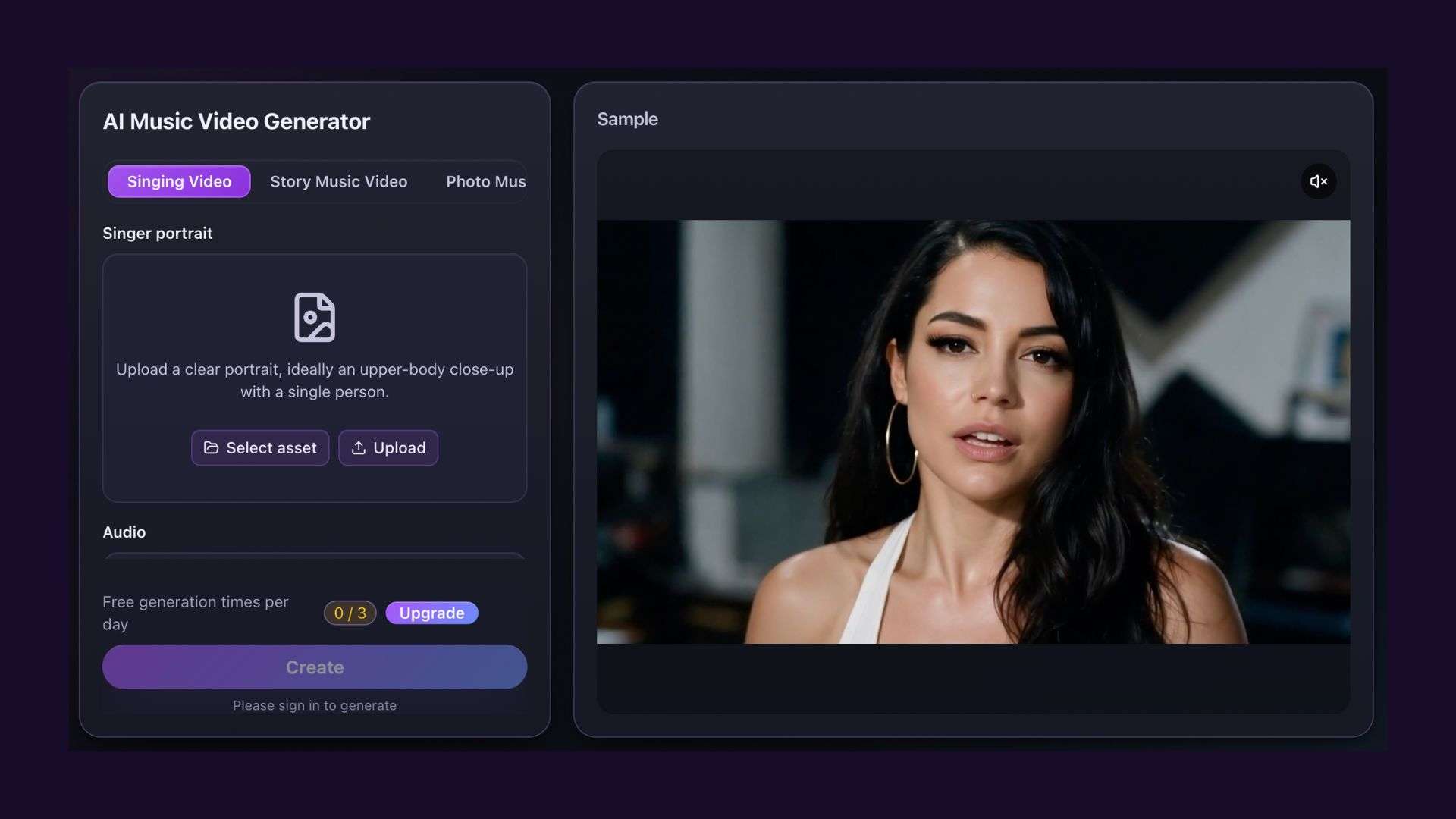
For audio-based projects, VidpexAI has three separate tools:
- AI Music Generator: Choose Inspiration Mode to describe the song you want or Custom Mode for a more directed setup. The description field accepts up to 1,000 characters, and the platform can generate lyrics from your prompt.
- AI Song Cover Generator: Upload an MP3, WAV, OGG, or M4A file (up to 50MB and eight minutes) to create an AI song cover. You can specify the original vocal gender and adjust the pitch. However, the voice selector currently shows zero male and female options, which may prevent users from choosing a voice.
- AI Music Video Generator: Turn a track into a visual clip using Singing Video, Story Music Video, or Photo Music Video. Singing Video requires a portrait, Story Music Video supports up to nine reference images and scene descriptions, and Photo Music Video animates a single image. Audio uploads support MP3, WAV, OGG, and M4A files up to 50MB and eight minutes.
Part 3. Testing VidpexAI Video and Image Generation Quality
To see what VidpexAI can produce, we tested three features: text-to-video, image generation, and AI video cloning. Each test uses a different prompt or visual reference to assess quality and consistency.
Text-to-Video Quality
For the text-to-video test, the prompt described an anthropomorphic rabbit wearing a business suit and carrying a briefcase while walking toward the camera on a city sidewalk. The test produced a 15-second, 720p clip using Wan 2.5.
- Visual quality: The rabbit's fur, suit, and briefcase are clearly defined. The city background and lighting give the scene a cinematic look.
- Motion and consistency: The rabbit maintains the same appearance and outfit throughout the clip. Its walking motion is mostly smooth, although some arm and leg movements look slightly stiff.
- Camera movement: The camera moves backward as the rabbit approaches, keeping it centered throughout the scene.
Overall, the clip looks polished, and the rabbit stays consistent from beginning to end. The main drawback is the slightly stiff walking animation.
AI Image Generation Results

An orange cat lounging in an executive office with a desk was uploaded with the prompt: "Put him in a professional setting with professional attire."
- Image quality: The orange fur and facial features remain recognizable, with clear details on the navy suit and white shirt.
- Prompt accuracy: The cat appears in professional attire against an office-like background, following the main instruction.
- Subject consistency: The cat remains recognizable, but its original lounging pose changes to an upright sitting position. Some facial features also look slightly stylized.
The transformation captures the requested professional look while keeping the cat recognizable. However, its original pose and composition change.
AI Viral Video Cloner Results
The side-by-side comparison shows the original mirror-selfie video and its AI-generated clone. Both show a person wearing a black winter outfit in front of an arched full-length mirror.
- Composition and framing: The generated video closely matches the original camera angle, mirror position, and subject placement.
- Motion matching: Subtle body shifts and posture changes closely follow the original movements.
- Outfit and styling: The black puffer jacket, skirt, and boots retain the same overall winter fashion aesthetic.
The generated video comes remarkably close to the original, especially in its framing and movements. It's a strong result for recreating this type of mirror-selfie content.
Part 4. VidpexAI Plans, Credits, and Pricing
VidpexAI offers two ways to purchase credits: one-time packages with generation limits and separate credit top-ups. Both options use one-off payments, so there is no recurring subscription
VidpexAI Pricing Plans
The one-time packages include AI image and video generation, 100+ templates and effects, image/video enhancement, watermark removal, watermark-free outputs, and priority support.
| Plan | Price | Credits | Images | Video HD |
| Lite | $4.99 | 200 | Up to 40 | Up to 10 |
| Plus | $7.99 | 360 | Up to 72 | Up to 18 |
| Prime | $11.99 | 580 | Up to 116 | Up to 29 |
Prime is marked as the most popular option. The listed discounts are 20% for Lite, 29% for Plus, and 34% for Prime.
VidpexAI Buy Credits
If you need a larger credit balance, VidpexAI also offers separate credit packages. These credits are valid for one year from the purchase date.
| Credits | Price |
| 1,100 | $19.99 |
| 2,260 | $39.99 |
| 3,000 | $49.99 |
| 6,300 | $99.99 |
How Do VidpexAI Credits Work?
VidpexAI deducts credits whenever you use a generation tool. Image generation uses approximately 5 credits per image, while HD video generation uses around 20 credits per video. These are estimates, as actual consumption varies by service, AI model, and generation settings.
Before purchasing, compare the credit requirements of your preferred tools and consider how quickly you expect to use your balance.
Part 5. Pros and Cons of VidpexAI
VidpexAI offers a broad set of creative tools, convenient payment options, and several useful generation features. However, output consistency and credit usage may affect the experience, especially for frequent users who regularly generate content.
- Covers multiple creative tasks, including AI image and video generation, music creation, effects, and viral video cloning.
- Gives users access to different AI models for exploring various visual styles and generation results.
- Closely matched the reference video's framing, outfit, setting, and movements in the viral video cloner test.
- Offers one-time credit packages and larger top-ups without recurring subscription fees.
- Supports watermark-free outputs with paid plans.
- Credit requirements vary by tool and model, making project costs harder to estimate.
- Image transformations may change the original subject's pose or composition.
- Some generated movements still look stiff, especially during character actions.
- Standalone credit top-ups expire after one year, which may not suit infrequent users.
- Advertised generation limits may vary depending on the selected model and settings.
Bonus: Refine Your VidpexAI Videos with Filmora
Once you download a video from VidpexAI, you may notice a few things you'd like to change. Maybe there’s one scene that’s too long, two clips don't flow well together, or the video needs a voiceover and subtitles. You don't have to spend more credits generating a new version just to fix these details. You can bring the footage into Wondershare Filmora and edit it directly.
Filmora is a video editing software that combines traditional timeline editing with AI-powered tools. This means you don't have to rely on AI-generated results alone to get the video you want. You can make manual adjustments, decide how each scene flows, customize the visual style, add branding elements, and prepare your video for different platforms.
What Filmora Offers
- Multitrack Timeline: Arrange your generated clips, trim unwanted sections, and combine different shots into one video.
- Transitions: Add transitions between clips to make scene changes feel smoother, especially when the footage comes from separate generations.
- Audio Editing: Add background music, voiceovers, or sound effects, then adjust their volume to balance the audio.
- Auto Captions: Generate subtitles from spoken dialogue, then edit the wording, timing, and appearance.
- Effects and Overlays: Add visual effects, stickers, filters, and overlays to give your footage a more distinctive presentation.
For example, you could use VidpexAI to generate individual shots for a product advertisement, then import those clips into Filmora to assemble the final sequence. Add a voiceover to explain the product, include background music, and place captions where needed. VidpexAI generates the clips, and Filmora lets you edit them into a complete video.
 Secure Download
Conclusion
VidpexAI delivers different results depending on the tool. The viral video cloner stood out in testing, with results that closely matched the video's framing and movements. Text-to-video produces engaging visuals, although the rabbit's walking motion looked a little stiff. The image generator followed the prompt but changed the cat's original pose.
For social media creators who enjoy trying different AI models, VidpexAI is worth a try. However, not every result will be ready to publish, so allow time for editing and check the credit costs before purchasing a package. Filmora works for the editing step, from trimming clips and adding music to preparing the final video.
FAQs
-
1. Is VidpexAI free or paid?
VidpexAI offers limited free access to some AI video and image generation tools. However, generation may require credits, and paid plans start at $4.99 for additional usage and watermark-free outputs. -
2. Does VidpexAI offer free credits?
Yes. New users may receive 10 free credits to try VidpexAI's AI generation tools. The available free credits may vary by account. -
3. What AI models does VidpexAI support?
VidpexAI offers models such as Wan, Kling, Seedance, Sora 2, Nano Banana, and Gemini. The available selection depends on the generation tool and may change over time.