

 TL;DR:
For creating viral AI baby dance videos in 2026, Wondershare Filmora powered by Google Veo 3.1 provides the most robust 4K editing capabilities for users with mid-to-high-end desktops, while Kling AI, Viggle AI, and Media.io offer accessible online alternatives for quick social media clips.
● Kling AI supports up to 10-second complex dance generations on its free tier but frequently experiences long server queues, whereas Viggle AI delivers fast reference-video pose matching via Discord, and Media.io suits beginners requiring one-click browser presets without advanced customization.
● To prevent distorted animations and ensure accurate pose detection across these platforms, you must upload a well-lit, front-facing portrait or full-body photo of a single baby against an uncluttered background, using a minimum 1080p source resolution.
● Free tiers impose strict operational constraints, including watermarked exports on Filmora's advanced AI modules, lower output resolutions and a 10-credit daily limit on Viggle AI, and restricted generation quality on mobile browsers compared to desktop processing.
Ask AI for a summary
 ChatGPT
 Perplexity
 Gemini
 Claude
 Grok
Grok
The internet is exploding with viral baby dance AI videos. In 2026, thanks to breakthroughs like Kling AI and Filmora's Veo 3.1 integration, you can turn a single photo into a hyper-realistic dancing masterpiece. Whether you need an AI baby dance video generator free of charge or a professional 4K tool, this guide covers the trending prompts and apps dominating TikTok and Reels today.
What is an AI Baby Dance Video Generator?
An ai baby dance video generator free utilizes advanced artificial intelligence and machine learning algorithms to animate static photographs. These sophisticated tools analyze facial features, body positioning, and movement patterns to create realistic dancing animations synchronized with music. The technology leverages deep learning models similar to those powering platforms like Viggle AI, Media.io, and Filmora's image-to-video features.
The process involves motion transfer algorithms that map professional dance movements onto uploaded images, creating seamless transitions and natural-looking animations. Modern free ai dance video generator platforms have democratized video creation, making it accessible to anyone with a smartphone or computer.
Key Features to Look for in Free Generators
When searching for the best baby dance video generator app, prioritize these essential features:
- User-friendly interface with intuitive controls
- Multiple dance templates including trending choreographies
- Music library integration with popular tracks
- High-resolution export options (minimum 720p)
- Fast processing speeds (under 5 minutes per video)
- No watermarks on free versions (when available)
- Cross-platform compatibility (iOS, Android, web)
Why AI Baby Dance Videos Are Trending in 2026
The explosion of ai baby dance video free content across TikTok, Instagram Reels, and YouTube Shorts reflects broader social media trends favoring short-form, entertaining visual content. According to recent viral video analytics, baby dance videos consistently achieve engagement rates 3-5 times higher than standard photo posts.
Several factors contribute to this phenomenon:
- Emotional resonance: Cute baby content triggers positive emotional responses
- Shareability: Parents eagerly share personalized videos with family networks
- Novelty factor: AI-generated content still captivates audiences with its technological innovation
- Accessibility: Free ai dance video generator TikTok tools eliminate technical barriers
- Trend participation: Allows families to join viral challenges effortlessly
4 Best AI Baby Dance Video Generator Free Tools (2026 Ranked)
1. Wondershare Filmora — Best for Pro Editing & AI Workflow
Wondershare Filmora (now powered by Google Veo 3.1) has evolved into a full-fledged AI content creation studio. It supports advanced text-to-dance prompts, motion transfer, and robust editing tools unmatched in its class.
 Secure Download
- AI Image-to-Video Motion Transfer: animate a single baby photo into dancing clips
- AI Beat Sync: automatically align baby movements to viral TikTok audio tracks
- Prompt Expansion Engine: refine user prompts for more natural choreography
- Multi-track Timeline: mix AI baby dance footage with effects, stickers, and captions
- Aspect Ratio Smart Adaptation: export directly in 9:16 vertical format for social media
- Professional-grade AI baby dance generation with realistic motion powered by Google Veo 3.1
- Built-in music beat detection to create perfectly synced baby dancing viral videos
- 4K export available even for AI-generated animations, ideal for YouTube Shorts publishing
- Complete editing toolkit to enhance lighting, color, and add trendy overlays after generation
- Free trial exports include a watermark when using advanced AI modules
- Desktop installation is required, which may not suit users seeking pure online tools
- Rendering longer or high-frame-rate projects needs a mid-to-high-end computer
- Filmora maintains a solid 4.5/5 rating on G2, where users highlight its smooth blend of AI creativity and traditional editing.
- Trustpilot reviewers rate it around 4.4/5, praising frequent AI feature updates such as Veo 3.1 integration.
- Free Trial
- One-time or Subscription
2. Kling AI — Best for Viral Dance Moves
Kling AI is a highly rated generator that excels in creating long, dynamic AI dance videos (up to ~10 seconds) with smooth, complex movements — ideal for challenging trends.
- Advanced Spatio-Temporal Motion Understanding for natural limb movement
- High-frame smoothness optimized for TikTok-style baby dance challenges
- Facial likeness retention ensures the baby looks consistent with the photo
- Excellent image-to-video model for creating high-energy AI baby dance videos
- Strong pose recognition that supports viral styles like street dance and shuffle
- Up to 10-second clip generation on the free tier
- Smooth motion consistency suitable for baby dancing viral video content
- Free users often experience long server queues due to heavy global demand
- Daily credit limits restrict large-scale content creation
- English prompts can sometimes generate unexpected choreography
- Product Hunt users call Kling AI one of the most realistic Sora alternatives for viral dancing.
- Large Discord communities praise its ability to follow complex trending baby dance AI prompts.
- Free – 66 daily credits
- Standard Plan – $10/month
3. Viggle AI — Discord-Friendly Meme Maker
Viggle AI prioritizes speed and meme-style culture. With an active Discord community and pre-made templates, users can generate playful baby dance clips rapidly.
- Mix Mode: upload a dance video and animate your baby photo onto it
- Pose Match AI: ensures movements follow the reference precisely
- Vertical Export: optimized for viral baby dance clips on social platforms
- Fastest tool for making baby dancing viral videos using face-swap with references
- Reference-video-based AI prompt workflow gives precise control over choreography
- Perfect for TikTok meme trends such as "baby dance AI challenge"
- Active Discord community provides free viral templates
- Output resolution is lower than professional software like Filmora
- Some results may look distorted when adult dance videos are used as references
- Limited background blending for complex scenes
- Reddit users frequently recommend Viggle AI as the most entertaining free AI baby dance generator.
- G2 reviews emphasize how easy it is to use through the Discord interface.
- Free – 10 credits/day
- Pro – $9.99/month
4. Media.io — Simplest Browser-Based Generator
A browser tool that focuses on ease of use with click-to-generate workflows — no software or installation required. Excellent for beginners and parents alike.
- Baby Dance Preset Library: select movements without writing prompts
- Auto Crop and Social Format Adaptation
- AI Face Enhancement keeps the baby expression clear and cute
- Completely browser-based AI baby dance video generator free for casual users
- One-click templates designed for parents and social media creators
- Automatic 9:16 resizing for TikTok and YouTube Shorts
- No installation or technical skills required
- Limited advanced prompt customization compared to Kling AI baby dance workflows
- Free credits are restricted for daily use
- Fewer creative editing options after video generation
- Trustpilot users rate Media.io around 4.3/5, appreciating its simplicity as a free AI baby dance generator.
- Capterra reviewers mention fast social-ready results for baby dancing viral video content.
- Free credits for new users
- Subscription – $19.99/month
How to Create AI Baby Dance Videos: Step-by-Step Guide
Creating a fun and engaging AI Baby Dance Video is easier than most people imagine. With the help of modern AI animation models, you can transform any cute baby photo into a lively dancing clip in just a few steps. Follow this practical guide to produce high-quality, share-ready results:
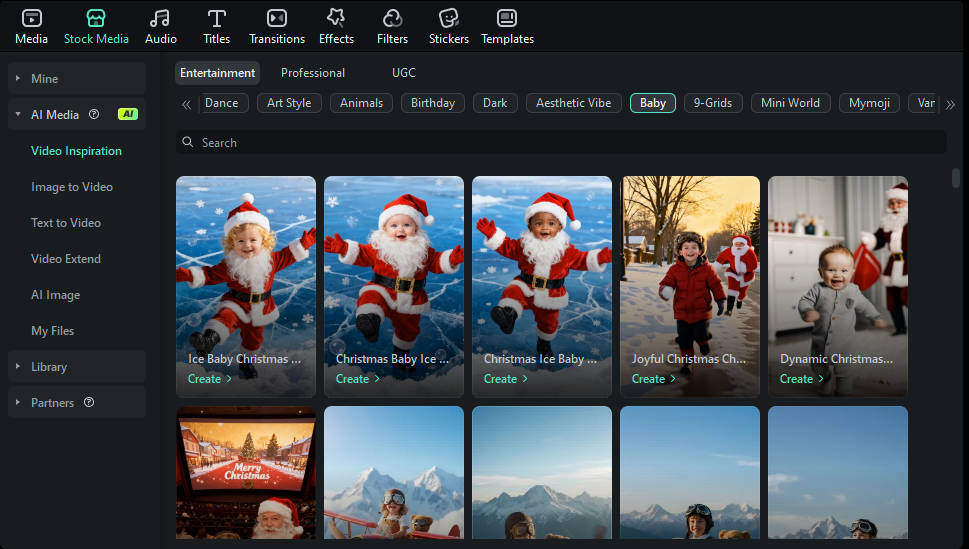
Method 1: Generate an AI Baby Dance Video Using Preset Templates
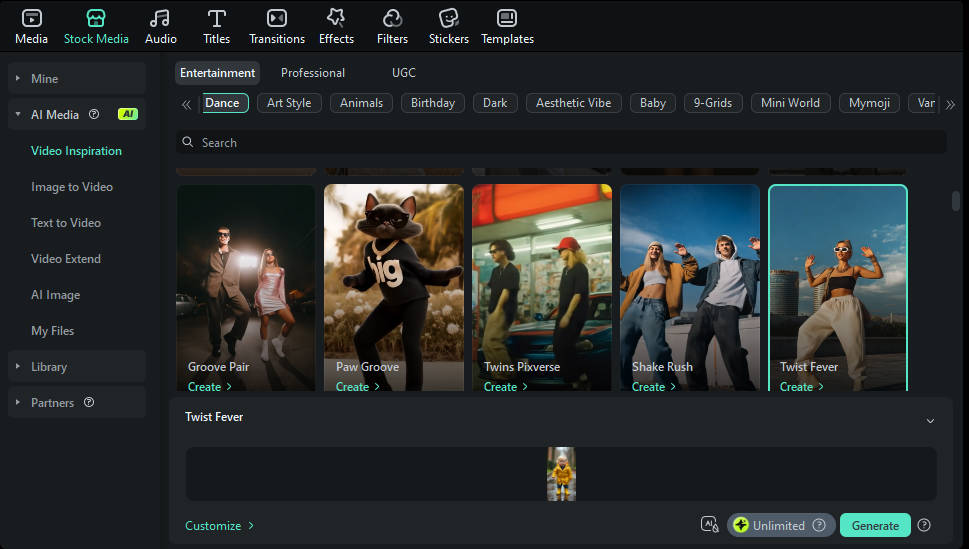 Secure Download
Method 2: Create an AI Baby Dance Video with Custom Prompts
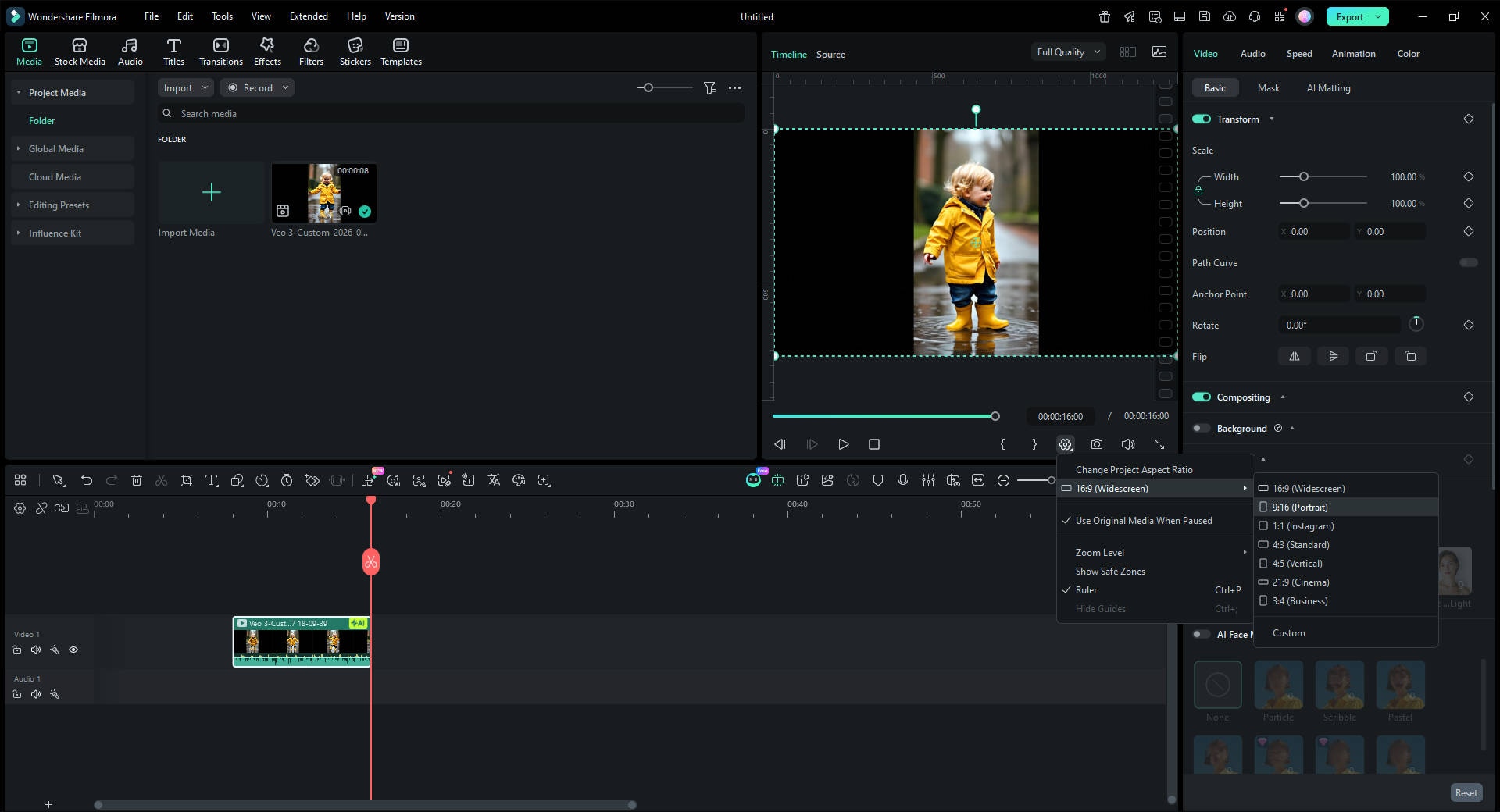
For creators who want more control, Filmora also provides a flexible Image to Video panel powered by Veo 3.1. This method helps you generate unique choreography instead of relying only on presets.
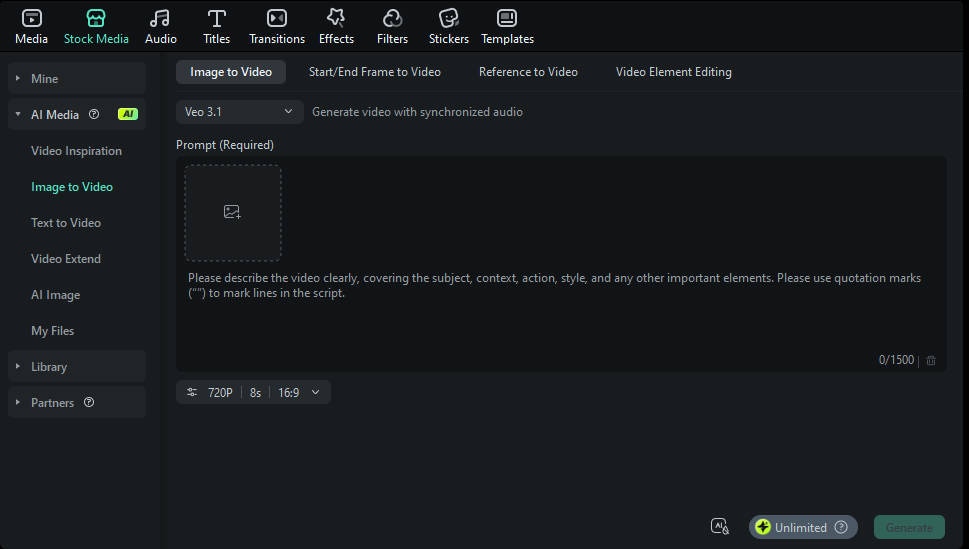
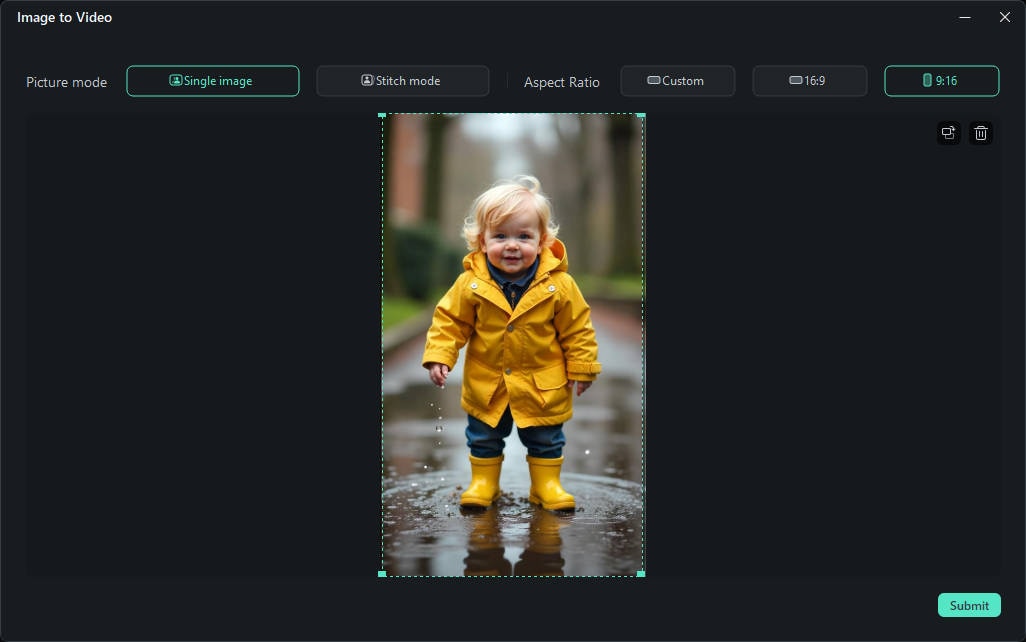
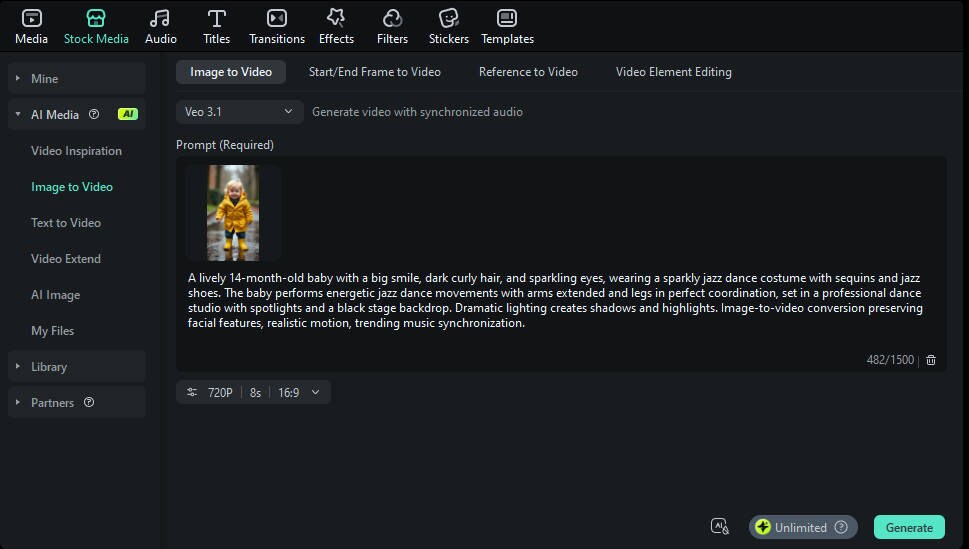
 Secure Download
Best Practices for Creating Viral Baby Dance Videos
Optimizing Video Quality
Technical excellence separates amateur content from viral sensations:
- Maintain consistent lighting throughout the video
- Ensure smooth frame rates (minimum 30fps, ideally 60fps)
- Check motion fluidity: AI animations should flow naturally
- Preview on multiple devices before publishing
- Test aspect ratios for target platforms
Choosing Appropriate Dance Styles
Age-appropriate choreography enhances appeal:
- Simple movements for infant photos (gentle swaying, bouncing)
- Energetic routines for toddler images (running, jumping)
- Complex choreography for older children (multi-step dances)
- Character consistency: Match personality to dance style
- Cultural sensitivity: Respect traditional dance forms
Adding Trending Music Tracks
Leverage audio trends for algorithmic advantages:
- Monitor TikTok's trending sounds weekly
- Use music discovery tools like TikTok Creative Center
- Sync beat drops with movement peaks
- Consider nostalgia appeal (90s/2000s throwbacks perform well)
- Test multiple audio options through A/B testing
Troubleshooting Common Issues
❓ What Should I Do If the Video Quality Is Low?
If your AI baby dance video appears blurry, pixelated, or low resolution, here are practical solutions to improve output quality:
- Use higher resolution source photos — starting from 1080p improves motion and clarity significantly.
- Choose the best export settings — select "High Quality" or "Best" rather than default options.
- Prefer desktop processing — web generators often limit resolution on mobile browsers.
- Upgrade to a paid tier if the free version caps quality or adds watermarks.
- Try alternate platforms like Filmora or Kling AI if consistent quality issues persist.
❓ Why Is AI Baby Dance Video Generation So Slow?
Longer wait times during AI video creation can frustrate creators. Here are common causes and fixes:
- Peak server traffic — try generating during off-peak hours to reduce queue time.
- Large source files — compress oversized images before uploading.
- Browser/app cache — clear cache and restart for better performance.
- Outdated software — always update to the latest version of the tool.
- Hardware limitations — phones are slower than desktops for complex AI tasks.
❓ Why Doesn't the Template Work With My Photo?
AI baby dance templates are trained for specific image inputs. If a template fails to animate your photo correctly, consider these common issues:
- Body positioning — full-body or clear silhouette photos yield the best results.
- Face clarity — ensure the baby's face is unobstructed and well-lit.
- Image orientation — vertical photos may not match landscape templates.
- Busy backgrounds — cluttered scenes confuse pose detection and motion prediction.
- Multiple subjects — single-baby photos generally perform best with AI motion models.
Master Your Creation: Effective AI Baby Dance Video Prompts
To achieve high-quality animations, your prompts should be descriptive. Here are some proven AI baby dance video prompt examples you can copy and paste into Filmora or other AI generators:
An enthusiastic 12-month-old baby with excited expression, wearing a sports jersey or team colors outfit with matching accessories. The baby performs celebratory victory dance moves in a sports stadium or arena setting with cheering crowd effects, team banners, confetti cannons, and stadium lighting. Triumph and joy emotion, sports event content, team spirit celebration, appeals to sports fans and creates shareable game-day content for viral reach during major sporting events.
A magical 10-month-old baby with dreamy features, soft curls adorned with flowers, and enchanting fairy tale costume (princess dress, fairy wings, or magical creature outfit). The baby dances gracefully in a whimsical fantasy setting with sparkles, magical forest background, floating butterflies, glowing fireflies, and soft mystical lighting. Storybook aesthetic, childhood imagination theme, perfect for bedtime content and kids' entertainment channels.
Conclusion
The ai baby dance video generator free revolution has democratized creative video production, enabling anyone to craft shareable, entertaining content within minutes. Whether you choose Viggle AI's simplicity, Media.io's social media optimization, or Filmora's professional-grade features, these tools unlock endless creative possibilities.
Remember that successful viral content combines technical quality with emotional resonance. Experiment with different templates, music selections, and editing styles to discover what resonates with your audience. As AI technology continues advancing, we can expect even more sophisticated features and realistic animations in future iterations.
Start creating your viral baby dance videos today using these free tools and proven strategies. With the right approach, your adorable dancing baby content could be the next social media sensation!
Ready to get started? Try Filmora's AI Image-to-Video feature now and join millions of creators transforming simple photos into captivating dance videos.

FAQ
-
Which AI baby dance video generator free tool has no watermark?
Viggle AI and Media.io offer the most beginner-friendly interfaces with one-click generation. For users seeking more control and professional results, Filmora's free trial provides excellent value with its comprehensive baby dance video templates and editing tools. -
How long does it take to create an AI baby dance video?
Most ai baby dance video generator free platforms process videos within 2-5 minutes. Processing time varies based on video length, complexity, server load, and chosen quality settings. Premium services often offer faster rendering. -
Are there AI baby dance video generator free apps for mobile?
Yes! Popular baby dance app free options include SelfyzAI (iOS/Android), Baby Dance - AI Video (iOS), and Filmora Mobile. These apps offer on-the-go creation with similar features to desktop versions. Download Filmora Mobile for comprehensive mobile editing. -
How do I make my AI baby dance video go viral?
Combine these strategies: post during peak engagement hours (6-9 PM local time), use 5-10 relevant hashtags including #AIBabyDance, participate in trending challenges, add captions for accessibility, engage with comments promptly, and share across multiple platforms simultaneously.
