

 TL;DR:
Creators can generate viral honey keyboard ASMR videos without risking equipment damage or physical mess by using Wondershare Filmora's Veo 3.1 tool to synthesize synced sticky typing visuals and audio.
● Bypassing physical syrup prevents permanent damage to expensive switches, eliminates sticky cleanup residue, and fixes the inconsistent audio rhythms caused by real honey changing texture over time.
● The Veo 3.1 model requires a stable internet connection rather than a powerful PC due to cloud processing, and each Image-to-Video or Text-to-Video generation will consume AI credits.
● For realistic audio-visual synchronization, prompts must explicitly specify elements like drip speed, syrup thickness, and precise sound textures such as a deep thock or sticky pull.
Ask AI for a summary
 ChatGPT
 Perplexity
 Gemini
 Claude
 Grok
Grok
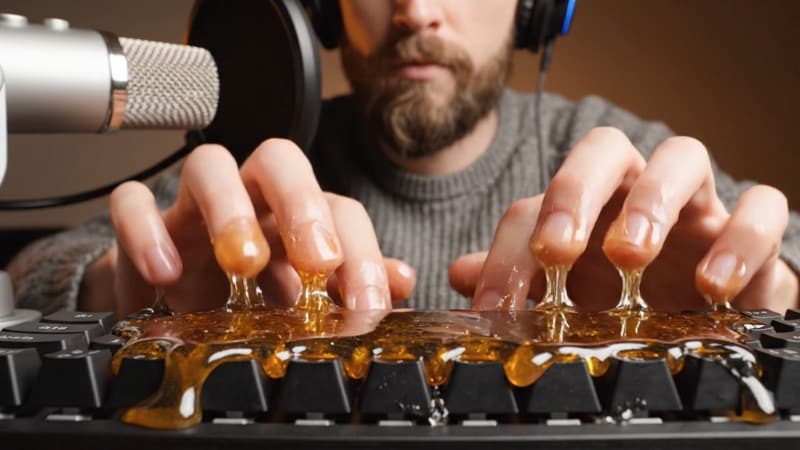
Do you know the honey keyboard videos that are going viral on social media right now? It's a trend where creators coat their keyboards in honey to make sticky typing sounds. These clips pull in millions of views because of their satisfying ASMR effect.
If you want to try the honey keyboard ASMR yourself, you might worry about wasting honey. You also deal with cleanup and the risk of ruining a keyboard you may still need.
Fret not! You can join the trend without any mess. With an AI honey keyboard tool, you can recreate the same sounds and visuals in minutes. Let's dive in and learn how to make your own honey keyboard trend video.
Part 1. What Is Honey Keyboard ASMR? Why Are Sticky Sounds Viral?
The honey keyboard trend starts from the broader keyboard-typing ASMR community. Creators test different textures to create unique tapping sounds, including honey.
Honey grew popular because it makes the keystrokes sound soft, wet, and sticky. These are three qualities that ASMR viewers often search for. Each tap produces a tactile sound that many fans use for calm or focus.
In honey keyboard ASMR videos, this texture also changes how each key responds. Its thick layer absorbs impact, softening the click into a gentle tap. The sticky surface creates a small pull sound during lift, which adds a bit of extra texture to the typing.
Here's what people love about these honey keyboard videos:
- Honey softens the pitch of keyboard clicks into "squishy" taps.
- The glossy surface adds a visual layer that suits ASMR audio.
- Sticky textures create a strong multisensory trigger that keeps viewers watching.
- Research also shows that gentle tapping sounds can trigger a deeper relaxation effect for many listeners.
Part 2. Why Using an AI Honey Keyboard Tool is the Clean Key to Perfect ASMR Videos
Many creators want to create honey keyboard videos but don't want sticky hands, wasted honey, or a damaged keyboard. But using AI can help you create them without even using real honey or setting up a messy scene.
Here are what the AI honey keyboard can do for you:
- Soft and sticky sound: AI forms thick, syrup-style taps that feel soft, sticky, and even dripping when needed.
- Strong visual appeal: You can design golden honey layers, clear drips, and slow-motion presses that fit the satisfying and ASMR niches.
- Better viewer time: Unusual textures and close-up clips hold viewers' attention, which helps with watch time and reach.
- Great for short-form content: The look and sound of honey keyboard clips work well on TikTok, YouTube Shorts, and Reels.
- Clean production: No ruined keys, no sticky desk, and no waste of honey, just quick output ready for editing.
Part 3. Challenges of Real Honey Keyboard ASMR
Creating honey keyboard videos with real honey takes a lot of waste for some people. This situation makes more people consider creating a honey keyboard with AI. It lets you avoid all of these issues while keeping the same sticky sound and glossy look.
Here are the common problems when you create real honey keyboards:
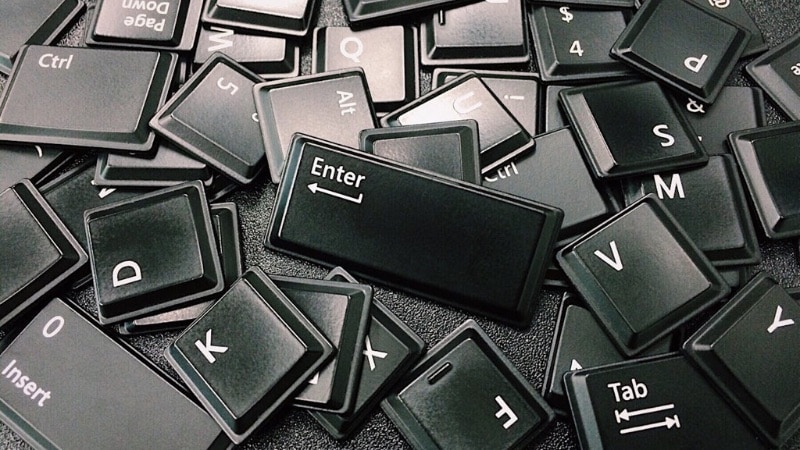
- Damage risk: Syrup or slime can leak into switches and recording gear. It can cause permanent damage and expensive repairs.
- Mess and hygiene: Cleanup takes time, effort, and often leaves the keyboard with a residue that ruins the keyboard's feel.
- Unstable sound: Honey changes texture as it sits. Its texture makes the tapping rhythm inconsistent and the audio hard to control.
- High cost: Many ASMR creators use premium keyboards, and frequent replacements drain the budget fast. AI avoids these issues and keeps production safe.
Part 4. Filmora's Veo 3.1: The Best AI to Generate Honey Keyboard ASMR Videos
Wondershare Filmora's Veo 3.1 brings a new level of control for creators who want to make AI honey keyboard ASMR videos. Its AI features are supported by Veo 3.1, which lets you create AI videos with an image and/or text prompt.
 Secure Download
Here's what Filmora's Veo 3.1 brings to your honey keyboard videos:
- Audio generation: Veo 3.1 forms deep "thock" sounds mixed with soft and sticky taps that match real honey texture.
- Synced visuals and sound: Each keypress matches its own drip, bounce, and release. The animation and audio move together, which makes the honey keyboard ASMR effect convincing.
- Prompt-based control: You can shape the qualities, such as sticky feel, soft taps, slow rhythm, or dripping motion, through text prompt phrases. The model reads your wording and builds the scene from it.
- Two creation modes:
- Image to Video: Upload your photo with a keyboard in front of you, and describe the honey effect you want to add.

-
- Text to Video: You only need a text prompt that describes what kind of honey AI keyboard you want to create.

- Full editing workflow: After generating the AI clip, you can edit the video further. For instance, you can refine color, add soft light, or place background audio without jumping to another tool.
Part 5. Step-by-Step Guide: Create AI Honey Keyboard ASMR Videos with Filmora
You can create a honey keyboard ASMR AI video inside Filmora. Follow the instructions below to create it using Filmora's Image to Video feature:
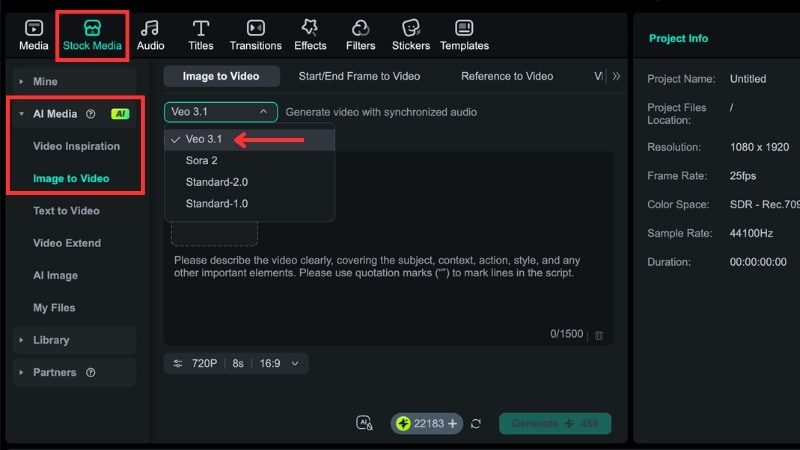 Secure Download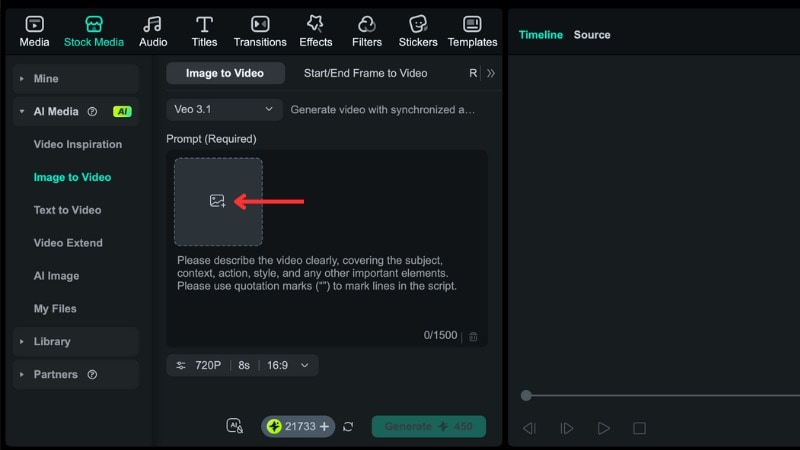
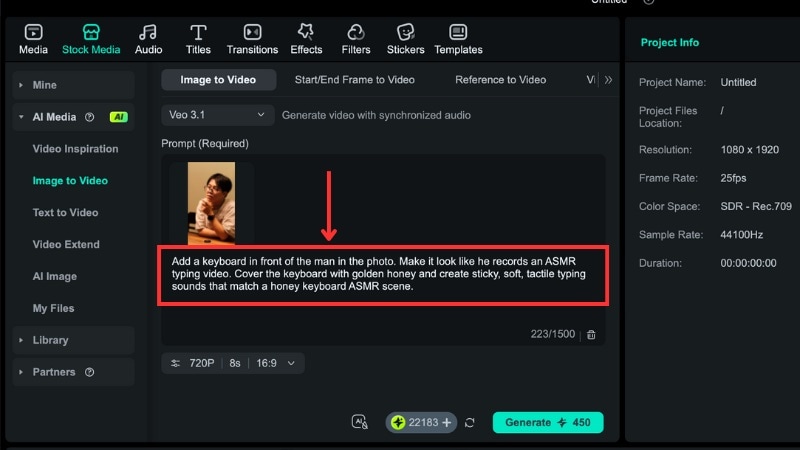
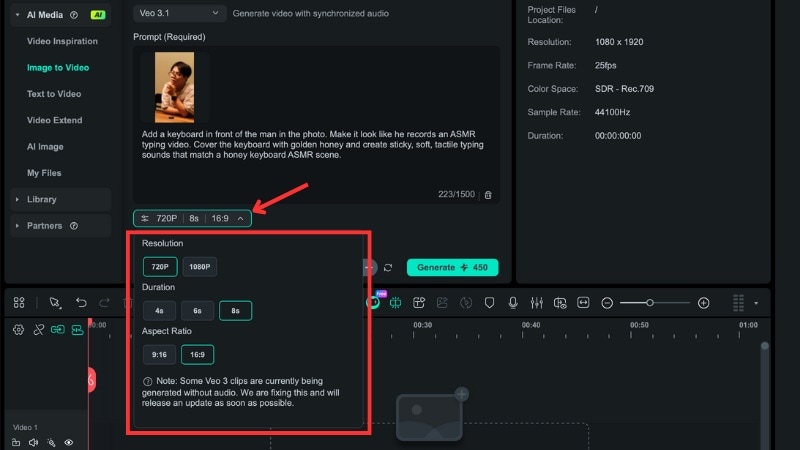
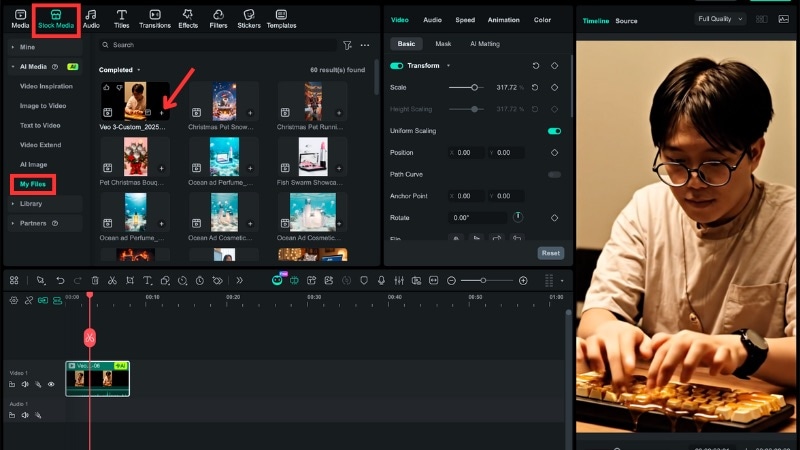
Here is the result of the AI honey keyboard we've just created in Filmora:
Want to Create It Without an Image? Use Filmora's Text to Video Feature
The steps stay almost the same. You skip the image upload and rely entirely on your text prompt. Just describe your honey keyboard scene, and Veo 3.1 will build everything from scratch.
For more information about Filmora's Text to Video feature, you can watch this video:
Part 6. Viral Honey Keyboard Prompt Pack for Filmora's Veo 3.1
Creating the text prompt for the AI honey keyboard video seems hard, but it's actually quite simple. You don't need complex wording; just describe in detail what you want the AI to show and how you want it to sound.
Below are sample prompts you can copy, tweak, and use directly in Filmora's Veo 3.1. Each example shows a slightly different scene or style, so you can pick one that matches your idea.
Sample Prompt 1 – Classic Honey Keyboard ASMR
"Close-up keyboard covered in thick golden honey. Slow typing motion with soft, sticky taps. Warm light reflects on the syrup's surface. Honey stretches between each key and finger. Match the sound with a deep thock base and gentle sticky release for a honey keyboard ASMR mood."
Sample Prompt 2 – Person Typing Honey Keyboard
"Place a keyboard in front of the person in the photo. Show him typing for an ASMR recording session. Cover the keys with golden honey that drips through the gaps. Create soft, sticky, tactile typing sounds that match the honey texture."
Sample Prompt 3 – Extreme Dripping Honey Effect
"Honey-coated keyboard with strong syrup drips between keys. Fingers press each key slowly with sticky pull sounds on release. Add soft light reflections, smooth motion, and clear honey strings that stretch with each tap. Build the sound with wet, squishy taps and a steady ASMR rhythm."
Sample Prompt 4 – Honey Dripping Mechanical Keyboard ASMR
"Ultra close-up macro shot of a mechanical keyboard slowly covered with thick golden honey, honey dripping between keycaps, sticky texture stretching and breaking, soft warm lighting, shallow depth of field, hyper-realistic details, slow motion, ASMR satisfying visual, clean background, cinematic macro photography, no hands, loopable scene."
Sample Prompt 5 – Transparent Keyboard Filled with Flowing Honey ASMR
"UTransparent acrylic keyboard filled with flowing golden honey under the keycaps, honey moving slowly as keys gently press down, glass-like reflections, soft studio lighting, minimal aesthetic, calming ASMR visual, ultra high detail, smooth motion, futuristic yet cozy atmosphere"
How to Use These Prompts Effectively
Here are some tips on how to use text prompts effectively for generating honey keyboard videos:
- Add details about drip speed, syrup thickness, or typing rhythm if you want stronger control.
- If your image contains a person, include a cue like "place the keyboard in front of him/her."
- If you want more sound detail, mention "deep thock," "sticky pull," or "wet tap."
- Add clear details, but keep each instruction simple so the AI understands your scene.
Conclusion
The honey keyboard ASMR trend continues to grow because it mixes sound, texture, and visual appeal. Many creators are now turning to AI honey keyboard generators to recreate the effect without sticky hands or broken keyboards. With Filmora's AI honey keyboard generation (Veo 3.1), you can make high-quality sticky typing sound videos in minutes. Try creating your first AI honey keyboard video today, then share it to social media!

FAQs
-
Do I need a powerful computer to generate AI honey keyboard visuals?
You don't need a high-end computer. Filmora handles the processing in the cloud, so your device only needs enough power to run the editor. A stable connection helps the generation run without interruption. -
Are AI honey keyboard ASMR videos monetizable?
Yes, you can monetize them as long as the platform allows AI-generated content. Each platform has its own rules, so check their guidelines before posting. You can also add your own editing, pacing, and sound layers in Filmora to create more original output. -
How detailed should an AI prompt be to generate a believable honey keyboard?
Use clear instructions and describe key elements such as drip movement, syrup thickness, typing rhythm, and sound texture. Short, direct phrases work best to guide the AI toward a realistic result.
