
Lifestyle Filters Showcase & Tutorials
Explore trending lifestyle filters and professional editing tips
Loading more lifestyle filters...
 Category:
 Duration:
 Aspect Ratio:
Unlock Professional Visuals with Lifestyle Filters
Achieving a consistent social media aesthetic is easier than ever with professional lifestyle filters. Filmora provides an expansive library of presets that go beyond simple overlays—each filter is designed to harmonize colors and Adjust brightness naturally, ensuring your footage looks like it was shot on a high-end cinema camera.
Whether you need to add text overlays for context or want to create a cohesive theme for your travel vlog, these lifestyle filters provide the perfect foundation for any creative project.
Natural Skin Tones & Organic Lighting Enhancements

Natural Skin Tones & Organic Lighting Enhancements
Filmora's lifestyle filters are engineered to preserve the integrity of your footage. Unlike generic mobile presets, our engine intelligently identifies skin tones and applies particle effects or subtle light leaks without washing out the human elements. This ensures your daily vlogs look authentic yet refined.
- 🌿 Skin-Safe Processing - Automatically protects natural textures while enhancing surrounding environment colors.
- 🔆 Smart Light Management - Softens harsh shadows and brightens underexposed areas with a single click.
- ✨ Subtle Bloom - Add professional glow effects to highlights for a dreamy, high-end production look.
Instant Mood Creation with Cinematic Depth

Instant Mood Creation with Cinematic Depth
Whether you're aiming for a moody "Dark Academy" vibe or a bright "Coastal Chic" look, our lifestyle filters collection has you covered. Each preset is customizable, allowing you to fine-tune the intensity or layer it with a motion blur to emphasize fast-paced action or peaceful scenery.
- 🎞️ Film Simulation - Emulate the look of classic 35mm film with authentic grain and vintage color shifts.
- 🏙️ Urban Style - Cool, desaturated tones designed specifically for cityscapes and architectural photography.
- 🌅 Golden Hour Forever - Warm up any scene with simulated sunset lighting that adds instant nostalgia.
- 💨 Speed & Motion - Optimized for high-energy clips, maintaining clarity even during rapid movements.
AI-Powered Harmonization for Multi-Clip Projects

AI-Powered Harmonization for Multi-Clip Projects
Editing a long video with clips from different cameras can be a nightmare. Filmora's AI video generator logic helps you apply a consistent lifestyle filter across your entire timeline, ensuring visual unity. You can even use Beat-Sync to change filter styles dynamically according to the rhythm of your soundtrack.
- Consistent Grading - Sync your selected lifestyle filters across multiple scenes with a single master adjustment.
- Audio-Visual Synergy - Automatically pair filters with Sound Effects for an immersive viewer experience.
- Dynamic Motion - Combine aesthetic filters with zoom motion to highlight specific details in your frame.
- Export Optimized - Presets are tuned for maximum resolution on all major social media platforms.
Frequently Asked Questions About Lifestyle Filters
How to Apply Lifestyle Filters in Filmora
Enhance your everyday moments with professional lifestyle filters in just three simple steps. Master the art of cinematic vlogging with Filmora's easy-to-use editing suite.
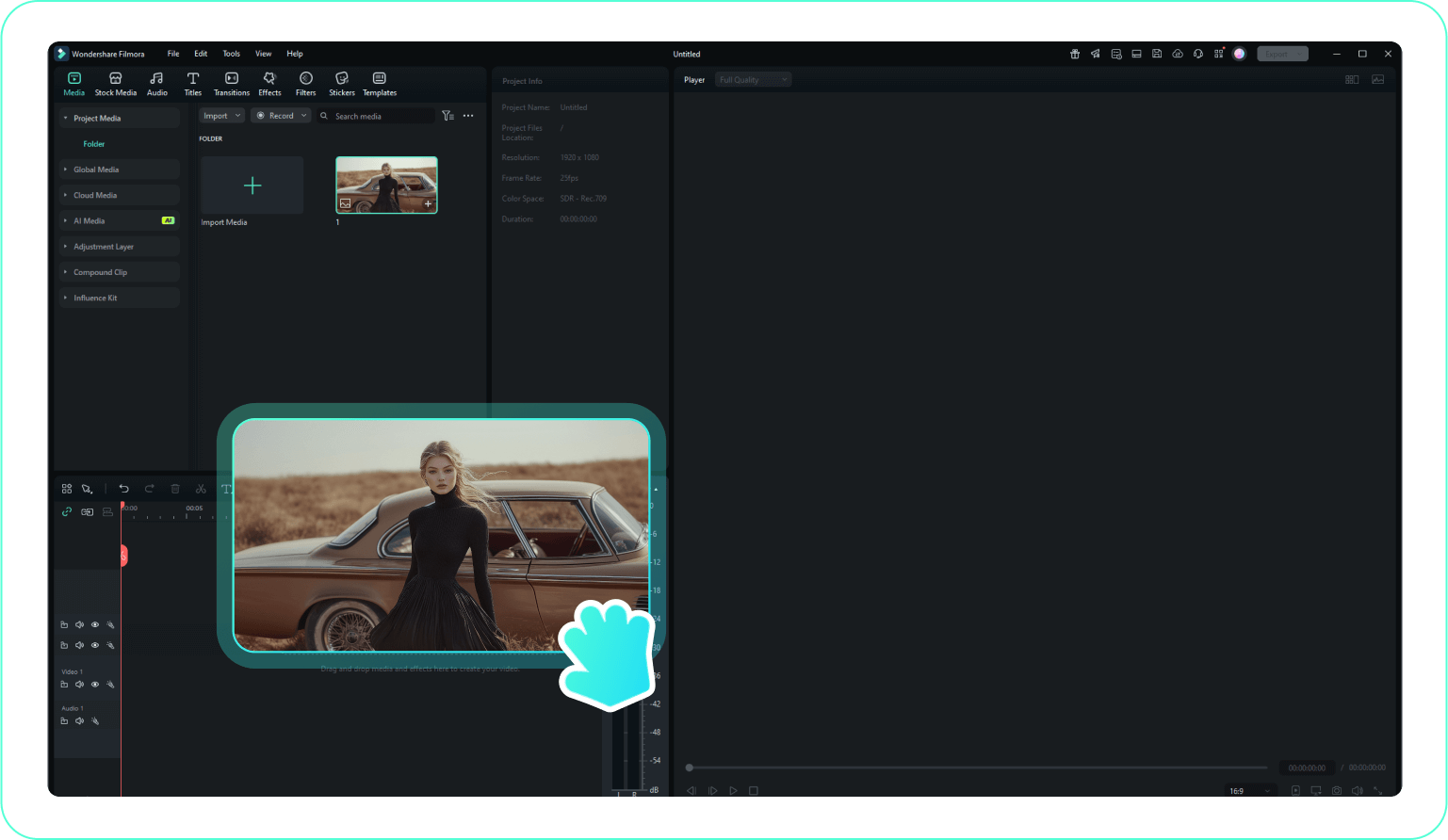
Step 1 Import Your Lifestyle Footage
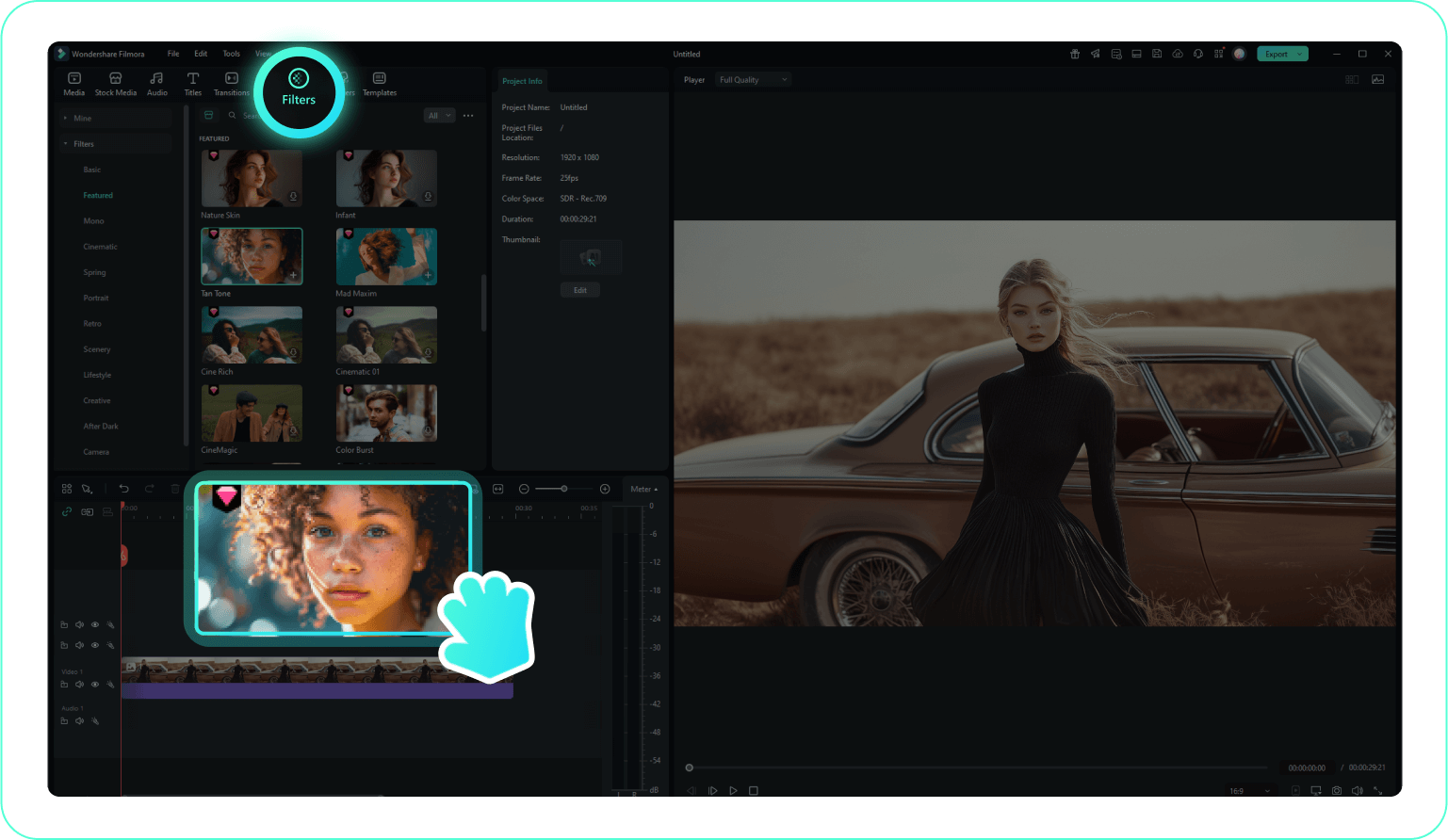
Step 2 Apply Your Selected Filter
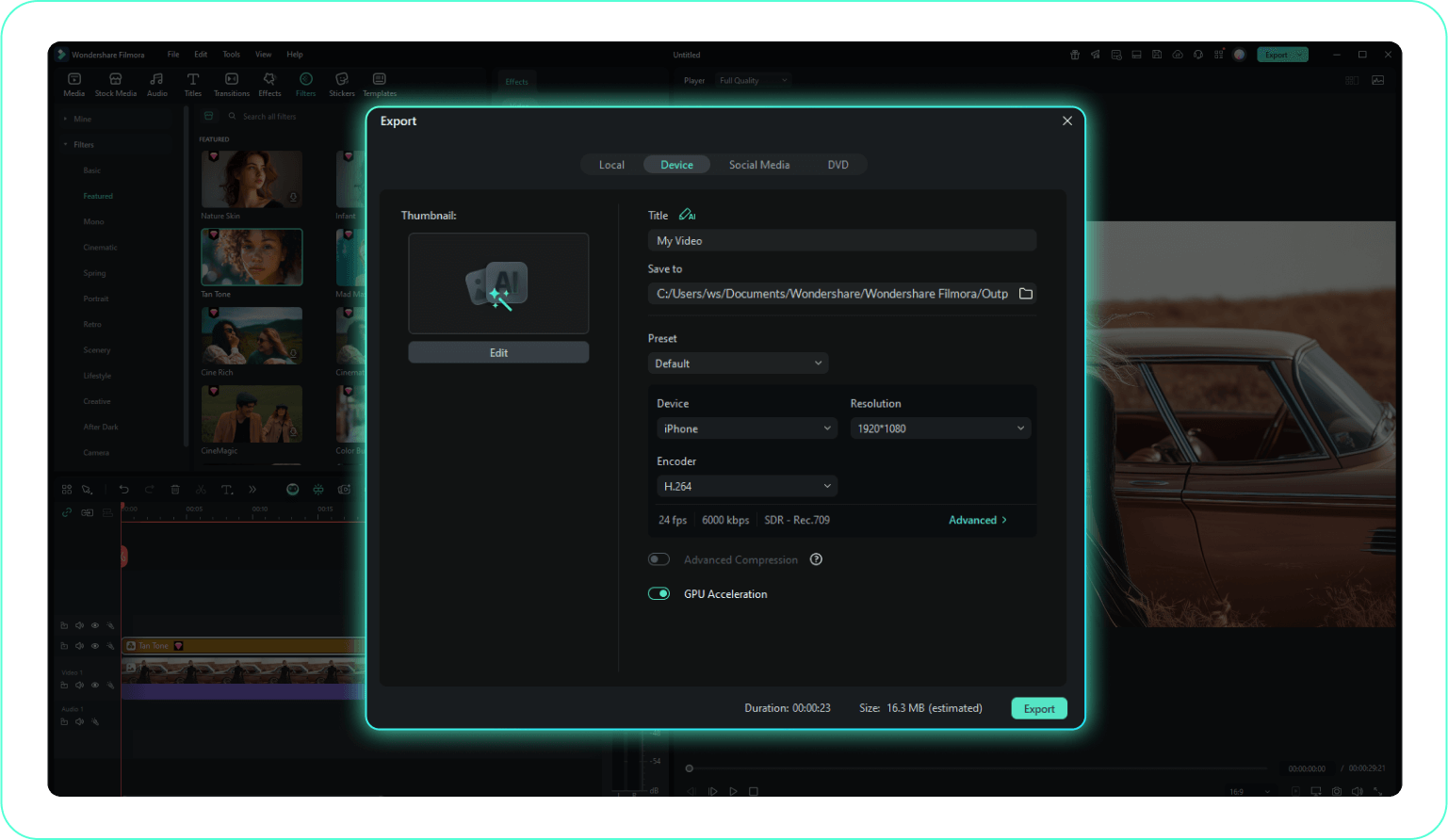
Step 3 Fine-Tune and Export
-
1:Import Your Lifestyle Footage
Open Filmora and upload your vlog or daily clips by clicking "Import Media". Drag the footage to the timeline to prepare it for your new look. -
2:Apply Your Selected Filter
Navigate to the "Filters" tab and explore hundreds of cinematic options. Drag your preferred lifestyle filters onto the timeline for an instant transformation. -
3:Fine-Tune and Export
Adjust the intensity using the Opacity slider and refine colors in the advanced panel. When the aesthetic is perfect, click Export to save your final creation.
Explore More Creative Video Templates
Discover other professional template categories to complement your aesthetic filters




