50+ Timer Effects & Countdown Packs:
Add Urgency and Polish to Your Content
Keep your viewers watching until the very last second. Explore our curated selection of timer video effects, featuring everything from neon digital clocks and retro flip-counters to sleek loading bars. Simply pick your favorite timer style, drag it into your timeline, and customize colors and duration to match your brand. Perfect for fitness coaches tracking sets, educators timing quizzes, and creators adding suspense to their storytelling.
Loading more templates...
 Category:
 Duration:
 Aspect Ratio:
Why Use Timer & Countdown Effects?
Level up your content effortlessly — the right timing elements turn ordinary clips into scroll-stopping videos!
Boost Watch Time with Visual Urgency

Boost Watch Time with Visual Urgency
Stop viewers from scrolling away by adding clear visual cues about video duration or upcoming reveals. A visible timer creates a psychological hook that encourages audiences to stick around for the final result, significantly improving retention rates.
- Perfect for "Wait for it" moments in TikToks and Reels to maximize completion rates
- Keep fitness enthusiasts engaged with on-screen interval timers for workout routines
- Add suspense to challenge videos and gaming speedruns with precise stopwatch overlays
Customize Every Second to Match Your Brand

Customize Every Second to Match Your Brand
Don't settle for generic, boring clocks. Filmora's timer effects are fully customizable, allowing you to tweak fonts, colors, and animations to seamlessly blend with your video's unique aesthetic while maintaining professional clarity.
- Adjust colors, opacity, and size to ensure the timer complements your footage
- Choose from diverse styles including neon digital, retro flip-clock, and minimalist bars
- Easily synchronize the countdown duration to match specific clips or music beats
- Real-time preview to fine-tune every detail before exporting
Professional Timekeeping Graphics in One Click

Professional Timekeeping Graphics in One Click
Forget complex keyframing or building animations from scratch. Filmora provides a massive library of pre-animated time elements that are ready to use instantly, saving you hours of editing time while delivering broadcast-quality results.
- Simply drag and drop countdowns or progress bars directly onto your timeline
- Overlay "REC" indicators or timestamps instantly for a found-footage aesthetic
- Combine with sound effects like ticking clocks or buzzers for a multisensory experience
- Optimized for all aspect ratios, from vertical Shorts to widescreen YouTube videos
FAQs About Timer Video Effects
How To Add Timer Effects to Videos
Whether you're a beginner or experienced creator, adding timing elements to your videos with our video effect editor is intuitive and fast.
Follow these simple steps to improve your videos with Filmora's extensive effect collection.
Step 1 Open Filmora and Import Your Video

Step 2 Choose and Apply Timer Effects

Step 3 Export or Continue Editing

Step 1: Open Filmora and Import Your Video
Launch Filmora on your computer and import the video file you want to edit into the media library. Then, drag it to the timeline to start editing.Step 2: Choose and Apply Timer Effects
Click the Effects or Stickers tab in the top toolbar. Search for "Timer" or "Countdown". Select an effect you like and drag and drop it onto your video clip in the timeline to apply it.Step 3: Export or Continue Editing
Once you're satisfied with the effect, export your video or continue editing by adding more effects, text, or music.
Step 1 Open Filmora and Import Your Video
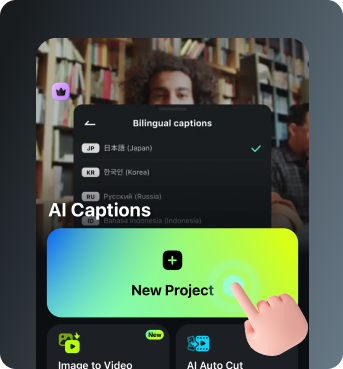
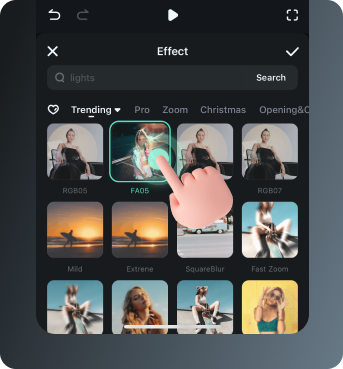
Step 2 Access and Select Your Video Effects
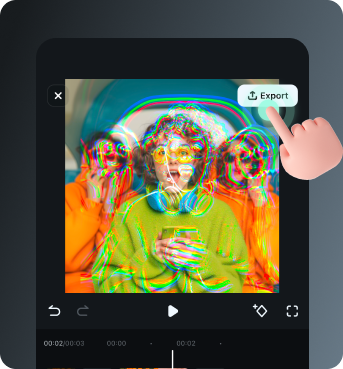
Step 3 Export or Keep Editing
Step 1: Open Filmora and Import Your Video
Open the Filmora app on your phone and import the video you want to edit. The clip will be added to your editing timeline automatically.Step 2: Access and Select Your Effect
Tap Animation to browse preset video effects and animations. Choose a timer style you like and apply it to enhance your video instantly.Step 3: Export or Keep Editing
After applying the effects, export your video or continue editing with additional animations, stickers, or adjustments.
Explore More Video Effects
From cinematic timer effects to dynamic zoom transitions — explore our free, ready-to-use effects for every creative project.