


A few years ago, telling a real photo from an AI image was a piece of cake because the weird flaws made it way too obvious. But as AI models keep improving, making that call gets harder by the day, leaving many creators frustrated by weird artifacts, broken text, and unpredictable layout controls. One model aiming to solve these headaches is Ideogram 4.0.
Released in June 2026, the latest version of the Ideogram series packs serious upgrades, but is it actually better or just a tiny step up from Ideogram 3.0? Today, we'll take a deep dive into Ideogram 4.0 vs older models and top competitors like Nano Banana Pro and GPT Image 2, so you can easily pick the absolute best tool for your workflow.
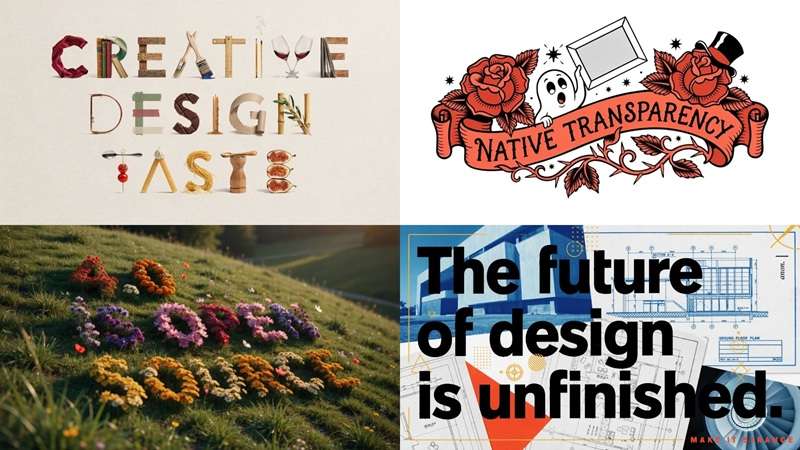
Part 1. Understanding Ideogram 4.0: Core Features & Capabilities
Ideogram 4.0 is an open-weight text-to-image model released by Ideogram on June 3, 2026. It is designed for visual work that goes beyond generating a single attractive picture, with particular attention to typography, layouts, composition, editing, and production design.
At the heart of Ideogram 4.0 is a smart training process called the Describe-to-Structure-to-Recreate framework. Instead of treating an image as one big flat scene, the system can analyze it and break it into components. This can include the background, individual elements, their descriptions, colors, and even their positions.
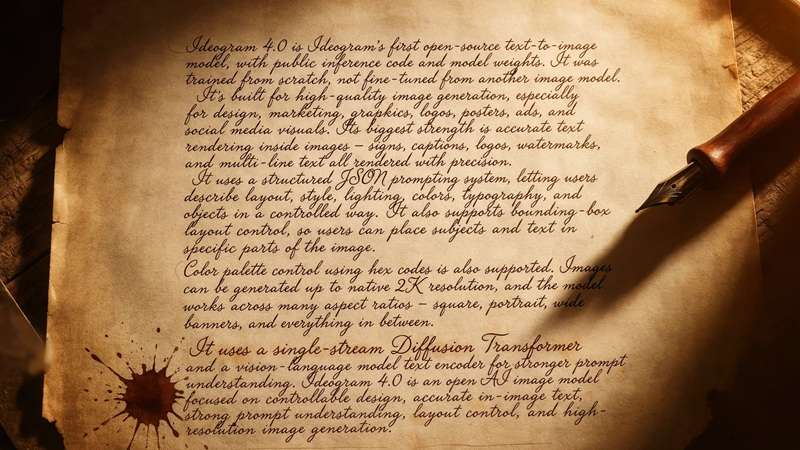
Core capabilities
A few features stand out as the direct result of that training approach:
- Structured Regional Controls: Define precise bounding boxes for every person, object, or text element so things stay exactly where you want them.
- Multilingual Typography Engine: Handles complex fonts, stylized lettering, and multiple languages without turning characters into gibberish.
- Native 2K Resolution: Renders crisp, high-detail visual assets up to 2K right out of the generator.
- Open-Weights Availability: You can run Ideogram 4.0 locally through tools like ComfyUI via Hugging Face, or stick to their fast cloud web app.
Ideogram 4.0 Plans and Pricing
Ideogram runs on a credit system across the board. Once you register, the free tier hands you 12 credits. That's a fine way to poke around, but it won't carry any real ongoing project. For consistent use, you'll want one of the paid plans.
| Feature | Free | Plus | Pro | Team |
| Price | $0 | $20 / month | $60 / month | $30 / month (per user) |
| Credits | - | 1,000 credits / month | 3,500 credits / month | 1,500 credits / month (per user) |
| Key Features | - | Private generation | Private & batch generation | Private & batch generation |
| Best For | Testing it out | Regular creators | Heavy users | Collaborative work |
|
Show More
Show Less
|
||||
Part 2. What's New With 4.0: The Ideogram Evolution
Ideogram 4.0 did not appear out of nowhere. Before it came Ideogram 3.0, Ideogram 2a, and Ideogram 2.0, with each version pushing the model in a slightly different direction.
The most confusing names are probably Ideogram 2.0 and Ideogram 2a. But 2a isn't a newer, better version of 2.0; it's a faster, cheaper sibling built for speed rather than maximum quality, meant for people who want quick iterations without burning through credits as fast.
| Category | Ideogram 2a | Ideogram 2.0 | Ideogram 3.0 | Ideogram 4.0 |
| Image Quality | Good, speed-first | Solid, 5 styles | Big jump, 4.3B presets | Best yet, near closed-model tier |
| Text Rendering Accuracy | Good short-word spelling | Strong typography on simple layouts | Excellent single-line text accuracy | Complex multi-line & multi-language typography |
| Core Architecture & Paradigm | Speed-tuned diffusion | Standard style-tagged diffusion | Multi-reference consistency pipeline | Structured JSON spatial mapping |
| Layout & Composition Control | Basic preset bounds | General prompt placement | Linear prompt-driven composition | Bounding-box regional positioning |
| Prompt Understanding | Minimal prompt length | Moderate visual interpretation | Strong natural language comprehension | High structural & spatial adherence |
|
Show More
Show Less
|
||||
From the comparison above, we can see that Ideogram 4.0 vs Ideogram 2a vs Ideogram 2.0 has brought the biggest change in creating high-quality pictures. Meanwhile, Ideogram 4.0 vs Ideogram 3.0 is not only about creating better images, but also changing the workflow itself by introducing open weights and structured JSON prompts.
Part 3. Ideogram 4.0 Use Cases: What Should You Create?
Better technology only matters if it helps you make something useful. Thanks to its structural upgrade, Ideogram 4.0 excels in projects that require precise layout design rather than random visual art generation. Below are a few situations where its capabilities can be particularly useful:
1. Posters and Graphic Design
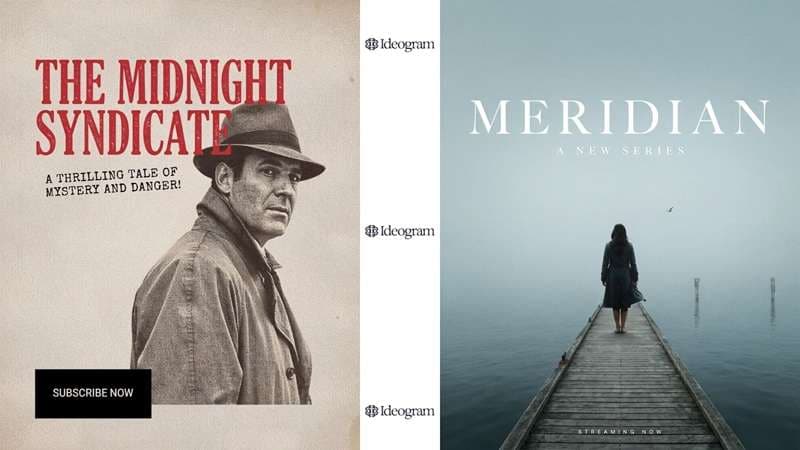
Posters are one of the obvious places where Ideogram 4.0 can shine. With bounding-box layout control, you can lock a headline to the top third of a poster, a subject in the center, and a logo in a corner, all in one generation instead of hoping the model guesses right.
2. Advertising and Marketing Visuals
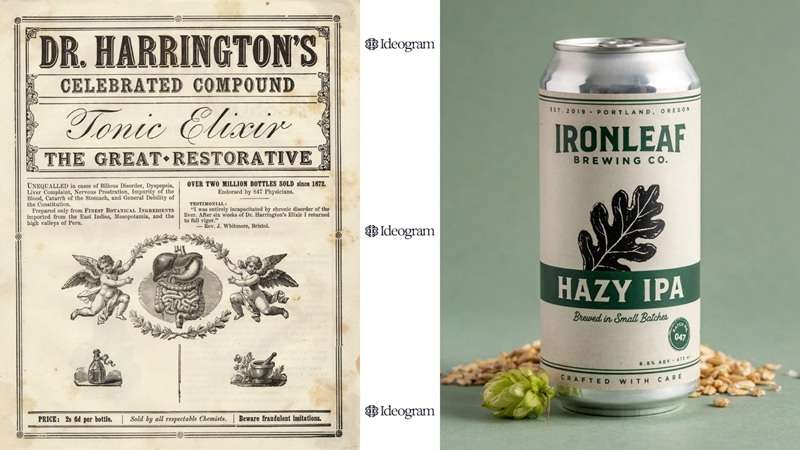
Ideogram 4.0's combination of prompt fidelity, typography, color conditioning, and structured elements can be useful for early advertising concepts and marketing visuals. You can specify where the product sits, add your promo text slogan directly on top, and generate clean transparent backgrounds for instant layout editing.
3. Concept Art and Creative Projects
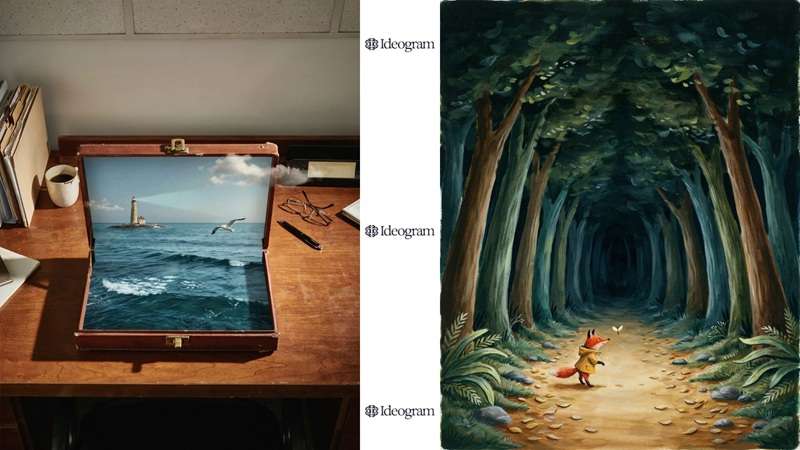
For creative work, precise control can be useful without turning every project into a technical exercise. In this case, concept artists can use Ideogram 4.0 to experiment with scene composition, objects, color palettes, characters, and visual hierarchy.
4. Fashion and Apparel
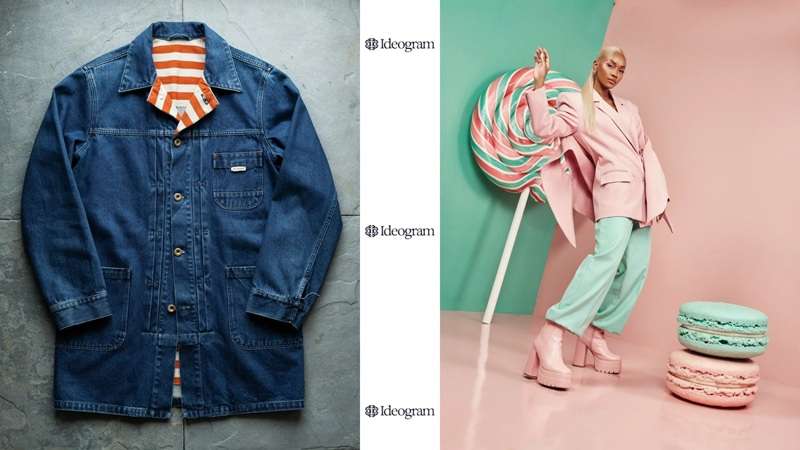
Fashion is another area where composition, materials, colors, and styling matter. Luckily, Ideogram 4.0 handles t-shirt graphics exceptionally well by keeping backgrounds easy to strip out. Plus, its focus on design and composition also makes it relevant for projects where text and visuals need to coexist.
Part 4. Ideogram 4.0 vs Other AI Image Generators
When it comes to AI image generation, no serious comparison would skip the two names dominating the conversation right now: Google's Nano Banana lineup and OpenAI's GPT Image 2.
But the thing is, each generator brings something unique to the table. So, let's break it all down. Below is a comparison table of Ideogram 4.0 vs Nano Banana lineup and GPT Image 2.
| Category | Ideogram 4.0 | Nano Banana Pro | Nano Banana 2 | GPT Image 2 |
| Core Model Focus | Structured graphic layout & typography | Cinematic photography & real-world context | High-speed generation & web-scale design | Conversational prompting & photorealism |
| Image Quality | Top open-weight model, 2nd overall by designer vote | Elite photorealism, native 4K | 95% of Pro's quality, much faster | Topped LMArena at launch, best all-around |
| Spatial / Regional Control | Explicit JSON bounding-box placement | Strong via deep multi-step reasoning | Good, simplifies very complex scenes | Plans layout via Thinking before rendering |
| Best Production Asset | Posters, branded typography, print | Photoreal product shots, portraits, 4K print | High-volume ecommerce & social variants | Text-heavy marketing assets, infographics |
| Complex Compositions | Excels with many labeled elements | Handles up to 8-14 reference images | Solid, but trims down heavy instructions | Reasons through dense multi-element scenes |
|
Show More
Show Less
|
||||
After looking at the table above, we can see that there isn't one universal winner here, just different tools built for different jobs. The better question is: What are you actually trying to make? Here is the summary of the comparison.
- Ideogram 4.0 vs Nano Banana Pro: Ideogram 4.0 wins on graphic layouts and precise font choices, while Nano Banana Pro gives you far better real-world photo textures and product shots.
- Ideogram 4.0 vs Nano Banana 2: Ideogram 4.0 gives you strict bounding-box visual placement, whereas Nano Banana 2 focuses on rapid, budget-friendly social media graphics.
- Ideogram 4.0 vs GPT Image 2: Ideogram 4.0 is your best bet for artistic typography and vector-style merch, while GPT Image 2 takes the lead in natural conversational prompts and multi-character photorealism.
Part 5. Access Nano Banana Pro and GPT Image 2 in Filmora
Based on everything above, Ideogram 4.0 and each of these models make a real case for themselves depending on what you're building. However, using all of them properly usually means juggling separate accounts, separate credit systems, and separate interfaces.
Thankfully, there's a much simpler way if you want Nano Banana and GPT Image 2 sitting in the same workspace, that is using Wondershare Filmora.

Filmora is a full video editor that also carries a genuinely wide bench of AI models under its own engine. For images specifically, it supports both generative tools and editing tools side by side, so you're not exporting files between five different apps just to finish one asset.
Quick Tutorial: How To Create an AI Image in Filmora
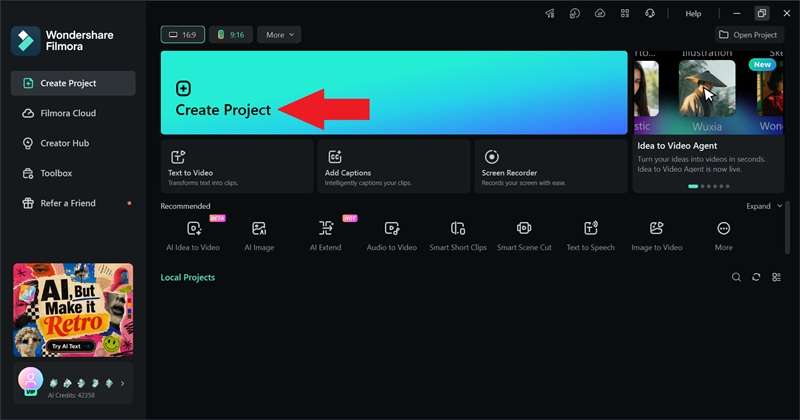
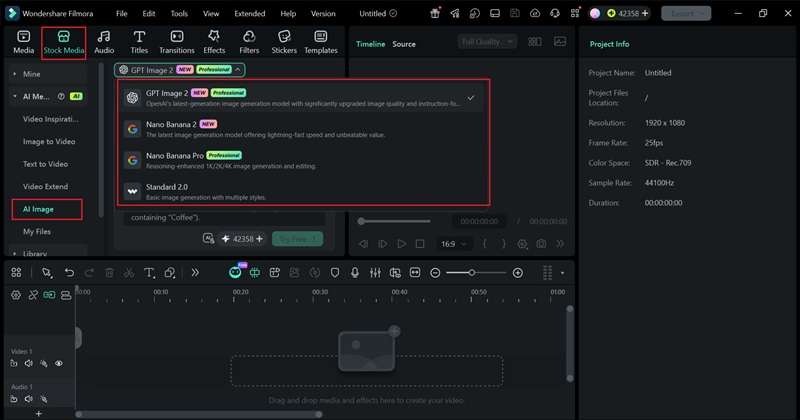
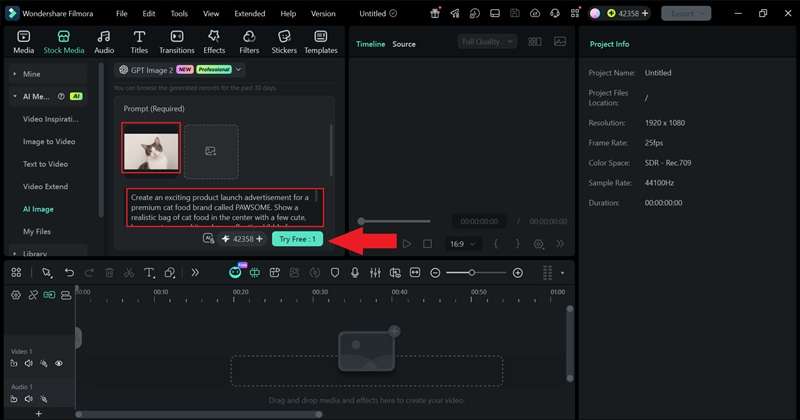
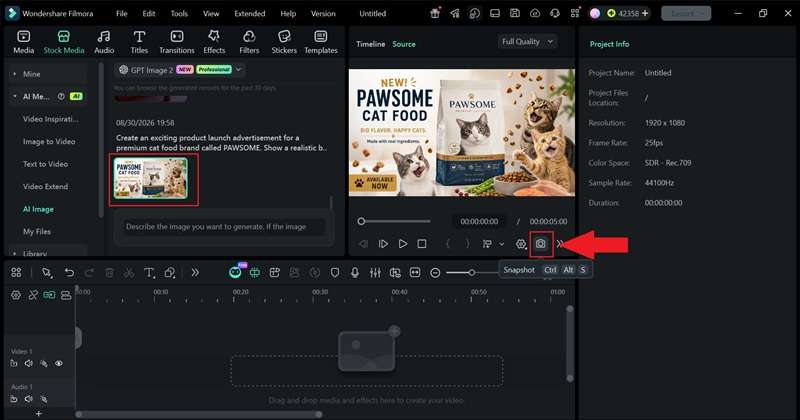
See the result below:

 Secure Download
Conclusion
Ideogram 4.0 earns its upgrade status honestly. The shift to an open-weight, structure-first model brings real gains in layout precision and text rendering that its earlier versions simply couldn't match. But comparing Ideogram 4.0 vs Nano Banana Lineup and OpenAI's GPT Image 2 is kind of difficult since all models are built for different purposes.
Rather than picking just one and living with its blind spots, Wondershare Filmora gives you a way to reach for the right model per task without leaving your project. Combined with a real editing timeline, it turns whichever image model wins a given comparison into something you can actually finish and ship.
FAQs
-
Can I run Ideogram 4.0 offline on consumer graphics hardware?
Yes, Ideogram 4.0 is released with open weights, so it can be run on your own hardware rather than only through a hosted website. However, it is a large 9.3-billion-parameter model, so running it locally requires suitable hardware and a compatible software setup. -
Why do some simple text prompts produce unexpected collage-style outputs in Ideogram 4.0?
Ideogram 4.0 relies heavily on its structural JSON framework. If you use a very short or vague prompt without clear spatial instructions, the model sometimes defaults to creating a grid or collage representation of the elements you described. Adding clearer positional details should fix this issue. -
Does Ideogram 4.0 have an API?
Yes, Ideogram offers a full developer API alongside its web interface. API pricing varies depending on resolution and execution mode, starting around $0.03 for Turbo generations and $0.06 to $0.10 for full Quality renders.
