

 TL;DR:
Kaiber AI is an experimental video generation suite best suited for musicians and creators producing short, stylized animations or beat-synced visuals using aggregated models like Kling, Luma, and Veo, while Wondershare Filmora remains the recommended choice for users requiring full multi-track timeline editing and narrative control.
● Kaiber AI aggregates multiple generation models into a single Superstudio canvas, but the outputs can be unpredictable and rapidly drain credits, with a basic 4-second clip consuming around 30 credits and upscaling to 1080p or 4K requiring extra spending on paid plans.
● The platform is highly effective for testing visual concepts or creating audioreactive music videos via its paid Beat Sync feature, though its barebones built-in editor makes it unsuitable for large-scale, hyper-realistic storytelling.
● For complete video production, Wondershare Filmora offers a superior NLE alternative across desktop and mobile platforms by combining AI generation models like Veo 3.1 and Sora 2 with professional multi-track editing, color grading, and up to 8K exports.
Ask AI for a summary
 ChatGPT
 Perplexity
 Gemini
 Claude
 Grok
Grok
In the rapidly evolving landscape of 2026, the Kaiber AI video generator has emerged as a powerhouse for creators. By integrating elite models like Kling, Luma, and Veo, it offers a unique creative suite. In this comprehensive Kaiber AI review, we'll test its text-to-video capabilities, music sync features, and overall quality to see if it's the best AI video generator for your projects.
So, we wanted to put the platform to the test and answer the questions many of you may have. Is it free to try? What can you do with Kaiber AI? How good is the video quality it produces? If you are wondering whether Kaiber AI video generator is worth considering for your projects, this review will help you decide.
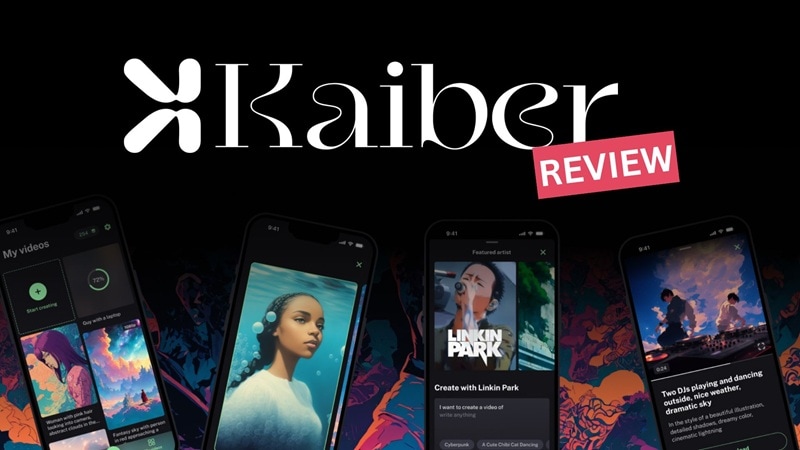
Part 1. What is Kaiber AI? Quick Overview
Kaiber AI isn't just a single AI tool. It works more like a creative suite that brings together an AI video generator and image generator with many AI models options to choose from. The platform is best known for creating fully animated videos in just a few minutes.
For the input methods, Kaiber AI video generator can generate videos from text prompts, images, or existing video clips. These options run on several generation models, which we'll break down in more detail later. The AI video generation tool itself is now branded as Superstudio, serving as Kaiber's primary workspace for creating and refining AI-generated videos.
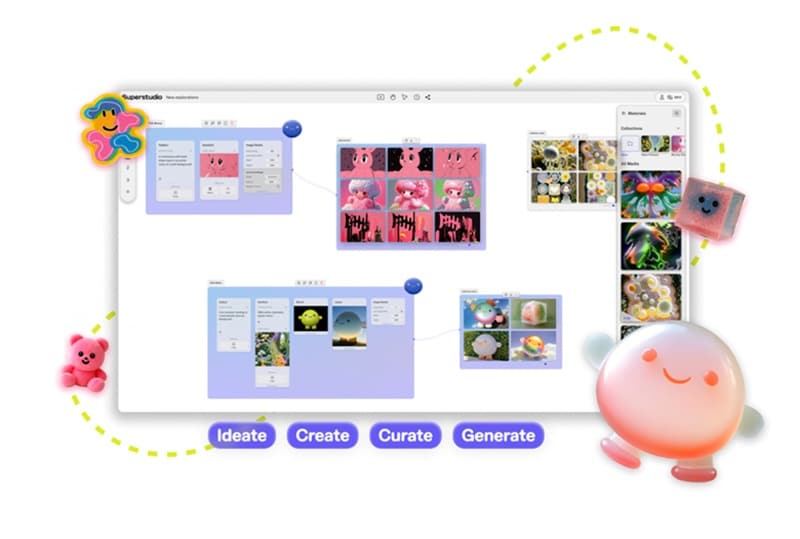
- Superstudio Canvas Editor: Inside Kaiber AI, Superstudio uses an infinite canvas with a node-based layout. You can connect scenes, styles, audio, and animations in one flow.
- Multimodal Generator: Create visuals from text prompts, images, or video clips, then layer them with music in a single workspace.
- Audioreactive Video Engine: Create visuals that react to your music by pulsing, cutting, and shifting with the beat.
- Desktop and Mobile Access: Get the full editing experience on desktop, while the mobile version offers a lighter setup for quick generation on the go.
- 4K Upscaling & Exports: Creator and Pro plans unlock higher-resolution exports, including 4K.
To get a feel for how the system works, you can try Kaiber AI video generator for free. This option works for testing and experiments only since it has its limitations.
| Flex | Creator | Pro | |
| Price | Free (pay as you go) | $29/month | $149/month |
| Credits | None | 1,400/month | 7,500 credits/month |
| Canvases | 2 | 5 | Unlimited |
| AI Models | Limited | All | All |
| Concurrent Generations | 3 at a time | 15 at a time | Unlimited |
| Commercial Use | |||
|
Show More
Show Less
|
|||
Note: If you need more credits, you can buy extra credit packs, with plans starting at $5 for 300 credits.
Part 2. Key Features: What Can You Create with Kaiber AI Video Generator?
By now, you should already have a general sense of how Kaiber AI works and what its core tools offer. This time, we will break down the practical things you can actually create with the Kaiber AI video generator.
Generate Videos from Text Prompts
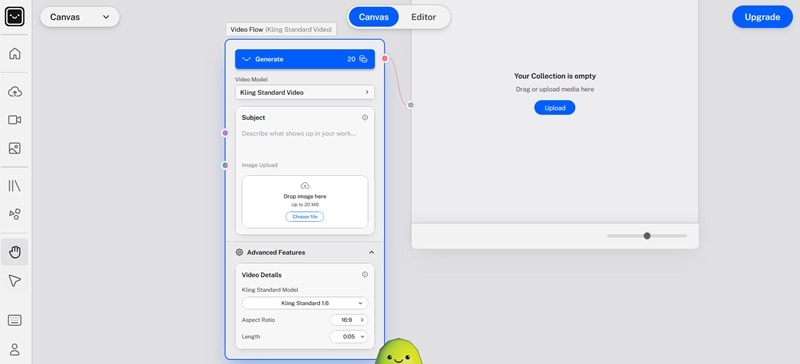
Kaiber AI interface may look a bit different from other AI video generators, as it uses a node-like setup where you can connect tools together. Even so, the process is still pretty much simple. You start by typing a text prompt that describes the scene, mood, or style you want. The system turns that prompt into animated clips.
Advanced Music-to-Video Synchronization (Audioreactivity)
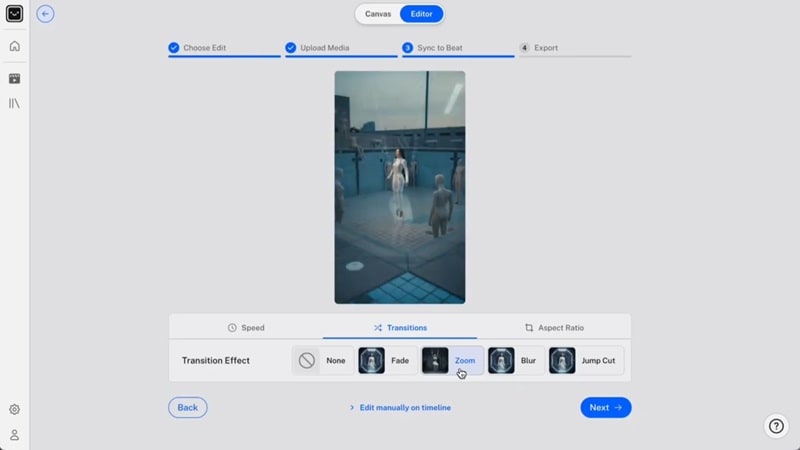
Kaiber can work as a Kaiber AI music video generator with its Beat Sync feature. Drop in your audio and media files (videos or images), and the tool will line everything up to the beat. You can pick from different styles like high energy, cinematic, or time skip.
A popular example is Linkin Park using Kaiber AI to create the Lost music video, which helped put Kaiber on the map as a reliable AI music video generator.
Transforming Stills into Cinematic Motion
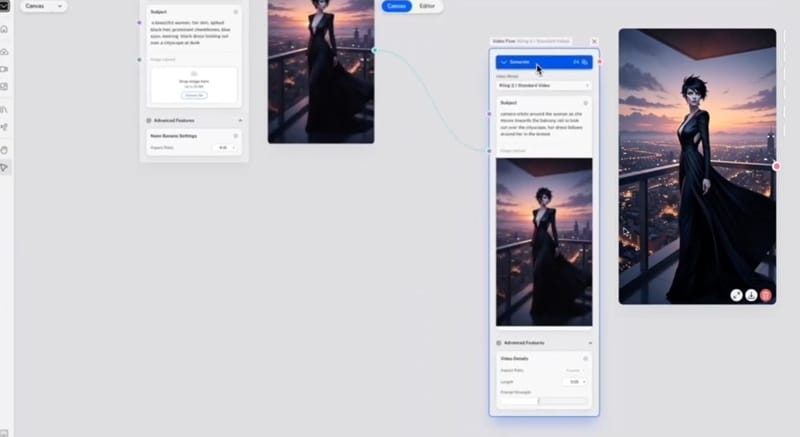
Besides creating videos from text prompts, Kaiber AI also lets you generate motion from still images. With Kaiber AI image-to-video generator, you can upload a photo and turn it into a short animated clip, and then layer in movement, transitions, and sound.
Split and Arrange Clips with a Built-In Editor
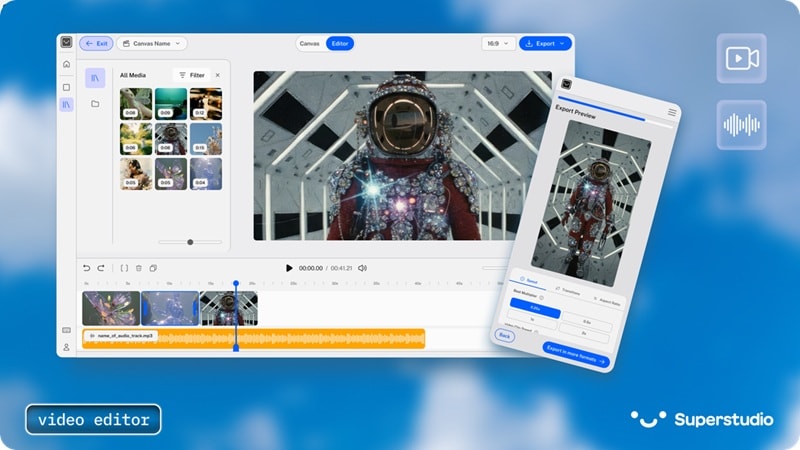
On top of its video generation tools, you can use Kaiber's built-in editor to edit your clips on a timeline. But compared to full NLE video editors, the interface is much more basic, with no advanced tools to overwhelm you since the editing options are pretty limited. You mainly use it to split and reorder clips, or add simple captions.
Part 3. The Power of Multi-Models: Veo, Kling, and Luma
The standout advantage of this AI video maker is its multi-model architecture. Unlike standard platforms, Kaiber aggregates the world's best AI video generation models—including Kling AI, Luma Dream Machine, and Google Veo—allowing users to switch styles instantly within the Superstudio canvas.
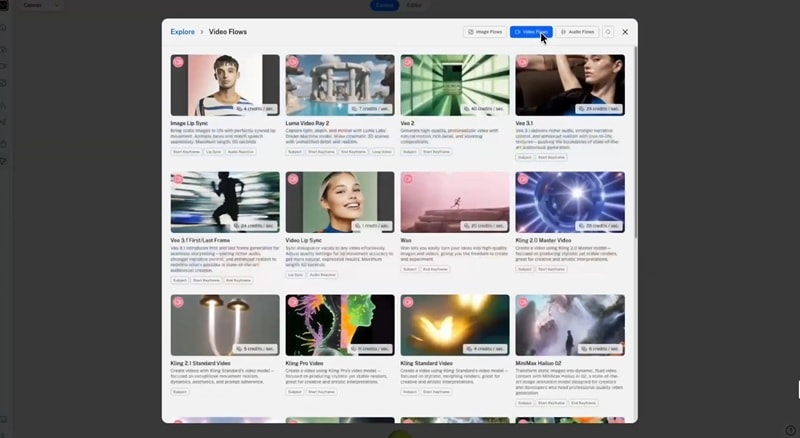
- Flipbook Video: Best for artistic, frame-by-frame animation.
- Kling: Best for movement realism and prompt adherence
- Luma Video: Best for cinematic shots with smooth camera motion and natural lighting.
- Veo: Best for high-quality, story-driven clips with richer detail and more complex scenes.
- MiniMax Hailuo: Best for turning static images into video with a more professional quality result.
- Wan: Best for experimental styles and creative motion effects.
Each model costs different amounts of credits to use, and some of the more advanced models are locked behind the premium plan. So, if you are on a Kaiber AI video generator free plan, you won't have access to everything. More powerful or newer models usually burn through credits faster than the basic ones.
Part 4. Kaiber AI Video Quality: Hands-On Testing Results
On the surface, Kaiber AI looks like a really promising AI video generator with a lot going for it. But after testing it hands-on, there are a few important things we want to point out about how it actually performs.
The Integrated Flow Makes Experimenting Easier
One thing Kaiber AI video maker does really well is how everything connects inside its canvas, complete with a built-in Collection feature where you can gather all the media you want to work on. You can move from text to video, image to video, and restyle your project without jumping between tools.
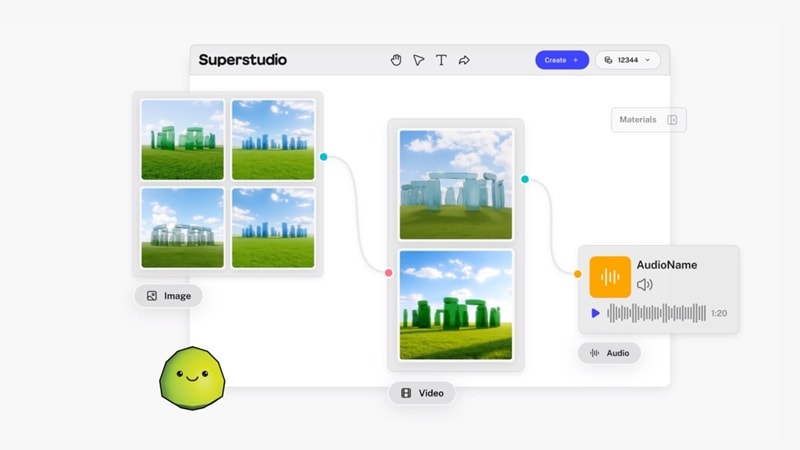
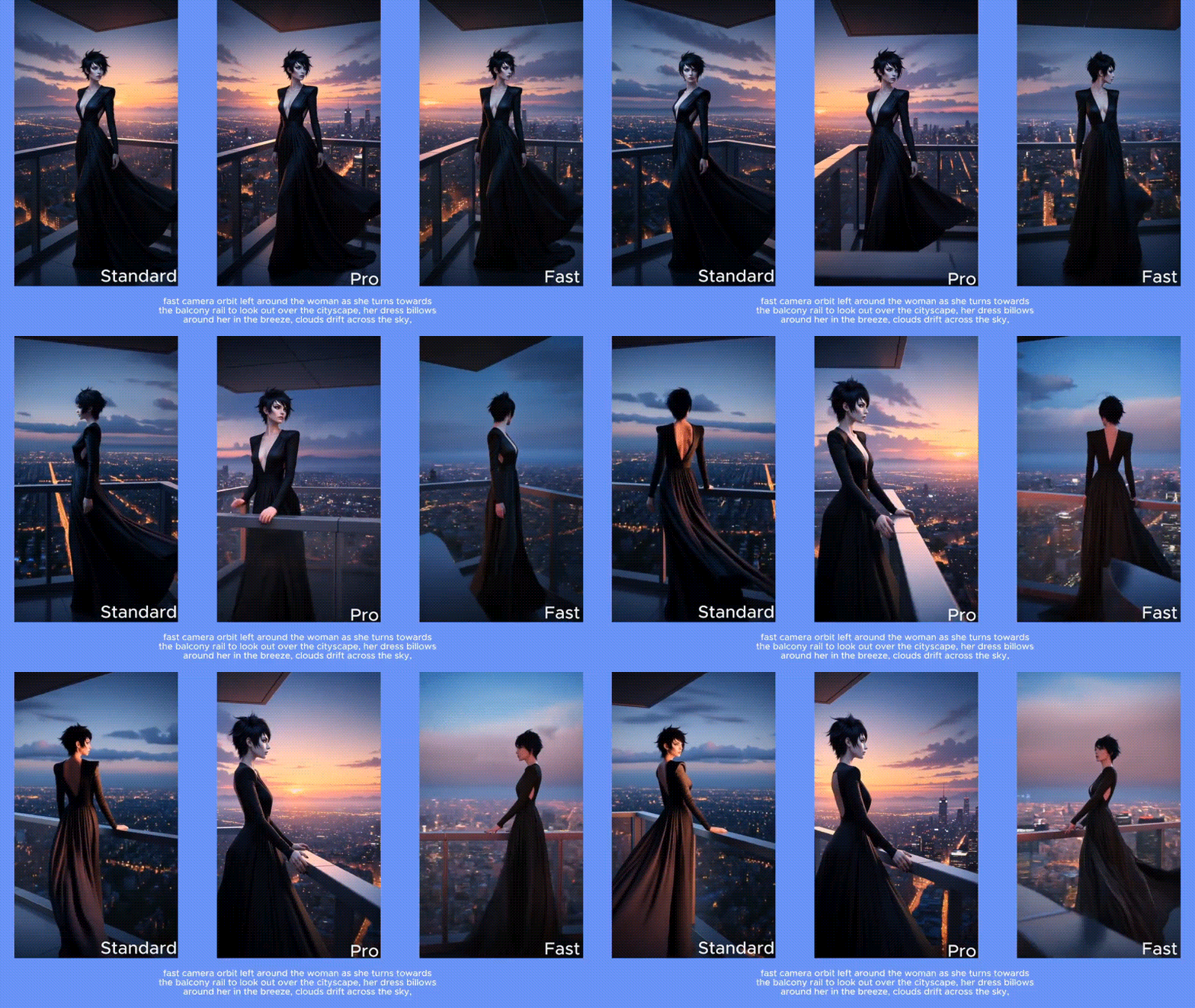
That flow makes it easier to experiment and mix styles in one place. It's also a nice touch that makes producing different versions of the same idea much more flexible. In our testing, Kaiber was good at producing artistic and animation videos rather than hyperrealistic AI videos.
Outputs Can be Unpredictable
That said, the results are not always consistent. Some prompts came out looking great on the first try, while others needed a few reruns to get something usable. You need to know which models work best for your style, or you'll end up wasting your credits.
Because of that, the Kaiber AI video generator feels more like a tool for experimenting and testing ideas rather than something you can rely on for regular use.
Part 5. The Good, the Bad, and the Limits of Kaiber AI
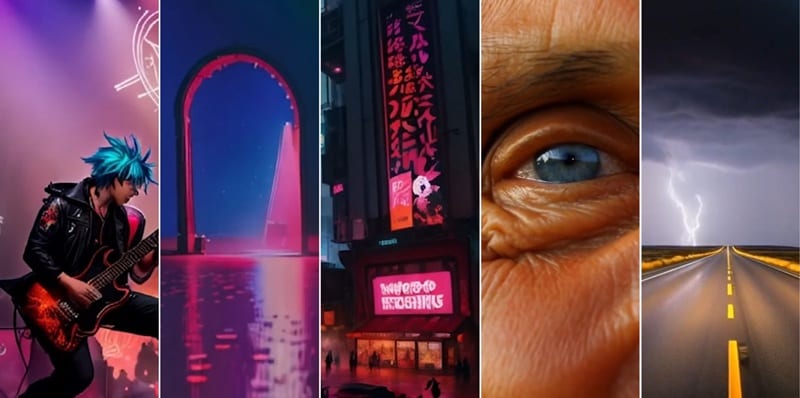
Putting our own review aside, Kaiber AI video generator has received mixed feedback across different review platforms. As of 2026, it holds a 2.9 out of 5 rating from 163 reviews on Trustpilot, while Product Hunt paints a 4.2 out of 5 rating from 11 reviews.
Based on our hands-on testing and what users say online, the strengths and weaknesses of Kaiber AI can be summarized as follows.
- Easy to get something on screen fast. Even though the layout isn't like most AI video tools, Kaiber still feels simple and beginner-friendly.
- Multiple input options. You can generate videos from text or images, and even sync visuals to music using Beat Sync.
- Multiple AI models. You can test and switch between models like Flipbook, Kling, Luma, and others, depending on the look you want.
- Active updates and community. Kaiber gets regular updates and has a helpful Discord community for you to share tips, feedback, and ideas.
- Short videos still cost a lot. A basic 4-second Motion clip can use 30 credits or more. That's only about 40 short clips for 1,400 credits on the Creator plan
- Pay twice for higher quality. Your first video comes in low resolution. To upscale it to 1080p or 4K, you have to spend extra credits.
- Credits disappear faster than you expect. While most people don't get the perfect result on the first go, Kaiber AI will also charge you when you rerun prompts. Many users go through hundreds of credits just to land one good video.
- Inconsistent results. The outputs can look great one time and totally miss the prompt the next time.
- Editing tools feel barebones. The built-in editor is fine for splitting and reordering clips, but that's about it.
- Premium features locked behind paywalls. Some of the better models and options are only available on higher-tier plans.
Part 6. Who Should Use Kaiber AI? Best Use Cases
The Kaiber AI video generator is not a one-size-fits-all tool, but in the right situations, it can be really useful and fun to work with.

Best For:
- Music videos and visualizers. Kaiber works best for beat-synced visuals, looping clips, and abstract animations that match a song's vibe with Beat Sync. Though, Kaiber AI music video generator is not free and only available on paid plans.
- Short social media content. It's a good fit for TikTok, Reels, and YouTube Shorts.
- Concept art and creative experiments. Great for testing visual ideas, moods, and styles before committing to a full production.
You may want to try the Kaiber AI video maker if you are:
- Musicians and DJs who want fast visuals for their tracks.
- Content creators focused on short-form and aesthetic videos.
- Designers and artists exploring AI-generated motion.
- Beginners who want a simple way to try different AI video models
It may not be a great option, however, if you need hyper-realistic storytelling and full control over long-form narratives for large-scale production. In that case, you can try using an AI video generator like Kaiber that feels more practical like Wondershare Filmora.
Part 7. Kaiber AI vs. Wondershare Filmora: Which Should You Choose?
Just like Kaiber AI, Filmora also supports a few advanced AI models as part of its feature set. But what really makes it different is that Filmora is a full NLE video editor that adds AI tools on top of a traditional timeline workflow, instead of relying only on AI generation.
Filmora: AI Video Generation Inside a Full Editor
Filmora works on Windows, macOS, iOS, and Android. The video generation tools in Filmora include AI Image to Video and Text to Video, with support from models like Veo 3.1, Sora 2, and Wan 2.1 (on Filmora mobile).
 Secure Download
This setup works right inside its multitrack timeline-based editor, so your generated clips can be dropped straight into a project and polished from there without switching tools. Some of Filmora's key features you can take advantage of include:
- Advanced color grading, with an AI Color Palette to help you match tones from references
- Easy background removal and subject isolation using Chroma Key, Smart Cutout, or AI Portrait.
- A built-in library of stock media, effects, transitions, music, stickers, and more.
- Arrange and combine multiple clips into one project on a timeline.
- Video upscaling powered by models like Topaz Starlight or a basic AI upscaler.
- Complete audio editing tools, with noise reduction, voice enhancement, and Auto Beat Sync that works like Kaiber's Beat Sync.
- Extend your video or audio naturally with AI Video Extend and AI Audio Stretch.
You can check out even more features of Filmora on its website.
Kaiber AI vs. Filmora Comparison
| Kaiber AI | Filmora | |
| Core Focus | AI video generator for artistic and stylized visuals | Full NLE video editor with built-in AI tools |
| Video Generation Models | Luma, Veo, Kling, Minimax, Wan | Veo 3.1, Sora 2, Wan 2.5 (Filmora for Mobile) |
| Editing Tools | Basic timeline to reorder clips and add captions | Full multi-track timeline, transitions, effects, keyframes, color grading, audio editing, motion graphics |
| Supported Export Format | MP4, MOV | MP4, MOV, AVI, MKV, WMV, GIF, and more |
| Output Quality | Up to 4K | Up to 8K |
| AI Features | Text to Video, Image to Video, Beat Sync, Image Generator | Text to Video, Image to Video, Auto Beat Sync, AI Image, AI smart cutout, AI portrait, AI Music Generator, Text to Speech, Auto Captions, and more |
| Platforms | Online | macOS, Windows, iOS, Android |
|
Show More
Show Less
|
||
Conclusion
Kaiber AI video generator feels like a creative playground more than a full production tool. The multi-model setup with Veo, Kling, and Luma is fun to experiment with, and switching between them can totally change the style of the same prompt.
But it is not the most reliable choice if you need full control over your edits. To turn those AI clips into more polished videos, Filmora is the tool you may want to use instead. It lets you generate clips and then fine-tune everything on the same timeline.

