


 TL;DR:
Qwen AI is a multimodal open-source ecosystem that rivals ChatGPT in coding, math, and multilingual capabilities, but creators must pair it with dedicated software like Wondershare Filmora to bypass its short, unpolished native video outputs.
● The Qwen 3 Max AI model introduces a "Thinking" layer capable of processing a 1-million-token context window for deep reasoning, while Qwen 2.5 AI remains optimized for precision coding and mathematical problem-solving.
● Instead of a monthly subscription, developers use a token-based system via Alibaba Cloud Model Studio that provides 1 million free tokens per model valid for 90 days, but mobile users must strictly avoid unofficial Qwen AI APK files due to high malware risks.
● Qwen's built-in video generator is restricted to 5-second clips with basic motion control and lacks audio tools, requiring users to export scripts or clips into Wondershare Filmora to extend frame durations, generate voiceovers, and assemble publishable timelines.
Ask AI for a summary
 ChatGPT
 Perplexity
 Gemini
 Claude
 Grok
Grok
Alibaba’s answer to ChatGPT, Qwen AI, is reported by the South China Morning Post to have captured more than 50% of global open-source model downloads as of March 2026. According to researchers at Interconnect AI, Qwen reached nearly 1 billion cumulative downloads by March, far surpassing rivals like Meta’s Llama and DeepSeek. This really shows that Qwen has made a big name for itself on the global stage.
So naturally, the question becomes simple: is chat Qwen AI just another chatbot, or is it something more powerful? Today, we’ll break it down!
Part 1. Not Just Another Chatbot: What Qwen AI Really Is
Technically, Qwen goes by the name QwenLM AI and is Alibaba Cloud's full-stack answer to tools like ChatGPT and Claude. The core aim is a flexible AI engine that developers and creators can plug into different workflows.
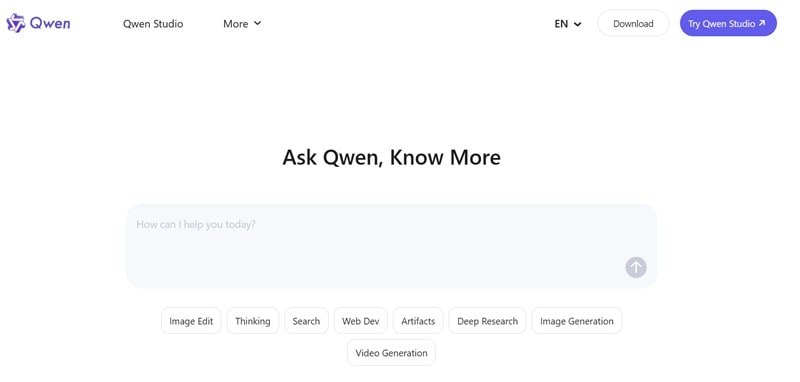
You’ll often hear terms like Qwen Studio, Qwen AI model, or Qwen API, Qwen 2.5 AI, Qwen3 AI, and they all refer to different parts of the same ecosystem. At its core, Qwen is designed to handle:
- Writing and conversation.
- Coding and technical tasks.
- Image generation.
- Early-stage video generation.
Instead of locking you into one interface, it works more like a flexible engine. That’s why developers lean on the Qwen API, while casual users stick to the Qwen AI chat interface.
Accessing the Qwen Ecosystem
There are a few ways to try Qwen:
| Access Method | What It Is | Best For |
| Qwen Chat (Web) | Visit https://qwen.ai/ online | Casual users, testing, quick tasks |
| Qwen AI App (Android) | Available on Google Play as the official Qwen chat app | Mobile-first creators and on-the-go use |
| Qwen API (DashScope) | Developer access via Alibaba Cloud Model Studio | Developers, automation, custom builds |
| Qwen Studio (Desktop) | Desktop and mobile app formerly known as Qwen Chat | Full workflow across devices with sync |
⚠️ Stay Safe with APKs: You might see links for a "Qwen AI APK" claiming to offer "unlocked premium features." Don't click them. These unofficial files are often packed with malware. Stick to the real Qwen AI login page or official apps.
Part 2. From Qwen to Qwen 3.6: How It Evolved
Qwen didn't just appear as a fully-formed competitor to ChatGPT. It went through years of iteration, each generation solving real problems from the previous version. The real shift happened with Qwen2 AI and the famous Qwen AI 2.5, which focused heavily on mathematics and coding perfection.
Then came the "multimodal jump" with Qwen 3 Max AI, introducing a massive "Thinking" layer that can process a staggering 1 million tokens, enough context to read an entire series of novels or analyze a feature-length film script in one go.
See the table below to see the different versions of Qwen and their improvement:
| Version | Released | Key Focus | What Improved |
| Qwen 1 | Late 2023 | The Foundation | Could write text, code, and handle multiple languages |
| Qwen 2 | June 2024 | Scale & Multilingual | Improved accuracy and supported more languages |
| Qwen 2.5 | March 2025 | Math, Code, Precision | Much better at coding, math, and reasoning |
| Qwen 3 | April 2025 | Thinking + Non-Thinking | Can switch between fast replies and deeper reasoning |
| Qwen 3.5 | February 2026 | Agentic & Multimodal | Works with text, images, video, and can perform tasks |
| Qwen 3.6 | April 2026 | Unified Vision + Agent Scale | Handles complex tasks better with lower cost |
The real turning point was clearly Qwen 2.5 AI chat. It became widely accessible through Qwen chat and platforms like Hugging Face and GitHub, while also adding multimodal support for text, images, video, and audio.
That upgrade improved reasoning and usability, and marked the moment Qwen chat started competing seriously with other major AI tools.
Part 3. The Token Economy: Understanding Qwen Pricing
Here's where Qwen takes a notably different path from most AI tools. There's no simple monthly subscription waiting for you. Instead, the Qwen API runs on a token-based pricing system through Alibaba Cloud Model Studio (also known as DashScope).
You pay for what you use, and the free tier is genuinely generous by industry standards.
- 1 million tokens free per model on activation (valid 90 days after activating Model Studio).
- The free quota covers flagship models: qwen3-max, qwen-max, qwen-plus, and more.
- Extra trial quotas for specialized models including TTS and text-embedding models.
- Qwen Chat / Qwen Studio web and app access included at no cost for conversational use.
Qwen3.6-Plus API Pricing (Token-Based)
Token pricing scales with request size. All prices are per 1 million tokens:
| Token Range (per request) | Input Price / 1M tokens | Output Price / 1M tokens |
| 0 – 32K tokens | $1.20 | $6.00 |
| 32K – 128K tokens | $2.40 | $12.00 |
| 128K – 252K tokens | $3.00 | $15.00 |
Other Key Models: Pricing at a Glance
| Model | Input / 1M Tokens | Output / 1M Tokens | Best For |
| qwen3-max | $1.20 | $6.00 | Complex reasoning, coding, research, long documents |
| qwen3.5-plus | $0.40 | $2.40 | Multimodal tasks (text + image + video), agentic coding |
| qwen-plus | $0.40 | $1.20 | Balanced cost-to-performance: mid-complexity tasks |
| qwen-max | $1.60 | $6.40 | General-purpose top-tier text generation |
Part 4. What Qwen Can Actually Do (Features Explained)
If you think the Qwen app is just a text box, you're missing out on the best parts. With a free tier that hands you a million tokens and a model family spanning text to video, Qwen covers a lot of creative and technical ground.

Here's a breakdown of each major capability:
- Smart Chat (Qwen AI Chat): It’s great for everyday stuff. Whether you need to rewrite an email to your boss or brainstorm 50 ideas for a faceless YouTube channel, chat Qwen AI 2.5 and 3.6 handle it with ease.
- Code Generation: Qwen's coding capabilities sit among the strongest in the open-source world. Practical use cases include generating scripts, debugging existing code, explaining unfamiliar codebases, and converting code between languages.
- AI Image Generation: With Qwen AI image generator, you can create high-res visuals. It's particularly good at adding text to images, something most AI tools struggle with.
- Qwen AI Video Generator: This is the newest frontier. You can turn a text prompt into a short video clip. While they aren't "Hollywood" ready yet, they are perfect for social media B-roll.
- Long Context Understanding: Because of its huge context window, you can drop a 50-page PDF into Qwen Max AI and ask it to find one specific detail. It won't break a sweat.
Part 5. Real Testing: Scripts, Images, and Video Results
Theory is fine, but nothing tells the truth like actually using the thing. So, we ran Qwen through three creator-focused tests: script writing, image generation, and video generation, to see where it delivers and where it falls short.
Test 1: Using Qwen for AI Script
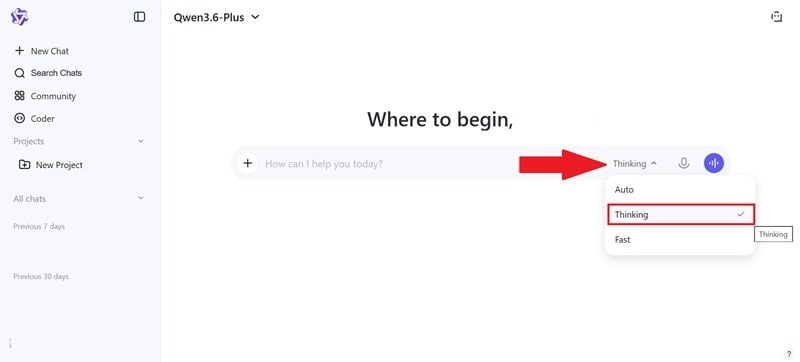
Step 1: Open Qwen chat at https://chat.qwen.ai/. Activate thinking mode for structured output.
Step 2: Write your prompt in the description box. Submitted: 'Write a 60-second YouTube script about AI video tools — conversational tone, hook in the first 5 seconds, CTA at the end'.
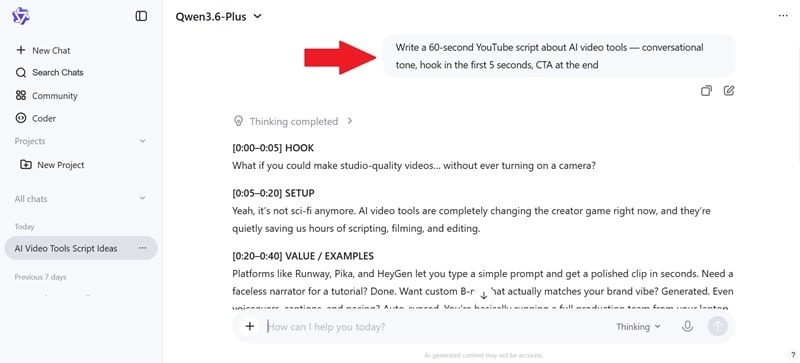
Step 3: Followed up with 'make the hook more punchy and cut the corporate tone'. Then, copy the final output to your document.
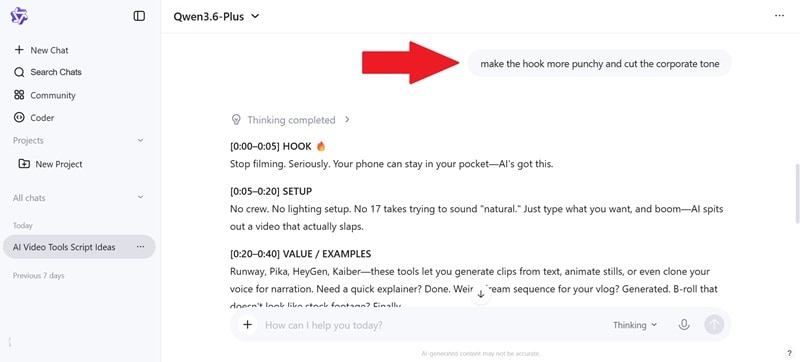
📝 Result:
- Script came out fast, under 15 seconds.
- The first draft leaned slightly generic in tone, but one follow-up prompt sharpened it noticeably.
- Overall: genuinely useful for scripting, especially as a first draft that you then edit.
Test 2: Using Qwen for AI Image
Step 1: Write your Qwen AI photo editing prompts in the description box.
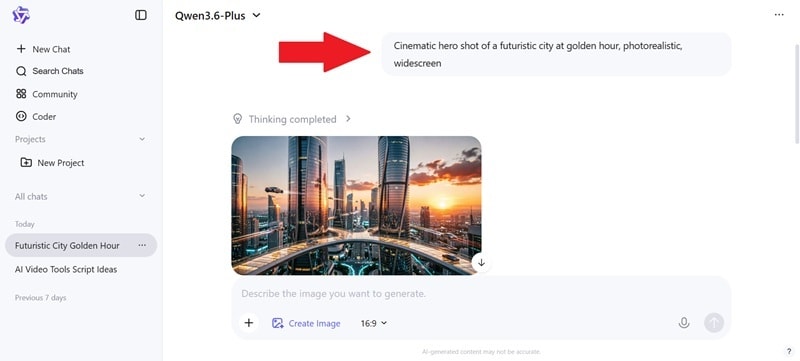
Step 2: Click Edit and add 'desaturate slightly, film grain texture' as a follow-up refinement prompt. Then click the download icon to save the Qwen Image AI to your device.
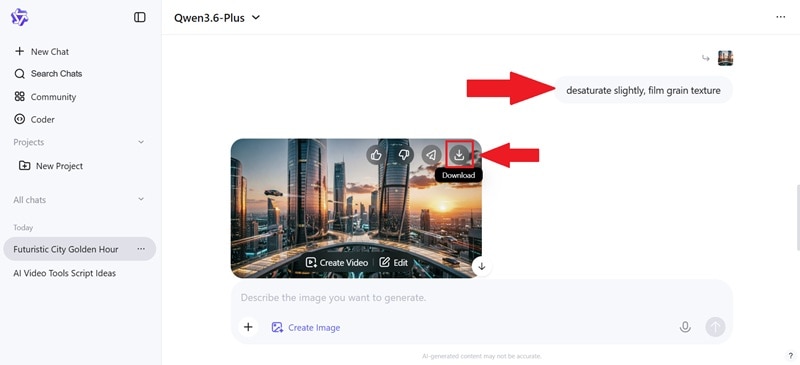
🖼️ Result:
- Decent quality, good enough for mood boards, social thumbnails, and presentations.
- Color handling was strong.
- Not as consistent as top-tier image models
- Fast generation time was a genuine plus.

Test 3: Using Qwen for AI Video
Step 1: Click the plus icon and select Create Video. Write your prompt in the description box.
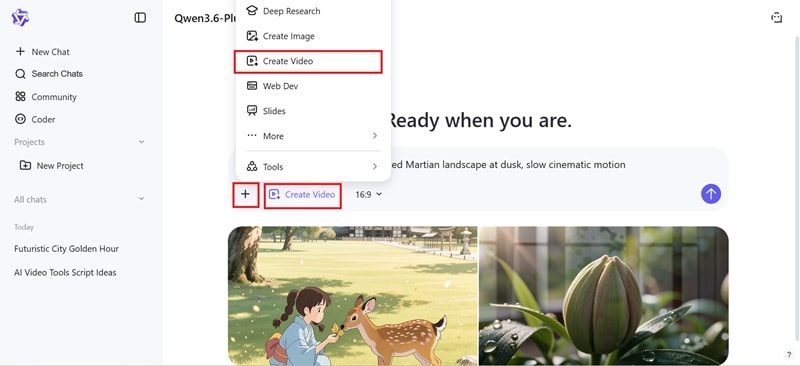
Step 2: Check out the result and select download to save the video to your device.
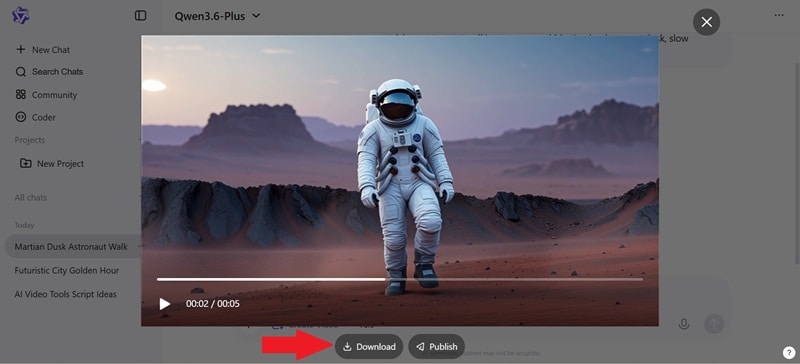
🎬 Result:
- Output was a short clip (around 5 seconds).
- Motion was basic, more sliding than cinematic movement.
- The visual style matched the prompt but camera control was limited.
- Fine for concept visualization or animatic-style storyboarding.
- The waiting time is quite long.
- Not ready for direct publishing as-is.

Our Honest Pros and Cons
- Budget-Friendly Power: One million 1M free tokens per model, valid for 90 days after activation, is enough to run serious testing and real small-scale projects without handing over a credit card.
- One Interface for Everything: Text, code, images, and video live in the same Qwen Studio chat environment.
- The Thinking Mode Is Genuinely Clever: Being able to toggle between fast general chat and deliberate step-by-step reasoning within the same model is a smooth workflow experience.
- Multilingual Mastery: It is arguably the best model on earth for translating and understanding non-English nuances.
- The Ecosystem Can Feel Fragmented: With so many model versions and access points, knowing which version to use for which task has a learning curve.
- Video Output Isn't Production-Ready: The clips are short (5 seconds), motion control is limited, and there's no multi-shot director-level control.
- Image Quality Has a Ceiling: Qwen image generation is capable for general use, but it doesn't reach the fine-detail precision and artistic control of dedicated tools like Midjourney or DALL-E 3.
- Regional Access Can Be Inconsistent: Users outside Singapore, the US, and the EU may encounter limitations that aren't always clearly documented upfront.
Part 6. Fixing the Gaps: Pairing Qwen with Filmora
Let's be direct about what Qwen is and isn't. It's a world-class thinker, writer, and creative assistant. But its video output tops out at a few seconds with limited motion control, and there's no editing timeline, no audio tools, no caption generation, and no publishing workflow.
For creators who want to go from Qwen's raw AI output to something polished and publishable, that's a significant gap. Wondershare Filmora is what closes it.
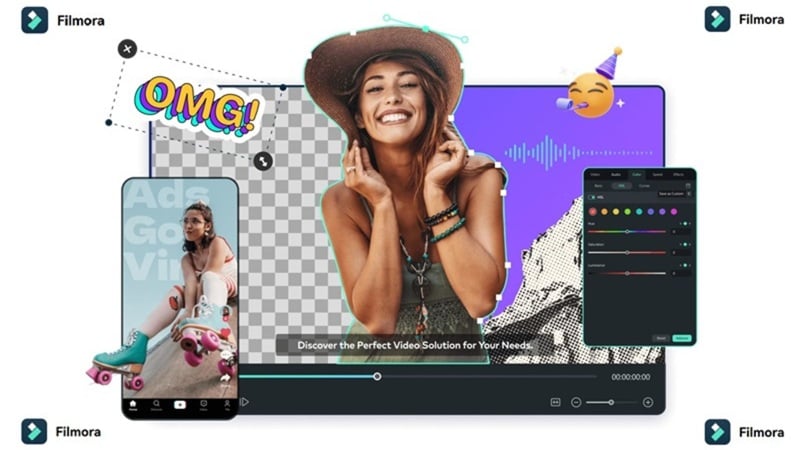
Filmora is a professional AI video editor that gives your Qwen assets a home. It's where the AI-generated clips, scripts, and images become actual videos; trimmed, scored, captioned, and formatted for every platform.
Mixing Qwen and Filmora Workflow
1. Script to Video Flow

Use Qwen AI chat to write your video script, complete with scene directions and timing notes. Import that script into Filmora and use the AI Script-to-Video feature to automatically generate a video draft from the script structure. You've turned words into a working video timeline before you've touched a single clip manually.
2. Extend the Short Clips

Qwen generates only 5-second clips. In that case, you can use Filmora's AI Video Extender to add frames beyond the original output. It smoothly extends motion and scene duration without the obvious seams you'd get from looping. A 5-second Qwen clip becomes a 20-30 second B-roll segment you can actually use.
3. Image to Animated Video

Another workflow you can try is to generate visual concepts and scene images with Qwen's image AI, then bring them into Filmora's AI image-to-video feature. All you need is to upload your picture and write down your prompt. Plus, inside the feature, there are template-based animation systems for all kinds of categories that are social-media hits!
4. Voice and Narration Layer
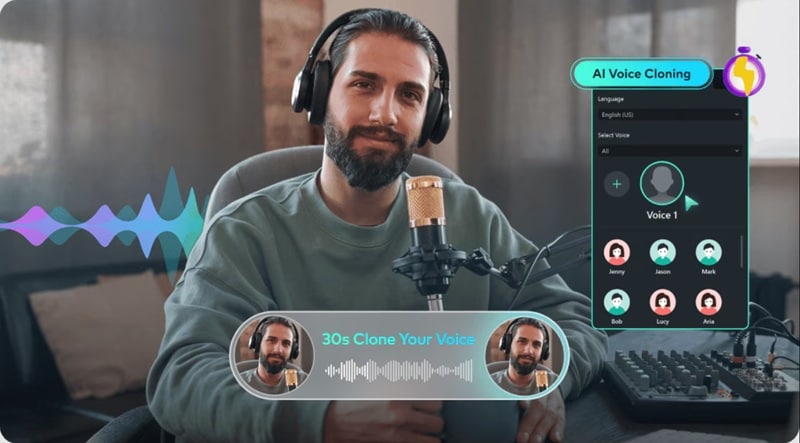
Filmora can generate a natural-sounding voiceover from the script text, or clone a specific voice style for brand consistency, turning Qwen's written output into a complete audio-visual package. All you have to do is to submit your Qwen-generated script into Filmora's Text-to-Speech engine or Voice Cloning tool.
5. Visuals + AI-Composed Music
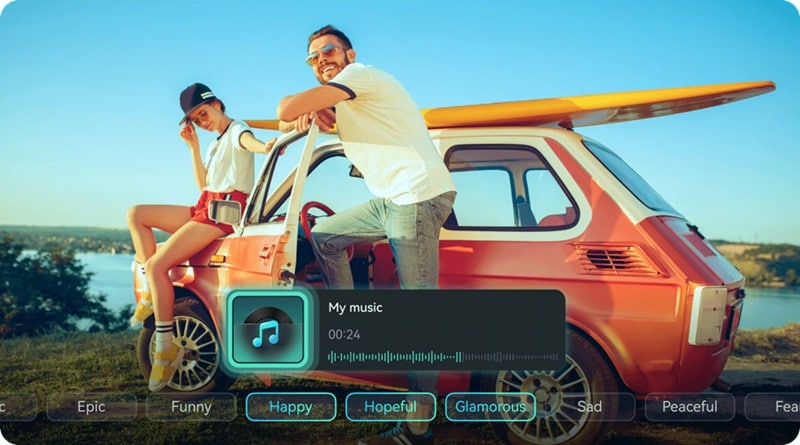
While Qwen produces the visuals and text, Filmora's AI Music Generator composes a royalty-free background track that matches the mood and pace of your video. Describe the vibe Qwen suggested in your script; 'upbeat and modern' or 'cinematic and tense’, and Filmora scores it automatically.
 Secure Download
How They Work Together (Simple View)
| Task | Qwen Role | Filmora Role |
| Script | Generate ideas | Convert to video |
| Visuals | Create images | Animate + edit |
| Clips | Generate short videos | Extend + polish |
| Audio | Script writing | Voice + music |
Secure DownloadConclusion
If you've been sleeping on Qwen AI, this is your wake-up call. The free tier is genuinely substantial. The model family covers text, code, images, and video from a single Qwen AI login. For developers, researchers, and content creators who want a capable all-in-one AI that doesn't require a US credit card to get started, Qwen 3.6 deserves serious consideration.
The place where Qwen needs backup is video production, and that's where Wondershare Filmora fills in seamlessly. Filmora takes everything Qwen generates and gives it a professional editing environment: a real timeline, AI captioning, music generation, voice cloning, platform-specific formatting, and cross-device flexibility. Together, they give you a workflow that’s both efficient and flexible.
FAQs about Qwen AI
-
Is Qwen AI good for beginners?
Qwen Chat (chat.qwen.ai) and Qwen Studio require no technical knowledge to start using. You can type a question, get an answer, generate an image, or request a script without understanding anything about tokens, APIs, or model parameters. -
Can Qwen AI replace video editors?
Not yet. While the Qwen AI video generator is cool for clips, you still need a dedicated editor like Filmora to put a professional project together. -
Is Qwen AI better than ChatGPT?
It depends on the task. On coding and mathematics, Qwen3 is competitive with and in some benchmarks ahead of GPT-4o. On the other hand, ChatGPT has a more polished consumer experience, better English-language creative writing consistency, and a larger third-party plugin ecosystem. -
Why is the Model Studio pricing based on "Tokens"?
Tokens allow for precision. Instead of a flat fee, you only pay for the exact amount of "thinking" the AI does for you, making it much more cost-effective for light users.
