


 TL;DR:
Triller remains functional in 2026 for effortlessly generating auto-edited music videos, but creators prioritizing audience reach, platform stability, and monetization should choose TikTok instead.
● The application eliminates manual video trimming by automatically cutting and syncing multiple recorded takes to the beat of a chosen track from its licensed music library.
● Platform accessibility is currently restricted; the official app is no longer available on the Google Play Store for Android users, and there is no native creation software for PC or Mac.
● Creators who require advanced production capabilities beyond basic auto-syncing can utilize Wondershare Filmora for specific tools like AI-generated royalty-free music, vocal removal, and automatic aspect ratio reframing.
Ask AI for a summary
 ChatGPT
 Perplexity
 Gemini
 Claude
 Grok
Grok
Short-form video apps have transformed the way people create and consume content, with TikTok leading the way. However, before TikTok took over, Triller emerged as a music-focused platform where users could create polished clips using AI-powered automatic editing features.
At its peak, Triller positioned itself as a serious TikTok alternative, especially for music creators. Today, however, its presence feels less certain. While the app still offers music video tools and social features, questions around its relevance and activity remain.
So, is the Triller app still worth using in 2026? This review takes a closer look at what the platform actually offers today.
Part 1. What Is Triller? Is It Still Active in 2026?
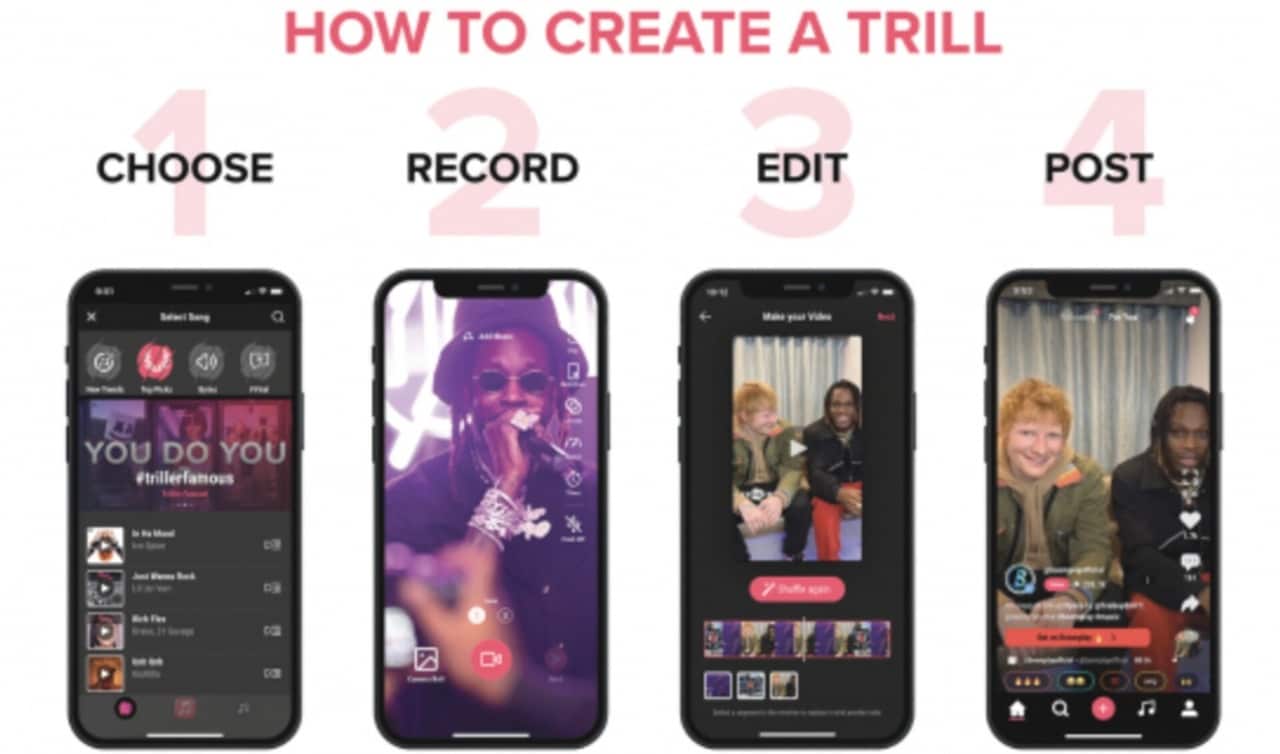
Triller started in 2015 as a simple idea: to make music videos easier to create. You just need to record a few takes and let the app automatically stitch them together into a full clip, rather than spending time on editing. Over time, it grew into a social platform where people could share short, music-driven videos and discover trending content.
So, what made Triller stand out was its strong focus on music and auto-editing, rather than viral trends.
Triller got its biggest spotlight in 2020, mostly because of TikTok. When the Trump administration threatened to ban TikTok in the U.S., many creators started looking for alternatives, and Triller was the obvious candidate. It shot up to number one in the App Store, and popular TikTok creators like Charli D'Amelio joined the platform.
Triller even sued TikTok's parent company ByteDance over a video editing patent, though ByteDance countersued shortly after. Then, the hype dried up not long after.
What Triller Looks Like in 2026
By 2026, things look a lot different. The company was delisted from Nasdaq due to financial reporting issues, which raised serious questions about its long-term stability. Users have also reported app performance problems and inconsistent activity across the platform.
So yes, you can still use the Triller app. Triller hasn’t completely disappeared and still operates, but it no longer dominates the scene or generates the widespread buzz it once did.
Part 2. What Does the Triller App Offer? Key Features at a Glance
Even with its ups and downs, Triller still centers around one core idea: creating music videos quickly and easily. Instead of overwhelming users with complex tools, it focuses on a streamlined, creator-friendly experience. Below are the key features you can expect.
AI Auto-Editing Technology
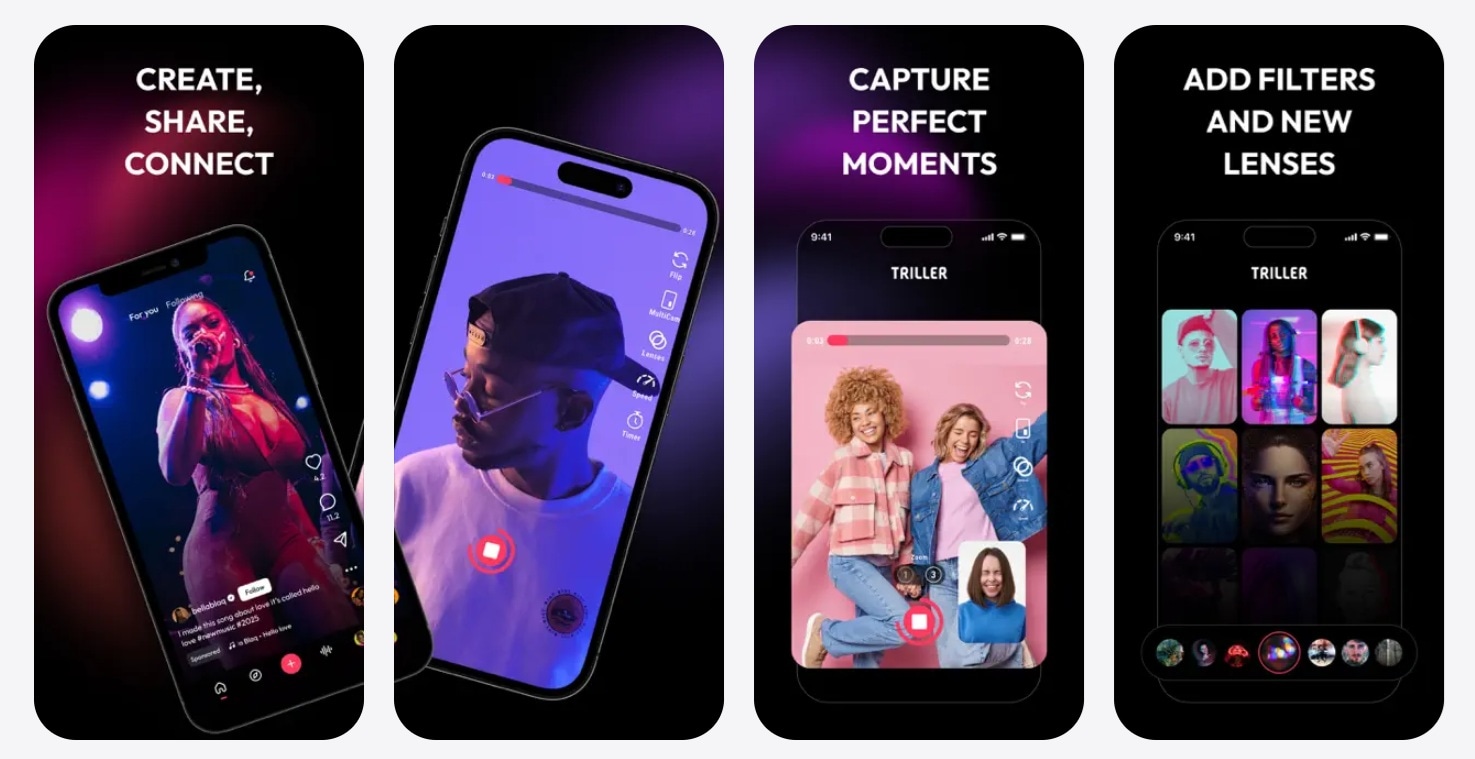
This is the Triller video app's signature feature. You can record multiple clips, and the app will automatically cut, sync, and combine them into a single video that matches the beat of your chosen music. It eliminates the need for manual editing, which is especially helpful for beginners.
Music Video Creation
Triller is built around music. You can choose tracks from its library or your personal collection, then create lip-sync videos, dance clips, or aesthetic edits that feel like mini music videos rather than casual posts.
Filters and Effects
To enhance your videos, Triller offers a variety of filters and visual effects. These help adjust mood, lighting, and style, giving your content a more polished, creative look with minimal effort.
Social Video Feed
Like most short-form platforms, Triller includes a feed where you can explore trending videos, follow creators, and discover new content. However, the activity level may feel quieter compared to larger platforms.
Video Sharing
Once your video is ready, you can share it directly from Triller to other platforms such as Instagram or save it to your device. This makes it easy to repurpose your content beyond the app itself.
Part 3. How to Create Videos on the Triller App
To get started with Triller, you can download the app on the App Store. If you are on Android, the official Android app is no longer on the Google Play Store. There's no confirmed timeline from Triller on whether it will return. Once you’re in, it’s pretty easy to create a video with Triller.
Step-by-Step: Creating a Video with Triller
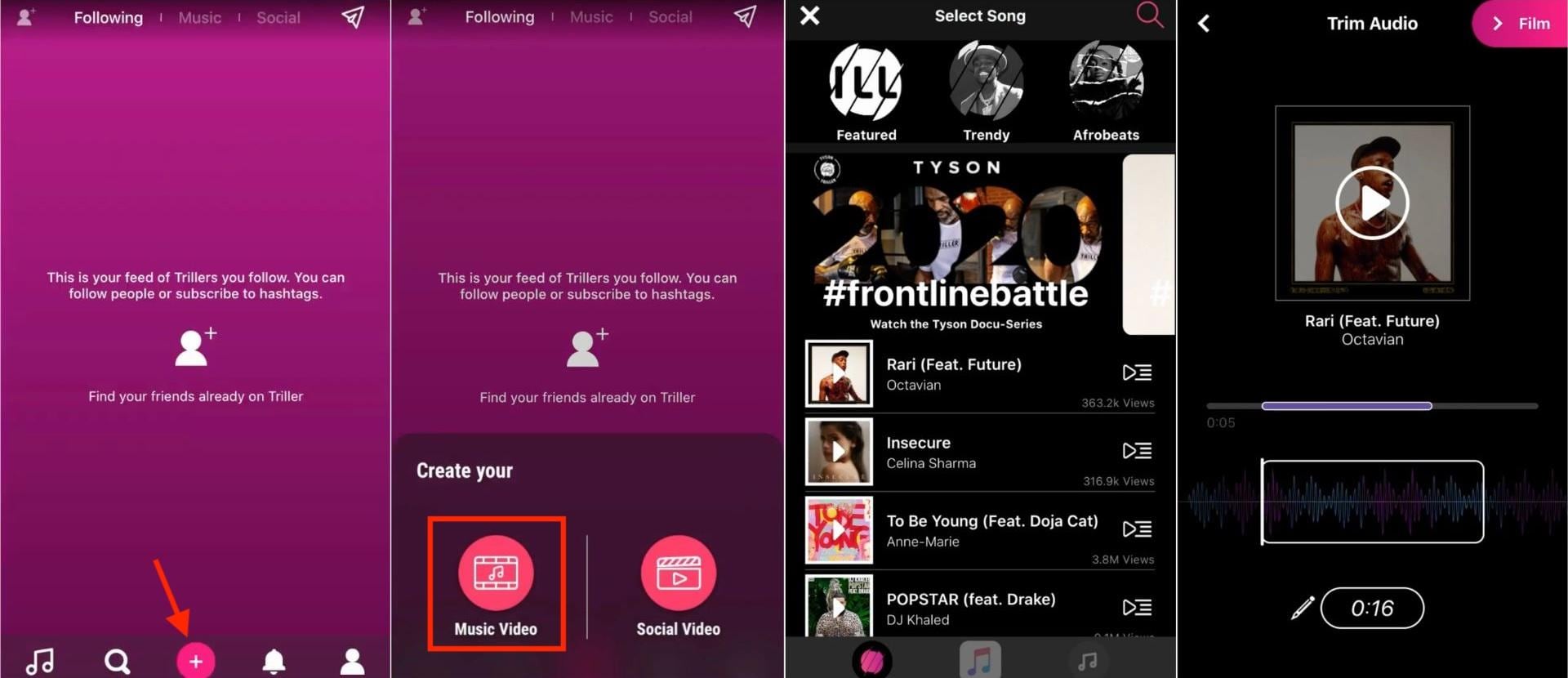
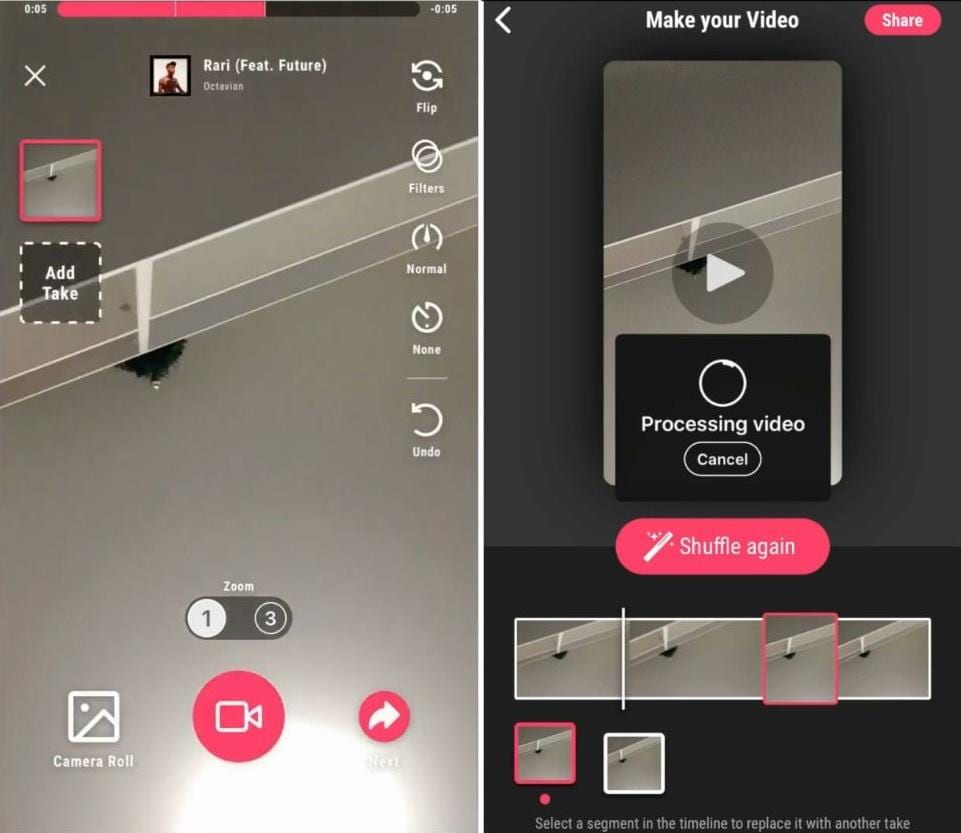
What makes this process stand out is how effortless it feels. Instead of trimming clips one by one, Triller handles the timing for you, so it feels more like directing a music video than editing one.
Part 4. Triller Pros and Cons: Is It Worth Using?
After spending time with Triller, it’s clear the app still has a distinct identity. But whether it’s worth using today depends on what you’re looking for as a creator.
- Effortless AI editing workflow. Triller’s auto-editing still feels unique. You focus on recording, and the app handles the timing and cuts.
- Strong music integration. The platform has long-standing partnerships with major labels, which makes it especially interesting for music-driven content.
- Simple and beginner-friendly. Compared to more complex editors, Triller keeps things straightforward, which lowers the barrier for new creators.
- Smaller and quieter audience. Although it has reported significant growth figures in the past, its current visibility and engagement are far lower than those of major competitors.
- Platform uncertainty. Recent business challenges, including being delisted from Nasdaq, raise concerns about long-term stability.
- Limited ecosystem. Compared to larger platforms, features such as discovery, monetization, and creator tools feel less developed.
Triller vs TikTok: Which Is Better for Creators
At one point, Triller was seen as a real TikTok competitor, even gaining momentum during periods of uncertainty around TikTok’s future. However, today, the gap between the two has widened significantly.
We made a comparison between Triller and TikTok that shows just how different these two platforms have developed.
| Triller | TikTok | |
| Launched | 2015 | 2016 |
| AI Editing | Automatic music-sync editing | Mostly manual with advanced tools |
| Music Library | Strong focus, deep industry ties | Extensive library with broader content use |
| Audience Size | Smaller, less active today | Massive global user base |
| Desktop Access | Limited | Available via web and desktop workflows |
| Monetization | More limited and inconsistent | Creator Fund, ads, brand deals |
| Best for | Quick music videos, simple edits | Viral content, growth, and monetization |
Which one should you choose?
- Go for Triller if you want a fast, music-focused editing experience without the hassle of manual trimming.
- Choose TikTok if your goal is reach, growth, and monetization, thanks to its much larger ecosystem.
Part 5. Looking for More Editing Power? Filmora Has You Covered
If you like the concept of Triller but feel limited by its simplicity, Wondershare Filmora offers a much more comprehensive creative suite, especially for music-based content.
Relying less on automated clip editing, Filmora gives you greater control, more AI tools, and higher flexibility, while remaining beginner-friendly. You can handle everything from raw footage to a finished video and export it directly to platforms like TikTok, Instagram, and YouTube, without switching between multiple apps.
 Secure Download
AI Music Generator
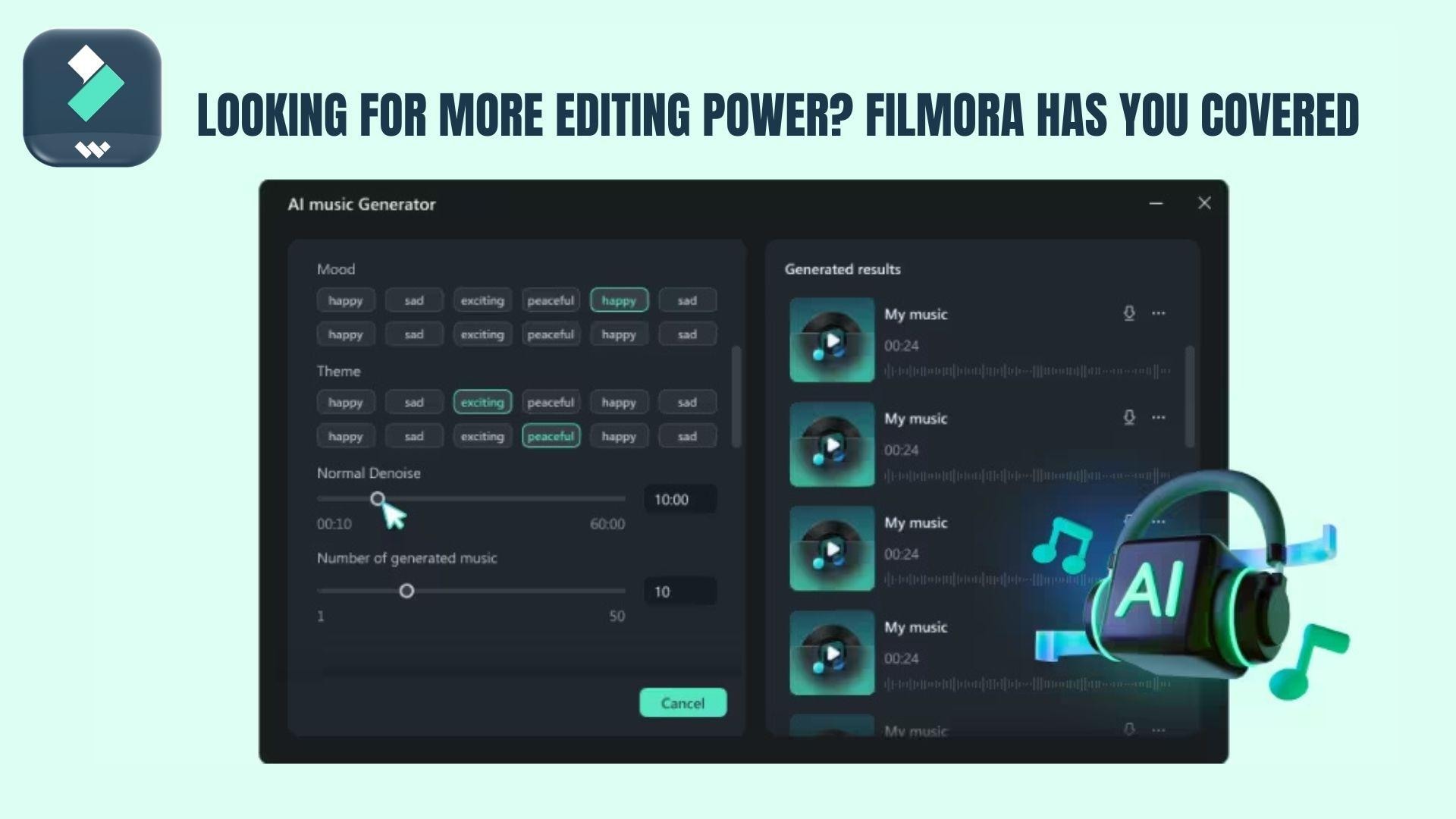
One of Triller’s biggest drawbacks is its lack of musical flexibility. Filmora solves this with an AI Music Generator that can create custom, royalty-free tracks based on mood, genre, and duration in seconds.
AI Sound Effects Generator
Beyond music, Filmora helps you enhance videos with sound design. You can generate or refine audio elements to better match your visuals, without searching for external assets.
More AI Editing Features
Filmora goes beyond basic editing with tools like:
- AI Vocal Remover: Strips the original vocals from any track so you can replace or layer audio without background interference.
- Audio Denoise: Cleans up unwanted background noise from your recordings automatically.
- Auto Reframe: Detects and follows your subject, then adjusts the frame to fit different aspect ratios.
- Speed Ramping: Smoothly transition between slow motion and normal speed within a single clip.
These features help you refine your videos to a higher professional standard compared to simple mobile apps.
Create Music Videos Quickly with Auto Beat
If you like Triller’s auto-editing, Filmora takes it further. Its Auto Beat Sync detects beats and automatically aligns clips to music, creating smooth, engaging edits with minimal effort.
Why It Works Better for Creators
Triller is great for quick, casual content. But if you want:
- more creative control
- better audio customization
- higher-quality results
Filmora meets those needs. It combines the speed of AI-powered editing with the flexibility of full video editing, so it's a better choice for creators who want to go beyond basic mobile editing.
Secure DownloadConclusion
Triller feels like a snapshot of an earlier moment in short-form video. The core idea still works. You record, the app edits, and you get a clean music clip in seconds. For quick, casual content, it can still feel fun and easy to use. But in 2026, it no longer leads the space, especially with stronger platforms offering wider reach and deeper tools.
If you are just experimenting with music videos, Triller can be a starting point. But if you are aiming to build a consistent style or improve video quality over time, you will likely outgrow it quickly. At that stage, having more control over editing, audio, and overall production becomes less of a bonus and more of a necessity.
FAQs
-
Is Triller safe and legit to use?
Yes, Triller is a legitimate app. Like other social platforms, you should still be careful with personal data and what you share.
-
Can I use Triller on a PC or Mac?
Not directly. Triller is designed primarily as a mobile app, especially for iOS devices. There is no fully supported desktop version or native app for PC or Mac, and most features are built around mobile recording and editing.
-
Why did Triller lose popularity?
Several factors contributed to the decline. First, strong competition from platforms like TikTok made it harder for Triller to keep users. At the same time, the company faced financial and operational challenges, including missed filings that led to its Nasdaq delisting. Combined with slower updates and reported app issues, this reduced its visibility over time.
-
Can I use Triller without an account?
You can browse some content, but to create, save, or share videos, you will need to sign in. Like most social video platforms, an account is required to unlock the full experience.
