


With AI content becoming part of everyday content creation, there’s no shortage of platforms promising fast, polished results. Mango AI is one of them, claiming more than 2.5 million users and 1,000 business partners worldwide.
But flashy numbers don't always mean a smooth editing experience, especially if you're trying out the Mango AI free options to see if it fits your workflow. In this review, we are taking a hands-on look at the Mango AI app to test its features, test the rendering quality, and see if it is truly worth your time.

Part 1. What You Need to Know About Mango AI
The team behind Mango AI has actually been around building visual creation software since 2003. They originally made downloadable desktop utilities for presentation making, flipbooks, and 2D character animations. Fast forward to today, and they have rolled all that background experience into a broad suite of software, expanding heavily into web-based AI tools.
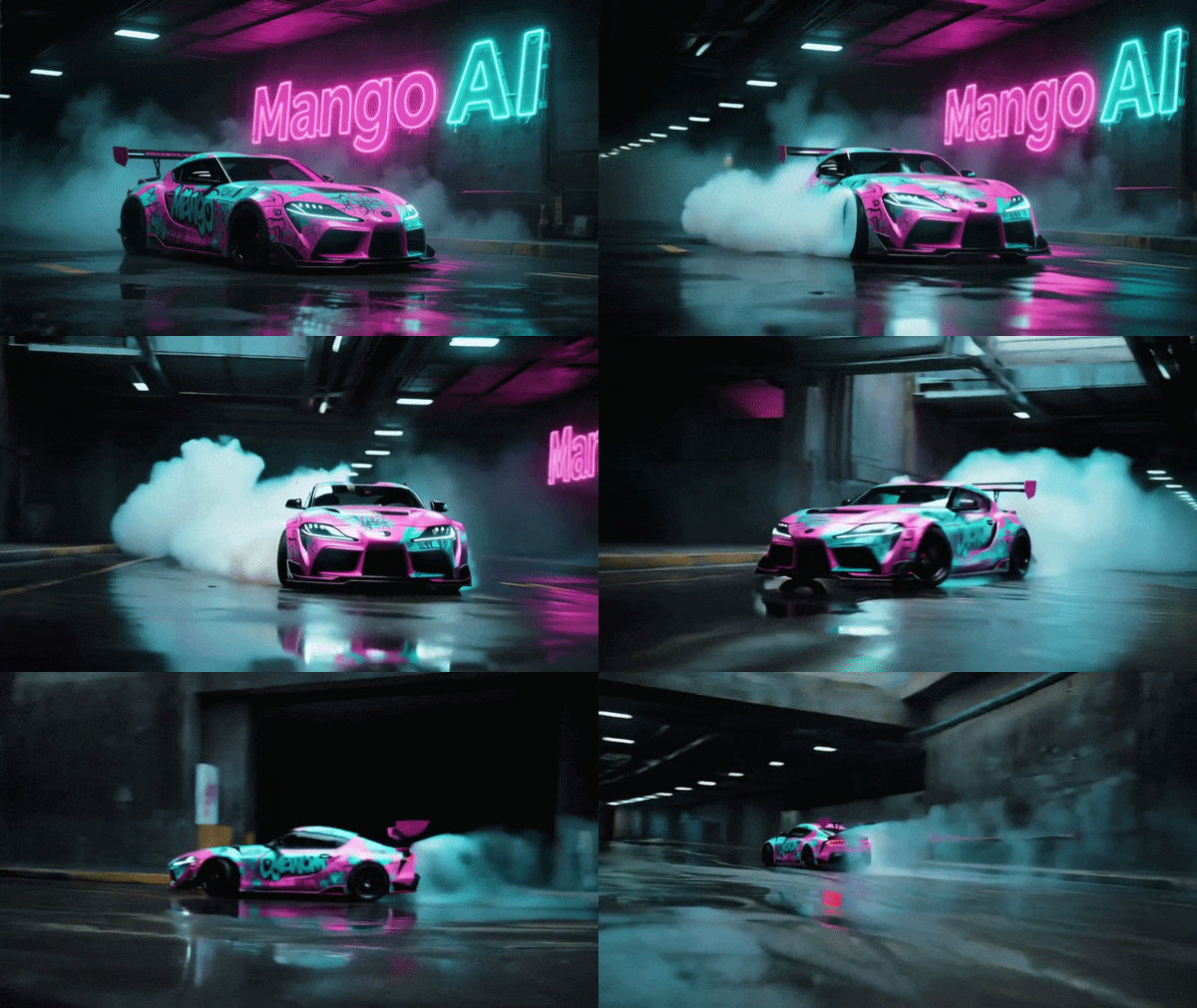
Now, there's one thing worth clearing up: Mango AI and Mango Animate AI are related, but they aren't exactly the same product. Mango Animate is the larger brand and product family, while Mango AI is its web-based collection of AI video, image, and voice tools.
Here's the easiest way to tell the products apart:
| Product | What It Does | Best For |
| Mango AI | Online AI video, image, and voice creation tools | Talking photos, AI videos, face swaps, and quick generations |
| Mango VM | Drag-and-drop video maker | Creating videos from templates, media, and scenes |
| Mango AM | Animation maker | Animated explainers and motion graphics |
| Mango WM | Whiteboard animation maker | Hand-drawn and whiteboard-style videos |
| Mango PM | Presentation maker | Animated presentations and business content |
| Mango CM | Character animation maker | Turning static characters into animated ones |
| Mango TM | Text video maker | Turning written text into animated video content |
|
Show More
Show Less
|
||
Part 2. Deep Dive Into Mango AI Features
When it comes to features, Mango AI is very much a do-it-all kind of platform, and honestly, there are enough tools crammed into its menu that listing every single one would turn this review into a spreadsheet. So instead, we're zooming in on the handful of features that actually get people searching for this platform in the first place.
1. Talking Photo
The Mango AI talking photo tool does exactly what its name suggests. You upload a portrait, give the person something to say through text or audio, and Mango AI animates the image so it appears to speak. It also includes built-in video templates tailored for specific niches, including corporate training clips, healthcare explainers, and educational content.
2. AI Dance Generator
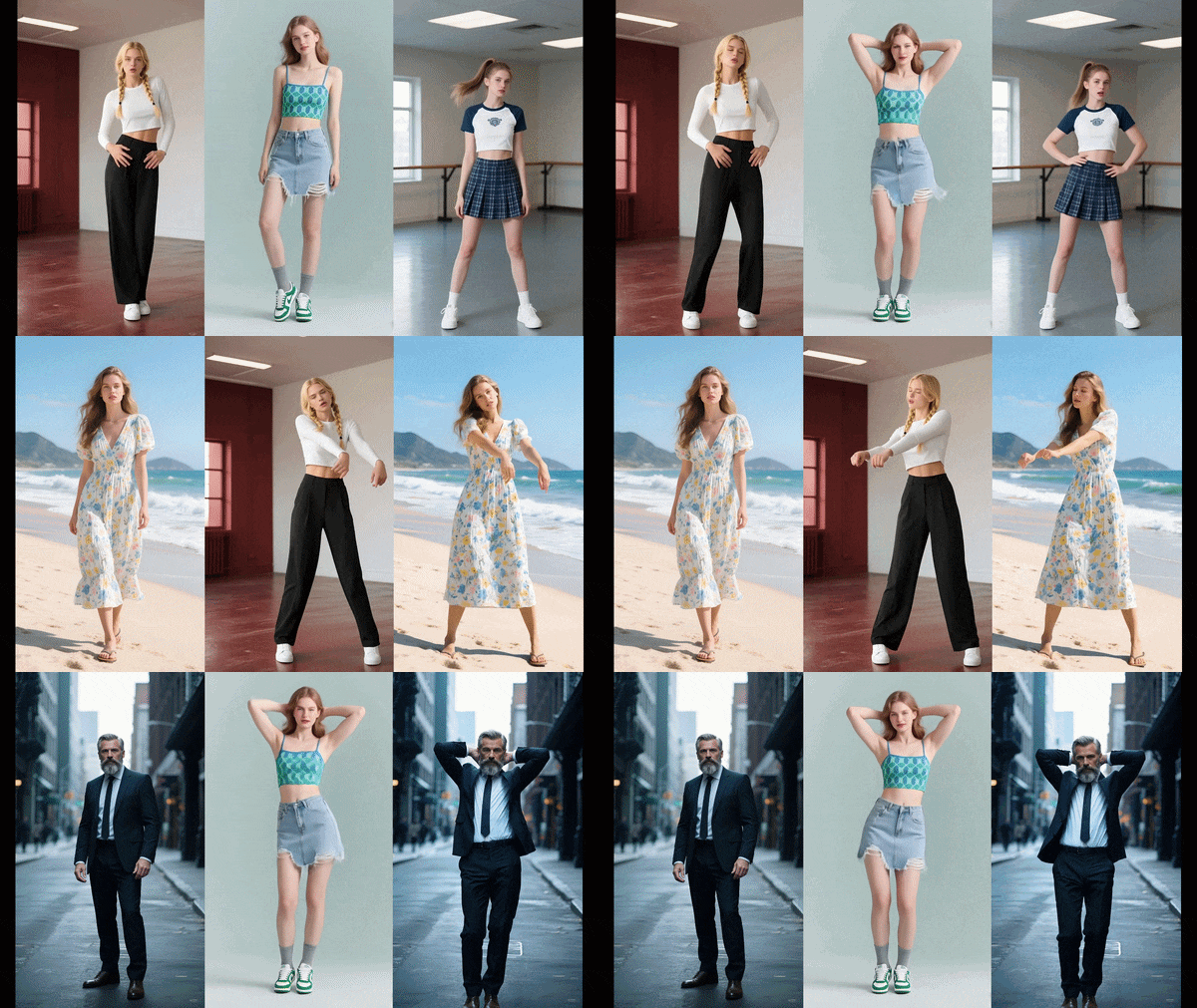
Taking a cue from short-form video trends, the Mango AI video dance generator lets you upload a full-body picture and map it onto motion presets. The feature analyzes human joints and applies fluid dance movement, creating a surprisingly funny clip out of simple static photos.
3. AI Image-to-Video & AI Text-to-Video
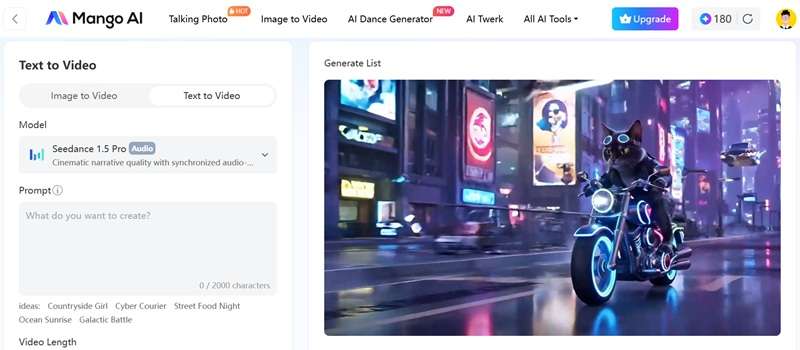
If you want to turn written prompts into full video sequences, the Mango AI video generator relies on dedicated underlying generative pipelines like Seedance. You can use text-to-video and image-to-video to generate footage from the prompt. It is a fast way to pump out short Mango animated images and background visuals.
4. AI Face Swap

The Mango AI face swap feature lets you replace a face in an image or video. You can even run a Mango animate face swap with multiple faces at once, which is great for group shots or swapping out cast members in stock footage clips.
Part 3. Mango AI Pricing: Is the Free Plan Worth It?
Mango AI itself runs entirely online, and it works through credit. When you create an account, the free plan currently gives you 180 credits, which is useful for getting a feel for the interface and trying several supported generations before paying. The following is the current Mango AI pricing plan structure:
| Plan | Monthly Price | Monthly Credits | Key Features |
| Free | $0 | 180 credits (reset monthly, can't top up) | Watermarked, Standard voices · 2 audio uploads, up to 1 min each |
| Starter | $12.9 / month | 600 credits/month | No watermark, Premium voices, Audio up to 5 mins |
| Pro | $19.9 / month | 1,200 credits/month | No watermark, Premium voices, Audio up to 10 mins |
| Enterprise | $99.9 / month | 6,000 credits/month | No watermark, Premium voices, Audio up to 15 mins |
|
Show More
Show Less
|
|||
If you're looking for a Mango Animate download, then it must be the other members of the Mango family: VM, AM, WM, PM, CM, and TM, that come as installable Windows and Mac software, and pricing for those works completely differently from the AI side.
Part 4. Testing Mango AI: Tutorial + Pros & Cons
Since the online version lets you test-drive it before spending anything, that's exactly the approach we took. We'll review how easy it is to set up a project, followed by our honest breakdown of where the app hits the mark and where it falls short.
How to Use Mango AI: Step-by-Step
For this walkthrough, let's use one of Mango AI's best-known tools: Talking Photo. Follow the guide below to learn how Mango Animate the talking photo from your picture.
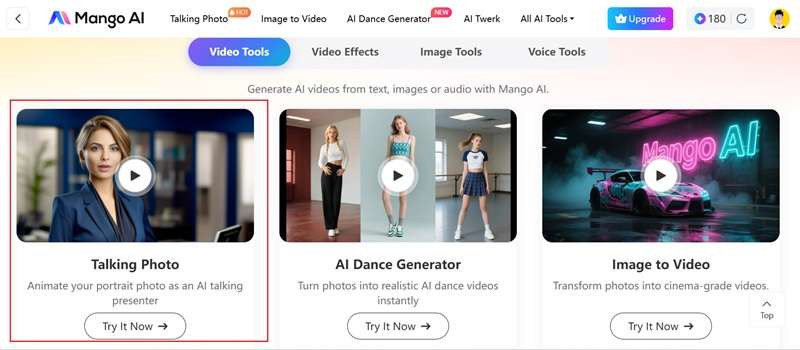
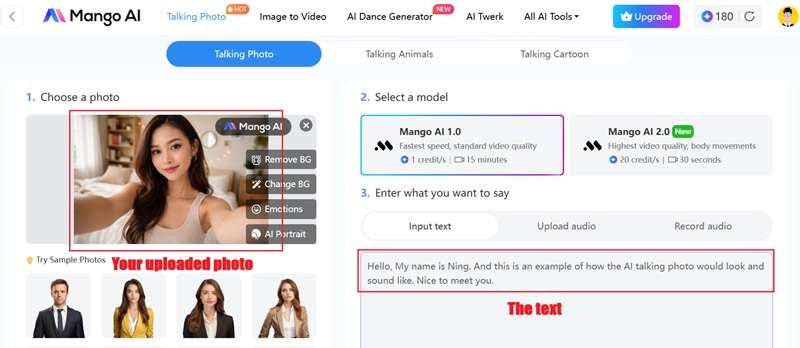
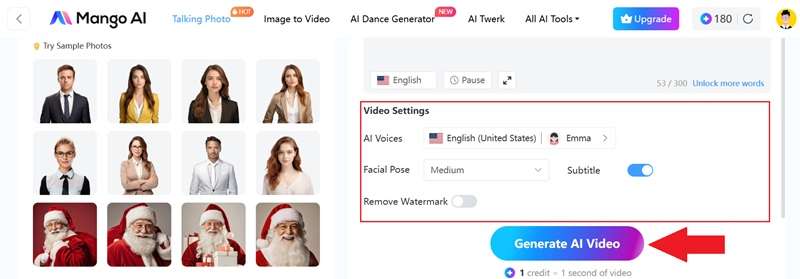
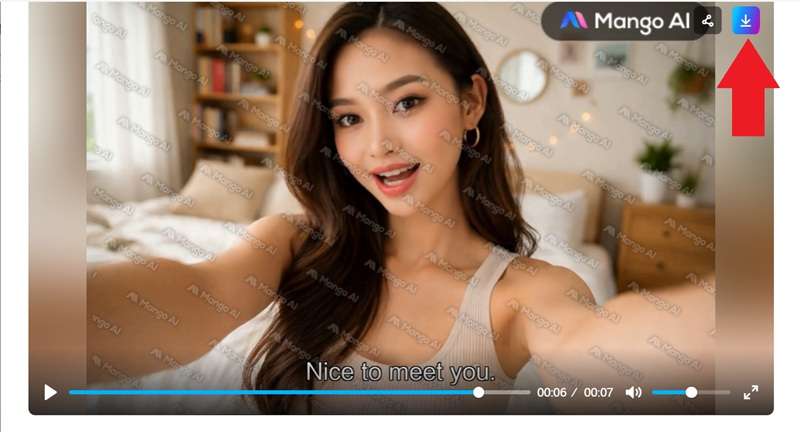
And that’s pretty much what it takes. Check out how the video turns out below.
Pros & Cons
So, is the Mango animated free version worth it? Well, there are ups and downs, and based on our experience, here's the honest scorecard.
- Extensive Feature Set: Having avatars, face swaps, text-to-video, and voice generators in one single place saves you from jumping between four different web apps.
- Helpful Onboarding Guides: The dashboard gives useful visual hints. For example, when uploading photos for a Mango animate talking photo, it tells you exactly what photo angles and lighting conditions work best.
- Generous Free Starter Credits: Giving users 180 credits upfront means you can properly test real exports before pulling out a credit card.
- Diverse Pre-made Templates: The included video templates for business, education, and social media give you a great starting point when you're low on time.
- Inconsistent Render Quality: Results can feel hit-or-miss depending on your source footage; background artifacts sometimes show up around moving subjects.
- Uncanny Lip-Syncing: The Mango AI voice is underwhelming. Mouth movements can occasionally look stiff or unaligned with complex words.
- No Commercial Rights for Free Tiers: You cannot legally use free exports for business marketing or monetized social channels.
- Strict Credit Drain: Complex tools like face swapping and longer video generations consume your monthly credits very quickly.
Part 5. Create AI Videos With Higher Quality: Wondershare Filmora
The free version of Mango AI is genuinely generous, no argument there, but the quality it produces can turn some people off pretty quickly, especially the moment you want to use a clip for anything more serious than a silly social post. If that's the wall you're hitting, it's worth knowing there's another option a lot of creators lean on instead.
Wondershare Filmora is one worth considering. This all-in-one video editor bundles several leading AI video generation models directly into its AI video engine: Google's Veo 3.1, Sora 2, and Seedance 2.0, among them, so instead of being tied to one model's strengths and limitations, you get to pick whichever engine actually fits the shot you're trying to make.
Why Choose Filmora?
1. Professional Editing Timeline

Once your AI clip is generated, Filmora hands you a full timeline to edit your clip. You can perform trims, transitions, color grading, and layered audio, instead of leaving you stuck with a single raw export like most standalone generators do.
2. Extensive Media Library

Filmora backs up its AI tools with a massive built-in library of stock footage, music, sound effects, and templates, so you're not stuck sourcing B-roll or a soundtrack from somewhere else entirely.
3. Advanced AI Features

Beyond the core video models, Filmora layers in tools like AI Video Extender (to stretch a clip past its native length), AI Color Palette, and voice cloning, genuinely useful add-ons that most single-purpose generators simply don't offer.
4. Flexible Compatibility
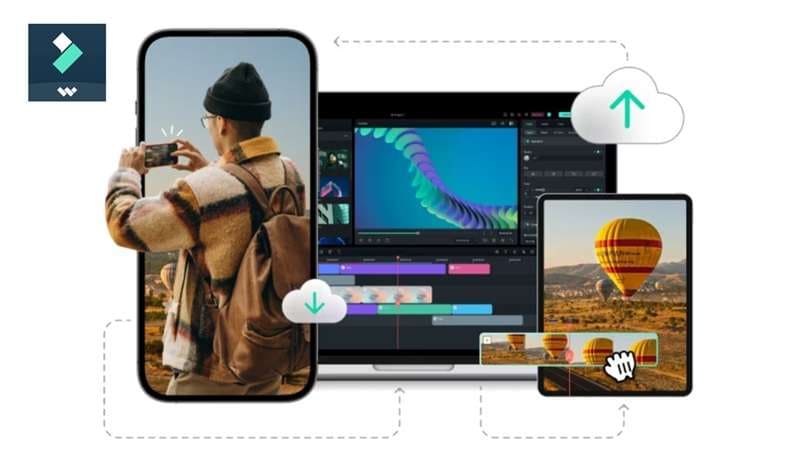
Filmora runs on Windows, Mac, iOS, and Android, so your project isn't tied to one machine or one operating system the way some downloadable animation software can be.
 Secure Download
Conclusion
Mango AI is packed with tools, and that's easily its biggest selling point. The 180-credit free plan also makes it easier to test the platform before committing. Still, results can be inconsistent, especially when facial animation and lip sync are involved.
So, for projects that need cleaner editing and more control, Wondershare Filmora is the stronger next step. Its combination of AI video generation and a full editing timeline gives you more ways to improve the final result instead of simply hoping the first generation gets everything right.
FAQs
-
Is Mango AI better suited for short clips or long-form projects?
It is built primarily for short-form content. Due to credit constraints and current rendering limits on digital avatars, the web app works best for social media reels, short marketing clips, quick educational intros, and training snippets rather than long-form documentaries or full-length feature videos. -
Do I automatically get full commercial rights to videos generated using the Mango AI app?
No. Commercial licensing is tied directly to your plan level. Content generated on the free tier or the basic Starter tier is restricted to personal use. If you want to use your videos for client work, paid advertising, or monetized channels, you need to subscribe to the Pro or Enterprise tier. -
Is Mango Animate safe to install and use?
Yes, the platform is safe, as long as you download from the official source. Be skeptical of unrelated apps or Mango AI APKs online that happen to share the "Mango AI" name, since that name isn't unique to this platform.
