

 100% Security Verified | No Subscription Required | No Malware


 ChatGPT
 Perplexity
 Gemini
 Claude
 Grok
Grok
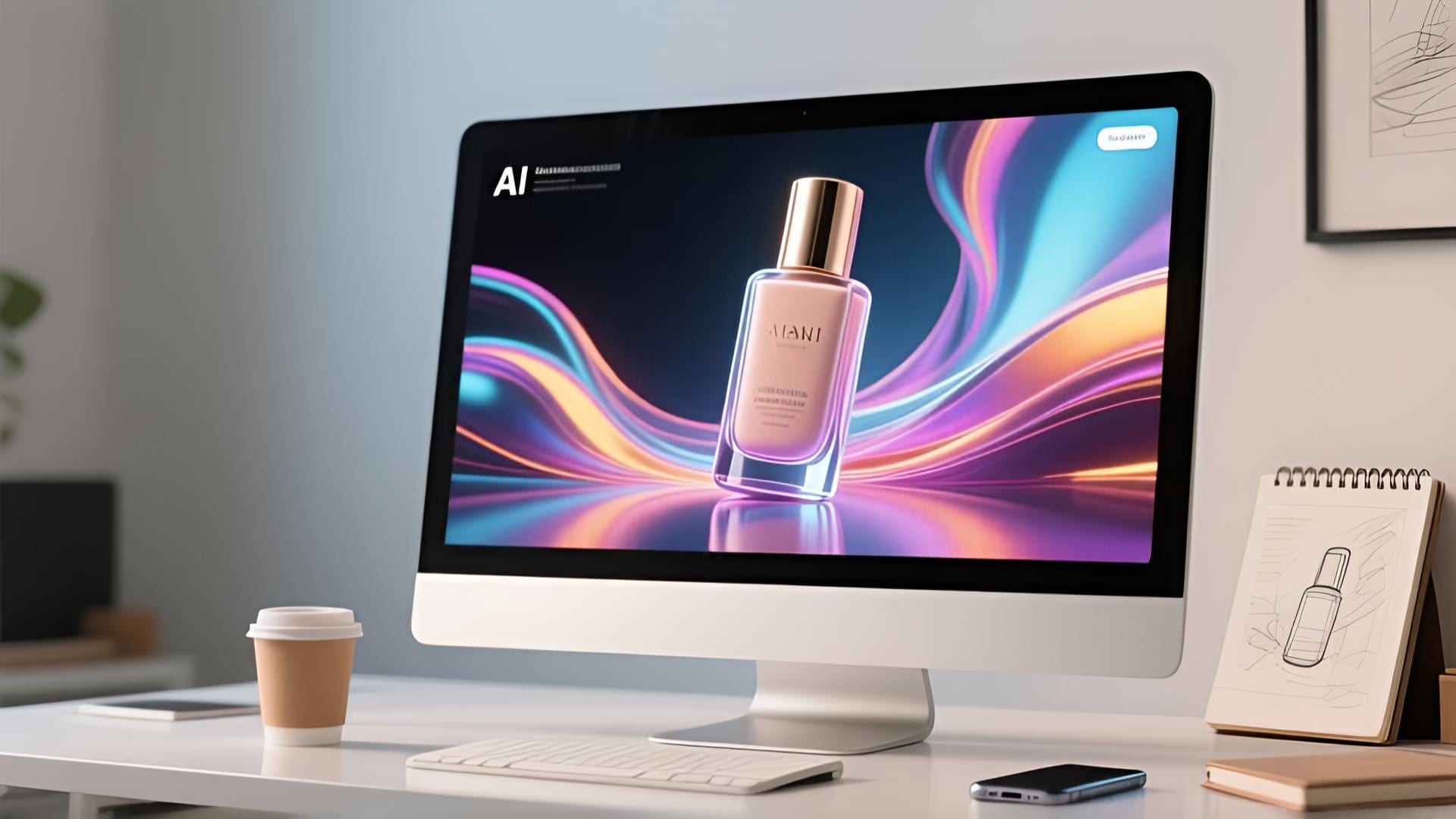
What if we told you that you don't need to hire a full crew or spend thousands just to make a commercial ad? Something that feels unrealistic is now completely doable with AI commercial generators, where anyone can turn a simple idea into a polished product ad in minutes.
These tools use AI to generate scenes, animate products, and automatically produce full video ads complete with VFX and background music. With it, production gets faster, costs drop, and your ads stay perfectly on-trend.
Now's your chance to create ads the same way top brands do — only smarter. Let's jump in!
In this article
Part 1. How AI Commercial Generators Are Changing Modern Marketing
Creating ads is usually a long process that takes a lot of planning, scripting, filming, editing, and revising. But with how fast technology is moving, an AI ad generator has become a practical solution for creating high-quality commercials in a fraction of the time.
Without hiring scriptwriters, videographers, voice actors, or animation designers, businesses can simply type in a prompt or select a style, and then instantly generate ads that include scenes, animations, and even voice narration around their products.
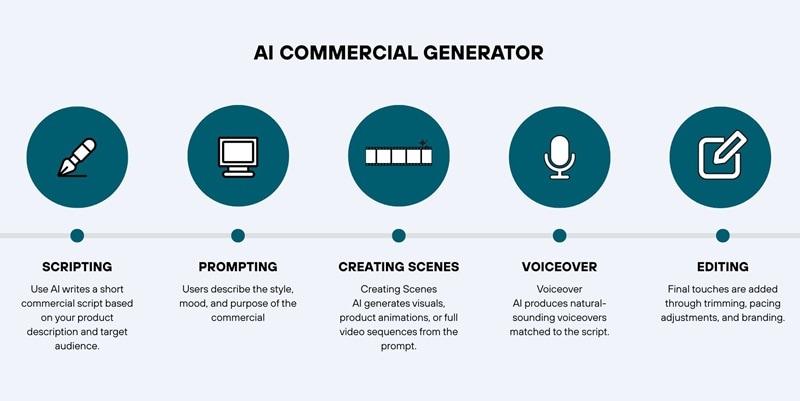
The AI handles every key step in the ad creation process. It analyzes your product, understands your prompt, and generates an ad with consistent pacing, visuals, and messaging. Many small businesses and marketers are adopting AI commercial generators for speed and the ability to scale campaigns with minimal cost and effort.
Here is a simple comparison to show how significant the process has changed:
| Category | AI Commercial Generator | Traditional Ad Production |
| Speed | Minutes to a few hours to generate a full ad | Days or weeks to plan, shoot, and edit |
| Cost | Lower | Higher. Requires crew, studio, actors, and equipment |
| Scalability | Can produce multiple variations quickly | Scaling means more shots and a higher cost |
| Visual Quality | Improving fast with AI-generated scenes and animations | High when done professionally |
| Skill Required | Beginner friendly | Requires multiple creative and technical specialists |
| Revision Process | Instant regeneration with new prompts | Reshoots or re-edits will increase costs and time |
Who Benefits from an AI Commercial Generator
AI commercial generators are becoming essential for many groups as they simplify video production and reduce costs. Some of the groups that benefit the most include:
- Small businesses and online shops that want to create professional ads without hiring a full production team.
- Marketers who need quick campaigns to test offers, hooks, and creatives for paid ads.
- E-commerce sellers producing engaging product ads, featuring rotating packages, beauty displays, or gift box reveals.
- Social media advertisers who need multiple variations for A/B testing on TikTok, Instagram, and YouTube.
- Agencies handling high-volume client work and looking to boost production efficiency without expanding their team.
- Startup brands launching new products and needing launch trailers or promotional clips, even with limited budgets.

From Idea to Video.
Your AI Creative Studio.
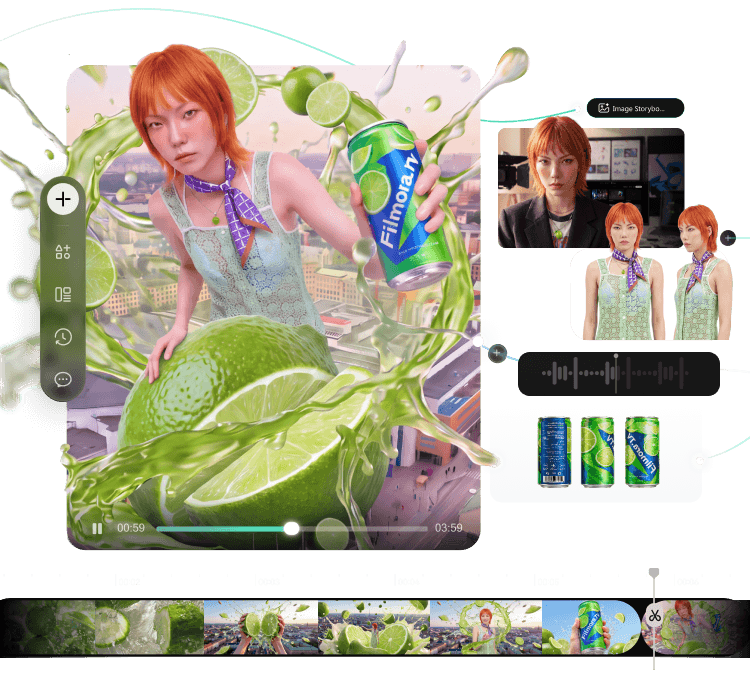
- Turn briefs into scripts, storyboards, and references
- Generate and compare across AI models in one project
- Move your best takes to the timeline for rough cuts
- Keep projects, assets, and feedback connected
Part 2. How to Create AI-Generated Commercials Using Only One Platform
When it comes to AI commercial generators, one of the best tools to help you create professional ads quickly is Wondershare Filmora. Usually, creating an ad with AI will require you to jump between different platforms. But with Filmora, you don't need to do that.
Watch the AI advertising example we made using Filmora below:
 secure download

Everything you need, from writing the script to producing the final video ad, can be done inside a single application. You get AI text generation, AI Image-to-Video templates, built-in stock media, AI text-to-speech, and a full editing workspace to help you produce high-quality ads quickly.
The process of making an AI commercial ad can be broken down into a few steps:
- Turning your concept into a script
- Creating the scenes based on the script
- Generating a voiceover
- Editing and polishing the video ad
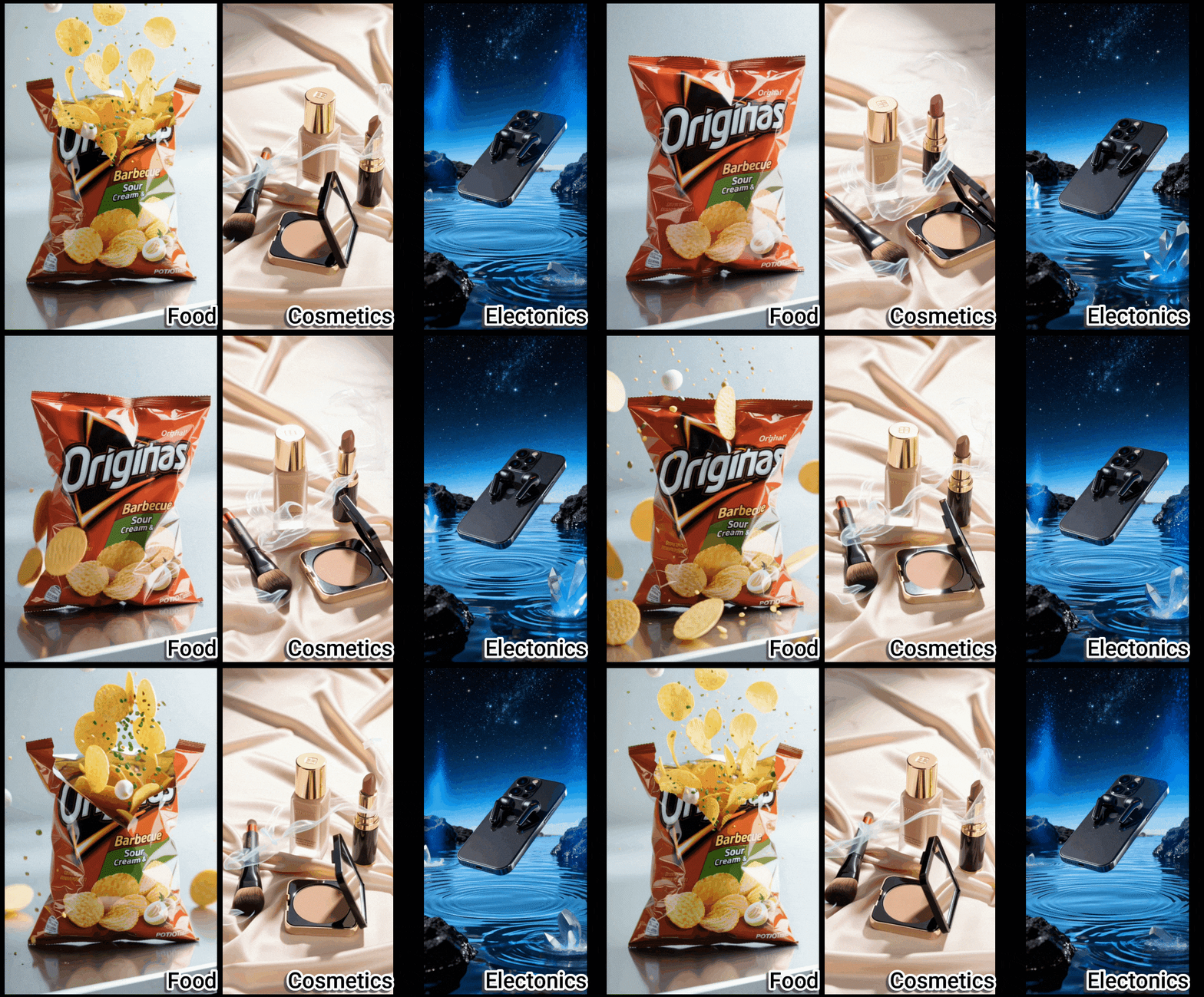
Note: Filmora offers AI templates across multiple product categories, allowing you to choose and customize according to your needs.
1. Turn Your Concept into a Script
Start by developing a concept for your commercial ad, and then turn it into a script.
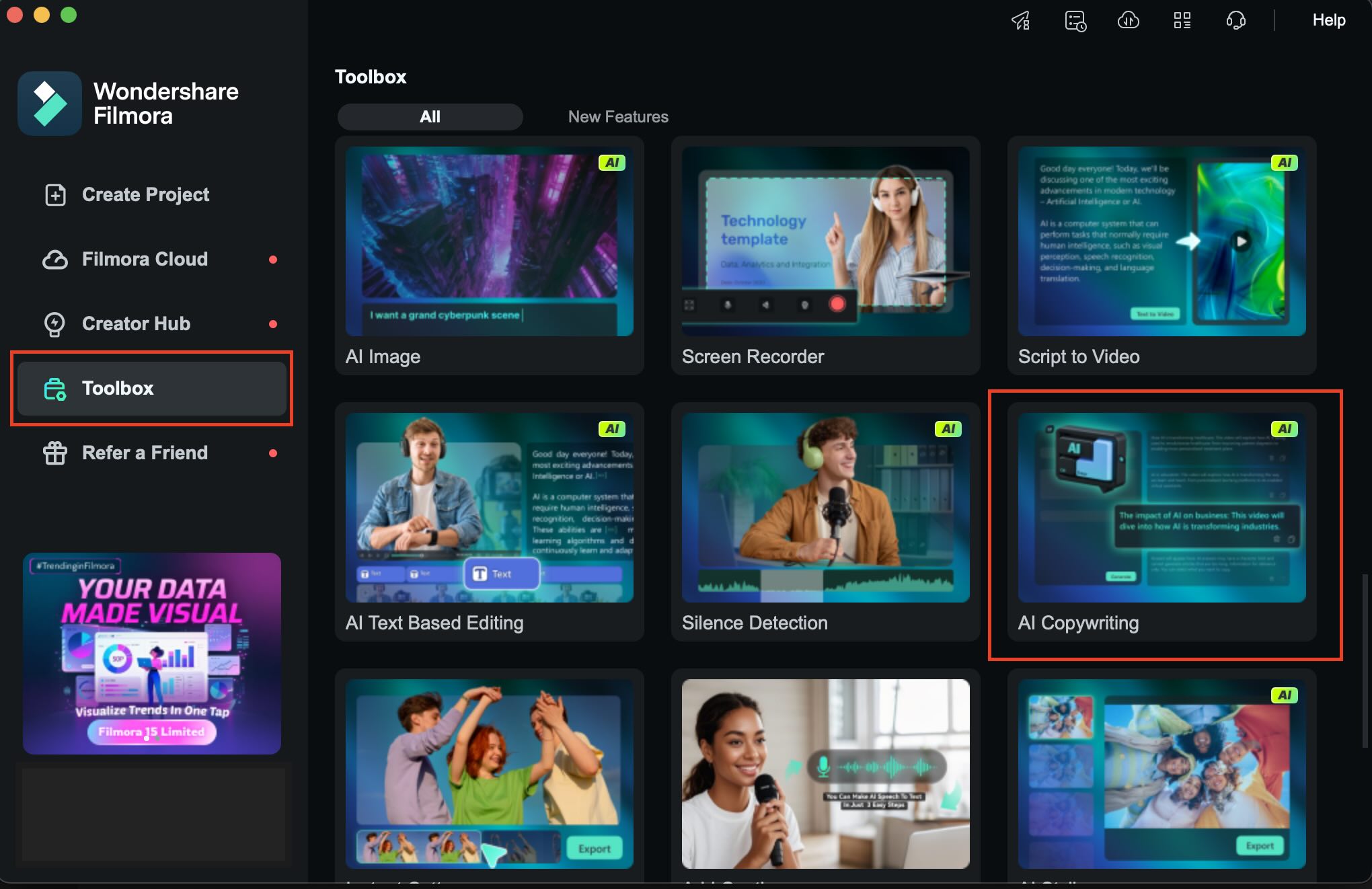
If you need help, use Filmora's AI Copywriting. You can access it by heading to AI Toolbox > AI Copywriting. Generate short variations for A/B testing.
2. Creating the Scenes
From the script, generate scenes that match each moment of your commercial. In Filmora, there are several ways to do it.
Way 1: Create an Ad Clip from an Image Using Templates
Even if you only have a single product image, you can turn it into a complete commercial using Filmora's Image-to-Video templates. Many of the ready-made options are designed specifically for marketing.
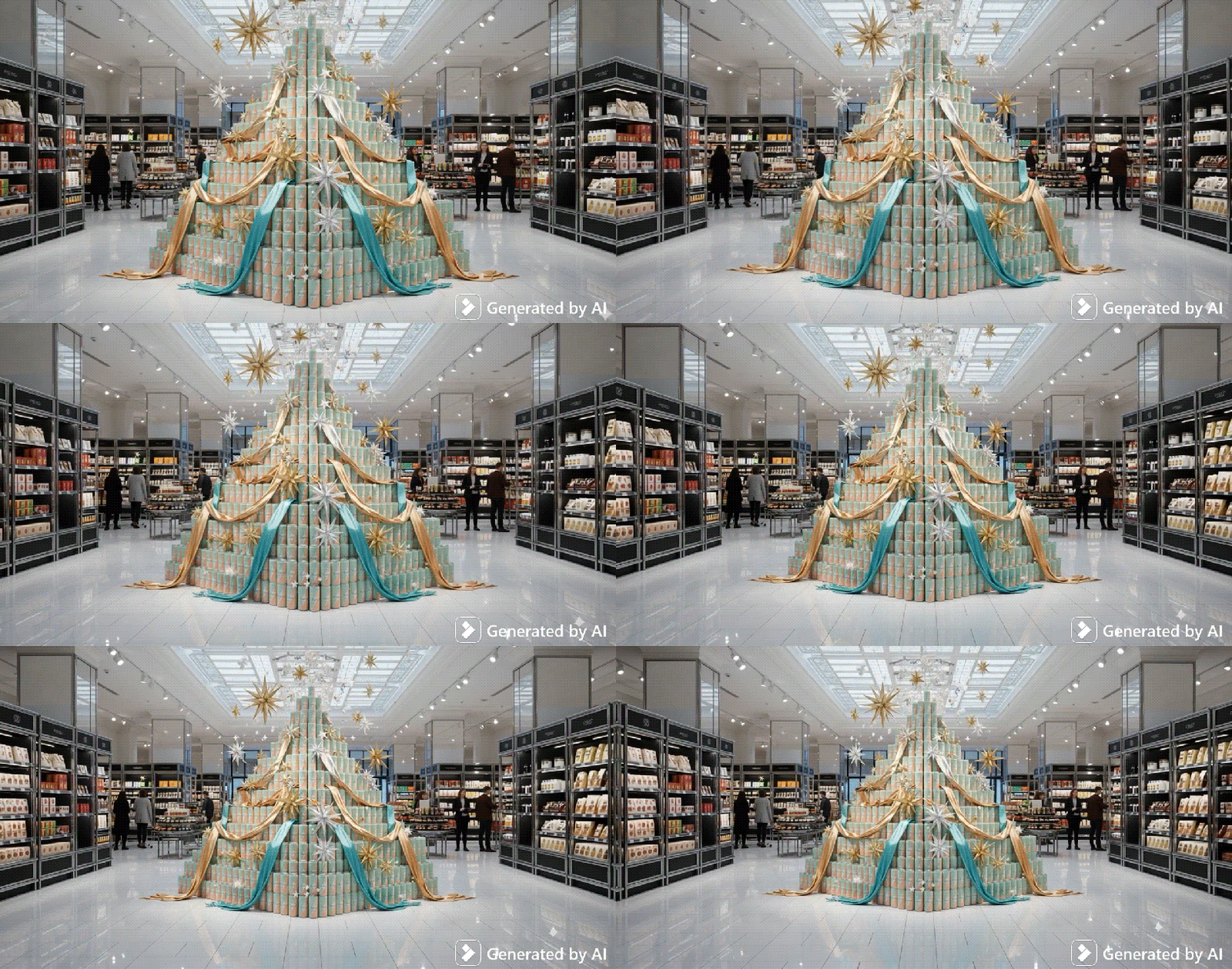
Follow the steps below to create a video ad from an image like the example above.
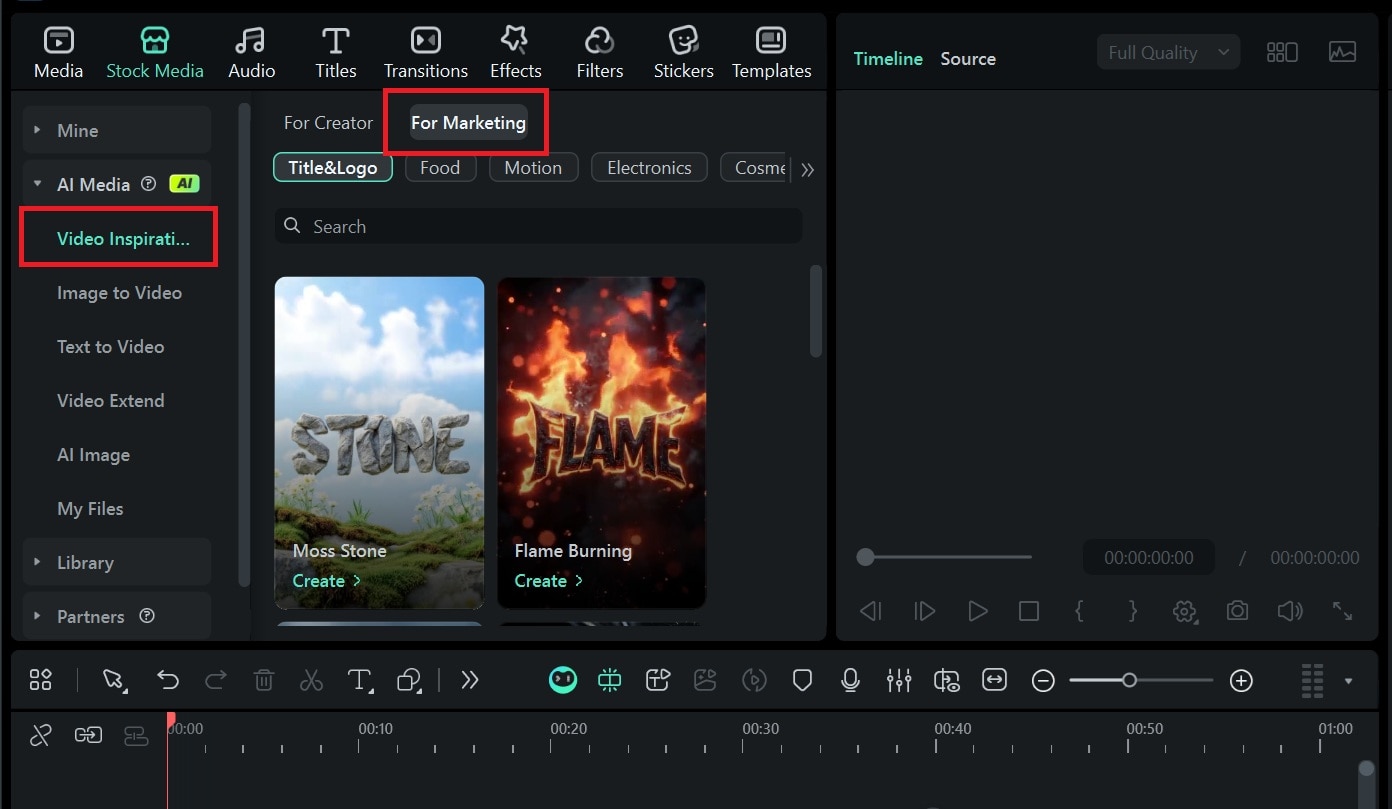
Step 1: Go to Stock Media > AI Media > Video Inspiration. If you want to narrow the results, open the Marketing tab to filter the templates.
Step 2: Select a marketing template you like. Then, upload the image of your product as the base reference. In this example, we are using the “Supermarket AD Gift Box” template.
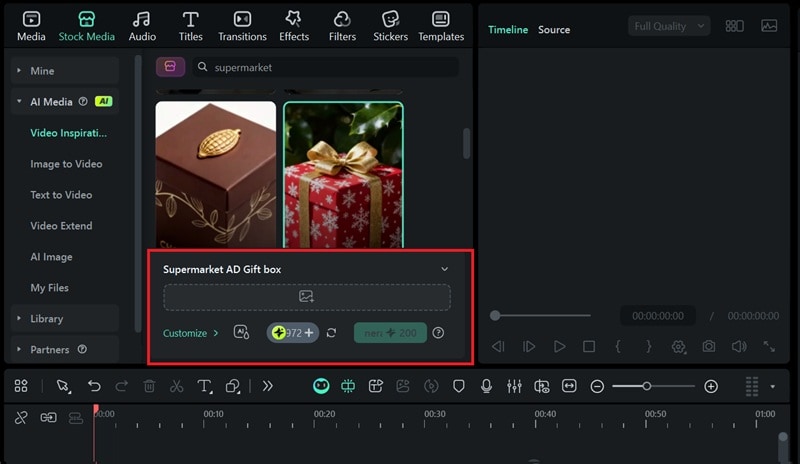
Your commercial video result will appear in the My Files panel. Next, you can add it to the timeline and combine it with other clips until everything comes together.
💡 Tip: If your product photo has a plain background, the animation will look better. Crop it slightly to center the product before applying the template.
Way 2: Turning Your Image into a Video with a Prompt
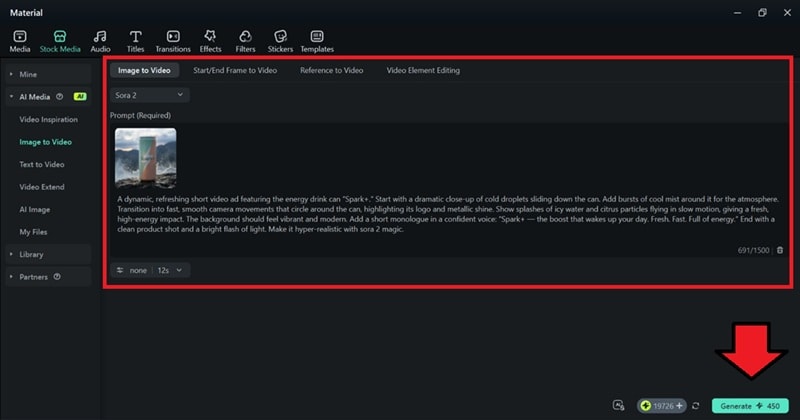
Filmora's AI Image to Video can also turn your image into a video from a prompt to describe motion, lighting, and camera moves. You can choose advanced models like Veo 3 and Sora 2 for better motion and realism.
Below are the step-by-step guide for using Image-to-Video:
Step 1: Go to Stock Media, then select AI Media > AI Image to Video. Choose model: Veo 3 (for realism) or Sora 2 (for stylized motion).
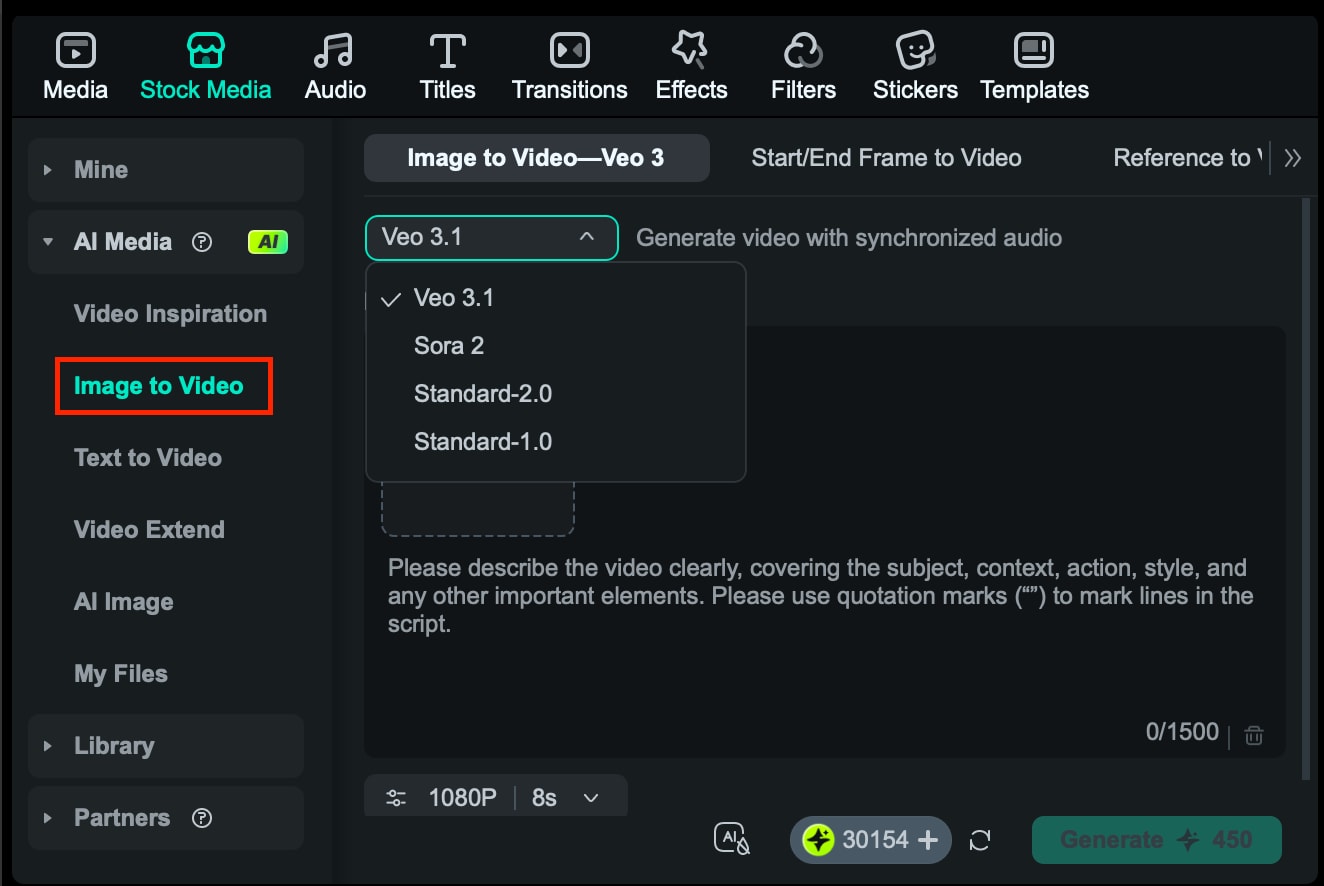
Step 2: Paste your prompt and set the duration (4–8 seconds). Then start generating and let the tool create the scene.
Way 3: Insert Raw Footage
Besides generating the visuals, you can also import the footage you have or download from Filmora's Stock Media library.
Step 1: Import your videosunder the Media tab or download from Stock Media > Library. Drag them into the timeline. Trim to match script timing.
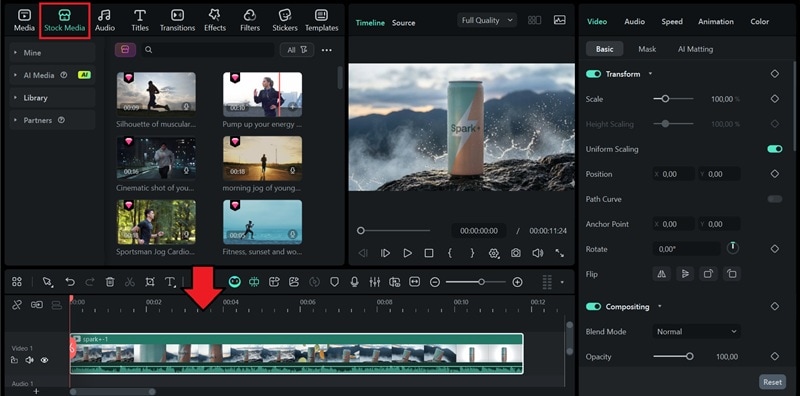
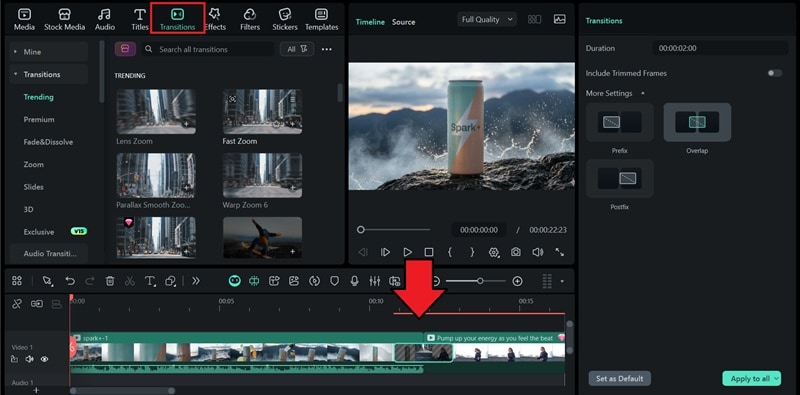
Step 2: Add transitions from the Transition tab to blend the clips.
3. Generating a Voiceover
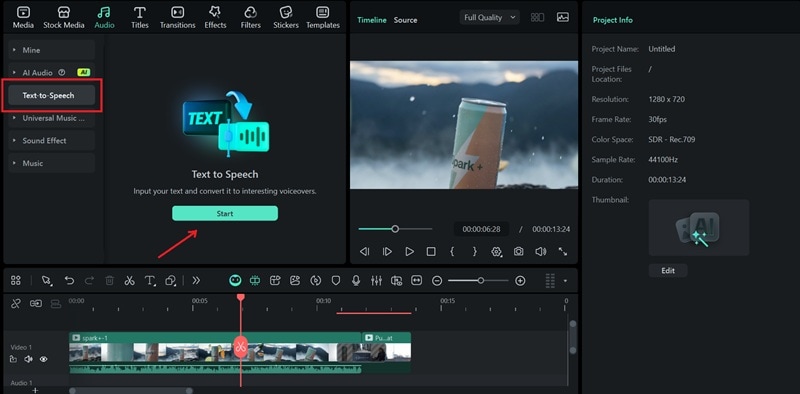
Once your scenes are in place, the next step is to add a voiceover that matches your script. With Filmora, you can either record your own voice or use AI Text-to-Speech to do it for you. Filmora's TTS also includes an AI Modelling feature that lets you mimic your own voice, if you wish.
Step 1: Select Audio > Text to Speech and click Start to open the TTS window.
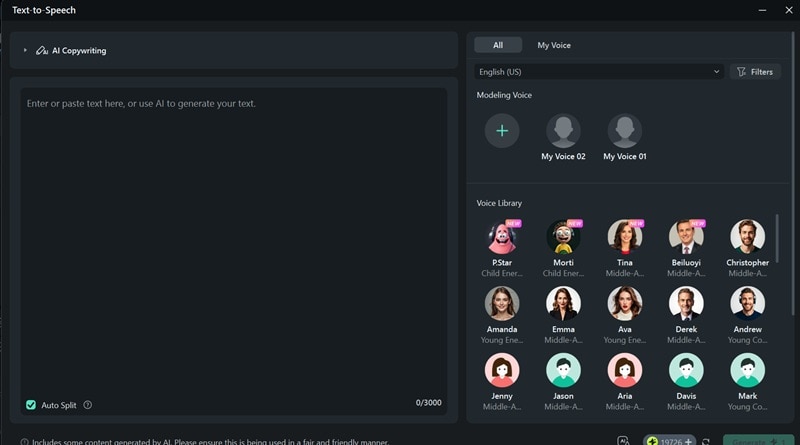
Step 2: Paste the final script and choose a voice that matches the clip. Generate TTS and place the audio on the timeline under your clips.
4. Editing and Polishing the Commercial
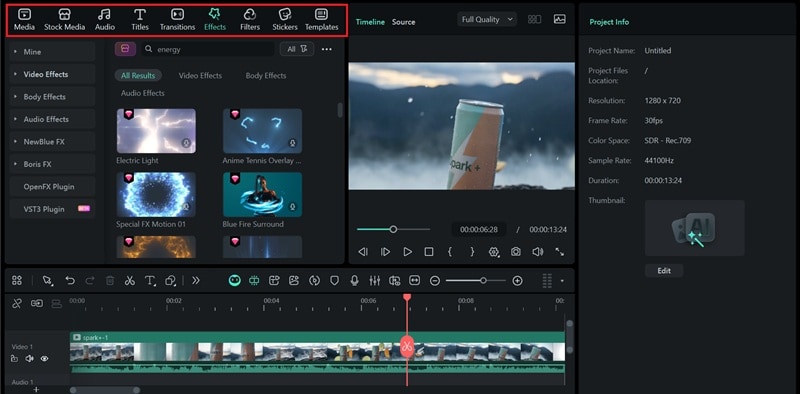
Now assemble all components and polish them for a professional finish. Use the toolbar to add effects, text, captions, and stickers, and make your commercial more visually appealing before exporting.
Part 3. Explore AI Advertising Examples to Learn From
The best way to understand how AI-powered commercials work is by seeing how others do it. So, we've also prepared some of the best AI commercials, which you can learn from. Take a look at how these brands use AI to create striking campaigns.
1. Coca-Cola Ad - "Holidays Are Coming."
Key takeaways:
- The ad shows that you can display the brand's name clearly without the usual distorted text, even if using AI.
- The snow, streets, lights, and buildings look detailed and atmospheric to give the video a strong holiday feel.
- The holiday jingle helps build excitement for the “Holidays are coming” moment.
2. Miniature Coca-Cola Ads: A Tiny Revolution!
Key takeaways:
- This short-form ad relies on clever visual tricks that transform ordinary scenes into tiny miniature worlds.
- Its charm comes from creative set design, shallow depth of field, and close-ups that feel handcrafted.
- You can recreate a similar look using the “Mini World” template in Filmora.
3. Original Source - Nature Hits Different!
Key takeaways:
- An example of AI in advertising, where the video blends AI-generated shots with real footage.
- AI was used to create exaggerated organic shapes and bold, highly saturated colors to grab attention.
- Smooth transitions between natural elements like water, leaves, and flowers
- Fast-paced motion sequences to create an energetic atmosphere
- A visual narrative focused on sensory experiences rather than storytelling
Conclusion
Now you're fully equipped to start creating your own AI-powered commercials. With AI commercial generators like Filmora, anyone can create professionally-made ads in a faster, more affordable way.
AI gives you the freedom to produce professional results without a large budget or studio team. So, try the techniques and examples in this guide, don't be afraid to experiment, and find out how easy it is to create ads that stand out!
 secure download