Forest Overlay Examples & Guides
Explore popular nature effects and see how to transform your footage
Loading more forest overlay effects...
 Category:
 Duration:
 Aspect Ratio:
Everything You Need to Apply a Forest Overlay
A beautifully crafted forest overlay can instantly shift the mood of your standard footage into a mesmerizing cinematic sequence. Filmora provides a massive collection of nature elements, from dappled sunlight to dense woodland silhouettes, that blend perfectly with your clips. Whether you are building a mysterious horror short or a peaceful travel vlog, these premium effects give you absolute creative freedom to stylize your visuals and enchant your audience using versatile video templates.
Rich Woodland Visuals for Instant Mood Enhancement
Rich Woodland Visuals for Instant Mood Enhancement
Avoid spending hours trying to composite complex nature scenes. The Filmora effects library contains diverse environmental elements that add instant depth to your projects. You can easily drag realistic foliage and mystical mist over your clips to establish a captivating setting. Every element integrates seamlessly to give your footage a deeply authentic natural vibe.
- Drag and drop environmental elements instantly onto your timeline.
- Enhance visual depth with realistic mist and dynamic shadows.
- Transform ordinary clips into majestic natural landscapes effortlessly.
Precise Control Over Shadow and Light Dynamics
Precise Control Over Shadow and Light Dynamics
Integrating a forest overlay requires accurate adjustments to make the composite look entirely natural. Filmora features advanced blending modes and intelligent masking tools that let you weave branches and sunlight around your main subjects. You can tweak opacity and apply color grading curves to ensure your added foliage perfectly matches the original lighting conditions of your base video.
- Adjust opacity and luminance to match your original scene lighting.
- Use intelligent masking tools to place subjects seamlessly behind trees.
- Cycle through distinct blend modes for perfect visual integration.
Generate Custom Nature Assets With Artificial Intelligence

Generate Custom Nature Assets With Artificial Intelligence
Sometimes you need a very specific tree branch or enchanted forest backdrop that traditional libraries lack. The integrated Filmora generation tools allow you to type simple text prompts to create entirely unique woodland elements. Using powerful internal engines like Nano Banana, you can render detailed botanical visuals and immediately composite them into your final project.
- Type simple prompts to produce completely unique environmental assets.
- Render detailed foliage using advanced internal generation engines.
- Composite your newly created graphics directly into your sequence.
Frequently Asked Questions About Forest Overlays
How to Apply a Forest Overlay in Filmora
Enhance your videos with lush woodland visuals in just a few clicks using intelligent AI video editing tools.
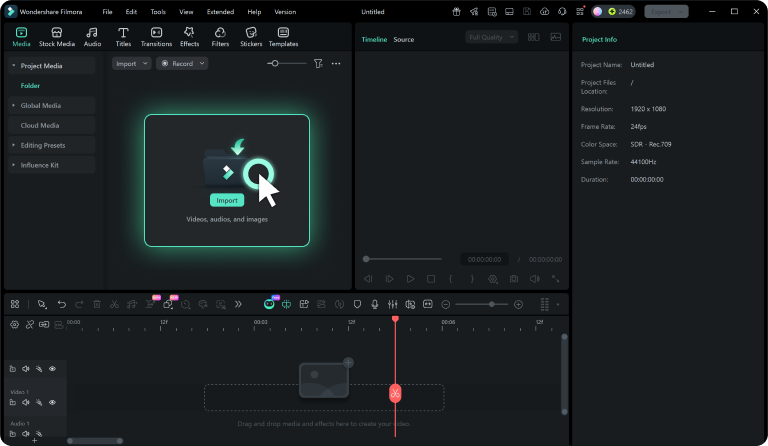
Step 1 Browse Nature Elements
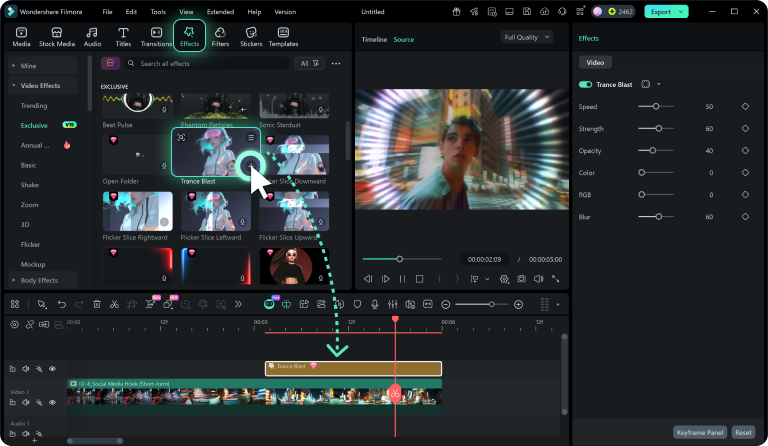
Step 2 Import the Overlay
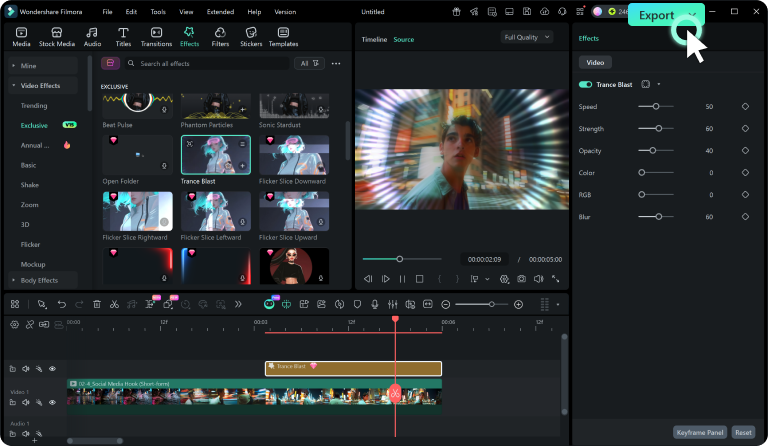
Step 3 Blend and Customize
-
1: Browse Nature Elements
Browse our forest overlay collection and preview misty woods or dense foliage. Use filters to locate the exact botanical style you need. -
2: Import the Overlay
Click download to acquire your chosen nature effect. It saves directly to your media panel, ready for instant application in Filmora. -
3: Blend and Customize
Drag the element onto your timeline above your footage. Tweak blending modes and opacity to perfectly merge the woodland aesthetics.
Expand Your Environmental Storytelling
Filmora offers much more than a simple forest overlay. You can manipulate environmental lighting, generate sweeping cinematic landscapes, and introduce complex seasonal changes to your footage. Whether you want to simulate a crisp autumn morning or a dense jungle canopy, our comprehensive visual toolkit provides everything required to build breathtaking worlds. Access thousands of raw materials from our stock media library to experiment with advanced visual effects and elevate your creative projects to a professional standard.