

 100% Security Verified | No Subscription Required | No Malware


 ChatGPT
 Perplexity
 Gemini
 Claude
 Grok
Grok
Gray Silver sits between neutral calm and sleek futurism. It often suggests precision, technology, and understated luxury, which makes it perfect for creators who want visuals that feel modern without being loud. In color psychology, gray tones can signal stability and professionalism, while silver adds a subtle metallic shine that feels cinematic and high-end.
In video editing, Gray Silver color schemes work beautifully for titles, YouTube thumbnails, intros, and overlays that need to look polished across devices and platforms. Whether you are designing a tech review sequence, a romantic wedding film, or a bold gaming intro, the Gray Silver palettes below come with ready-to-use HEX codes so you can match them easily in Filmora and keep your brand consistent across every frame.
In this article
Minimal & Modern Gray Silver Color Palettes
Urban Chrome Fade
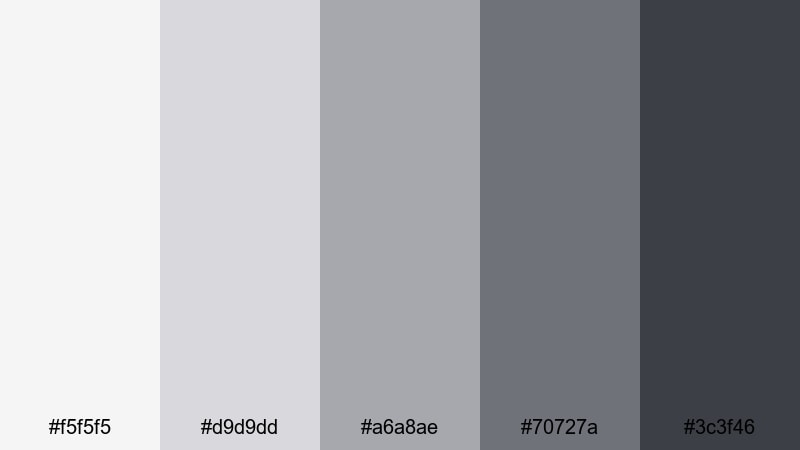
- HEX Codes: #f5f5f5, #d9d9dd, #a6a8ae, #70727a, #3c3f46
- Mood: clean, urban, and contemporary with a cool metallic edge
- Use for: Ideal for tech review intros, product demos, and sleek UI-style lower thirds in video.
Urban Chrome Fade feels like brushed aluminum, polished concrete, and reflective city glass. The lightest gray (#f5f5f5) acts like a soft studio highlight, while the deeper tones (#70727a and #3c3f46) bring weight and contrast. Together, they create a highly versatile Gray Silver gradient that looks organized and premium without feeling cold.
Use this palette for minimalist channel branding, clean YouTube thumbnails, and lower thirds that resemble a modern interface. In Filmora, you can apply the lighter tones to backgrounds and frames, then use the darkest gray for text or icons so everything remains easy to read on both desktop and mobile screens.
Pro Tip: Build a Cinematic Gray Silver Look in Filmora
To keep an Urban Chrome Fade aesthetic across an entire video, start by setting your primary text, background panels, and overlay graphics to these HEX codes inside Filmora. Use the mid-tone grays for subtle shapes behind titles and the darkest shade for key labels or callouts. This instantly gives your tech reviews or product demos a cohesive, interface-inspired look.
You can also save this Gray Silver scheme as a style reference: reuse it in your intro, B-roll labels, end screens, and shorts exports so your channel feels consistent wherever viewers find you.
AI Color Palette
If you have a reference image that already nails this Urban Chrome Fade look (for example, a cityscape shot or a product photo), you can let Filmora do the heavy lifting. Filmora's AI Color Palette feature can analyze that reference and apply a similar Gray Silver mood across your clips in just a few clicks.
Import your footage, choose a still or clip that represents the tones you like, and run AI Color Palette to match the rest of your timeline. This is perfect when you want your talking-head shots, screen recordings, and B-roll to all share the same modern, metallic feel without manual tweaking.
 secure download

HSL, Color Wheels & Curves
Once your Gray Silver base is in place, fine-tune it using HSL, color wheels, and curves in Filmora. Slightly lifting the blue and cyan hues can push your grays toward a more futuristic chrome, while warming the midtones creates a softer, lifestyle-friendly silver. You can see how these tools shape mood in Filmora's in-depth color grading tutorial on HSL and curves.
Use the curves tool to deepen shadows without crushing detail, giving your UI overlays a cinematic contrast. Then, tweak highlight wheels to control how bright the silvery areas feel, especially in titles and bright product shots.
secure download1000+ Video Filters & 3D LUTs
To speed up styling, combine this Gray Silver palette with Filmora's preset looks. Filmora's video filters and 3D LUTs make it easy to add soft fades, cinematic contrast, or tech-inspired glows over your neutral grays.
Try cool-toned LUTs for sci-fi or gadget content, or subtle film filters for review channels that want a more editorial feel. By starting from Urban Chrome Fade and then layering filters, you keep your branding consistent while still giving each series its own flavor.
secure downloadGlass Tower Morning

- HEX Codes: #f7f9fb, #dde3ea, #b5bcc6, #8b94a1, #5a6472
- Mood: airy, refined, and quietly futuristic
- Use for: Works well for corporate explainers, startup pitch decks, and clean title cards.
Glass Tower Morning captures the feeling of early light on high-rise windows. The soft whites and pale silvers give a sense of clarity and space, while the deeper bluish grays ground the palette so it still feels professional and trustworthy.
Use the lighter tones for presentation backgrounds, lower thirds, and full-screen title cards in Filmora, and reserve the darker grays for text and key UI elements. This Gray Silver scheme is especially strong for business channels, SaaS product intros, and pitch videos where you want a calm, confident, and slightly futuristic atmosphere.
Satellite Signal
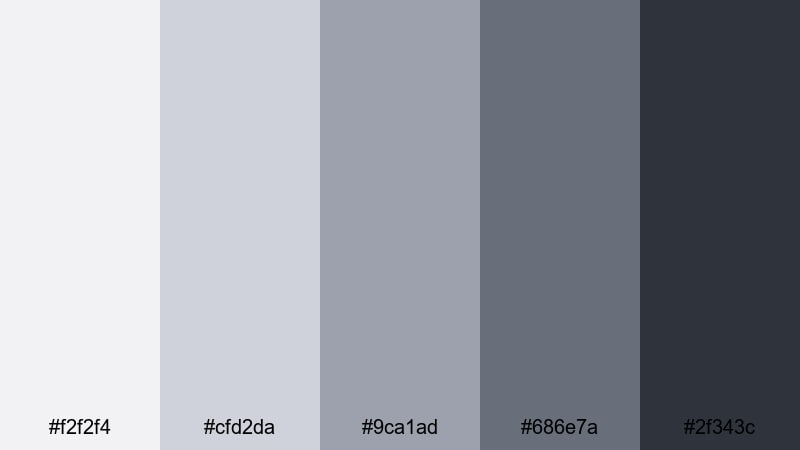
- HEX Codes: #f2f2f4, #cfd2da, #9ca1ad, #686e7a, #2f343c
- Mood: technical, precise, and cool-toned
- Use for: Great for motion graphics, HUD elements, and science or data-focused content.
Satellite Signal feels like metal panels, broadcast gear, and digital static. The cool Gray Silver range runs from almost-white to dark graphite, creating strong separation for interface-style graphics and charts.
It works beautifully for infographics, animated dashboards, and HUD overlays in Filmora. Use the mid grays for panel backgrounds, the darkest tone for crisp typography, and the lightest silver for glowing outlines or data highlights in your intros and explainer thumbnails.
Monochrome Interface
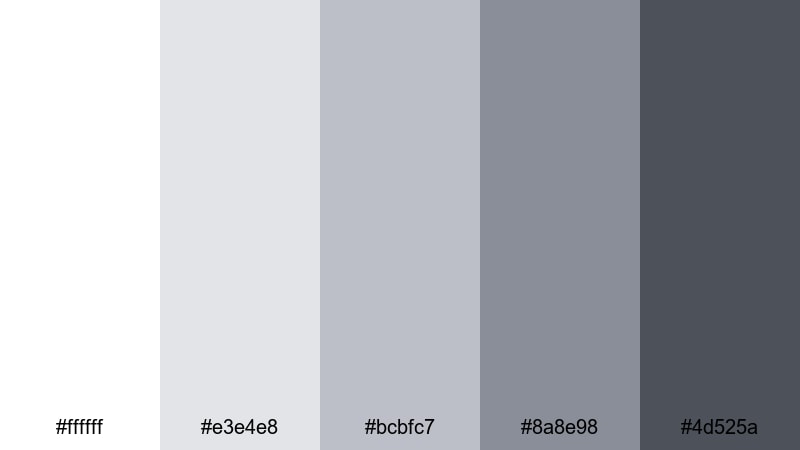
- HEX Codes: #ffffff, #e3e4e8, #bcbfc7, #8a8e98, #4d525a
- Mood: minimal, balanced, and product-focused
- Use for: Perfect for app promos, software walkthroughs, and clean UI mockups in video frames.
Monochrome Interface is a crisp gradient from pure white to deep slate gray. It keeps attention on your product by removing distractions and color noise, ideal for UI-heavy tutorials and SaaS walkthroughs.
In Filmora, combine white or very light gray backgrounds with darker text and simple line icons to mirror modern app design. This palette is also great for YouTube thumbnails where screens, devices, or overlays need to appear tidy and easy to understand at a glance.
Cinematic & Moody Gray Silver Color Palettes
Noir City Rain
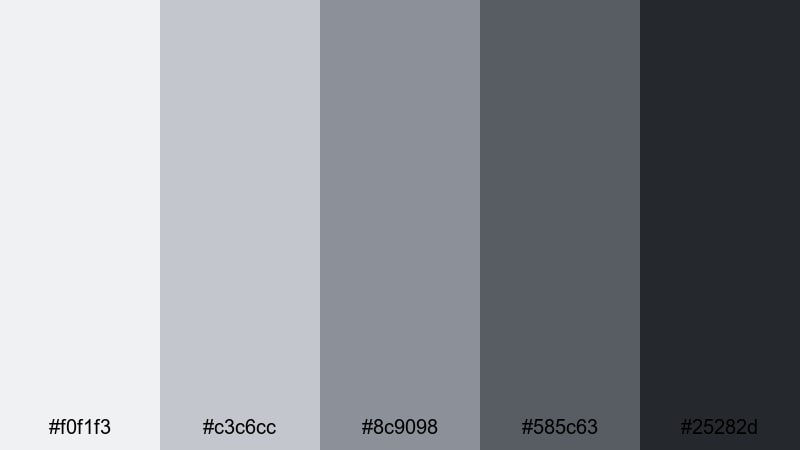
- HEX Codes: #f0f1f3, #c3c6cc, #8c9098, #585c63, #25282d
- Mood: dramatic, rainy-night, and cinematic
- Use for: Use for thriller-style trailers, city b-roll, and dramatic title sequences.
Noir City Rain feels like wet pavement under streetlights. The soft silvers at the top of the palette mimic mist and reflections, while the deep charcoal provides a moody base for shadows and silhouettes.
Use it in Filmora to grade urban B-roll, opening titles, and short film trailers. Light grays work well for subtle glow text or credits, while the darkest tone is ideal for letterbox bars, fade-ins, and backgrounds behind bold typography in your thumbnails.
Steel Horizon Dusk
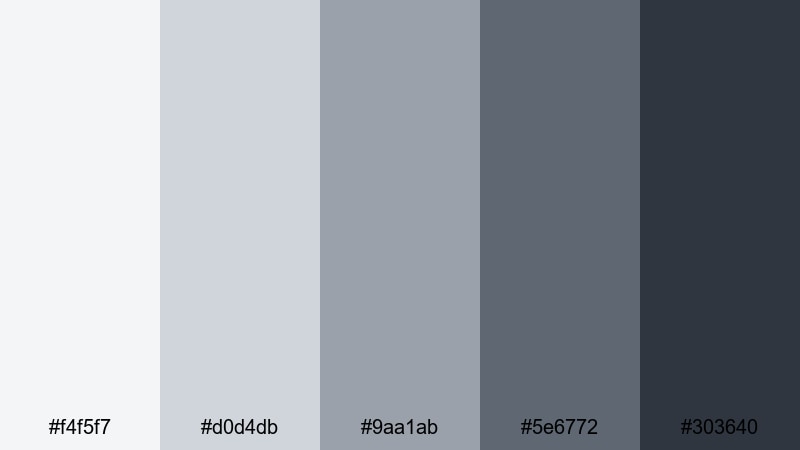
- HEX Codes: #f4f5f7, #d0d4db, #9aa1ab, #5e6772, #303640
- Mood: brooding, expansive, and cinematic
- Use for: Great for travel vlogs, drone footage, and slow cinematic timelapses.
Steel Horizon Dusk echoes overcast skies and distant mountains. The lighter silvers give a hazy daylight impression, while the deeper steel tones create a strong base for wide, dramatic compositions.
Apply this palette to drone footage, landscape shots, and moody timelapses in Filmora. Use the lighter grays for titles that sit over clouds or water, and the darker shades for subtle vignettes, frame lines, or gradient overlays that add depth without overpowering your footage.
Nebula Drift

- HEX Codes: #f3f4f6, #d4d7e0, #a4a9b7, #6e7381, #393d47
- Mood: mysterious, spacey, and atmospheric
- Use for: Ideal for sci-fi intros, tech logo reveals, and ambient music visuals.
Nebula Drift brings bluish silvers and deep grays together for a subtle sci-fi feeling. The tones are soft enough for ambient content but still carry a mysterious, space-inspired atmosphere.
It is perfect for logo reveals, animated grids, and looping background visuals in Filmora. Use the lighter silvers for glowing lines or star-like particles, and the darker tones for spacey backdrops behind your titles and music visualizers.
Midnight Hangar

- HEX Codes: #e9eaec, #c0c3c9, #8c9098, #555860, #1e2126
- Mood: industrial, intense, and cinematic
- Use for: Works well for automotive edits, action sequences, and gear-focused product shots.
Midnight Hangar feels like a dim industrial space lit by overhead lights. Cool silvers fade into near-black, giving your footage a sense of weight and tension without losing clarity.
Use this palette in Filmora for car edits, gear showcases, or action highlights. Let the lighter grays define reflections and metal surfaces, while the darkest shade becomes your go-to color for backgrounds, shadows, and bold, high-contrast titles in thumbnails and end screens.
Soft & Romantic Gray Silver Color Palettes
Silver Lace Blush

- HEX Codes: #fdf7f8, #f0e4e8, #cfc4cf, #a3a1aa, #73727a
- Mood: romantic, soft, and delicate
- Use for: Perfect for wedding films, engagement reels, and lifestyle brand promos.
Silver Lace Blush weaves gentle blush tones through muted silvers. It feels like lace, soft textiles, and diffused window light, ideal for storytelling that centers on love and connection.
Use the lightest shades for airy backgrounds, title cards, and slideshow frames in Filmora. Reserve the deeper grays for names, dates, and key captions so text remains readable. This palette also works well for beauty brand intros and Instagram Reels covers when you want romance without overly bright colors.
Cloud Veil Wedding

- HEX Codes: #fbfbfc, #e6e7ec, #c6c9d2, #a0a4af, #777b86
- Mood: ethereal, calm, and refined
- Use for: Great for wedding highlight films, slideshow openings, and title overlays.
Cloud Veil Wedding feels like a bridal veil moving in soft light. The pale grays and silvery undertones create an ethereal atmosphere that looks timeless in both color and black-and-white edits.
In Filmora, this palette is ideal for delicate transitions, gentle title overlays, and chapter cards in wedding highlight films. Use the darker grays sparingly for names and key phrases, while keeping the rest of the frame bathed in light, veiled tones.
Moonlit Rose Mist
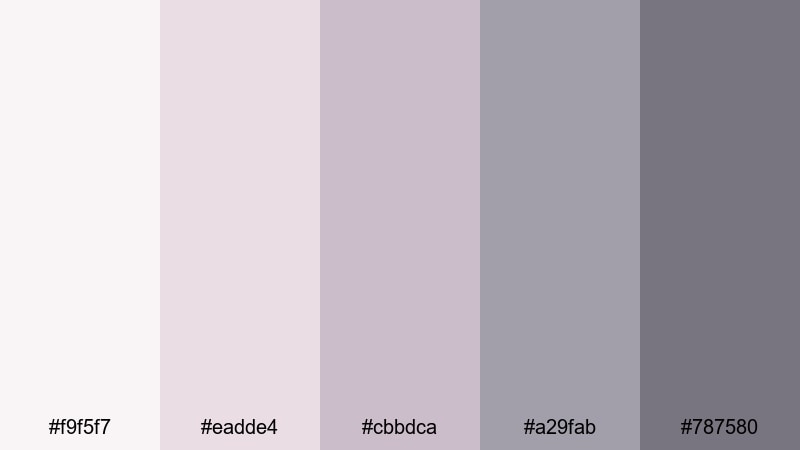
- HEX Codes: #f9f5f7, #eadde4, #cbbdca, #a29fab, #787580
- Mood: serene, nostalgic, and intimate
- Use for: Use for storytelling vlogs, soft brand intros, and memory recap videos.
Moonlit Rose Mist blends dusty rose with Gray Silver shadows, creating a tender, moonlit atmosphere. It feels nostalgic and intimate, like old photographs with a modern polish.
Use this palette in Filmora for personal vlogs, anniversary videos, or brand stories that focus on memory and emotion. Soft pinkish-gray backgrounds paired with darker text create gentle yet readable thumbnails and title cards, while transitions in these tones keep the whole edit feeling cohesive.
Frosted Champagne
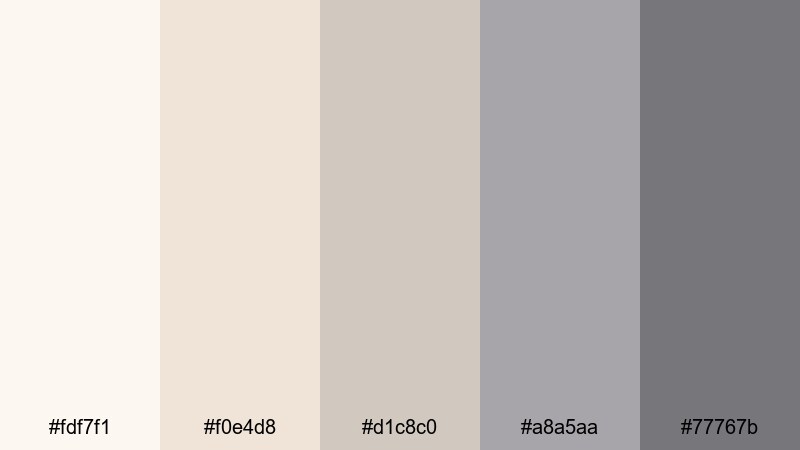
- HEX Codes: #fdf7f1, #f0e4d8, #d1c8c0, #a8a5aa, #77767b
- Mood: festive, warm, and sophisticated
- Use for: Ideal for event recaps, holiday promos, and luxury lifestyle content.
Frosted Champagne pairs warm champagne notes with grounded grays, giving you a metallic glow that still feels tasteful. It is celebratory without being flashy, perfect for elegant events and premium branding.
Use the lighter, warmer tones for borders, frames, and accent shapes in Filmora, then balance them with cool Gray Silver text and icons. This palette works well for New Year recaps, gala highlight reels, and luxury product promos where you want a hint of sparkle while keeping everything refined.
Bold Accent Gray Silver Color Palettes
Neon Circuit Steel
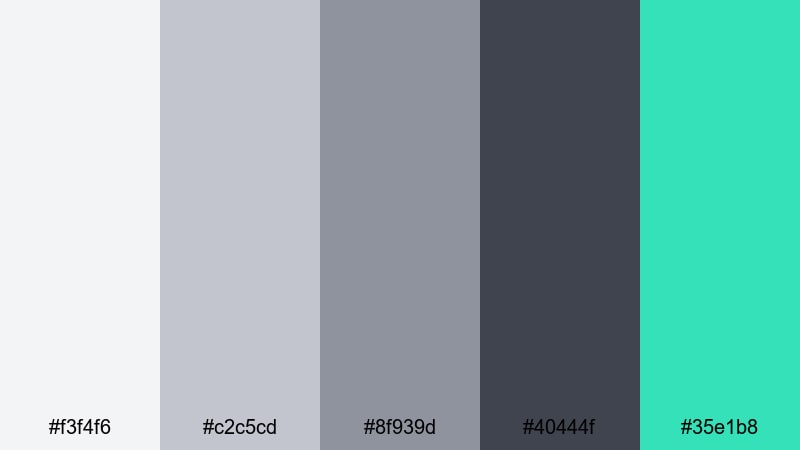
- HEX Codes: #f3f4f6, #c2c5cd, #8f939d, #40444f, #35e1b8
- Mood: energetic, futuristic, and tech-driven
- Use for: Perfect for gaming intros, tech channels, and kinetic typography sequences.
Neon Circuit Steel sets neutral silvers against a punchy neon teal accent (#35e1b8). The result feels like glowing circuitry etched into brushed metal, ideal for high-energy, tech-focused content.
In Filmora, keep most of your UI, backgrounds, and frames in the Gray Silver range, then use the neon teal sparingly for buttons, subscribe reminders, progress bars, and key words in kinetic text. This makes your calls to action stand out instantly in thumbnails, intros, and stream overlays.
Signal Red Alloy
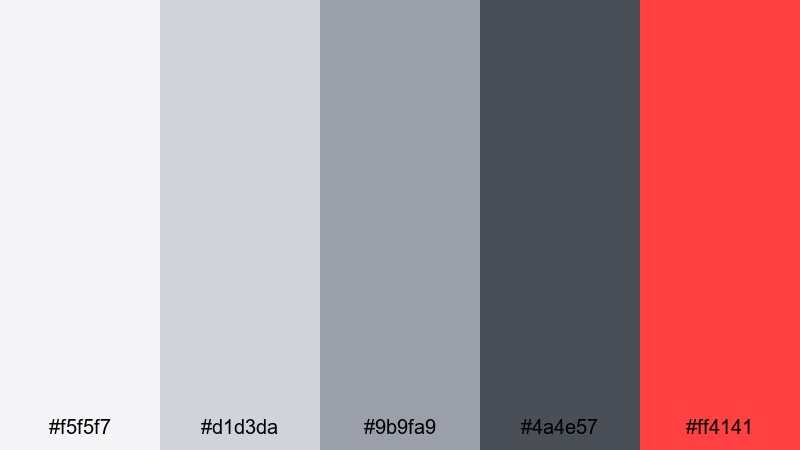
- HEX Codes: #f5f5f7, #d1d3da, #9b9fa9, #4a4e57, #ff4141
- Mood: urgent, bold, and high-impact
- Use for: Use for alerts, call-to-action end screens, and dynamic sports or fitness edits.
Signal Red Alloy combines cool, steady grays with a vivid red accent (#ff4141) that grabs attention. It feels like a warning light on a metal surface, perfect when you want viewers to act fast.
Use the Gray Silver spectrum for your overall layout in Filmora, then bring in the red accent only for CTA buttons, discounts, timers, or key action verbs. This palette is especially strong for sports and fitness thumbnails, urgency-based end screens, and bold text overlays on high-energy footage.
Electric Indigo Chrome
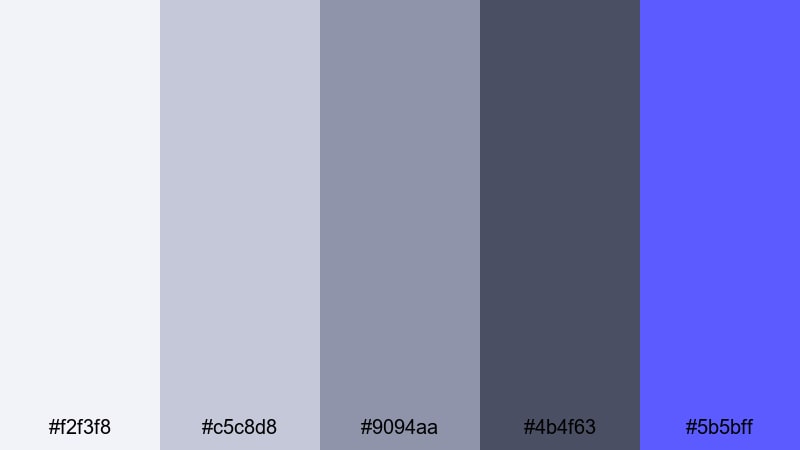
- HEX Codes: #f2f3f8, #c5c8d8, #9094aa, #4b4f63, #5b5bff
- Mood: edgy, digital, and high-contrast
- Use for: Great for music videos, stream overlays, and bold channel branding.
Electric Indigo Chrome mixes cool silver gradients with an electric indigo pop (#5b5bff). It looks sharp, digital, and slightly rebellious, great for creators who want their channel to feel modern and distinctive.
In Filmora, let the Gray Silver tones define panels, backgrounds, and subtle gradients, then use indigo for logos, lower-third highlights, waveform accents, and animated transitions. This palette works perfectly for EDM or hip-hop music videos, Twitch and YouTube Gaming overlays, and any bold personal brand that leans into a digital aesthetic.
Tips for Creating Gray Silver Color Palettes
Gray Silver palettes are powerful because they are neutral yet expressive. A few practical guidelines will help you combine them with accents and footage so your videos stay readable, on-brand, and cinematic.
- Always check contrast between text and background. Pair very light Grays Silvers with deep charcoals or black for titles and key information.
- Use one accent color at a time. With bold palettes like Neon Circuit Steel or Signal Red Alloy, keep most of the frame neutral and let the accent draw attention to buttons, CTAs, or key stats.
- Match your grading to your graphics. If your overlays are cool Gray Silver, avoid overly warm footage unless you are deliberately creating contrast; use Filmora color tools to cool or warm clips subtly.
- Reserve the darkest gray for structure. Use it for outlines, drop shadows, and dividers so your layouts feel clear and organized on both mobile and desktop.
- Keep brand consistency across assets. Reuse the same HEX codes in your intros, lower thirds, thumbnails, and end screens so viewers instantly recognize your channel style.
- Test on different devices. Export short samples and review them on phone, tablet, and monitor to ensure your Gray Silver tones do not look washed out or too dark.
- Use gradients sparingly. Soft Gray Silver gradients behind text or logos can add depth, but keep them subtle so they do not distract from your message.
- Create palette presets in Filmora. Save commonly used colors in the title and graphics tools so you can apply your Gray Silver scheme quickly to new projects.
Gray Silver color palettes can make your videos feel futuristic, romantic, or bold depending on how you combine tones and accents. From minimalist tech intros to cinematic cityscapes and soft wedding films, these 15 palettes give you ready-made HEX codes to shape the mood and identity of your brand.
Try dropping a few of these palettes into Filmora, set up your titles and overlays with matching colors, and then grade your footage to harmonize with them. With tools like AI Color Palette, HSL controls, and LUTs, you can lock in a consistent Gray Silver aesthetic across intros, B-roll, shorts, and social cutdowns.
The more you reuse a distinctive Gray Silver scheme, the more recognizable your channel or brand becomes. Start with the palette that fits your niche best, experiment in Filmora, and refine until your visuals feel exactly as polished and cinematic as you imagine.
secure download