

 100% Security Verified | No Subscription Required | No Malware


 ChatGPT
 Perplexity
 Gemini
 Claude
 Grok
Grok
Silver Blue sits between cool sky tones and polished metal, which makes it perfect when you want visuals that feel calm, high end, and slightly futuristic. Psychologically, these hues are linked with clarity, trust, and focus, so they work well for thoughtful storytelling, minimalist branding, and cinematic atmospheres without feeling cold or harsh.
For video creators, designers, and Filmora users, a refined Silver Blue color palette can unify everything from YouTube thumbnails and channel intros to lower thirds, UI screens, and aesthetic edits. Below you will find ready made Silver Blue color combinations with HEX codes so you can recreate the exact look in Filmora, your thumbnails, or any design tool.
In this article
Soft & Dreamy Silver Blue Palettes
Arctic Halo Glow
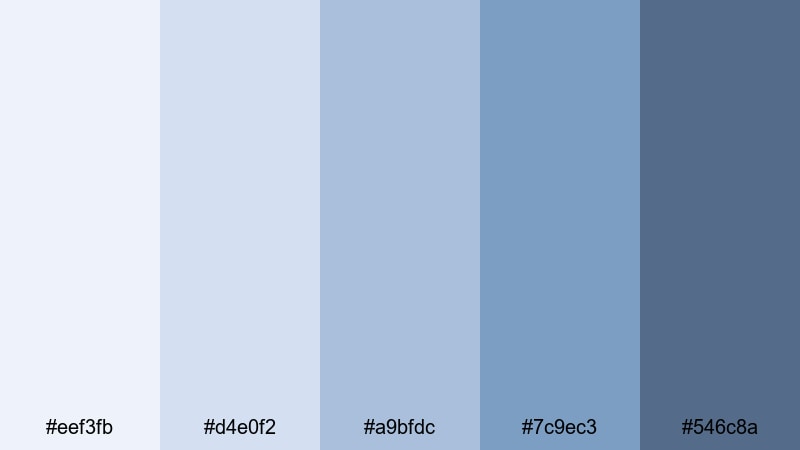
- HEX Codes: #eef3fb, #d4e0f2, #a9bfdc, #7c9ec3, #546c8a
- Mood: calm, airy, and ethereal
- Use for: Perfect for dreamy travel vlogs, slow lifestyle montages, and soft cinematic titles.
Arctic Halo Glow floats between misty white and gently deepening Silver Blue, like morning light on snow. It feels light, breathable, and almost weightless, which instantly softens any frame or design layout.
Use this palette for daydream style B roll, airy thumbnails, or channel banners that should feel friendly and unobtrusive. In Filmora, it works beautifully for lower thirds, title cards, and overlays on travel, cozy routines, or productivity content where you want calm focus instead of loud contrast.
Pro Tip: Build Soft Silver Blue Aesthetics in Filmora
To keep a gentle palette like Arctic Halo Glow consistent, design your key elements directly in Filmora. Sample your chosen HEX codes for title backgrounds, shapes, and overlay graphics, then reuse those presets across your whole project so intros, B roll, and end screens all share the same airy Silver Blue mood.
Pair the lightest tones with your text backgrounds and use the deeper blues for accent strokes, icons, or motion graphics. This keeps everything readable while preserving that soft, cinematic Silver Blue atmosphere from start to finish.
AI Color Palette
If you already have an image that captures your perfect Silver Blue look, such as a screenshot of this palette or a snowy skyline photo, you can turn it into a full video grade in one step. Filmora's AI Color Palette feature reads the colors from your reference and applies a matching style to your clips.
Import your footage, choose a reference frame with your ideal Silver Blue, and let AI transfer the palette to other shots. It is an easy way to match A roll, B roll, and thumbnails so everything in your content ecosystem looks like part of the same calm, Silver Blue world.
 secure download

HSL, Color Wheels & Curves
After matching your Silver Blue palette, fine tune it with Filmora's HSL sliders, color wheels, and curves. You can mute overly bright cyans, push midtones into a cooler direction, or slightly warm the highlights to keep skin tones natural while the background stays icy and clean.
Tools like the curves and color wheels let you deepen shadows for a more cinematic contrast, or lift them for a dreamy, foggy feel, just like in a professional grade. For a step by step walkthrough, you can follow this Filmora color grading tutorial while you experiment with your Silver Blue footage.
secure download1000+ Video Filters & 3D LUTs
Once your base Silver Blue palette is in place, you can speed up styling with Filmora's ready made effects. Filmora's video filters and 3D LUTs make it easy to add light leaks, soft glows, or subtle film grain that all sit on top of your existing color work.
Apply a cinematic LUT to push your Arctic Halo Glow tones into a filmic space, then stack a gentle vignette or diffusion filter for extra depth. Saving these as presets lets you reuse your favorite Silver Blue looks on every vlog, reel, or client edit with one click.
secure downloadFrosted Morning Mist
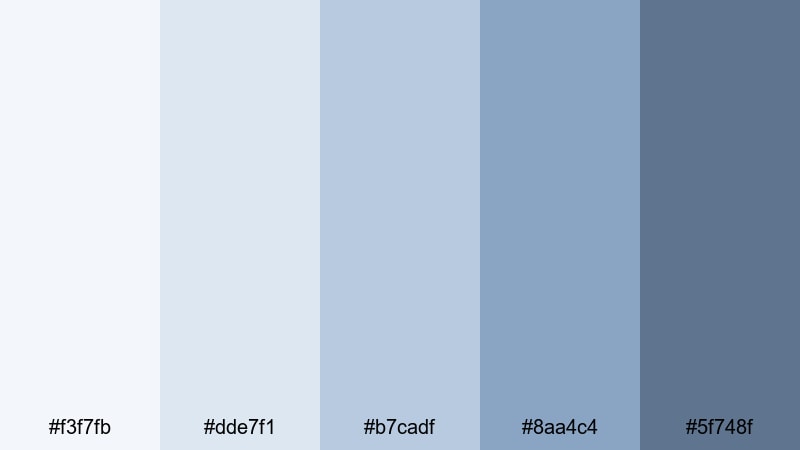
- HEX Codes: #f3f7fb, #dde7f1, #b7cadf, #8aa4c4, #5f748f
- Mood: soft, introspective, and peaceful
- Use for: Ideal for reflective voiceover content, morning routines, and chilled music videos.
Frosted Morning Mist leans into pale blues and cloud like grays, evoking quiet mornings, notebooks, and slow playlists. It feels intimate and reflective, without the heaviness of darker blues.
Use it on talking head frames with a soft blur background, calm study or journal vlogs, and podcast thumbnails where you want viewers to feel safe and focused. Title cards in these tones, created in Filmora, will support gentle storytelling, self care content, and low key lo fi edits.
Moonlit Harbor Haze
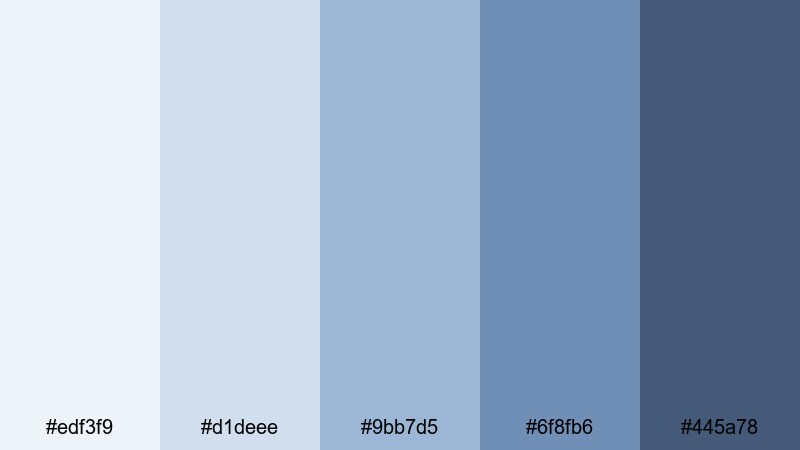
- HEX Codes: #edf3f9, #d1deee, #9bb7d5, #6f8fb6, #445a78
- Mood: romantic, nostalgic, and cinematic
- Use for: Works well for romantic edits, slow city night b-roll, and subtle title screens.
Moonlit Harbor Haze starts with pale harbor sky tones and fades into inky navy, like city lights reflecting on water. It carries a gentle nostalgia, perfect for date nights, road trips, or soft city montages.
Apply it to opening titles, end cards, and overlay shapes around portraits or couples in your videos. In thumbnails, use the lightest shade behind text and the deepest Silver Blue around the edges to frame your main subject with a cinematic, late night feel.
Powdered Skyline Blush
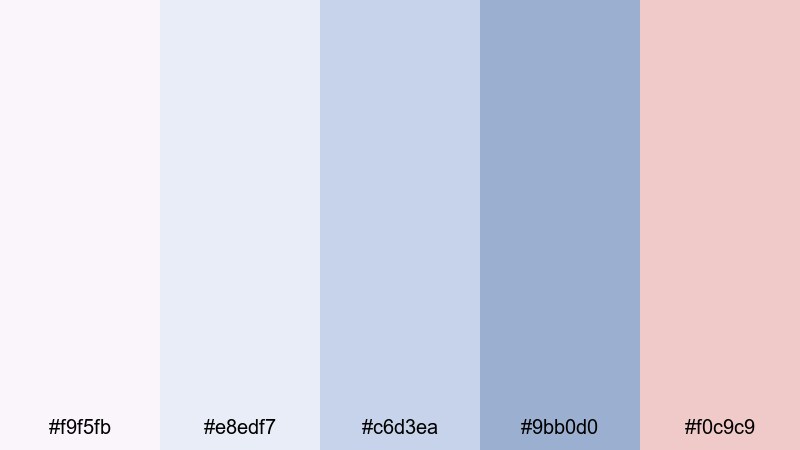
- HEX Codes: #f9f5fb, #e8edf7, #c6d3ea, #9bb0d0, #f0c9c9
- Mood: romantic, hopeful, and lighthearted
- Use for: Great for wedding highlights, proposal clips, and uplifting lifestyle reels.
Powdered Skyline Blush combines gentle Silver Blue with a soft blush accent, like pastel skies at golden hour. The palette feels tender and uplifting, adding emotion without strong saturation.
Use the blush tone as a subtle highlight for key words in your title designs or for small icons and hearts in wedding edits. In Filmora, this palette is ideal for romantic short films, engagement reels, or feminine brand intros where calm blues keep things elegant while the pink brings warmth and joy.
Modern & Minimal Silver Blue Palettes
Chromed Ice Minimal
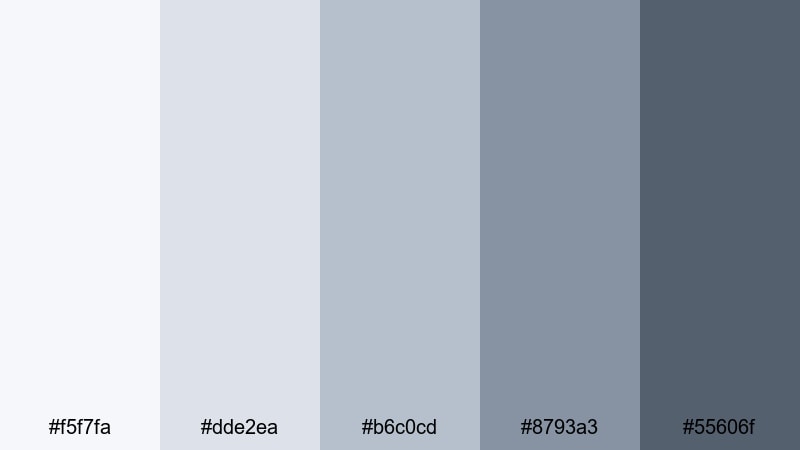
- HEX Codes: #f5f7fa, #dde2ea, #b6c0cd, #8793a3, #55606f
- Mood: clean, professional, and minimal
- Use for: Perfect for tech explainers, SaaS promos, and sleek lower thirds in tutorials.
Chromed Ice Minimal is all about sleek cool grays and refined Silver Blue accents. It feels like a polished interface, ideal for brands that want to look organized and trustworthy without loud colors.
Use it to design modern title slides, product callouts, and UI mockups inside your videos. In thumbnails, combine the lightest shade as the background with darker Silver Blue for borders and typography to create a clean, premium tech vibe.
Urban Steel Horizon
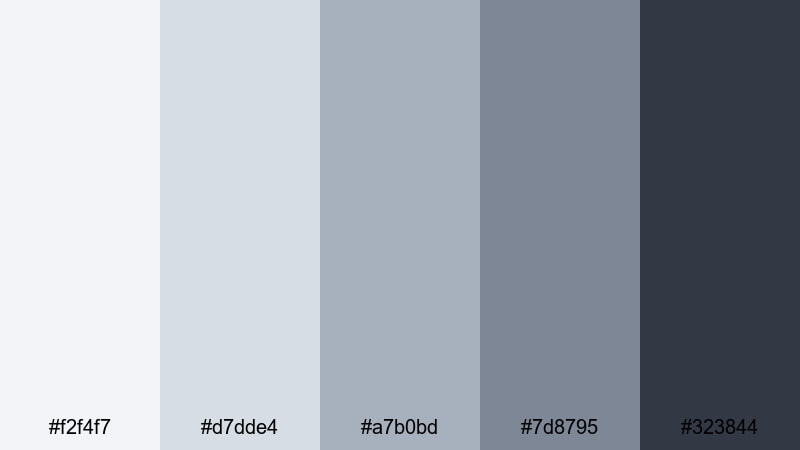
- HEX Codes: #f2f4f7, #d7dde4, #a7b0bd, #7d8795, #323844
- Mood: urban, sleek, and confident
- Use for: Use this palette for city vlog titles, architecture reels, and modern channel branding.
Urban Steel Horizon mixes steel grays with deep Silver Blue to echo skyscrapers, metal, and glass. It feels sharp and confident, perfect for creators who want strong, urban branding.
Apply this palette to line graphics, split screens, and motion titles in your city vlogs or architecture reels. On YouTube channel art and logo stings, the darkest tone can anchor your logo while the mid silvers and blues frame shots with a cool, editorial look.
Digital Glacier Fade
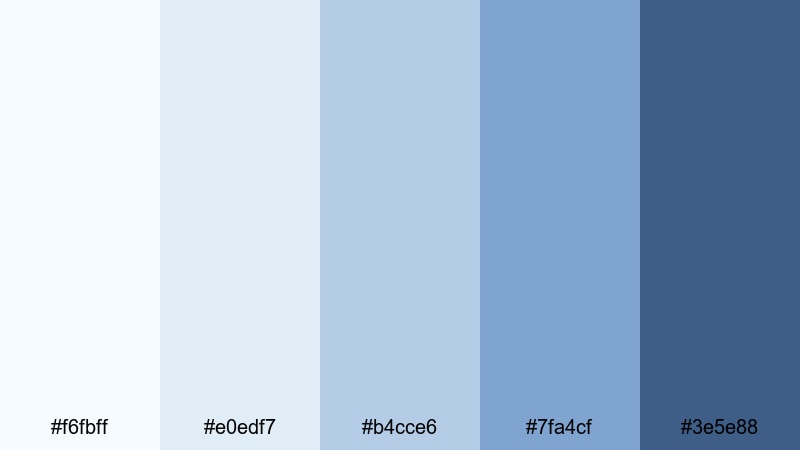
- HEX Codes: #f6fbff, #e0edf7, #b4cce6, #7fa4cf, #3e5e88
- Mood: techy, futuristic, and cool
- Use for: Great for app demos, UI animations, and motion graphics overlays in tutorials.
Digital Glacier Fade flows from icy cyan whites into deeper Silver Blue, like a gradient across a modern interface. It instantly feels digital and structured, ideal for technology and software content.
Use the lighter tones for clean backgrounds in screen recordings, and reserve the deeper blues for UI highlights, progress bars, and timeline accents. In Filmora, you can build animated overlays in these colors around your app walkthroughs or coding tutorials to keep everything on brand.
Studio Neon Frost
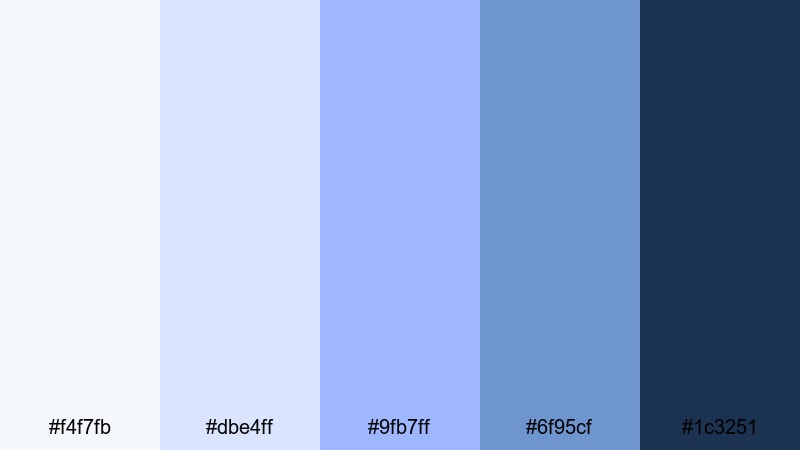
- HEX Codes: #f4f7fb, #dbe4ff, #9fb7ff, #6f95cf, #1c3251
- Mood: edgy, stylish, and creative
- Use for: Ideal for channel intros, motion logos, and music visualizers with a modern edge.
Studio Neon Frost pairs soft blues with an electric periwinkle highlight, creating a studio ready, slightly neon twist. It stays mostly minimal, but that hit of color gives energy and style.
Use the brighter periwinkle as a key accent for logo outlines, waveform animations, or beat synced text in music visualizers. For intros and outros, combine the deep navy with soft gradients in lighter Silver Blue to produce a sharp, creative identity that still feels cohesive on your channel grid.
Bold & Cinematic Silver Blue Palettes
Midnight Silver Tide
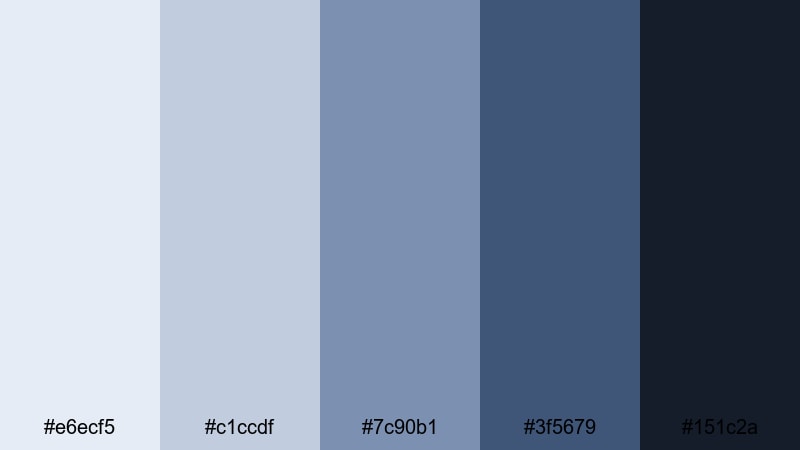
- HEX Codes: #e6ecf5, #c1ccdf, #7c90b1, #3f5679, #151c2a
- Mood: dramatic, moody, and cinematic
- Use for: Perfect for short films, moody B-roll, and dramatic gaming intros.
Midnight Silver Tide moves from soft, cloudy blues into almost black navy, delivering strong contrast and depth. It feels serious and cinematic, ideal when you want to heighten drama and tension.
Use the darkest tones in your letterboxing bars, title backgrounds, and UI frames, while the mid blues carry your main scenes. In thumbnails or key art, place characters against the lighter hues and frame them with the darkest Silver Blue for a striking, movie poster style design.
Electric Aurora Stream
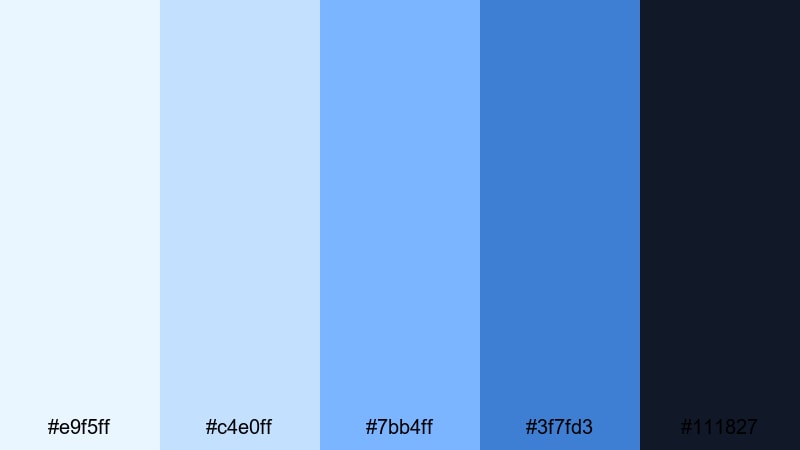
- HEX Codes: #e9f5ff, #c4e0ff, #7bb4ff, #3f7fd3, #111827
- Mood: energetic, futuristic, and intense
- Use for: Best for high energy edits, tech promos, and concert or festival highlight videos.
Electric Aurora Stream ramps up the intensity with vivid azure and deep Silver Blue, like a digital aurora cutting across the night sky. It is bold and eye catching, perfect for fast cuts and energetic content.
Use it in glitch transitions, light streaks, and animated shapes that follow beats in concert recaps or EDM visualizers. For gaming thumbnails or tech promos, the bright mid blues can spotlight key text, while the almost black background gives you a powerful contrast that reads clearly even on mobile.
Deep Cosmos Alloy
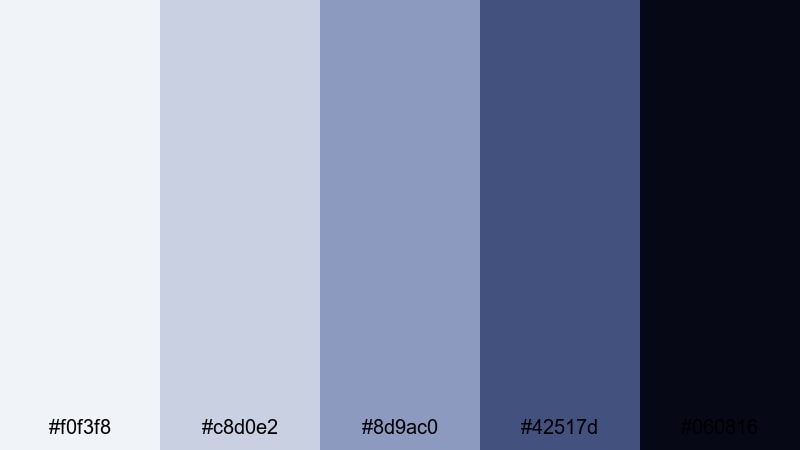
- HEX Codes: #f0f3f8, #c8d0e2, #8d9ac0, #42517d, #060816
- Mood: mysterious, sci fi, and immersive
- Use for: Use for sci fi intros, space themed motion graphics, and abstract visualizers.
Deep Cosmos Alloy layers dusty starfield grays over dense cosmic Silver Blue, falling into near black space. It instantly feels otherworldly and immersive, like a sci fi title sequence.
Use the darkest tone for space backgrounds and the mid blues for planet edges, HUD lines, and holographic UI elements. In Filmora, this palette works well with particle effects, lens flares, and minimal typography to build futuristic intros and ambient, looping visualizers for music.
Noir Skyline Reflections
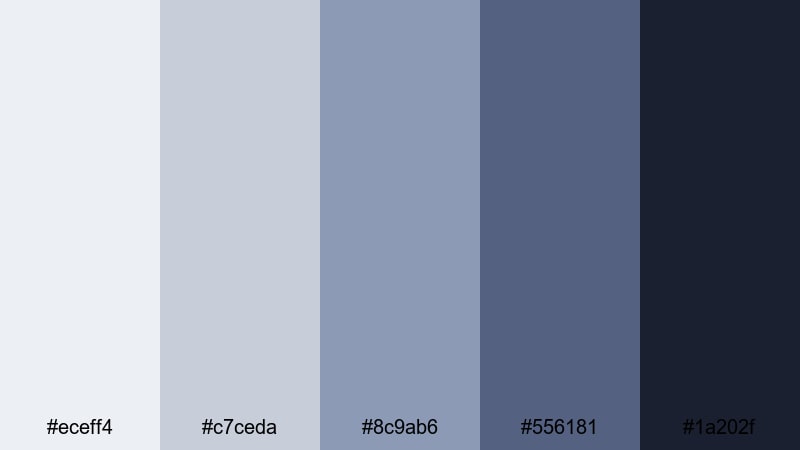
- HEX Codes: #eceff4, #c7ceda, #8c9ab6, #556181, #1a202f
- Mood: stylish, cinematic, and urban noir
- Use for: Great for crime drama edits, city night sequences, and stylish documentary titles.
Noir Skyline Reflections blends smoky grays and inky Silver Blue to echo wet streets, neon signs, and distant high rises. It feels stylish and slightly mysterious, ideal for story driven city content.
Use it for title cards, chapter markers, and interview lower thirds in documentary style videos. The lighter grays can host text and logos, while the deeper shades create gradient overlays or vignettes that give your footage a moody noir polish.
Nature Inspired Silver Blue Palettes
Glacial Lake Drift
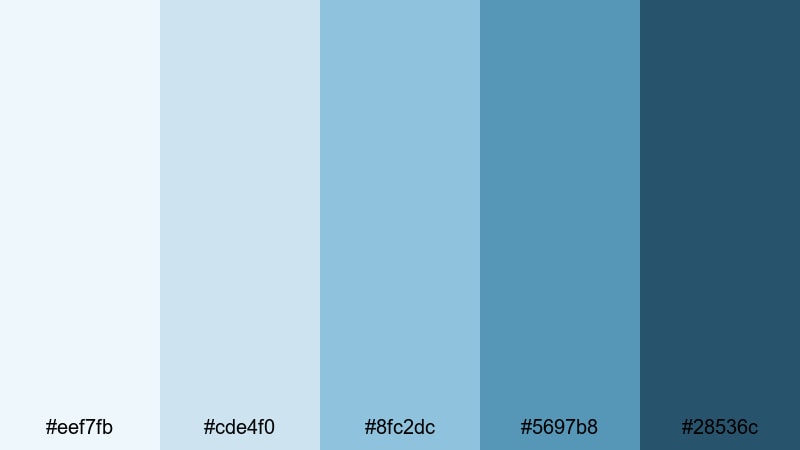
- HEX Codes: #eef7fb, #cde4f0, #8fc2dc, #5697b8, #28536c
- Mood: fresh, tranquil, and organic
- Use for: Ideal for travel vlogs, outdoor documentaries, and calming B-roll sequences.
Glacial Lake Drift merges clear lake teals with soft Silver Blue, capturing the feeling of cold mountain air and clean water. It is refreshing without being overly saturated, which keeps footage looking natural.
Use it to grade drone shots, hiking sequences, and eco branded intros. In thumbnails or Instagram covers, pair the mid teals with white text for clarity, and let the darker blue anchor your logo or channel name for a steady, outdoor focused identity.
Winter Pine Fjord
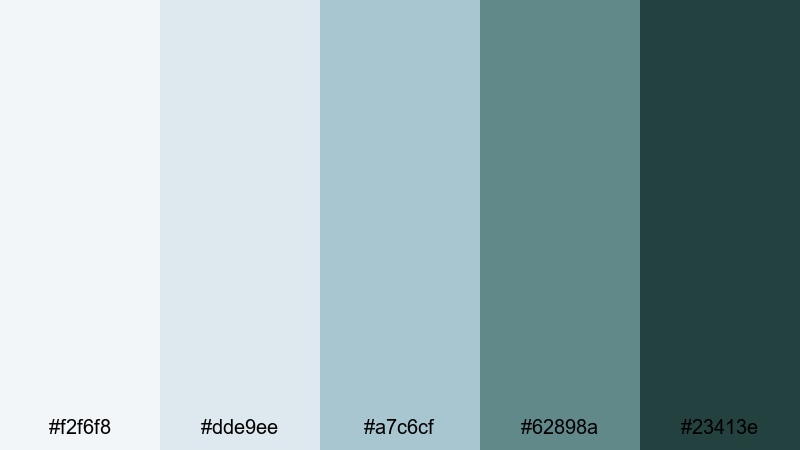
- HEX Codes: #f2f6f8, #dde9ee, #a7c6cf, #62898a, #23413e
- Mood: cool, grounded, and restorative
- Use for: Use this palette for camping vlogs, hiking reels, and calm winter landscapes.
Winter Pine Fjord balances muted Silver Blue with a deep pine green, evoking Nordic forests and quiet winter coasts. It feels grounded and restorative, with enough contrast to stay visually engaging.
Use the greens in overlays, badges, and call to action buttons, while the paler blues support your main footage and text. This palette suits sustainable brands, outdoor channels, and minimalist lifestyle content that emphasizes calm, slow living close to nature.
Coastal Storm Break
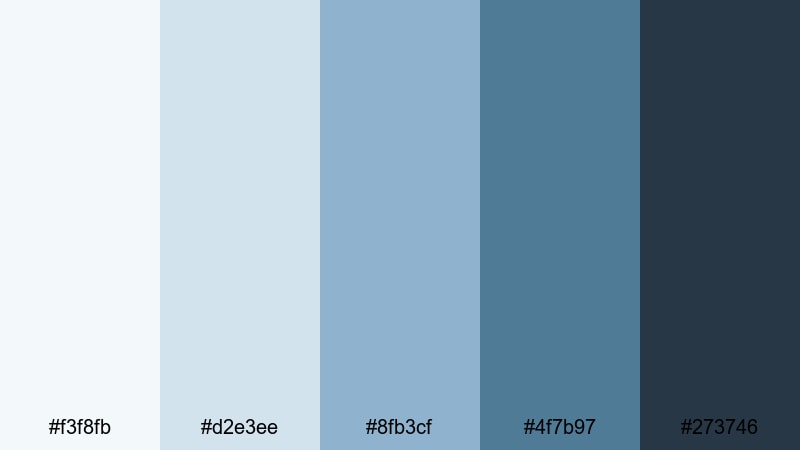
- HEX Codes: #f3f8fb, #d2e3ee, #8fb3cf, #4f7b97, #273746
- Mood: dramatic, refreshing, and coastal
- Use for: Great for surfing clips, seaside travel videos, and moody seascape montages.
Coastal Storm Break blends sea spray blues with stormy Silver Blue shadows, capturing the energy of changing coastal weather. It feels both refreshing and slightly dramatic, ideal for wave, wind, and cloud filled shots.
Use the darker tones for lower thirds and overlays that sit over crashing surf or rain, and keep the lighter hues for sky gradients, maps, and travel graphics. In thumbnails, a bright sea tone behind your subject with a dark Silver Blue frame can give your seaside content a professional, cinematic edge.
Tips for Creating Silver Blue Color Palettes
When you build your own Silver Blue palettes for video and design, a few practical rules will help you keep things cinematic, readable, and on brand across intros, thumbnails, and full edits.
- Decide the mood first: choose lighter, pastel Silver Blue mixes for calm and dreamy edits, or deeper navy focused combinations for drama and intensity.
- Balance contrast: pair very light Silver Blue or off white with a clearly darker accent so titles, captions, and buttons stay readable on mobile screens.
- Limit accent colors: add at most one or two accent hues (like blush pink or pine green) so Silver Blue remains the hero of your brand look.
- Test on footage: drop solid color shapes and titles directly over your video in Filmora to see how the palette interacts with skin tones, skies, and shadows.
- Use gradients wisely: build soft gradients between two Silver Blue shades to create depth in backgrounds without distracting from your subject.
- Keep brand consistency: reuse the same HEX codes for channel art, end screens, and social thumbnails so viewers instantly recognize your Silver Blue identity.
- Mind text hierarchy: reserve the darkest Silver Blue or near black for headlines, and use mid tones for subheadings and UI details to guide the eye.
- Save presets: once you like a Silver Blue grade in Filmora, save it as a preset or LUT so you can apply it quickly to future projects.
Silver Blue color palettes are versatile enough to cover dreamy lifestyle edits, sharp tech explainers, cinematic shorts, and nature vlogs, all while giving your channel a cohesive, sophisticated tone. By picking the right mix of light, mid, and deep hues, you can control how calm, bold, or futuristic your visuals feel.
Use the HEX codes in this guide as a starting point, then refine them with Filmora's color tools, titles, and effects until they match your personal style. Testing each palette on your own footage, thumbnails, and intro animations will help you discover which Silver Blue combinations truly fit your brand.
Once you have your favorites, build a small toolkit of Silver Blue presets and overlays in Filmora so every new project automatically carries the same polished, recognizable look.
secure downloadNext: Taupe Color Palette
