
Page Turning Transition Examples & Guides
Browse our collection of dynamic page turning transition effects and cinematic guides.
Loading more page turning transition examples...
 Category:
 Duration:
 Aspect Ratio:
Everything You Need to Master Page Turning Transitions
A well-placed page turning transition can instantly transform a standard montage into an engaging storybook experience. Filmora provides an extensive library of cinematic video transitions that drop effortlessly onto your timeline. Whether you are crafting a digital photo album, an educational presentation, or a vintage film aesthetic, Filmora equips you with the exact tools needed to make every scene change look completely natural.
Seamless Cinematic Storytelling for Any Project
Seamless Cinematic Storytelling for Any Project
Elevate your narrative flow by connecting distinct scenes with a realistic page turning transition. This classic visual technique acts as a bridge between contrasting concepts, giving your audience a clear psychological cue that a new chapter is beginning in your video.
- Enhance your digital scrapbooks and nostalgic photo montages with highly realistic paper curl animations.
- Control the precise peeling angle and shadow depth to match the specific lighting conditions of your raw footage.
- Keep your viewers fully immersed in the narrative by creating smooth and distraction-free scene changes.
Advanced Keyframe Customization for Perfect Timing
Advanced Keyframe Customization for Perfect Timing
Go beyond standard presets by leveraging the robust Filmora video editor timeline to manipulate every aspect of your page turning transition. You have complete authority over the speed, acceleration, and visual rhythm of the page peel effect to ensure it complements your background music flawlessly.
- Adjust the exact duration of the page turn to match the specific tempo of your cinematic audio track.
- Modify the peeling direction to seamlessly guide the viewer's eye toward the most important visual element on screen.
- Apply dynamic speed ramps to make the page curl start slowly and accelerate dramatically toward the end.
AI-Powered Visual Enhancements and Asset Integration

AI-Powered Visual Enhancements and Asset Integration
Filmora is not just about basic edits; it is a comprehensive AI creative suite designed to supercharge your workflow. Enhance the atmosphere around your page turning transition by integrating unique AI-generated graphics from the AI Image Generator, utilizing cutting-edge models like GPT Image 2 and Nano Banana Pro to elevate your content.
- Generate custom vintage paper textures using Filmora AI to use as underlying backgrounds for your scene changes.
- Combine your page turns with dynamic AI stickers and specialized video effects to create a truly personalized visual style.
- Automatically synchronize the peak motion of your transitions to the beat of an AI-generated musical score.
Frequently Asked Questions About Page Turning Transitions
How to Add a Page Turning Transition in Filmora
Give your video projects a creative, storybook feel by applying a smooth page turning transition in just a few simple steps.
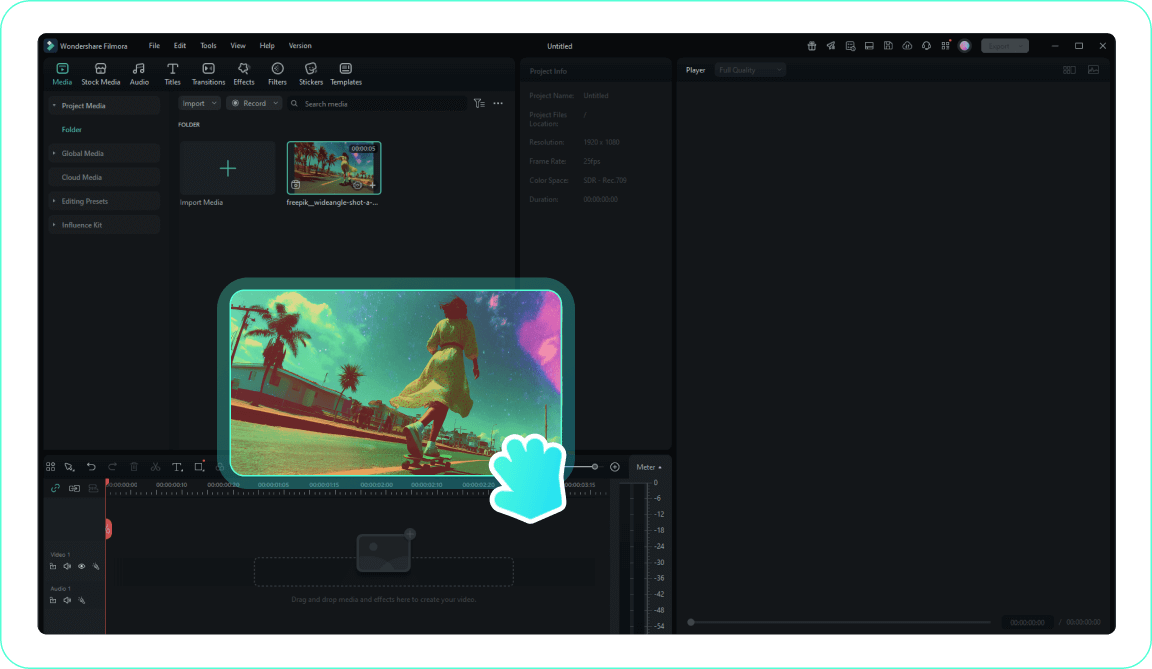
1. Import Your Video
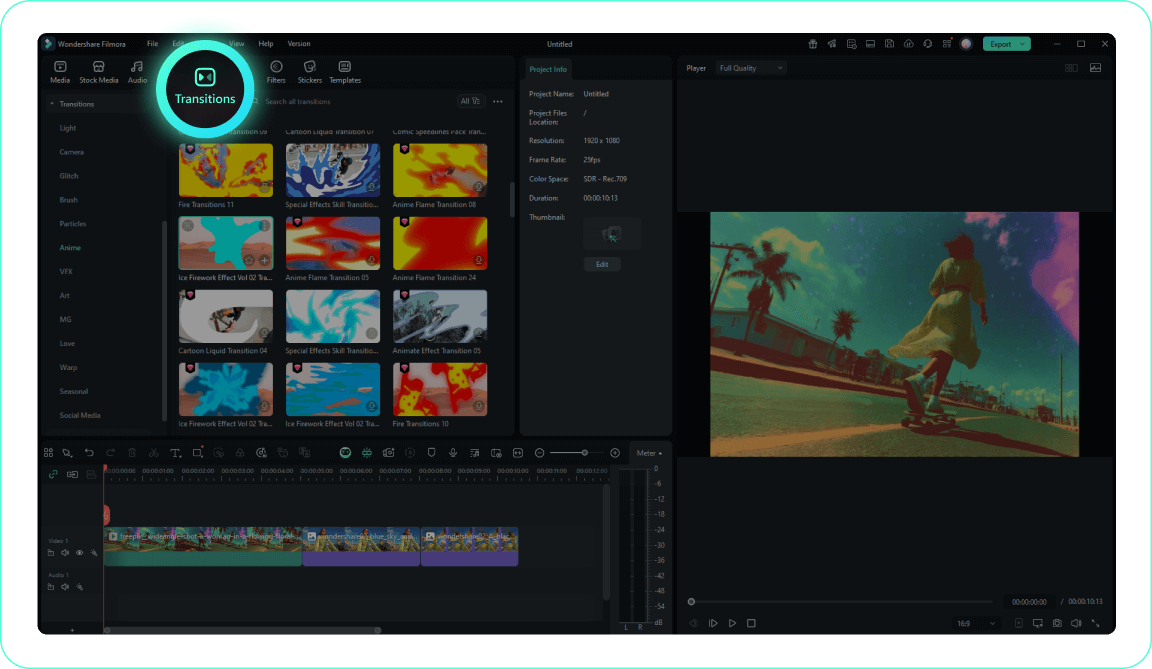
2. Access the Transitions Tab
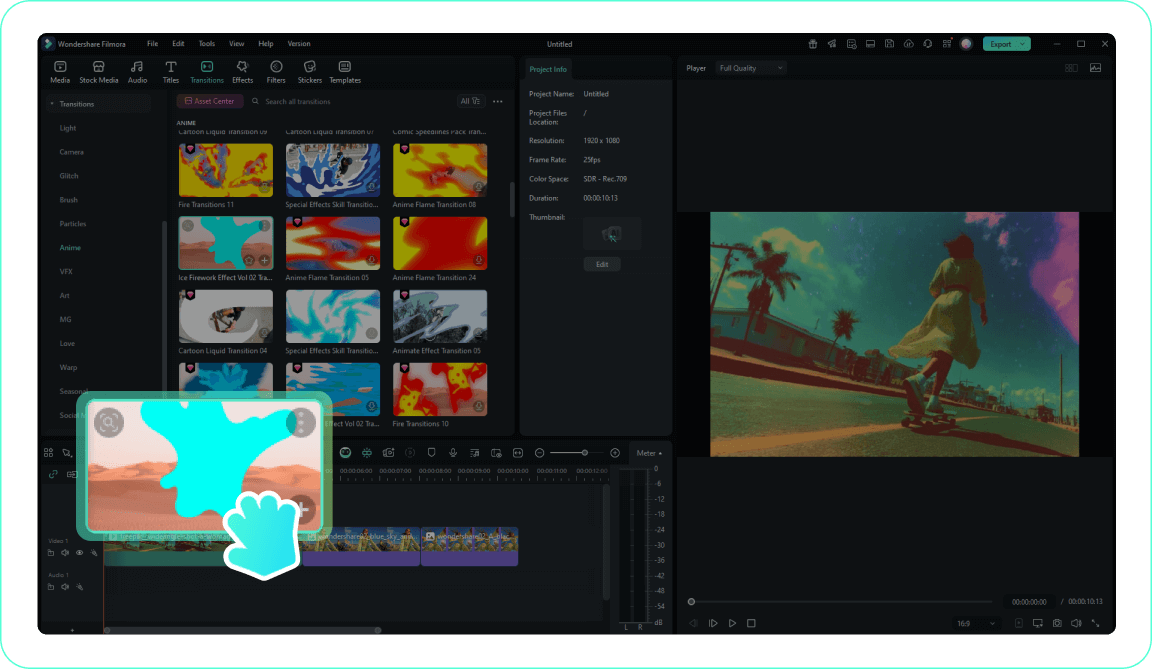
3. Apply Your Transition
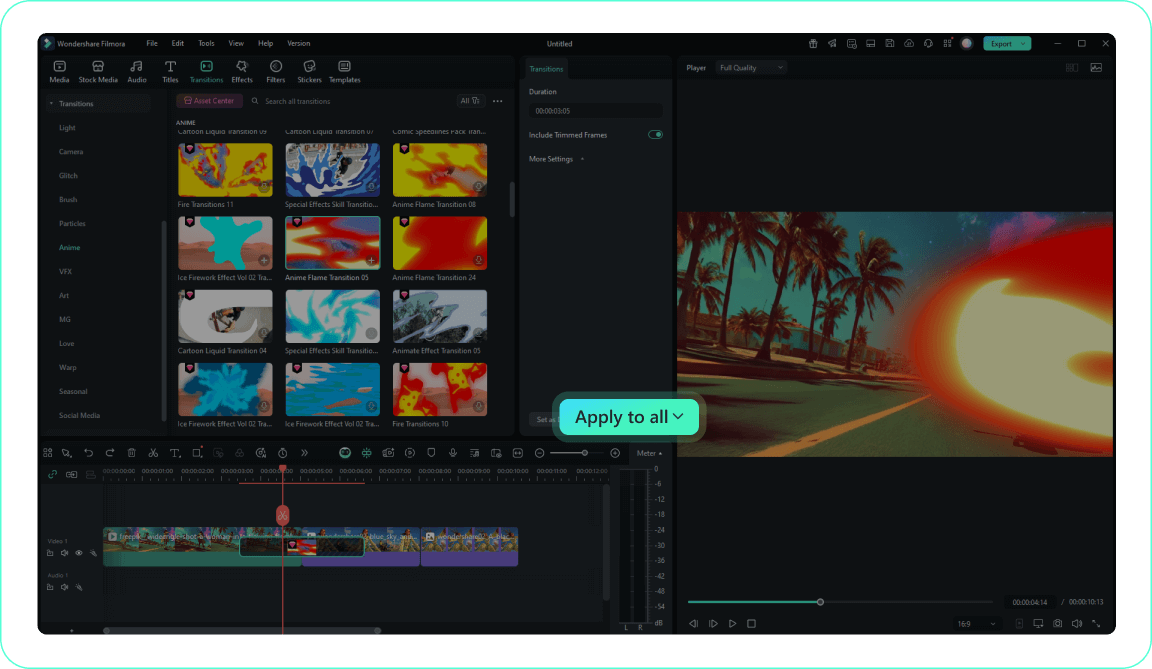
4. Customize and Preview
-
1. Import Your Video
Import your raw footage into the media library and drag it onto the editing timeline to prepare for your new visual effects.Pro Tip: Keep your workspace organized by grouping clips into dedicated folders. -
2. Access the Transitions Tab
Navigate to the top menu and open the transitions library to discover a wide variety of cinematic video effects. -
3. Apply Your Transition
Search for the page turning transition and drag it directly between two connected clips on your timeline. -
4. Customize and Preview
Double-click the applied effect to adjust its duration or peeling direction, then play the sequence to ensure a flawless visual flow.Pro Tip: Save your modified settings to quickly apply the same timing across your entire sequence.
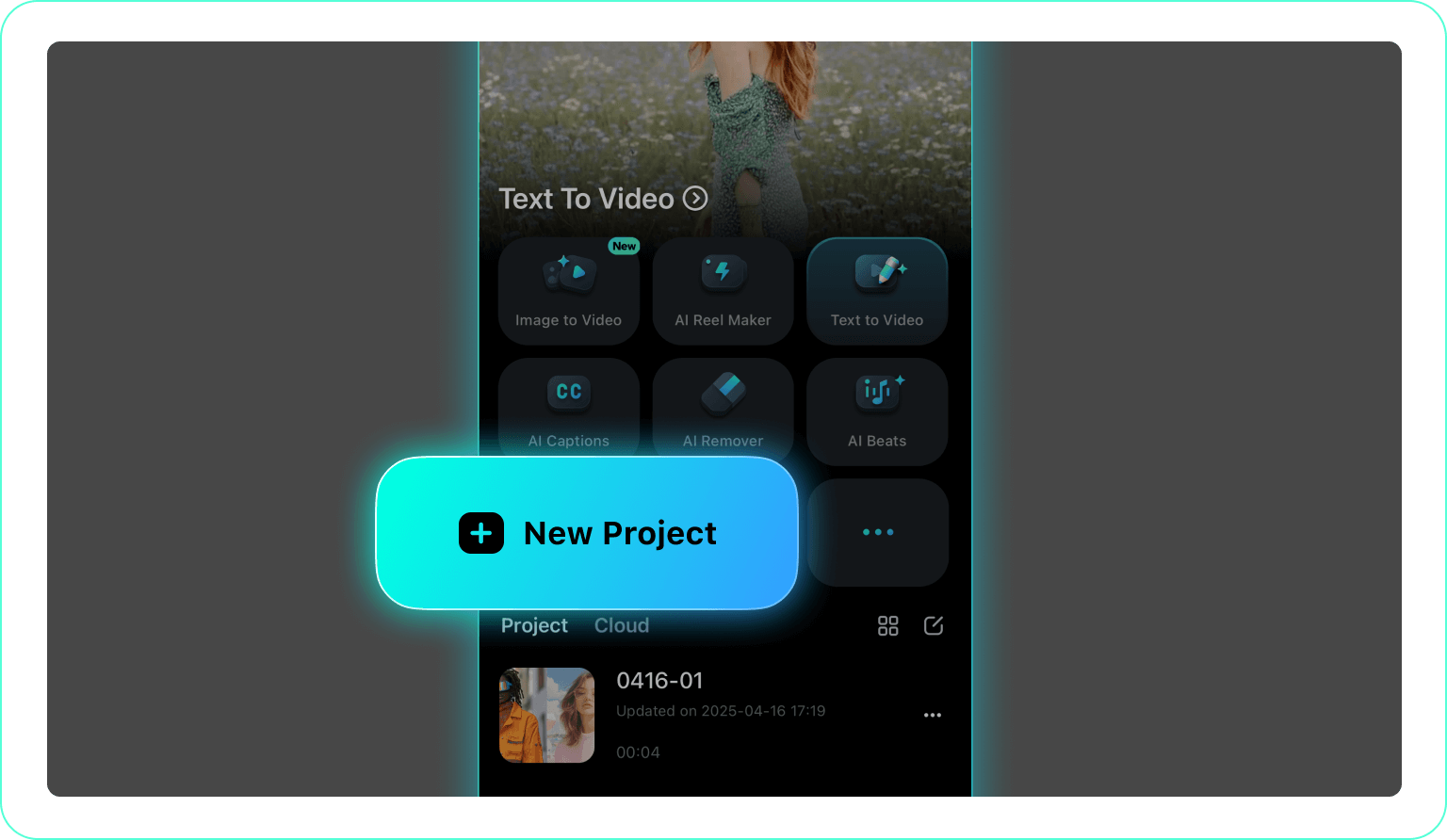
1. Open Your Project
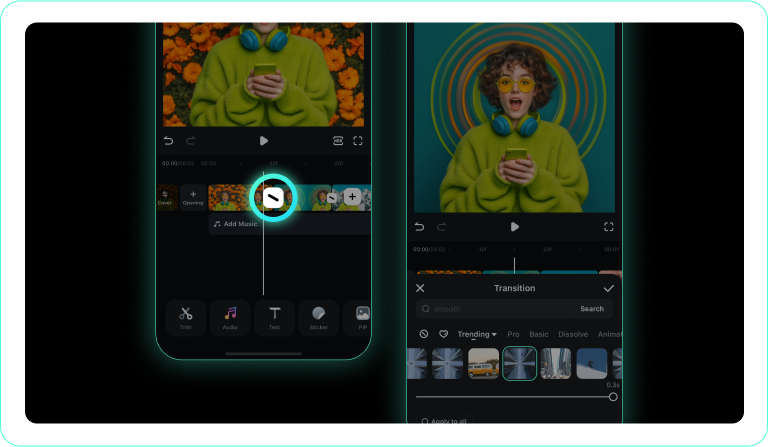
2. Tap the Transitions Icon
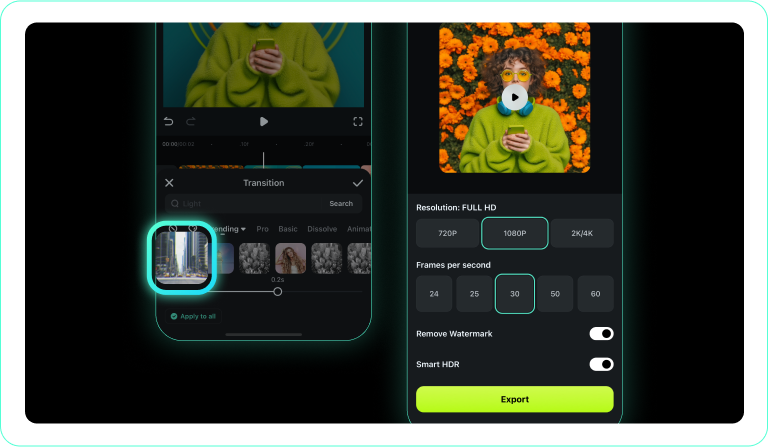
3. Choose and Apply a Transition
-
1. Open Your Project
Launch the Filmora mobile application and import the clips you wish to merge. -
2. Tap the Transitions Icon
Select the intersection point between your media clips to open the available animation options. -
3. Choose and Apply a Transition
Search for the page curl effect, customize its speed, and apply it directly to your mobile timeline.
Elevate Your Content With a Cinematic Page Turning Transition
Filmora offers much more than basic scene cuts. By utilizing a high-quality page turning transition, you can instantly give your video projects a sophisticated, story-driven atmosphere. Layer this effect with vintage film filters, utilize advanced color correction to match your scene aesthetics, and incorporate stunning creative assets to build a cohesive narrative. Whether you are assembling an emotional wedding montage or a fast-paced travel vlog, mastering these visual techniques ensures your content remains engaging, professional, and visually unforgettable.








