
Split Transition Examples & Guides
Browse dynamic split screen transitions and professional editing workflows.
Loading more split transition examples...
 Category:
 Duration:
 Aspect Ratio:
Everything You Need to Master Split Screen Transitions
A beautifully timed split transition can completely transform the pacing of an ordinary clip into a polished cinematic masterpiece. Filmora provides an expansive library of built-in video transitions that allow you to seamlessly divide your frame, bridging completely different scenes without missing a beat.
Whether you are producing high-energy gaming montages, dual-perspective storytelling sequences, or professional corporate reels, Filmora empowers you to customize every aspect of your split effects with absolute precision before publishing to your favorite platforms.
Seamlessly Merge Storylines With Split Screen Transitions
Seamlessly Merge Storylines With Split Screen Transitions
Combine parallel narratives effortlessly without complex keyframing. Filmora's advanced transition engine allows you to divide the screen dynamically, instantly revealing simultaneous actions or shifting geographical locations. This powerful capability ensures your audience remains deeply engaged as your story unfolds across multiple perspectives at once.
- Slice through your footage dynamically to transition smoothly between contrasting environments.
- Control the precise angle and feathering of the split line for a polished cinematic aesthetic.
- Combine multiple clips into a single cohesive frame before fully transitioning into the next scene.
Enhance Split Cuts With Advanced AI Tools
Enhance Split Cuts With Advanced AI Tools
Push your creative boundaries by integrating generative AI into your editing workflow. Filmora gives you instant access to powerful models like GPT Image 2, Nano Banana, and Nano Banana Pro to create striking visual assets that can slide perfectly into your split sequence. Pair these capabilities with intelligent AI video editing tools to automate the technical heavy lifting.
- Generate completely original background elements using GPT Image 2 directly within the editing timeline.
- Synchronize your split transition perfectly with the rhythmic beat using automated audio detection.
- Apply intelligent masking to isolate moving subjects just before they slide out of the visible frame.
- Expand your visual canvas rapidly with Nano Banana Pro to fill gaps in complex multi-screen layouts.
Elevate Visual Impact With Cinematic Filters and Effects

Elevate Visual Impact With Cinematic Filters and Effects
A raw transition is merely the foundation of a great edit. Enhance the dramatic mood of your split screen transitions by layering stunning video filters and applying precise color correction. Whether you desire a gritty high-contrast look or a soft dreamy aesthetic, Filmora supplies all the tools needed to unify both sides of the screen seamlessly.
- Unify the color palette of two completely different scenes seamlessly during the transition playback.
- Apply dynamic motion blur to the dividing line to create an intense sense of high-speed action.
- Layer atmospheric lighting overlays on top of the transition to blend incoming and outgoing shots naturally.
- Export your finished project in optimal aspect ratios to preserve the quality of your intricate split effects.
Frequently Asked Questions About Split Transitions
How to Add a Split Transition in Filmora
Craft professional split screen transitions in just a few simple steps, elevating your edits without any complex keyframing.
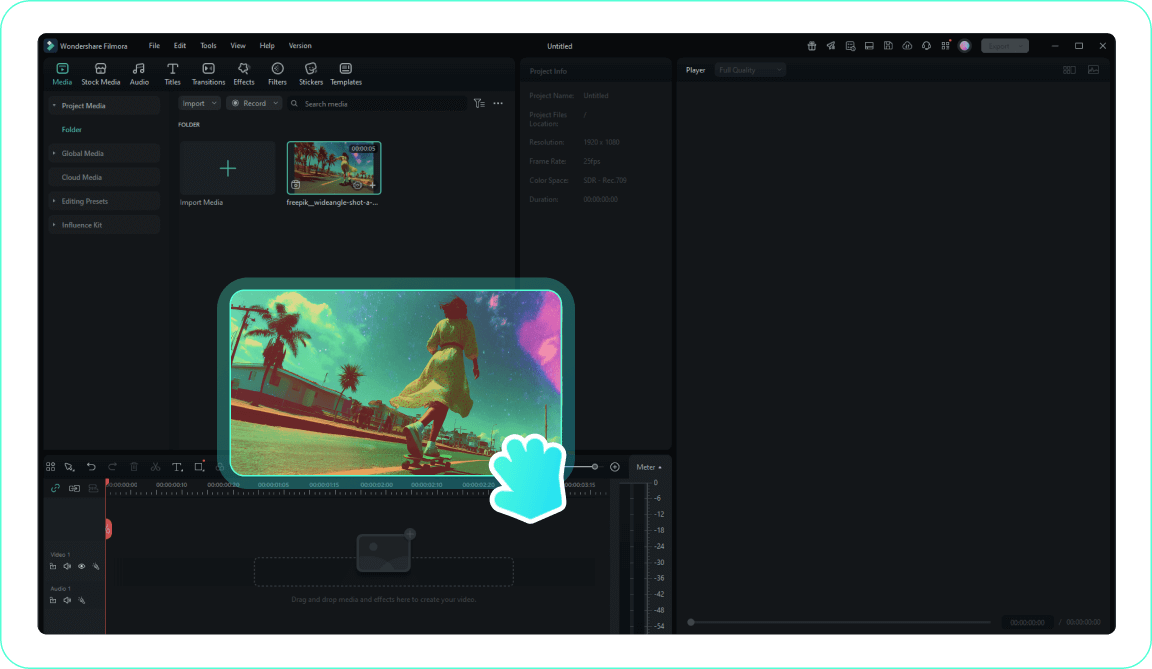
1. Import Your Video
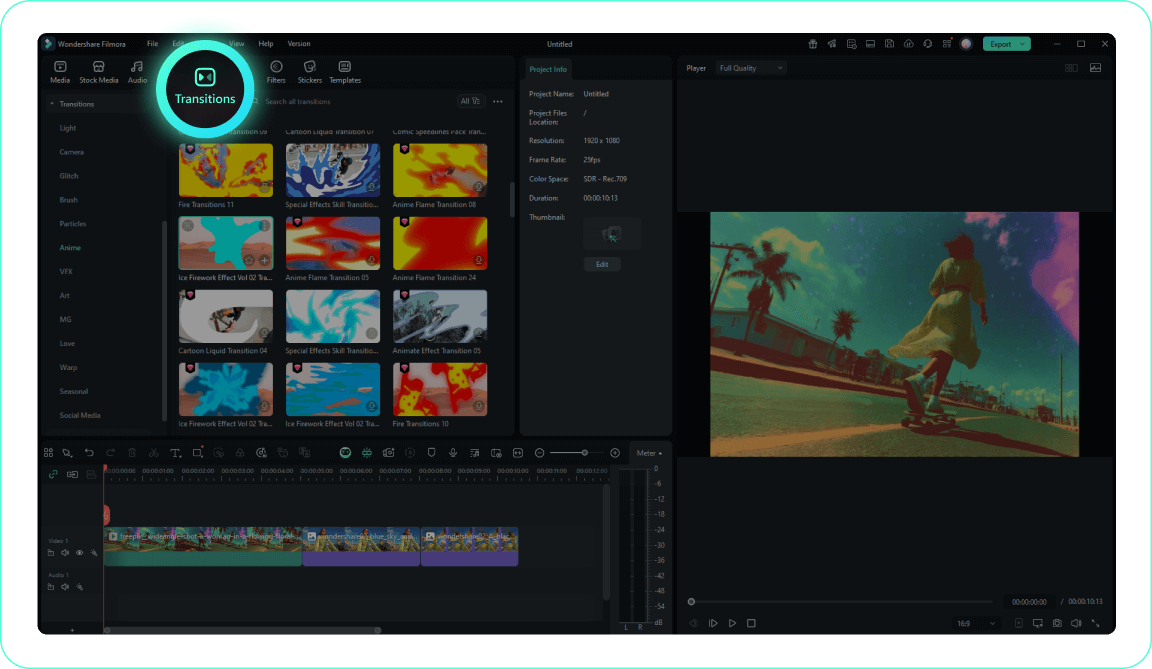
2. Access the Transitions Tab
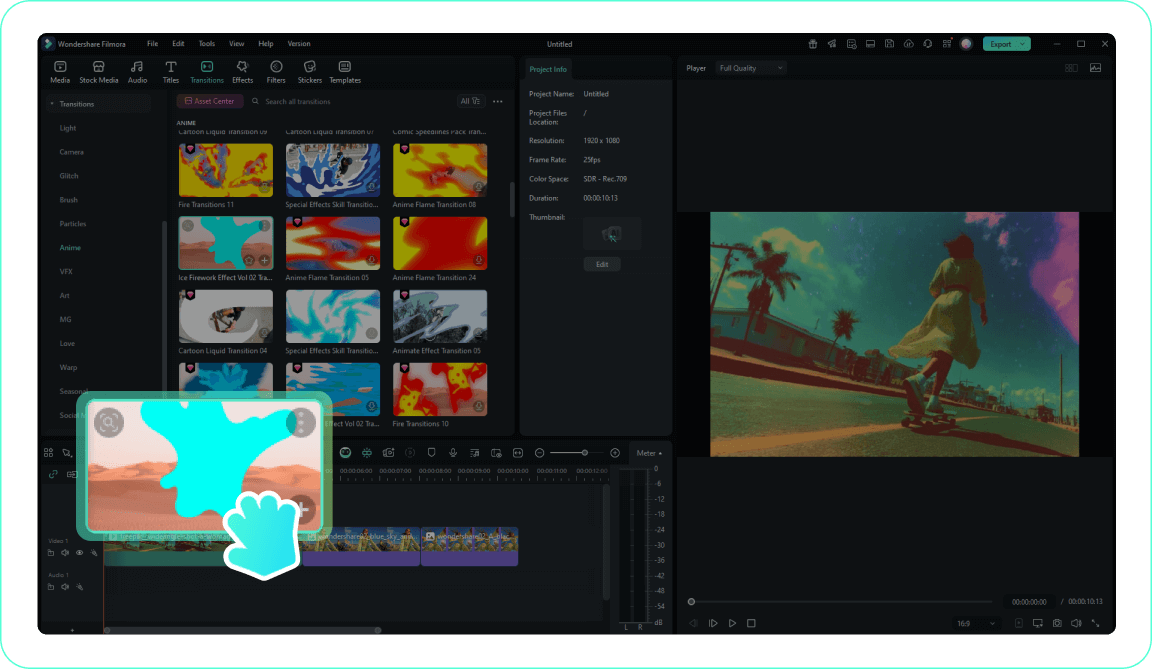
3. Apply Your Split Transition
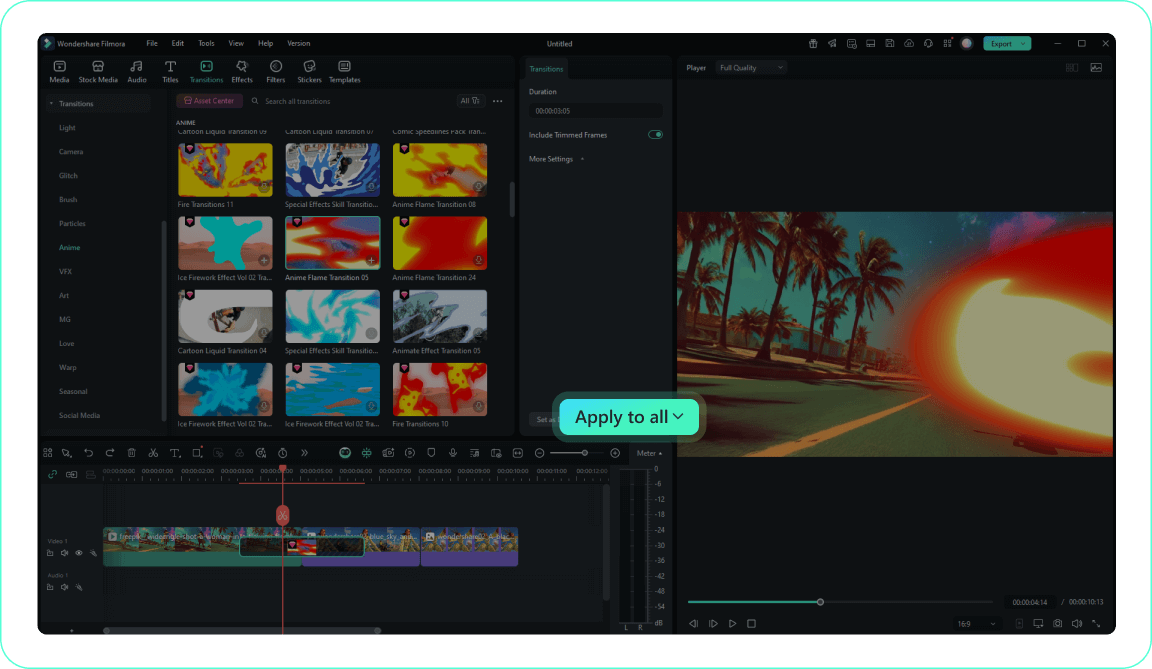
4. Customize and Preview
-
1. Import Your Video
Import your raw footage into the media library and drag the clips onto your timeline sequentially.Pro Tip: Keep files organized into separate folders for complex transition sequences. -
2. Access the Transitions Tab
Navigate to the top menu and open the transitions panel to find dynamic split effects. -
3. Apply Your Split Transition
Drag your selected split transition between two intersecting video clips for a seamless visual shift. -
4. Customize and Preview
Double-click the applied effect to modify its speed and direction, then play it back to check the rhythm.Pro Tip: Right-click on a transition and select Apply to All for consistent styling across multiple clips.
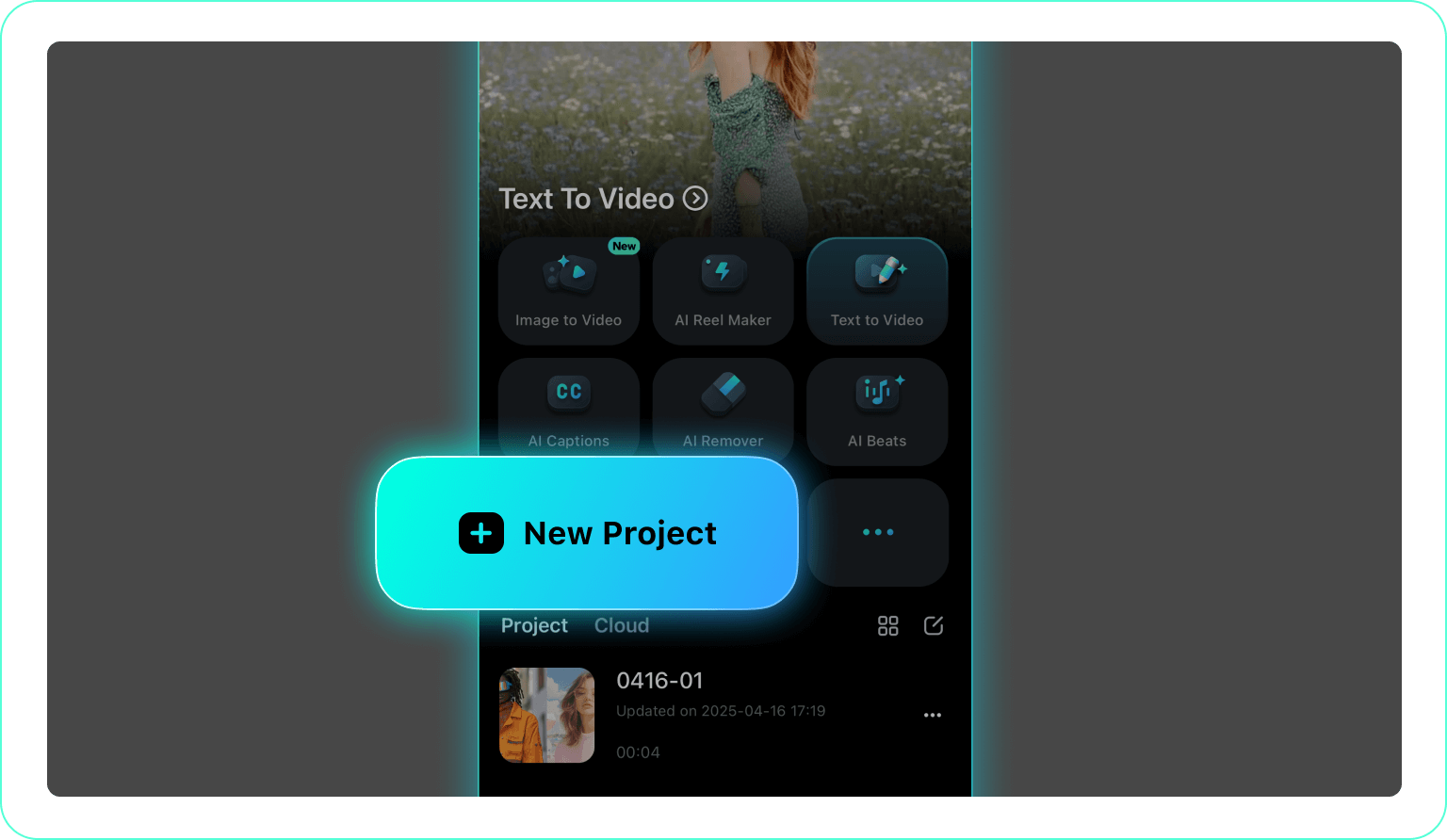
1. Open Your Project
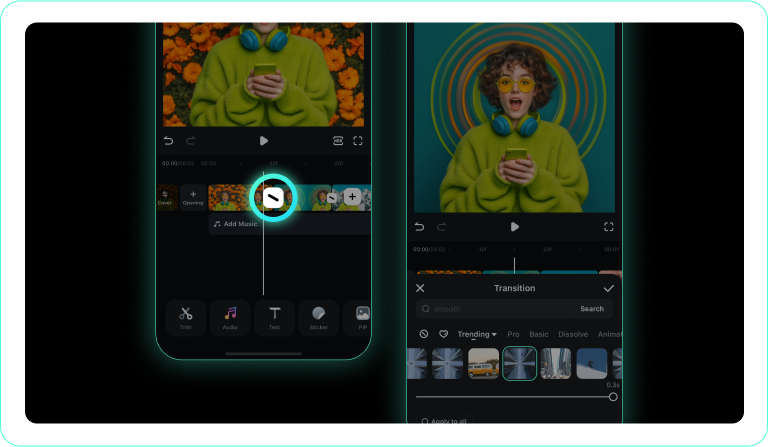
2. Tap the Transitions Icon
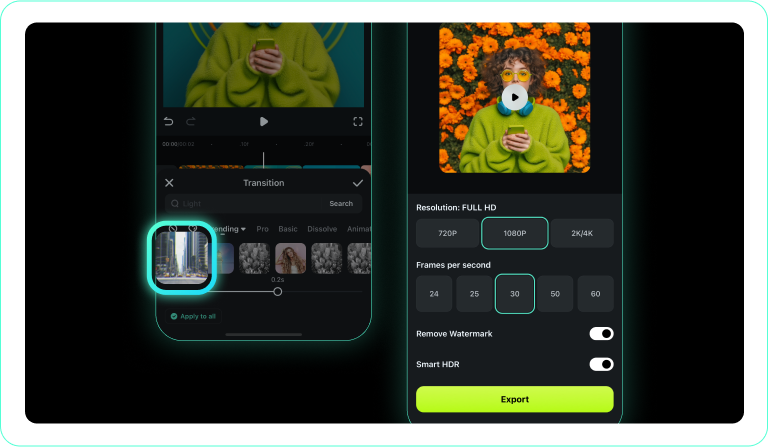
3. Choose and Apply a Transition
-
1. Open Your Project
Launch the Filmora App on your mobile device and load the media you wish to merge. -
2. Tap the Transitions Icon
Tap the junction point between your clips on the timeline to reveal the transition menu. -
3. Choose and Apply a Transition
Select a split transition style that fits your pacing and confirm the visual effect.
Go Beyond Basic Cuts With Advanced Visual Storytelling
Mastering the split transition is just the first step in creating captivating digital content. With Filmora, you can completely transform your workflow using intuitive tools designed for modern creators. Easily add titles to your split-screen sequences, browse thousands of royalty-free creative assets, or generate entirely new concepts using cutting-edge generative AI models. Whether you are producing high-octane action reels, cinematic travel vlogs, or engaging social media shorts, Filmora provides an all-in-one platform to bring your most ambitious ideas to life with professional polish and absolutely zero friction.








