วิธีนำเข้าวิดีโอและรูปภาพจากกล้อง โทรศัพท์ และเครื่องบันทึก
Next Episodes
นี่คือวิธีการนำเข้าวิดีโอ เพลง และรูปภาพของคุณจากโทรศัพท์ กล้องวิดีโอ หรือคอมพิวเตอร์เข้าสู่ Filmora
- เชื่อมต่อโทรศัพท์ กล้องวิดีโอ หรือกล้องของคุณกับคอมพิวเตอร์
- เมื่อเชื่อมต่อแล้ว ให้คลิกที่ปุ่ม Media ใน Filmora ที่ด้านบน ให้คลิกที่ไอคอนลูกศรถัดจาก "Import" และเลือก "Import from camera or phone" ในเมนูแบบเลื่อนลง
- ในหน้าต่างป๊อปอัพ ให้เลือกกล้องวิดีโอ กล้อง หรือโทรศัพท์ของคุณเพื่อนำเข้า หลังจากการสแกนเสร็จสิ้น คุณสามารถเลือกไฟล์ที่ต้องการนำเข้าสู่ Filmora เพื่อแก้ไขได้
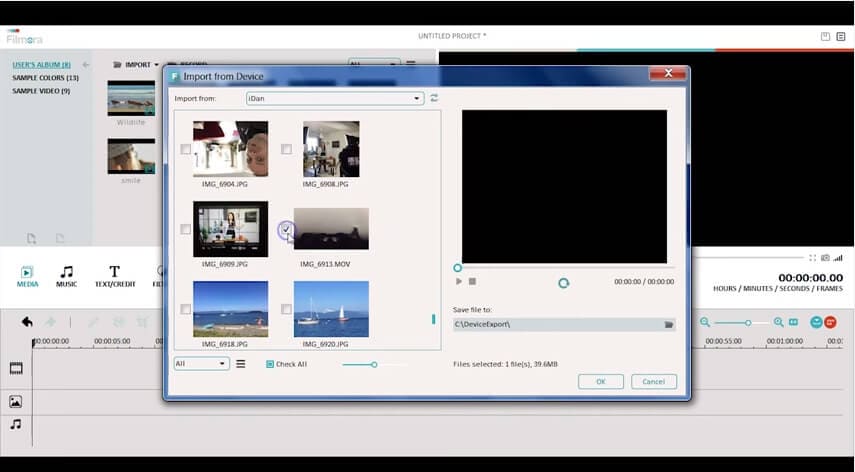
คุณยังสามารถนำเข้าไฟล์สื่อที่บันทึกไว้ในคอมพิวเตอร์ของคุณเพื่อแก้ไขได้
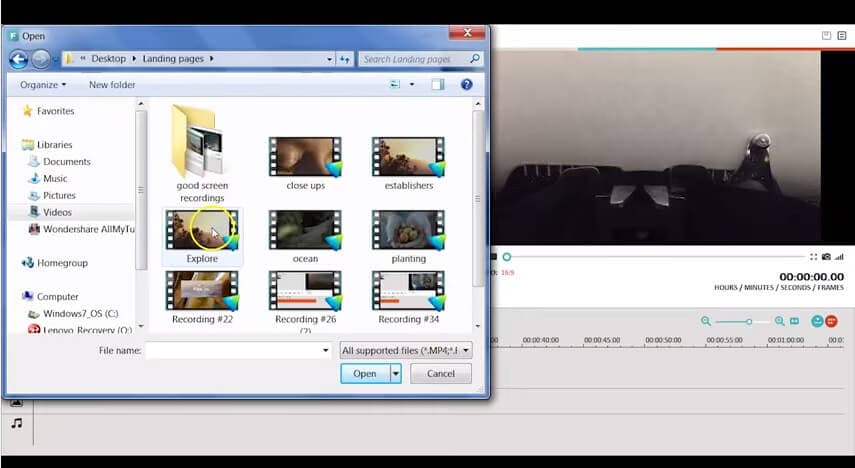
ในการนำเข้าไฟล์เหล่านั้น คุณสามารถไปที่ส่วน Media และเลือก Import หน้าต่างป๊อปอัพจะปรากฏขึ้นเพื่อให้คุณเลือกไฟล์เสียง รูปภาพ และวิดีโอจากคอมพิวเตอร์ของคุณ
Watch More Quick-n-Dirty Video Tips
Explore Wondershare
Try Now
-
Products Platforms
Features
-
Video
Assets
-
-
AI -
Content Generation -
Efficiency Level-Up
Video/Image
- AI Text to VideoVeo 3.1
- AI Image to VideoVeo 3.1
- AI Image Generator >
- AI Video ExtenderNEW
-
-
Solutions Marketing & Business
-
Resources -
Video Prompts
150+ FREE video prompts covered to quickly generate similar videos -
Video Trends
Discover top ten vdeo marketing trends 2025 -
Video Encyclopedia
Learn video editing technical terms -
Content Hub
Explore tips, creation ideas, and sparkling events -
Creator Hub
Get inspired by a wide range of content creators -
DIY Special Effects
Create video effects like a pro just by yourself
-
-
Help Center Support
-
FAQs >
Troubleshooting and help files -
Guide & Tutorials >
Product videos, tutorials, and guides -
Tech Specs >
Specific product requirements and functions -
Team & Business >
Flexible plans for teams and enterprises
Learn
-
What's New >
Our latest updates and problem fixes -
Version History >
To see how products and offerings have changed -
Reviews >
See what our users say
-
-
- search
Call us: +1-60-4343-8521
Mon-Fri 6:00 PM to 11:00 AM Pacific Time
International phone rates may be charged by your service provider
Search
Searching for something? Try one of the links below:
Hot Tutorials

Explore Wondershare
Try Now
-
Products Platforms
Features
-
Video
Assets
-
-
AI -
Content Generation -
Efficiency Level-Up
Video/Image
- AI Text to VideoVeo 3.1
- AI Image to VideoVeo 3.1
- AI Image Generator >
- AI Video ExtenderNEW
-
-
Solutions Marketing & Business
-
Resources -
Video Prompts
150+ FREE video prompts covered to quickly generate similar videos -
Video Trends
Discover top ten vdeo marketing trends 2025 -
Video Encyclopedia
Learn video editing technical terms -
Content Hub
Explore tips, creation ideas, and sparkling events -
Creator Hub
Get inspired by a wide range of content creators -
DIY Special Effects
Create video effects like a pro just by yourself
-
-
Help Center Support
-
FAQs >
Troubleshooting and help files -
Guide & Tutorials >
Product videos, tutorials, and guides -
Tech Specs >
Specific product requirements and functions -
Team & Business >
Flexible plans for teams and enterprises
Learn
-
What's New >
Our latest updates and problem fixes -
Version History >
To see how products and offerings have changed -
Reviews >
See what our users say
-
-
- search
Call us: +1-60-4343-8521
Mon-Fri 6:00 PM to 11:00 AM Pacific Time
International phone rates may be charged by your service provider
Search
Searching for something? Try one of the links below: