

 100% Security Verified | No Subscription Required | No Malware

Urban Instagram accounts and lifestyle creators rely on city video filters to turn ordinary streets into cinematic backdrops. With the right mix of contrast, color, and grain, every crosswalk, cafe corner, and skyline shot can feel like a mini film scene.
This guide breaks down 12 city video filters for Instagram designed for urban aesthetic content, from moody street nights to bright daytime strolls, so you can keep your grid and reels looking cohesive and on-brand.
In this article
Bright City Daylight Filters
Clean Crisp City
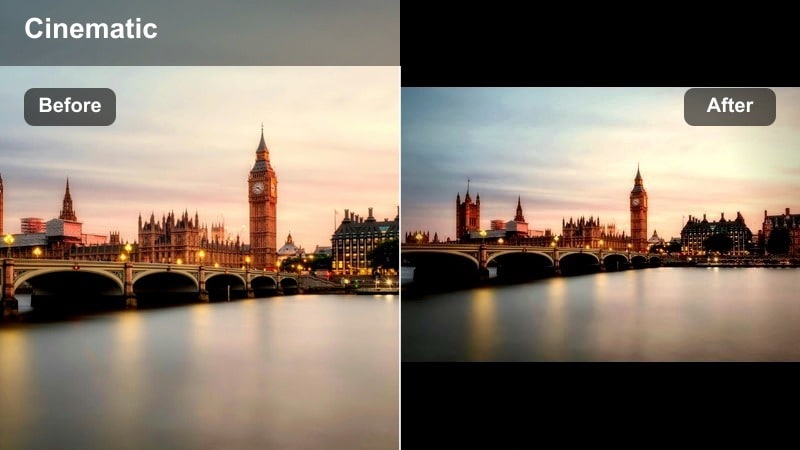
- Effect look: Bright, sharp, and clean with neutral colors and subtle clarity for modern city shots.
- Best for: Daytime street walks, cafe fronts, glass buildings, and lifestyle OOTD clips in natural light.
- Editing tip: Slightly lower highlights and boost clarity or sharpness to keep white walls and glass from blowing out while keeping lines defined.
Clean Crisp City is the kind of city video Instagram filter that keeps your feed looking professional without screaming filtered. It keeps whites controlled, lines sharp, and colors neutral, so glass buildings, bright sidewalks, and outfits all look polished and on-brand. In Filmora, this works perfectly as a base look when you want modern, minimal, and bright city footage.
Apply this style to your Instagram city filter workflow by slightly reducing highlights and gently increasing clarity or sharpness inside Filmora. This helps your cafe windows, skyscraper reflections, and bright signage stay readable on small screens. If your camera overexposes mid-day scenes, pull exposure down a touch and then use Filmoras color tools to refine contrast so every edge remains clean and crisp.
Pro tip: Keep skin tones natural in hard daylight
If faces look too washed out, reduce exposure slightly and pull back highlights instead of lowering overall brightness.
Use selective color tools to warm up skin tones while keeping the rest of the city scene neutral and crisp.
Match Your City Filters With AI-Powered Color Control
Instead of guessing sliders, use Filmoras AI-powered color tools to quickly match your city clips to a consistent aesthetic. From warm street glows to cool steel skylines, AI helps you lock in a vibe fast.
Analyze one favorite clip, save it as a preset, and then batch-apply the same look across a full reel sequence so your feed feels intentional and polished.
 secure download

See City Filters in Action on Real Street Footage
Drag in handheld sidewalk shots, rooftop views, or subway B-roll and preview multiple Filmora filters side by side to see which works best for your urban aesthetic content.
Compare crisp neutral styles, gritty street looks, and dreamy night grades on the same clip so you choose the filter that fits your story, not just the trend.
secure downloadTurn Your Favorite City Filters Into Reusable LUTs
Once you dial in the perfect city video filters for Instagram, save them as LUTs so you can reuse the same urban look on future reels, TikToks, and long-form edits.
Sharing content across multiple accounts or creators becomes easier when everyone can start from the exact same base LUT and adjust from there inside Filmora.
secure downloadSoft Urban Pastel
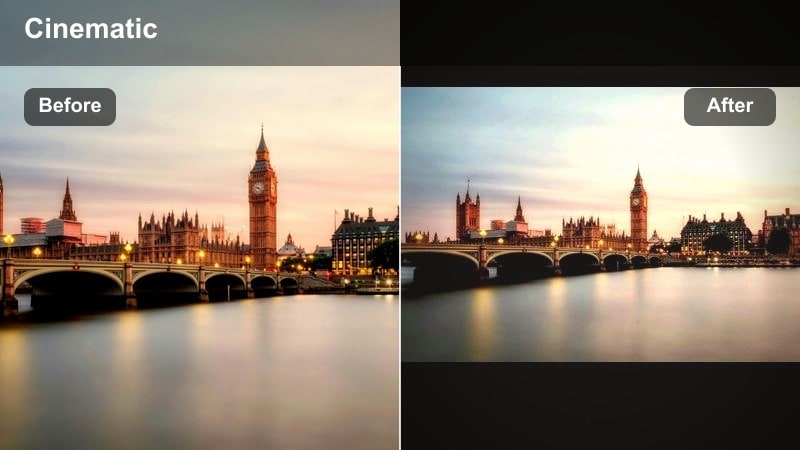
- Effect look: Soft pastel tones with gentle contrast and a dreamy haze over city streets.
- Best for: Lifestyle city posts, brunch spots, boutique storefronts, and soft aesthetic reels.
- Editing tip: Lift shadows slightly and reduce clarity a touch to enhance the dreamy vibe, but avoid overblurring lines of architecture.
Soft Urban Pastel gives your city content that airy, lifestyle-friendly mood that works perfectly for brunch, shopping, and OOTD reels. Colors lean pastel, contrast stays gentle, and the entire frame feels slightly dreamy without losing structure. In Filmora, this city video Instagram filter style is ideal if you want your grid to feel light and feminine while still showing off urban details.
To create the look in Filmora, start by lifting shadows and slightly lowering clarity. Then, soften contrast and add a subtle warm tint to highlights, checking that building edges and window frames remain visible. If the scene starts to look too flat, reintroduce a small amount of local contrast so your subject stands out while the background stays soft and pastel.
Pro tip: Balance pastel with detail
Keep edges like window frames and railings slightly sharpened so your pastel look feels soft but not blurry.
If skies turn too white, reduce highlights and add a light blue tint to keep the pastel look balanced.
High Contrast Streets
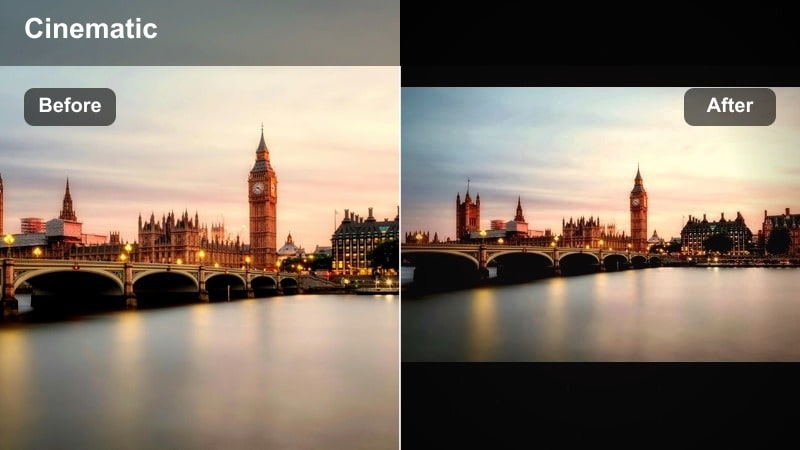
- Effect look: Punchy contrast with deep blacks and bright whites that make every line pop.
- Best for: Architecture shots, crosswalk moments, quick transitions, and bold city reels.
- Editing tip: Add a small fade to the blacks to avoid harsh clipping, and tweak saturation to prevent colors from looking cartoonish.
High Contrast Streets is all about drama and structure, perfect when you want your skyscrapers, crosswalks, and shadows to jump out on the Instagram feed. This city video filter pushes blacks deeper, boosts whites, and makes architectural lines more graphic so transitions and B-roll feel bold and energetic. It is a strong option for creators who like punchy, high-impact reels.
In Filmora, increase overall contrast and deepen blacks, then add a touch of fade so the image does not clip. Fine-tune saturation so colors stay rich but not overly neon, and consider using the color wheels to keep skin tones natural. For best results, apply this to shots with clear shapes and leading lines so the high-contrast look naturally guides the viewers eye.
Pro tip: Use contrast to guide the eye
Frame your subject against lighter or darker backgrounds so the high-contrast look naturally draws attention to them.
Lower midtone contrast slightly if faces start looking too harsh or shadowy.
Moody Night City Filters
Neon Noir
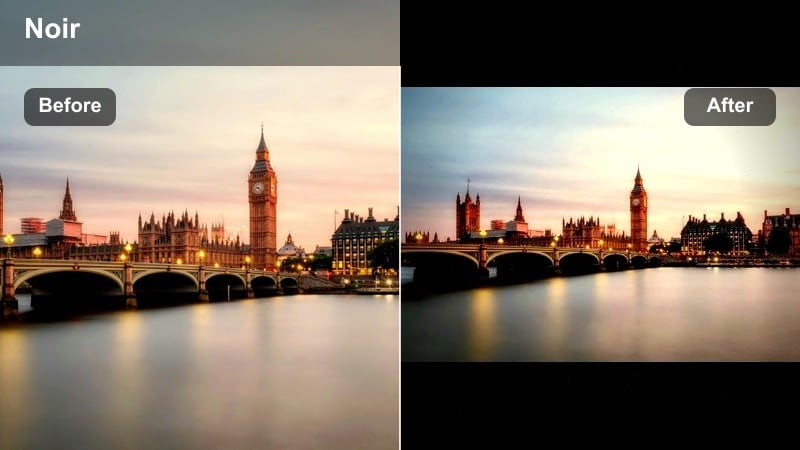
- Effect look: Deep shadows, glowing highlights, and saturated neon signs for cinematic night shots.
- Best for: Night streets, bar signs, reflections on wet asphalt, and cyberpunk-inspired reels.
- Editing tip: Drop overall saturation slightly and then selectively boost reds, pinks, and blues to keep neon colors intense but controlled.
Neon Noir is a go-to city video Instagram filter for night clips packed with signs and reflections. It leans into deep blacks, glowing lights, and rich neon hues, turning rainy streets and nightlife B-roll into mini movie scenes. This style works especially well for cyberpunk-inspired edits, music-driven reels, and any content where light and color are the main characters.
In Filmora, reduce global saturation a bit, then selectively boost reds, magentas, and blues for controlled neon punch. Raise highlights to make signs glow while protecting detail with the curves tool. Add a subtle vignette and a hint of color noise reduction so the dark areas stay clean without stripping the atmosphere from your night footage.
Pro tip: Protect detail in dark night shots
Raise shadows slightly so building textures do not disappear into pure black while keeping overall mood dark.
Use noise reduction carefully at night to smooth grain without making the video look plasticky.
Amber Street Glow
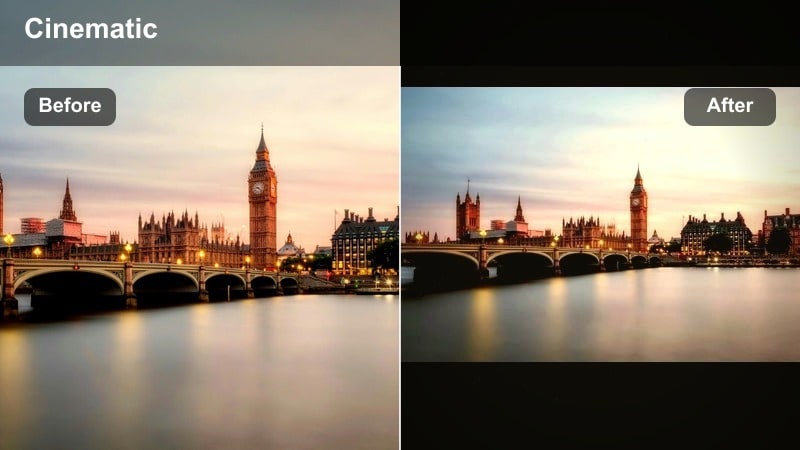
- Effect look: Warm amber streetlights, softened shadows, and cozy night tones across the frame.
- Best for: Golden street lamps, late-night cafes, rooftop hangs, and intimate night vlogs.
- Editing tip: Increase warmth and tint toward orange slightly, then cool down shadows a bit to keep the image from turning fully orange.
Amber Street Glow gives your city nights a romantic, cozy atmosphere that pairs perfectly with vlogs, date nights, and rooftop hangs. Streetlights shift toward amber, shadows soften, and the overall frame feels inviting rather than harsh. It is a strong choice when you want your city video filters for Instagram to feel warm and cinematic instead of dark and gritty.
Inside Filmora, push the temperature slider warmer and add a slight orange tint in the midtones. Then, cool the shadows just a bit so the entire clip does not turn orange. You can also soften contrast and introduce a gentle bloom on highlights to make lamps and windows feel like natural light sources wrapping around your subject.
Pro tip: Separate skin from streetlights
If faces turn too orange, reduce orange saturation in HSL while keeping yellows and reds slightly boosted.
Add a gentle vignette so the warm light feels focused on the subject rather than the entire frame.
Cool Midnight Blocks
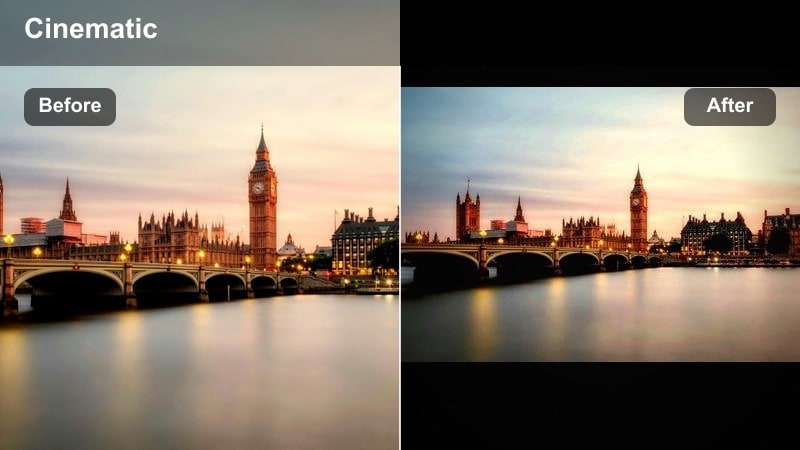
- Effect look: Cool blue shadows, slightly desaturated colors, and a quiet midnight feel.
- Best for: Empty streets, skyline shots, late-night walks, and moody narrative reels.
- Editing tip: Shift temperature to the cool side and gently lower saturation so city lights pop against muted surroundings.
Cool Midnight Blocks brings a calm, cinematic character to late-night city scenes, perfect for storytelling reels and quieter moments. Shadows lean blue, overall saturation drops slightly, and the result feels like a reflective midnight walk through the city. This filter is ideal when you want an urban Instagram LUT that communicates mood and solitude instead of nightlife energy.
In Filmora, drag the temperature slider cooler and nudge saturation down so colored lights and signs stand out against the desaturated city. Use the color wheels to keep midtones slightly warmer if you are showing faces, and raise exposure a little so important details remain visible after the cool shift. Adding a small amount of grain can enhance the cinematic late-night vibe without overwhelming the footage.
Pro tip: Avoid lifeless blues
Keep a bit of warmth in midtones to preserve skin tone and prevent the entire scene from feeling too cold.
Subtly raise exposure so darker clips keep some detail in shadows after the cool shift.
Street Aesthetic and Gritty Filters
Gritty Street Film
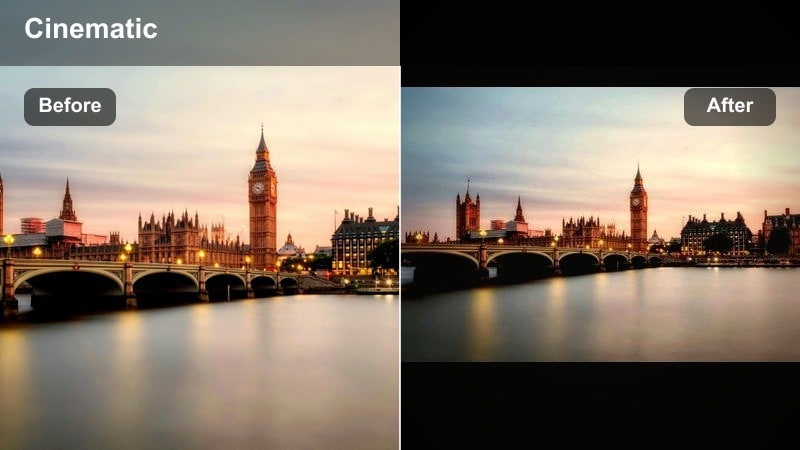
- Effect look: Muted colors, lifted blacks, and subtle grain for a raw film-style street look.
- Best for: Street photography style reels, skateboard clips, alleyway walks, and candid city shots.
- Editing tip: Slightly fade the blacks and add fine film grain, then pull down saturation to emphasize texture over color.
Gritty Street Film channels a documentary vibe, giving your city reels raw, textured energy. Colors are muted, blacks are lifted, and subtle grain makes your footage feel like it was shot on 16mm film. This city video Instagram filter works especially well for skateboarding clips, alleyway walks, and any content where imperfections are part of the story.
In Filmora, fade your blacks using the curves tool, reduce saturation, and add fine film grain for a tactile feel. Keep sharpening modest so grain remains natural, then use local contrast adjustments to bring out textures in walls, pavement, and clothing. This approach lets your street scenes feel intentionally rough while still being clear enough for Instagram viewing.
Pro tip: Let texture carry the mood
Film grain and slightly lifted blacks can make handheld, imperfect clips feel intentional and cinematic.
Keep stabilization light so the street grit and handheld motion still feel authentic rather than overly polished.
Urban Desaturated Chrome
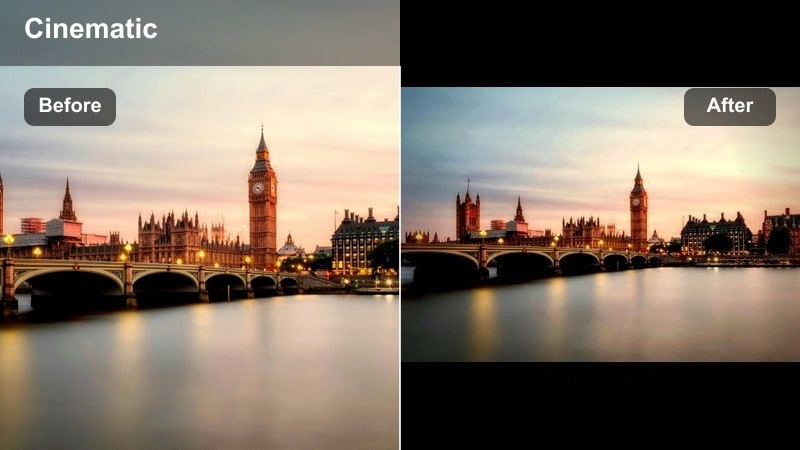
- Effect look: Low saturation, strong contrast, and cool metal tones for concrete-heavy scenes.
- Best for: Parking garages, subways, overpasses, and monochrome-leaning street aesthetics.
- Editing tip: Drop vibrance more than saturation so subtle colors remain, then cool midtones to emphasize steel and concrete.
Urban Desaturated Chrome is built for industrial, concrete-heavy shots where you want a clean, editorial feel. Saturation sits low, contrast is firm, and the palette leans toward cool metal tones, giving your city video filters for reels a polished magazine-style edge. It is an excellent choice for subways, garages, and minimalist outfit posts.
Inside Filmora, lower vibrance more than overall saturation to keep small pops of color. Cool the midtones using the color wheels, then add moderate contrast to emphasize structure in steel, glass, and concrete. If you need certain brand colors or outfits to stand out, selectively boost those hues with HSL so they pop against the otherwise muted environment.
Pro tip: Protect important accent colors
If brand colors or outfits matter, mask or selectively boost those hues after you desaturate the overall scene.
Use subtle local contrast adjustments on key subjects to help them separate from similar-toned backgrounds.
Street Aesthetic Warm Grain
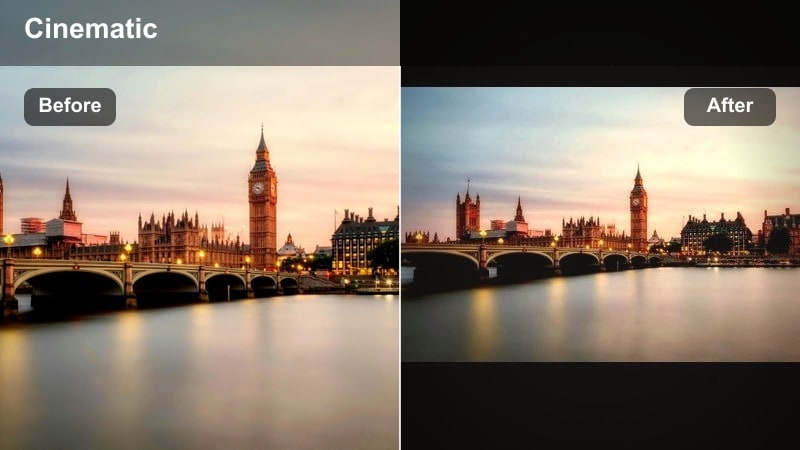
- Effect look: Warm highlights, faded blacks, and noticeable grain for a nostalgic street diary feel.
- Best for: Everyday sidewalk scenes, thrift hauls, vintage-style city diaries, and POV clips.
- Editing tip: Lift blacks, raise warmth slightly, and add medium grain size, but reduce sharpening so the image feels softer and analog.
Street Aesthetic Warm Grain turns your daily city clips into nostalgic diary entries, like they were captured on an old camcorder. Highlights run warm, blacks fade gently, and grain is visible enough to feel intentional. This filter is ideal for POV walks, thrift hauls, and storytime reels where emotion and memory matter more than clinical sharpness.
In Filmora, lift your blacks and increase warmth, then introduce medium-sized grain while reducing sharpening. You can soften contrast slightly to enhance the analog feel, and use a light vignette to keep focus on the center of the frame. Export a few variations at different intensities so you have matching looks ready for sunny days, cloudy afternoons, and golden hours.
Pro tip: Match grain to video resolution
For high-resolution footage, keep grain size smaller and intensity moderate so it feels realistic instead of noisy.
Apply grain after major color corrections to avoid smoothing it out during later adjustments.
Creator-Favorite City Filters for Instagram
Minimal City Neutral
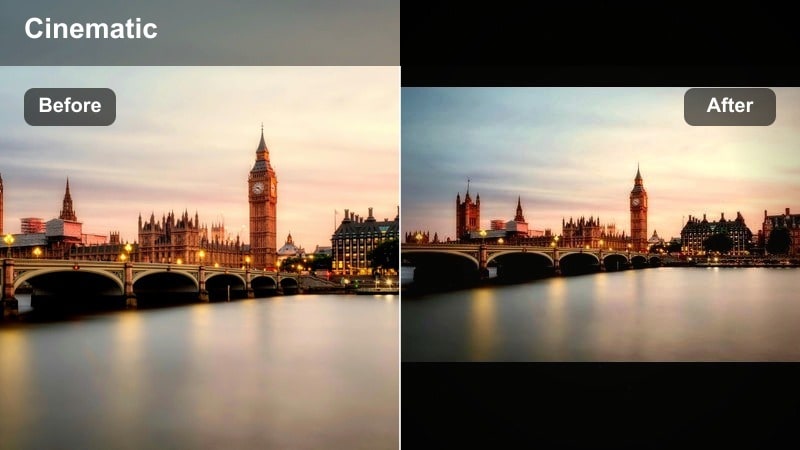
- Effect look: Balanced colors, mild contrast, and a clean neutral tone for cohesive grids.
- Best for: Instagram city posts that mix outfits, food, and architecture in one consistent aesthetic.
- Editing tip: Keep white balance close to natural and adjust saturation per color so storefronts and skies do not overpower outfits.
Minimal City Neutral is your everyday workhorse filter: clean, versatile, and subtle enough to pair with almost any city content. Colors stay balanced, contrast is gentle, and nothing looks overly stylized, so your grid remains cohesive even when you mix food, outfits, and architecture. It is the perfect base city video filter for Instagram creators who want consistency first.
Use Filmora to set a natural white balance and medium contrast, then fine-tune saturation for individual colors like blue skies, green plants, or bright storefronts. Save this as a preset or LUT, and apply it to new footage before adding creative tweaks. This gives you a repeatable foundation that keeps your urban style recognizable across reels and posts.
Pro tip: Use neutral as a base look
Save this look as a base preset to keep your city videos consistent before adding stronger creative tweaks.
Apply the preset first, then fine-tune exposure and white balance per clip so the overall grid matches.
Teal Orange Avenues
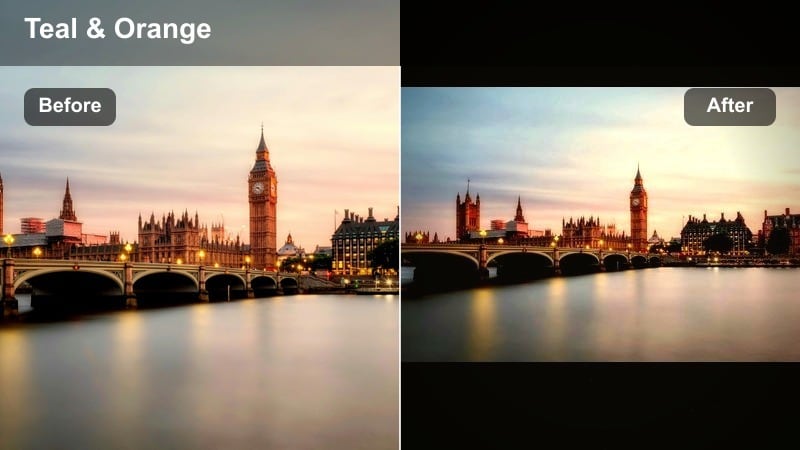
- Effect look: Classic teal shadows and warm orange skin tones with cinematic contrast.
- Best for: Urban fashion reels, travel vlogs, car shots, and cinematic B-roll around the city.
- Editing tip: Push blues and cyans into teal while warming midtones; then reduce saturation slightly to keep the look stylish, not cartoonish.
Teal Orange Avenues delivers the classic cinematic look popular in movies and high-end travel edits. Shadows shift toward teal, skin tones stay warm, and contrast gives your footage a polished, big-screen vibe. This urban Instagram LUT style is perfect for fashion, cars, and dynamic B-roll where you want instant visual impact.
In Filmora, use HSL or color wheels to push blues and cyans toward teal, then warm midtones and highlights for natural skin. Reduce overall saturation a bit so the teal-orange split feels stylish instead of exaggerated. Keep an eye on sidewalks, buildings, and signage; if they turn too teal, pull the blue saturation down or nudge hue closer to neutral.
Pro tip: Dial in teal and orange with restraint
Watch building walls and sidewalks; if they become overly teal, pull back blue saturation or adjust the hue toward neutral.
Use the look more subtly on clips with lots of brand colors so it does not conflict with logos or signage.
Soft Haze City Reels
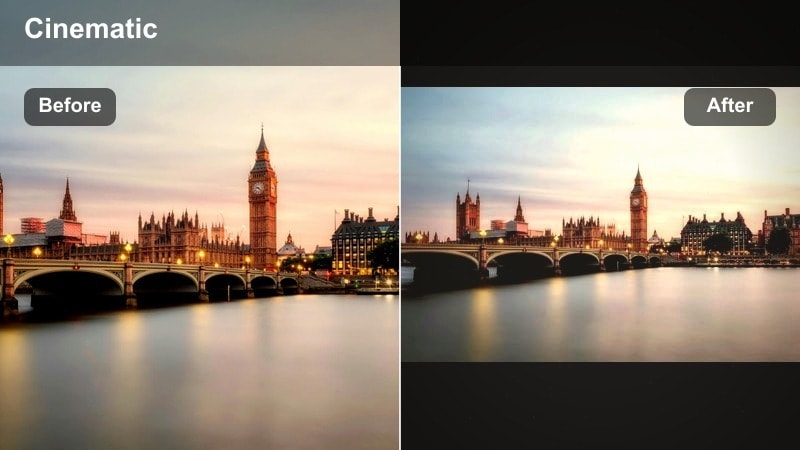
- Effect look: Gentle glow, lower contrast, and a subtle blur on highlights for dreamy reels.
- Best for: Transition reels, slow-motion spins, rooftop sunsets, and romantic city montages.
- Editing tip: Reduce clarity and add a light bloom effect to bright areas, then slightly increase saturation to keep the scene from looking flat.
Soft Haze City Reels is built for dreamy transitions, romantic montages, and rooftop sunsets. It lowers contrast, adds a gentle glow, and slightly softens highlights so your footage feels ethereal and cinematic. This city video Instagram filter works especially well with slow motion, whip-pans, and trend-based transition reels.
In Filmora, reduce clarity, apply a soft bloom or glow to bright areas, and then bump saturation just enough to keep colors alive. You can sharpen your subject slightly while letting the background stay hazy, ensuring faces remain clear on mobile screens. Combine this look with smooth motion effects or speed ramps for reels that feel polished and emotionally engaging.
Pro tip: Use haze to guide focus
Apply a bit more haze in the background than on the subject so faces stay readable and sharp enough for mobile screens.
Combine the haze with gentle camera movement for reels to make transitions feel smoother and more cinematic.
Tips for Using City Video Instagram Filter Filters in Filmora
- Shoot with consistent white balance in-camera so your city filters apply cleanly across multiple clips.
- Expose slightly darker than you think at night to protect highlights on signs and windows before adding filters.
- Create a base neutral preset for your city content, then stack creative filters on top for special reels.
- Test how each filter looks on both front and rear camera footage to avoid surprise skin tone shifts.
- Keep vertical framing in mind; apply subtle vignettes that guide attention toward the center of the Instagram frame.
- Save multiple versions of your favorite filter at different strengths to match bright days, cloudy afternoons, and nights.
- Use the same two or three city filters across a series to keep your Instagram grid visually consistent.
- Always preview your filtered video on a phone screen, not just a desktop, to confirm it reads well for Instagram viewers.
City video filters for Instagram help you turn everyday streets into a signature visual style, from gritty alleyways to soft rooftop sunsets, while keeping your grid cohesive and branded.
Experiment with a small set of go-to presets, refine them in Filmora, and then carry those same urban looks into your future reels for a recognizable aesthetic your audience can instantly spot.
secure downloadNext: Explore City Video Filters for Reels to Boost Urban Engagement
