

 100% Security Verified | No Subscription Required | No Malware


 ChatGPT
 Perplexity
 Gemini
 Claude
 Grok
Grok
Coffee Brown sits between rich espresso and soft latte on the color spectrum, bringing warmth, comfort, and reliability to any frame. Psychologically, it feels grounded and trustworthy, like a favorite cafe corner or a well worn leather notebook. In video and design, Coffee Brown is often used to create cozy storytelling atmospheres, premium brand vibes, and calm, neutral backgrounds that let your subject shine.
For creators and Filmora users, Coffee Brown color palettes are powerful tools for shaping vlogs, thumbnails, intros, lower thirds, and channel branding into a consistent visual identity. Below are 15 Coffee Brown color palettes with ready to use HEX codes, so you can quickly build warm, cinematic looks across your videos, graphics, and social media content.
In this article
Cozy & Warm Coffee Brown Color Palettes
Morning Latte Studio
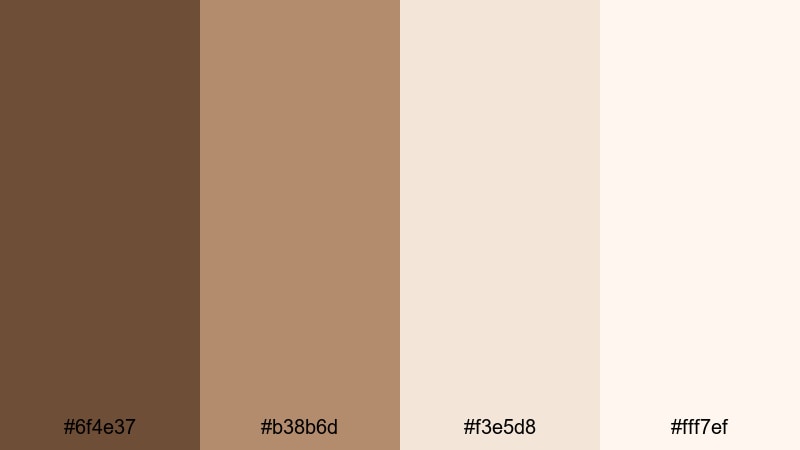
- HEX Codes: #6f4e37, #b38b6d, #f3e5d8, #fff7ef
- Mood: Soft, welcoming, and gently energizing like the first cup of coffee in a bright studio.
- Use for: Great for vlog intros, lifestyle thumbnails, and creator branding that aims to feel warm and approachable.
Creamy Coffee Brown tones blended with latte beiges give this palette a sunlit, softly caffeinated vibe. It feels like natural light spilling across a wooden desk, ideal for channels that want to appear kind, personal, and easy to approach.
Use the deeper Coffee Brown as an accent for text, frames, or logo marks, and keep the lighter latte shades for backgrounds, thumbnails, and YouTube cover art. In Filmora, this palette works beautifully across lifestyle vlogs, study with me videos, and cozy studio B roll, making everything look warm without feeling heavy.
Pro Tip: Build a Soft Coffee Brown Aesthetic in Filmora
To keep a Morning Latte Studio look consistent, save these Coffee Brown HEX codes inside Filmora for your titles, shapes, and overlays. Use the darkest shade for key text and graphic accents, then apply the mid browns and creams behind your lower thirds, subscribe buttons, and intro cards.
When you repeat the same Coffee Brown tones from your intro through to your B roll and end screen, your channel begins to feel like a cohesive brand. Filmora lets you quickly duplicate title presets and color blocks, so your warm studio style stays intact across every episode, reel, and short.
AI Color Palette
If you have a favorite photo of your workspace, latte art, or a Coffee Brown mood board, you can turn it into a full video look using Filmora. Filmora's AI Color Palette feature analyzes a reference image and transfers its tones to your clips, so your entire edit shares the same creamy browns and soft highlights.
Import your reference shot, match it to a representative clip, then apply that match across the timeline. Your vlog intro, A roll, and B roll will instantly feel like they were filmed under the same cozy studio light, even if they were shot at different times or locations.
 secure download

HSL, Color Wheels & Curves
Once your Coffee Brown base is in place, fine tune it in Filmora using HSL, color wheels, and curves. Subtly lift the oranges and yellows to keep skin tones natural, while pulling down the shadows curve to deepen your espresso tones for a more cinematic studio feel. You can see a full workflow in this Filmora color correction tutorial, then adapt the same steps to your Morning Latte Studio palette.
Use the color wheels to warm midtones and slightly cool highlights if you want a modern, balanced look. HSL sliders are ideal for taming any overly saturated browns or beiges so your frame stays soft, cozy, and easy to watch over long videos.
secure download1000+ Video Filters & 3D LUTs
If you want to speed up your grading, Filmora's video filters and 3D LUTs make it easy to push your Coffee Brown palette toward specific styles. Warm film LUTs, vintage filters, and soft glow effects can instantly make your Morning Latte Studio footage feel more cinematic, romantic, or dreamy.
Drop a warm filter on your A roll, then stack subtle vignette or grain filters on B roll for extra depth. Because LUTs keep colors consistent, your Coffee Brown aesthetic will look unified across main videos, Shorts, Instagram Reels, and TikTok edits exported from Filmora.
secure downloadFireside Storytime
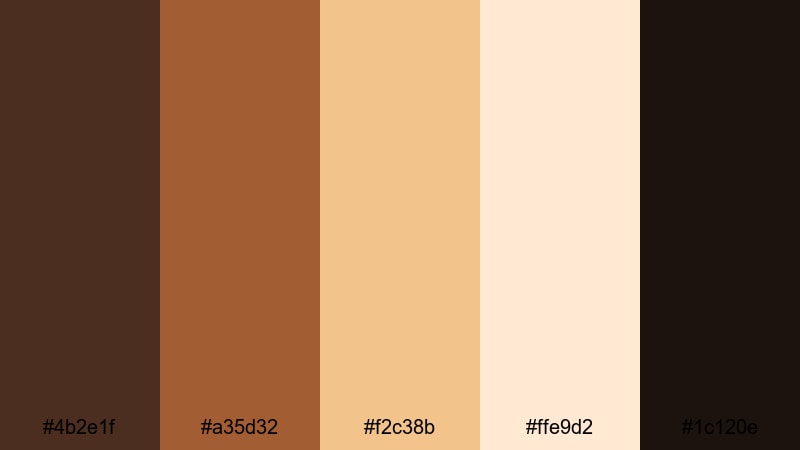
- HEX Codes: #4b2e1f, #a35d32, #f2c38b, #ffe9d2, #1c120e
- Mood: Nostalgic and intimate, like telling stories by a crackling fireplace.
- Use for: Ideal for narrative videos, podcast covers, and title cards where you want a close, personal feeling.
Deep Coffee Brown shadows and ember like oranges give this palette a fireside glow. The warm highlights feel like candlelight on skin, while the nearly black shade grounds everything with cinematic contrast.
Use it for storytelling channels, podcasts, or cozy narration videos. In Filmora, apply the darkest tone to backgrounds and overlays, then pick the golden oranges for title text, waveform graphics, and thumbnail accents to make your story feel like it is unfolding by the fire.
Caramel Drizzle Glow
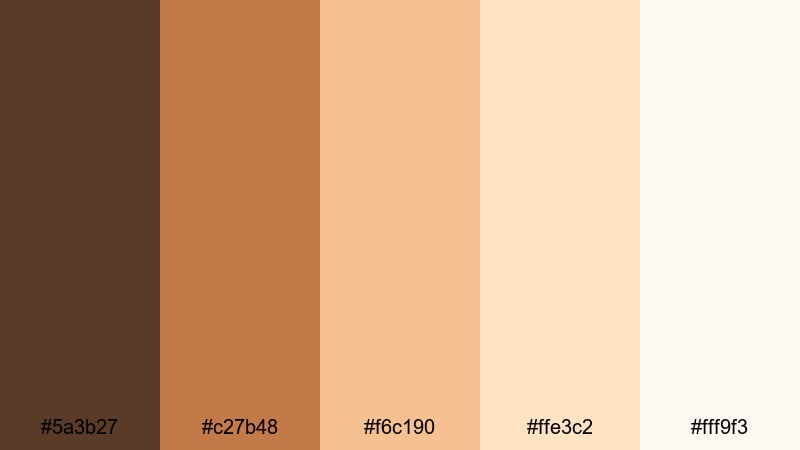
- HEX Codes: #5a3b27, #c27b48, #f6c190, #ffe3c2, #fff9f3
- Mood: Sweet, glowing, and indulgent with a dessert inspired warmth.
- Use for: Perfect for food videos, cafe promo edits, and product shots that need a rich, appetizing glow.
Sugary caramels and creamy Coffee Brown tones make every frame feel edible. The mid browns resemble drizzled caramel, while the pale creams mimic whipped topping and soft studio light.
Use this palette for recipe videos, dessert shorts, or cafe promos. In your Filmora projects, apply the lightest shade to text backplates and lower thirds, the caramel tones to logo elements and callouts, and the rich Coffee Brown to borders around thumbnails so your food content looks delicious at a glance.
Cafe Window Light
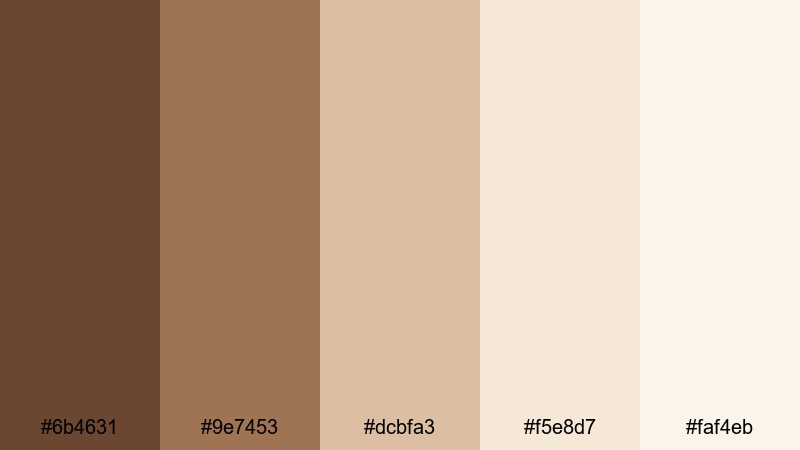
- HEX Codes: #6b4631, #9e7453, #dcbfa3, #f5e8d7, #faf4eb
- Mood: Calm and contemplative, like working beside a bright cafe window on a slow afternoon.
- Use for: Use for study vlogs, coworking promos, and calm productivity content needing soft daylight Coffee Brown tones.
This palette captures the peaceful feeling of a sunny cafe table: medium Coffee Browns echo wooden furniture, and the soft creams act like diffused daylight. It is warm but not heavy, making it gentle on the eyes during long videos.
In Filmora, apply these tones to background cards for timestamps, productivity tips, and chapter markers. Use the mid browns for headings and the lightest cream for clean negative space in thumbnails, ideal for students, freelancers, and creators sharing workday routines.
Minimal & Modern Coffee Brown Color Palettes
Urban Espresso Minimal

- HEX Codes: #3c2a23, #6f4c3b, #c9b29a, #f2efe9
- Mood: Clean and urban with a sleek, modern coffee shop attitude.
- Use for: Best for minimalist brand intros, motion graphics, and tech or design channels wanting a grounded but stylish look.
Urban Espresso Minimal pairs dark espresso Coffee Brown with cool beige neutrals. The overall look is sophisticated and streamlined, like a boutique coffee bar in the city.
Use the darker shades for bold titles, logo stingers, and lower thirds, while the light neutrals keep backgrounds uncluttered. In Filmora, this palette works well for minimalist channel openers, UI style overlays, and product demo screens where you want warmth without losing that modern, tech savvy edge.
Sleek Cold Brew UI
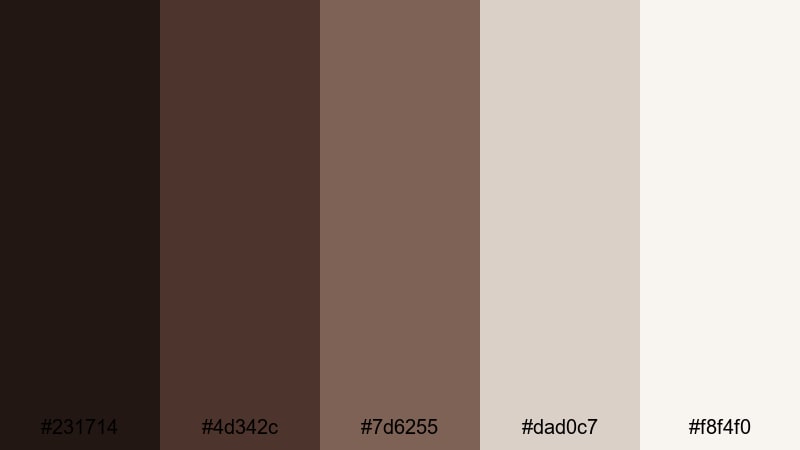
- HEX Codes: #231714, #4d342c, #7d6255, #dad0c7, #f8f4f0
- Mood: Polished and contemporary, with chilled Coffee Brown notes for a tech forward feel.
- Use for: Strong choice for app demos, UI walkthroughs, and channel branding that needs clarity with subtle warmth.
Cool toned Coffee Brown shades give this palette a refined, almost metallic finish, softened by airy off whites. It feels like a UI theme more than a rustic cafe, making it perfect for digital content.
Use it when designing interface inspired graphics in Filmora: button overlays, cursor highlights, feature callouts, and screen mockups. The contrast between dark browns and light neutrals keeps text readable and professional in tutorials, SaaS explainers, or productivity app reviews.
Mocha Typography Set
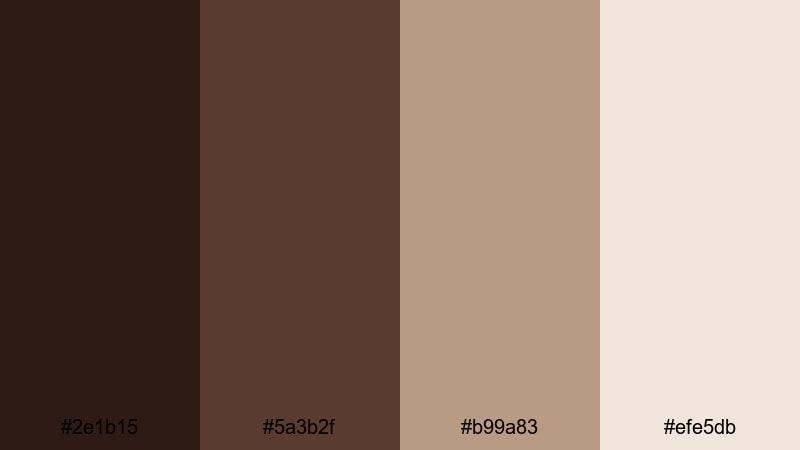
- HEX Codes: #2e1b15, #5a3b2f, #b99a83, #efe5db
- Mood: Sophisticated and typographic focused, ideal for crisp titles and overlays.
- Use for: Use for bold text graphics, lower thirds, and channel logos where contrast and legibility are key.
This palette is built for typography. The near black mocha shade adds serious weight to headers, while the lighter stone tones keep everything readable and elegant.
In Filmora, use the darkest Coffee Brown for main titles and the mid brown for subtitles and lower thirds. The pale background tones help text blocks and end cards stand out in educational content, branding videos, and cinematic essays where clarity is crucial.
Concrete Roast Loft
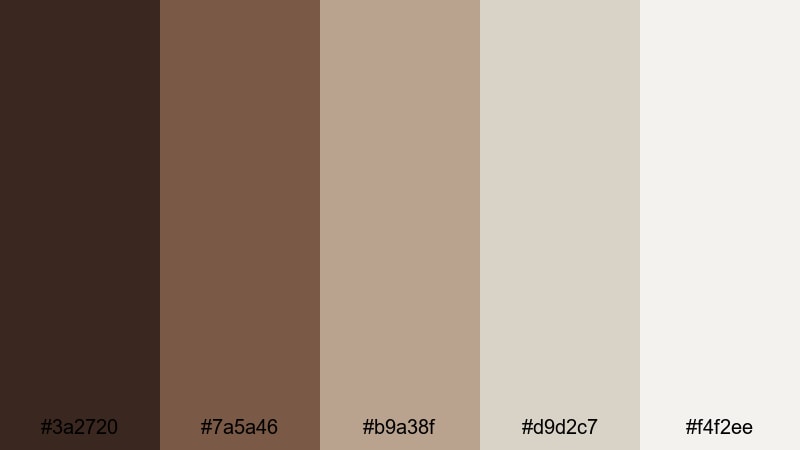
- HEX Codes: #3a2720, #7a5a46, #b9a38f, #d9d2c7, #f4f2ee
- Mood: Edgy yet neutral, combining loft style browns with soft industrial grays.
- Use for: Great for interior design reels, architecture edits, and branding that leans chic and metropolitan.
Concrete Roast Loft fuses Coffee Brown warmth with soft industrial neutrals. It feels like exposed brick, steel, and linen mixed together in a stylish city loft.
Apply it to interior design reels, real estate tours, and architecture breakdowns in Filmora. Use the deeper browns for headers and logo marks, while the grayish neutrals frame your footage in clean lower thirds and panel style titles that do not distract from the visuals.
Natural & Earthy Coffee Brown Color Palettes
Forest Trail Brew
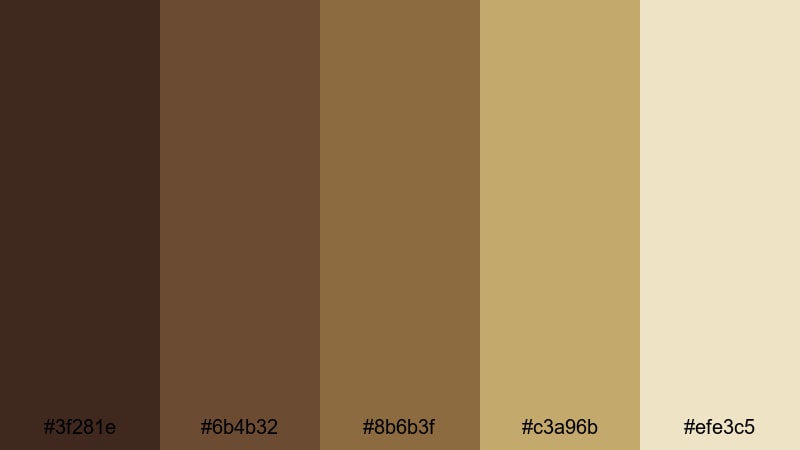
- HEX Codes: #3f281e, #6b4b32, #8b6b3f, #c3a96b, #efe3c5
- Mood: Earthy, adventurous, and grounded like a forest walk with a travel mug in hand.
- Use for: Perfect for travel vlogs, hiking content, and outdoor brand films that want a natural warm grade.
Forest Trail Brew blends woodsy Coffee Browns with golden, earth toned highlights. It feels grounded and adventurous, like damp soil, tree bark, and soft morning sun.
Use this palette to grade hiking clips, camping B roll, or eco brand stories in Filmora. The darker browns suit logo stamps and map graphics, while the warm golden tones can tint your highlights for a nature documentary or travel vlog look without skewing into neon greens.
Clay Mug Market

- HEX Codes: #5b3b2a, #8d5d3c, #c68b59, #e6c399, #f8eddc
- Mood: Handcrafted and artisanal, inspired by ceramics, markets, and handmade goods.
- Use for: Use for product showcases, small business promos, and maker content where craft and warmth matter.
Clay Mug Market leans into terracotta oranges and Coffee Brown shades reminiscent of pottery stalls and handmade mugs. It radiates craftsmanship and human touch.
In Filmora, this palette is ideal for small business promos, Etsy shop intros, or maker process videos. Use the rich browns for logo backgrounds and price tags, the terracotta midtones for product callouts, and the light beige for clean title cards that still feel warm and artisanal.
Rustic Beans And Linen
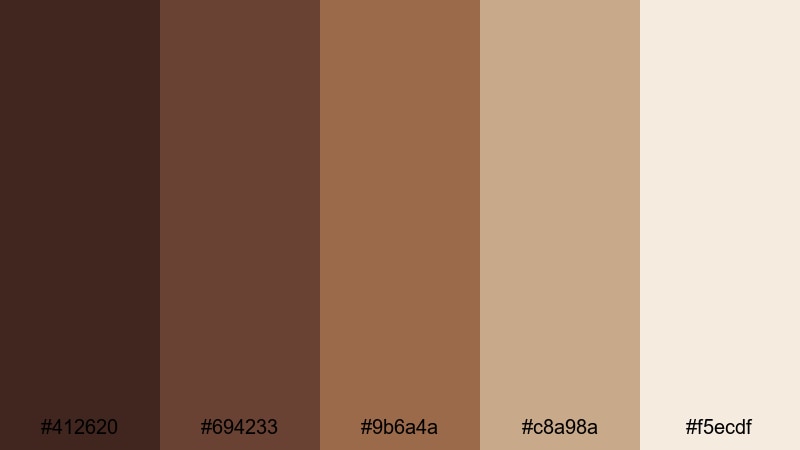
- HEX Codes: #412620, #694233, #9b6a4a, #c8a98a, #f5ecdf
- Mood: Organic and tactile, with textures of burlap, roasted beans, and sunlit textiles.
- Use for: Best for slow living edits, coffee brand visuals, and recipe videos that lean organic and honest.
This palette feels like burlap sacks, roasted beans, and linen tablecloths. Layered Coffee Brown hues meet dusty neutrals, bringing out texture and authenticity in every frame.
Use it for slow living vlogs, ethical coffee brands, and rustic recipe videos. In Filmora, apply the deeper browns to labels, badges, and chapter titles, while the lighter linen tones soften backgrounds in thumbnails, intro cards, and outro screens.
Rainy Orchard Roast
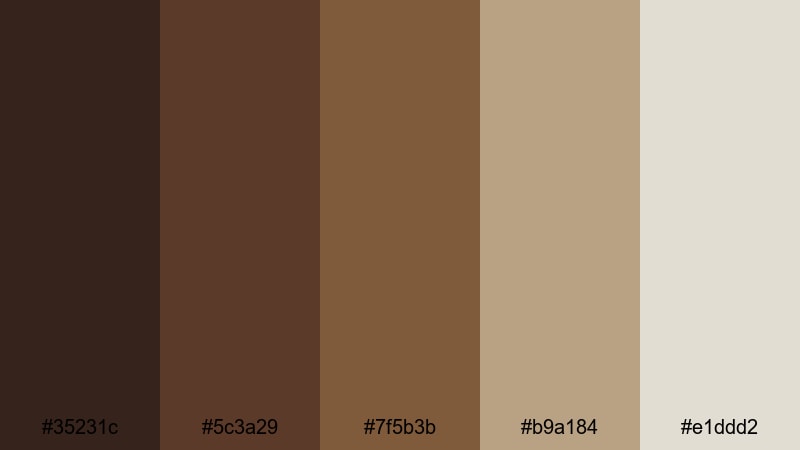
- HEX Codes: #35231c, #5c3a29, #7f5b3b, #b9a184, #e1ddd2
- Mood: Calm and muted, like sipping coffee under gray skies beside autumn trees.
- Use for: Great for moody day in the life vlogs, cozy B roll, and cinematic bokeh heavy shots.
Rainy Orchard Roast is muted and contemplative. The Coffee Browns are soft rather than punchy, and the supporting neutrals feel like overcast skies and distant fog.
This is a strong choice for moody vlogs, rainy day routines, or autumn focused edits. In Filmora, use the darker tones for subtle title bars and the pale grays for minimal text boxes, letting your soft focus visuals and bokeh highlights carry the emotion.
Vintage & Cinematic Coffee Brown Color Palettes
Analog Cafe Grain
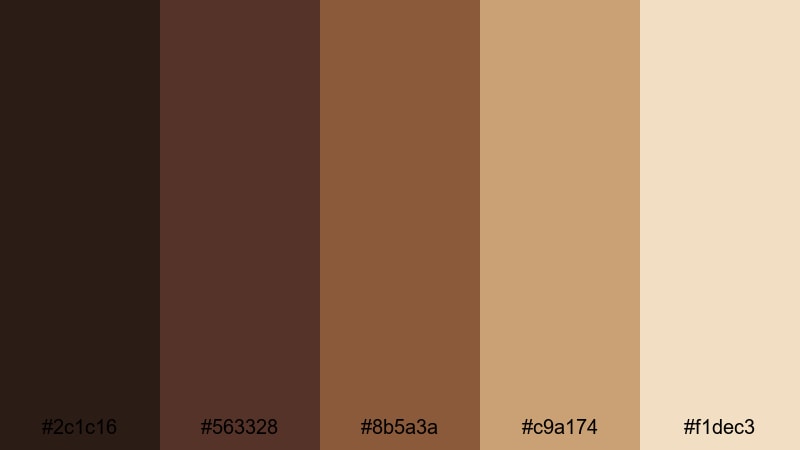
- HEX Codes: #2c1c16, #563328, #8b5a3a, #c9a174, #f1dec3
- Mood: Textured and filmic, reminiscent of 35mm cafe scenes and analog stills.
- Use for: Ideal for cinematic title sequences, film essay channels, and retro inspired travel edits.
Analog Cafe Grain mimics the warm Coffee Brown cast of vintage film stock. Deep shadows, soft mid browns, and golden highlights create a timeless cafe atmosphere.
Use this palette in Filmora when editing film essays, retro travel diaries, or narrative shorts. Combine these colors with film grain overlays and subtle vignettes, keeping titles in the deeper browns and reserving the golden beige for subtitles and credits.
Sepia Roast Memories
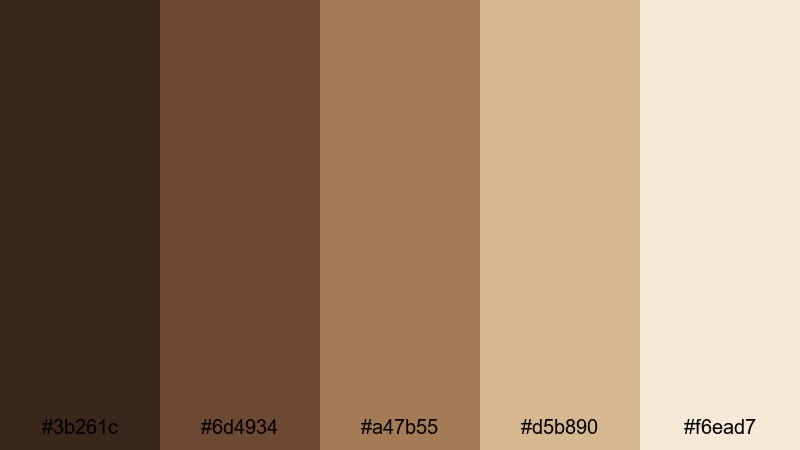
- HEX Codes: #3b261c, #6d4934, #a47b55, #d5b890, #f6ead7
- Mood: Sentimental and softly faded, like flipping through old coffee stained photographs.
- Use for: Use for memory montages, family videos, and nostalgic brand storytelling needing a sepia wash.
Sepia Roast Memories washes Coffee Brown tones with a soft, faded glow. It feels like old photo albums and postcards, perfect for emotional storytelling.
Apply a gentle sepia style grade in Filmora using these HEX references for overlays, borders, and photo style frames. This palette works especially well in anniversary videos, family montages, brand history reels, or any edit where you want past and present to blend together gracefully.
Noir Coffee Title Sequence
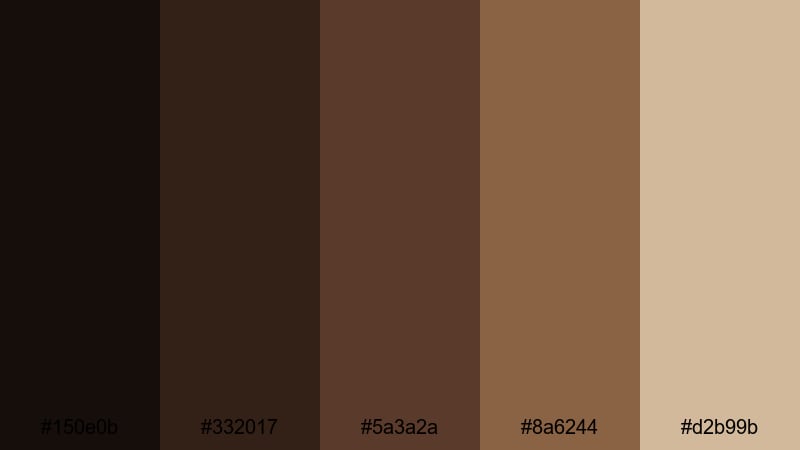
- HEX Codes: #150e0b, #332017, #5a3a2a, #8a6244, #d2b99b
- Mood: Dramatic and mysterious, channeling classic noir with a Coffee Brown twist.
- Use for: Perfect for trailers, mystery or crime content, and bold cinematic openers with strong contrast.
Noir Coffee Title Sequence uses inky shadows and rich Coffee Brown midtones to echo classic noir films. The palette is high contrast and dramatic, yet warmer than pure black and white.
Use it in Filmora for thriller trailers, mystery intros, or bold title sequences. Keep backgrounds almost black, type in the mid browns, and reserve the lighter beige for key phrases, taglines, and logo reveals that need to stand out sharply on screen.
Tips for Creating Coffee Brown Color Palettes
Coffee Brown works beautifully as a base color for warm, cinematic visuals, especially when you balance it with creams, neutrals, or gentle accent hues. When building your own palettes for videos and design, keep these practical guidelines in mind.
- Pair Coffee Brown with light creams or off whites to maintain readability in titles, lower thirds, and subtitles.
- Use the darkest Coffee Brown shade for text and icons, and reserve mid browns for backgrounds so elements do not blend together.
- Add a subtle accent color (like a muted blue, glaucous, or soft green) for buttons, links, or important callouts so viewers know where to look.
- Match your color palette to your footage by adjusting white balance and tint before applying overlays or titles in Filmora.
- Keep skin tones natural by using HSL in Filmora to limit how strongly your Coffee Brown grade affects oranges and reds.
- Test your palette on both light and dark thumbnails to make sure it still stands out in YouTube and social feeds.
- Create reusable title and lower third presets in Filmora with your Coffee Brown HEX codes to keep branding consistent across episodes.
- For cinematic looks, deepen Coffee Brown shadows slightly and add a gentle vignette, but avoid crushing blacks so detail is preserved.
Coffee Brown color palettes can make your channel feel cozy, premium, or cinematic depending on how you combine them with neutrals and highlights. Whether you are editing vlogs, tutorials, branded content, or short films, these 15 palettes give you a solid starting point for warm, consistent visuals.
Load the HEX codes into Filmora, experiment with AI Color Palette, HSL, and LUTs, and save your favorite looks as reusable presets. Over time, your Coffee Brown aesthetic will become a recognizable part of your personal or business brand.
Try a palette that fits your next video, then tweak it until it matches your story, your lighting, and your style. With Filmora, it is easy to keep that Coffee Brown mood flowing from intro to outro.
secure downloadNext: Glaucous Color Palette
