

 100% Security Verified | No Subscription Required | No Malware


 ChatGPT
 Perplexity
 Gemini
 Claude
 Grok
Grok
Coral Reef is a modern twist on classic coral: warmer than pastel peach, softer than neon orange, and instantly reminiscent of sunsets, shells, and shallow tropical water. Psychologically, it feels friendly, optimistic, and inviting, which makes it perfect for creators who want their brand to feel human, warm, and approachable instead of cold or overly corporate.
In video editing, branding, thumbnails, intros, and social graphics, Coral Reef stands out beautifully on both light and dark backgrounds, especially when paired with soft creams or deep navy tones. Below are 15 ready-to-use Coral Reef color palettes with HEX codes created for YouTube thumbnails, vlog aesthetics, cinematic edits, and social posts. They are easy to recreate and apply inside Filmora so your entire project looks cohesive from the first frame to the final end screen.
In this article
Soft & Romantic Coral Reef Color Palettes
Sunrise Coral Blush
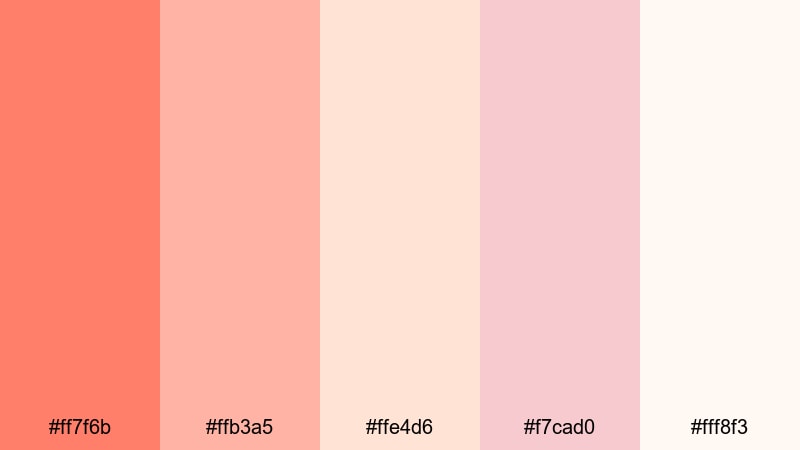
- HEX Codes: #ff7f6b, #ffb3a5, #ffe4d6, #f7cad0, #fff8f3
- Mood: Warm, dreamy, and affectionate with a soft sunrise glow.
- Use for: Perfect for wedding highlight reels, couples vlogs, and gentle storytelling thumbnails.
Sunrise Coral Blush feels like the first light hitting the water: soft, rosy, and flattering on skin tones. The deeper coral (#ff7f6b) gives you a clear accent color, while the blush and cream shades keep the overall frame airy and romantic.
Use this palette for wedding title cards, engagement announcement posts, couples vlogs, and lifestyle intros where you want everything to look tender and nostalgic. In Filmora, you can apply the rich coral to text and call-to-action buttons, then keep backgrounds and overlays in the lighter blush and cream tones for a cohesive Coral Reef aesthetic.
Pro Tip: Build a Cinematic Coral Reef Sunrise Look in Filmora
To keep this soft Coral Reef palette consistent, treat the strongest coral tone as your hero color across the entire edit. Use it for key titles, lower thirds, and subtle graphic frames, while the lighter blush tones stay in your backgrounds and overlays. This balance ensures your wedding films, couple stories, and brand reels feel unified from shot to shot.
Inside Filmora, you can save title templates, color presets, and overlays using these exact HEX codes so you can reuse the Sunrise Coral Blush look across intros, reels, shorts, and full-length edits without rebuilding the style every time.
AI Color Palette
If you already have a reference image of a sunrise beach or coral bouquet you love, Filmora makes it easy to transfer those colors to your whole project. Filmora's AI Color Palette feature can analyze that reference frame and apply the same Coral Reef tones to your clips, so everything from A-roll to B-roll shares the same warm blush mood.
Simply pick a shot with the ideal colors, then let AI Color Palette match your other clips to it. This is especially powerful for wedding films and romantic vlogs shot across different locations and cameras, helping you fix color inconsistencies and keep that delicate sunrise coral vibe throughout.
 secure download

HSL, Color Wheels & Curves
Once your Coral Reef palette is in place, you can fine-tune it using Filmora's HSL sliders, color wheels, and curves. Slightly shifting oranges toward coral, softening reds, and lifting midtones will make skin look smoother and more cinematic without losing that sunrise warmth. This is especially useful when matching footage shot at different times of day.
If you want a deeper dive into grading, guides on color correction tips in Filmora show how to use curves to boost contrast gently in the shadows while protecting your light coral highlights. A small S-curve and a subtle warm push in the midtones can turn a flat frame into a romantic, film-like scene.
secure download1000+ Video Filters & 3D LUTs
To speed up your workflow, you can combine these Coral Reef hex codes with Filmora's filters and LUTs. Filmora’s video filters and 3D LUTs make it easy to add soft bloom, pastel fades, or subtle teal-and-orange contrast that still respects your custom coral tones.
Apply a gentle filmic LUT, then refine it with color controls so your text, overlays, and footage sit in the same romantic Coral Reef world. This approach works brilliantly for Instagram Reels, YouTube Shorts, and long-form wedding edits where you want a polished signature look without manually grading every clip.
secure downloadSeashell Whisper Tones
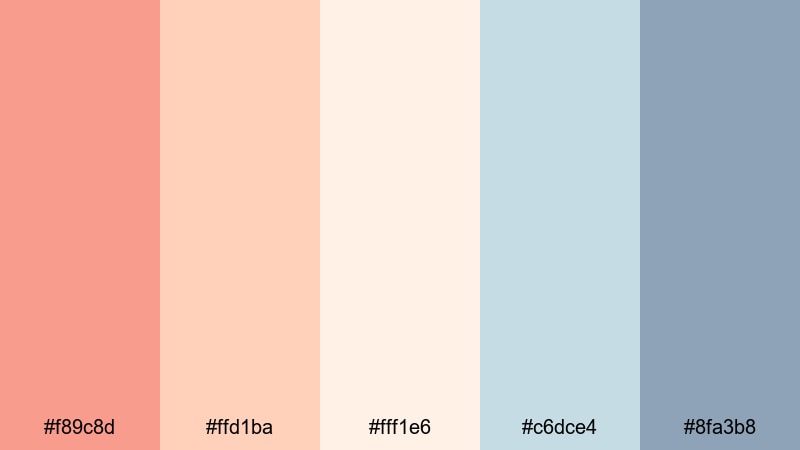
- HEX Codes: #f89c8d, #ffd1ba, #fff1e6, #c6dce4, #8fa3b8
- Mood: Calm, nostalgic, and softly coastal.
- Use for: Ideal for aesthetic travel vlogs, minimalist beauty content, and soft-spoken tutorials.
Seashell Whisper Tones blends muted coral with seashell creams and misty coastal blues. It feels slow, reflective, and a bit nostalgic, like flipping through old beach polaroids.
This palette works beautifully for minimalist thumbnails, calm talking-head videos, and soft-spoken tutorials where you want viewers to feel relaxed. Use coral for small accents like subscribe buttons or icons, keep your backgrounds in shell cream, and reserve the blue tones for lower thirds or subtle gradient overlays in Filmora.
Peach Tide Romance

- HEX Codes: #ff8a73, #ffb89c, #ffe0c2, #f6d1c1, #fdf5ef
- Mood: Playful yet tender, like golden hour by the shore.
- Use for: Works beautifully for lifestyle intros, product close-ups, and gentle brand reveal animations.
Peach Tide Romance leans into sunny, peachy corals layered over creamy sand tones. It feels playful but never loud, giving your frames a flattering glow that is kind to skin and product shots alike.
Try using the deeper coral for outline strokes, buttons, or drop shadows, while your backgrounds stay in pale peach and sand. In Filmora, this palette is great for animated openers, product hero shots, and beauty or skincare branding when you want warmth without harsh contrast.
Coastal Powder Daydream
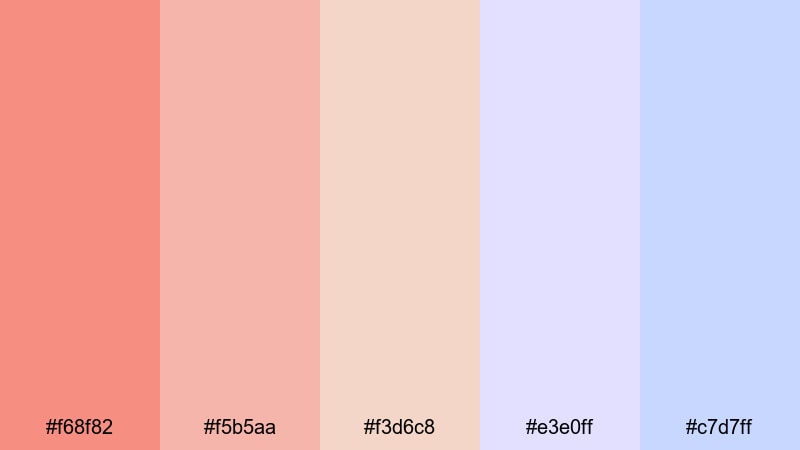
- HEX Codes: #f68f82, #f5b5aa, #f3d6c8, #e3e0ff, #c7d7ff
- Mood: Dreamy, airy, and slightly whimsical.
- Use for: Great for dreamy b-roll sequences, channel trailers, and gentle fashion lookbooks.
Coastal Powder Daydream pairs soft Coral Reef hues with powdered lilac and periwinkle blues, creating a cotton-candy coastal atmosphere. It feels whimsical and light, perfect when you want your visuals to look delicate and imaginative.
Use coral and blush tones for text and icons, then wash your backgrounds with the light lilac and blue shades for a pastel gradient. This works wonderfully in Filmora for dreamy channel trailers, lookbooks, and montage sequences set to soft music.
Gentle Lagoon Glow
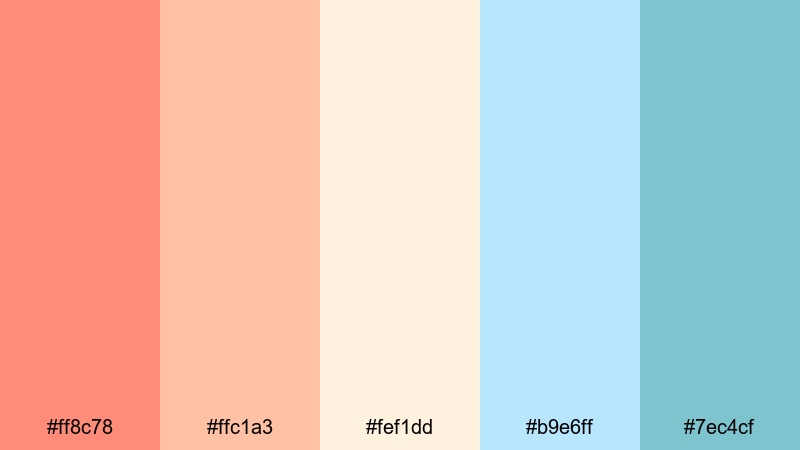
- HEX Codes: #ff8c78, #ffc1a3, #fef1dd, #b9e6ff, #7ec4cf
- Mood: Light, hopeful, and softly tropical.
- Use for: Perfect for morning routines, wellness content, and calming channel backgrounds.
Gentle Lagoon Glow balances Coral Reef warmth with lagoon blues and creamy highlights. The result is light, hopeful, and breezy, like a slow morning beside clear water.
For wellness or productivity content, use coral for key callouts and progress bars, while blues and creams dominate your backgrounds and shape layers. In Filmora, this palette shines in intro animations, split-screen layouts, and clean social media graphics for channels focused on health, mindfulness, or self-care.
Bold & Tropical Coral Reef Color Palettes
Tropical Reef Pop

- HEX Codes: #ff6b6b, #ff9f43, #ffd93d, #1dd3b0, #1768ac
- Mood: Energetic, playful, and full of vacation vibes.
- Use for: Best for travel montages, energetic intros, and eye-catching YouTube thumbnails.
Tropical Reef Pop is a high-energy mix of vibrant coral, citrus orange, sunny yellow, and juicy aqua. It instantly feels like cocktails by the pool, street markets, and GoPro footage on the beach.
Use coral and yellow for big, bold text and call-to-action buttons, then weave aqua and blue into frames, outlines, or kinetic shapes. In Filmora, this palette is perfect for fast-paced travel edits, upbeat reels, and thumbnails where you want viewers to feel holiday energy at a glance.
Festival Boardwalk Splash
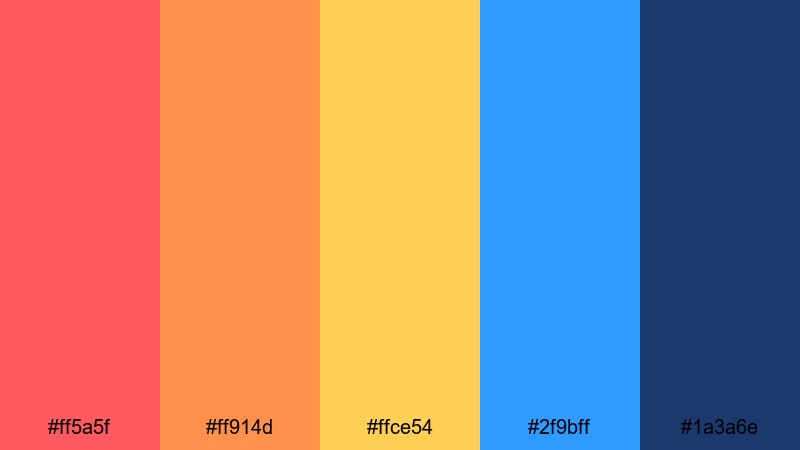
- HEX Codes: #ff5a5f, #ff914d, #ffce54, #2f9bff, #1a3a6e
- Mood: Festive, loud, and carnival-bright.
- Use for: Great for event recaps, music videos, and bold channel branding graphics.
Festival Boardwalk Splash feels like a seaside funfair at golden hour. Punchy coral, tangerine, and lemon tones buzz against vivid and deep blues, giving your visuals a bright, celebratory edge.
Use this palette in Filmora for bold lower thirds, animated stickers, and fast transitions in concert recaps or party highlight reels. Reserve the darkest blue for backgrounds and outlines so your coral and yellow elements explode off the screen without becoming chaotic.
Coral Surf Neon
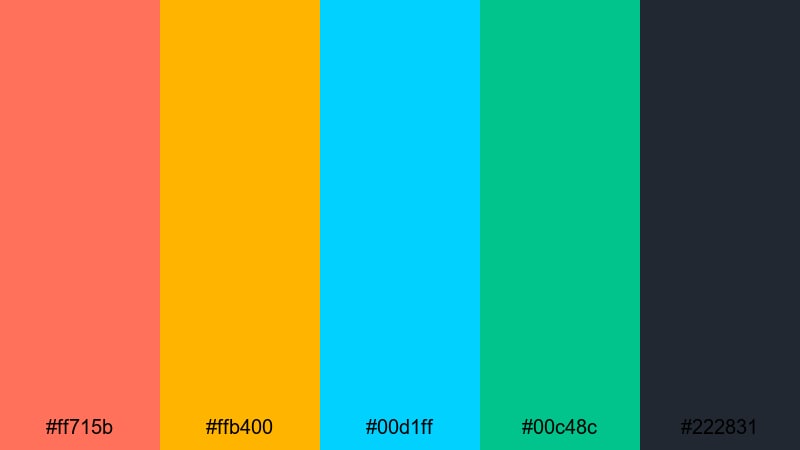
- HEX Codes: #ff715b, #ffb400, #00d1ff, #00c48c, #222831
- Mood: High-contrast, edgy, and neon-sporty.
- Use for: Perfect for action edits, sports highlights, and kinetic typography sequences.
Coral Surf Neon brings together neon coral, electric gold, cyan, and teal anchored by deep charcoal. It feels bold, modern, and slightly futuristic, great for sports and street-style content.
Use the dark charcoal as your main canvas and let the neon tones drive titles, HUD-style graphics, and kinetic typography in Filmora. This palette is ideal for surf edits, gym reels, esports highlights, and any thumbnail that needs to scream energy and intensity.
Sunset Carnival Burst

- HEX Codes: #ff6363, #ff9966, #ffde59, #ff6fb5, #3a3d98
- Mood: Joyful, cinematic, and saturated like a sunset fairground.
- Use for: Ideal for festival recaps, travel shorts, and colorful announcement graphics.
Sunset Carnival Burst layers coral, peach, golden yellow, and magenta against deep indigo. It feels like a fairground or rooftop party framed against a glowing sky.
In Filmora, try using indigo for backdrops and frame bars, while coral and magenta drive word marks, logos, and countdowns. This palette is strong enough for big text-heavy thumbnails and channel banners where you want a colorful yet coordinated feel.
Island Drone Vibes
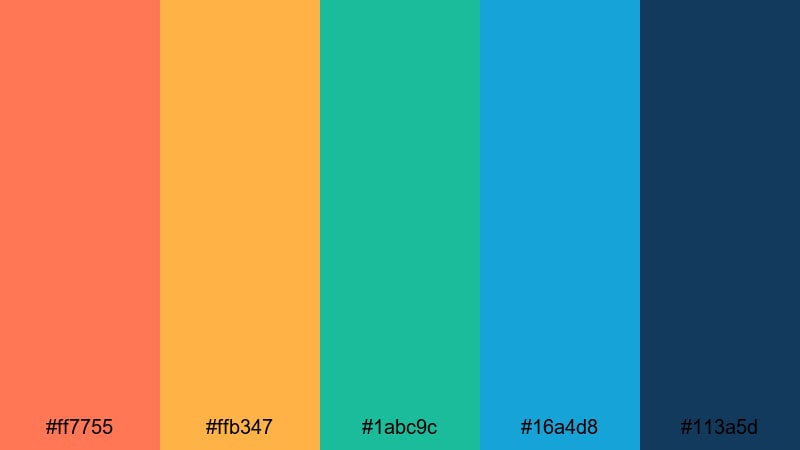
- HEX Codes: #ff7755, #ffb347, #1abc9c, #16a4d8, #113a5d
- Mood: Adventurous, sunny, and ocean-breezy.
- Use for: Great for drone shots over beaches, surf edits, and tropical destination guides.
Island Drone Vibes mixes sunset coral and mango with jade and oceanic blues, echoing beaches, reefs, and cloudless skies. It feels adventurous and free, perfect for wide drone landscapes.
Use coral and mango for bold titles and map graphics, then keep your overlays and accent shapes in turquoise and blue. This palette helps you color grade ocean footage in Filmora so water looks alive, skies feel rich, and your text elements still stand out clearly on top.
Modern & Moody Coral Reef Color Palettes
Coral Noir Contrast

- HEX Codes: #ff7b6e, #f7c1b3, #4b4b5a, #23232f, #0f141a
- Mood: Sophisticated, dramatic, and cinematic.
- Use for: Perfect for film-style grading, tech promos, and stylish intro sequences.
Coral Noir Contrast sets soft Coral Reef accents against charcoal and inky navy tones. It feels sleek and cinematic, like neon lights over a dark city street.
Use the darkest shades for backgrounds and letterboxing bars, letting coral handle key titles, logos, and important UI-style elements. In Filmora, this palette is ideal for cinematic openers, tech reviews, or product promos where you want a single warm highlight color to cut through a moody frame.
Midnight Harbor Coral
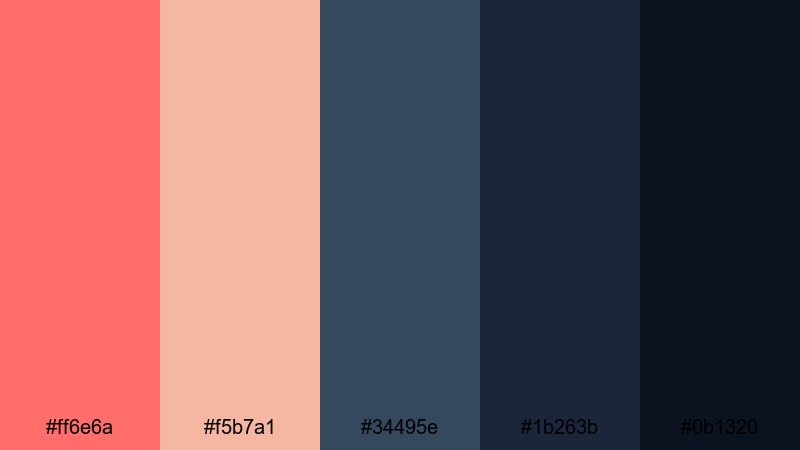
- HEX Codes: #ff6e6a, #f5b7a1, #34495e, #1b263b, #0b1320
- Mood: Quietly intense, night-urban, and reflective.
- Use for: Great for night city b-roll, cinematic travel diaries, and documentary-style edits.
Midnight Harbor Coral captures the feeling of harbor lights glowing against deep night water. Coral tones provide emotional warmth, while layered midnight blues create depth and seriousness.
Use coral sparingly for chapter titles, map pins, or minimal line art, and lean on the blues for backgrounds, title cards, and frame lines. In Filmora, this palette works beautifully for documentary intros, reflective travel diaries, or moody city b-roll sequences shot at night.
Urban Coral Chrome
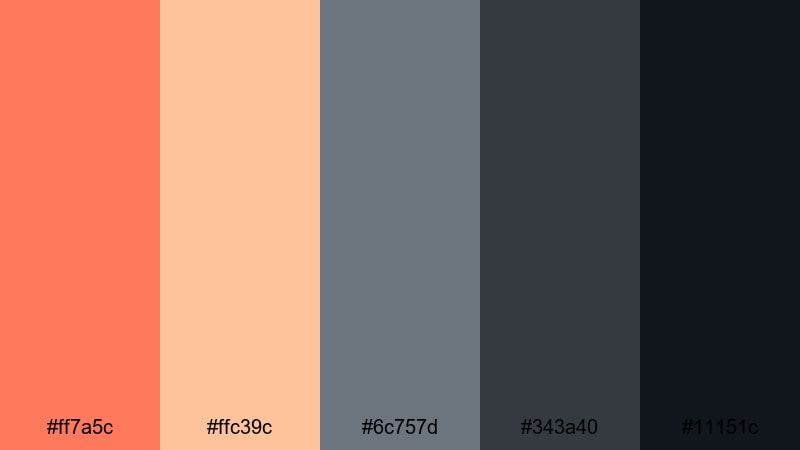
- HEX Codes: #ff7a5c, #ffc39c, #6c757d, #343a40, #11151c
- Mood: Modern, polished, and slightly industrial.
- Use for: Ideal for tech reviews, branding bumpers, and stylish product showcases.
Urban Coral Chrome balances warm coral and latte tones with cool chrome grays and ink black. It feels modern and slightly industrial, making it a strong choice for tech and design-forward brands.
Let the grays and dark tones structure your frames, while coral handles highlights on buttons, badges, and important callouts. In Filmora, use this palette for product explainer videos, app previews, and channel branding where you want a touch of human warmth inside an otherwise sleek design system.
Cinematic Ember Reef

- HEX Codes: #ff6f61, #ffa177, #ffd9c0, #2d3a4b, #0b1723
- Mood: Film-like, emotive, and slightly nostalgic.
- Use for: Perfect for short films, story-driven vlogs, and emotional brand stories.
Cinematic Ember Reef uses ember-like coral and apricot highlights against slate and midnight blues. It feels emotive and a little nostalgic, like stills from an indie film.
In Filmora, this palette shines when you want your vlogs or brand stories to look more like cinema than casual content. Use coral for scene titles, captions, and date stamps, while the darker tones frame your footage with subtle letterboxing and graphic elements.
Deep Current Elegance
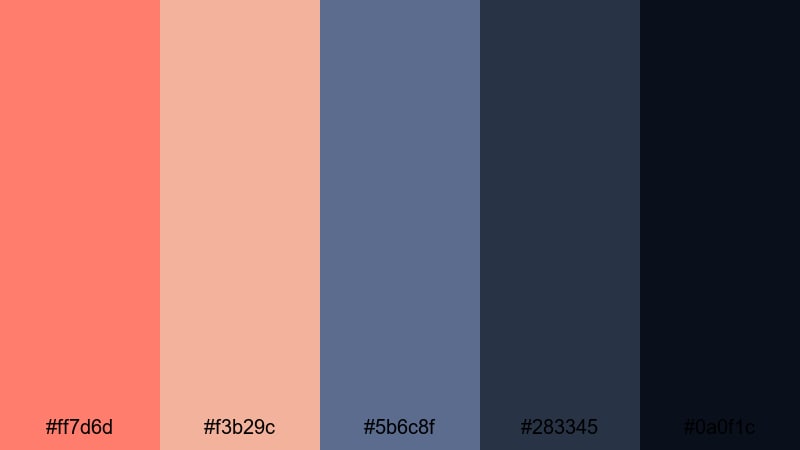
- HEX Codes: #ff7d6d, #f3b29c, #5b6c8f, #283345, #0a0f1c
- Mood: Refined, calm, and luxuriously deep.
- Use for: Great for premium brand intros, editing presets, and elegant social media graphics.
Deep Current Elegance floats sophisticated coral and nude tones above inky blue depths. It feels calm, premium, and subtly luxurious, ideal for brands that want refinement without feeling cold.
Use the darkest navy as your primary background, with coral and nude shades highlighting logos, taglines, and key stats. In Filmora, this palette works well for premium intros, branded presets, and Instagram or YouTube graphics where you want a high-end Coral Reef twist.
Tips for Creating Coral Reef Color Palettes
When you build your own Coral Reef color palette for video or design, the goal is to balance warmth and clarity so your visuals stay readable, emotional, and on-brand across every platform.
- Pair Coral Reef with at least one light neutral (ivory, sand, blush) and one deep shade (navy, charcoal) so you always have background and text options with strong contrast.
- Use Coral Reef as an accent or brand color, not the background for long text blocks. This keeps your titles eye-catching and your paragraphs easy to read.
- Check your thumbnails in small sizes on mobile. If the coral text blends into the image, darken either the background or add a subtle shadow or outline in Filmora.
- Limit yourself to 3–5 active colors per frame even if your palette is larger. Too many corals, yellows, and blues at once can look messy, especially in fast edits.
- Match your footage to your graphic palette. If your Coral Reef overlays look warm but your footage is cold or green, use Filmora's color correction tools to gently warm up the image.
- Keep brand consistency by reusing the same HEX codes for logos, lower thirds, and end screens across all videos, stories, and shorts.
- Test Coral Reef on both light and dark modes. Make sure your logo, subtitles, and key icons stay visible whether you are using a white or deep navy background.
- Create a couple of presets in Filmora that save your favorite Coral Reef grading, text colors, and shadow styles so you can apply your look to new projects in a few clicks.
Coral Reef palettes can completely change how viewers feel about your channel or brand. Soft palettes create intimacy and romance, bold tropical mixes shout energy and adventure, and moody Coral Reef combinations give your edits a cinematic, premium edge. With clear HEX codes, you can keep that identity consistent across intros, overlays, and social graphics.
Experiment with these 15 palettes in Filmora, then tweak saturation, contrast, and brightness so they fit your footage and style. Saving your favorite combinations as presets will help you build a recognizable, Coral Reef inspired aesthetic that carries through every upload.
Whether you are editing wedding highlights, cinematic travel films, or clean tech reviews, letting Coral Reef be your main accent color is an easy way to add warmth and personality without sacrificing professionalism.
secure downloadNext: Luxury Color Palette
