

 100% Security Verified | No Subscription Required | No Malware


 ChatGPT
 Perplexity
 Gemini
 Claude
 Grok
Grok
Drab is one of those understated colors that quietly shapes a scene instead of shouting for attention. Sitting between earthy brown, olive, and soft gray, a drab color palette signals calm, maturity, realism, and sometimes grit. In video, design, and branding, it is perfect for grounded storytelling, minimalist channels, neutral video color grading, and any project that needs to feel cinematic without bright, flashy tones.
Below you will find a collection of carefully curated drab color combinations with HEX codes, ready for Filmora users and other creators. Use these palettes for vlog aesthetics, YouTube thumbnail color ideas, intros, overlays, and full branding systems, whether you are designing a channel look or building earthy editing presets for your next drab themed video.
In this article
Cinematic Neutral Drab Color Palettes
Urban Fog Frames
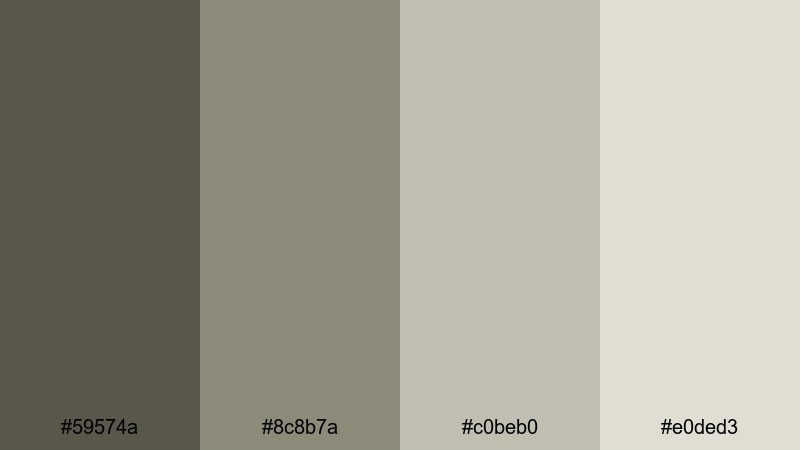
- HEX Codes: #59574a, #8c8b7a, #c0beb0, #e0ded3.
- Mood: Calm, grounded, and slightly gritty like a city waking up in soft fog.
- Use for: Ideal for documentary intros, moody city vlogs, and grounded storytelling sequences.
Urban Fog Frames is a cool, cinematic drab color palette that feels like early morning streets before the traffic hits. The mix of #59574a and #8c8b7a builds a solid, urban base, while #c0beb0 and #e0ded3 add airy light tones so your frames never look too heavy or dull. It captures that soft city haze that makes everyday shots feel quietly poetic.
Use this palette for aesthetic vlog intros, talking-head footage near windows, and minimal YouTube thumbnails where text and subjects should stand out against a subtle, drab background. It works especially well for realistic color grading, street photography edits, urban B-roll sequences, and branded content that wants to look modern but not overly polished.
Pro Tip: Build a Cinematic Drab Look in Filmora
To keep an Urban Fog Frames mood across an entire edit, start by choosing one reference shot with your ideal balance of drab neutrals and soft highlights. In Filmora, adjust that clip first, then use it as your baseline for A-roll, city B-roll, and even social cutdowns. Keeping your midtones slightly cool and your highlights gently off-white will hold that foggy atmosphere across all scenes.
For thumbnails and title cards, reuse the lighter tones from this palette (#c0beb0 and #e0ded3) as background blocks and keep your text in the darker drab shades. This makes your channel feel branded and cinematic without needing bright, saturated colors.
AI Color Palette
You can turn Urban Fog Frames into a reusable drab color style with Filmoras AI tools. Grab a still frame or create a simple color card that shows all four HEX colors, then use Filmoras AI Color Palette feature to match the overall mood across other clips in your timeline.
AI Color Palette analyzes your reference and automatically transfers the neutral, foggy look to your talking-head shots, B-roll, and cutaway details. It is a quick way to keep your entire vlog, documentary intro, or short film consistent, even if you shot on different days or in slightly different lighting conditions.
 secure download

HSL, Color Wheels & Curves
Once the base drab palette is in place, fine-tune it with Filmoras HSL, color wheels, and curves. Use HSL to gently desaturate greens and yellows so buildings, roads, and skin tones stay natural. Then adjust the color wheels to keep shadows in the deeper drab tones while pushing highlights slightly warmer or cooler depending on your story. For a deeper dive, Filmoras guide on color correction tips in Filmora can help you refine every channel.
Curves are perfect for shaping contrast in a drab color palette: lift the shadows just a touch for a foggy, low-contrast look, or add a soft S-curve for more cinematic punch without breaking the neutral mood. This lets you adapt Urban Fog Frames for different platforms, from YouTube to Instagram Reels, while keeping the same signature feel.
secure download1000+ Video Filters & 3D LUTs
To speed up your workflow, combine this drab color palette with Filmoras built-in looks. Filmoras video filters and 3D LUTs make it easy to add subtle film grain, matte contrast, or a soft teal-and-brown shift that still respects your drab base. You can layer filters and dial down opacity to keep the result controlled.
Experiment with cinematic LUTs on top of your neutral grade to give your content a premium finish, especially for trailers, narrative shorts, and channel intros. This works well when you want the grounded realism of drab tones plus a slightly stylized, big-screen feel.
secure downloadDusty Backlot Streets
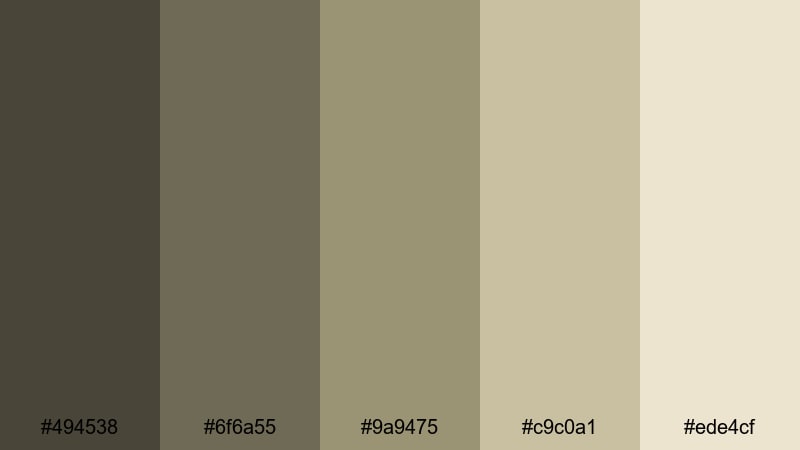
- HEX Codes: #494538, #6f6a55, #9a9475, #c9c0a1, #ede4cf.
- Mood: Textured and nostalgic, like an old studio backlot after a long shoot day.
- Use for: Perfect for narrative shorts, indie film titles, and behind-the-scenes reels.
Dusty Backlot Streets combines earthy drab browns and soft dust tones to echo classic studio sets and worn props. The darker shades anchor your shadows, while the lighter beiges and creams feel like sun-baked walls and faded posters. It is a nostalgic, filmic combination that instantly makes footage feel more handcrafted.
Use this drab color palette for behind-the-scenes videos, end credits, and textured YouTube thumbnails. It suits narrative shorts, cinematography breakdowns, and any project that leans into indie film aesthetics. Layer it with subtle grain and you get a timeless, tactile mood perfect for story-driven channels.
Overcast Studio Scene
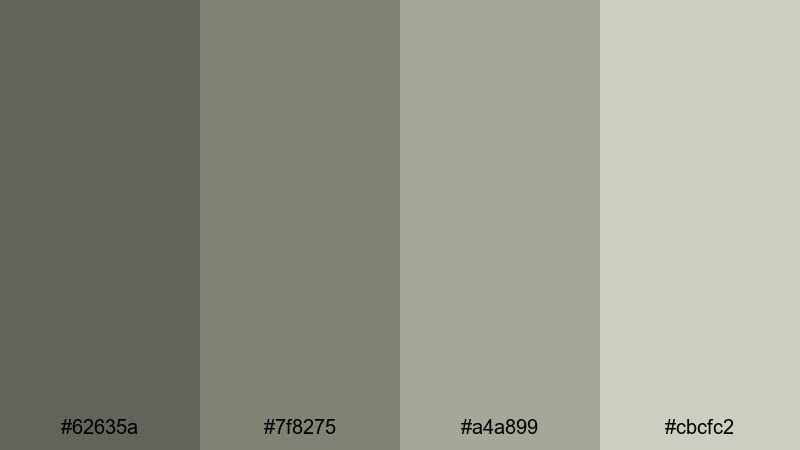
- HEX Codes: #62635a, #7f8275, #a4a899, #cbcfc2.
- Mood: Softly desaturated and professional, like a cloudy-day studio setup.
- Use for: Great for talking-head videos, tutorials, and tech reviews that need a calm visual base.
Overcast Studio Scene is built on cool drab greens and grays that feel controlled and professional. It is the visual equivalent of diffused softbox lighting: no harsh contrast, no distracting hues, just a clean environment where the subject is the focus.
This palette is ideal for minimalist channels, productivity videos, and tech reviews. Use the mid-tones for backdrops and desk shots, keep text in the darker gray, and reserve the lightest tone for UI overlays, lower thirds, and chapter markers. You get readable, on-brand visuals that work across intros, thumbnails, and full-length tutorials.
Documentary Grit Reel
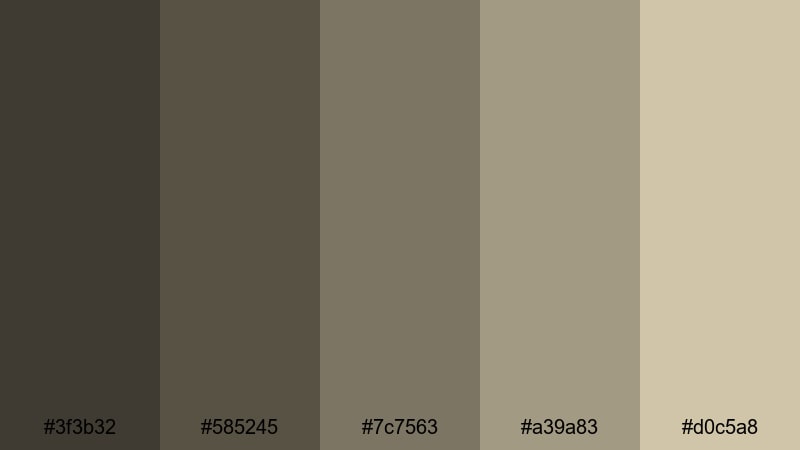
- HEX Codes: #3f3b32, #585245, #7c7563, #a39a83, #d0c5a8.
- Mood: Serious, grounded, and authentic with a touch of cinematic grit.
- Use for: Designed for social documentaries, travel diaries, and character-driven stories.
Documentary Grit Reel uses weighted drab browns and sandy highlights to create a raw, reportage-style mood. The deeper tones build a sense of seriousness and weight, while the lighter beige provides enough contrast for faces and titles without losing that grounded look.
Use this palette when you want your footage to feel honest and lived-in: social issues content, real-life travel diaries, and character portraits. It works equally well for cinematic B-roll, interview backdrops, and strong yet subtle YouTube thumbnail designs where storytelling is more important than bright, trendy colors.
Vintage & Rustic Drab Color Palettes
Old Film Archive
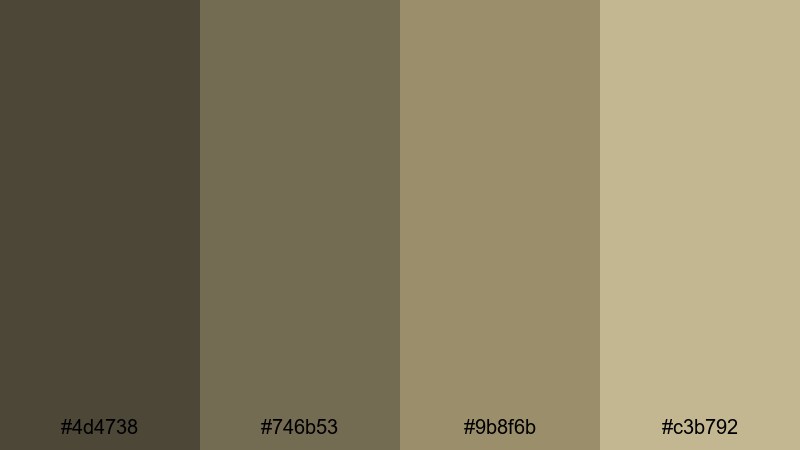
- HEX Codes: #4d4738, #746b53, #9b8f6b, #c3b792.
- Mood: Warm, dusty, and archival like boxes of forgotten reels on wooden shelves.
- Use for: Ideal for retro edits, history content, and stylized title cards with film grain.
Old Film Archive mixes classic drab olives with tobacco browns to echo aged paper, leather bindings, and fading celluloid. The palette feels like stepping into a quiet archive room where every object has a story, making it perfect for nostalgic, memory-focused content.
Use this drab color combination for historical explainers, throwback montages, and retro-styled channel branding. Apply it to title cards, transitions, and lower thirds, and add a film grain overlay in Filmora to complete the old-reel impression. It is also a great base for vlog flashbacks or storytime videos that reference the past.
Faded Military Canvas
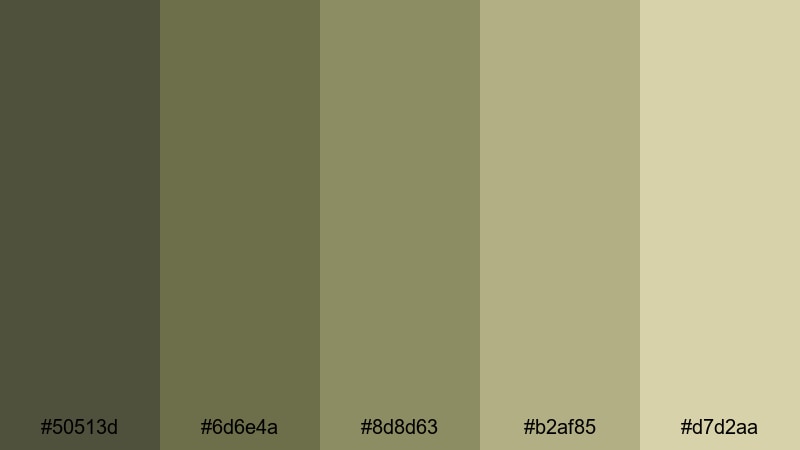
- HEX Codes: #50513d, #6d6e4a, #8d8d63, #b2af85, #d7d2aa.
- Mood: Stoic and rugged, with a utilitarian vintage military tone.
- Use for: Works well for survival vlogs, outdoor gear reviews, and rugged travel edits.
Faded Military Canvas leans into olive drab and sun-bleached khaki, suggesting tents, packs, and field journals that have seen real use. It has a rugged practicality to it, which feels authentic for outdoor and adventure content.
Use this palette for survival channels, camping trip recaps, and bushcraft tutorials. In thumbnails, combine the darker greens for borders or frames and the lighter khakis behind text. In your edit, use it as a neutral color grading base that works well with natural greens and browns found in forests, mountains, and industrial areas.
Railway Freight Patina
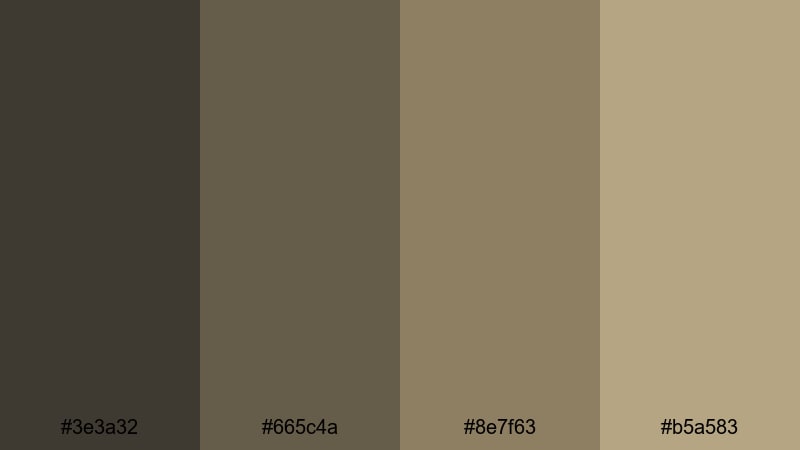
- HEX Codes: #3e3a32, #665c4a, #8e7f63, #b5a583.
- Mood: Weathered and industrial, like freight cars and rusted rails at dusk.
- Use for: Great for travel montages, train station b-roll, and nostalgic adventure edits.
Railway Freight Patina combines deep drab browns with muted metal-like tones, creating a worn industrial charm. It feels heavy and rhythmic, like the slow movement of freight cars and the clank of tracks, which gives motion in your video an extra sense of weight and history.
Use this palette for travel sequences that feature trains, ports, or older city infrastructure. It is excellent for montages, intro sequences, and time-lapses around stations or bridges. In titles and thumbnails, pair the darkest shade with a warm off-drab highlight to echo rust-orange rail details without needing overly strong color.
Sepia Field Journal
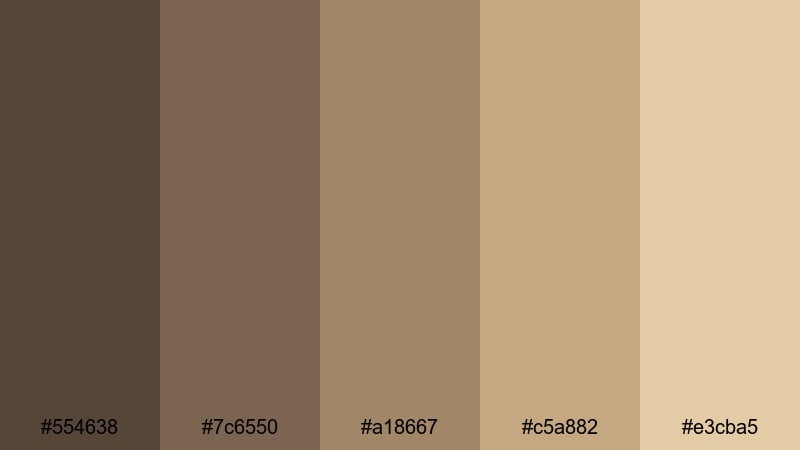
- HEX Codes: #554638, #7c6550, #a18667, #c5a882, #e3cba5.
- Mood: Warm, nostalgic, and exploratory like hand-sketched maps and notes.
- Use for: Perfect for travel diaries, nature essays, and handwritten-style title cards.
Sepia Field Journal uses honeyed drab browns and beiges that resemble weathered notebook pages and sepia photographs. It carries a sense of gentle exploration, as if you are paging through sketches and notes from a long, thoughtful journey.
Use this aesthetic color palette for vlog series about slow travel, eco-living, or reflective storytelling. Apply it to animated maps, lower thirds designed like sticky notes, and chapter cards styled as journal pages. It is also strong for Pinterest and YouTube cover art where you want a warm, nostalgic identity that still feels neutral and understated.
Minimal & Modern Drab Color Palettes
Industrial Loft Desk
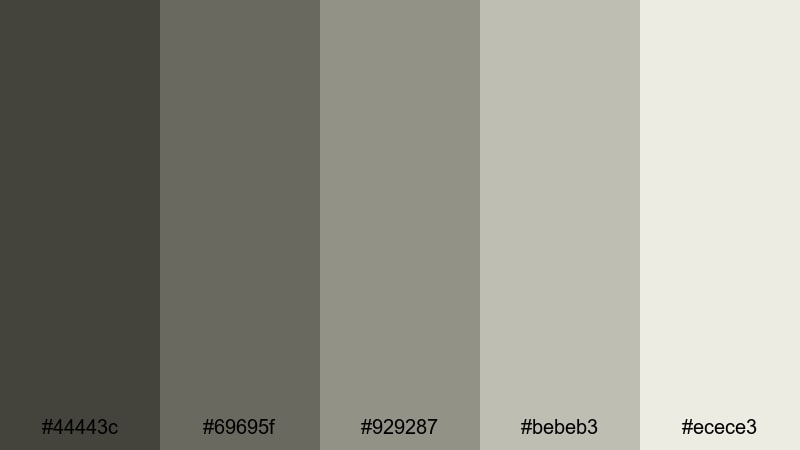
- HEX Codes: #44443c, #69695f, #929287, #bebeb3, #ecece3.
- Mood: Clean, understated, and creative like a modern loft workspace.
- Use for: Great for productivity videos, desk setups, and design-focused channels.
Industrial Loft Desk mixes cool drab grays with chalky off-whites, creating an uncluttered visual base that still feels lived-in. The darker shades evoke metal shelves and concrete walls, while the lighter ones mimic sketch paper and soft daylight.
This palette is ideal for productivity vlogs, study-with-me videos, and workspace tours. Use it for color grading your desk shots, then carry the same HEX codes into your thumbnail backgrounds, typography, and channel banners for cohesive branding. It will keep your layout minimal, professional, and creator-friendly.
Muted Interface Grid
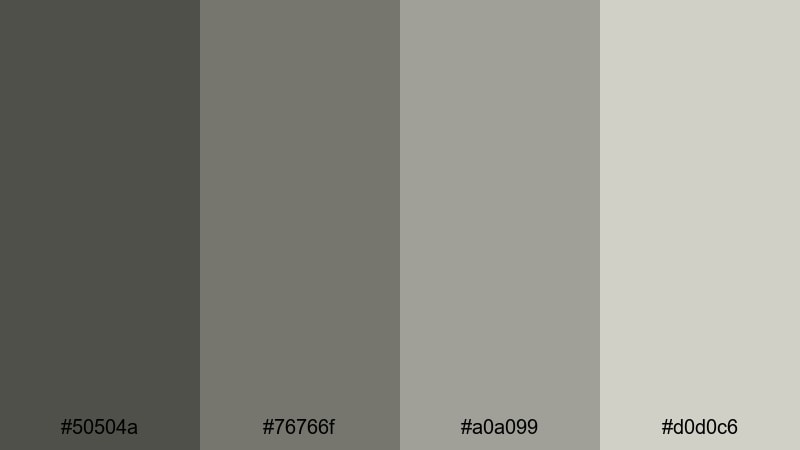
- HEX Codes: #50504a, #76766f, #a0a099, #d0d0c6.
- Mood: Orderly, cool, and tech-forward with understated digital polish.
- Use for: Perfect for UI motion graphics, app demos, and lower-third overlays.
Muted Interface Grid feels like the color of wireframes and interface mockups. Its drab neutrals are cool enough to look modern, but soft enough that they never overpower whatever UI or text you place on top.
Use this palette for screen recordings, app demos, and software tutorials. Build lower thirds, button animations, and overlay panels using the mid and light tones, with the darkest shade reserved for text or icons. The result is a clean, tech-fluent look that keeps viewers focused on the product or workflow you are explaining.
Concrete Brand System
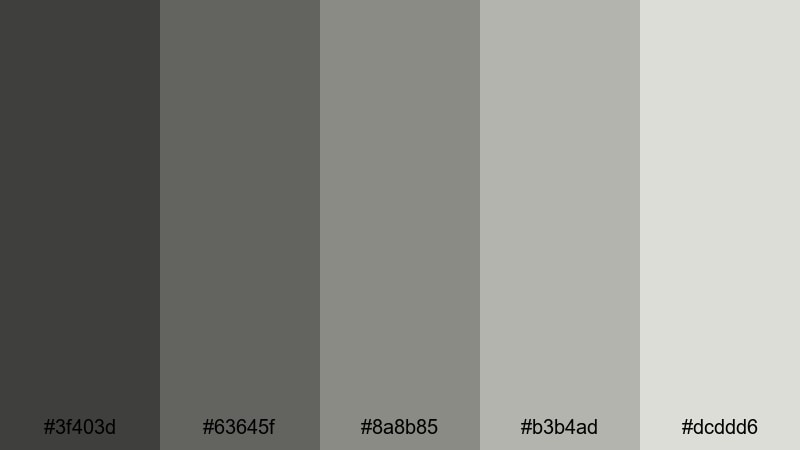
- HEX Codes: #3f403d, #63645f, #8a8b85, #b3b4ad, #dcddd6.
- Mood: Sophisticated and structured, like a high-end brand style guide.
- Use for: Ideal for logo animations, brand intros, and pitch decks turned into video.
Concrete Brand System layers drab grays that suggest concrete, steel, and glass, but without the coldness of pure monochrome. It is a sophisticated, neutral base that works well for premium brands, agencies, and portfolio-style channels.
Use this drab color palette for animated logos, channel stingers, and branded slide-style videos. It keeps typography legible, product shots clean, and motion graphics professional. When applied to thumbnails, it signals reliability and structure, especially if your niche is design, marketing, business, or tech strategy.
Weathered Tech Shell
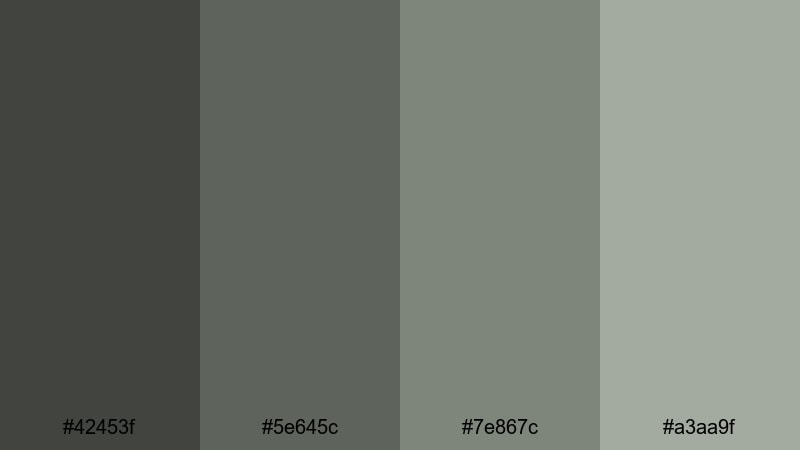
- HEX Codes: #42453f, #5e645c, #7e867c, #a3aa9f.
- Mood: Cool, slightly worn, and futuristic with a utilitarian edge.
- Use for: Best for tech reviews, sci-fi edits, and hardware b-roll with character.
Weathered Tech Shell uses greenish drab grays that feel like matte metal cases, worn gadgets, and functional sci-fi gear. It is tech-forward but not glossy, which makes products feel tested, reliable, and real.
Use this palette in your tech reviews, teardown videos, and cinematic hardware B-roll. Grade your footage so casings and cables sit in these drab tones, then reuse the same HEX values in animated specs overlays and info panels. It also works well for sci-fi edits, where you want a grounded future look rather than neon-heavy cyber visuals.
Soft Atmospheric Drab Color Palettes
Rainy Window Bokeh
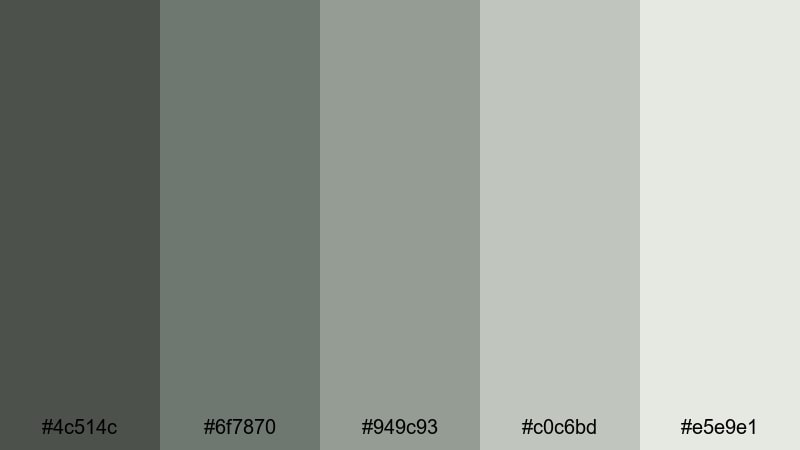
- HEX Codes: #4c514c, #6f7870, #949c93, #c0c6bd, #e5e9e1.
- Mood: Moody yet gentle, like watching traffic lights blur through rain.
- Use for: Great for lofi edits, lyric videos, and ambient background loops.
Rainy Window Bokeh captures the soft, reflective mood of a rainy day. The drab greens and mists of gray suggest wet pavement and blurred city lights, giving your footage a dreamy yet grounded tone.
Use this palette for lofi music loops, lyric videos, journal-style vlogs, or calm productivity backgrounds. It works beautifully with slow camera moves, bokeh shots, and text overlays. In thumbnails, pair the darker green-grays with the lightest tone for a cozy, cinematic contrast that still feels low-key.
Mossy Riverbank Calm
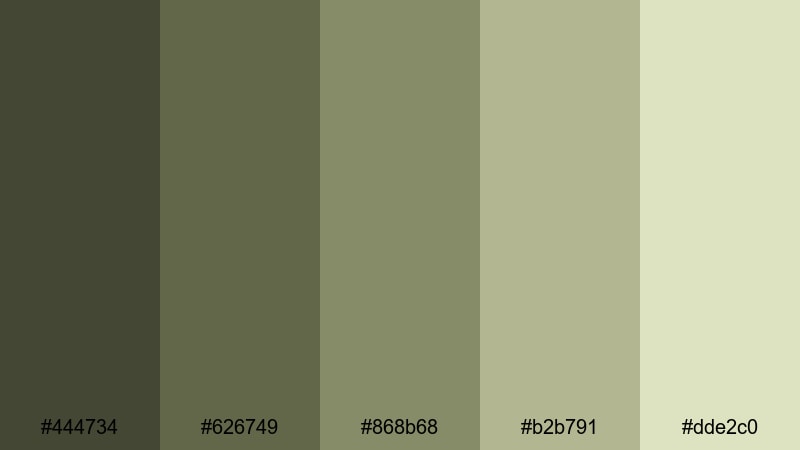
- HEX Codes: #444734, #626749, #868b68, #b2b791, #dde2c0.
- Mood: Grounding and organic, like a quiet walk along a shaded riverbank.
- Use for: Perfect for nature vlogs, hiking recaps, and slow-travel storytelling.
Mossy Riverbank Calm blends leafy drab greens with pale riverbed tones, creating an earthy, peaceful mood. It softens outdoor footage, avoiding oversaturated greens while keeping everything naturally vibrant.
Use this palette for hiking vlogs, campsite morning scenes, and slow-travel storytelling. Color grade your landscapes into these hues, then bring the same HEX codes into your titles and lower thirds. This keeps your brand consistent across long-form videos, shorts, and thumbnail designs that promise calm, thoughtful nature content.
Dust Storm Horizon
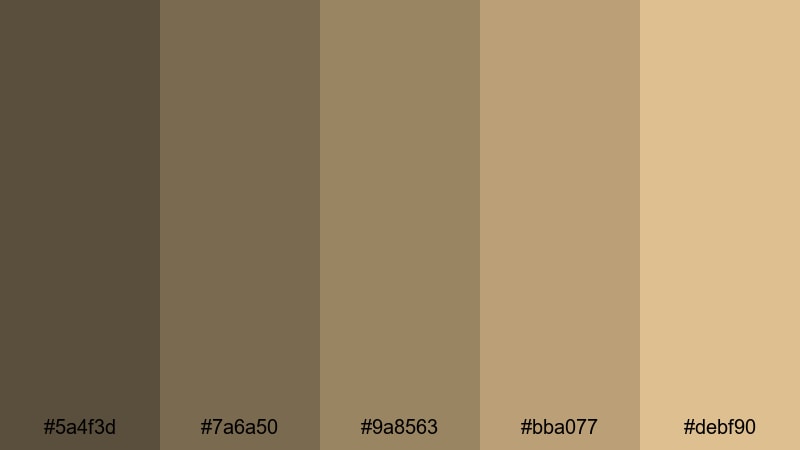
- HEX Codes: #5a4f3d, #7a6a50, #9a8563, #bba077, #debf90.
- Mood: Hazy and tense, like watching a storm roll over dry open land.
- Use for: Works well for travel trailers, desert sequences, and dramatic time-lapses.
Dust Storm Horizon combines sandy drab browns with sunburnt highlights, building a warm, cinematic tension. It feels like hot air, distant thunder, and long horizons, giving your footage a sense of scale and anticipation.
Use this drab palette for desert shots, road-trip montages, and dramatic time-lapses of changing skies. It is also strong for travel trailers and cinematic channel intros where you want warmth without full-on orange saturation. In thumbnails, contrast the darker browns with the pale, sunlit tones to create depth and drama.
Twilight Alley Haze
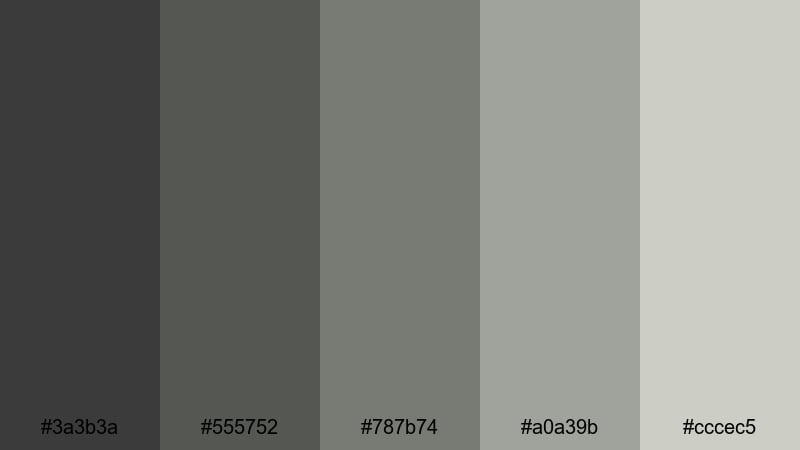
- HEX Codes: #3a3b3a, #555752, #787b74, #a0a39b, #cccec5.
- Mood: Subtle and mysterious, like a quiet alley just after sunset.
- Use for: Great for urban night vlogs, street photography edits, and narrative shorts.
Twilight Alley Haze uses smoky drab grays with soft highlights, hinting at neon glow without relying on bright colors. It is moody yet readable, which is crucial for night scenes that still need clarity on social platforms.
Use this palette for night vlogs, street photography edits, and noir-inspired shorts. Grade your shadows into the deeper grays while keeping midtones and highlights in the softer hues. For thumbnails, let the darkest tone frame your subject and add titles using the mid-light gray for a cinematic night look that stays clean and legible.
Tips for Creating Drab Color Palettes
Drab color palettes work best when they feel intentional, not accidental. Combining drab with careful contrast, clear hierarchy, and occasional accent colors can give your videos, thumbnails, and brand design a strong identity that is subtle but memorable.
- Start with one anchor drab tone (olive, brown, or gray) and build 3 to 4 supporting shades that move from dark to light for shadows, midtones, and highlights.
- Add a restrained accent color such as rust orange, muted teal, or soft cream to draw attention to key elements like titles, buttons, or call-to-action text.
- Check readability by testing white and near-black text on your mid and light drab tones; adjust brightness or contrast if captions and UI elements are hard to read.
- Match your palette to your niche: cooler drab grays for tech and productivity, earthy greens and browns for outdoor or travel, warmer sepia drabs for history and storytelling.
- In Filmora, use HSL to desaturate strong colors in your footage so they better align with your chosen drab palette and keep the overall mood cohesive.
- Save presets: once you dial in a drab grade for one clip, save it as a custom preset or LUT and reuse it across intros, B-roll, shorts, and thumbnails for brand consistency.
- Balance minimalism and depth by using flatter drab backgrounds with slightly more contrast and texture on the subject, so the viewer always knows where to look.
- Test your drab color combinations on different screens and in both light and dark app themes to be sure your aesthetic stays clear and attractive everywhere.
Thoughtfully chosen drab color palettes can make your videos feel cinematic, grounded, and uniquely yours. Whether you lean into urban fog, vintage sepia, minimal tech grays, or soft atmospheric greens, these HEX codes give you a solid starting point for consistent visual storytelling.
Use Filmora to translate these drab palettes into real-world edits: match your footage to the colors you like, apply AI Color Palette to entire projects, and refine the look with HSL, color wheels, curves, filters, and LUTs. With a bit of experimentation, your thumbnails, intros, and full timelines can all share the same subtle, professional mood.
Keep testing combinations, save your favorite drab looks as presets, and build a recognizable visual identity that viewers recognize instantly whenever your content appears in their feed.
secure download