

 100% Security Verified | No Subscription Required | No Malware


 ChatGPT
 Perplexity
 Gemini
 Claude
 Grok
Grok
Light Coral sits between soft pink and warm orange, so it instantly feels friendly, romantic, and a little bit nostalgic. It is eye-catching without being loud, which makes it perfect for emotional storytelling, lifestyle brands, and any video that should feel welcoming and human. In color psychology, Light Coral suggests warmth, care, and optimism, making it ideal for content about relationships, self-care, travel, and personal growth.
For creators and Filmora users, a good Light Coral color palette can define the mood of your thumbnails, intros, lower thirds, titles, and color grades across an entire project. Below you will find ready-made Light Coral color palettes with HEX codes you can use in vlogs, wedding films, social media edits, and branding visuals to keep your style consistent and cinematic.
In this article
Soft & Romantic Light Coral Palettes
Blush Sunrise Story
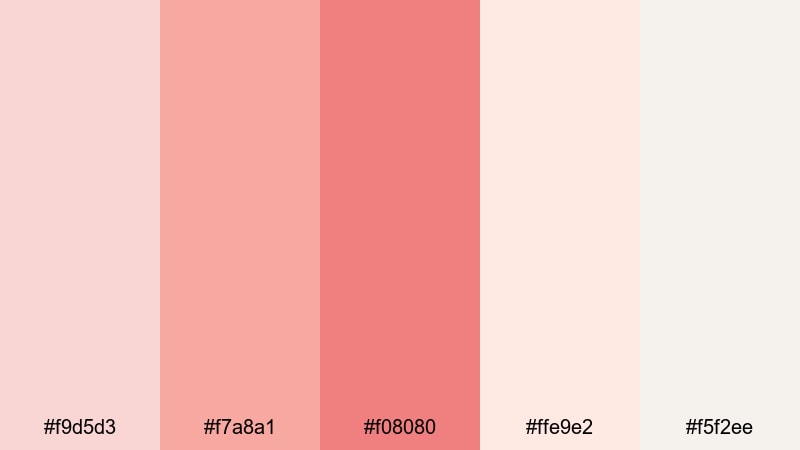
- HEX Codes: #f9d5d3, #f7a8a1, #f08080, #ffe9e2, #f5f2ee
- Mood: Gentle, romantic, and full of early-morning optimism.
- Use for: Use for wedding highlight reels, proposal videos, and dreamy lifestyle thumbnails.
Blush Sunrise Story is a tender mix of blush pinks, classic Light Coral, and creamy off-whites. It feels like the first light of the day hitting sheer curtains, softening everything in the frame. On screen, these tones create a gentle glow that flatters skin and adds emotional warmth to your footage.
Use this palette for wedding stories, proposal shorts, and intimate vlogs where you want every frame to feel personal and hopeful. In Filmora, you can pull these HEX codes into your titles, lower thirds, overlays, and thumbnail backgrounds so your whole project shares the same soft, romantic Light Coral aesthetic.
Pro Tip: Build a Cinematic Light Coral Look in Filmora
To keep this soft Light Coral mood consistent, start by designing a simple style kit in Filmora. Create one or two lower third templates using the blush and coral tones, then save them as presets so you can reuse them across an entire series. Match your titles, transitions, and end screen cards to the same HEX values so everything feels like part of one love story.
When you edit, use Light Coral as an accent on important moments: highlight keywords in your text, frame rings or hands with a soft coral vignette, or add a Light Coral gradient behind key b-roll shots. This subtle repetition makes your project feel cinematic and intentional instead of random.
AI Color Palette
If you design a Light Coral reference card or already have a still from your favorite shot in this palette, you can use Filmora's AI Color Palette feature to spread that look across your whole video. Import your reference frame, pick it as the source, then let AI match the tone and warmth to your other clips.
This is especially useful for wedding highlights shot in different lighting conditions. AI Color Palette helps keep your blush tones, Light Coral midtones, and creamy whites consistent from the ceremony to the reception, so your final edit feels cohesive and polished.
 secure download

HSL, Color Wheels & Curves
To fine-tune this Light Coral aesthetic, use Filmora's HSL, color wheels, and curves controls. Slightly desaturate reds and oranges for a more vintage, filmic feeling, or lift the midtones while keeping highlights soft to avoid harsh skin tones. Tools like these are demonstrated in Filmora's color correction tips guide, which can help you dial in your exact romantic look.
You can also push blues and cyans slightly cooler on the color wheels while keeping Light Coral warm in the midtones. This gentle contrast between warm subjects and cooler backgrounds makes your couples or main characters stand out, perfect for cinematic wedding films and emotional vlogs.
secure download1000+ Video Filters & 3D LUTs
If you want to stylize your Light Coral palette even faster, explore Filmora's video filters and 3D LUTs. Soft pastel filters, warm film looks, and vintage LUTs can all enhance your blush tones with one click, then you can fine-tune opacity to avoid overdoing it.
Apply a gentle film LUT on top of your Blush Sunrise Story palette for wedding highlights, engagement announcements, or romantic reels. This keeps your Light Coral base intact while adding subtle grain, contrast, or haze that makes your visuals feel more cinematic and ready for thumbnails, trailers, and social posts.
secure downloadRosy Wedding Glow

- HEX Codes: #ffe3dc, #ffb5a7, #f28482, #f6bdc0
- Mood: Warm, intimate, and celebratory.
- Use for: Perfect for save-the-date teasers, engagement shorts, and elegant slideshow openings.
Rosy Wedding Glow wraps classic Light Coral in soft peach and rosy tones, giving every frame a candlelit feel. It is romantic without being too sugary, which works beautifully for modern couples and elegant lifestyle visuals.
Use these HEX codes on save-the-date animations, wedding slideshow backgrounds, and YouTube channel branding focused on love, relationships, or celebrations. In thumbnails, pair the warmer coral tones with white text for strong contrast and an instantly recognizable romantic brand look.
Peach Cloud Daydream
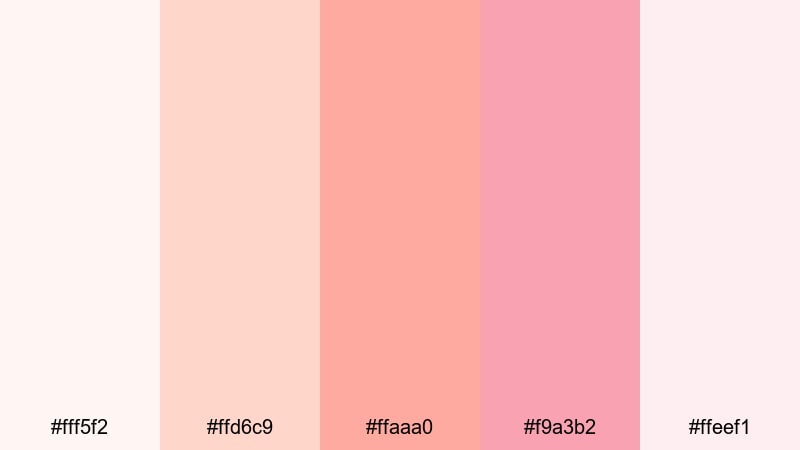
- HEX Codes: #fff5f2, #ffd6c9, #ffaaa0, #f9a3b2, #ffeef1
- Mood: Whimsical, dreamy, and nostalgic.
- Use for: Use for dreamy travel diaries, aesthetic study vlogs, and soft storytelling edits.
Peach Cloud Daydream is all about milky whites and airy peach corals, like sunlight diffused through clouds. It creates a dreamy haze that is perfect for soft-focus b-roll, cozy room tours, and gentle day-in-the-life vlogs.
Apply these colors to lower thirds, highlight boxes around key text, and subtle gradient overlays that sit over your footage at low opacity. For study or journaling content, build thumbnail backgrounds with the palest peach and then add one stronger coral accent to draw the eye to your title.
Soft Coral Bouquet
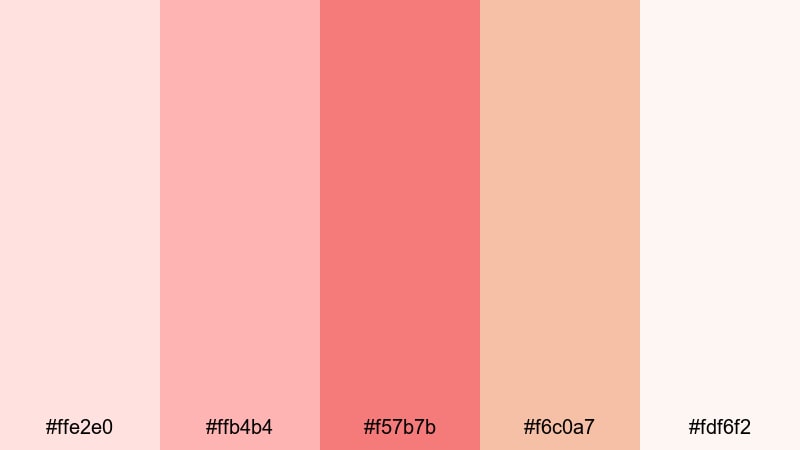
- HEX Codes: #ffe2e0, #ffb4b4, #f57b7b, #f6c0a7, #fdf6f2
- Mood: Floral, feminine, and gently joyful.
- Use for: Great for beauty tutorials, product flat-lays, and brand reels with a delicate touch.
Soft Coral Bouquet feels like a fresh arrangement of flowers translated into color: petal pinks, Light Coral blooms, and warm nude accents grounded by creamy whites. It is feminine and joyful without losing sophistication.
Use this palette for beauty channels, stationery brands, skincare launches, and lifestyle reels. In Filmora, match your product labels, captions, and background blocks to these HEX codes so your on-screen graphics look like an extension of your packaging and social media grid.
Fresh & Minimal Light Coral Palettes
Clean Coral Interface
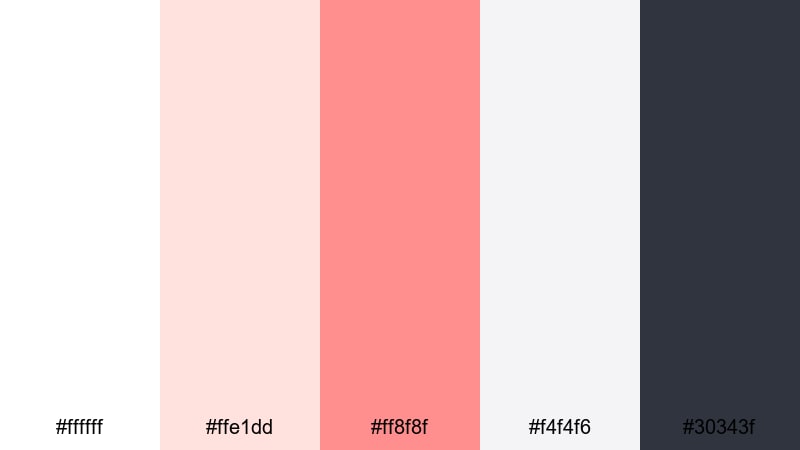
- HEX Codes: #ffffff, #ffe1dd, #ff8f8f, #f4f4f6, #30343f
- Mood: Fresh, minimal, and confident.
- Use for: Use for app mockups, lower thirds, and modern explainer videos.
Clean Coral Interface balances bright whites and soft grays with confident Light Coral accents and a charcoal anchor. It feels like a clean UI brought to life, making it ideal for tech, SaaS, and productivity content.
Use white and light gray as your main background, then reserve the coral for buttons, icons, and key stats in your explainer videos. The deep charcoal is perfect for text and minimal logo marks, keeping everything readable on screens of any size.
Nordic Coral Breeze
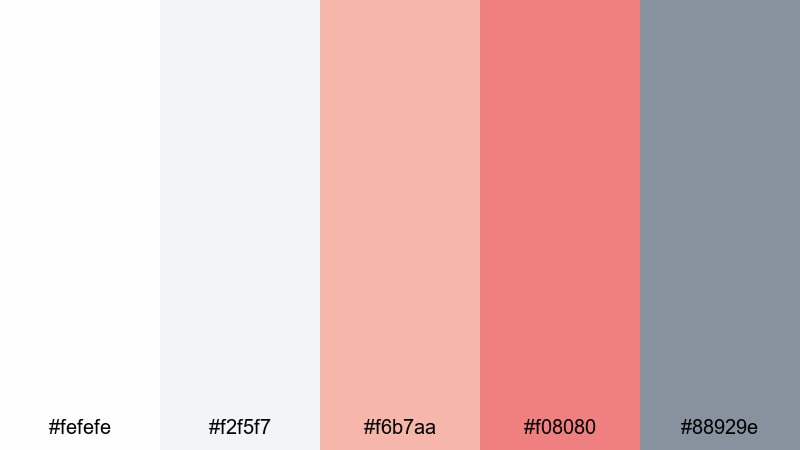
- HEX Codes: #fefefe, #f2f5f7, #f6b7aa, #f08080, #88929e
- Mood: Calm, airy, and contemporary.
- Use for: Perfect for minimalist channels, productivity content, and subtle brand refreshes.
Nordic Coral Breeze brings together Scandinavian-style whites and soft grays with a gentle Light Coral accent and muted blue-gray. The overall feel is calm and restrained, with just enough warmth to stay human.
This palette works well for productivity vlogs, minimal desk setups, wellness channels, or any brand that wants a neat, airy aesthetic. Use the coral shades on key action words in your titles or progress bars in your motion graphics, while keeping most backgrounds in the cool, pale neutrals.
Minimal Coral Focus
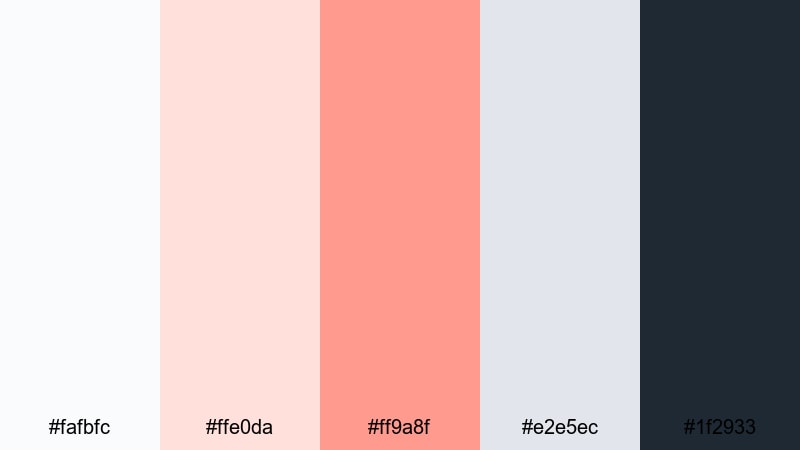
- HEX Codes: #fafbfc, #ffe0da, #ff9a8f, #e2e5ec, #1f2933
- Mood: Focused, polished, and professional with a soft edge.
- Use for: Use for channel branding, tutorial lower thirds, and portfolio reels.
Minimal Coral Focus is designed to keep your visuals professional but approachable. Soft off-whites and cool grays act as a neutral canvas, while Light Coral provides a single clear focal accent anchored by a dark navy charcoal.
Use this palette when designing tutorial titles, chapter bars, and lower thirds in Filmora. Light Coral should highlight your main call-to-action or key chapter labels, while the deep navy handles text and logo shapes, ensuring strong contrast and a clean, trustworthy feel.
Soft Coral on Slate

- HEX Codes: #fbe9e7, #f9a29a, #f08080, #5a6b7a, #101820
- Mood: Sleek, modern, and balanced.
- Use for: Great for cinematic titles, interfaces, and sophisticated social graphics.
Soft Coral on Slate contrasts glowing Light Coral tones with cool slate blues and deep charcoal. This mix feels modern and slightly cinematic, with warmth in the accents and seriousness in the base tones.
Use the darker slate and charcoal shades as backgrounds for bold titles, then let Light Coral sit on top for text highlights, icons, or thin frames around your footage. It is a strong choice for YouTube channels that want to feel polished yet approachable, such as design tutorials or premium lifestyle content.
Bold & Tropical Light Coral Palettes
Tropical Coral Splash
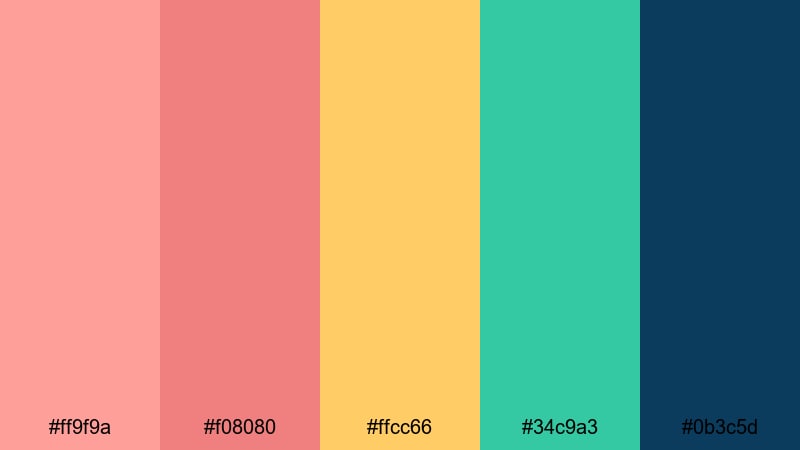
- HEX Codes: #ff9f9a, #f08080, #ffcc66, #34c9a3, #0b3c5d
- Mood: Energetic, playful, and beachy.
- Use for: Use for summer vlogs, travel reels, and upbeat channel trailers.
Tropical Coral Splash mixes punchy Light Coral with sunshine yellow, vibrant teal, and a deep ocean blue. The result is a bright, energetic palette that instantly says summer, waves, and sunny streets.
Use this palette for travel intros, festival vlogs, and fun lifestyle shorts. Coral and yellow can drive your titles and animated icons, while teal and navy work as backgrounds and accent shapes. It is perfect for thumbnails that must stand out in a crowded feed.
Coral Reef Fiesta
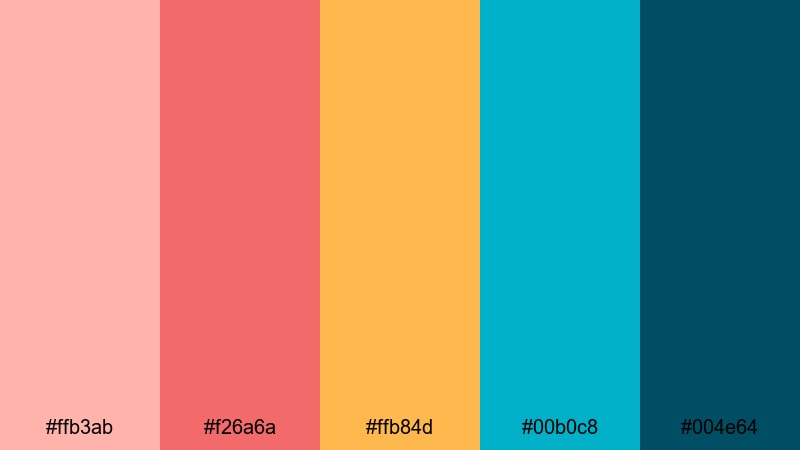
- HEX Codes: #ffb3ab, #f26a6a, #ffb84d, #00b0c8, #004e64
- Mood: Festive, bold, and adventurous.
- Use for: Perfect for party recaps, festival content, and dynamic montage sequences.
Coral Reef Fiesta combines vivid Light Coral with golden orange and deep ocean blues for a palette that feels like a party underwater. It is bold, saturated, and ideal for music-driven, high-energy edits.
Use the bright coral and orange tones on beat-synced text, overlays, and animated shapes. The teal and dark blue shades are great for backgrounds on title cards or outros, giving your montage structure while keeping the overall look fun and adventurous.
Neon Sunset Boardwalk
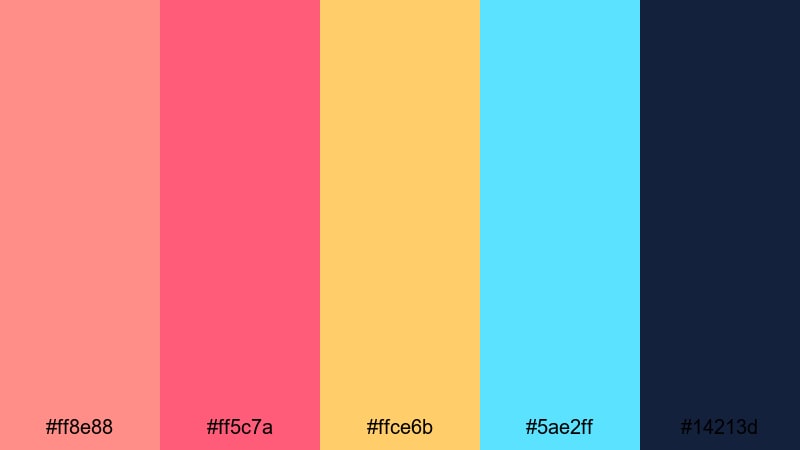
- HEX Codes: #ff8e88, #ff5c7a, #ffce6b, #5ae2ff, #14213d
- Mood: Electric, cinematic, and nostalgic.
- Use for: Use for nightlife vlogs, skate edits, and retro-styled title sequences.
Neon Sunset Boardwalk pushes Light Coral into a more electric, almost neon space, pairing it with hot pinks, bright cyan, and inky navy. It feels like retro arcades, city lights, and golden hour turning into night.
Use this palette for skate edits, nightlife vlogs, synthwave intros, or retro-styled titles. Coral and pink tones can color your main typography and light leaks, while cyan adds contrast on outlines or glitch effects. The deep navy anchors the scheme for legible text and darker backgrounds.
Paradise Coral Punch
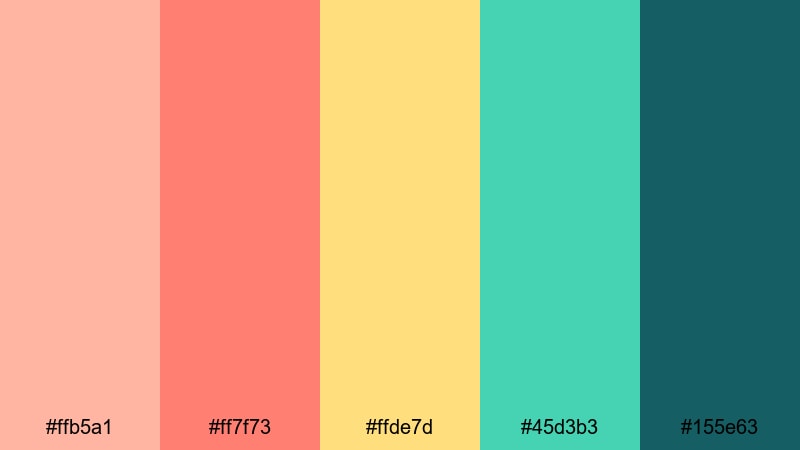
- HEX Codes: #ffb5a1, #ff7f73, #ffde7d, #45d3b3, #155e63
- Mood: Juicy, upbeat, and vacation-ready.
- Use for: Great for travel intros, resort promos, and fun lifestyle shorts.
Paradise Coral Punch is a juicy mix of Light Coral, mango yellow, and lagoon teal. It instantly feels like pool days, cocktails, and tropical escapes, making it a great choice for travel and resort content.
Use Light Coral and mango yellow to highlight text, price tags, or key offers in resort promos, while teal and deep green-teal shades frame footage of water, nature, and sky. This palette translates well to both horizontal travel edits and vertical Reels or Shorts.
Vintage & Cinematic Light Coral Palettes
Retro Coral Title Card
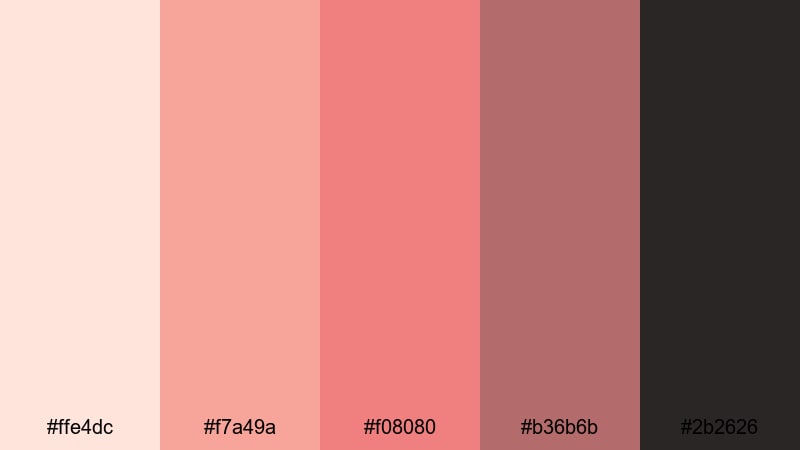
- HEX Codes: #ffe4dc, #f7a49a, #f08080, #b36b6b, #2b2626
- Mood: Nostalgic, bold, and slightly dramatic.
- Use for: Use for retro title cards, film-style openers, and stylized credits.
Retro Coral Title Card desaturates Light Coral and pairs it with warm browns and deep espresso. The palette feels like an old film poster or 70s title card, full of character and a bit of drama.
Use it to design opening titles, intertitles, and end credits for narrative shorts, storytime vlogs, or documentary chapters. Let the darker brown and espresso handle background and text, while Light Coral provides punch on key words, borders, and subtle texture overlays.
Dusty Coral Film Grain
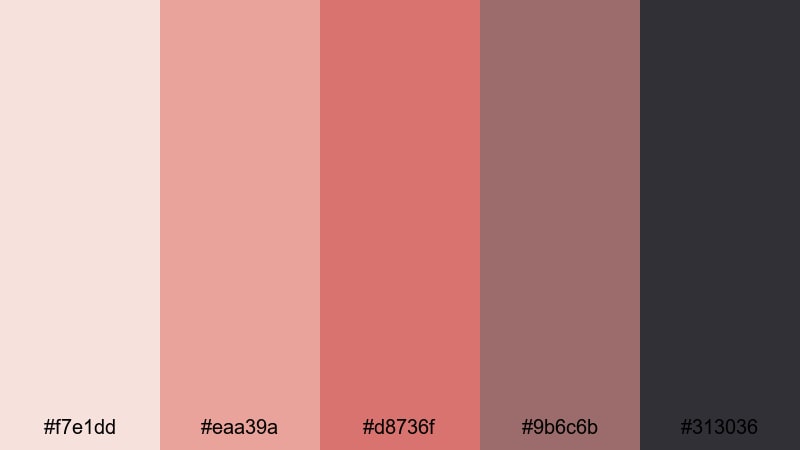
- HEX Codes: #f7e1dd, #eaa39a, #d8736f, #9b6c6b, #313036
- Mood: Soft, moody, and cinematic.
- Use for: Perfect for short films, narrative vlogs, and moody color grades.
Dusty Coral Film Grain leans into muted corals, mauves, and charcoal, creating a soft but moody tone. It feels like a memory or a quiet moment, especially when combined with film grain and gentle fades.
Use this palette for emotional storytelling, journal-style vlogs, or low-key fashion lookbooks. In Filmora, apply these HEX values to your subtitles, chapter labels, and simple graphic frames, then add a subtle grain overlay and lowered contrast to push the cinematic feeling further.
Coral Noir Montage
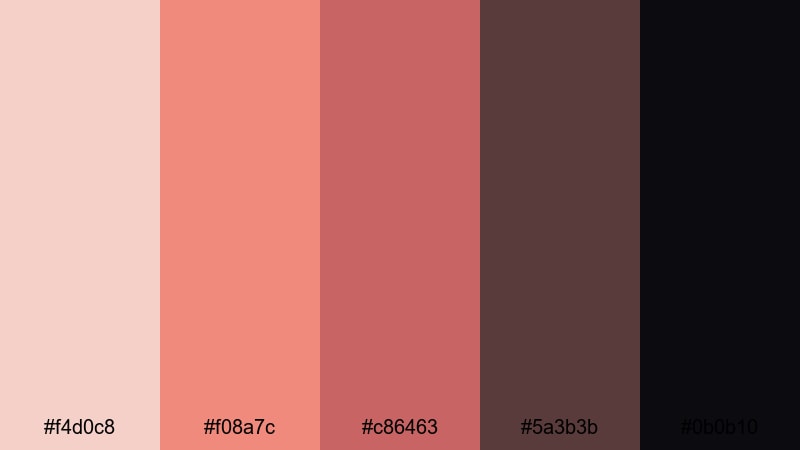
- HEX Codes: #f4d0c8, #f08a7c, #c86463, #5a3b3b, #0b0b10
- Mood: Dramatic, stylish, and editorial.
- Use for: Use for fashion reels, trailer-style edits, and dramatic montage sequences.
Coral Noir Montage takes Light Coral into a deeper, smokier space with rich bricks and near-black shadows. It feels like a fashion editorial or a moody trailer, mixing warmth with strong contrast.
Use the lighter coral tones for titles and graphic accents, while the brick and deep browns create sophisticated backgrounds and frames. The near-black shade (#0b0b10) is ideal for letterbox bars, logo stings, and bold typography, giving your montage a premium, cinematic edge.
Tips for Creating Light Coral Color Palettes
Light Coral is versatile, but it works best when you balance warmth, contrast, and readability. Keep these practical tips in mind when building or customizing your own Light Coral color combinations for video and design.
- Pair Light Coral with neutrals (white, cream, soft gray, or charcoal) so it can stand out as an accent instead of overwhelming the frame.
- For readability, use dark text (#101820, #1f2933, or similar) on Light Coral backgrounds, and white or off-white text on darker coral or slate backgrounds.
- Decide on a role for Light Coral in your brand: is it your main background color, a highlight for calls-to-action, or a subtle accent? Use it consistently in that role.
- Match your color palette to your footage by sampling real colors from skin tones, sunsets, or decor, then adjusting them closer to your chosen Light Coral HEX codes.
- Limit your active colors in any one frame to 2–3 main shades plus neutrals. Use the remaining palette colors more sparingly for variety across scenes and thumbnails.
- Check how your Light Coral palette looks on mobile by previewing titles and thumbnails at small sizes. Adjust saturation and contrast if key text is hard to read.
- Use subtle gradients (for example, from soft blush to Light Coral) in backgrounds or overlays to avoid flat blocks of color while keeping the overall look cohesive.
- When grading footage in Filmora, gently warm highlights and mids to harmonize with your Light Coral graphics, but keep shadows neutral or slightly cool to maintain depth.
Light Coral color palettes can completely change how your content feels, from soft and romantic to bold and tropical or moody and cinematic. By choosing a palette that matches your story and applying it consistently, you build a recognizable visual identity across thumbnails, intros, and entire video series.
As you experiment with these 15 Light Coral combinations, try dropping their HEX codes straight into Filmora's titles, shapes, and overlays, then refine the look with color grading tools, filters, and LUTs. A few simple adjustments can turn a good palette into a signature style that viewers remember.
Open a new project, pick one Light Coral palette that fits your next idea, and test it on your intro, lower thirds, and end screen. With Filmora, it is easy to adjust and reuse that look across future edits so your channel or brand feels cohesive from the first frame to the last.
secure downloadNext: Blue Coral Color Palette
