

 100% Security Verified | No Subscription Required | No Malware

The Light Pastel Color Tone Filter collection in Filmora helps content creators turn ordinary footage into soft, airy visuals with gentle colors and smooth contrast. These filters brighten highlights, mute harsh tones, and introduce subtle pastels that feel calm and cinematic.
Whether you film lifestyle vlogs, sit-down content, or aesthetic B-roll, these presets offer quick ways to create a cohesive pastel color tone without heavy manual grading. Choose the filter that matches your scene and fine-tune intensity for your signature style.
In this article
Soft Daylight and Window-Lit Scenes
Airy Morning Vlog
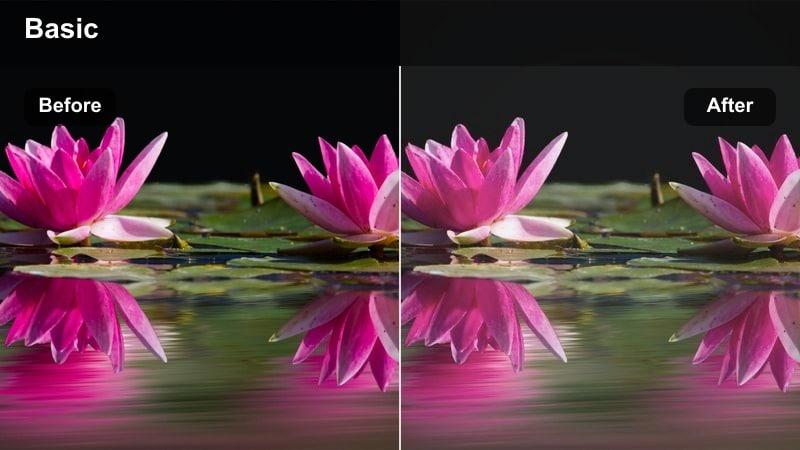
- Effect look: Bright, low-contrast pastel highlights for clean morning light
- Best for: Indoor morning vlogs, desk setups, light-filled bedrooms
- Editing tip: Reduce contrast slightly and push temperature a touch warmer to keep skin tones soft but not washed out.
Airy Morning Vlog is designed to lift shadows and soften color intensity so your morning footage feels fresh, quiet, and inviting. In Filmora, one click brightens highlights, smooths contrast, and introduces light pastel tones that make white bedding, curtains, and mugs look crisp without feeling clinical.
Use this preset whenever you film by a window or in a bright room and want a relaxed, lifestyle aesthetic. Dial back the strength slider if your original exposure is already bright, then fine-tune contrast and warmth so faces stay natural while backgrounds lean into the airy pastel mood.
Use AI Tools to Refine Your Pastel Color Palette
Filmora's AI-powered color tools help you quickly align your light pastel color tone filter presets with the exact mood you want. Start by applying a pastel preset, then let AI suggest adjustments to exposure, white balance, and color balance for a unified soft look across your edit.
Once you have a pastel direction that matches your channel aesthetic, save it as a custom preset so future projects can reuse the same look without repeating manual color grading steps.
 secure download

Preview Light Pastel Filters in Real Time
Filmora lets you hover over each light pastel color tone filter and instantly preview how it transforms your clip in the Viewer. This makes it easy to compare options such as Airy Morning Vlog versus Soft City Stroll on the same footage without committing to a look too early.
After choosing a favorite, you can still nudge exposure, saturation, or contrast while keeping the responsive, drag and drop workflow that suits everyday content creation.
secure downloadCombine Pastel Filters with CINEMATIC LUTs
For creators who want more depth without losing the soft aesthetic, Filmora lets you layer light pastel color tone filters with cinematic LUTs. Apply a gentle pastel filter first, then add a low-strength LUT to introduce subtle contrast and filmic character.
This approach is ideal when you want your videos to feel more polished and cinematic, but still keep the airy, dreamy color palette that matches lifestyle, beauty, or vlog content.
secure downloadWindow Light Soft Glow
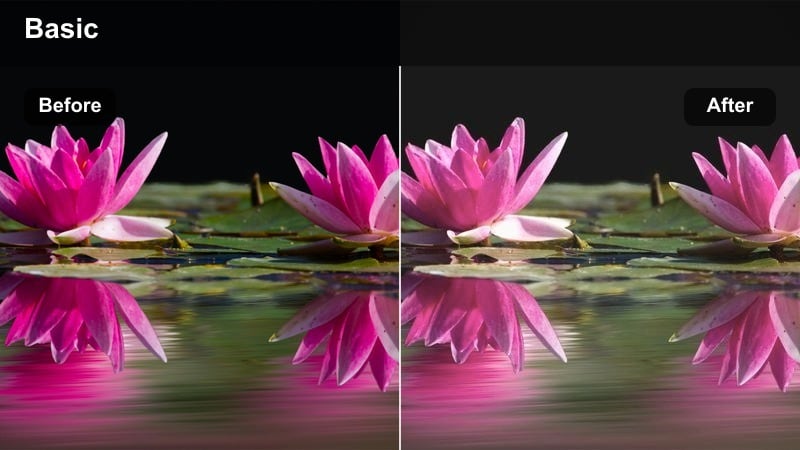
- Effect look: Gentle glow with creamy whites and pastel desaturation
- Best for: Window-lit talking head videos, tutorials, and cozy chats
- Editing tip: Lower the filter strength on overexposed clips to avoid blown-out highlights while keeping the glow.
Window Light Soft Glow wraps your subject in a subtle halo effect that turns ordinary daylight into a cinematic, creamy wash. In Filmora, this preset slightly desaturates strong colors and smooths contrast so white walls, curtains, and frames look soft but still defined.
Apply it to sit-down videos where you are facing a window or large light source and want an inviting, cozy vibe. Watch your scopes as you adjust intensity, lowering exposure first if needed, so the glow feels intentional rather than blown out.
Minimal Desk Pastel
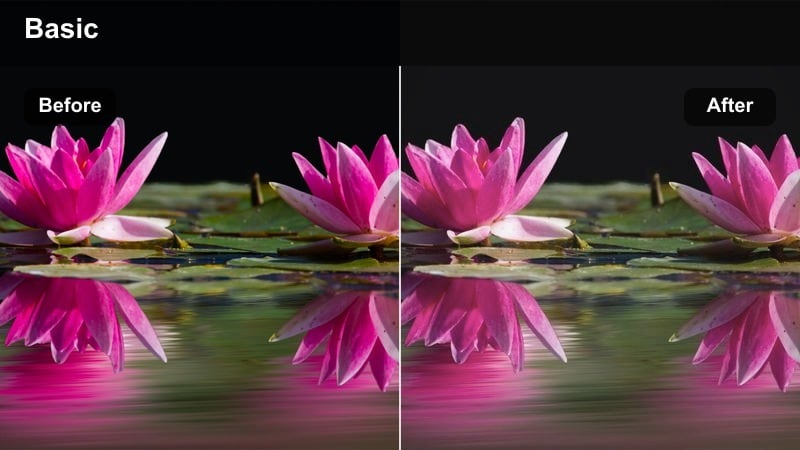
- Effect look: Soft neutrals with muted saturation and light pastel accents
- Best for: Desk tours, productivity vlogs, workspace B-roll
- Editing tip: Use subtle vignette after the filter to draw focus toward the center of your frame without darkening pastels too much.
Minimal Desk Pastel cleans up busy workspaces by gently muting strong colors and evening out contrast. In Filmora, it turns bright stationery, screens, and decor into a cohesive pastel palette that feels modern and distraction free.
Use this preset for top-down shots, desk tours, or productivity segments where you want viewers focused on layout and motion rather than bold colors. Add a light vignette and adjust saturation of specific hues, such as blues or greens, so UI elements stay clear while everything else feels softly styled.
Outdoor Pastel Ambience and Street Moments
Soft City Stroll
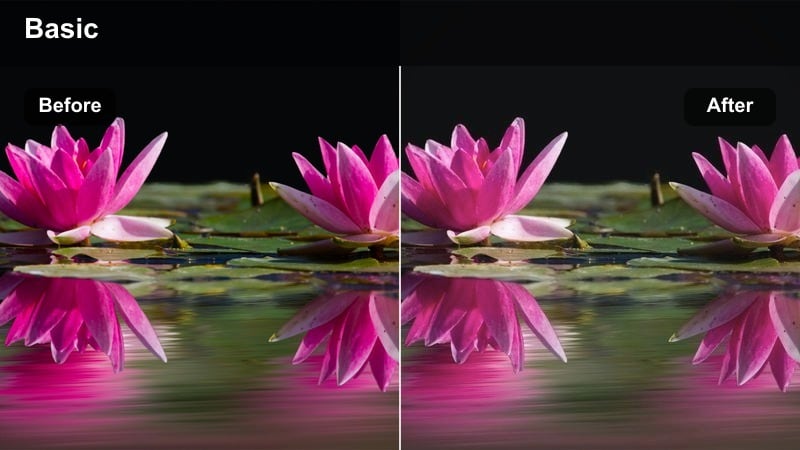
- Effect look: Muted urban colors with lifted blacks and light pastel sky tones
- Best for: Casual walking vlogs, city B-roll, handheld street footage
- Editing tip: Stabilize your clips before applying the filter so the gentle color tone feels more cinematic and intentional.
Soft City Stroll is built to tame the harsh mix of signs, cars, and concrete you often get in street footage. In Filmora, it raises black levels slightly, softens contrast, and shifts skies and distant buildings toward relaxed pastel tones for a calmer urban look.
Apply it to walking vlogs or B-roll captured in busy neighborhoods when you want a dreamy, slow-living mood. Stabilize clips first, then make small exposure tweaks per shot so faces, sidewalks, and storefronts share a consistent brightness and pastel character throughout the sequence.
Pastel Sunset Promenade
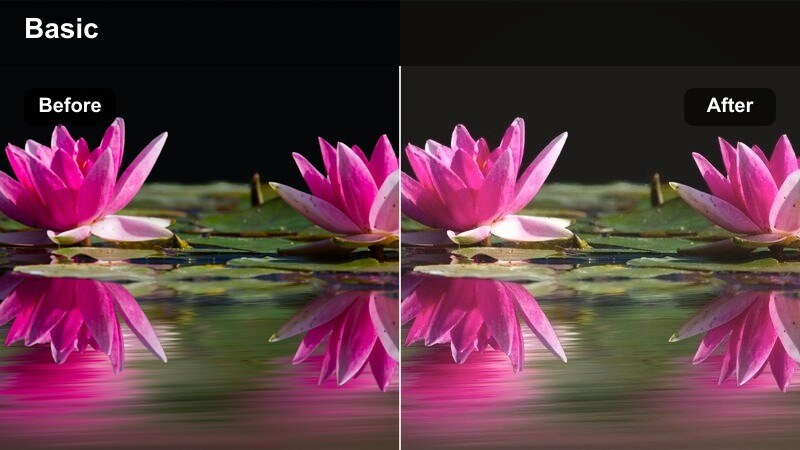
- Effect look: Soft pink and peach highlights with gentle fade in shadows
- Best for: Golden-hour walks, waterfront scenes, rooftop views
- Editing tip: Warm your white balance slightly to enhance the pink pastel tones without turning the whole frame orange.
Pastel Sunset Promenade is tuned for golden hour, turning the sky into a smooth gradient of pinks and peaches while keeping the rest of the frame delicately faded. Filmora uses this preset to soften hard shadows and prevent clipped highlights so your sunset stays romantic and cinematic.
Use it on waterfront clips, rooftop views, or promenade walks where the sky plays a major role in the composition. After applying, nudge white balance warmer and refine skin tones using Filmora's HSL or skin tone controls so faces look flattering while the background carries the stronger pastel hues.
Light Urban Overlook
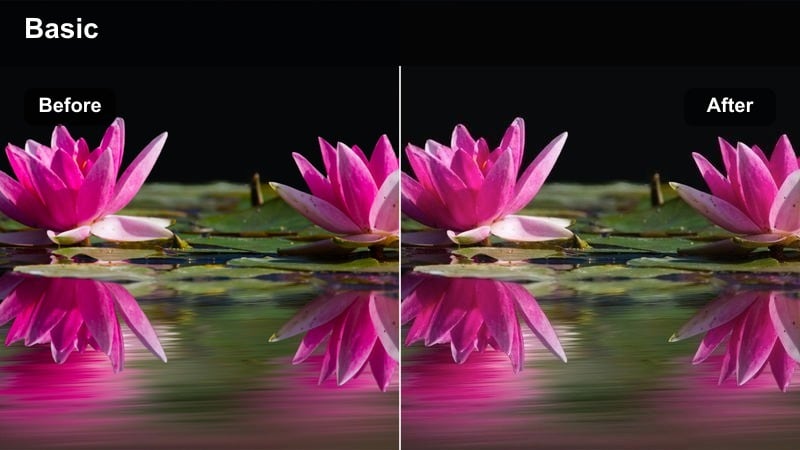
- Effect look: Cool pastel blues and grays with softened contrast on buildings
- Best for: Overlook shots, skyline B-roll, balcony talking clips
- Editing tip: Slightly boost saturation only in the blue channel to keep the sky pastel but still noticeable behind you.
Light Urban Overlook cools your cityscapes with pastel blues and grays, ideal for skyline shots and balcony intros. In Filmora, it reduces midtone contrast so distant buildings look smooth and calm while the sky takes on a gentle, airy tone.
Apply it to static tripod shots or slow pans of the city, especially when you are framed against the skyline. Position your subject a bit away from the background, then boost blue saturation lightly so the sky stands out as a soft backdrop without overpowering the subject.
Lifestyle Aesthetic and Everyday Moments
Cozy Room Aesthetic
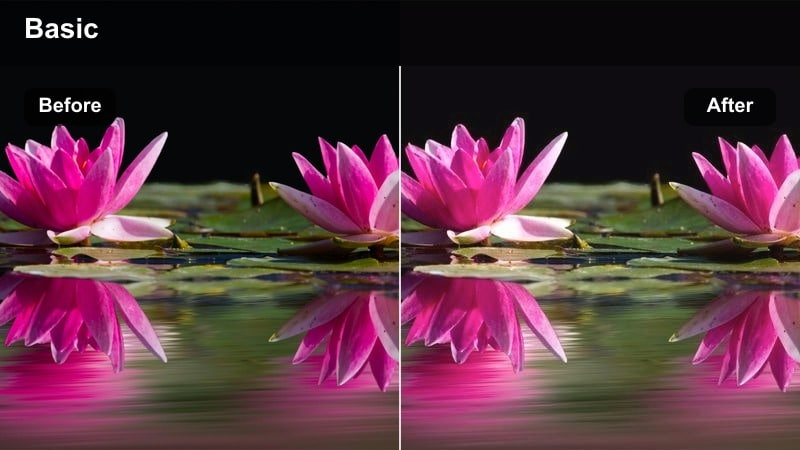
- Effect look: Soft beige and pastel highlights with gentle filmic fade
- Best for: Room tours, lifestyle B-roll, aesthetic montage sequences
- Editing tip: Combine this filter with a slight film grain effect to keep the softness while adding subtle texture.
Cozy Room Aesthetic is made for warm corners, shelves, and bedroom shots you want to feel lived in yet curated. In Filmora, the preset leans into beige and cream highlights, adds a light fade to blacks, and desaturates strong colors so every object feels like part of a cohesive lifestyle tableau.
Use it across room tours, decor updates, or montage sequences to create a unified visual story. Add a touch of film grain and save your adjusted version as a custom preset so future videos filmed in the same room instantly match your established pastel look.
Pastel Daily Routine
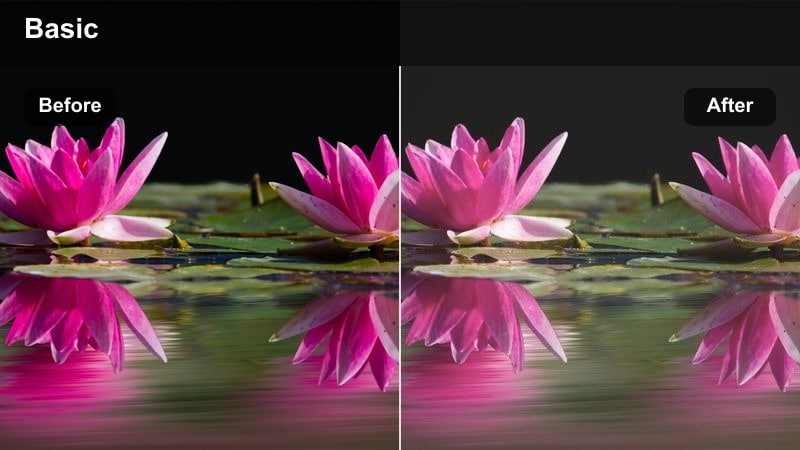
- Effect look: Lightened midtones with pastel-leaning neutrals and subtle fade
- Best for: Morning and night routines, slow-living vlogs, timelapses
- Editing tip: Use speed ramps and this filter together so the soft colors balance the movement and keep the sequence relaxing.
Pastel Daily Routine brightens midtones and gently fades contrast so everyday actions feel cinematic and calm. In Filmora, it smooths out mixed lighting and nudges neutrals toward soft pastel shades, perfect for capturing small rituals around the house.
Apply it across full routines, from kitchen to bathroom to bedroom, to reduce color clashes and maintain a steady mood. Combine with speed ramps or subtle slow motion so movement stays engaging while the pastel toning keeps everything soothing and easy to watch.
Light Pastel B-Roll
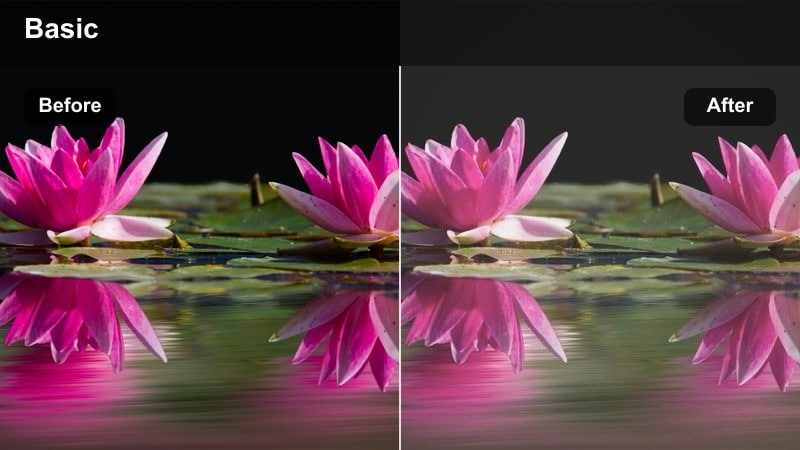
- Effect look: Very soft saturation and lifted shadows with airy color fade
- Best for: Handheld detail shots, slow-motion inserts, filler B-roll
- Editing tip: Trim your B-roll clips shorter after applying the filter so each soft moment feels intentional, not repetitive.
Light Pastel B-Roll is tailored for cutaway shots of objects, hands, and textures that bridge your main scenes. In Filmora, it lifts shadows, pulls back saturation, and adds an airy fade so these inserts feel dreamy and complementary rather than visually loud.
Use it on close-ups of decor, coffee cups, plants, or city details that support your story without drawing too much attention. Keep each B-roll clip short and let the soft toning, gentle music, and minimal sound design work together to maintain a light, uninterrupted flow.
Studio and Sit-Down Content with Pastel Tones
Soft Tutorial Pastel
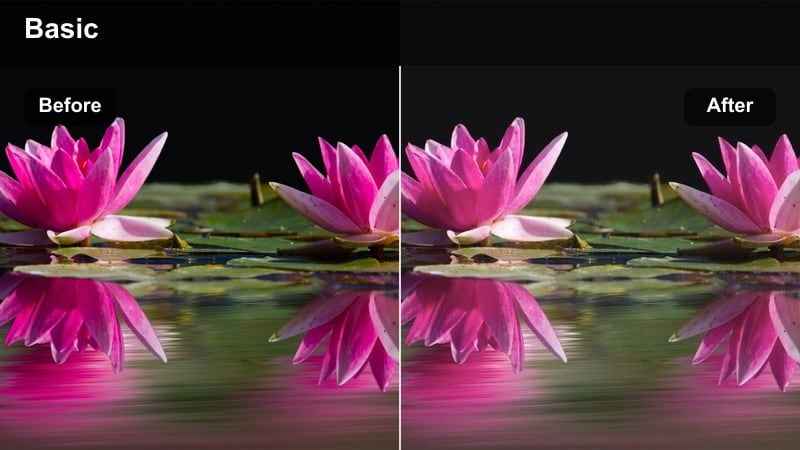
- Effect look: Balanced exposure with pastel background tones and natural skin
- Best for: Educational videos, how-to tutorials, screen-share intros
- Editing tip: Keep the filter intensity moderate so slides, overlays, and on-screen text remain sharp and readable.
Soft Tutorial Pastel gives your educational content a friendly, modern feel while preserving clarity. In Filmora, it gently brightens mids, softens background colors into pastel shades, and keeps skin tones close to true to life so viewers can focus on what you are teaching.
Apply it to A-roll segments, intro pieces, and any shots that sit beside slides or screen recordings. Keep intensity moderate and double check overlays, lower thirds, and callouts so text remains crisp against the softer, pastel treated background.
Pastel Interview Setup
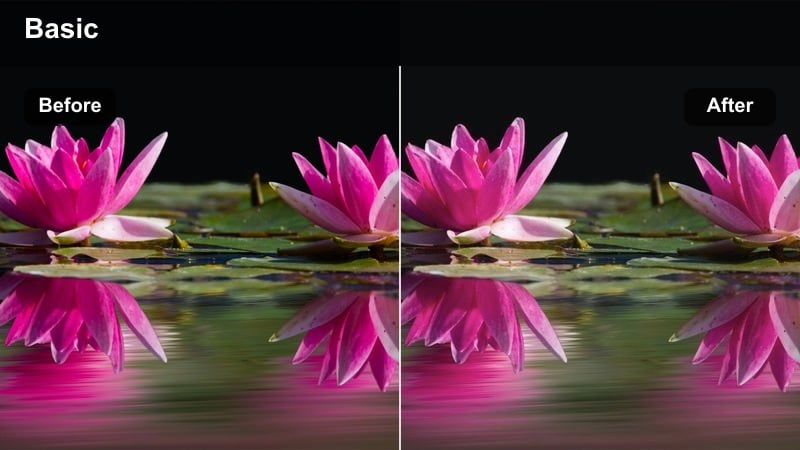
- Effect look: Subtle pastel background with neutral, true-to-life skin tones
- Best for: Interviews, podcast video, two-person sit-downs
- Editing tip: Place practical lights in the background and let this filter soften their colors into pleasing pastel glows.
Pastel Interview Setup focuses on shaping your background while keeping faces accurate and professional. In Filmora, this preset softens lamps, shelves, and wall decor into gentle pastel glows, adding depth without distracting from what guests are saying.
Use it on one or multiple camera angles in podcast or interview setups. Add small practical lights behind your subjects, then apply the preset and tune exposure and white balance on each angle so both speakers share consistent skin tones and a unified, pastel toned environment.
Creator Brand Pastel
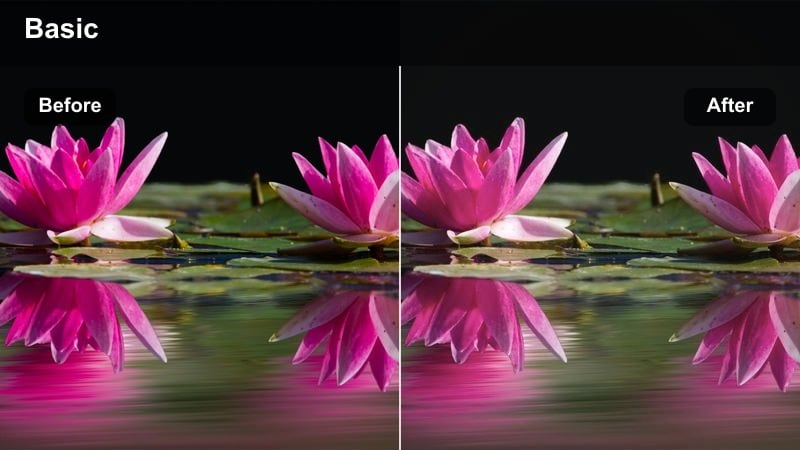
- Effect look: Light, brand-friendly pastel palette with slightly brightened mids
- Best for: Channel trailers, brand deals, product mentions
- Editing tip: Adjust the hue of pastel backgrounds to echo your logo or brand colors for a subtle visual link.
Creator Brand Pastel is designed to help you build a recognizable, sponsor ready visual identity. In Filmora, it brightens midtones, softens contrast, and shifts backgrounds into a light pastel palette that can be nudged toward your brand colors using hue adjustments.
Apply it to intros, outros, and any branded segments where you present products or speak directly to camera. Once you have tuned the pastel tones to complement your logo, save the setup as a custom preset so future collaborations and channel updates instantly match the same signature style.
Tips for Using Light Pastel Color Tone Filter Filters in Filmora
- Shoot slightly darker than usual so the pastel filters have room to lift exposure without blowing out highlights.
- Lock white balance in camera to prevent color shifts that can work against the soft pastel tones in post.
- Keep backgrounds simple with limited dominant colors so the pastel treatment looks clean rather than busy.
- Adjust filter intensity on a clip by clip basis to maintain natural skin tones while backgrounds stay airy and pastel.
- Use Filmora's scopes to monitor exposure and ensure lifted shadows and highlights still hold detail after applying filters.
- Export a short test sequence and review it on both phones and laptops to confirm your pastel look translates across screens.
- Save tweaked versions of your favorite pastel presets as custom looks so your channel style stays consistent over time.
Light pastel color tone filters in Filmora give content creators a fast way to turn everyday footage into soft, cinematic visuals that feel modern and calming.
Experiment with different presets, adjust intensity, and save your own variations so you can build a recognizable pastel style across all your content.
secure downloadNext: Cinematic Color Fade Lut
