

 100% Security Verified | No Subscription Required | No Malware


 ChatGPT
 Perplexity
 Gemini
 Claude
 Grok
Grok
Royal Blue sits between vivid primary blue and deep navy, which makes it feel both powerful and trustworthy. It is often linked with confidence, clarity, and a premium, almost royal presence on screen. In video and branding, Royal Blue grabs attention without feeling aggressive, and its cool tone helps balance bright accents like gold, neon pink, or icy cyan.
For YouTube thumbnails, channel intros, vlogs, and brand kits, a well-planned Royal Blue color palette can instantly define your visual identity. Below you will find 15 ready-made Royal Blue color combinations with HEX codes, designed for creators and Filmora users who want cinematic, modern, or elegant looks they can apply consistently across videos, overlays, and graphics.
In this article
Bold And Cinematic Royal Blue Color Palettes
Neon City Nightfall
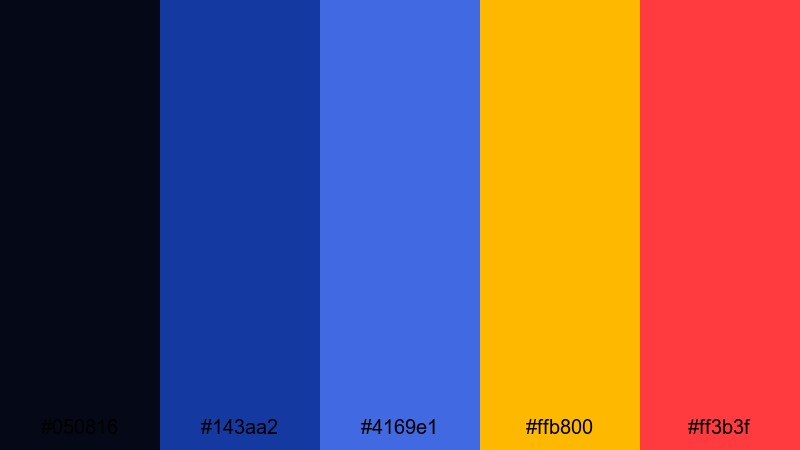
- HEX Codes: #050816, #143aa2, #4169e1, #ffb800, #ff3b3f
- Mood: Energetic, high-contrast, and futuristic with a cinematic nightlife feel.
- Use for: Ideal for high-energy YouTube intros, gaming thumbnails, and tech promo edits that need to pop on crowded feeds.
Neon City Nightfall throws deep navy and intense Royal Blue against blazing gold and red neons. The result feels like a late-night cityscape full of motion, glowing billboards, and cyberpunk-style lighting. The dark base (#050816) keeps everything grounded while the Royal Blue (#4169e1) acts as your main brand color, supported by bright accent strokes.
Use this palette when you want your video thumbnails, lower thirds, and titles to jump off the screen. In Filmora, you can build bold end screens, kinetic text animations, and overlay graphics that repeat this Royal Blue with the same neon accent codes, so your intros, streaming alerts, and short-form clips all share one striking visual language.
Pro Tip: Build a Cinematic Royal Blue Look in Filmora
When you work with a bold palette like Neon City Nightfall, consistency is everything. In Filmora, set Royal Blue as your base text and shape color, then reuse it across titles, transitions, and overlay elements. Accent key beats in the music with flashes of #ffb800 or #ff3b3f for call-to-action buttons, subscribe graphics, and impact frames so your whole edit feels like one connected neon world.
You can also save custom presets for titles, filters, and overlays that use this exact palette. That way every new episode, highlight reel, or short you create will automatically carry the same cinematic Royal Blue signature, whether you are editing widescreen videos, vertical shorts, or social teasers.
AI Color Palette
If you have a reference frame or thumbnail mockup that already nails your Royal Blue mood, Filmora's AI Color Palette feature can scan its colors and apply a similar look across your timeline. This is perfect for keeping b-roll, face cam, and motion graphics aligned with your chosen HEX codes without manual tweaking on every clip.
Load in your best Neon City Nightfall style frame, then use AI Color Palette to match all other clips in the sequence. In one move, your vlog intro, main content, and outro can shift toward the same deep blues, strong Royal Blue mids, and punchy neon accents, giving you a cohesive, high-energy visual identity.
 secure download

HSL, Color Wheels & Curves
To push this palette into a truly cinematic zone, fine-tune your blues in Filmora's HSL controls and color wheels. Slightly deepen the blues in the shadows and add a touch of teal into the midtones to create more separation between the Royal Blue and your neon accents. A gentle S-curve on the RGB curves can increase contrast, making gold and red accents glow without clipping highlights.
If you want more guidance, follow a dedicated guide to video color correction in Filmora, then adapt the steps to your Neon City Nightfall HEX values. Dial in a look that works once, save it as a custom LUT or preset, and reuse it on future episodes or campaigns.
secure download1000+ Video Filters & 3D LUTs
Once your Royal Blue base is set, you can speed up styling with Filmora's presets. Filmora's video filters and 3D LUTs make it easy to add glow, grain, or stylized contrast while keeping your blue tones intact. Choose filters that boost contrast and saturation, then refine the intensity so skin tones stay natural against your bold background.
Apply a cinematic LUT for your overall mood, then layer glitch, light leak, or neon-style filters on select clips for emphasis. This helps you move from flat footage to a polished, Royal Blue-driven aesthetic in just a few clicks, ideal for fast-paced content calendars.
secure downloadElectric Ocean Surge
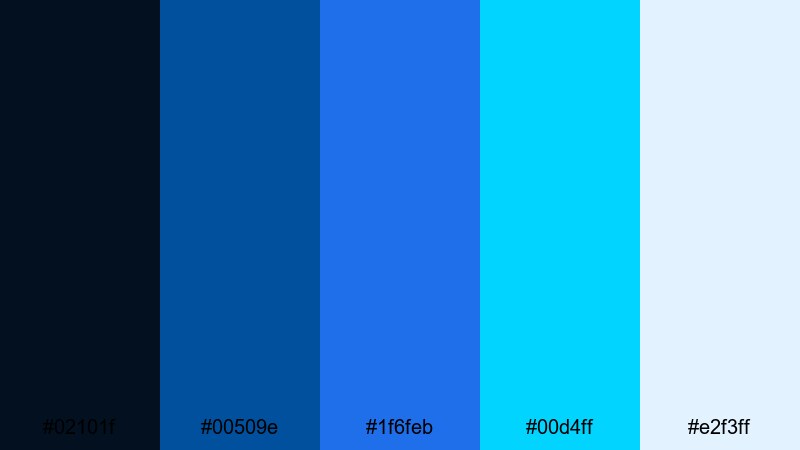
- HEX Codes: #02101f, #00509e, #1f6feb, #00d4ff, #e2f3ff
- Mood: Fresh, electric, and powerful like crashing waves under stadium lights.
- Use for: Great for sports edits, travel reels, and dynamic B-roll overlays where motion and energy are the focus.
Electric Ocean Surge mixes deep ocean navy with bright Royal Blue and vibrant cyan for a palette that feels both athletic and futuristic. The bright cyan (#00d4ff) and icy highlight (#e2f3ff) bring in a sense of spray, reflections, and high-speed motion.
Use it to color your scoreboards, timer graphics, and text in sports edits, or to highlight water, sky, and motion blur shots in travel vlogs. In thumbnails, a dark background with Royal Blue titles and cyan edges creates a crisp, energetic look that stands out against typical red and yellow-heavy feeds.
Stadium Spotlight Blues
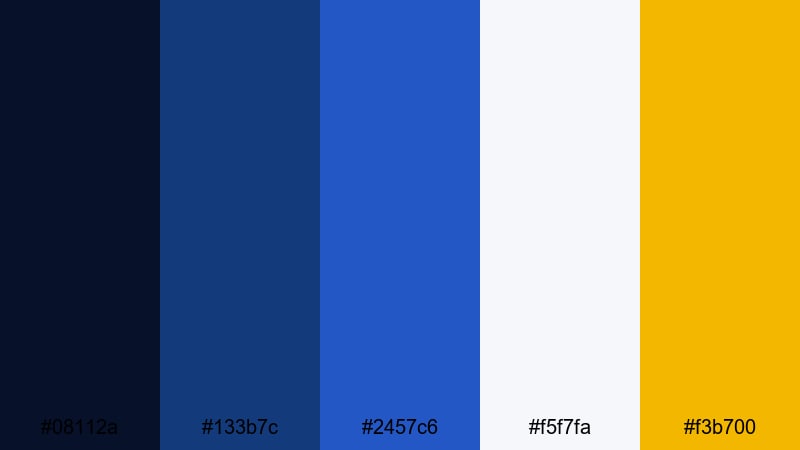
- HEX Codes: #08112a, #133b7c, #2457c6, #f5f7fa, #f3b700
- Mood: Heroic, intense, and triumphant with a sports broadcast vibe.
- Use for: Perfect for highlight reels, event trailers, esports channels, and performance recaps that need a big-arena feel.
Stadium Spotlight Blues layers dark navy shadows with ascending Royal Blue tones and a burst of gold (#f3b700). It mimics the feeling of a stadium floodlight hitting the main subject, with clean whites for score text and UI elements.
This palette is ideal for esports thumbnails, match recaps, or any performance where you want a winner-takes-all atmosphere. Use Royal Blue for your main titles, the navy shades for backgrounds, and gold for MVP callouts, rating badges, or final scores. The light neutral (#f5f7fa) keeps text highly readable on social feeds.
Hypernova Royal Burst
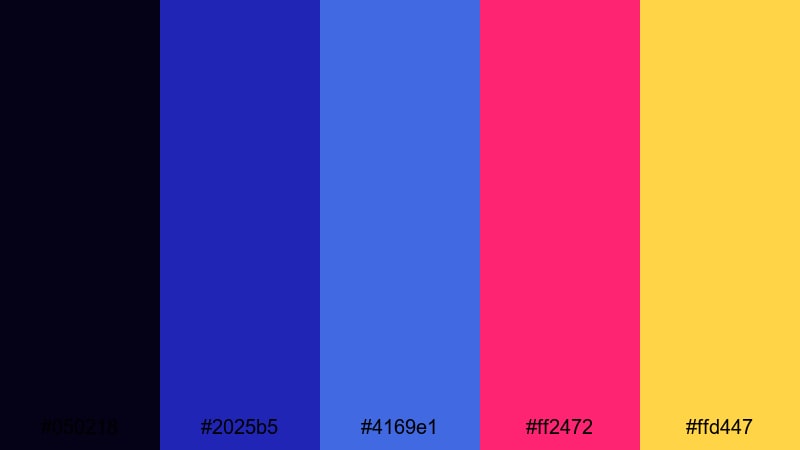
- HEX Codes: #050218, #2025b5, #4169e1, #ff2472, #ffd447
- Mood: Explosive, sci-fi, and adrenaline-fueled with neon contrast.
- Use for: Use in trailers, glitch transitions, and music videos where you want bold color hits synced to the beat.
Hypernova Royal Burst pushes Royal Blue into a sci-fi dimension. Deep cosmic blue (#050218) forms the backdrop, while saturated Royal Blue and indigo are punched up with neon magenta (#ff2472) and cosmic gold (#ffd447). The combination feels like laser beams, space battles, and festival lights.
Drop this palette into glitch transitions, lyric videos, or EDM intros where color must hit in time with the music. Royal Blue can anchor lower thirds and logo marks, while magenta and gold flicker as accents, outlines, or chromatic aberration effects in Filmora to make every beat visually explode.
Soft And Dreamy Royal Blue Color Palettes
Cloud Drift Daydream
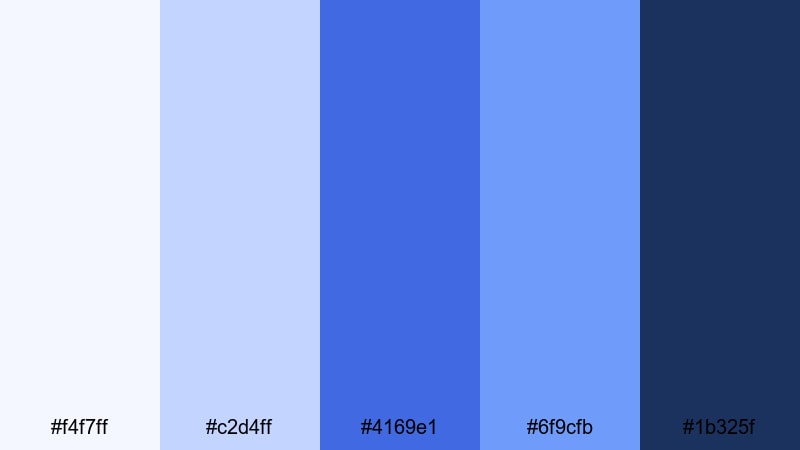
- HEX Codes: #f4f7ff, #c2d4ff, #4169e1, #6f9cfb, #1b325f
- Mood: Airy, hopeful, and calming with a dreamy sky-story feel.
- Use for: Lovely for vlogs, lifestyle montages, study-with-me videos, and soft title cards.
Cloud Drift Daydream floats between pale sky blues and a focused Royal Blue accent. The light tones (#f4f7ff, #c2d4ff) evoke soft daylight and clouds, while Royal Blue and the deeper navy shade (#1b325f) give enough structure to keep designs from feeling washed out.
Use the lighter colors for backgrounds, lower thirds, or full-frame overlays in vlogs and study videos, then rely on Royal Blue for titles, icons, and timeline markers. This palette keeps your visuals peaceful and easy on the eyes, ideal for longer content like productivity sessions and calm lifestyle storytelling.
Misty Harbor Dawn
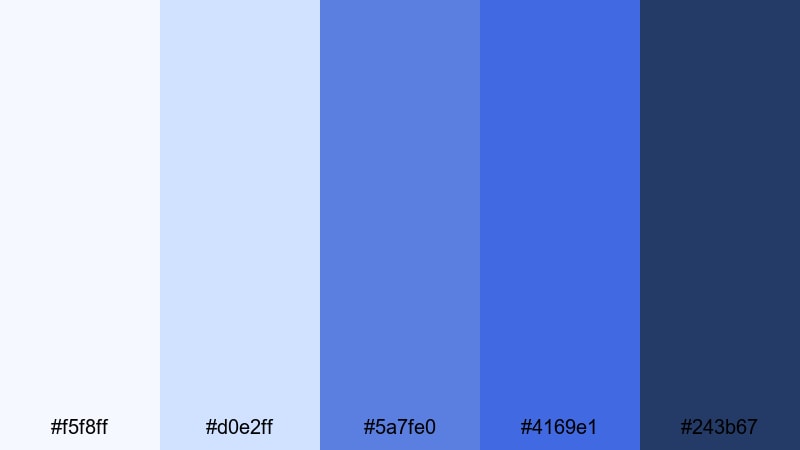
- HEX Codes: #f5f8ff, #d0e2ff, #5a7fe0, #4169e1, #243b67
- Mood: Gentle, reflective, and cinematic like early morning by the water.
- Use for: Works well for travel diaries, reflective voiceovers, and calm product showcases.
Misty Harbor Dawn leans into soft, misty blues with a gently rising intensity from pale fog (#f5f8ff) to grounded navy (#243b67). Royal Blue anchors the mid-range, tying together highlights and shadows into a cohesive, reflective mood.
Use this palette for travel diaries at sunrise, introspective talking-head videos, or slow-motion b-roll over voiceover. Light tones can sit behind captions and chapter headings, while Royal Blue emphasizes key phrases, location tags, or product names without breaking the tranquil mood.
Bluebell Storybook Glow
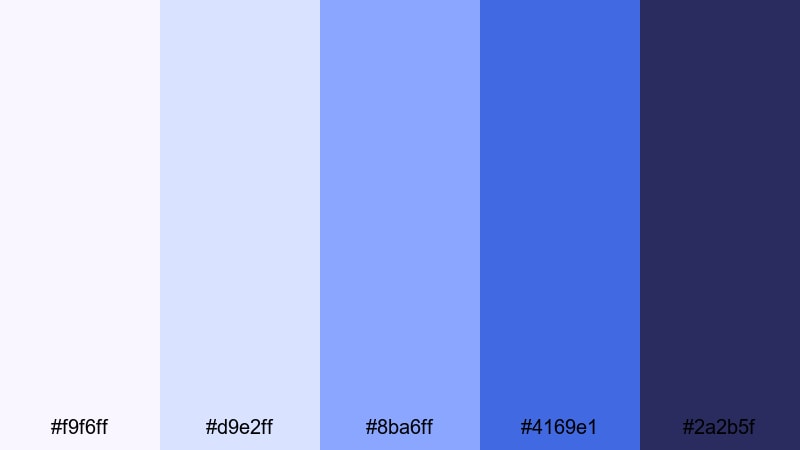
- HEX Codes: #f9f6ff, #d9e2ff, #8ba6ff, #4169e1, #2a2b5f
- Mood: Whimsical, nostalgic, and slightly magical like a fairytale vignette.
- Use for: Perfect for cozy reading vlogs, kids content, soft animations, and intro cards.
Bluebell Storybook Glow adds a hint of lavender into soft blues, creating a whimsical, almost fairytale feeling. The mid-tone blue (#8ba6ff) feels friendly and approachable, while Royal Blue provides a clearer focal point for key elements like titles and buttons.
Use this palette for book-channel intros, kids animations, or cozy journaling content. The lightest shade makes great panels or rounded card backgrounds, while deeper tones keep outlines, drop shadows, and text crisp for clarity across mobile and desktop screens.
Serene Tidal Lullaby
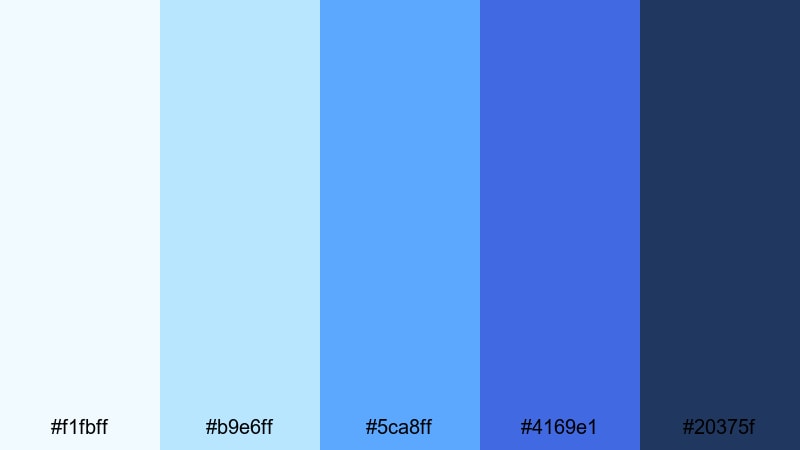
- HEX Codes: #f1fbff, #b9e6ff, #5ca8ff, #4169e1, #20375f
- Mood: Relaxing, fluid, and coastal with gentle movement.
- Use for: Great for meditation content, spa promos, wellness influencers, and nature b-roll sequences.
Serene Tidal Lullaby combines soft aqua tones with Royal Blue and a deep sea navy (#20375f). It feels like gentle waves and slow water reflections, calming without becoming dull. The medium blue (#5ca8ff) adds a touch of liveliness while staying soothing.
Use this palette in wellness intros, guided meditations, and ASMR thumbnails. Royal Blue is ideal for your logo lockup and channel name, while the lighter aquas wash over backgrounds or animate as subtle gradients and overlays to keep the frame feeling fluid and relaxed.
Modern And Minimal Royal Blue Color Palettes
Clean Interface Royal
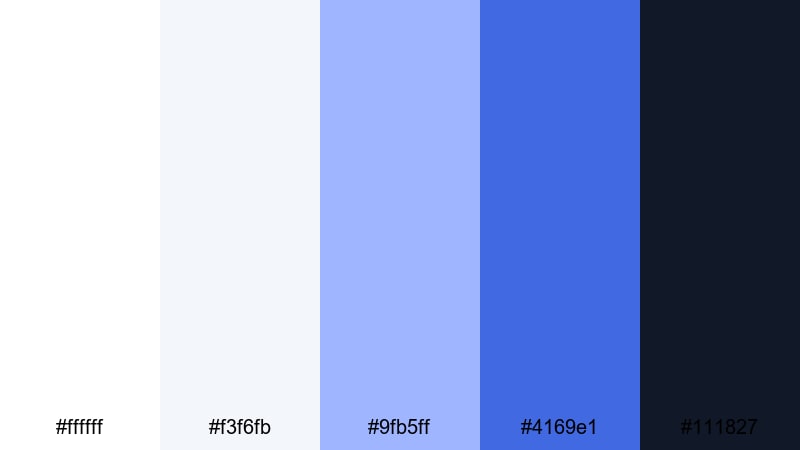
- HEX Codes: #ffffff, #f3f6fb, #9fb5ff, #4169e1, #111827
- Mood: Crisp, professional, and minimal with tech brand polish.
- Use for: Ideal for app demos, SaaS explainers, UI overlays, and channel branding for creators in tech or productivity.
Clean Interface Royal is built around white and soft neutral blues, with Royal Blue and charcoal (#111827) providing structure and contrast. It feels like a UI kit or product landing page brought directly into your video frames.
Use white and light grayish blue for backgrounds and panels, then assign Royal Blue to primary buttons, feature callouts, and your brand name. Charcoal is perfect for body text and small labels, ensuring high readability on tutorials, dashboards, and productivity content.
Gridline Tech Blueprint
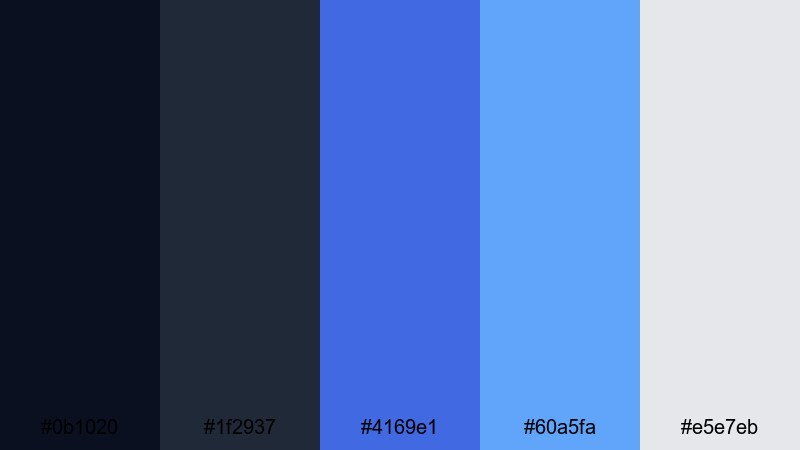
- HEX Codes: #0b1020, #1f2937, #4169e1, #60a5fa, #e5e7eb
- Mood: Technical, precise, and forward-looking like a digital blueprint.
- Use for: Use for tutorials, coding content, motion graphics, and infographic-style explainers.
Gridline Tech Blueprint pairs dark, nearly black blues with Royal Blue and cool accent blues. The effect is sleek and technical, like a futuristic dashboard or engineering blueprint on screen.
Lean on the darkest shade (#0b1020) for full-screen backgrounds, then draw attention with Royal Blue lines, grids, and icons. The lighter blue (#60a5fa) and soft gray (#e5e7eb) help you build visual hierarchies in charts, code overlays, and infographic-style animations in Filmora.
Monochrome Royal Focus
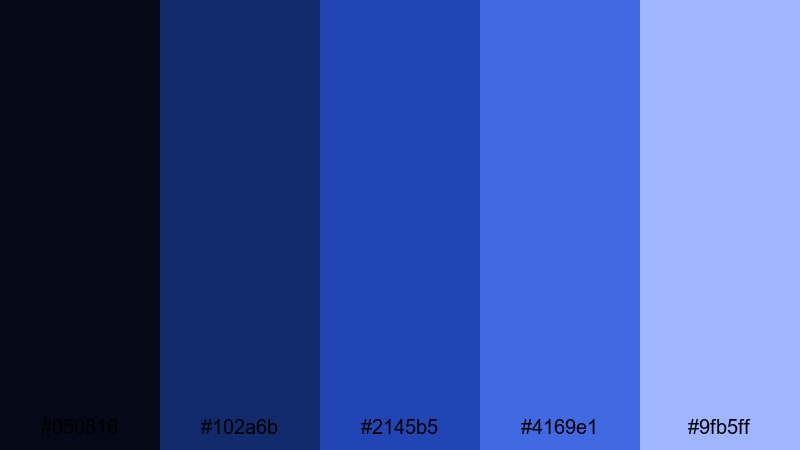
- HEX Codes: #050816, #102a6b, #2145b5, #4169e1, #9fb5ff
- Mood: Focused, controlled, and sophisticated with a monochrome twist.
- Use for: Great for brand kits, minimalist thumbnails, and cohesive Instagram or YouTube channel visuals.
Monochrome Royal Focus explores multiple shades of blue from deep navy to soft periwinkle, all within the same color family. Because the palette stays so tight, it feels professional, organized, and highly intentional.
Use darker blues as backdrops, mid blues for content frames and UI elements, and the lightest blue for highlights or secondary text. This palette works especially well for creators who want minimalism without going full black-and-white, keeping Royal Blue as a clear signature color in every scene.
Nordic Royal Contrast
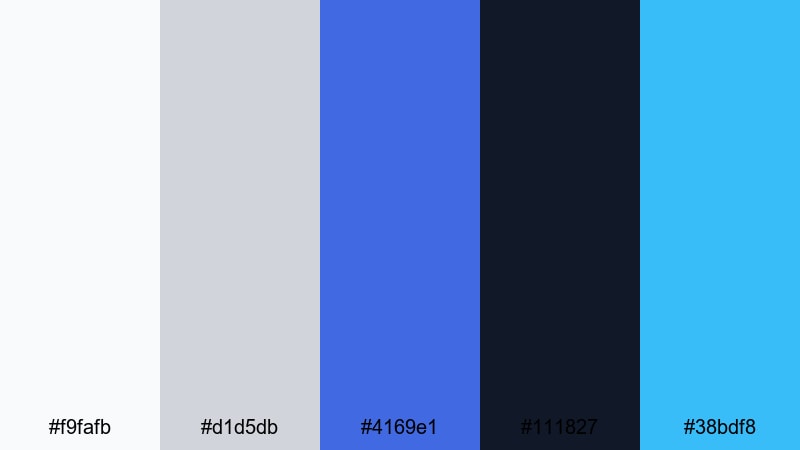
- HEX Codes: #f9fafb, #d1d5db, #4169e1, #111827, #38bdf8
- Mood: Cool, minimal, and Scandinavian-inspired with sharp contrast.
- Use for: Best for design-forward channels, product showcases, and sleek promo reels.
Nordic Royal Contrast balances soft, almost white grays with a punchy Royal Blue, deep near-black (#111827), and a crisp cyan accent (#38bdf8). The arrangement feels very modern and design-focused, similar to clean Nordic web design.
Use the pale grays for negative space, product pedestals, and text backgrounds. Royal Blue can act as your primary brand color, while cyan picks out important buttons or metrics. This is a great palette for channels that focus on gear reviews, design breakdowns, or minimalist lifestyle branding.
Luxurious And Elegant Royal Blue Color Palettes
Royal Gala Evening
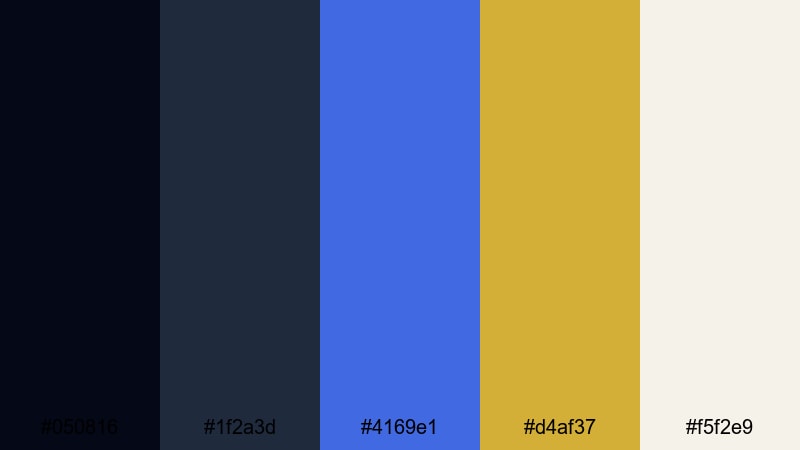
- HEX Codes: #050816, #1f2a3d, #4169e1, #d4af37, #f5f2e9
- Mood: Opulent, formal, and grand like a black-tie event.
- Use for: Perfect for wedding films, luxury brand promos, gala recaps, and upscale channel branding.
Royal Gala Evening brings classic luxury to Royal Blue by pairing it with rich gold (#d4af37), deep charcoal blues, and a soft ivory highlight (#f5f2e9). The palette suggests velvet suits, evening gowns, and warm spotlight reflections.
Use this combination for wedding film titles, VIP event recaps, or premium product campaigns. Royal Blue can hold monograms and logos, gold highlights key names or dates, and ivory keeps lower thirds and captions elegant and easy to read on both big screens and mobile devices.
Velvet Sapphire Soiree
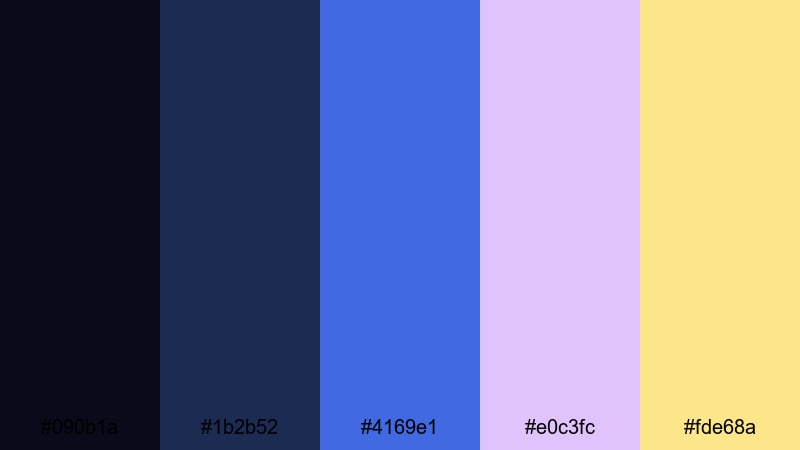
- HEX Codes: #090b1a, #1b2b52, #4169e1, #e0c3fc, #fde68a
- Mood: Romantic, lush, and cinematic with velvet-like depth.
- Use for: Use in fashion videos, perfume-style ads, cinematic trailers, and dramatic portrait edits.
Velvet Sapphire Soiree draws on deep sapphire tones and Royal Blue, softened by lilac highlights (#e0c3fc) and champagne gold (#fde68a). The contrast between cool blues and delicate warm highlights gives everything a rich, tactile feeling, like fabric and soft lighting.
Use the deepest blue as a backdrop for model shots and cinematic titles. Royal Blue can edge frames or outline graphics, while lilac and champagne add dreamy flares, accent lines, or subtle gradients on call-to-action cards. This palette is perfect when you want your brand to signal luxury and romance without feeling old-fashioned.
Crown Jewel Luminaire
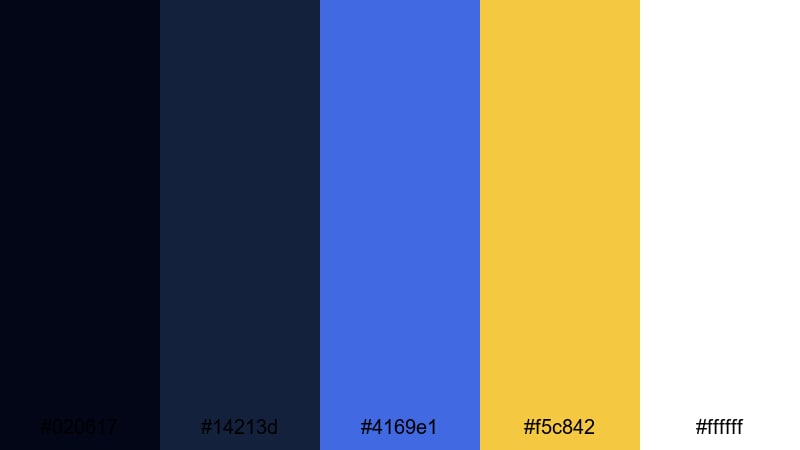
- HEX Codes: #020617, #14213d, #4169e1, #f5c842, #ffffff
- Mood: Striking, prestigious, and radiant with a ceremonial edge.
- Use for: Great for logo reveals, award graphics, channel intros, and any sequence that needs a royal spotlight.
Crown Jewel Luminaire frames rich, dark blues with a ceremonial Royal Blue and bright jewel gold (#f5c842), supported by clean white for text. It feels like a trophy presentation, award show, or royal announcement.
Use this palette for logo stings, award titles, subscriber milestones, and any video where you want to celebrate achievements. Let Royal Blue carry your primary visuals while gold highlights the subject name, award category, or milestone number, and white keeps typography clear and timeless.
Tips for Creating Royal Blue Color Palettes
Royal Blue is flexible enough to work in bold, soft, minimal, or luxurious designs, as long as you balance it with the right neutrals and accents. Use these tips to build or customize Royal Blue palettes that look great in Filmora and across your brand.
- Pair Royal Blue with a clear neutral: soft white, light gray, or deep navy helps keep your layouts clean and readable.
- Use high-contrast accents sparingly: colors like gold, neon pink, or bright red should highlight CTAs, logos, or key frames, not overwhelm every shot.
- Check text readability: always test Royal Blue backgrounds behind white or black text on small screens to avoid eye strain or low contrast.
- Match your palette to the mood: cooler combinations with cyan and gray suit tech and productivity, while gold and ivory lean more premium and ceremonial.
- Stay consistent across assets: repeat the same HEX codes in thumbnails, intros, lower thirds, and end cards so your channel feels unified.
- Use gradients to soften: blend Royal Blue into lighter blues or aquas for gentle sky or water effects instead of harsh, flat fills.
- Adapt to your footage: if your footage is already very warm, use Royal Blue as a clean accent; if footage is cool, let Royal Blue be the hero and keep accents subtle.
- Create presets in Filmora: save your favorite color combinations as text styles, overlays, and effect presets so every new project starts on-brand.
Royal Blue palettes can make your visuals feel powerful, trustworthy, and memorable, whether you are editing cinematic trailers, cozy vlogs, or premium brand promos. By combining Royal Blue with the right neutrals, golds, or neon accents, you define a clear mood that your audience will start to recognize instantly in their feed.
Use these 15 Royal Blue color combinations as starting points, then fine-tune them in Filmora with AI Color Palette, HSL tools, color wheels, and LUTs. The more you repeat your chosen HEX codes across thumbnails, intros, overlays, and end screens, the stronger and more professional your visual identity will look.
Open your next project in Filmora, pick one palette that fits your content mood, and start building a consistent Royal Blue style that carries across every video, short, and social post you create.
secure downloadNext: Teal Red Color Palette
