

 100% Security Verified | No Subscription Required | No Malware


 ChatGPT
 Perplexity
 Gemini
 Claude
 Grok
Grok
Teal and magenta look like opposites at first glance, but together they create one of the most eye-catching modern color stories. Teal brings calm, clarity, and a hint of techy freshness, while magenta adds emotion, excitement, and a playful pop. That contrast is why teal magenta grades are popular in films, music videos, thumbnails, and overlays when creators want visuals that feel cinematic yet vibrant.
For video intros, YouTube thumbnails, vlogs, channel branding, and social posts, a well-planned teal magenta color palette keeps everything looking intentional instead of random. Below you will find 15 ready-to-use teal magenta color combinations with HEX codes, tailored for creators and Filmora users who want consistent, stylish visuals across their edits.
In this article
Soft & Dreamy Teal Magenta Color Palettes
Cotton Candy Tides
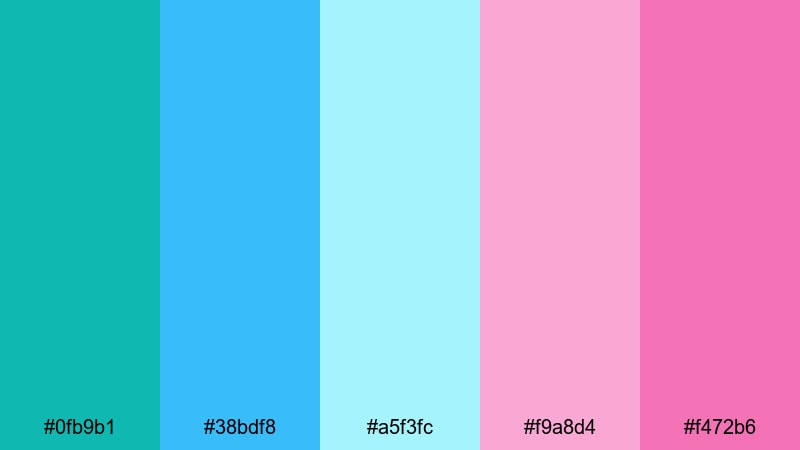
- HEX Codes: #0fb9b1, #38bdf8, #a5f3fc, #f9a8d4, #f472b6
- Mood: Playful, airy, and nostalgic.
- Use for: Ideal for vlog intros, lifestyle thumbnails, and dreamy travel titles.
Cotton Candy Tides mixes bright aqua teals with soft ice-blue and cotton candy magentas for a light, nostalgic feel. It looks like sea spray catching a pastel sunset, which makes it perfect for any creator who wants their channel to feel sweet, friendly, and upbeat.
Use the deeper teal (#0fb9b1) for text or logo accents, the light blues as gentle backgrounds, and the pinks for buttons, arrows, or highlight elements in thumbnails and title cards. In Filmora, this palette works beautifully for vlog intros, day-in-the-life edits, and dreamy B-roll overlays that need a pastel yet modern teal magenta theme.
Pro Tip: Keep Your Teal Magenta Aesthetic Consistent in Filmora
Once you fall in love with a palette like Cotton Candy Tides, the real power comes from using it everywhere: intros, lower thirds, transitions, and even your end screens. In Filmora, you can save your favorite teal magenta HEX codes and reuse them in titles, shapes, and backgrounds so every video on your channel feels like it belongs to the same visual world.
Try designing one base intro and one end screen using this palette, then duplicate and tweak them for future videos. That way, your teal magenta aesthetic stays recognizable while you change up footage, text, and music from project to project.
AI Color Palette
If you have a screenshot or mood board that uses Cotton Candy Tides, you can turn it into a full video look with Filmora. Filmora's AI Color Palette feature analyzes your reference colors and applies a similar tone across your entire edit, from talking-head shots to B-roll.
Import your reference image, let AI read the teal and magenta balance, and then match that style to the rest of your clips. It is a fast way to keep your skies, skin tones, and overlays in the same soft and dreamy color space without manually grading every shot.
 secure download

HSL, Color Wheels & Curves
After you match your teal magenta look, you can fine-tune it using Filmora's HSL sliders, color wheels, and curves. Slightly desaturate teal in the shadows for a cleaner, more cinematic base, or push magenta into the midtones for rosy highlights that flatter skin and sunsets. Tools like these, covered in Filmora's color correction guide, help you control mood without breaking your palette.
Use curves to lift the blacks for a soft matte vibe, or cool down the highlights for a misty morning feel. Small adjustments go a long way, especially when you want that dreamy teal magenta look to feel polished rather than over-saturated.
secure download1000+ Video Filters & 3D LUTs
To speed up styling, you can stack this teal magenta palette with Filmora's looks and presets. Filmora's video filters and 3D LUTs make it easy to add soft bloom, film grain, or vibe-specific tints on top of your base colors.
Try pairing Cotton Candy Tides with light vintage or pastel LUTs for dreamy vlogs, or subtle cinematic filters for smoother skin tones. With over 1000 filters available, you can keep your teal magenta base consistent while giving each video its own personality.
secure downloadSeaside Orchid Mist
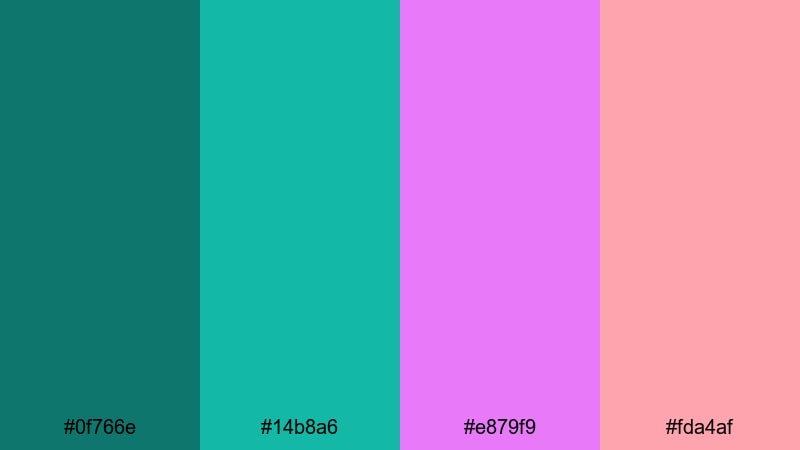
- HEX Codes: #0f766e, #14b8a6, #e879f9, #fda4af
- Mood: Calm, romantic, and soothing.
- Use for: Perfect for wedding highlight reels, romantic travel vlogs, and soft branding overlays.
Seaside Orchid Mist combines muted teal greens with soft orchid magentas for a calm yet romantic atmosphere. It feels like a quiet beach evening with pastel florals in the background, making it ideal for gentle storytelling and emotional edits.
Use the deeper teal (#0f766e) for titles or logo marks, the lighter teal for lower thirds, and let the orchid tones highlight key words or important elements in thumbnails. This palette is especially strong for couples photos, engagement announcements, wedding highlight reels, and romantic travel vlogs edited in Filmora.
Morning Lagoon Glow
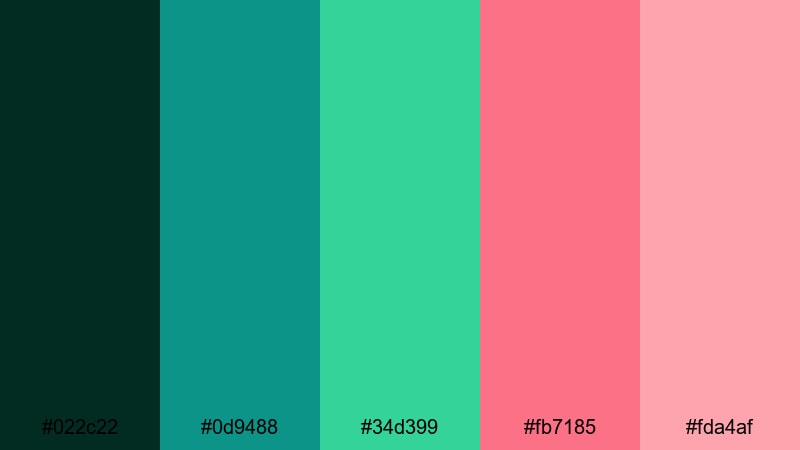
- HEX Codes: #022c22, #0d9488, #34d399, #fb7185, #fda4af
- Mood: Fresh, hopeful, and lightly cinematic.
- Use for: Great for sunrise b-roll, calming productivity vlogs, and eco-focused content.
Morning Lagoon Glow shifts from deep lagoon greens in the shadows to bright greens and warm magenta highlights. It feels like the first light hitting the water, giving your footage a hopeful, fresh energy.
In practice, you can keep backgrounds in the darker teal and green range, then use the rose and blush magentas for call-to-action buttons, graphs, or timeline markers. This combo works well for productivity channels, nature vlogs, eco-friendly brands, and any video where you want a calm but optimistic teal magenta color story.
Blossom Tide Whispers
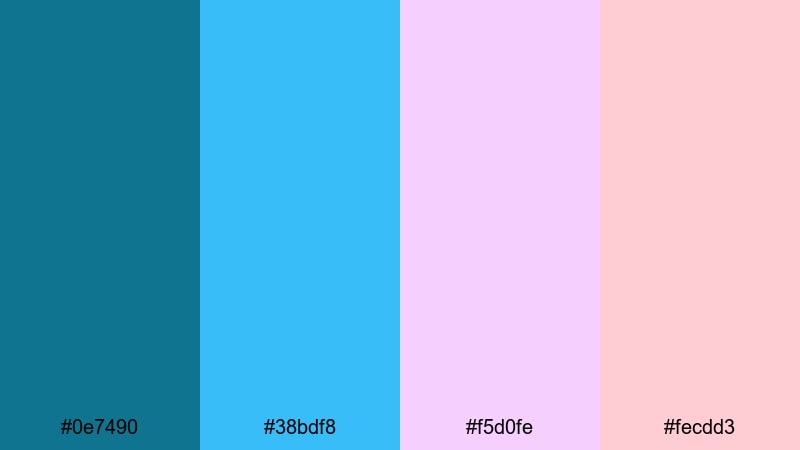
- HEX Codes: #0e7490, #38bdf8, #f5d0fe, #fecdd3
- Mood: Delicate, feminine, and whimsical.
- Use for: Use for beauty channels, stationery-inspired graphics, and gentle title cards.
Blossom Tide Whispers pairs airy teal blues with petal-soft magentas and pinks. It creates a pastel wash that feels delicate and whimsical, perfect for content that leans feminine or cozy.
Use the teal tones to keep your layouts feeling fresh and modern, while the lilac and blush shades add warmth to text, frames, stickers, and overlay elements. This palette is ideal for beauty tutorials, stationery or bullet journal channels, soft-spoken commentary videos, and clean, friendly YouTube branding built in Filmora.
Bold & Electric Teal Magenta Color Palettes
Cyber Reef Pulse
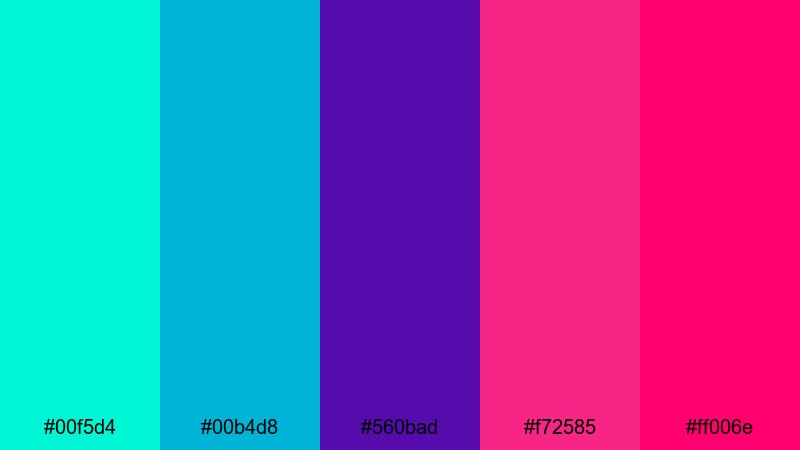
- HEX Codes: #00f5d4, #00b4d8, #560bad, #f72585, #ff006e
- Mood: High-energy, futuristic, and intense.
- Use for: Best for gaming intros, tech promos, and dynamic motion graphics.
Cyber Reef Pulse slams neon teals into deep violet and hot magentas for a loud, cyber-inspired impact. It feels like RGB lighting and holographic UI screens, so it instantly pushes your visuals into a futuristic space.
Use the bright teals for glowing outlines, HUD elements, or progress bars, while the purples and magentas carry titles, logos, and glitch effects. This palette is ideal for gaming intros, esports highlights, tech product promos, and motion graphics packs created in Filmora where you want a strong, electric teal magenta signature.
Neon Galaxy Bloom
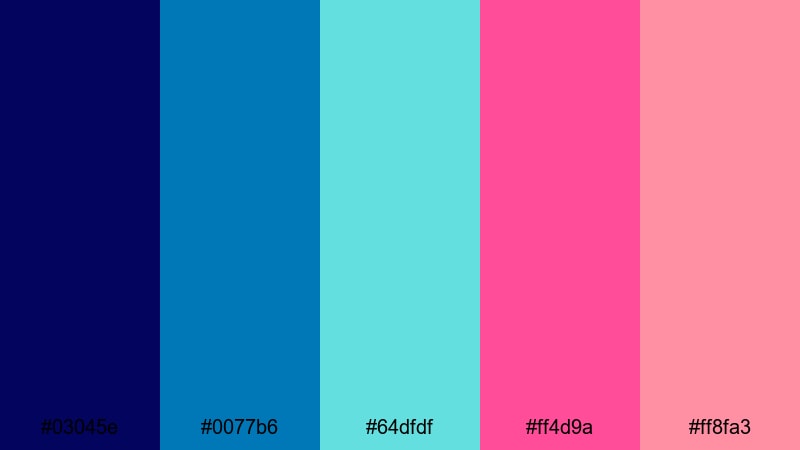
- HEX Codes: #03045e, #0077b6, #64dfdf, #ff4d9a, #ff8fa3
- Mood: Cosmic, adventurous, and vivid.
- Use for: Perfect for sci-fi edits, music videos, and title sequences with space vibes.
Neon Galaxy Bloom combines deep space blues with glowing teal and blossoming magenta accents. It has a rich, cosmic feel that works beautifully for sci-fi themes or dreamy, surreal edits.
Let the darkest blue (#03045e) act as your background night sky, bring in teal for stars, lines, or waveforms, and reserve the magentas for focal points like artist names, episode titles, or chorus lyrics. This is an excellent teal magenta color palette for music videos, AMVs, lyric visuals, or channel branding that leans into galactic aesthetics.
Electric Tide Festival
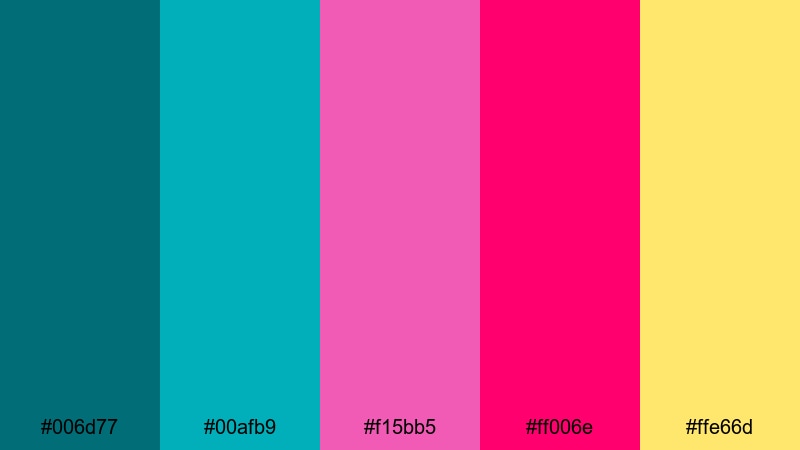
- HEX Codes: #006d77, #00afb9, #f15bb5, #ff006e, #ffe66d
- Mood: Festive, loud, and energetic.
- Use for: Great for festival recaps, concert footage, and social ads that must pop in feeds.
Electric Tide Festival brings together punchy teals, neon magentas, and a hit of bright yellow for maximum crowd energy. It feels like LED stage lights and confetti cannons, perfect for anything related to live events and parties.
Use teal as the base for overlays and shape elements, magenta for big titles and transitions, and the yellow as a sparing accent on dates, discounts, or call-to-action text. This high-contrast teal magenta color combination works well in vertical shorts, story ads, and festival recap montages that need to grab attention quickly in social feeds.
Magenta Surf Hype
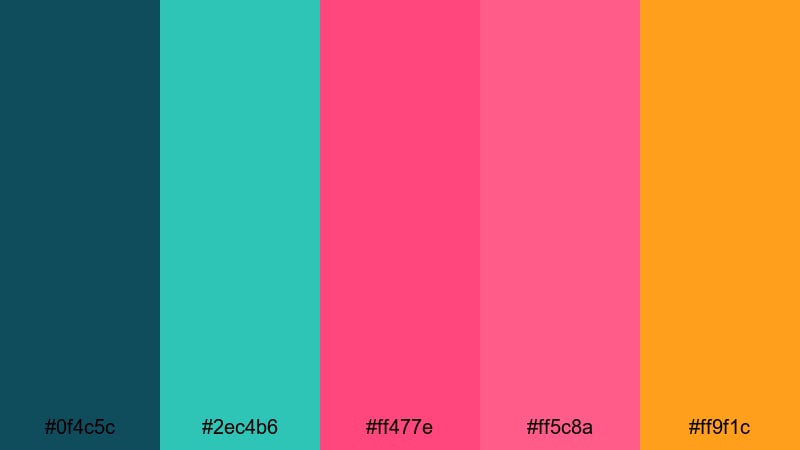
- HEX Codes: #0f4c5c, #2ec4b6, #ff477e, #ff5c8a, #ff9f1c
- Mood: Sporty, upbeat, and confident.
- Use for: Perfect for surf edits, fitness reels, and hype countdown screens.
Magenta Surf Hype grounds your visuals in ocean-deep teal and aqua, then injects electric magenta and bold orange for a sporty, confident feel. It is dynamic without feeling too techy, great for outdoor or action-heavy content.
Keep overlays and UI elements in teal tones and let magenta carry your main text, timers, and progress bars. The orange (#ff9f1c) is powerful as a one-click highlight color for key stats or calls to subscribe. Use this palette for surf compilations, fitness edits, countdown screens, and sports reels that need a high-energy teal magenta treatment.
Modern Minimal Teal Magenta Color Palettes
Teal Quartz Studio
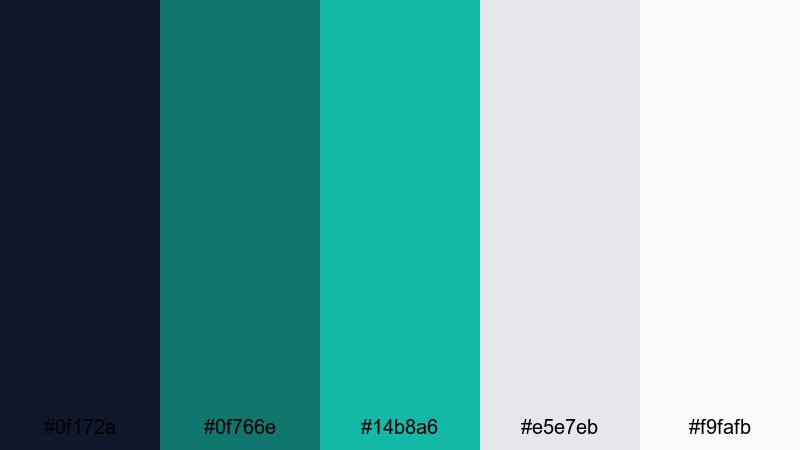
- HEX Codes: #0f172a, #0f766e, #14b8a6, #e5e7eb, #f9fafb
- Mood: Clean, professional, and calming.
- Use for: Ideal for tutorials, SaaS explainers, and minimalist channel branding.
Teal Quartz Studio leans into deep navy, refined teals, and soft neutrals for a modern, studio-grade look. It keeps the teal magenta idea very subtle by skipping bright pink in favor of calming, minimal tones.
Use the navy as your canvas, build interface-style panels with the teals, and leave plenty of white or light gray space for text. This palette works well for tech explainers, app demos, course intros, and tutorial thumbnails where you want trust and clarity first, with just a hint of teal color personality.
Magenta Accent Grid

- HEX Codes: #020617, #0ea5e9, #e11d48, #f97373, #e5e7eb
- Mood: Sleek, bold, and design-forward.
- Use for: Use for UI-inspired lower thirds, tech channels, and graphic overlays.
Magenta Accent Grid uses a very dark base, a crisp teal accent, and sharp magenta highlights to mimic clean interface design. It feels like a modern dashboard or analytics tool, ideal for structured layouts.
Keep most of the frame in the deep near-black (#020617) and gray, then lay out teal lines, boxes, and grids. Use magenta for primary buttons, notifications, and key metrics in your overlays and lower thirds. This teal magenta color combination is perfect for tech YouTube channels, data storytelling, UI walkthroughs, and productivity-focused content edited in Filmora.
Urban Lagoon Stream
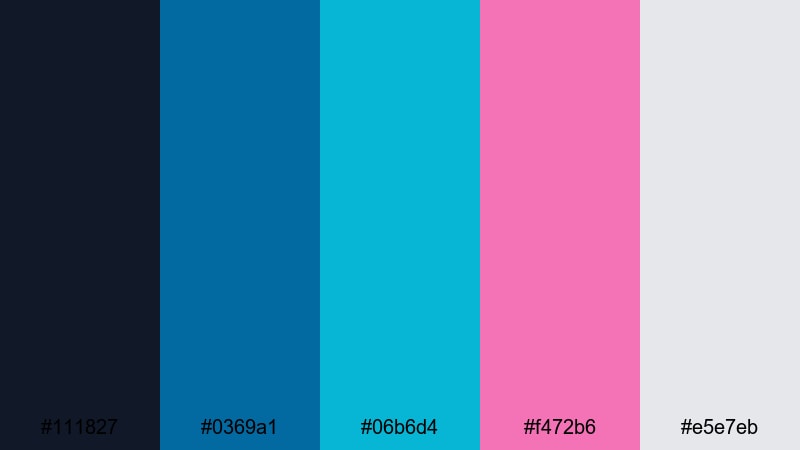
- HEX Codes: #111827, #0369a1, #06b6d4, #f472b6, #e5e7eb
- Mood: Contemporary, urban, and cool-toned.
- Use for: Great for city b-roll, productivity content, and clean lower thirds.
Urban Lagoon Stream balances cool navy and lagoon teals with a single soft magenta accent. It feels urban, modern, and slightly understated, which makes it perfect for creators who want color but still need a clean, professional look.
Use dark blue and teal gradients for backgrounds, pair them with simple white text, and reserve the magenta (#f472b6) for a few strategic highlights like subscribe buttons or important labels. This is a strong choice for city b-roll sequences, day-in-the-city vlogs, office setups, and productivity channels that like a cool-toned teal magenta aesthetic.
Clean Signal Dusk
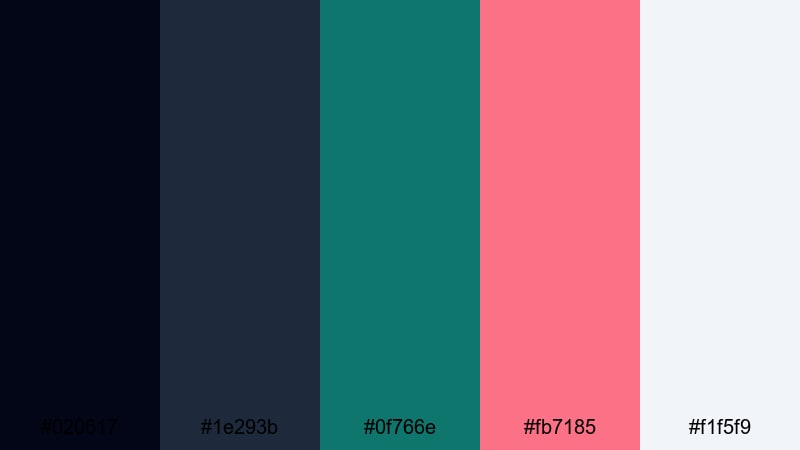
- HEX Codes: #020617, #1e293b, #0f766e, #fb7185, #f1f5f9
- Mood: Composed, cinematic, and slightly moody.
- Use for: Perfect for cinematic explainers, channel trailers, and brand bumpers.
Clean Signal Dusk layers deep dusk blues with a grounded teal and one magenta highlight. The result is cinematic but not overwhelming, giving your videos a composed, evening-like atmosphere.
Use the darker tones as a backdrop for hero text, product mockups, or talking-head frames, and let teal shape subtle gradients or accent blocks. Bring in the magenta sparingly for logo details, progress bars, or timeline markers in Filmora. This palette is excellent for channel trailers, brand bumpers, and cinematic explainers that need a serious but still colorful teal magenta edge.
Retro Neon Teal Magenta Color Palettes
Arcade Sunset Waves
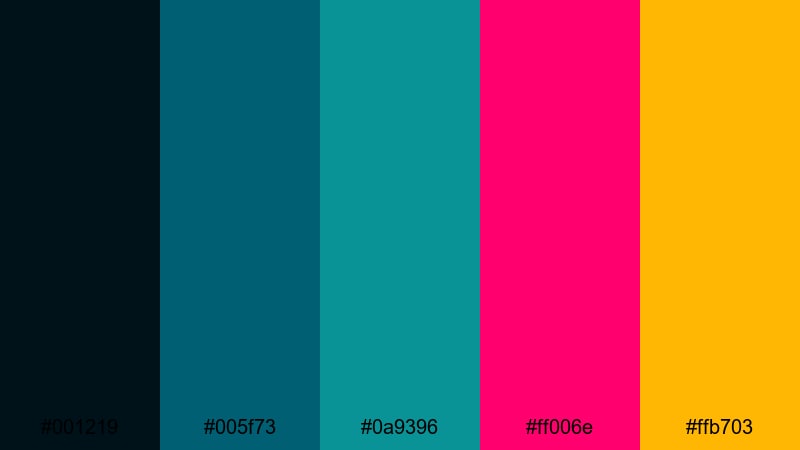
- HEX Codes: #001219, #005f73, #0a9396, #ff006e, #ffb703
- Mood: Retro, nostalgic, and energetic.
- Use for: Best for retro gaming edits, 80s-style titles, and nostalgic montage sequences.
Arcade Sunset Waves mixes dark teal blues with neon magenta and warm sunset gold. It feels like an old-school arcade cabinet glowing in a dusk-lit room, instantly triggering retro nostalgia.
Use the darker teals to build retro grids or wave patterns, layer magenta for titles and score text, and highlight key moments with the gold (#ffb703). This teal magenta palette is excellent for 80s-inspired openers, retro gaming edits, nostalgic travel montages, and synth-heavy playlists edited in Filmora.
Synthwave Marina
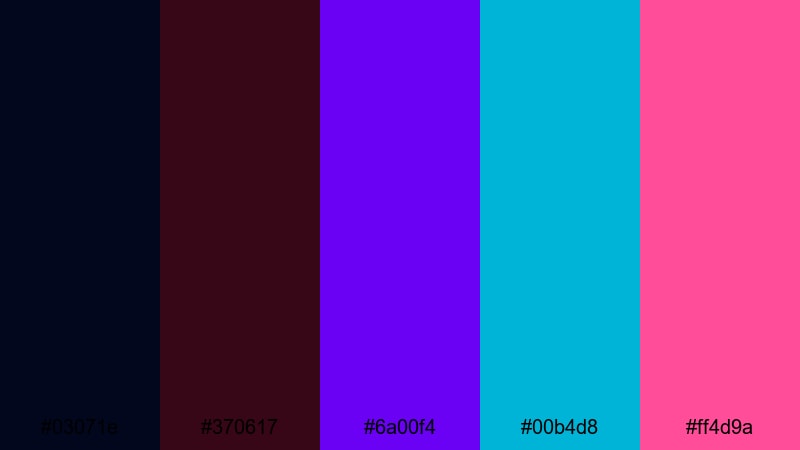
- HEX Codes: #03071e, #370617, #6a00f4, #00b4d8, #ff4d9a
- Mood: Moody, cinematic, and synthwave-inspired.
- Use for: Great for music videos, lyric visuals, and stylized channel art.
Synthwave Marina dives into inky shadows, violet neon, teal highlights, and bright magenta accents. It feels like classic synthwave posters and outrun cityscapes, ideal for high-style visuals.
Make the darkest shades your base, then pull out neon streaks and shapes in teal and magenta. Use this palette for lyric videos, music visualizers, motion posters, and channel art where teal magenta is part of your identity and you want that nostalgic, cyber-coast feel.
Laser Coral Mirage
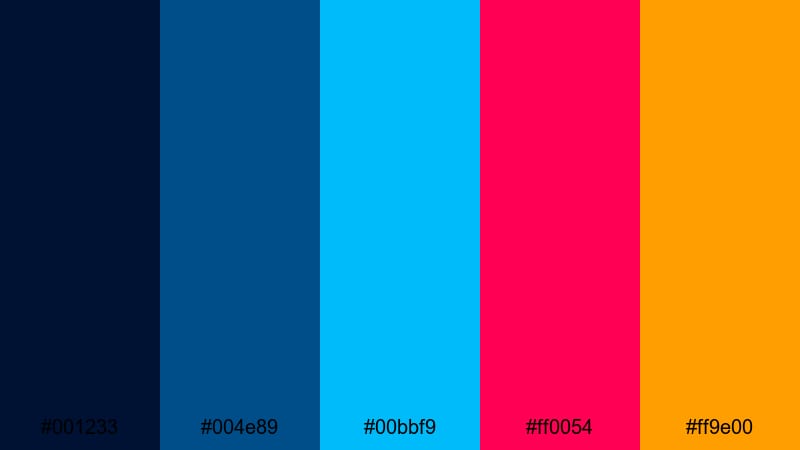
- HEX Codes: #001233, #004e89, #00bbf9, #ff0054, #ff9e00
- Mood: Trippy, high-contrast, and dynamic.
- Use for: Perfect for channel idents, glitch transitions, and bold promo bumpers.
Laser Coral Mirage sets electric teal and laser magenta against deep navy and warm coral. The contrast is strong and a little trippy, perfect when you want a retro-futuristic hit that still feels fresh.
Use the dark blues for background and frame edges, add teal as light beams or scan lines, and let magenta and coral punch out key words, logos, and glitch elements. This teal magenta color combination is ideal for channel idents, logo animations, glitch transitions, and bold promo bumpers in Filmora.
Tips for Creating Teal Magenta Color Palettes
Whether you use one of these ready-made palettes or build your own, a strong teal magenta scheme depends on balance, readability, and consistency across all your video assets.
- Decide your hero color first: choose teal or magenta as the main brand color, then use the other as a supporting accent so your frames never feel chaotic.
- Control contrast for readability: pair bright text with dark backgrounds (or vice versa), and avoid putting saturated teal text directly on saturated magenta without a neutral buffer.
- Add neutrals to breathe: whites, soft grays, or very dark navy help your teal magenta accents pop and prevent eye fatigue in long videos.
- Match your footage: if your camera captures lots of green or blue, lean into teal-heavy palettes; if your scene already has warm lights and skin tones, use softer magentas.
- Limit strong accents: keep your most intense teal or magenta for CTAs, important stats, or your logo, not for every single element on screen.
- Stay consistent across formats: reuse the same HEX codes on your YouTube banner, thumbnails, lower thirds, and end screens so viewers instantly recognize your brand.
- Test on mobile: preview your teal magenta thumbnails and titles on a small screen to ensure text stays legible and key details do not blend into the background.
- Save presets in Filmora: once you refine a teal magenta look, save it as a custom preset or template so you can apply the same style in a few clicks on future projects.
Teal magenta color palettes are powerful tools for shaping mood, storytelling, and brand identity. From soft and dreamy to bold and electric, this pairing can make your intros more memorable, your thumbnails more clickable, and your channel visuals instantly recognizable.
Try a few of the palettes above on your next edit in Filmora, then adjust saturation, contrast, and overlays until the look feels like you. Over time, a consistent teal magenta style will turn casual viewers into subscribers who recognize your videos at a glance.
Save your favorite HEX codes, build a couple of reusable templates, and let Filmora handle the heavy lifting with AI Color Palette, HSL and curves controls, and ready-made filters and LUTs. The more you refine your teal magenta aesthetic, the more professional and cohesive your creative projects will feel.
secure downloadNext: Night Color Palette
