

 100% Security Verified | No Subscription Required | No Malware


 ChatGPT
 Perplexity
 Gemini
 Claude
 Grok
Grok
True Blue is one of the most trusted colors in visual storytelling. It feels stable, calm, and cinematic, which is why brands, streamers, and filmmakers use it for logos, lower-thirds, and clean interfaces. In video, True Blue often becomes the backbone of your color grade, carrying the mood in skies, shadows, and text while still feeling professional and easy on the eyes.
When paired with the right supporting tones, True Blue works perfectly for YouTube thumbnails, openers, title cards, and channel branding. Below you will find 15 carefully curated True Blue color palettes with ready-to-use HEX codes. They are tailored for creators and Filmora users who want consistent, stylish color across intros, vlogs, gaming edits, and more.
In this article
Soft & Cinematic True Blue Color Palettes
Twilight Storyboard Calm
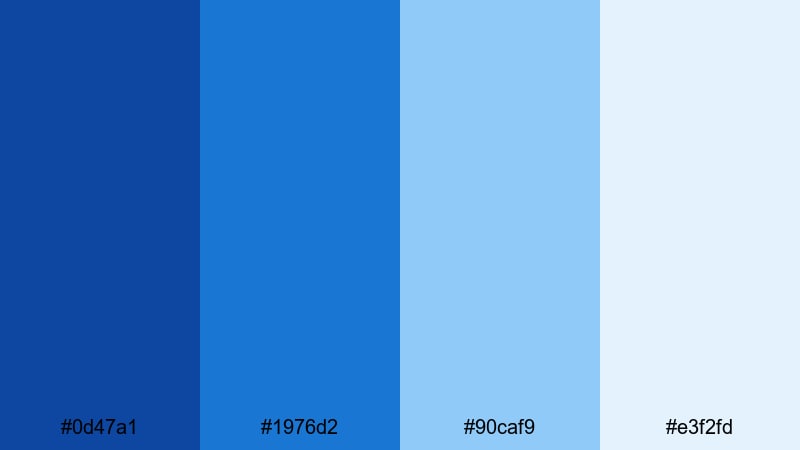
- HEX Codes: #0d47a1, #1976d2, #90caf9, #e3f2fd
- Mood: Quiet, reflective, and cinematic like a blue hour montage.
- Use for: Use this palette for travel vlogs, narrative intros, and reflective B-roll sequences that need a soft storytelling feel.
This palette eases from deep True Blue into pale sky tones, just like the sky when daylight fades into evening. The darker blues anchor your frames, while the lighter tints feel airy and emotional, perfect for slow camera moves and gentle transitions.
Use the darker HEX codes (#0d47a1, #1976d2) for titles, lower-thirds, and gradients behind text, then let the lighter shades (#90caf9, #e3f2fd) wash over backgrounds, overlays, or subtle vignettes. In Filmora, this combination works beautifully for cinematic travel intros, storytime thumbnails, and end screens that feel calm but still visually rich.
Pro Tip: Build a Cinematic True Blue Look in Filmora
To keep this twilight-inspired True Blue look consistent, design your main thumbnail, intro, and lower-thirds with the same four HEX codes. In Filmora, you can create color-matched title templates using the deeper blues for text and the lighter tones for shapes and background panels, then save them as custom presets for future videos.
When editing a full vlog, apply a gentle blue-hour style grade to your footage, then reuse the same palette in overlays, subtitles, and transitions. This way, every shot and graphic feels like it belongs in the same cinematic story, from opening frame to final card.
AI Color Palette
If you have a reference frame that perfectly captures this Twilight Storyboard Calm mood, you can let Filmora do the heavy lifting. Filmora's AI Color Palette feature analyzes that reference and automatically applies its True Blue tones to your entire timeline or selected clips.
Simply choose your best twilight shot or a custom PNG color card using these HEX codes, set it as the reference, and let AI Color Palette match the rest. It is a fast way to unify intros, B-roll, and cutaways with the same calm blue atmosphere, even if your original clips were shot on different cameras or in mixed lighting.
 secure download

HSL, Color Wheels & Curves
Once AI has matched your overall look, you can fine-tune True Blue tones in Filmora using HSL, color wheels, and curves. Slightly darken the blues in the shadows for a more dramatic twilight effect, push the midtones toward a softer blue to keep skin tones natural, and lift the highlights so the lightest tints still feel airy.
Tools like those in Filmora's color correction and grading controls give you precise control over saturation and luminance. Adjust the blue and cyan channels gently so skies look cinematic, not cartoonish, and add a subtle S-curve to give your footage contrast without crushing detail in dark areas.
secure download1000+ Video Filters & 3D LUTs
To speed up your workflow, you can start from Filmora presets that already lean into cool, cinematic looks. Filmora's video filters and 3D LUTs make it easy to give your footage a unified True Blue base, then you can nudge colors toward this exact twilight palette with a few small tweaks.
Apply a blue-toned LUT on your clips, then layer titles, shapes, and overlays using the HEX codes from this palette. The combination of filters, LUTs, and custom graphics will give your channel a recognizable True Blue identity across intros, vlogs, and short-form edits.
secure downloadSeaside Diary Frames
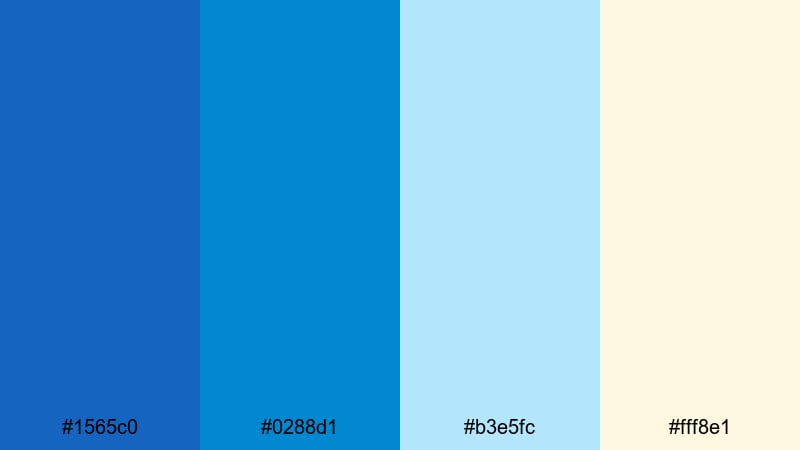
- HEX Codes: #1565c0, #0288d1, #b3e5fc, #fff8e1
- Mood: Fresh, airy, and nostalgic like a day at the beach.
- Use for: Perfect for lifestyle vlogs, beach travel videos, and aesthetic reels that mix cool water tones with warm highlights.
Seaside Diary Frames balances clear True Blue water tones with a soft sand and sunlit cream accent. The palette feels breezy and nostalgic, like leafing through a summer photo journal.
Use the cooler HEX codes (#1565c0, #0288d1, #b3e5fc) for backgrounds, gradients, and overlays that echo ocean and sky, while #fff8e1 adds warmth to buttons, icons, stickers, and handwritten-style titles. In Filmora, this palette is ideal for diary-style edits, chapter cards, Instagram Reels covers, and story highlights that feel light and vacation-ready.
Rainy Window Vlog
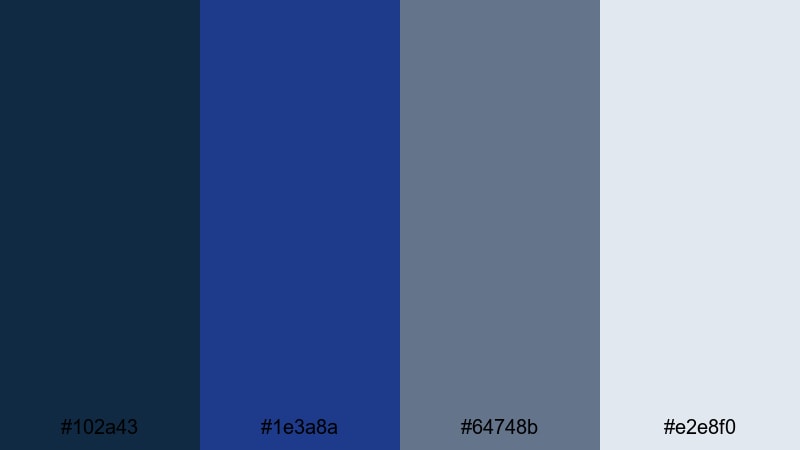
- HEX Codes: #102a43, #1e3a8a, #64748b, #e2e8f0
- Mood: Moody, introspective, and slightly desaturated.
- Use for: Use this palette for study-with-me edits, rainy-day vlogs, and podcast videos that need a calm, sophisticated tone.
Rainy Window Vlog leans into deeper True Blue and muted grays, creating a cozy, introspective look. It captures the feeling of watching raindrops slide down glass while you focus on work, journaling, or deep conversation.
Use the darkest tones (#102a43, #1e3a8a) for backgrounds, sidebars, and frames, then let #64748b carry neutral UI elements or chapter markers. The soft light gray #e2e8f0 is perfect for readable text on darker cards, subtle borders, or waveform backdrops in podcast-style videos. This palette is great for thumbnails with minimal clutter and clean, podcast-ready branding in Filmora.
Moonlit Travel Memories
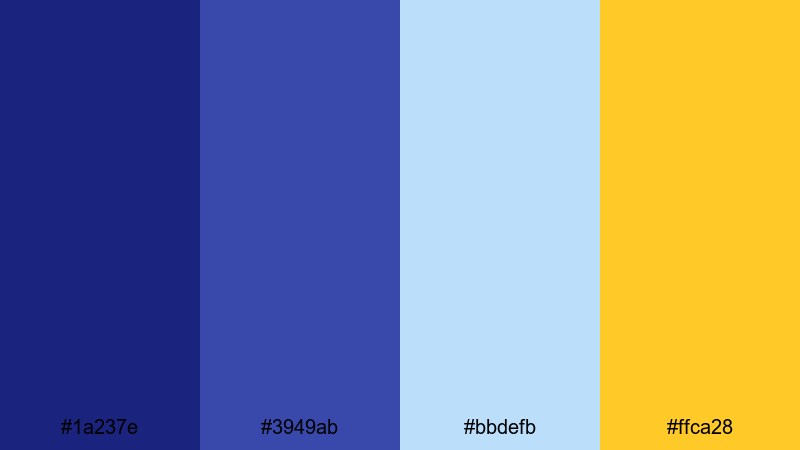
- HEX Codes: #1a237e, #3949ab, #bbdefb, #ffca28
- Mood: Dreamy and nostalgic with a touch of golden memory.
- Use for: Great for travel highlight reels, slideshow recaps, and emotional storytelling segments.
Moonlit Travel Memories mixes inky night True Blue with a soft golden accent, echoing streetlights and windows glowing at dusk. The blues feel dreamy and cinematic, while the warm gold gives your frames a hint of memory and emotion.
Use #1a237e and #3949ab for backgrounds, overlays, and gradient shadows in your titles. #bbdefb can soften transitions, map animations, or caption panels, while #ffca28 draws attention to important buttons, timestamps, or highlight moments in thumbnails. In Filmora, this palette shines in recap slideshows, end cards, and emotionally charged sequences with time-lapse skies or city lights.
Bold & Vibrant True Blue Color Palettes
Electric Ocean Energy
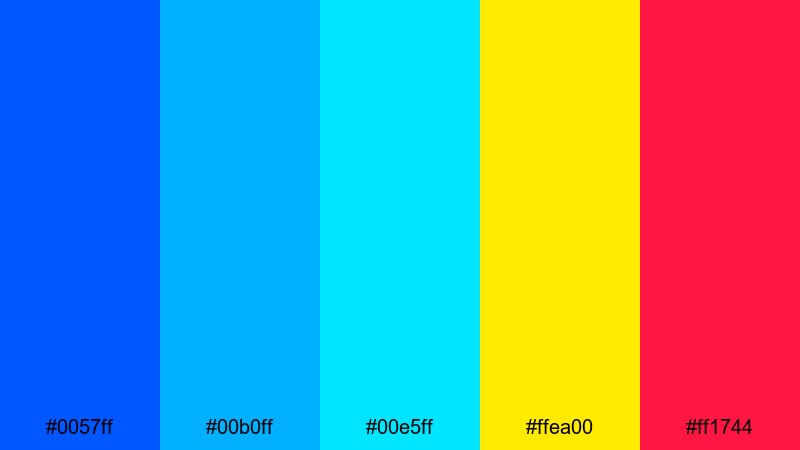
- HEX Codes: #0057ff, #00b0ff, #00e5ff, #ffea00, #ff1744
- Mood: High-energy, electric, and eye-catching.
- Use for: Best for hype reels, sports edits, and energetic intros where you want colors to pop in the thumbnail and motion graphics.
Electric Ocean Energy is all about impact. Intense True Blue and neon aqua tones create a bright ocean of color, while the vivid yellow and red accents slice through the frame with high contrast and urgency.
Use the blues (#0057ff, #00b0ff, #00e5ff) as your base for backgrounds, streaks, and glowing outlines. Reserve #ffea00 and #ff1744 for key callouts like score numbers, action verbs in titles, or subscribe buttons on thumbnails. In Filmora, this palette is perfect for kinetic typography, glitch transitions, sports montages, and fast-paced promo edits that must stand out in a crowded feed.
True Blue Pop Thumbnail
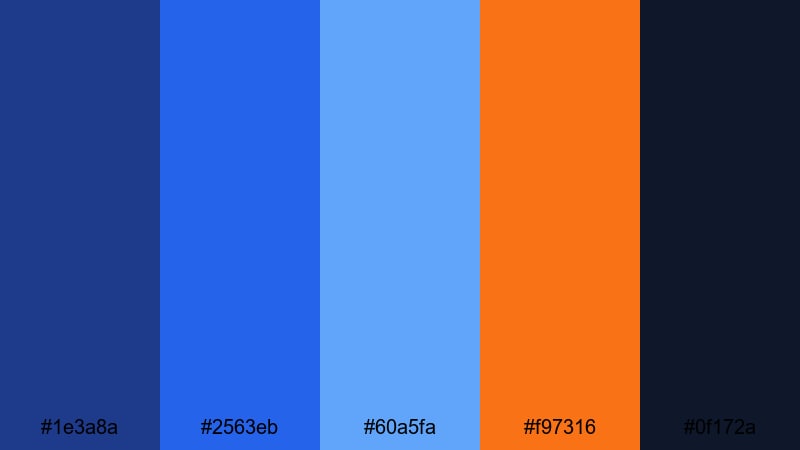
- HEX Codes: #1e3a8a, #2563eb, #60a5fa, #f97316, #0f172a
- Mood: Bright, modern, and optimized for clicks.
- Use for: Use this palette for YouTube thumbnails, subscribe banners, and social cover images that must stand out in crowded feeds.
True Blue Pop Thumbnail stacks a gradient of engaging blues with a punchy orange accent and a deep near-black for contrast. This combination is engineered for readability and high click-through on platforms like YouTube.
Use #1e3a8a and #2563eb for bold backgrounds and shapes behind your subject, then add highlights with #60a5fa on borders or icons. The orange #f97316 is perfect for arrows, badges, and call-to-action buttons, while #0f172a keeps outlines, drop shadows, and header bars strong and legible. Build thumbnail templates in Filmora using this palette so every upload feels on-brand.
Festival Night Skies
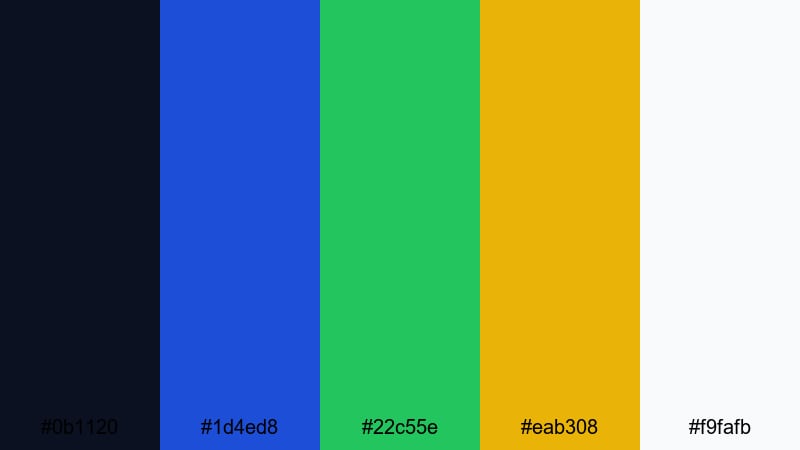
- HEX Codes: #0b1120, #1d4ed8, #22c55e, #eab308, #f9fafb
- Mood: Festive, adventurous, and full of contrast.
- Use for: Great for event recaps, concert highlights, and party edits that mix dark backgrounds with neon-like accents.
Festival Night Skies places a deep True Blue night sky (#0b1120) behind vibrant sparks of green and gold. It feels like stage lights and festival signs glowing in the dark, ready for music clips and crowd shots.
Use #1d4ed8 as your primary brand blue on titles and overlays, with #22c55e and #eab308 adding neon-like pops in confetti graphics, animated stickers, and countdown timers. #f9fafb keeps text and icons crisp on dark backgrounds. In Filmora, combine this palette with light leaks and lens flare effects to create an energetic nightlife or concert recap style.
Digital Gamer Pulse
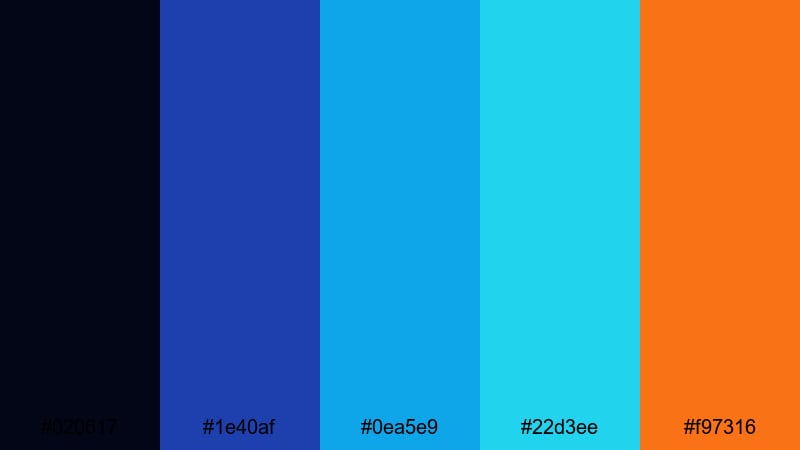
- HEX Codes: #020617, #1e40af, #0ea5e9, #22d3ee, #f97316
- Mood: Techy, neon, and adrenaline-filled.
- Use for: Perfect for gaming intros, streaming overlays, and esports highlight videos with a digital edge.
Digital Gamer Pulse starts with a dark, almost-black True Blue base (#020617) and layers on glowing cyan tones and a hot orange accent. It feels like a futuristic HUD or cyber arena, ideal for gaming and tech content.
Use #1e40af for solid UI panels, chat boxes, and camera frames. #0ea5e9 and #22d3ee work well as neon strokes, waveform outlines, and animated lines around gameplay windows. The orange #f97316 is perfect for warnings, alerts, and live indicators on stream overlays. Set up your Twitch or YouTube stream package in Filmora using these colors so your intro, BRB, and end scenes all share the same digital energy.
Modern & Minimal True Blue Color Palettes
Clean Tech Intro
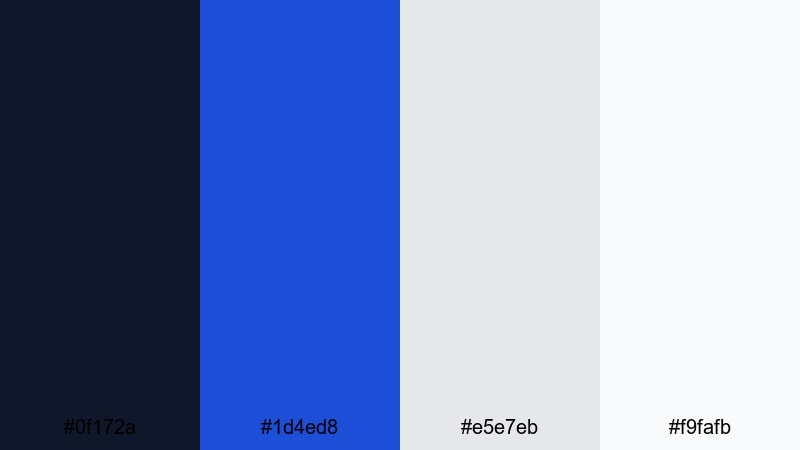
- HEX Codes: #0f172a, #1d4ed8, #e5e7eb, #f9fafb
- Mood: Professional, minimal, and trustworthy.
- Use for: Use this palette for SaaS promos, app demos, and channel intros that need a clean and corporate-friendly look.
Clean Tech Intro combines a trustworthy True Blue with restrained neutrals. It feels like a modern dashboard or software interface: minimal, readable, and polished.
Use #0f172a for nav bars, logos, and footer strips. #1d4ed8 can carry your main brand elements like buttons and titles, while #e5e7eb and #f9fafb keep backgrounds bright and uncluttered. In Filmora, this palette fits perfectly with interface mockups, app demos, corporate explainers, and startup landing-page videos.
True Blue Brand Grid
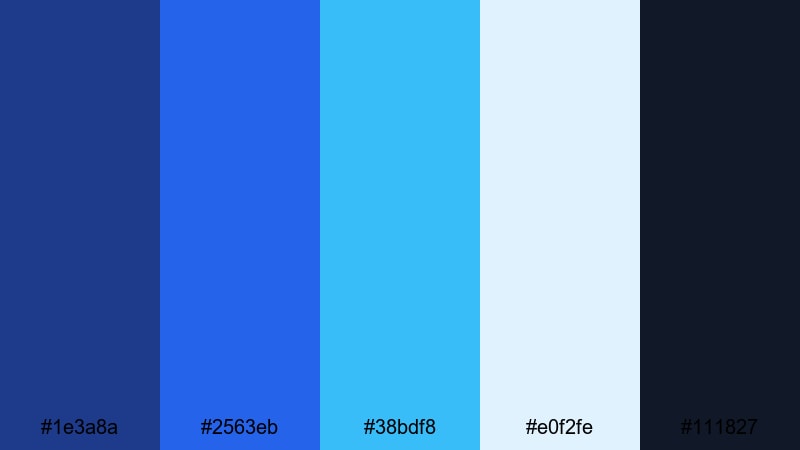
- HEX Codes: #1e3a8a, #2563eb, #38bdf8, #e0f2fe, #111827
- Mood: Structured, branded, and versatile.
- Use for: Ideal for building a consistent channel identity across intros, outros, lower-thirds, and social templates.
True Blue Brand Grid gives you a full system of blues, from deep navy to pale ice blue, plus a strong near-black anchor. It is designed for creators who want a flexible but unified brand kit.
Use #1e3a8a for logo locks and key brand marks, #2563eb for primary buttons and large titles, and #38bdf8 for icons, progress bars, or highlights. #e0f2fe works well in minimal backgrounds, while #111827 grounds your text and outlines. In Filmora, turn this palette into reusable presets for lower-thirds, subscribe animations, and end screens so your channel branding always looks cohesive.
Nordic Studio Titles
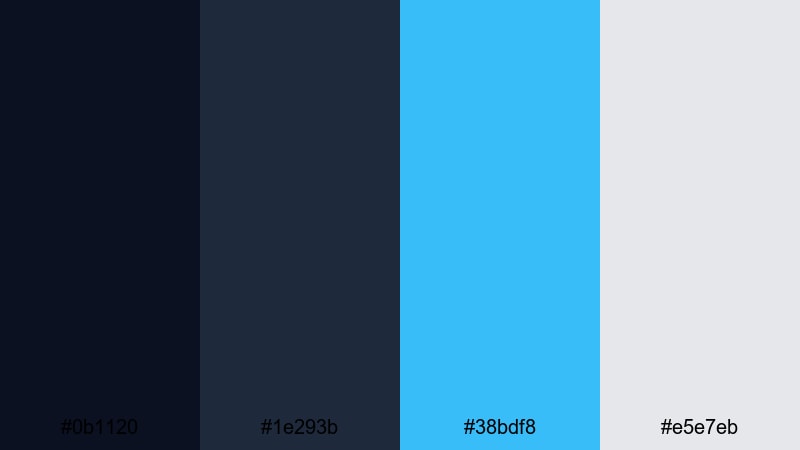
- HEX Codes: #0b1120, #1e293b, #38bdf8, #e5e7eb
- Mood: Cool, refined, and editorial.
- Use for: Great for minimalist title sequences, lookbooks, and portfolio videos with a design-forward feel.
Nordic Studio Titles leans into dark, inky blues balanced by an icy accent and clean gray. It feels like a design studio or magazine cover, with a lot of negative space and careful typography.
Use #0b1120 and #1e293b for full-frame backgrounds and large blocks of color, then add #38bdf8 for thin lines, underlines, or accent words in your titles. #e5e7eb keeps body text and caption boxes light and legible. This palette is ideal in Filmora for portfolio showcases, fashion lookbooks, and channel trailers that emphasize layout and typography over heavy effects.
Calm Productivity Desk
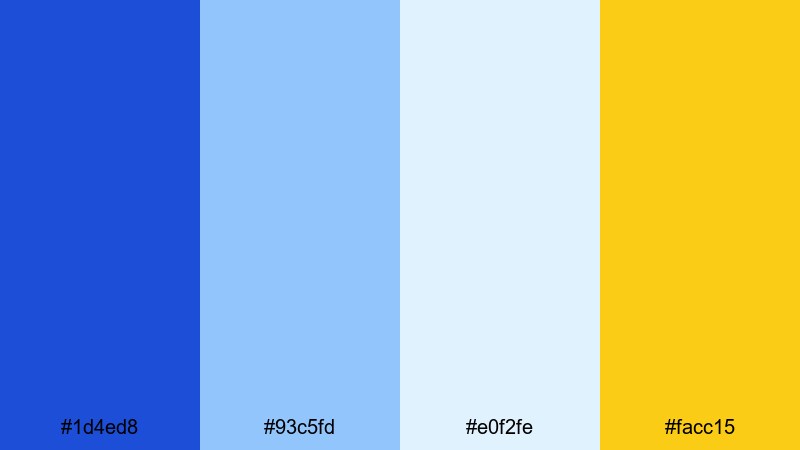
- HEX Codes: #1d4ed8, #93c5fd, #e0f2fe, #facc15
- Mood: Focused, optimistic, and clean.
- Use for: Use this palette for study-with-me content, productivity channels, and educational videos that need a calm but upbeat look.
Calm Productivity Desk mixes gentle True Blue gradients with a friendly yellow highlight. The overall effect is tidy and focused, but not cold, making it perfect for educational and productivity content.
Use #1d4ed8 and #93c5fd in your titles, progress trackers, and calendar overlays. #e0f2fe is ideal for note-style backgrounds, slide frames, and whiteboard-style graphics. The cheerful yellow #facc15 draws the eye to key info like timestamps, task lists, or CTA buttons. In Filmora, this palette works well for study timers, tutorial openers, and clean infographic animations.
Retro & Neon True Blue Color Palettes
80s Tape Rewind
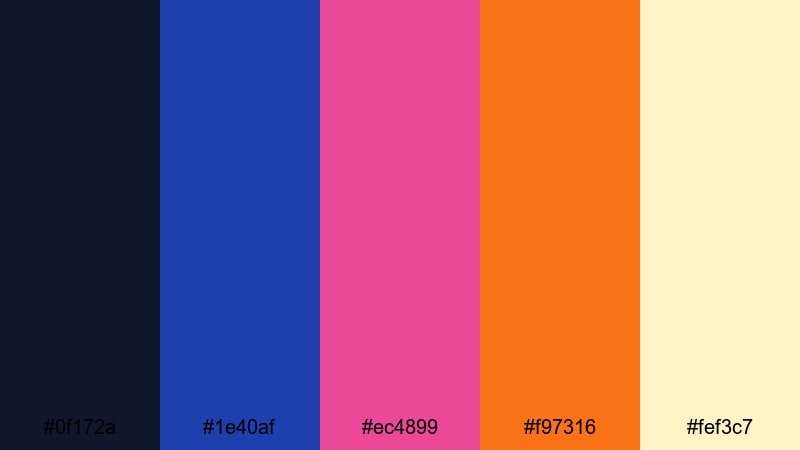
- HEX Codes: #0f172a, #1e40af, #ec4899, #f97316, #fef3c7
- Mood: Retro, nostalgic, and slightly grungy.
- Use for: Perfect for VHS-style edits, throwback montages, and nostalgic music videos with a synthwave twist.
80s Tape Rewind uses moody True Blue shadows with hot pink and orange accents, echoing old tape covers and neon signs. The light cream tone softens the palette and adds vintage warmth.
Use #0f172a and #1e40af as your base for backgrounds and vignettes, then let #ec4899 and #f97316 bring in retro neon in text, strokes, and glitch elements. #fef3c7 works nicely for faded subtitles or retro text boxes. Combine this palette with Filmora VHS overlays, grain, and chromatic aberration for throwback intros, music edits, and nostalgia-heavy montages.
Neon City Timelapse
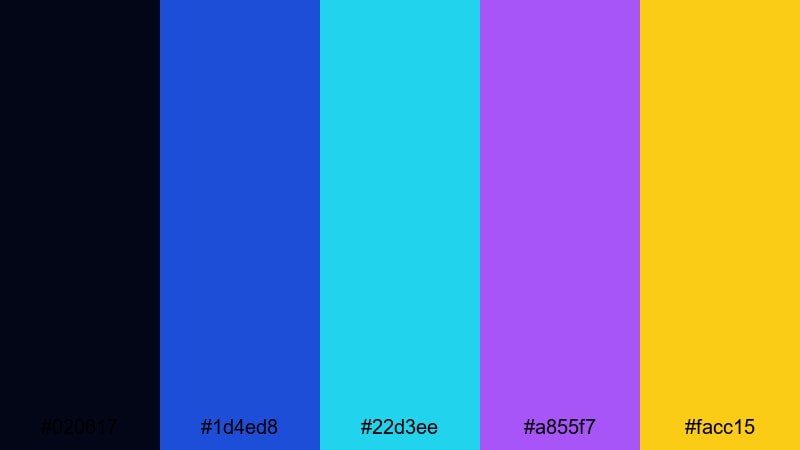
- HEX Codes: #020617, #1d4ed8, #22d3ee, #a855f7, #facc15
- Mood: Futuristic, vibrant, and cinematic.
- Use for: Use this palette for city timelapses, night drives, and tech promos that glow with neon color.
Neon City Timelapse sets a dark True Blue night base against cyan, violet, and yellow sparks, creating a cyberpunk skyline feeling. It is perfect for shots of traffic trails, high-rise lights, and tech motion graphics.
Use #020617 as your primary background and vignette shade. #1d4ed8 and #22d3ee work well in animated lines, grids, and UI elements, while #a855f7 and #facc15 highlight logo reveals, callouts, or key words in titles. In Filmora, pair this palette with time-remap effects, light streak transitions, and parallax layers for modern, neon-drenched openers.
Retro Arcade Stream
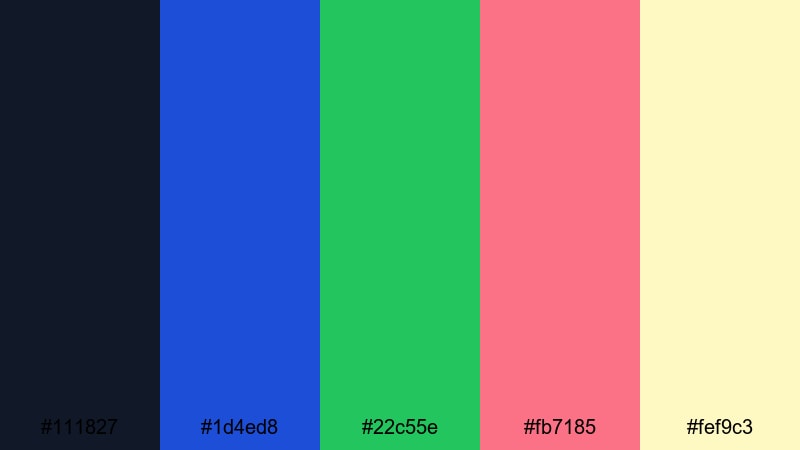
- HEX Codes: #111827, #1d4ed8, #22c55e, #fb7185, #fef9c3
- Mood: Playful, nostalgic, and streaming-ready.
- Use for: Great for livestream overlays, channel banners, and intermission screens inspired by classic arcade games.
Retro Arcade Stream combines deep True Blue tones with bright green, soft pink, and creamy yellow to recreate the feel of classic arcade cabinets and pixel graphics. It is fun, nostalgic, and made for streaming layouts.
Use #111827 as your base canvas for overlays and panels. #1d4ed8 can frame webcams and chat boxes, while #22c55e and #fb7185 add playful arcade color to scoreboards, badges, and pop-up alerts. #fef9c3 keeps text boxes readable and warm. Build full streaming scenes in Filmora using this palette for Start, BRB, and Ending Soon screens that match your gaming or retro content.
Tips for Creating True Blue Color Palettes
True Blue is flexible enough to feel corporate, cozy, or electric, depending on what you pair it with. These tips will help you combine True Blue with supporting colors for thumbnails, intros, and video graphics that stay readable and on-brand.
- Pick one core True Blue HEX code as your brand anchor, then build lighter and darker variations around it for backgrounds, titles, and accents.
- Use warm contrast colors (gold, yellow, or orange) sparingly to highlight CTAs, timestamps, and key phrases without overpowering the blue base.
- Check text contrast by testing your title colors on both dark and light True Blue backgrounds to keep subtitles and overlays readable on mobile.
- Match your palette to your footage: cooler, desaturated blues work better with moody vlogs, while brighter, saturated blues suit gaming, sports, and tech edits.
- Limit your palette to 3–5 active colors per design (background, primary text, accent, and one or two neutrals) to avoid cluttered thumbnails.
- Save HEX codes as custom colors in Filmora so your titles, transitions, and stickers always use the same precise True Blue combinations.
- Test different color orders in gradients (dark-to-light, blue-to-gold) for intros and end cards until you find a flow that matches your music and pacing.
- Keep accessibility in mind by avoiding very low-contrast combos like light blue text on slightly darker blue backgrounds for small on-screen text.
True Blue can do a lot of heavy lifting in your visual identity. From calm, cinematic vlogs to neon gaming overlays and minimal tech intros, the right blue-based palette sets the tone before a viewer even presses play.
Use these 15 True Blue color palettes and HEX codes as a starting point, then refine them inside Filmora so they fit your footage, pacing, and style. Once your favorite palette is dialed in, save it as a template for thumbnails, titles, and end screens so every upload feels like part of the same world.
Experiment, compare a few different blue combinations on your timeline, and see how they change the mood of your edits. With Filmora's color tools, filters, and presets, it is easy to turn a simple True Blue idea into a signature look your audience recognizes instantly.
secure downloadNext: Gold Green Color Palette
