

 100% Security Verified | No Subscription Required | No Malware


 ChatGPT
 Perplexity
 Gemini
 Claude
 Grok
Grok
White, blue, and green together create a calm, clean, and trustworthy mood that works beautifully on screens. White keeps everything light and minimal, blue adds clarity and focus, and green brings in freshness and nature. Used well, a white blue green color palette can make your visuals feel airy and modern or deep and cinematic, depending on how bright or dark you go.
For video creators, YouTubers, and designers, these colors are perfect for intros, vlogs, explainer videos, branding, and thumbnails that need a cool, cohesive look. Below you will find 15 ready-made white blue green color palettes with HEX codes you can plug straight into thumbnails, overlays, and Filmora color grading to keep your whole project visually consistent.
In this article
Soft & Airy White Blue Green Color Palettes
Coastal Mist Harmony
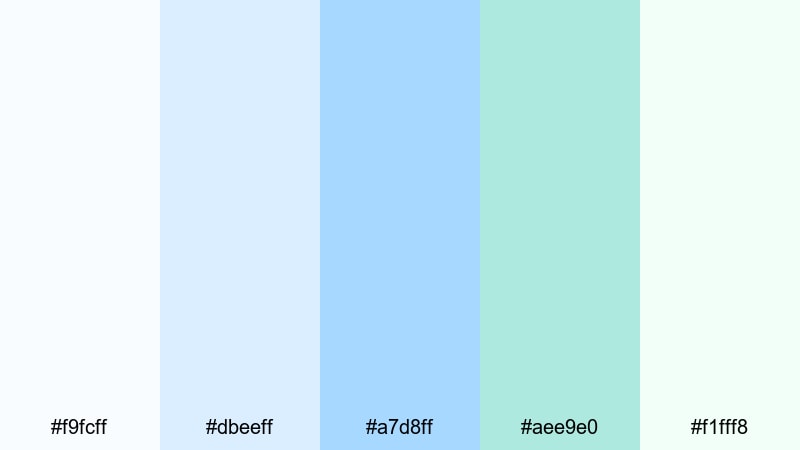
- HEX Codes: #f9fcff, #dbeeff, #a7d8ff, #aee9e0, #f1fff8
- Mood: Calm, breezy, and gently optimistic.
- Use for: Perfect for travel vlogs, wellness intros, and relaxing montage sequences that need a light, seaside feel.
Coastal Mist Harmony feels like standing on a quiet shore just after sunrise. Soft whites, powdery blues, and seafoam green combine into an airy wash of color that keeps your frames bright without looking harsh. It is ideal when you want your visuals to feel open, breathable, and soothing.
Use this palette for minimalist travel titles, aesthetic wellness b-roll, or soft gradient backgrounds behind your lower thirds. In thumbnails, let the deeper blue or seafoam act as an accent around white text so your white blue green branding looks cohesive from channel banner to end screen.
Pro Tip: Build a Cinematic White Blue Green Look in Filmora
To keep a coastal, misty feeling across an entire project, start by designing your key colors in titles and overlays, then match your footage to them in Filmora. Use whites and light blues for text and graphic elements, and lean on softer green tones in transitions, callouts, and end cards so every part of your video reflects the same cool, breezy identity.
In Filmora, you can save title templates, lower thirds, and frames that use this exact white blue green palette. Reusing those presets across travel vlogs, shorts, and community posts helps your channel feel consistent without redesigning from scratch every time.
AI Color Palette
If you have a screenshot of your favorite coastal scene or a custom color card, Filmora's AI Color Palette feature can automatically transfer that white blue green mood to the rest of your clips. Just pick a reference frame with the perfect light blues and greens and let Filmora analyze and match its tones to other shots.
This is especially useful when your travel vlog mixes phone footage, camera clips, and stock media. AI Color Palette helps unify everything so your intros, b-roll sequences, and outros all share the same cool seaside atmosphere without manual grading on every single clip.
 secure download

HSL, Color Wheels & Curves
To refine a white blue green palette like this, use Filmora's HSL and color wheel controls to gently desaturate harsh blues and push greens slightly toward teal for a more cinematic feel. You can then use curves to lift highlights so whites stay soft and airy while deepening midtones for subtle contrast.
Tools like these in Filmora's color correction workspace help you match your footage to the exact HEX codes you picked, whether you want a bright lifestyle look or a calmer, foggy shoreline vibe.
secure download1000+ Video Filters & 3D LUTs
Once your base colors are set, Filmora's video filters and 3D LUTs make it easy to add character without breaking your palette. You can choose gentle pastel or film-style LUTs that keep whites soft and blues cool, or mix in haze and glow filters to enhance the dreamy seaside tone.
Apply these looks to entire sequences like intros, montage sections, or end screens so the white blue green color story feels intentional from first frame to last, even if your original clips were shot in different locations and lighting.
secure downloadMorning Dew Pastels

- HEX Codes: #ffffff, #e3f2ff, #c7e8ff, #bdeee0, #d7f8e9
- Mood: Gentle, hopeful, and softly luminous.
- Use for: Great for morning routine videos, skincare content, and minimal product showcases that need a clean yet friendly touch.
Morning Dew Pastels captures that first-light glow when everything feels new. Bright white keeps your layout crisp, while hazy blues and minty greens add just enough color to feel fresh and inviting. The overall effect is clean but not clinical, ideal for channels that want to look soft and caring.
Use this palette for skincare how-tos, wellness thumbnails, or unboxing videos where you want packaging and products to stand out against a calm background. In Filmora, combine white lower thirds with pastel blue accents and mint highlights in icons or buttons so your whole video feels like a slow, peaceful morning.
Cloudlit Lagoon Dreams
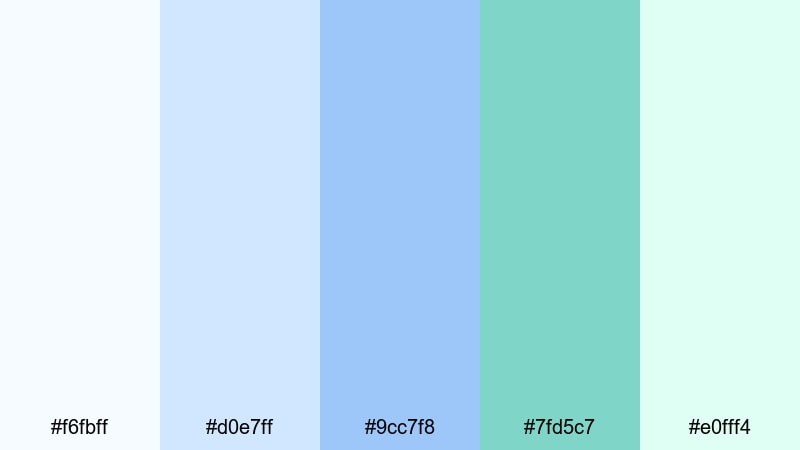
- HEX Codes: #f6fbff, #d0e7ff, #9cc7f8, #7fd5c7, #e0fff4
- Mood: Dreamy, weightless, and slightly whimsical.
- Use for: Ideal for cinematic b-roll, dreamy lifestyle edits, and gentle title cards with a soft fantasy edge.
Cloudlit Lagoon Dreams feels like floating between sky and water. Featherlight whites and sky blues blend into lagoon green, giving your visuals a dreamy, almost underwater-cloud aesthetic. It softens hard edges and makes motion feel smooth and hypnotic.
Try this palette for slow montage edits, dreamy travel reels, or cinematic lifestyle content. Let the deeper lagoon green frame your text or logo while the lighter blues wash across your backgrounds and overlays. In thumbnails, pairing a white subject cutout with these soft gradients can create a scroll-stopping, ethereal look.
Seafoam Storyboard
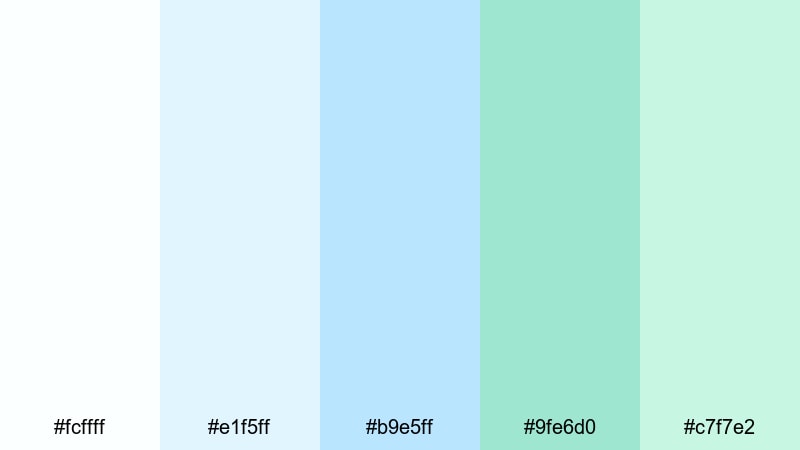
- HEX Codes: #fcffff, #e1f5ff, #b9e5ff, #9fe6d0, #c7f7e2
- Mood: Light, playful, and gently refreshing.
- Use for: Use for storyboard slides, how-to tutorials, and explainer videos where you want clarity with a cheerful, approachable tone.
Seafoam Storyboard mixes delicate whites, frothy seafoam greens, and pale blues for a bubbly, easygoing tone. It feels bright, friendly, and professional at the same time, which is perfect when you are explaining complex topics but do not want your visuals to feel heavy.
Use it as the base for simple motion graphics, clean slides, and text-heavy overlays in Filmora. White backgrounds with blue-green shapes and icons make information easy to read in tutorials, while soft gradients in these colors can create smooth transitions, chapter cards, and on-brand YouTube thumbnails.
Fresh & Natural White Blue Green Color Palettes
Garden Breeze Opener
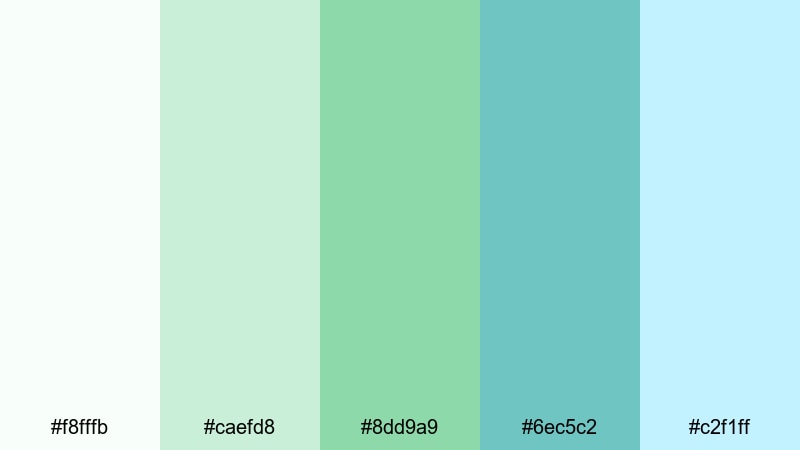
- HEX Codes: #f8fffb, #caefd8, #8dd9a9, #6ec5c2, #c2f1ff
- Mood: Organic, uplifting, and full of fresh air.
- Use for: Best for eco brands, gardening channels, and outdoor lifestyle videos that highlight greenery and fresh spaces.
Garden Breeze Opener feels like a sunlit garden after rain. Soft whites and fresh greens combine with cool aqua for a palette that breathes life into any scene without feeling overly saturated. It suggests health, growth, and authenticity.
Use this palette for channel branding around sustainability, plant care, food growing, or outdoor workouts. In Filmora, you can pair real garden footage with white titles, mint accents, and aqua callouts to keep your message clean while still celebrating nature. It also works well for Instagram Reels and shorts that spotlight plants and outdoor routines.
Alpine Lake Clarity
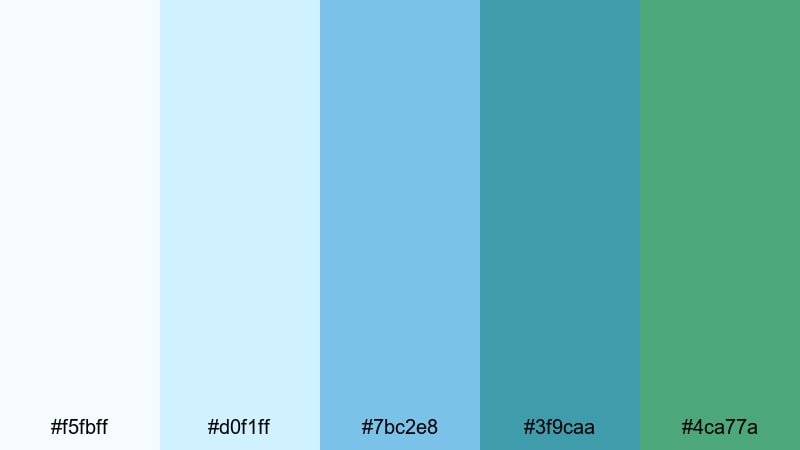
- HEX Codes: #f5fbff, #d0f1ff, #7bc2e8, #3f9caa, #4ca77a
- Mood: Clear, invigorating, and outdoorsy.
- Use for: Great for hiking films, drone shots over water, and sporty brand intros that lean into nature and clarity.
Alpine Lake Clarity is crisp and invigorating, with ice-blue highlights and evergreen accents that call to mind a clear mountain lake. The cooler blues signal focus and energy, while the grounded greens keep everything connected to nature.
Use this palette in adventure vlogs, action montages, or outdoor brand intros. In thumbnails, a white or very light sky with bold turquoise and green accents can make your subject pop. For text and lower thirds in Filmora, use the darker teal and green for lines and badges so your on-screen graphics feel tough yet fresh.
Herbal Spa Serenity

- HEX Codes: #f9fffc, #e1f4eb, #b2e1cf, #7bc5be, #5ea8d8
- Mood: Spa-like, soothing, and naturally luxurious.
- Use for: Perfect for wellness brands, spa promos, ASMR content, and calming tutorial backdrops.
Herbal Spa Serenity wraps your visuals in soft herbal greens and serene aqua blues, creating a premium wellness atmosphere. It feels gentle and caring, but also slightly upscale, making it great for brands that want to communicate relaxation and quality.
Try this palette for spa promos, yoga classes, meditation channels, and ASMR thumbnails. Use off-white and pale green as backgrounds, then layer slightly deeper teal and blue in your text, icons, and overlays. In Filmora, pairing this palette with slow camera moves and gentle blur effects can turn even simple product shots into peaceful, luxurious visuals.
Rainwashed Leaves
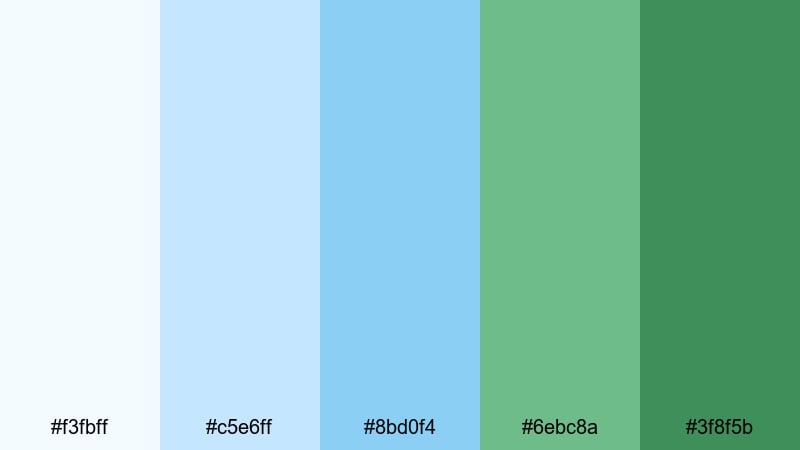
- HEX Codes: #f3fbff, #c5e6ff, #8bd0f4, #6ebc8a, #3f8f5b
- Mood: Clean, earthy, and quietly dramatic.
- Use for: Use for cinematic nature b-roll, product shoots with plants, and eco-documentary titles.
Rainwashed Leaves balances crisp blues with deep leafy greens, evoking foliage rinsed by a passing shower. It brings together cleanliness and earthy richness, which is ideal when you want your visuals to feel natural but still polished and cinematic.
Use it in documentary-style intros, environmental projects, or nature b-roll sequences. In thumbnails and titles, mix the darker green with white text for strong contrast, and use the mid-tone blues to add subtle gradients or frames. In Filmora, this palette works well with light vignettes and contrast tweaks that highlight texture on leaves, soil, and water.
Modern & Minimal White Blue Green Color Palettes
Nordic Screen Clean
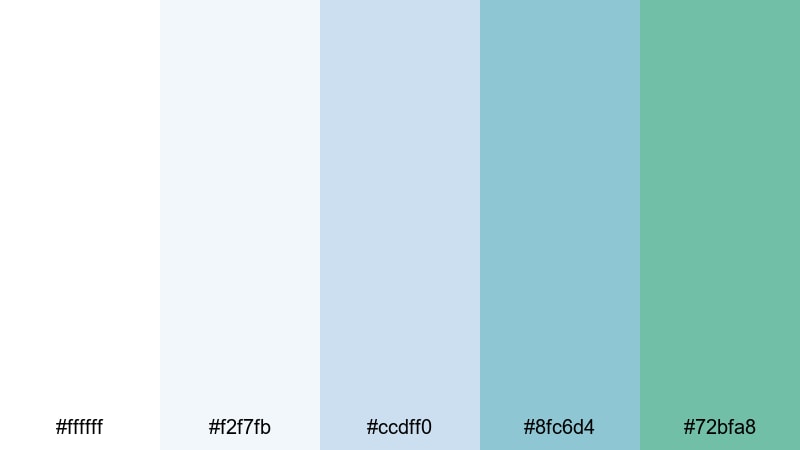
- HEX Codes: #ffffff, #f2f7fb, #ccdff0, #8fc6d4, #72bfa8
- Mood: Minimal, professional, and quietly confident.
- Use for: Ideal for app promos, software walkthroughs, and tech explainer videos that need a sleek, accessible interface feel.
Nordic Screen Clean uses snowy whites and muted blue greens to create a modern, low-noise interface aesthetic. It feels organized and user-friendly, which is exactly what you want for software demos and UI-heavy content.
Use this palette for product tours, tutorial series, or any tech content where screens and overlays are the main focus. White backgrounds with cool blue panels and soft green accent buttons look great in Filmora when you are building on-screen callouts, cursor highlights, and clean thumbnail layouts for your channel.
Dashboard Aqua Grid
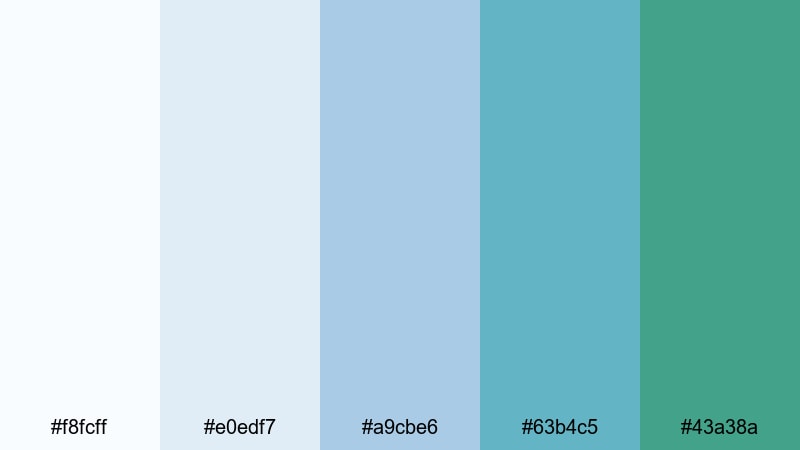
- HEX Codes: #f8fcff, #e0edf7, #a9cbe6, #63b4c5, #43a38a
- Mood: Smart, data-driven, and cool-headed.
- Use for: Great for analytics dashboards, startup pitch decks, and infographic-style video graphics.
Dashboard Aqua Grid delivers a smart, data-driven look with cool blues and controlled greens. It instantly makes charts, graphs, and UX layouts feel more trustworthy and organized without leaning into harsh, corporate colors.
Use it for startup pitches, business explainers, financial breakdowns, or productivity content. In Filmora, combine white backgrounds with blue-green bar charts, icons, and progress visuals. This white blue green combination ensures numbers and labels remain readable while still looking stylish in thumbnails, slide-style videos, and social media carousels.
Techno Glacier Fade
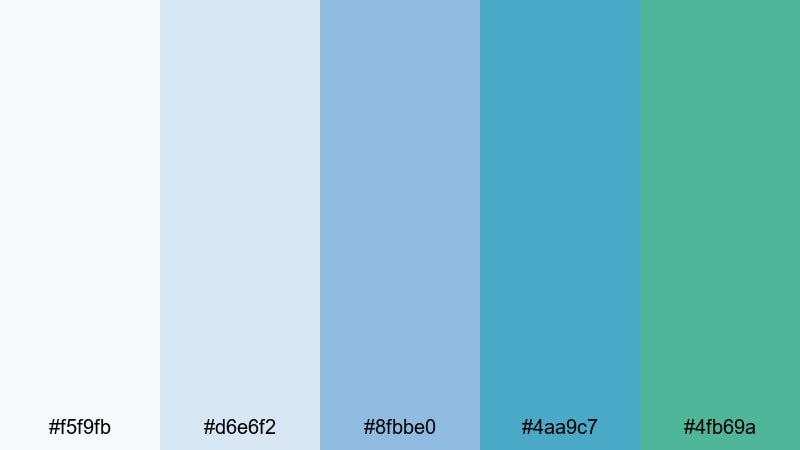
- HEX Codes: #f5f9fb, #d6e6f2, #8fbbe0, #4aa9c7, #4fb69a
- Mood: Futuristic, streamlined, and lightly energetic.
- Use for: Use for product reveals, motion graphics, and logo stings that need a clean tech aesthetic.
Techno Glacier Fade layers glacier blues and digital teal into a futuristic yet minimal gradient. It carries a subtle sci-fi edge without going full neon, making it great for tech products, SaaS tools, and modern gadgets.
Use this palette for logo stings, app launch trailers, or motion graphics intros. In Filmora, you can animate shapes that transition through these blues and greens behind your logo, or build gradient title bars in these tones. For thumbnails, combine a white or very light background with a strong teal accent to make your product or app icon stand out.
Bold & Cinematic White Blue Green Color Palettes
Neon Harbor Nights
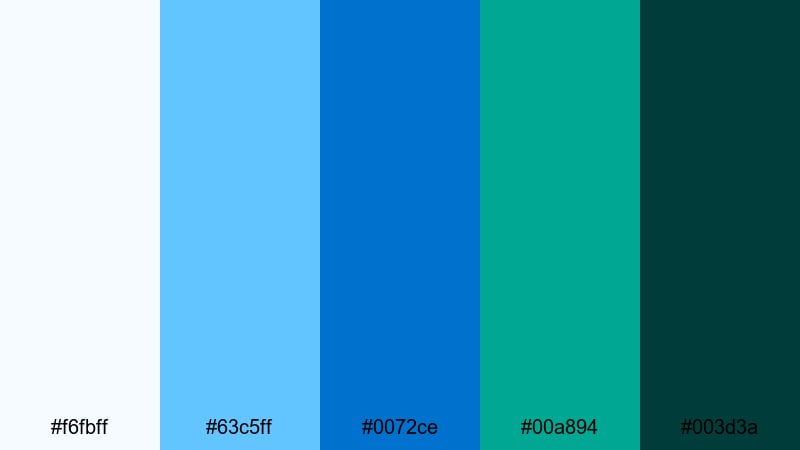
- HEX Codes: #f6fbff, #63c5ff, #0072ce, #00a894, #003d3a
- Mood: Electric, cinematic, and high contrast.
- Use for: Perfect for nightlife edits, music videos, and gaming intros where you want a striking cool-toned punch.
Neon Harbor Nights goes bold with harbor blues, vivid teal, and deep green-black shadows. It feels like city lights reflecting on dark water, which gives your footage instant cinematic energy and contrast.
Use this palette for music videos, gaming intros, club scenes, or cyberpunk-inspired edits. In thumbnails, pair the darkest teal with bright cyan and white text for a neon sign effect. Inside Filmora, combine this palette with glow, blur, and speed ramping to amplify the sense of motion and nightlife drama.
Tropical Title Splash
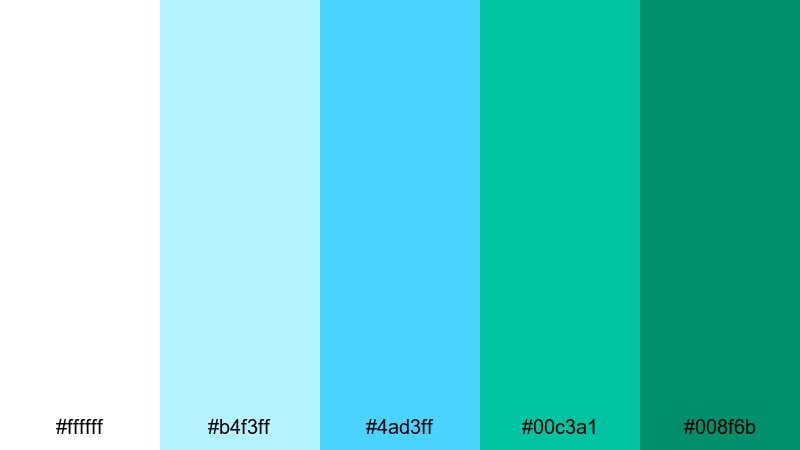
- HEX Codes: #ffffff, #b4f3ff, #4ad3ff, #00c3a1, #008f6b
- Mood: Vibrant, energetic, and vacation-ready.
- Use for: Great for travel openings, summer promo spots, and energetic social edits that need immediate impact.
Tropical Title Splash is a poolside burst of cool color. Bright white works as a clean base, while punchy aqua and saturated greens provide instant energy. It feels fun, sunny, and perfect for anything related to summer or beach escapes.
Use it to design bold opening titles, Instagram Reels covers, or YouTube thumbnails for travel and lifestyle content. In Filmora, make your title cards pop by setting white text over aqua and green strips, then carry those same hues into your transitions, stickers, and call-to-action cards so viewers instantly recognize your tropical theme.
Deep Current Drama
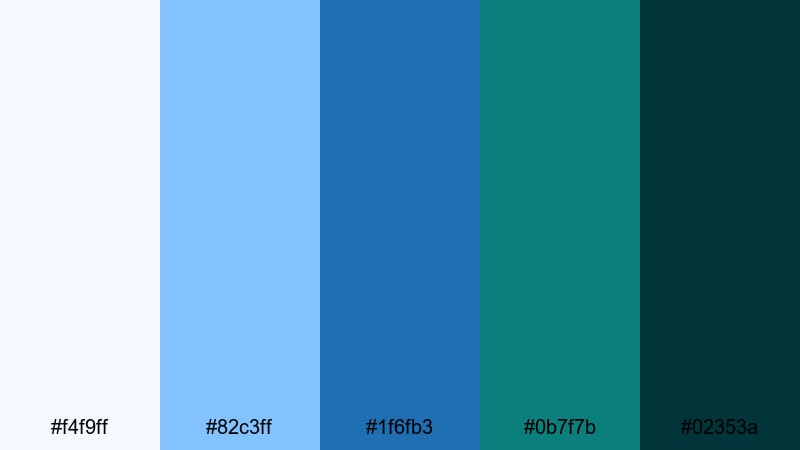
- HEX Codes: #f4f9ff, #82c3ff, #1f6fb3, #0b7f7b, #02353a
- Mood: Moody, powerful, and cinematic.
- Use for: Use for trailers, dramatic story content, and intense slow-motion sequences that need emotional weight.
Deep Current Drama moves from pale surface blue to near-black teal, like looking down into a powerful ocean current. It is rich and cinematic, adding emotional weight to your story-driven content and trailers.
Use this palette when you want cool tones that still feel serious and intense. In Filmora, grade your footage toward these blues and greens, then use the darkest teal for letterboxing, title backgrounds, and end screens. On thumbnails, contrasting a bright subject with this deep gradient can signal drama, mystery, or high stakes.
Aurora Studio Scene
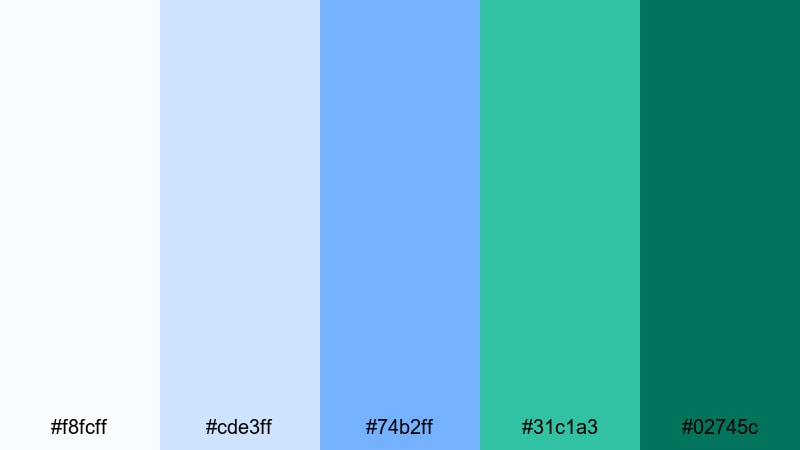
- HEX Codes: #f8fcff, #cde3ff, #74b2ff, #31c1a3, #02745c
- Mood: Creative, cinematic, and slightly surreal.
- Use for: Ideal for studio shoots, creative brand films, and stylized thumbnails that need a polished, aurora-like glow.
Aurora Studio Scene blends glowing sky blues with emerald teals, echoing the northern lights against a clean white base. It brings a slightly surreal, creative edge to your work while staying polished and professional.
Use this palette for studio shoots with RGB lighting, creative brand films, or eye-catching thumbnails for tutorials and campaigns. In Filmora, you can create light streaks, gradient overlays, and animated shapes in these colors to simulate an aurora glow around your subject or logo, giving your white blue green branding a distinct signature look.
Tips for Creating White Blue Green Color Palettes
White blue green combinations are flexible enough for calm wellness content and bold cinematic edits. A few simple guidelines will help you balance contrast, readability, and brand identity across all your videos and designs.
- Pick a dominant color: Decide whether white, blue, or green will carry most of the frame. Use the others as accents so your palette does not feel chaotic.
- Use white for clarity: Keep key text, UI elements, and backgrounds light or white when you need clean readability, especially in tutorials and screen recordings.
- Balance blue and green: Lean toward blue for tech, focus, and professionalism; lean toward green for wellness, nature, and eco messaging. Mix them based on your brand story.
- Control contrast in thumbnails: Use your darkest blue or green behind bright white text or cutouts so titles remain readable even on small mobile screens.
- Match footage with grading: Use color correction in Filmora to push your clips slightly toward your chosen HEX codes so overlays, titles, and footage feel like one system.
- Limit accent colors: If you add another hue (like yellow or coral), keep it minimal so your white blue green identity still feels dominant and recognizable.
- Test light and dark modes: Check how your palette looks on both light and dark backgrounds, especially for overlays, captions, and lower thirds.
- Stay consistent across assets: Reuse the same HEX codes in intros, end screens, channel art, and social posts to build strong visual recognition over time.
Used thoughtfully, white blue green color palettes can make your channel feel calm, trustworthy, or dramatically cinematic while keeping everything cool-toned and cohesive. From soft wellness edits to high-energy nightlife reels, adjusting saturation and contrast lets you tell very different stories with the same three core colors.
Try importing these HEX codes into Filmora and building a few reusable presets for titles, overlays, and color grading. Once your white blue green look is saved, you can apply it in seconds to new projects, keeping your intros, thumbnails, and full-length videos aligned with your visual brand.
Whether you are editing vlogs, tutorials, or brand films, experimenting with these palettes inside Filmora will help you quickly discover the white blue green combination that feels most like you.
secure download